Overview

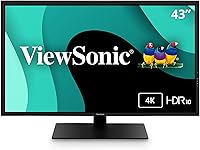
The ViewSonic VX4381-4K 43-inch 4K Monitor is a large-format display built squarely for people who spend long hours at a desk and want more screen without juggling multiple monitors. It uses an MVA panel, which sits between IPS and TN in the display hierarchy — offering stronger contrast ratios and decent viewing angles that hold up better than TN, though color vibrancy won't quite match a high-end IPS. At this price point, it targets the home office and productivity crowd rather than enthusiasts chasing perfect color science. ViewSonic positioned it as a practical workhorse when it launched in mid-2021, and that ethos runs through every spec choice.

Features & Benefits

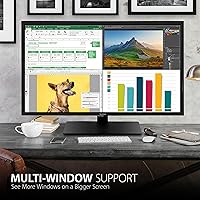
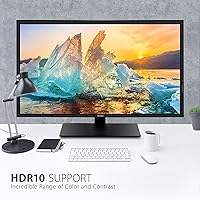
The 43-inch 4K resolution is the obvious headline — at 3840x2160, text stays crisp and you can comfortably run multiple windows side by side without things feeling cramped. The matte screen coating is a practical win for anyone working near a window. HDR10 support is included, though it's worth keeping expectations measured: MVA panels typically lack the peak brightness and local dimming needed to make HDR truly pop, so think of it as a nice bonus for streaming rather than a professional color tool. Connectivity is solid, with HDMI, DisplayPort, Mini DisplayPort, and three USB 2.0 ports covering most setups. One clear limitation: the 60Hz refresh rate makes this a non-starter for competitive gaming.

Best For

This widescreen monitor makes the most sense for home office users who want a single screen to replace a cluttered two-monitor arrangement. The Picture-by-Picture and Picture-in-Picture modes are genuinely useful — you can plug in a laptop and a desktop simultaneously and see both at full HD. It also suits photographers and light video editors who want 4K detail for reviewing files without paying for a color-critical pro display. Financial traders, security operators, or anyone managing multiple live feeds will appreciate the multi-source input flexibility. Mac users will find compatibility straightforward. Before buying, measure your desk carefully — at nearly 39 inches wide and over 37 pounds, desk space matters.

User Feedback

The aggregate rating of 3.7 out of 5 stars across fewer than 80 reviews deserves honest acknowledgment — that's below average for the monitor category, and the small sample size means a handful of negative experiences can skew the score noticeably. On the positive side, buyers consistently praise the sheer screen real estate and the flexibility to connect multiple devices without adapters. Criticism tends to center on color accuracy out of the box, with some users finding the default calibration flat or slightly off, and a few noting that panel uniformity was not consistent across units. Whether that reflects a design limitation or a quality control issue is hard to say definitively at this review volume.

Pros

  • Massive 43-inch 4K screen eliminates the need for a dual-monitor setup entirely.
  • MVA panel provides strong contrast ratios and holds up well at wide viewing angles.
  • Picture-by-Picture mode lets you run two full HD sources side by side simultaneously.
  • Matte screen coating cuts glare effectively in bright, window-heavy workspaces.
  • Broad input options — HDMI, DisplayPort, Mini DisplayPort, and USB — cover nearly every device without adapters.
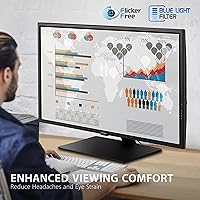
  • Flicker-Free and Blue Light Filter make long work sessions noticeably more comfortable.
  • HDR10 adds a visible improvement when streaming color-rich content casually.
  • Compatible with both Mac and PC out of the box, no configuration gymnastics required.
  • Three USB 2.0 ports add useful peripheral connectivity directly from the display.

Cons

  • A 3.7-star average from fewer than 80 reviews signals reliability concerns worth taking seriously.
  • Color accuracy out of the box has been a recurring complaint, often requiring manual calibration.
  • Panel uniformity appears inconsistent across units, suggesting possible quality control variability.
  • At over 37 pounds, repositioning or mounting this display is a two-person job.
  • The 60Hz refresh rate creates a hard ceiling for anyone interested in smooth motion or gaming.
  • HDR10 implementation is underwhelming in practice — the panel lacks the brightness to make it meaningful.
  • The stand has been criticized for feeling less sturdy than expected at this size and price.
  • Limited review volume makes it difficult to judge long-term durability with confidence.
  • Default image settings may disappoint users who expect accurate color straight out of the box.

Ratings

Our AI rating system analyzed verified global user reviews for the ViewSonic VX4381-4K 43-inch 4K Monitor, actively filtering out incentivized, bot-generated, and duplicate submissions to surface what real buyers actually experienced. The scores below reflect both the genuine strengths that kept users satisfied and the recurring pain points that dragged the overall rating below category average. Nothing has been smoothed over — the picture here is as honest as the feedback we processed.

Screen Real Estate
88%
For users replacing a dual-monitor setup, the sheer amount of usable workspace on this large-format display consistently drew praise. Spreadsheet users, coders with multiple windows open, and remote workers juggling video calls alongside documents all reported that the 43-inch canvas genuinely changed how they organized their day.
A few buyers found the size overwhelming at typical desk depths, noting that sitting too close made it difficult to take in the full screen without moving their head. Those with shallower desks occasionally felt they needed to push their chair back further than comfortable to use it effectively.
4K Image Clarity
83%
At 3840x2160, text rendering on this widescreen monitor is sharp enough that users working with fine detail — photo culling, document review, or reading dense spreadsheets — noticed a real improvement over 1080p displays they had previously used. The pixel density at this size keeps individual elements crisp without scaling tricks.
Some users noted that the out-of-box sharpness settings needed adjustment before the image looked its best, with a handful reporting that the default picture mode added an artificial edge-enhancement effect that made text look slightly over-processed until corrected in the OSD menu.
Color Accuracy
54%
46%
For general productivity tasks like web browsing, document editing, and casual video streaming, most users found the colors perfectly adequate and not visually objectionable. The matte coating helped prevent the washed-out look that glossy panels can produce under strong ambient light.
This is one of the most consistently flagged issues across reviews. Out-of-box calibration left several buyers disappointed, with colors appearing flat or slightly cool compared to reference. Those doing any serious photo editing found the panel unreliable without third-party calibration hardware, which adds cost and effort not everyone anticipated.
Panel Uniformity
51%
49%
When units performed well, users working across the full width of the screen — for instance, monitoring multiple data feeds side by side — reported no distracting hotspots in normal use. The matte finish helped mask minor brightness variation that might be more visible on a glossy surface.
Panel uniformity was a notable dividing line between satisfied and dissatisfied buyers. A meaningful portion of reviewers reported visible brightness drop-off toward the edges or corners, and a few experienced backlight bleed that became obvious during dark-scene video playback or when viewing the screen at an angle in a dim room.
Multi-Source Connectivity
81%
19%
The combination of HDMI, DisplayPort, Mini DisplayPort, and three USB 2.0 ports meant that most buyers could connect their full desk setup — two computers, a USB hub, and a peripheral or two — without reaching for a separate dock. Mac and PC users both reported connecting without compatibility issues.
The USB 2.0 ports felt dated to some users who expected at least one USB 3.0 or USB-C port at this price point. Transfer speeds for USB drives were noticeably slower than what buyers were accustomed to from their laptops, which frustrated those who regularly move large files.
Picture-by-Picture Functionality
76%
24%
Users who purchased this display specifically for multi-source monitoring — traders watching multiple feeds, IT professionals switching between machines — found the PBP and PIP modes genuinely functional and easy to configure through the OSD. The ability to see two Full HD sources simultaneously without a KVM switch was a real workflow benefit.
The OSD menu for configuring multi-picture modes was described as unintuitive by several users, requiring multiple button presses to reach settings that should be more accessible. A few buyers also noted that PBP mode reduced each source to Full HD rather than 4K, which was not clearly communicated in the product description.
HDR Performance
47%
53%
HDR10 support meant that compatible streaming content displayed with marginally richer contrast than a non-HDR panel would produce. For casual movie watching or YouTube content with HDR metadata, some users noticed a subtle improvement in shadow detail and highlight rendering.
The practical HDR experience was a letdown for buyers who expected a dramatic visual upgrade. The MVA panel lacks the peak brightness and granular local dimming needed to make HDR content truly impactful, and several users explicitly stated that HDR mode made colors look oversaturated rather than more realistic. The gap between expectation and reality was significant here.
Refresh Rate & Motion
58%
42%
For the target audience of productivity users and office workers, 60Hz is entirely sufficient. Document scrolling, video conferencing, and everyday desktop navigation all felt smooth and responsive to users who were not coming from high-refresh-rate gaming monitors.
Anyone stepping down from a 144Hz or higher display will immediately feel the difference. Reviewers who tried gaming on this panel — even casually — found fast motion visibly choppy, and a few buyers admitted they had not fully registered the 60Hz limitation before purchasing, leading to returns.
Build Quality
62%
38%
The overall chassis felt reasonably solid to most users, and the thin-bezel design gave the display a cleaner, more modern look than older ViewSonic models. For a stationary home office setup where the monitor is placed and rarely moved, the build was considered acceptable.
The stand drew consistent criticism for wobble and lack of rigidity, particularly noticeable when typing on a desk that transfers vibration to the monitor. Given the display weighs over 37 pounds, users who wanted to reposition it regularly or mount it on an arm reported the process was more cumbersome than anticipated.
Ergonomics & Adjustability
49%
51%
Basic tilt adjustment was appreciated by users who just needed to angle the screen slightly downward or upward to match their seated eye level. For users who set it once and leave it, the limited adjustment range was not a daily frustration.
Beyond tilt, ergonomic flexibility is minimal — there is no height adjustment or pivot on the included stand. Buyers who wanted to raise the display to a precise eye level had to resort to monitor risers or third-party arms. For a screen this large and heavy, the lack of height adjustment felt like a meaningful omission.
Eye Comfort
74%
26%
Flicker-Free technology and the built-in Blue Light Filter were genuine highlights for users logging eight or more hours at the desk daily. Several reviewers specifically mentioned reduced end-of-day eye strain compared to their previous monitors, crediting these features rather than any placebo effect.
The Blue Light Filter does visibly shift the color temperature toward warmer tones at higher intensity settings, which a few color-sensitive users found distracting during work that required neutral whites. The trade-off between eye comfort and color accuracy is a real one that users had to balance manually through the OSD.
Glare Resistance
79%
21%
The matte anti-glare coating handled window reflections and overhead lighting well in most home office environments. Users working near windows who had previously struggled with glossy panels found this display significantly easier to use during daylight hours without repositioning their desk or adding blackout blinds.
In very bright environments or under direct strong light, some localized glare was still visible, though it was far less intrusive than what a glossy alternative would produce. The matte coating also slightly softened the image compared to what the same panel might look like with a glossy finish, which bothered pixel-peeping users more than casual ones.
Value for Money
57%
43%
For buyers who specifically needed a large 4K display with multi-source input support and did not want to pay premium-brand prices, the 43-inch 4K panel offered more raw screen for the dollar than most alternatives in its size class at launch. The connectivity package added genuine value for multi-device desk setups.
The below-average user rating and reported quality control inconsistencies undercut the value proposition significantly. When you factor in the risk of receiving a unit with uniformity or calibration issues — and the hassle of a return involving a 37-pound box — the effective value for money drops considerably compared to competitors with more consistent track records.

Suitable for:

The ViewSonic VX4381-4K 43-inch 4K Monitor is a strong fit for home office professionals who want the breathing room of a multi-monitor setup condensed into a single, large screen. Remote workers managing spreadsheets, documents, and video calls simultaneously will appreciate how much real estate 43 inches of 4K resolution actually provides — windows stop feeling cramped fast. The built-in Picture-by-Picture and Picture-in-Picture modes make it especially practical for anyone who regularly switches between two machines, like a personal laptop and a work desktop. Light content creators — photographers culling images or editors doing rough cuts — will find the 4K detail useful for close inspection work, even if the panel is not a color-grading standard. Financial traders, security professionals, or broadcast operators who need to monitor multiple live video feeds from a single display will also get real utility from the multi-source input support. Mac and PC users alike will connect without adapter headaches, which is a quiet but meaningful convenience.

Not suitable for:

Buyers chasing a top-tier visual experience should look elsewhere before committing to this widescreen monitor. The MVA panel delivers decent contrast but does not match the color accuracy or brightness output that serious photographers, videographers, or graphic designers rely on for professional work. HDR10 support sounds appealing on paper, but without meaningful peak brightness or local dimming, the practical HDR effect is subtle at best — do not buy this expecting a cinematic display. Competitive gamers should skip it entirely: 60Hz is simply not enough for fast-paced titles where responsiveness matters. The physical footprint is also a real consideration — nearly 39 inches wide and weighing over 37 pounds, this is not a monitor you casually move around or drop onto a flimsy IKEA desk. Finally, the below-average user rating and relatively small review pool introduce enough uncertainty that buyers who need proven reliability might want to wait for a more established track record or consider alternatives with more confident community consensus.

Specifications

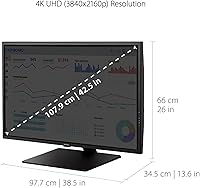
  • Screen Size: The display measures 43 inches diagonally, providing substantial workspace for multitasking without requiring multiple monitors.
  • Resolution: Native resolution is 3840x2160 (4K UHD), delivering sharp text and fine image detail across the full panel surface.
  • Panel Type: Uses an MVA (Multi-Vertical Alignment) panel, which offers stronger contrast ratios and wider viewing angles than TN panels but typically lower color vibrancy than IPS.
  • Refresh Rate: Operates at a standard 60Hz refresh rate, appropriate for productivity and general media consumption but not suited to competitive gaming.
  • HDR Support: Supports HDR10 content, providing expanded contrast and color range for compatible video and streaming sources.
  • Aspect Ratio: Features a 16:9 widescreen aspect ratio, the standard format for modern video content and productivity workflows.
  • Screen Surface: The matte anti-glare coating reduces reflections from ambient light sources, making it more comfortable in bright or mixed-lighting environments.
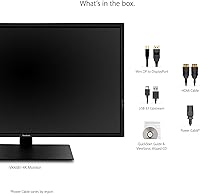
  • Inputs: Connectivity includes HDMI, full-size DisplayPort, and Mini DisplayPort inputs to accommodate a wide range of laptops, desktops, and media devices.
  • USB Ports: Includes three USB 2.0 ports for connecting peripherals such as keyboards, mice, or USB drives directly through the monitor.
  • Multi-Picture Modes: Supports both Picture-by-Picture (PBP) and Picture-in-Picture (PIP) modes, allowing up to four simultaneous Full HD video sources on screen.
  • Eye Care: Equipped with Flicker-Free technology and a Blue Light Filter to reduce visual fatigue during extended use at the desk.
  • Dimensions: The monitor measures approximately 38.5″ wide, 26″ tall, and 13.6″ deep with the stand attached, requiring a large, sturdy desk surface.
  • Weight: Weighs 37.5 pounds with the stand, which makes repositioning or wall-mounting a two-person task in practice.
  • Color Finish: Available in matte black, with a thin-bezel design intended to minimize visual distraction around the active screen area.
  • VESA Compatibility: The display supports VESA mounting, allowing users to attach it to a compatible monitor arm or wall mount in place of the included stand.
  • Brand & Model: Manufactured by ViewSonic under the model designation VX4381-4K, first made available in June 2021.
  • User Rating: Holds an aggregate rating of 3.7 out of 5 stars based on 78 user ratings, which is below the typical average for monitors in this category.

Related Reviews

ViewSonic VP2768a-4K 27-Inch 4K Monitor

86%
94%
Color Accuracy
88%
Ergonomics & Comfort
91%
Value for Money
89%
Build Quality
85%
Ease of Setup
More
ViewSonic VX3267U-4K 32-inch 4K IPS Monitor
74%
91%
Image Sharpness
83%
USB-C Functionality
76%
Color Accuracy
54%
HDR Performance
47%
Stand & Ergonomics
More
ViewSonic VG2756-4K 27-Inch 4K Docking Monitor

80%
91%
USB-C Docking Performance
88%
Display Clarity
74%
Connectivity & Port Selection
86%
Ergonomics & Stand Quality
71%
Color Accuracy
More
ViewSonic VA2756-4K-MHD 27-Inch 4K Monitor
84%
92%
Display Quality
90%
Color Accuracy
88%
Design & Build Quality
85%
Ease of Setup
89%
Connectivity Options
More
ViewSonic VP3256-4K 32-Inch 4K UHD Monitor
88%
94%
Display Quality
92%
Color Accuracy
88%
Ergonomics & Comfort
86%
Build Quality
90%
Ease of Setup
More
ViewSonic VP3268A-4K 32-inch 4K UHD IPS Monitor
86%
94%
Color Accuracy
88%
Ergonomics/Comfort
91%
Build Quality
83%
HDR Performance
85%
Connectivity Options
More
ViewSonic VX3276-4K-MHD 32-inch 4K Monitor

76%
91%
Image Clarity & Sharpness
74%
Color Accuracy
86%
Contrast & Black Levels
61%
HDR Performance
58%
Refresh Rate & Motion Handling
More
ViewSonic VX2776-4K-MHDU 27-inch 4K IPS Monitor

75%
91%
Image Clarity
93%
USB-C Convenience
78%
Color Accuracy
54%
HDR Performance
46%
Stand & Ergonomics
More
ViewSonic VX1655-4K-OLED 15.6-inch Portable OLED Monitor
77%
93%
Display Quality
91%
Portability
84%
USB-C Connectivity
88%
Build Quality
67%
Stand Stability
More
Dell UltraSharp U4320Q 43-inch 4K Monitor
75%
96%
Screen Real Estate
89%
Image & Color Accuracy
91%
USB-C Connectivity
88%
Build Quality
54%
Glare & Screen Surface
More

FAQ

In most cases, yes. The 43-inch 4K panel includes HDMI and DisplayPort inputs, both of which are widely supported on Macs via standard cables or a USB-C to DisplayPort adapter. If your MacBook only has USB-C or Thunderbolt ports, you will need an appropriate cable or adapter, but no proprietary accessories are required.

Yes, that is actually one of this display's more practical strengths. The Picture-by-Picture mode lets you connect two sources simultaneously and view them side by side, each at Full HD resolution. It works well for people juggling a work laptop and a personal desktop on the same desk.

It depends on what you play. For single-player story games, strategy titles, or casual gaming, 60Hz is perfectly acceptable. For competitive multiplayer games where fast reaction times and smooth motion matter — think first-person shooters or battle royale titles — 60Hz will feel noticeably limited, and you would be better served by a monitor with a higher refresh rate.

Honestly, it is subtle. MVA panels generally lack the peak brightness and zone-based local dimming that make HDR visually dramatic. You will notice slightly richer contrast in compatible content, but do not expect the kind of HDR impact you would get from a high-end TV or a monitor built specifically around HDR performance. Think of it as a modest enhancement rather than a headline feature.

The stand offers basic tilt adjustment, but the range of ergonomic adjustment is limited compared to premium monitor stands. Some users have noted that the stand feels less rigid than expected given the monitor's size and weight. If ergonomics are important to you, a VESA-compatible monitor arm is worth considering as an alternative.

At 43 inches, the optimal viewing distance is typically around 3 to 4 feet. At a standard desk, most users sit roughly 2 to 2.5 feet from the screen, which can feel overwhelming for some. It is worth measuring your actual desk depth before buying — this is genuinely a large display, and not everyone finds it comfortable up close.

Two 27-inch monitors in a standard arrangement give you roughly similar total screen area, but with a physical gap in the middle. The 43-inch 4K panel eliminates that gap and unifies the workspace, which many people find cleaner for productivity. The trade-off is that moving windows across a single large screen requires more mouse travel than a well-configured dual-monitor setup.

You do not need anything extreme for productivity use. Most discrete graphics cards from the past several years, and even some integrated graphics solutions, can drive 4K at 60Hz over DisplayPort or HDMI 2.0. That said, if you plan to game at 4K, a more capable GPU will matter significantly for maintaining smooth frame rates.

ViewSonic typically backs their monitors with a limited warranty — commonly three years for the panel and parts — but it is worth verifying the specific terms at the time of purchase, as they can vary by region and retailer. If you are buying from Amazon, check the seller's return window carefully, especially given the below-average user rating on this model.

It is worth taking seriously. The ViewSonic VX4381-4K 43-inch 4K Monitor sits below the typical rating you would expect from a monitor in this price range, and with fewer than 80 reviews, a small cluster of negative experiences can pull the average down considerably. Common criticisms include out-of-box color calibration and panel uniformity concerns, which suggests some unit-to-unit variability. It is not necessarily a reason to walk away, but it is a reason to buy from a retailer with a straightforward return process.

Where to Buy



