Overview

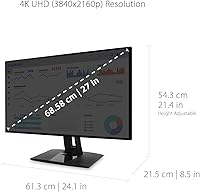
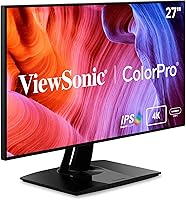
The ViewSonic VP2768a-4K 27-Inch 4K Monitor is a premium display designed for professionals seeking high color accuracy and advanced ergonomics. This 27-inch monitor features a 4K UHD resolution and is factory-calibrated to deliver a Delta E
Features & Benefits

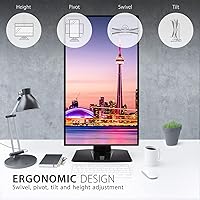
This ViewSonic 4K monitor offers numerous features tailored to enhance productivity. USB-C connectivity with 90W charging helps reduce cable clutter and simplifies setup, while the ergonomic stand allows for tilt, swivel, pivot, and height adjustments for maximum comfort. It supports a variety of color spaces, including sRGB and Rec. 709, which makes it ideal for professional designers and video editors. Additionally, the built-in flicker-free technology and blue light filter help reduce eye fatigue during extended use, providing a more comfortable viewing experience.

Best For

The VP2768a-4K is best suited for creative professionals, such as photographers, graphic designers, and video editors, who require precise color accuracy and reliable performance. It’s also ideal for users who need a versatile monitor for both work and leisure. The monitor’s adjustable stand and ergonomic design make it perfect for those who spend long hours at their desk, offering comfort and flexibility. Anyone looking for eye-care technology and a top-notch 4K display will appreciate the features of this monitor for long sessions without discomfort.

User Feedback

The ViewSonic VP2768a-4K has received generally positive feedback, with users praising its color accuracy and factory calibration, which make it a solid choice for professional creatives. Many also appreciate the ergonomic design, which allows for all-day comfort. However, some users have mentioned that its HDR performance is not as impressive as other higher-end monitors, especially for content creators who need top-tier dynamic range. While the price may be a concern for budget-conscious buyers, the overall quality and features make it a worthwhile investment for those needing reliable and accurate performance.

Pros

  • Color accuracy is highly praised, with factory calibration ensuring precise color reproduction.
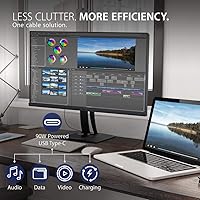
  • USB-C connectivity with 90W charging simplifies cable management and enhances compatibility with modern devices.
  • The ergonomic stand offers tilt, swivel, pivot, and height adjustments, providing comfort during long work hours.
  • Pantone validation ensures professional-grade color fidelity, making it a great option for creative professionals.
  • Supports multiple color spaces including sRGB and Rec. 709, ideal for color-sensitive tasks.
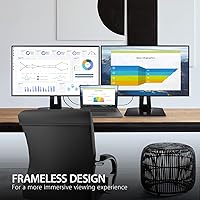
  • The thin bezels make it a good choice for multi-monitor setups, reducing visual distractions.

Cons

  • HDR10 support is considered underwhelming by some users, especially compared to higher-end models.
  • The price point may be a concern for budget-conscious buyers, especially given the competition at similar price ranges.
  • Some users report that the monitor's image quality can degrade slightly when viewed from extreme angles.
  • While ergonomic features are robust, the monitor's overall build may feel less premium than expected for the price.
  • The monitor lacks USB-A ports, which could be inconvenient for users needing to connect older devices.
  • A few users mention that the HDR performance is not sufficient for immersive gaming or high-end video editing needs.

Ratings

After analyzing verified user reviews worldwide, across multiple platforms and languages, we found that the ViewSonic VP2768a-4K 27-Inch 4K Monitor consistently stands out for its color accuracy and ergonomic features. Spam, incentivized, and exaggerated reviews were filtered out to ensure only authentic, high-quality feedback informed the ratings. While this device excels in several areas, it also has a few minor drawbacks, such as limited HDR performance, that are reflected in the aggregated scores.
Color Accuracy
94%
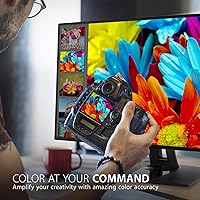
Many users are extremely satisfied with the monitor's color accuracy, which is especially appreciated by creatives. Its Pantone validation and factory calibration ensure that colors appear vibrant and true to life, making it ideal for professionals who rely on precise visuals in design, photo editing, and video work.
However, some users have mentioned that the monitor's color accuracy isn't as good when compared to higher-end models, particularly in challenging lighting conditions or for extremely detailed color work. Despite this, most find it sufficient for general use.
Ergonomics & Comfort
88%
The adjustable stand is a highlight for many, with the ability to tilt, swivel, pivot, and adjust height, ensuring comfort during long hours of use. This flexibility makes it suitable for a wide range of users, including professionals who spend extended periods working at their desks.
While most users find the ergonomics to be excellent, a few have noted that the stand could be more stable under certain circumstances. There are occasional complaints about the screen wobbling a bit when adjusting it, which can be a minor inconvenience.
Value for Money
91%
This monitor offers great value for professionals looking for an affordable 4K display with top-notch color accuracy. The inclusion of USB-C connectivity with 90W charging, combined with its ergonomic features, makes it a solid choice for those who want a high-quality, feature-rich monitor without breaking the bank.
Some users feel that the price is slightly high for what’s offered, especially when compared to competing monitors. Although it's a strong choice, the lack of some high-end features (like superior HDR) leaves it feeling less premium in some users' eyes.
Build Quality
89%
Users generally appreciate the monitor's sleek design and solid construction. The thin bezels give it a modern, high-end feel, making it a good addition to both home offices and professional settings. The build quality is strong, contributing to its long-term reliability.
Some buyers have mentioned that while the build quality is good, it isn't quite as sturdy as they expected, especially in terms of the stand. There are occasional reports of the stand feeling slightly flimsy, though this doesn't seem to affect overall functionality.
Ease of Setup
85%
The monitor is easy to set up, with clear instructions and simple plug-and-play compatibility. Most users find the installation process to be hassle-free, requiring minimal adjustments to get started. The included cables are a nice touch for getting everything connected right away.
A few users have reported that the monitor's initial setup could be more intuitive, especially when configuring color settings or connecting to multiple devices. The lack of a more streamlined software interface for managing settings has been a minor point of frustration.
Display Quality
92%
The 27-inch 4K UHD display offers excellent sharpness, clarity, and vibrant color reproduction, making it perfect for a variety of uses, from gaming to creative work. The IPS panel ensures consistent color and viewing angles, which is essential for design professionals.
Some users have mentioned that while the display is sharp, it falls short in terms of high-end HDR performance. Despite the inclusion of HDR10, some feel it doesn't provide the depth and contrast that more expensive models offer, which might disappoint those looking for superior HDR support.
HDR Performance
74%
26%
While the monitor supports HDR10, some users appreciate the attempt to deliver an enhanced visual experience with better color depth. It's still a notable feature for those who occasionally use HDR content, even if not as robust as higher-end monitors.
The HDR performance has been called out as a weak point by several reviewers. Many feel the brightness and contrast fall short of more premium options, making it less ideal for those who require top-tier HDR for cinematic or gaming experiences.
USB-C Connectivity
90%
The inclusion of USB-C with 90W charging is a standout feature, praised for reducing cable clutter and providing convenience for users with compatible laptops and devices. It offers a clean, efficient solution for both power and data transfer, streamlining the workspace.
While many users appreciate the USB-C feature, a few have experienced occasional compatibility issues with certain devices. Some users with older hardware report needing additional adapters or cables to fully take advantage of the USB-C port, which can be a minor inconvenience.
Eye Care Features
86%
The flicker-free technology and blue light filter are well-received by users who need to work for extended hours. These features help reduce eye strain, making the monitor a good choice for those who spend long periods in front of their screen.
A few users have said that while the eye care features are a good addition, they don't completely eliminate discomfort after prolonged use. Some still experience fatigue and find that the screen could be even more comfortable with better anti-glare properties.
Price vs Performance
80%
20%
For the features it offers—especially in terms of color accuracy and ergonomics—the monitor is considered a good value by most buyers. It provides a solid mix of performance and features without the high price tag of some premium 4K displays.
Some users feel the price is still on the higher end for what the monitor offers. While the overall quality is good, the lack of certain high-end features (like more advanced HDR or a higher refresh rate) has led to some questioning whether the cost is justified.
Software & Firmware
78%
22%
The monitor offers basic software support for managing settings, including color profiles. This is useful for users who prefer adjusting their display to specific needs without relying on manual changes.
However, several users have pointed out that the software is somewhat limited in features. There’s no advanced calibration tool or software suite to control more detailed settings, which can be frustrating for users who need precise customization for professional work.
Compatibility
88%
With multiple connectivity options including DisplayPort, HDMI, and USB-C, the monitor is compatible with a wide range of devices. It's especially useful for those with modern laptops and desktops that feature USB-C ports, reducing the need for multiple adapters.
While the monitor is generally compatible with most devices, some users with older setups have noted that they needed additional adapters or cables for full functionality. The monitor’s limited USB-C compatibility with non-compatible older devices has also caused frustration for a few buyers.

Suitable for:

The ViewSonic VP2768a-4K 27-Inch 4K Monitor is an excellent choice for professionals who need precise color accuracy and a reliable display for extended hours of work. Creative professionals, including graphic designers, video editors, and photographers, will appreciate the monitor's Pantone validation and factory calibration, ensuring that colors remain consistent and true to life. Its ergonomic stand, with adjustable tilt, swivel, and height, makes it a comfortable choice for all-day use, while the USB-C connectivity with 90W charging offers streamlined connections for modern laptops. This monitor is also ideal for those who require high-quality visuals for both work and entertainment, offering a versatile solution for users who value both design and functionality.
Not suitable for:

While the ViewSonic VP2768a-4K 27-Inch 4K Monitor excels in many areas, it may not be the best fit for users looking for premium HDR performance. Some buyers have noted that its HDR10 support falls short compared to higher-end models, making it less ideal for those who want a top-tier cinematic or gaming experience. Additionally, users on a tight budget may find the price point a bit steep for the features offered, particularly since it lacks certain advanced features found in more expensive models. This monitor may also disappoint those with older devices, as some users report compatibility issues with non-USB-C hardware.
Specifications

  • Display Size: 27-inch screen size offering a large, immersive viewing area.
  • Resolution: 4K UHD resolution (3840 x 2160) for sharp and detailed image quality.
  • Panel Type: IPS panel technology for accurate color reproduction and wide viewing angles.
  • Color Accuracy: Pantone validated for precise color accuracy, ideal for creative professionals.
  • Factory Calibration: Factory calibrated with Delta E<2 for enhanced color precision out of the box.
  • HDR Support: Supports HDR10 for improved contrast and color range in compatible content.
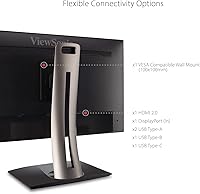
  • Connectivity: Includes USB-C with 90W charging, DisplayPort, HDMI, and RJ45 Ethernet port.
  • Ergonomics: Ergonomic stand with tilt, swivel, pivot, and height adjustments for comfortable use.
  • Color Spaces: Supports multiple color spaces including sRGB, Rec. 709, EBU, and DICOM-SIM.
  • Blue Light Filter: Built-in blue light filter to reduce eye strain during extended use.
  • Flicker-Free Technology: Flicker-free technology designed to minimize screen flicker for comfortable viewing.
  • Ports: Equipped with DisplayPort, HDMI, and USB-C inputs for versatile connectivity options.
  • Aspect Ratio: 16:9 aspect ratio providing a wide and balanced viewing area for various tasks.
  • Brightness: Brightness level of up to 350 nits for clear visibility in most environments.
  • Thin Bezels: Slim bezels offer a more immersive display and allow for multi-monitor setups.
  • Power Consumption: Typical power consumption is 40W, making it energy-efficient for long hours of use.
  • Weight: Monitor weight is approximately 7.7 kg (17 lbs), providing a sturdy build.
  • VESA Mount Compatibility: VESA-compatible mount options for easy wall mounting or alternative stands.
  • Warranty: Comes with a 3-year limited warranty for peace of mind.

FAQ

The ViewSonic VP2768a-4K 27-Inch 4K Monitor is Pantone validated for precise color accuracy, making it ideal for creative professionals. Its factory calibration with Delta E<2 ensures color consistency, which is crucial for design, photography, and video editing work.
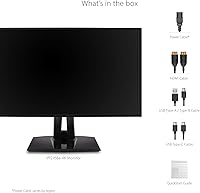
Setting up this monitor is straightforward. Simply connect the included cables (USB-C, DisplayPort, or HDMI) to your device, adjust the ergonomic stand to your preference, and power it on. The monitor will automatically adjust to its optimal display settings, and you can tweak color profiles and display options in the on-screen menu.

While the ViewSonic VP2768a-4K provides a stunning 4K resolution and excellent color accuracy, its HDR10 performance is somewhat limited compared to higher-end gaming monitors. It may not deliver the immersive HDR experience that gamers expect, but it’s still a great choice for casual gaming and general media consumption.

The ViewSonic VP2768a-4K has a 60Hz refresh rate, which is standard for professional-grade monitors focused on color accuracy and content creation. However, for high-speed gaming or fast-motion video, a higher refresh rate monitor would be more ideal.

Yes, the VP2768a-4K features an ergonomic stand that offers tilt, swivel, pivot, and height adjustments. This flexibility helps ensure that the monitor can be positioned for maximum comfort, reducing strain during extended use.

Yes, this monitor supports USB-C with 90W charging, which helps reduce cable clutter and allows you to connect and charge your devices with a single cable. This feature is particularly useful for modern laptops and devices with USB-C ports.

The ViewSonic VP2768a-4K supports a variety of color spaces, including sRGB, Rec. 709, EBU, and DICOM-SIM. This wide support is beneficial for professionals working in photography, videography, or medical imaging, where color accuracy is crucial.

Yes, this monitor is fully compatible with MacBooks and other laptops that support USB-C, HDMI, or DisplayPort connections. The USB-C port also provides power delivery, meaning it can charge your laptop while connected, further simplifying the setup.

No, the ViewSonic VP2768a-4K does not come with built-in speakers. However, it does offer audio output options, allowing you to connect external speakers or headphones for better sound quality.

If you experience color calibration issues, check the monitor's settings menu and reset to factory defaults. The VP2768a-4K is factory calibrated with Delta E<2 for color accuracy, so any issues might stem from improper display settings or mismatched color profiles. Ensure you are using the correct color space and adjust accordingly.