Overview

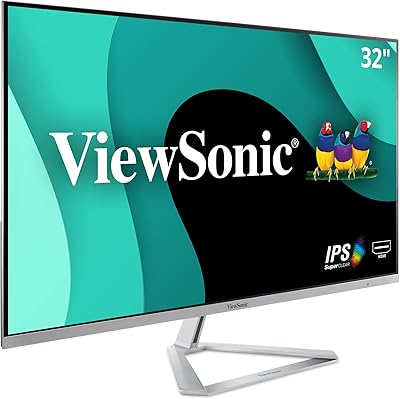
The ViewSonic VX3276-4K-MHD 32-inch 4K Monitor launched back in 2019, yet it continues to hold its own in a crowded mid-range display market — and that alone says something. This 32-inch monitor strikes a practical balance between sharp 4K resolution and a price point that won't make you wince. The matte black-and-silver finish looks clean without drawing attention to itself, and the thin bezels give it a modern profile that suits most desk setups. One thing to set straight upfront: at 60Hz, this is built for productivity and media consumption, not fast-paced gaming. If you can live with that, it's a genuinely capable display.
Features & Benefits

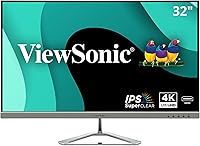
At the core of this ViewSonic 4K display is an MVA panel, which is worth understanding. Unlike IPS alternatives, MVA delivers stronger contrast ratios and deeper blacks — a real advantage if you watch a lot of video or work in darker environments. HDR10 is on the spec sheet, but keep expectations grounded; at this tier it adds a modest boost to color depth rather than a dramatic visual transformation. The connectivity is genuinely flexible: HDMI, DisplayPort, and Mini DisplayPort mean you can hook up a MacBook, a desktop PC, or a gaming console without hunting for adapters. Flicker-Free technology and a built-in blue light filter are quiet but meaningful for anyone logging long hours in front of a screen.

Best For

This 32-inch monitor is a strong fit for remote workers and home office users who want substantial screen space without committing to a premium-tier budget. If you are upgrading from a 1080p display, the jump to 4K at this size is immediately noticeable — text is crisper, and photos or video content look considerably more refined. Mac users and laptop owners will appreciate how straightforward the connection process is across devices. The slim bezels make it a natural choice for dual-monitor configurations, since the visual gap between screens stays minimal. It is less suited to serious color graders or photographers who need strict accuracy, and competitive gamers will want a higher refresh rate elsewhere.

User Feedback

Across more than 8,000 ratings, the VX3276-4K-MHD sits at a well-earned 4.5 stars. Buyers consistently highlight the sharp image quality and straightforward setup — most report being up and running within minutes. Where the praise drops off is the stand: it tilts, and that is essentially it. No height adjustment, no swivel, which frustrates users who need ergonomic flexibility. Experienced reviewers often recommend budgeting for a VESA-compatible arm from the start. Color accuracy draws mixed but fair comments — adequate for spreadsheets and casual photo viewing, not for print work or professional editing. Long-term reliability appears solid, with few reports of panel degradation or hardware failure after extended use.

Pros

  • The jump from 1080p to 4K at 32 inches is immediately visible — text is sharper and detail-rich content looks noticeably better.
  • The MVA panel delivers stronger contrast and deeper blacks than similarly priced IPS alternatives, making dark content look genuinely good.
  • Flicker-Free technology and a built-in blue light filter hold up well for users logging six to ten hours daily at their desk.
  • Connectivity is broad and practical — HDMI, DisplayPort, and Mini DisplayPort cover most laptops, desktops, and consoles without adapters.
  • Slim bezels make this 32-inch monitor an easy fit for dual-monitor setups where visual continuity between screens matters.
  • Setup is fast and straightforward — most users report being up and running within fifteen minutes, no technical experience needed.
  • The matte anti-glare surface handles ambient light well and avoids the reflection issues that plague glossy panels in bright rooms.
  • Long-term reliability is solid, with few reports of panel degradation or brightness drop-off after extended months of daily use.
  • The Movie and Text viewing presets are genuinely useful in daily rotation, not just checkbox features that nobody touches.
  • Over 8,000 verified ratings averaging 4.5 stars reflects consistent real-world satisfaction across a wide range of buyers and use cases.

Cons

  • The stand offers tilt adjustment only — no height, no swivel, no pivot — which is a meaningful ergonomic shortcoming for many users.
  • Buying a VESA monitor arm separately to compensate for the stand adds cost and hassle that should not be necessary at this price tier.
  • HDR10 support is real but underwhelming in practice — do not expect it to compare with dedicated HDR displays.
  • No USB-C input is an increasingly noticeable omission for modern laptop users who prefer single-cable connectivity.
  • Color accuracy is not sufficient for professional photo editing, print design, or any color-critical creative workflow.
  • Black smearing during fast motion is a known MVA trait and shows up in user feedback, particularly during dark action sequences.
  • Backlight bleed in the lower corners is reported by a consistent subset of owners, most noticeable during dark scenes in dim rooms.
  • The OSD menu navigation relies on rear-mounted buttons that are difficult to use by feel, especially during initial setup.
  • Factory brightness defaults too high for comfortable indoor use — a manual adjustment session is necessary before serious use.
  • Newer competing monitors at similar prices now offer USB-C, better stand ergonomics, and higher refresh rates, narrowing the VX3276-4K-MHD's value edge.

Ratings

The ViewSonic VX3276-4K-MHD 32-inch 4K Monitor has accumulated thousands of verified buyer experiences worldwide, and our AI rating system has analyzed that feedback in full — filtering out incentivized reviews, bot activity, and outlier spam to surface what real users actually think. The scores below reflect a transparent, balanced picture of where this 32-inch monitor genuinely excels and where it falls short, so you can make a confident buying decision without surprises.

Image Clarity & Sharpness
91%
Users upgrading from 1080p displays consistently describe the jump in text sharpness and fine detail as immediately noticeable — particularly when working with spreadsheets, reading long documents, or browsing high-resolution photography. At 32 inches, the 4K pixel density keeps the image looking crisp without needing to sit unusually close.
A small number of users report that at the default factory sharpness setting, fine edges can look slightly over-processed. Most resolve this by dialing back sharpness in the OSD menu, but it adds a setup step that should not be necessary out of the box.
Color Accuracy
74%
26%
For everyday tasks — video calls, web browsing, streaming, and casual photo viewing — colors look punchy and well-saturated without appearing artificial. Most home office users report the default color temperature feels natural enough that they never feel the need to calibrate.
Anyone doing serious color grading, photo retouching for print, or professional graphic design will find the accuracy lacking. The MVA panel does not cover a wide enough color gamut for precision work, and sRGB coverage is adequate rather than impressive — a recurring theme in buyer reviews from creative professionals.
Contrast & Black Levels
86%
This is where the MVA panel genuinely pulls ahead of comparably priced IPS monitors. Users watching dark films or working with dark-themed interfaces notice that blacks look convincingly deep rather than washed out, giving the image a sense of depth that flat IPS panels at this price often cannot match.
MVA panels carry a known weakness: black smearing during fast motion. Users who occasionally play slower-paced games or watch action sequences report subtle trailing artifacts in dark areas. It is not severe, but it is noticeable enough to come up repeatedly in long-term reviews.
HDR Performance
61%
39%
HDR10 support does add a visible lift to compatible content — users streaming HDR-enabled titles on supported platforms notice slightly richer highlights and improved shadow detail compared to SDR mode. It is a welcome bonus for casual viewing on a display at this price level.
Expectations need to be firmly managed here. This is entry-level HDR in the truest sense: peak brightness and local dimming capabilities are not in the same conversation as dedicated HDR displays. Enthusiasts who have used premium HDR monitors will likely find the difference underwhelming, and several reviewers explicitly call it a checkbox feature rather than a genuine selling point.
Refresh Rate & Motion Handling
58%
42%
At 60Hz, the VX3276-4K-MHD is perfectly fluid for office work, video calls, streaming, and casual entertainment. Users who primarily use it for productivity report zero issues with the refresh rate — it simply does not come up as a concern in that context.
For anyone who plays fast-paced games even occasionally, 60Hz is a clear limitation that other reviews do not always disclose upfront. Competitive gaming, fast shooters, and titles that benefit from high frame rates will feel noticeably less smooth compared to 144Hz or higher displays available at similar price points.
Ergonomics & Stand Adjustability
44%
56%
The stand itself is stable — no wobble or flex during normal desk use, which is more than can be said for some budget monitor stands. The physical footprint is reasonable given the 32-inch panel size, and the overall build does not feel cheap despite the price tier.
The stand offers tilt adjustment only. No height adjustment, no swivel, no pivot — and this is the single most frequently raised complaint across hundreds of reviews. Users who care about ergonomics almost universally end up purchasing a VESA-compatible monitor arm separately, which adds cost and complexity that should have been unnecessary. It is a genuine design shortcoming.
Connectivity & Compatibility
89%
The combination of HDMI, DisplayPort, and Mini DisplayPort covers an unusually wide range of devices without needing adapters. Mac users with older USB-C-to-Mini-DisplayPort cables, Windows desktop users, and laptop owners all report clean, reliable connections with no driver issues or signal instability.
There is no USB-C port, which is an increasingly common omission complaint from newer MacBook and thin laptop users who prefer a single-cable setup. Users with only USB-C outputs will need a separate adapter or dock, which is a mild but genuine inconvenience worth flagging.
Eye Comfort & Long Sessions
83%
Flicker-Free technology and the built-in blue light filter get consistent praise from users who spend six to ten hours a day in front of this display. Remote workers and students specifically mention reduced eye fatigue compared to previous monitors, which is one of the more practical benefits this display delivers reliably.
The blue light filter, when pushed to its stronger settings, introduces a noticeable warm color cast that some users find too aggressive for accurate on-screen work. Most settle on a middle setting as a compromise, but it would benefit from finer gradation between filter levels.
Viewing Presets & OSD Usability
67%
33%
The Movie and Text presets in particular earn positive mentions — users report that switching to Text mode genuinely improves readability during long reading or coding sessions, while Movie mode adds a bit of warmth that suits evening streaming. The presets are accessible and quick to cycle through.
The OSD menu navigation is functional but dated. Button placement on the back of the monitor makes blind adjustments frustrating, and several users report it takes a few sessions to memorize which button does what. The Game preset also draws criticism for not being particularly useful on a 60Hz panel.
Build Quality & Aesthetics
78%
22%
The slim bezel design looks clean and modern on a desk, and the matte finish avoids the fingerprint-magnet problem common on glossy monitors. Users setting up dual-monitor configurations specifically appreciate how minimal the bezel gap is between screens, which makes for a less interrupted viewing experience.
The plastic chassis, while acceptable, does not convey the premium feel of higher-end displays. A few users note minor flex in the back panel when adjusting cables. It is not a structural concern, but it reinforces that this is a mid-range product — durable enough, but not built to impress up close.
Setup & Out-of-Box Experience
88%
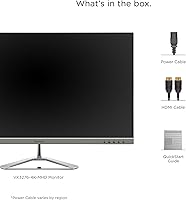
Assembly is consistently described as quick and painless — most users have the monitor up and running within ten to fifteen minutes with no prior technical experience required. The included cables cover basic connectivity, and signal detection across different input sources is reliable from the first boot.
The factory calibration, while usable, leaves some room for improvement — brightness defaults to a level that several users find too high for comfortable indoor use. A short calibration session is recommended, though not everyone thinks to do this before forming their first impressions.
Value for Money
84%
For the combination of screen size, resolution, and build quality, most users feel the price is fair and defensible. The recurring sentiment in long-term reviews is that the display continues to perform consistently months after purchase, which reinforces the sense that the money was well spent.
The stand limitation and the absence of USB-C do give some buyers pause when comparing against newer competitors that have addressed both issues at similar price points. The value calculus is still positive for most, but it is no longer the clear, uncontested bargain it was at launch.
Long-Term Reliability
81%
19%
Owners who have used the VX3276-4K-MHD for two or more years report no significant degradation in panel brightness or color consistency. Dead pixel complaints are relatively rare across the review pool, and the power supply appears stable with no widespread reports of unexpected shutdowns or flickering over time.
A modest but persistent cluster of reviews mentions backlight bleed visible in dark environments, particularly in the lower corners. It does not affect everyday productivity use, but users who frequently watch films with dark scenes in a dim room may find it distracting. ViewSonic customer support response times also draw mixed feedback in warranty-related reviews.

Suitable for:

The ViewSonic VX3276-4K-MHD 32-inch 4K Monitor is a well-matched choice for remote workers and home office users who spend long days in front of a screen and want the productivity benefits of 4K resolution without paying flagship prices. At 32 inches, the panel gives you genuine breathing room for multitasking — keeping a document, browser, and communication tool open simultaneously without things feeling cramped. People upgrading from a 1080p display will notice an immediate and meaningful improvement in text clarity, which makes a real difference during extended reading, coding, or spreadsheet work. Casual content consumers — those who stream high-resolution video, browse photography, or do light video editing on the side — will get solid everyday performance from this display. Mac users and those switching between multiple devices will appreciate how painlessly the HDMI, DisplayPort, and Mini DisplayPort inputs handle different connections. If you are setting up a dual-monitor workstation, the slim bezels keep the visual gap between screens minimal, which is a small but genuinely useful ergonomic detail.
Not suitable for:

The ViewSonic VX3276-4K-MHD 32-inch 4K Monitor has a handful of real limitations that make it the wrong choice for certain buyers, and it is worth being direct about them. Competitive or fast-paced gamers should look elsewhere — 60Hz is a firm ceiling, and once you have used a 144Hz or higher display, going back feels noticeably sluggish during action-heavy gameplay. Professional photographers, print designers, and video colorists who rely on precise color accuracy will also find this display insufficient; the color gamut and factory calibration are adequate for general use, not for work where accurate color reproduction directly affects the output. The stand is a persistent frustration — it tilts and nothing else, meaning users who care about proper ergonomic positioning will almost certainly need to budget for a separate VESA monitor arm from the start. Anyone hoping to run a clean single-cable setup from a modern laptop via USB-C will be disappointed, as there is no USB-C input on this display. Buyers in dim viewing environments who are sensitive to backlight bleed may also notice it in the corners during dark scenes, which is not disqualifying but is worth knowing before you commit.
Specifications

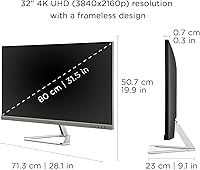
  • Screen Size: The display measures 32 inches diagonally, providing generous screen real estate well suited to multitasking and immersive media consumption.
  • Resolution: Native resolution is 3840x2160 (4K UHD), delivering four times the pixel count of a standard 1080p display for noticeably sharper text and detail.
  • Panel Type: Uses an MVA (Multi-domain Vertical Alignment) panel, which produces higher contrast ratios and deeper blacks compared to IPS panels at a similar price point.
  • Refresh Rate: Runs at a fixed 60Hz refresh rate, appropriate for productivity, media streaming, and casual use but not suited for competitive or fast-paced gaming.
  • HDR Support: Compatible with HDR10 content, offering improved contrast and color depth over SDR when viewing supported video sources — entry-level HDR performance only.
  • Aspect Ratio: Standard 16:9 widescreen aspect ratio, consistent with the majority of desktop applications, streaming platforms, and video content formats.
  • Screen Surface: Matte anti-glare coating reduces reflections from ambient light sources, making the display more comfortable to use in brightly lit office or home environments.
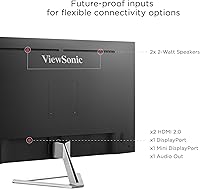
  • Inputs: Connectivity includes one HDMI port, one full-size DisplayPort, and one Mini DisplayPort, covering a wide range of laptops, desktops, and media devices.
  • Eye Care: Certified Flicker-Free technology eliminates screen flicker across all brightness levels, and a Blue Light Filter reduces high-energy light emission during extended use.
  • VESA Mounting: The monitor is VESA-compatible, allowing the stock stand to be replaced with a third-party monitor arm for users who require height, swivel, or pivot adjustability.
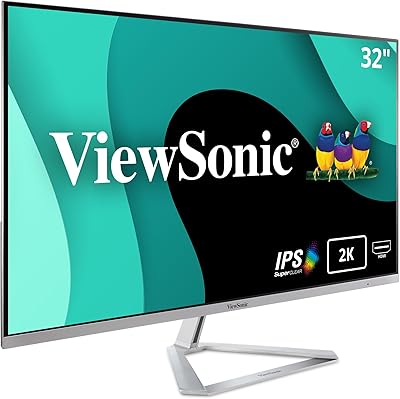
  • Bezel Design: Ultra-thin bezels on three sides of the panel minimize visual interruption, making it a practical choice for side-by-side dual-monitor configurations.
  • Viewing Presets: Five built-in display presets — Game, Movie, Web, Text, and Mono — allow quick switching between optimized color and contrast profiles for different use cases.
  • Dimensions: The assembled unit measures 28.1 x 19.9 x 9.1 inches (W x H x D), with the stand included in the depth measurement.
  • Weight: Total unit weight with stand is 15 pounds, which is standard for a monitor of this panel size and should pose no issues for typical desk placement.
  • Color Finish: Ships in a Black and Silver colorway with a predominantly matte plastic chassis — understated and professional in appearance without being visually distracting.
  • Power Input: Operates on 110V AC power, compatible with standard North American wall outlets without the need for a voltage converter.
  • Manufacturer: Designed and sold by ViewSonic, a display-focused brand with a broad monitor lineup spanning consumer, business, and professional segments.
  • Availability: First made available in June 2019 and confirmed as not discontinued by the manufacturer, indicating ongoing production and parts availability.

Related Reviews
ViewSonic VX3276-2K-MHD 32-Inch Monitor
85%
92%
Display Quality
89%
Design and Aesthetics
77%
Build Quality
88%
Ease of Setup
94%
Flicker-Free and Eye Comfort
More
ViewSonic VX3276-MHD 32-inch 1080p IPS Monitor

73%
88%
Value for Money
76%
Display Quality
61%
Sharpness & Pixel Density
83%
Eye Comfort & Ergonomics
58%
Stand & Build Quality
More
ViewSonic VX3267U-4K 32-inch 4K IPS Monitor

74%
91%
Image Sharpness
83%
USB-C Functionality
76%
Color Accuracy
54%
HDR Performance
47%
Stand & Ergonomics
More
ViewSonic VA2756-4K-MHD 27-Inch 4K Monitor
84%
92%
Display Quality
90%
Color Accuracy
88%
Design & Build Quality
85%
Ease of Setup
89%
Connectivity Options
More
ViewSonic VP3256-4K 32-Inch 4K UHD Monitor
88%
94%
Display Quality
92%
Color Accuracy
88%
Ergonomics & Comfort
86%
Build Quality
90%
Ease of Setup
More
ViewSonic VP3268A-4K 32-inch 4K UHD IPS Monitor
86%
94%
Color Accuracy
88%
Ergonomics/Comfort
91%
Build Quality
83%
HDR Performance
85%
Connectivity Options
More
ViewSonic XG320U 32-Inch 4K UHD Gaming Monitor
87%
93%
Display Quality
91%
Gaming Performance
95%
Color Accuracy
88%
Build Quality
89%
Ergonomics
More
ViewSonic VX3218-PC-MHD 32-Inch Curved 1080p Gaming Monitor
84%
88%
Performance for Gaming
84%
Visual Quality
92%
Value for Money
80%
Build Quality
85%
Eye Care Features
More
ViewSonic VX3258-PC-MHD 32-inch Curved 1080p Gaming Monitor

82%
91%
Gaming Performance
84%
Visual Quality
95%
Refresh Rate & Response Time
80%
Build Quality
70%
Ergonomics & Adjustability
More
ViewSonic VP2768a-4K 27-Inch 4K Monitor
86%
94%
Color Accuracy
88%
Ergonomics & Comfort
91%
Value for Money
89%
Build Quality
85%
Ease of Setup
More

FAQ

Yes, in most cases. The Mini DisplayPort input is particularly useful for older MacBooks, and newer models with USB-C can connect via a USB-C to DisplayPort adapter. Just note there is no native USB-C port on this display, so you will need a cable or adapter depending on your MacBook generation.

The included stand only supports tilt adjustment — there is no height, swivel, or pivot movement built in. This is one of the most common frustrations buyers mention. If ergonomics matter to you, budgeting for a VESA-compatible monitor arm from the start is a practical workaround that most long-term owners end up doing anyway.

It depends entirely on what kind of gaming you do. For slower-paced games, RPGs, strategy titles, or casual play, 60Hz is perfectly adequate. For competitive shooters, fast action games, or anyone accustomed to 144Hz or higher, this display will feel limiting. The 60Hz cap is a firm hardware ceiling, so there is no way to push it higher.

Honestly, it is more of a bonus than a headline feature. You will notice a modest improvement in contrast and highlight detail when watching HDR-enabled content on compatible platforms, but it does not come close to what a true HDR display with high peak brightness and local dimming delivers. Go in with realistic expectations and you will not be disappointed — just do not buy this specifically for HDR performance.

Yes, but the HDMI version on this monitor is 2.0, which supports 4K at 60Hz without issues. For full 4K resolution at the native refresh rate, either the HDMI or DisplayPort connection will work reliably. Just make sure your source device also supports 4K output — the monitor itself is not the limiting factor in most setups.

The screen has a matte anti-glare coating, which handles reflections from windows and overhead lights noticeably better than glossy alternatives. If your workspace has significant ambient light, this coating is a genuine advantage. The tradeoff is a very slight reduction in perceived color vibrancy compared to glossy panels, though most users find the tradeoff well worth it.

With the stand attached, it sits about 9.1 inches deep, nearly 28 inches wide, and just under 20 inches tall. It is a large display, so make sure your desk is at least 24 inches deep for comfortable viewing distance. The stand footprint is relatively modest given the panel size, so it does not eat up desk space as aggressively as some larger stands.

No, this 32-inch monitor does not include built-in speakers. You will need external speakers or headphones for audio. This is a common characteristic among monitors in this display category, so it is worth factoring into your setup planning if audio matters to your workflow.

For casual photo browsing and light editing, the color performance is perfectly fine. For professional-grade work where color accuracy directly affects your output — such as print design, retouching for clients, or video color grading — this display is not the right tool. The color gamut coverage and factory calibration are adequate for general use, not precision creative workflows.

A meaningful share of user reviews do mention backlight bleed, most commonly appearing as faint light leakage in the lower corners when viewing dark content in a dim room. It is not universal — panel quality can vary unit to unit — but it is consistent enough in the review pool to be worth knowing about upfront. For everyday office work it is essentially a non-issue; in a darkened room watching dark films, some users find it distracting.

Where to Buy