ViewSonic VG2756-4K 27-Inch 4K Docking Monitor


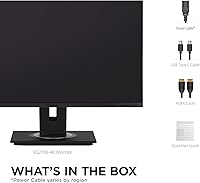
Overview
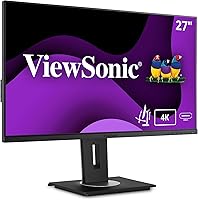
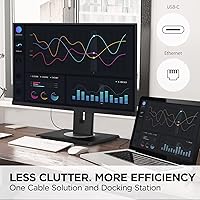
The ViewSonic VG2756-4K 27-Inch 4K Docking Monitor is built for one specific kind of professional: someone who wants to sit down, plug in one cable, and get straight to work. The 27-inch IPS panel delivers crisp, detailed imagery with a matte finish that handles office lighting without turning into a mirror. A single USB-C connection carries power, video, and data simultaneously — no dock, no adapter pile. The ergonomic stand is genuinely well-executed for this price range, offering real adjustment range rather than token tilt. Worth stating upfront: the 60Hz refresh rate makes this a pure productivity display. If you game or work with fast-moving content, look elsewhere.
Features & Benefits
The 90W USB-C Power Delivery is the headline feature here, and it earns that status. Plug in a MacBook or Windows laptop and this docking monitor handles charging while simultaneously pushing 4K video — one cable doing the job of three. The built-in RJ45 Ethernet port is a quiet but significant inclusion; wired internet straight through the monitor means no dongle dangling off your desk. Color accuracy on the IPS panel is solid and honest — good enough for photo editing, though not a replacement for a factory-calibrated display. The stand covers tilt, swivel, height, and rotation, which is a fuller range than many competitors offer at this tier. The Blue Light Filter and Flicker-Free technology add meaningful comfort for long sessions.
Best For
This docking monitor suits remote and hybrid workers who treat desk cleanliness as a priority. If you carry a laptop between locations, the quick-release stand with its built-in carrying handle makes relocation far less painful than it sounds. MacBook users in particular will appreciate the one-cable docking — no hub required. Creative professionals doing photo retouching or layout work will find the 4K resolution earns its keep for fine detail, even if the panel isn't professionally calibrated. Anyone still running a 1080p display will notice an immediate, substantial visual jump. The one group this display isn't built for is anyone who needs high refresh rates — gamers and motion-heavy video editors should shop elsewhere.
User Feedback
Sitting at a 4.5-star average across more than 100 ratings, the VG2756-4K has built real goodwill — and the reasons are consistent. Buyers repeatedly note that USB-C plug-and-play works exactly as described, with no driver issues or compatibility surprises. Stand stability and overall build quality come up often in a positive light. That said, not every buyer leaves happy. Several users flagged the 60Hz limitation as a letdown, having expected more flexibility at this price point. The USB expansion is also limited — two ports total — which pinches users running multiple peripherals. A notable detail that catches some buyers off guard: there are no built-in speakers. Managed expectations make a real difference here; buyers who understand what this display is designed for tend to rate it highly.
Pros
- Single USB-C cable handles display, data, and 90W laptop charging simultaneously — a genuine desk simplifier.
- Built-in RJ45 Ethernet port removes the need for a separate dock or network dongle.
- 4K IPS panel delivers sharp, detailed imagery well-suited for spreadsheets, design work, and document review.
- Matte anti-glare coating holds up well in bright rooms and near windows without heavy reflections.
- The ergonomic stand covers tilt, swivel, height, and rotation — a fuller range than most competitors at this price tier.
- Flicker-Free and Blue Light Filter technologies make a noticeable difference during long work sessions.
- Quick-release stand with built-in carrying handle makes relocation or hot-desking much less of a hassle.
- Plug-and-play USB-C compatibility is consistently reliable across MacBooks and most modern Windows laptops.
- VESA mount support gives users the option to ditch the stand entirely and go arm-mounted.
- Buyers upgrading from 1080p will notice an immediate and significant improvement in screen real estate and detail.
Cons
- 60Hz refresh rate is a firm ceiling — no flexibility for users who later want smoother motion performance.
- Only two USB ports total, which runs out fast with a typical full-peripheral desk setup.
- No built-in speakers; an external audio solution is required from the start.
- IPS panel is not factory-calibrated, so color-critical professionals will need a separate display or calibration hardware.
- At 16.5 pounds, the VG2756-4K is on the heavier side for a monitor marketed with portability in mind.
- USB hub expansion is limited enough that many users will still end up needing a secondary hub.
- No USB4 or Thunderbolt support, which may matter as laptop ecosystems continue to shift toward those standards.
- The 60Hz cap combined with the price point may feel hard to justify for buyers on the fence about gaming use.
Ratings
Our AI-generated scores for the ViewSonic VG2756-4K 27-Inch 4K Docking Monitor were built by analyzing verified purchase reviews from buyers worldwide, with spam, incentivized feedback, and bot activity actively filtered out before scoring. The ratings reflect what real professionals encountered day-to-day — not just the highlights, but the friction points too. Both the genuine strengths and the recurring frustrations are transparently baked into every score below.
USB-C Docking Performance
Display Clarity
Connectivity & Port Selection
Ergonomics & Stand Quality
Color Accuracy
Eye Comfort
Build Quality & Materials
Setup Experience
Portability & Relocation
Glare & Reflections
Value for Money
Compatibility Range
OSD & Menu Controls
Suitable for:
The ViewSonic VG2756-4K 27-Inch 4K Docking Monitor was clearly designed with a specific professional in mind — the laptop-first worker who wants a cleaner, more capable desk without building out a full docking station setup. Remote and hybrid workers will get the most out of it, particularly those who connect and disconnect a MacBook or Windows laptop multiple times a day and want a single USB-C cable to handle everything in one move. The built-in RJ45 port makes it an especially strong fit for anyone who relies on wired internet for video calls or large file transfers, eliminating yet another peripheral from the equation. Creative professionals doing detailed photo editing or graphic design work will appreciate the 4K resolution for fine detail, as long as they understand the panel is competent rather than professionally calibrated. Corporate users who share workstations or move monitors between rooms will also find the quick-release stand and carrying handle surprisingly practical for day-to-day logistics.
Not suitable for:
The ViewSonic VG2756-4K 27-Inch 4K Docking Monitor is a productivity-focused display, and buyers expecting anything beyond that will likely feel shortchanged. The 60Hz refresh rate is the most immediate dealbreaker for gamers or anyone working extensively with motion-heavy video content — there is no workaround, and it is simply not the right tool for that job. Multimedia professionals who need a factory-calibrated panel with verified color accuracy for broadcast or print work should also look at purpose-built alternatives, as this display's IPS panel is solid but not in that league. With only two USB ports total, anyone running a full peripheral setup — external drive, keyboard, mouse, webcam, audio interface — will hit expansion limits fast. The absence of built-in speakers is another friction point for users expecting a fully self-contained workstation experience, since an external speaker or headphone setup becomes mandatory from day one.
Specifications
- Screen Size: The display measures 27 inches diagonally, offering a comfortable amount of screen real estate without requiring an ultrawide footprint on your desk.
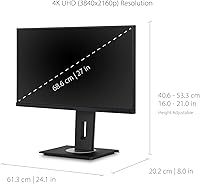
- Resolution: Native resolution is 3840×2160 (4K UHD), delivering noticeably sharper text and image detail compared to a standard 1080p or 1440p display.
- Panel Type: IPS (In-Plane Switching) panel technology provides wide viewing angles and consistent color representation across the full screen surface.
- Refresh Rate: The display runs at a fixed 60Hz refresh rate, which is standard for productivity-focused monitors but not suitable for gaming or high-frame-rate video work.
- Aspect Ratio: 16:9 widescreen aspect ratio is the standard format for most office applications, video conferencing tools, and general content consumption.
- Screen Surface: A matte anti-glare coating diffuses ambient light, reducing reflections in brightly lit rooms and making the display more comfortable to use near windows.
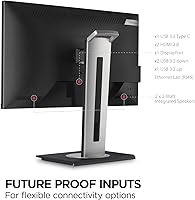
- USB-C Input: A single USB-C port supports up to 90W Power Delivery, allowing most modern laptops to charge and display 4K output over one cable simultaneously.
- Ethernet Port: A built-in RJ45 Ethernet port enables a direct wired network connection through the monitor, removing the need for a separate USB network adapter.
- Video Inputs: In addition to USB-C, the monitor includes one HDMI port and one DisplayPort input for connecting desktop PCs or secondary devices.
- USB Ports: The monitor provides one USB 3.0 port and one USB 2.0 port for connecting peripherals such as a mouse, keyboard, or USB drive.
- Ergonomic Range: The stand supports up to 40 degrees of tilt, plus swivel, height adjustment, and full portrait rotation to accommodate a wide range of seating positions and postures.
- Stand Design: A quick-release mechanism allows the monitor head to detach from the stand without tools, and an integrated carrying handle makes transport straightforward.
- Eye Care: Flicker-Free backlight technology and a built-in Blue Light Filter are included to reduce visual fatigue during extended work sessions.
- VESA Compatibility: The monitor is VESA mount compatible, allowing the stand to be replaced with a third-party monitor arm for a more customized desk configuration.
- Dimensions: Product dimensions are approximately 24.1 inches wide by 16 inches tall by 8 inches deep with the stand attached.
- Weight: The monitor weighs 16.5 pounds including the stand, which is worth considering if frequent relocation or arm-mounting is part of your setup plan.
- Color Finish: Available in black with a clean, professional aesthetic that suits both home office and corporate workstation environments.
- Speakers: The VG2756-4K does not include built-in speakers, so a separate audio output device or headphones will be required for sound.
Related Reviews

ViewSonic VP2768a-4K 27-Inch 4K Monitor

ViewSonic VA2756-4K-MHD 27-inch 4K Monitor

ViewSonic VX2776-4K-MHDU 27-inch 4K IPS Monitor
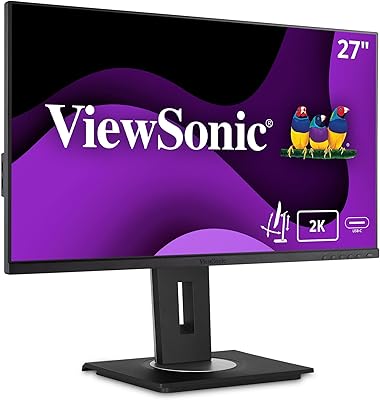
ViewSonic VG2756A-2K 27-inch Docking Monitor

ViewSonic VP3256-4K 32-inch 4K IPS Monitor
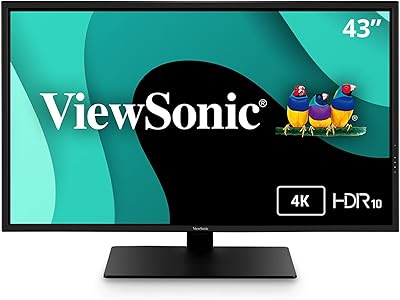
ViewSonic VX4381-4K 43-inch 4K Monitor

ViewSonic VX3267U-4K 32-inch 4K IPS Monitor

ViewSonic VX3276-4K-MHD 32-inch 4K Monitor

ViewSonic VP3268A-4K 32-inch 4K Monitor
