Overview

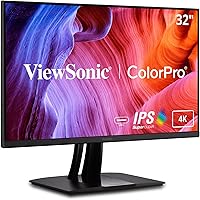
The ViewSonic VP3256-4K 32-inch 4K IPS Monitor is built squarely for professionals who need color they can trust — not a display chasing high refresh rates or flashy specs. ViewSonic's VP series has long been their dedicated pro lineup, and this entry makes that heritage accessible without requiring a five-figure budget. What separates this 32-inch color-accurate display from similarly priced alternatives is a combination of Pantone Validated certification and factory-calibrated Delta E accuracy — two credentials that matter far more to a working designer than peak brightness numbers. Throw in a genuinely capable ergonomic stand and USB-C connectivity, and you have a workstation monitor that actually thinks about the person sitting in front of it.
Features & Benefits

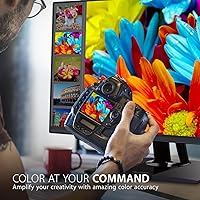
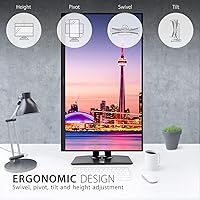
At 32 inches with a native 4K resolution, the VP3256-4K delivers the kind of pixel density that makes working with fine typography or detailed photo editing noticeably more comfortable. The IPS panel covers 100% sRGB, EBU, and SMPTE C color spaces, meaning whether you are preparing files for web, print, or broadcast, the colors you see translate reliably elsewhere. Pantone Validation is worth unpacking: it means this display can accurately reproduce Pantone's standardized color library — critical for brand designers matching physical print swatches to digital work. USB-C single-cable connectivity handles power, video, and data at once, which is particularly convenient for MacBook users. The ergonomic stand supports full tilt, swivel, pivot, and height adjustment, making it easy to find a comfortable position across a long workday.

Best For

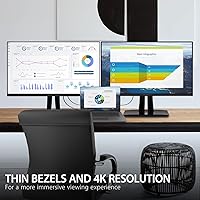
This 32-inch color-accurate display is an obvious fit for graphic designers and illustrators who depend on color consistency — particularly those doing print work where Pantone matching is non-negotiable. Photographers handling color grading or preparing files for professional printing will appreciate the factory-calibrated accuracy that removes guesswork from the editing process. Video professionals working within EBU or SMPTE C broadcast standards will find the color space coverage genuinely useful rather than a marketing checkbox. It also works well as a single-cable docking solution for MacBook or modern laptop users looking to cut desk clutter. Home office power users who want one large, well-built display that handles everything from spreadsheets to photo editing will find this ViewSonic pro monitor covers that range comfortably.

User Feedback

Across more than 400 ratings, the VP3256-4K holds a strong 4.5-star average, and the praise is consistent: buyers highlight out-of-the-box color accuracy, sturdy build quality, and the stand's flexibility. For a monitor at this price tier, that level of satisfaction carries weight. That said, two recurring criticisms show up often enough to flag. The 60Hz refresh rate is a real ceiling for anyone migrating from a high-refresh display — it is not a defect, but it limits versatility. Some users also note that the 60W USB-C power delivery falls short when paired with power-hungry laptops under heavy load. Most buyers still consider the investment well-justified given the color credentials, but those two caveats are worth factoring in before purchasing.

Pros

  • Factory-calibrated Delta E accuracy means colors are reliable straight out of the box, with no extra setup required.
  • Pantone Validation gives designers a trustworthy reference for matching digital colors to physical print standards.
  • Full 100% sRGB, EBU, and SMPTE C coverage makes this VP3256-4K genuinely versatile across design, photo, and video work.
  • The ergonomic stand offers tilt, swivel, pivot, and height adjustment — rare at this price tier and genuinely useful daily.
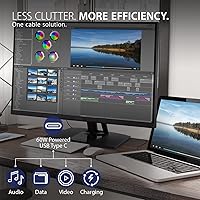
  • Single USB-C cable handles video, data, and laptop charging, cutting desk clutter significantly for MacBook and ultrabook users.
  • The matte IPS panel performs well in bright office environments with minimal glare interference.
  • A 4.5-star average across hundreds of buyers reflects consistent satisfaction, not just a handful of enthusiastic early reviews.
  • Flicker-Free technology and a built-in Blue Light Filter make extended editing sessions noticeably more comfortable on the eyes.
  • Build quality is consistently praised by buyers — this 32-inch color-accurate display feels solid and well-engineered, not flimsy.

Cons

  • The 60Hz refresh rate is a hard ceiling that rules out any gaming or fast-motion use cases entirely.
  • USB-C power delivery tops out at 60W, which may not fully charge high-performance laptops under heavy workloads.
  • At 24 pounds, this ViewSonic pro monitor is on the heavier side and is not easy to reposition frequently.
  • HDR10 support exists on paper, but peak brightness is not competitive with dedicated HDR displays for cinematic viewing.
  • The price is difficult to justify for buyers whose work does not specifically require color-critical accuracy.
  • No built-in speakers, which is a minor but real inconvenience for users who prefer an all-in-one workstation setup.
  • Connectivity is solid but lacks Thunderbolt support, which may matter to users in fully integrated Apple or high-bandwidth workflows.

Ratings

The scores below for the ViewSonic VP3256-4K 32-inch 4K IPS Monitor were generated by AI after analyzing verified buyer reviews from multiple global markets, with spam, bot-submitted, and incentivized feedback actively filtered out. Each category reflects the full spectrum of real user experiences — not just the highlights — so both the genuine strengths and the recurring frustrations are transparently represented. Whether this display fits your workflow or falls short of your expectations, these ratings aim to give you an honest, grounded picture before you commit.
Color Accuracy
93%
This is where the VP3256-4K earns its reputation most decisively. Designers and photographers consistently report that colors translate reliably to print and other output devices straight from the box, with no immediate need for third-party calibration. The Pantone Validation and sub-2 Delta E performance are not just marketing claims — buyers working in brand design and photo retouching notice the difference in their daily work.
A small number of buyers with highly specialized color workflows note that the factory calibration profile can drift slightly over time and recommend periodic recalibration for the most demanding output. For everyday creative use this is a minor concern, but perfectionists working in color-critical print production may want to budget for a colorimeter.
Panel Clarity & Sharpness
89%
At 32 inches with a native 4K resolution, pixel density is high enough that text, fine linework, and detailed photo editing all look crisp at a normal seated distance. Reviewers moving from 1080p or 1440p displays frequently describe the jump in perceived clarity as immediately noticeable and difficult to go back from.
The matte coating, while practical for glare reduction, introduces a subtle diffusion that can slightly reduce perceived pop compared to glossy panels. This is a minor tradeoff most users accept quickly, but buyers accustomed to glossy consumer displays may find the matte finish takes some adjustment.
Build Quality & Stand
88%
The physical construction is one of the most consistently praised aspects across hundreds of reviews. The stand in particular draws repeated compliments — full tilt, swivel, pivot, and height adjustment in a monitor at this tier is genuinely appreciated by users who spend long hours at their workstations and need to fine-tune positioning throughout the day.
At 24 pounds the unit is heavy, and a few buyers mention that repositioning the monitor on a shared desk requires noticeable effort. The stand itself is stable and well-built, but its footprint is on the larger side, which can feel intrusive on smaller desks.
USB-C Connectivity
79%
21%
For MacBook users and those with modern USB-C laptops, the single-cable setup genuinely simplifies the workstation. Power delivery, video output, and data transfer over one cable is the kind of practical convenience that becomes a daily quality-of-life win, particularly for anyone who docks and undocks a laptop regularly.
The 60W power delivery cap is a recurring complaint among buyers with more demanding laptops. High-performance 16-inch MacBook Pro users and similar power-hungry machines report the monitor struggles to maintain battery level under heavy load, which undermines the single-cable convenience proposition for that specific audience.
Ergonomics & Comfort
86%
The full range of ergonomic adjustments means most users can find a genuinely comfortable position without needing a separate monitor arm. Buyers who work long creative sessions — sometimes six to ten hours at a stretch — specifically call out the pivot and height adjustment as important for avoiding neck and shoulder strain.
A small number of taller users feel the maximum height adjustment still falls short of their ideal eye level, requiring them to supplement with a monitor riser. This is not a universal complaint but worth noting for anyone with a particularly high seated eye position.
Eye Strain Reduction
83%
The combination of Flicker-Free backlighting and a built-in Blue Light Filter receives consistent positive feedback from users who spend full workdays in front of the screen. Graphic designers and photo editors in particular mention reduced end-of-day eye fatigue compared to their previous monitors.
The Blue Light Filter mode noticeably warms the color temperature of the display, which makes it impractical to use during color-critical work. Users have to choose between eye comfort and color accuracy, which is an unavoidable tradeoff on this and most similar monitors.
Refresh Rate & Motion
51%
49%
For the core professional use cases this monitor targets — static design work, photo editing, document review — 60Hz is entirely functional and presents no real-world issues. Users doing these tasks day-to-day report no frustration with the refresh rate because their work does not demand anything higher.
This is the most frequent source of disappointment from buyers who expected more versatility. Coming from 120Hz or 144Hz displays, the 60Hz ceiling feels noticeably limiting, and any use case involving fast video scrubbing, gaming, or motion graphics playback exposes the constraint quickly. It is a firm limitation that does not suit mixed-use buyers.
Value for Money
76%
24%
Buyers who specifically need Pantone Validation and factory-calibrated color accuracy at 32 inches and 4K tend to feel the price is fair given the credentials. The combination of professional color certification, ergonomic stand, and USB-C connectivity bundled at this price point is genuinely competitive within the pro monitor segment.
For buyers whose work does not specifically require color accuracy certifications, the price is harder to defend against less expensive 4K IPS alternatives that cover basic creative tasks adequately. Several reviewers acknowledge they are paying a clear premium for the professional credentials, and those credentials are only worthwhile if your workflow actually uses them.
Out-of-Box Setup
91%
Assembly and initial setup receive almost universally positive feedback. The stand attaches without tools in most accounts, and the monitor is recognized by both macOS and Windows without requiring driver installation. Buyers report being up and running within minutes of unboxing.
The included documentation is minimal, and a few buyers unfamiliar with DisplayPort or USB-C signal prioritization found the input switching less intuitive than expected when connecting multiple sources simultaneously. This is a minor learning curve rather than a design flaw.
Connectivity Breadth
82%
18%
Having USB-C, HDMI, DisplayPort, and USB all on one panel gives this 32-inch color-accurate display meaningful flexibility for mixed device environments. Users running a MacBook alongside a desktop PC, or switching between a laptop and a dedicated workstation, appreciate not needing a separate switch or dock.
The absence of Thunderbolt support is a tangible gap for users deep in Apple or Intel Thunderbolt ecosystems who rely on daisy-chaining or high-bandwidth peripherals. Additionally, there is no USB hub expansion beyond the basic ports, which limits desk connectivity for users with many USB peripherals.
HDR Performance
58%
42%
HDR10 support means the VP3256-4K can process and display HDR-flagged content, which is useful for video editors who need to review HDR deliverables as part of a broader workflow without a dedicated HDR reference monitor alongside their workstation.
Peak brightness is not competitive with consumer HDR displays, so HDR content does not look dramatically different from SDR on this panel. Buyers expecting vivid HDR pop comparable to OLED or high-brightness VA panels will be disappointed — this is a professional reference monitor, not an entertainment display.
Glare & Screen Surface
81%
19%
The matte anti-glare coating is well-regarded by users working in brightly lit office environments or near windows. Reflections that would be distracting on a glossy panel are largely diffused, allowing work to continue without repositioning the monitor or adjusting room lighting.
In dim or controlled lighting environments, the matte coating can make blacks look slightly washed out compared to a glossy display at the same settings. This is an inherent characteristic of matte coatings rather than a defect, but it is worth knowing if you work primarily in a dark studio setup.
Long-Term Reliability
77%
23%
Buyers who have owned the monitor for a year or more generally report continued satisfaction with color performance and build durability. ViewSonic's VP series has a track record of holding up in professional studio environments, and that reputation is reflected in the long-term reviews for this model.
There are occasional reports of backlight uniformity issues emerging after extended ownership, with faint brightness variations appearing toward screen edges over time. These reports are not widespread but suggest that some unit-to-unit variation exists in panel consistency, which matters most for precision color work.

Suitable for:

The ViewSonic VP3256-4K 32-inch 4K IPS Monitor was built with a specific type of buyer in mind: creative professionals whose work lives or dies by color accuracy. Graphic designers handling brand identities will immediately appreciate the Pantone Validation, which means colors on screen correspond directly to physical Pantone swatches — no more guessing whether a client's logo red will survive the trip to print. Photographers doing color grading or preparing files for professional lab output will benefit from the factory-calibrated Delta E accuracy, which removes the need to run third-party calibration software right out of the box. Broadcast and video editors working within EBU or SMPTE C standards will find the color space coverage practically useful, not just a checkbox on a spec sheet. Modern laptop users — particularly those on MacBooks or USB-C-equipped Windows machines — will also appreciate the single-cable setup that handles power, video, and data simultaneously, keeping the desk clean without sacrificing performance. Home office professionals who want one large, well-built display that handles a wide range of demanding tasks comfortably will find this 32-inch color-accurate display a genuinely satisfying long-term investment.
Not suitable for:

Buyers coming to the ViewSonic VP3256-4K 32-inch 4K IPS Monitor from a gaming or high-refresh-rate background are likely to feel constrained by its 60Hz ceiling, and that limitation is worth taking seriously before purchasing. If your workflow includes fast-paced gaming, motion graphics playback, or any content where smooth frame rendering matters, this is simply not the display for that job — it was engineered for color fidelity, not speed. Users who rely heavily on USB-C to charge power-hungry laptops under load should also be cautious: the 60W power delivery works fine for lighter ultrabooks, but high-performance machines drawing more power will not charge at full speed while in use. Budget-conscious buyers hoping to stretch a tight display budget may also find the price hard to justify if color accuracy is not central to their daily work — there are less expensive 4K IPS options that serve general productivity well enough. Finally, buyers who need wide HDR dynamic range for content consumption or cinematic work should note that this ViewSonic pro monitor supports HDR10 but is not a dedicated HDR display, so peak brightness and contrast are not its strong suits.
Specifications

  • Screen Size: The display measures 32 inches diagonally, providing ample workspace for detailed creative tasks without requiring a dual-monitor setup.
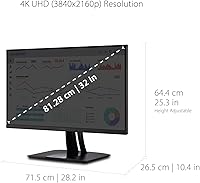
  • Resolution: Native resolution is 3840x2160 (4K UHD), delivering sharp detail and fine text clarity at typical desktop viewing distances.
  • Panel Type: An IPS panel is used, offering wide viewing angles and consistent color reproduction across the entire screen surface.
  • Refresh Rate: The display runs at a maximum of 60Hz, suited to professional creative workflows but not designed for high-frame-rate gaming.
  • Color Coverage: Covers 100% sRGB, EBU, and SMPTE C color spaces, making it compatible with a broad range of design, photo, and video production standards.
  • Color Accuracy: Factory calibrated to Delta E less than 2, meaning color deviation from the reference standard is imperceptible to the human eye under normal conditions.
  • Pantone Validated: Certified by Pantone to accurately reproduce Pantone Matching System colors, which is particularly relevant for designers working with print or brand color standards.
  • HDR Support: Supports HDR10 content, though peak brightness is typical of a professional reference monitor rather than a consumer HDR display.
  • USB-C Power: The USB-C port delivers up to 60W of power delivery, sufficient for most ultrabooks and mid-range laptops but may not fully charge high-performance machines under load.
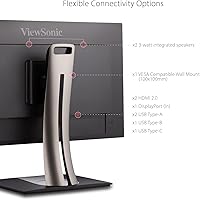
  • Connectivity: Input options include USB-C, HDMI, DisplayPort, and USB, providing compatibility with a wide range of desktop and laptop systems.
  • Ergonomics: The included stand supports tilt, swivel, pivot, and height adjustment, allowing the display to be configured for individual comfort across extended work sessions.
  • Eye Care: Flicker-Free backlighting and a built-in Blue Light Filter are included to reduce visual fatigue during prolonged use.
  • Screen Surface: The panel uses a matte anti-glare coating, which reduces reflections from ambient light sources in typical office environments.
  • Aspect Ratio: Standard 16:9 widescreen aspect ratio, compatible with the vast majority of professional applications and content formats.
  • Adaptive Sync: Adaptive Sync technology is supported to reduce screen tearing, though this is a secondary feature given the display's primary professional focus.
  • Weight: The monitor with stand weighs 24 pounds, which is sturdy and stable on a desk but should be accounted for if frequent repositioning is needed.
  • Dimensions: Overall product dimensions are 10.4 x 25.4 x 28.2 inches (depth x width x height) with stand attached.
  • Voltage: The display supports up to 240 volts, making it compatible with power standards across most international regions.

Related Reviews

ViewSonic VP3268A-4K 32-inch 4K Monitor

79%
93%
Color Accuracy
91%
Out-of-Box Calibration
88%
Build Quality
86%
Ergonomics & Stand
89%
Connectivity
More
ViewSonic VG2756-4K 27-Inch 4K Docking Monitor

80%
91%
USB-C Docking Performance
88%
Display Clarity
74%
Connectivity & Port Selection
86%
Ergonomics & Stand Quality
71%
Color Accuracy
More
ViewSonic VX3267U-4K 32-inch 4K IPS Monitor

74%
91%
Image Sharpness
83%
USB-C Functionality
76%
Color Accuracy
54%
HDR Performance
47%
Stand & Ergonomics
More
ViewSonic VX3276-4K-MHD 32-inch 4K Monitor
76%
91%
Image Clarity & Sharpness
74%
Color Accuracy
86%
Contrast & Black Levels
61%
HDR Performance
58%
Refresh Rate & Motion Handling
More
ViewSonic XG320U 32-Inch 4K Gaming Monitor
77%
88%
Image Quality
91%
Color Accuracy
84%
Gaming Performance
58%
HDR Performance
76%
Motion Clarity
More
ViewSonic VA3209M 32-inch FHD IPS Monitor
75%
91%
Value for Money
93%
Screen Size & Real Estate
78%
Image Quality & Color Accuracy
58%
Pixel Density & Sharpness
86%
Eye Comfort & Fatigue Reduction
More
ViewSonic VX3276-MHD 32-inch 1080p IPS Monitor
73%
88%
Value for Money
76%
Display Quality
61%
Sharpness & Pixel Density
83%
Eye Comfort & Ergonomics
58%
Stand & Build Quality
More
ViewSonic VP2768a-4K 27-Inch 4K Monitor
86%
94%
Color Accuracy
88%
Ergonomics & Comfort
91%
Value for Money
89%
Build Quality
85%
Ease of Setup
More
ViewSonic VX4381-4K 43-inch 4K Monitor

66%
88%
Screen Real Estate
83%
4K Image Clarity
54%
Color Accuracy
51%
Panel Uniformity
81%
Multi-Source Connectivity
More
ViewSonic VA2756-4K-MHD 27-Inch 4K Monitor
84%
92%
Display Quality
90%
Color Accuracy
88%
Design & Build Quality
85%
Ease of Setup
89%
Connectivity Options
More

FAQ

It comes factory calibrated to Delta E less than 2, so for most professional use cases it is ready to go right out of the box. You can always run your own calibration with a colorimeter if your workflow demands the absolute tightest accuracy, but the majority of buyers report being satisfied with the default calibration without any adjustments.

Pantone Validation means the display has been independently tested and confirmed to accurately reproduce colors from the Pantone Matching System, which is the standardized color language used widely in printing, branding, and product design. If your work never touches print or physical materials, the validation is less critical — but it is still a strong indicator of overall color fidelity, which benefits photo editing, digital illustration, and video work regardless.

For the 13-inch and 14-inch MacBook Pro models, 60W is generally sufficient to maintain or slowly charge the battery during typical workloads. However, the 16-inch MacBook Pro and other high-performance laptops that normally require 96W or more may charge more slowly or gradually drain under heavy CPU and GPU load. It is worth checking your specific laptop's charging requirements before relying solely on this connection.

Technically yes, but it is not ideal for that purpose. The 60Hz refresh rate is noticeably limited compared to the 144Hz or higher displays purpose-built for gaming. Fast-paced games will feel less fluid, and competitive gaming at this refresh rate puts you at a disadvantage. Adaptive Sync is supported, which helps with tearing, but this monitor is really built around color work rather than motion performance.

Yes, the stand fully supports pivot rotation, so you can rotate the panel 90 degrees into portrait orientation. Combined with height, tilt, and swivel adjustment, it covers most ergonomic setups without needing a separate VESA arm. The 24-pound weight means the stand feels stable in all positions rather than wobbly.

It works equally well with both. The USB-C connection is particularly convenient for modern Macs and Windows laptops with Thunderbolt or USB-C ports, but the HDMI and DisplayPort inputs ensure broad compatibility with desktop PCs and older setups too. There are no driver requirements — it is plug and play on both platforms.

Matte coatings do introduce a very slight diffusion compared to glossy panels, and in side-by-side comparisons with glossy displays some people notice a minor reduction in perceived contrast. That said, for professional color work the anti-glare benefit almost always outweighs this tradeoff, and at 4K resolution the pixel density is high enough that sharpness remains excellent for practical use.

The difference is most apparent in color accuracy and certification. Budget 4K IPS panels often cover adequate sRGB percentages but lack factory calibration, independent Pantone certification, and the verified Delta E accuracy this VP3256-4K carries. For general productivity or casual creative work, a cheaper option may suffice. For professional output where colors need to be trusted and reproducible, the extra investment in the VP3256-4K removes meaningful uncertainty from the workflow.

No, the VP3256-4K does not include built-in speakers. If audio output is important to your setup, you will need external speakers or headphones connected to your computer or a separate audio interface.

The display is VESA mount compatible, which means you can attach it to any standard third-party monitor arm or wall mount that supports the appropriate VESA pattern. Removing the included stand and using an arm is a practical option for users who want more desk space or a more flexible positioning range than the stand provides.

Where to Buy