Overview

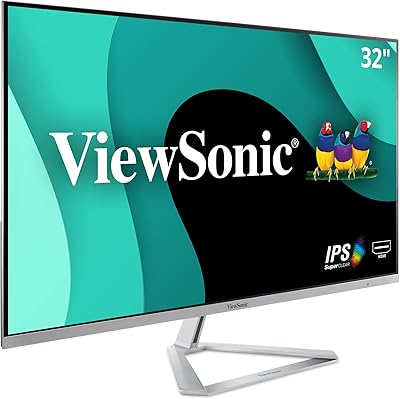
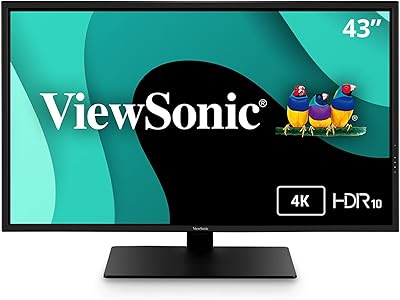
The ViewSonic VX3267U-4K 32-inch 4K IPS Monitor sits comfortably in the mid-range sweet spot — sharp enough for serious work, priced well below the pro-grade tier. Ultra-thin bezels keep the look clean, making it a natural fit for dual-monitor arrangements where thick frames would break your focus. The standout convenience is the USB-C single-cable setup: plug in your laptop and you get video, data, and 65W charging through one port. That said, this is an everyday workhorse, not a display engineered for competitive gaming or precision color grading. Set expectations accordingly and it delivers well.
Features & Benefits

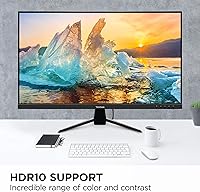
At 32 inches, 4K resolution means packing 3840x2160 pixels into a panel where individual dots are genuinely hard to pick out — text is crisp, fine photo details read clearly, and spreadsheets stay legible at comfortable scaling. The 65W USB-C port is the practical highlight: connect a MacBook or any modern laptop and the monitor handles power alongside video and data, cutting cable mess to a single run. HDR10 is present, but manage expectations — this isn't a local-dimming panel, so the HDR lift is subtle rather than dramatic. Flicker-Free and a blue light filter help during long desk sessions, and the USB-C, HDMI, DisplayPort input lineup covers most setups without adapters.

Best For

This 32-inch IPS display is a strong match for remote workers and home office users who want a large, sharp screen without the clutter of multiple cables. MacBook owners in particular benefit from USB-C charging — no separate power brick needed at the desk. Hobbyist photo editors and everyday content viewers will appreciate the 4K detail, and thin bezels keep things tidy in a side-by-side configuration. Students setting up a productivity station will find it punches above its weight. What it isn't built for: competitive gaming where a high refresh rate matters, or color-critical professional work that demands factory calibration and a wide color gamut.

User Feedback

With just over 100 ratings and a 4.1-star average, the VX3267U-4K has a small but mostly positive feedback base — enough to spot patterns, not enough to call definitive. Buyers consistently praise image sharpness out of the box and the convenience of USB-C powering their laptops without a second adapter. On the flip side, the stand is a recurring frustration: it tilts but offers no height or pivot adjustment, a real ergonomic limitation. A handful of users report inconsistent USB-C charging speeds depending on the laptop model. HDR gets a tepid response — most feel it adds little over standard mode, which honestly aligns with what entry-level HDR10 realistically delivers.

Pros

  • Genuine 4K sharpness at 32 inches makes text and fine detail noticeably crisper than 1080p or 1440p alternatives.
  • USB-C with 65W Power Delivery lets laptop users run video and charging through a single cable, cutting desk clutter significantly.
  • The IPS panel delivers consistent colors and wide viewing angles — no washed-out look when glancing from the side.
  • Ultra-thin bezels make this a natural choice for side-by-side dual-monitor setups.
  • Matte anti-glare coating handles reflections well in typical home office lighting.
  • Three input options — USB-C, HDMI, and DisplayPort — cover most devices without needing adapters.
  • Flicker-Free technology and a blue light filter make extended work sessions more comfortable for sensitive eyes.
  • Out-of-box color accuracy is clean enough for everyday use without manual calibration.
  • The overall build is solid and understated, fitting most desk aesthetics without looking cheap.

Cons

  • The included stand only tilts — no height adjustment, swivel, or pivot, which is a real ergonomic limitation for many users.
  • HDR10 support is entry-level only; without local dimming, the practical difference over standard mode is minimal.
  • USB-C charging speed can vary depending on the connected laptop, with some users reporting inconsistent power delivery.
  • No factory calibration report means color accuracy is acceptable but not verifiable for professional creative work.
  • The refresh rate is standard 60Hz, making this a poor match for anyone who games competitively or values smooth motion.
  • Color gamut coverage stays within sRGB territory — wide-gamut workflows in DCI-P3 or Adobe RGB are not well served.
  • At 17.2 pounds, the monitor is on the heavier side if you plan to reposition it frequently.
  • The built-in view mode presets are hit or miss in practice — most users end up sticking with one setting and ignoring the rest.
  • With just over 100 ratings, long-term reliability data is still limited compared to more established models in this category.

Ratings

Our AI rating system analyzed verified global buyer reviews for the ViewSonic VX3267U-4K 32-inch 4K IPS Monitor, actively filtering out incentivized, bot-generated, and spam submissions to surface what real users genuinely experienced. Scores reflect a balanced synthesis of praise and recurring frustrations — nothing is glossed over. Where this 32-inch IPS display earns strong marks, the data backs it; where it falls short, those gaps are scored and explained honestly.

Image Sharpness
91%
At 32 inches, 4K pixel density makes a real, everyday difference — spreadsheet text stays crisp at comfortable scaling, and detailed photos show fine grain and edge definition that 1440p panels simply cannot match. Buyers coming from 1080p displays consistently describe the clarity upgrade as immediately noticeable.
A small number of users noted slight softness at extreme screen edges, which can occur on larger IPS panels. This is rarely a dealbreaker for desk use but was flagged by a few detail-oriented buyers working close to the screen.
USB-C Functionality
83%
For laptop users — especially MacBook owners — the single-cable desk setup is the most praised practical feature: video, data, and 65W charging through one port genuinely reduces cable clutter in a meaningful way. Users who switched from multi-cable setups describe the difference as immediately cleaner and less frustrating.
Charging speed inconsistency is the most common complaint in this category — some laptops receive noticeably less than the rated 65W depending on the device and USB-C controller involved. A handful of users also reported needing to reseat the cable after waking from sleep to restore a stable connection.
Color Accuracy
76%
24%
Out-of-box color reproduction is described by most users as clean and natural for everyday tasks — web browsing, document work, and casual photo viewing all look accurate without manual calibration. The IPS panel maintains color consistency across wide viewing angles, which matters in collaborative desk setups.
The display covers a standard sRGB gamut without factory calibration data, which limits its credibility for professional color-critical workflows. Hobbyist editors working in Adobe RGB or DCI-P3 color spaces will find the coverage visibly lacking compared to wide-gamut alternatives in the same price tier.
HDR Performance
54%
46%
HDR10 content is technically supported, and compatible streaming platforms recognize the display correctly. For buyers who simply want HDR compatibility checked on a spec list, the box is ticked.
Without local dimming zones, the practical impact of HDR mode is minimal — contrast lift over standard SDR is subtle at best and nearly imperceptible in a bright room. Buyers coming from OLED TVs or high-end mini-LED monitors have expressed genuine disappointment here, and the score reflects that gap between expectation and reality.
Stand & Ergonomics
47%
53%
The stand is stable and keeps the monitor firmly in place during daily use without any wobble or creep. For users whose desk height happens to align with the fixed stand height, setup is straightforward and the tilt range covers most standard viewing positions.
Tilt-only adjustment is a persistent and well-documented complaint — no height, swivel, or pivot means buyers with specific ergonomic needs are forced to buy a monitor arm just to get comfortable positioning. This is a notable omission at this price point, and it represents the single most recurring source of frustration across the review base.
Build Quality
78%
22%
The chassis feels solid and the matte black finish looks clean on most desk setups without attracting fingerprints the way glossy panels do. Ultra-thin bezels are consistently described as well-constructed rather than flimsy, which is not always the case at this price tier.
A few buyers noted that the plastic on the rear housing feels less premium than the front panel presentation suggests, and the OSD control buttons are positioned awkwardly at the back edge of the monitor. Neither issue affects functionality, but they contribute to a slightly budget feel on closer inspection.
Glare & Reflections
82%
18%
The matte anti-glare coating handles typical home office lighting conditions well — overhead lights and indirect window light are diffused rather than reflected back as distracting hotspots. Most users working in mixed-lighting environments report no need for curtains or repositioning.
In very bright, sun-facing rooms the coating reduces but does not eliminate all reflections, and the diffusion can introduce a slight haze over dark content in high-contrast scenes. This is a trade-off inherent to matte coatings rather than a specific failing of this panel.
Eye Comfort
79%
21%
Flicker-Free backlighting is genuinely useful for users sensitive to PWM flicker, and many buyers who specifically sought this feature reported reduced eye fatigue after long work sessions compared to their previous displays. The blue light filter adds an optional warm shift that some find helpful for evening use.
The blue light filter shifts white tones noticeably warmer, which makes it impractical during any color-sensitive task. Users who hoped for a more neutral low-blue-light mode without the color shift found the trade-off frustrating, as toggling between modes via the OSD adds friction.
Gaming Performance
43%
57%
The 4K resolution makes visually detailed single-player games look genuinely impressive, and the IPS panel avoids the washed-out off-angle look that TN panels suffer from when gaming from a relaxed position on a couch or wide desk chair.
A 60Hz refresh rate and the absence of adaptive sync make this a poor choice for competitive or fast-paced gaming — motion blur is visible in high-speed scenes and the input lag experience is noticeable alongside high-refresh alternatives. Users who bought this expecting a capable gaming monitor report clear disappointment.
Connectivity Range
84%
Three input types — USB-C, HDMI, and DisplayPort — cover the vast majority of real-world device combinations without requiring adapters, which buyers setting up mixed-device workstations (a laptop plus a desktop, for example) specifically appreciated. Switching between inputs via the OSD is simple enough for daily use.
There are no downstream USB-A hub ports on the monitor, which limits its utility as a desk hub beyond the single USB-C connection. Users who expected to consolidate peripherals through the display found themselves still needing a separate USB hub.
Setup Experience
81%
19%
Assembly is quick — the stand clicks into the monitor base without tools and the cable routing is clean. Most buyers describe being display-ready within ten minutes of opening the box, with no driver installation required for basic operation.
The OSD button placement on the rear edge is unintuitive to navigate without a reference, and a few users reported mild confusion matching USB-C charging behavior to their specific laptop model during first setup. The included documentation is minimal and does not address USB-C compatibility specifics.
Multi-Monitor Suitability
86%
Ultra-thin bezels on three sides make side-by-side pairings look cohesive, and users who built dual-monitor setups with two of these units consistently praised how narrow the center gap appears in practice. The 32-inch size gives each display enough real estate to stand independently without feeling cramped.
The fixed-height stand makes precise vertical alignment between two monitors fiddly — without height adjustment, users often end up with a slight mismatch between the two panels unless both desks and surfaces are perfectly level. A monitor arm resolves this but adds to the total setup cost.
Value for Money
77%
23%
For buyers who prioritize 4K sharpness and USB-C convenience in a large 32-inch format, the VX3267U-4K delivers a competitive combination of features at a mid-range price that would cost meaningfully more from premium display brands. Home office users in particular feel they get practical daily value from the one-cable workflow.
The stand limitation and underwhelming HDR implementation make the value calculation less clear-cut than the spec list implies — buyers who end up purchasing a monitor arm on top of the display price start to feel the value gap narrow against better-equipped competitors. It rewards the right buyer and mildly disappoints the wrong one.

Suitable for:

The ViewSonic VX3267U-4K 32-inch 4K IPS Monitor is built for people who spend long hours at a desk and want a large, sharp display without paying a premium price for features they will never use. Remote workers and home office professionals are the obvious fit — the 32-inch 4K panel gives you real estate to keep multiple windows open without squinting at small text, and the matte surface handles ambient light well in typical office environments. MacBook and modern laptop users get the most practical value here: a single USB-C cable docks your machine, charges it at 65W, and drives a 4K display all at once, which genuinely simplifies the daily setup and teardown. Hobbyist photographers and content consumers who want noticeably sharper detail than a 1080p or 1440p screen will also find this a meaningful upgrade. Students building out a dual-monitor workstation will appreciate the ultra-thin bezels keeping the pairing visually clean.

Not suitable for:

Buyers with specific performance or calibration demands will likely find this 32-inch IPS display frustrating in ways that matter. Competitive gamers who rely on high refresh rates — 144Hz or above — should look elsewhere; this panel is not built for that use case, and the response time will feel sluggish in fast-paced titles. Professional photo editors, retouchers, or graphic designers who need factory-calibrated color accuracy and a wide color gamut will outgrow what the VX3267U-4K offers relatively quickly, as it does not ship with a calibration report and covers a standard sRGB range rather than DCI-P3. Anyone expecting a meaningful HDR experience will be disappointed — HDR10 support here is nominal, and without local dimming, the contrast lift compared to SDR mode is barely noticeable. Finally, buyers who prioritize ergonomics should know the included stand only tilts; there is no height adjustment, swivel, or pivot, which forces some users to improvise with monitor arms or risers.

Specifications

  • Panel Type: Uses an IPS (In-Plane Switching) panel, which provides wide viewing angles and consistent color reproduction compared to TN alternatives.
  • Screen Size: The active display area measures 32 inches diagonally, offering generous screen real estate for multitasking and detailed work.
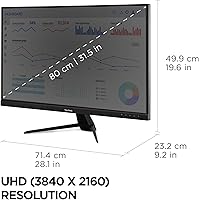
  • Resolution: Native resolution is 3840x2160 pixels (4K UHD), delivering a pixel density that keeps text sharp and fine image detail clearly defined at typical desktop distances.
  • Aspect Ratio: Standard 16:9 widescreen aspect ratio, compatible with virtually all video content, operating systems, and productivity layouts.
  • HDR Support: Supports HDR10 content, providing basic high dynamic range compatibility; this is an entry-level implementation without local dimming zones.
  • USB-C Power: The USB-C port delivers up to 65W of Power Delivery, sufficient to charge most modern laptops while simultaneously transmitting video and data.
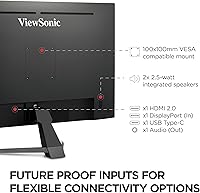
  • Inputs: Connectivity includes one USB-C, one HDMI, and one DisplayPort input, covering a wide range of laptops, desktops, and workstations without requiring adapters.
  • Surface: The screen uses a matte anti-glare coating that diffuses reflections, making it more practical in rooms with overhead lighting or nearby windows.
  • Eye Care: Incorporates Flicker-Free backlight technology and a software Blue Light Filter to reduce potential eye fatigue during extended viewing sessions.
  • Bezel Design: Ultra-thin bezels on three sides minimize the visual gap between panels, making this a practical choice for side-by-side multi-monitor configurations.
  • View Presets: Includes five preset display modes — Game, Movie, Web, Text, and Mono — accessible via the OSD menu for quick scene-based adjustments.
  • Dimensions: The assembled monitor with stand measures approximately 28.1 x 19.6 x 9.2 inches (W x H x D), fitting standard deep desks without issue.
  • Weight: Complete unit with stand weighs 17.2 pounds; not unusually heavy for its size but worth noting if frequent repositioning is needed.
  • Stand Adjustment: The included stand supports tilt adjustment only; height, swivel, and pivot adjustments are not available without a third-party monitor arm.
  • Color: Available in matte black finish, which blends cleanly into most desk setups and does not show fingerprints as readily as gloss alternatives.
  • VESA Compatibility: The VX3267U-4K supports VESA mounting, allowing users to replace the included stand with a compatible monitor arm for improved ergonomic positioning.
  • Refresh Rate: Operates at a standard 60Hz refresh rate, appropriate for productivity, media consumption, and casual creative work, but not suited for high-frame-rate gaming.
  • Manufacturer: Designed and produced by ViewSonic, a display brand with over three decades of experience in commercial and consumer monitor markets.

Related Reviews

ViewSonic VP3268A-4K 32-inch 4K UHD IPS Monitor
86%
94%
Color Accuracy
88%
Ergonomics/Comfort
91%
Build Quality
83%
HDR Performance
85%
Connectivity Options
More
ViewSonic VG2756-4K 27-inch 4K IPS Monitor
86%
92%
Display Quality
89%
Ergonomics
85%
Connectivity Options
88%
Build Quality
90%
Ease of Setup
More
ViewSonic VP3256-4K 32-Inch 4K UHD Monitor
88%
94%
Display Quality
92%
Color Accuracy
88%
Ergonomics & Comfort
86%
Build Quality
90%
Ease of Setup
More
ViewSonic VX3276-4K-MHD 32-inch 4K Monitor
76%
91%
Image Clarity & Sharpness
74%
Color Accuracy
86%
Contrast & Black Levels
61%
HDR Performance
58%
Refresh Rate & Motion Handling
More
ViewSonic VA3209M 32-inch FHD IPS Monitor
75%
91%
Value for Money
93%
Screen Size & Real Estate
78%
Image Quality & Color Accuracy
58%
Pixel Density & Sharpness
86%
Eye Comfort & Fatigue Reduction
More
ViewSonic XG320U 32-Inch 4K UHD Gaming Monitor
87%
93%
Display Quality
91%
Gaming Performance
95%
Color Accuracy
88%
Build Quality
89%
Ergonomics
More
ViewSonic VX3276-MHD 32-inch 1080p IPS Monitor
73%
88%
Value for Money
76%
Display Quality
61%
Sharpness & Pixel Density
83%
Eye Comfort & Ergonomics
58%
Stand & Build Quality
More
ViewSonic VP2768a-4K 27-Inch 4K Monitor
86%
94%
Color Accuracy
88%
Ergonomics & Comfort
91%
Value for Money
89%
Build Quality
85%
Ease of Setup
More
ViewSonic VA2756-4K-MHD 27-Inch 4K Monitor
84%
92%
Display Quality
90%
Color Accuracy
88%
Design & Build Quality
85%
Ease of Setup
89%
Connectivity Options
More
ViewSonic VX4381-4K 43-inch 4K Monitor

66%
88%
Screen Real Estate
83%
4K Image Clarity
54%
Color Accuracy
51%
Panel Uniformity
81%
Multi-Source Connectivity
More

FAQ

Yes, the USB-C port on this 32-inch IPS display delivers up to 65W of power, which is enough to charge most MacBook Pro models during normal use. You plug in one cable and get your display, data connection, and charging all at once. Just confirm your laptop supports USB-C Power Delivery — most modern MacBooks and Windows ultrabooks do.

Honestly, the difference is subtle. HDR10 is supported, but this panel does not have local dimming zones, which is what makes HDR really pop on premium displays. If you're coming from an OLED TV or a high-end mini-LED monitor, you'll find the HDR mode here underwhelming. For most everyday content, sticking with standard SDR mode is perfectly fine.

Unfortunately, the included stand only tilts — there's no height, swivel, or pivot adjustment built in. For many buyers that's workable, but if ergonomics matter to you, a VESA-compatible monitor arm is worth the extra investment. The VX3267U-4K supports VESA mounting, so swapping out the stand is straightforward.

It works well in that role. The ultra-thin bezels keep the visual seam between two panels minimal, which makes side-by-side arrangements feel more cohesive. The 32-inch size at 4K also means each panel gives you substantial usable space, so you're not just doubling up on small screens.

The panel runs at 60Hz, which is standard for productivity and media use but not what you want for competitive gaming. If you play fast-paced titles where 144Hz or higher makes a real difference, this is the wrong display for that purpose. For casual single-player games or slower-paced genres, 60Hz at 4K still looks great.

The matte anti-glare coating does a solid job diffusing reflections in typical office environments. It won't eliminate every reflection in a bright sun-facing room, but it handles overhead fluorescent lighting and indirect window light much better than a glossy panel would.

For hobbyist photo editing, it performs well — 4K resolution reveals fine detail, and out-of-the-box color is reasonably accurate for casual work. If you're doing professional retouching that requires verified color accuracy, wide-gamut coverage like DCI-P3, or a factory calibration report, this monitor doesn't offer those. It covers sRGB territory, which is fine for most web and general-purpose editing.

Most likely not. The monitor includes HDMI and DisplayPort inputs alongside USB-C, so the majority of desktop GPUs from the past several years will connect directly. Only very old machines relying exclusively on VGA or DVI would need an adapter, and those adapters are widely available if needed.

It helps for some people, but results vary. The filter reduces blue light output, which some users find makes long sessions more comfortable — especially in the evening. It does shift colors warmer, so if accurate color matters for your work, you'll want to toggle it off during that time. Flicker-Free backlighting is arguably more universally beneficial for reducing fatigue.

The VX3267U-4K holds a 4.1-star average, which is a reasonable indicator of general satisfaction, though the pool of around 111 ratings is relatively small compared to more established models. The feedback skews positive on image quality and USB-C convenience, with the main complaints centered on stand limitations and USB-C charging inconsistency with certain laptops. It's not a long-tenured product, so long-term reliability data is still limited.

Where to Buy