Overview

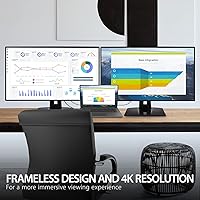
The ViewSonic VP3268A-4K 32-inch 4K Monitor is built squarely for creative professionals who cannot afford to guess at color. Unlike budget or prosumer displays that ship with acceptable-but-unverified color reproduction, this ViewSonic professional monitor arrives factory hardware-calibrated with a printed calibration report included in the box — a meaningful distinction at this price tier. The 32-inch IPS panel achieves Delta E

Features & Benefits

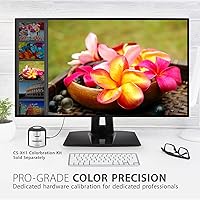
The VP3268A-4K ships with factory hardware calibration and a 14-bit 3D LUT that translates into real confidence on day one — you do not need to run your own calibration software before trusting what you see. It covers 100% sRGB, Rec. 709, EBU, SMPTE-C, and DICOM-SIM, so switching between photo retouching, broadcast video work, or medical imaging does not require a separate display. The 90W USB-C connection handles both video and laptop charging over a single cable, and the built-in RJ45 Ethernet port means you skip the hub entirely. Flicker-Free technology and a Blue Light Filter make multi-hour editing sessions noticeably easier on the eyes.

Best For

This color-accurate display is a natural fit for graphic designers and photographers who need to know that the green they see on screen will appear the same in print or on a client's calibrated device. Video editors working in Rec. 709 or SMPTE-C color spaces will appreciate not having to second-guess their grade. Medical imaging professionals get DICOM-SIM support without paying for a specialty clinical monitor. Creative professionals running a laptop — Mac or PC — can carry a single USB-C cable for power and a full 4K signal. One honest caveat: if gaming is any part of your routine, the 60Hz refresh rate will feel limiting.

User Feedback

Owners consistently praise stand stability and build quality — the ergonomic range draws specific compliments from people who split time between sitting and standing desks. Color accuracy out of the box earns strong marks, though a handful of users note that a personal calibration pass pushes results even further. USB-C compatibility is broadly positive across Mac and Windows laptops. The OSD button layout, however, is a recurring friction point — navigating settings takes real adjustment before it feels natural. The 60Hz panel draws occasional pushback from users coming from higher-refresh displays. Long-term reliability feedback skews positive, with few reports of panel degradation after extended daily use.

Pros

  • Factory hardware calibration with an included calibration report means accurate color from the moment you plug it in.
  • Pantone validation gives designers a verifiable guarantee that on-screen colors align with physical Pantone swatches.
  • Delta E<2 accuracy makes print-to-screen color matching reliable enough to reduce client revision rounds.
  • 90W USB-C charging and video over a single cable genuinely cleans up a busy desk.
  • Supports five distinct color spaces, making it practical across photography, video, and medical imaging workflows.
  • Built-in RJ45 Ethernet removes the need for a separate hub or adapter for wired network access.
  • The ergonomic stand offers tilt, swivel, pivot, and height adjustment, covering almost every working position.
  • Flicker-Free technology and a Blue Light Filter make all-day editing sessions less fatiguing on the eyes.
  • Build quality and stand sturdiness draw consistent praise from long-term users.
  • Matte anti-glare coating performs well in mixed or bright ambient lighting common in studio environments.

Cons

  • The 60Hz refresh rate feels sluggish to anyone transitioning from a 120Hz or higher display.
  • OSD button placement and menu navigation have a noticeable learning curve that takes time to get comfortable with.
  • At 23.5 pounds, repositioning the monitor is awkward and often requires assistance.
  • HDR10 support is present but does not deliver the vivid, high-brightness HDR experience enthusiasts may expect.
  • USB-C compatibility, while broadly positive, has occasional hiccups with certain third-party laptops and cables.
  • The premium price is difficult to justify for users who do not actively work within professional color spaces.
  • No built-in speakers, which adds another peripheral to manage for users who want audio at their workstation.
  • At 32 inches and 4K resolution, scaling behavior on Windows can require manual adjustment to feel right.

Ratings

The scores below for the ViewSonic VP3268A-4K 32-inch 4K Monitor were generated by AI after analyzing verified buyer reviews from multiple global markets, with spam, bot-submitted, and incentivized feedback actively filtered out. Each category reflects the full range of real user sentiment — not just the highlights — so both the strengths and the friction points are represented honestly. Buyers consistently land in predictable camps with this display, and those patterns are clearly reflected in the scores.
Color Accuracy
93%
Color accuracy is the single most praised aspect of this display across nearly every verified review. Photographers and designers consistently report that colors match their print output and client-approved references with minimal deviation, validating the Delta E
A small number of users found minor unit-to-unit variation in specific hue ranges, particularly in green-to-yellow transitions. While the deviation is within the stated Delta E
Out-of-Box Calibration
91%
The included printed calibration report gives professionals a concrete baseline to work from the moment the monitor is set up, which is a genuinely rare inclusion at any price point. Most users report no need for immediate recalibration, and those who tested their unit against a colorimeter found the results closely matched the report. This is especially valuable for freelancers who do not own calibration hardware.
A subset of technically demanding users noted that the provided calibration report covers the factory state but does not account for the monitor's output after warm-up time. Display panels can drift slightly as they reach operating temperature, meaning the calibration at cold boot may differ fractionally from the stable working state.
Build Quality
88%
The physical construction of this color-accurate display earns consistent praise, with reviewers specifically calling out the solidity of the chassis and the lack of flex or creak when adjusting the stand. It feels appropriately substantial for a professional workstation monitor, and the matte finish on the housing resists fingerprints and scuffs reasonably well over extended daily use.
At 23.5 pounds, the weight that contributes to the solid feel also makes repositioning the monitor a two-person task in practice. A few users noted that the plastic used on the rear panel, while sturdy, looks less premium than the front-facing materials suggest at first glance.
Ergonomics & Stand
86%
The stand's full range of tilt, swivel, pivot, and height adjustment earns strong marks from users who alternate between sitting and standing desks throughout the day. Stand stability is a recurring highlight — it holds position after adjustment without any noticeable drift, which is important for a 32-inch panel that moves a lot of weight when repositioned.
The pivot function works well mechanically but results in a very tall portrait-mode display that not all ceiling heights or desk configurations can accommodate comfortably. A minority of users also found the height adjustment range slightly narrow for very tall standing desk setups.
Connectivity
89%
The port selection on the VP3268A-4K is genuinely comprehensive for a professional monitor. Having USB-C with 90W Power Delivery, built-in RJ45 Ethernet, HDMI, DisplayPort, and multiple USB-A ports in a single display eliminates the need for a separate dock or hub in most creative workstation setups. Users transitioning from a cluttered multi-adapter desk setup consistently mention this as a practical relief.
USB-C compatibility is broadly positive but not universal — a handful of users reported handshake issues with specific third-party cables or less common laptop models, requiring troubleshooting before a stable single-cable connection was achieved. The USB 2.0 ports, while useful for peripherals, are slow by current standards for file transfer tasks.
Refresh Rate
47%
53%
For its intended professional use case — color grading, photo editing, graphic design — 60Hz is entirely adequate and matches the frame rate ceiling of most color-critical production workflows. Users who use this strictly as a color work display rarely mention refresh rate as a concern because their work does not demand faster panel response.
60Hz is the most common complaint among buyers who also game or who switched from higher-refresh monitors. The slower panel makes everyday UI interactions like scrolling and window dragging feel noticeably less fluid compared to 120Hz or higher displays, and it is a meaningful limitation for any workflow that involves fast-motion video playback or review.
OSD & Controls
58%
42%
Once users memorize the button layout and menu structure, navigating the OSD becomes manageable for routine tasks like switching color space modes between editing sessions. The range of adjustable settings available through the menu is extensive and well-suited to the monitor's professional feature set.
The physical OSD buttons on the rear of the panel are one of the most frequently cited pain points in user reviews. Locating them by touch without looking is frustrating, and the menu hierarchy takes longer than expected to learn. Several users wish ViewSonic had included a dedicated physical joystick controller, as competing monitors at this price tier sometimes offer.
Eye Comfort
84%
Flicker-Free backlighting and the hardware Blue Light Filter receive genuine appreciation from users who spend six to ten hours a day in front of this display. Designers working on deadline-driven projects report noticeably less end-of-day eye fatigue compared to previous monitors without these features, which is the practical outcome that matters most.
The Blue Light Filter modes do introduce a visible warm color shift that affects on-screen accuracy in higher filter settings. Users doing color-critical work typically keep the filter off or at its lowest setting during active editing, which limits how much eye protection benefit they actually use during their most intensive working hours.
HDR Performance
61%
39%
HDR10 support means the monitor can correctly interpret and display HDR-flagged content, which is useful for video editors who need to preview HDR master files without switching to a separate display. The IPS panel does provide improved contrast and highlight detail versus SDR playback on the same content.
Peak brightness is not in the range of monitors designed with HDR as a primary feature, so the HDR experience is functional rather than impressive. Buyers expecting the vivid highlight pop of a dedicated HDR consumer display will be disappointed — this is an SDR-first professional panel that happens to support HDR rather than the reverse.
Value for Money
72%
28%
For a professional whose daily work depends on verified color accuracy, the combination of factory calibration, Pantone validation, multi-color-space coverage, and comprehensive connectivity represents genuine value at this price tier compared to buying a basic monitor plus a separate dock plus calibration services. The all-in-one nature of the feature set is the real value argument.
For buyers outside the color-professional target audience, the premium is hard to justify against a well-reviewed prosumer IPS display that costs significantly less. The 60Hz panel and the aging USB 2.0 ports also make the price feel steep to buyers comparing this against newer releases with more modern feature sets at similar or lower price points.
USB-C Single-Cable Workflow
83%
The 90W Power Delivery over USB-C is genuinely sufficient to charge most current-generation creative laptops — including demanding MacBook Pro models — while carrying a full 4K signal. Users who have adopted a single-cable desk setup consistently describe it as one of the most practical day-to-day improvements to their workspace.
Real-world USB-C compatibility depends heavily on the laptop model and cable quality, and the experience is not perfectly consistent across all hardware combinations. A few users with Windows ultrabooks reported needing to source a better cable or adjust display settings before the connection stabilized at full 4K resolution.
Matte Anti-Glare Finish
81%
19%
The matte coating handles reflections well in studio environments with large windows or overhead lighting, which is a real practical concern for professionals working in spaces they cannot fully control. Most users prefer it over glossy panels for extended work sessions because distracting reflections do not compete with fine color decisions.
Some users with very high ambient lighting found that the matte coating adds a slight grain to the image compared to glossy panels, which can be perceptible on fine gradients or very light tonal ranges. This is a known trade-off with matte anti-glare coatings rather than a defect specific to this display.
Long-Term Reliability
79%
21%
Given that this model has been on the market since early 2021, there is a meaningful body of longer-term user feedback to draw from. The majority of owners who have used the display for two or more years report no significant panel degradation, backlight issues, or hardware failures, which speaks well to the build durability for a professional workstation fixture.
A small but non-trivial number of users have reported dead pixels or backlight inconsistencies appearing within the first year of use. ViewSonic's warranty and support process receives mixed reviews — straightforward cases are handled adequately, but users with borderline or intermittent issues describe the replacement process as slower and more bureaucratic than expected.
Multi-Color-Space Versatility
87%
The ability to switch cleanly between sRGB, Rec. 709, SMPTE-C, EBU, and DICOM-SIM from the OSD makes this display genuinely multi-disciplinary. A video editor who also handles photography work can switch color space modes per project without touching any software settings, which streamlines a workflow that would otherwise require switching between multiple displays or profiles.
Color space switching is accessed through the OSD menu, which — given the button usability issues noted elsewhere — makes rapid switching between modes during a busy editing session more cumbersome than it should be. A dedicated hardware shortcut or external controller would meaningfully improve this otherwise strong feature.

Suitable for:

The ViewSonic VP3268A-4K 32-inch 4K Monitor is purpose-built for professionals whose work lives or dies by color accuracy — graphic designers, brand identity specialists, and photographers who regularly need what they see on screen to match what comes off a printer or appears on a client's calibrated device. The Pantone validation and Delta E<2 accuracy are not marketing checkboxes for this audience; they are practical assurances that reduce costly revision cycles. Video editors working in broadcast color spaces like Rec. 709 or SMPTE-C will find the multi-color-space support genuinely useful rather than redundant. Creative professionals running a single laptop — whether Mac or Windows — benefit from the 90W USB-C connection that handles both power and a full 4K signal without a dock. Medical imaging professionals or radiologists who need DICOM-SIM support in a non-clinical setting also get real value here. If your home studio or small agency workspace is already cluttered with adapters and hubs, the built-in RJ45 Ethernet port and USB expansion help consolidate your setup meaningfully.

Not suitable for:

The VP3268A-4K is a focused professional tool, and buyers outside that target will likely feel the trade-offs more than the benefits. The 60Hz refresh rate is the most immediate limitation — anyone who games, edits fast-motion video, or has grown accustomed to a 120Hz or higher display will notice the difference in everyday cursor and window movement, not just in games. At this price point, buyers who primarily need a large display for general productivity, media consumption, or casual creative work are paying a premium for color science infrastructure they will rarely use. The OSD navigation has a learning curve that casual users may find frustrating compared to monitors with more intuitive menu systems. This color-accurate display is also relatively heavy at 23.5 pounds, which makes repositioning or desk reconfiguration more of a two-person job than expected. Finally, buyers hoping for HDR that genuinely pops should know that HDR10 support here is functional but not the high-brightness, wide-gamut HDR experience found on dedicated HDR-focused panels.

Specifications

  • Panel Type: The display uses an IPS (In-Plane Switching) panel, which delivers consistent color and wide viewing angles compared to TN or VA alternatives.
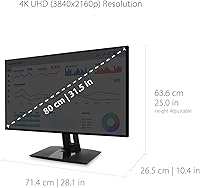
  • Resolution: Native resolution is 3840x2160 (4K UHD), providing sharp detail across the full 31.5″ viewable area.
  • Screen Size: The physical screen measures 32 inches diagonally, with a 31.5″ viewable area after accounting for bezels.
  • Refresh Rate: The panel runs at a fixed 60Hz refresh rate, which is standard for professional color-work monitors but below gaming-oriented displays.
  • Color Accuracy: Factory calibration achieves a Delta E of less than 2, meaning color deviations are imperceptible to the human eye under normal viewing conditions.
  • Color Spaces: Supported color spaces include 100% sRGB, Rec. 709, EBU, SMPTE-C, and DICOM-SIM, covering photo, broadcast video, and medical imaging workflows.
  • Calibration: Each unit is hardware calibrated using a 14-bit 3D LUT before shipment, with a printed calibration report included in the box.
  • Pantone Validated: The monitor carries official Pantone validation, confirming it can accurately reproduce colors from the Pantone Matching System.
  • HDR Support: HDR10 content is supported, though peak brightness is suited to SDR-first professional use rather than consumer HDR entertainment.
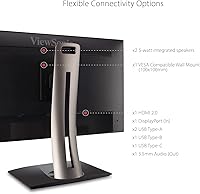
  • Connectivity: Input and output ports include USB-C (90W Power Delivery), HDMI, DisplayPort, four USB-A 2.0 ports, one USB 3.0 port, and a built-in RJ45 Ethernet jack.
  • USB-C Charging: The USB-C port delivers up to 90W of Power Delivery, enough to charge most modern laptops while simultaneously carrying a 4K video signal.
  • Ergonomics: The stand supports tilt, swivel, pivot (portrait rotation), and height adjustment, accommodating a wide range of desk setups and working postures.
  • Eye Care: Flicker-Free backlighting and a hardware Blue Light Filter are built in to reduce eye strain during prolonged viewing sessions.
  • Surface Finish: The screen uses a matte anti-glare coating that controls reflections in bright or mixed-lighting studio environments without significantly affecting image clarity.
  • Aspect Ratio: The panel uses a standard 16:9 widescreen aspect ratio, compatible with the vast majority of professional and consumer content formats.
  • Weight: The monitor with stand weighs 23.5 pounds, which is on the heavier side and should be factored in when planning desk load or wall-mount compatibility.
  • Dimensions: With the stand attached, the unit measures approximately 10.4 x 28.1 x 25 inches (D x W x H), requiring meaningful desk depth clearance.
  • Voltage: The monitor is rated for 240V AC input, and ships with region-appropriate power hardware for standard outlet compatibility.
  • Release Date: The VP3268A-4K was first made available in January 2021 and represents ViewSonic's professional VP-series line for color-critical workflows.
  • Bezel Design: The monitor features a thin-bezel design on three sides, reducing visual interruption in multi-monitor configurations.

Related Reviews

ViewSonic VP3256-4K 32-inch 4K IPS Monitor

80%
93%
Color Accuracy
89%
Panel Clarity & Sharpness
88%
Build Quality & Stand
79%
USB-C Connectivity
86%
Ergonomics & Comfort
More
ViewSonic VX3267U-4K 32-inch 4K IPS Monitor

74%
91%
Image Sharpness
83%
USB-C Functionality
76%
Color Accuracy
54%
HDR Performance
47%
Stand & Ergonomics
More
ViewSonic VX3276-4K-MHD 32-inch 4K Monitor
76%
91%
Image Clarity & Sharpness
74%
Color Accuracy
86%
Contrast & Black Levels
61%
HDR Performance
58%
Refresh Rate & Motion Handling
More
ViewSonic XG320U 32-Inch 4K Gaming Monitor

77%
88%
Image Quality
91%
Color Accuracy
84%
Gaming Performance
58%
HDR Performance
76%
Motion Clarity
More
ViewSonic VP2768a-4K 27-Inch 4K Monitor

86%
94%
Color Accuracy
88%
Ergonomics & Comfort
91%
Value for Money
89%
Build Quality
85%
Ease of Setup
More
ViewSonic VA2756-4K-MHD 27-Inch 4K Monitor
84%
92%
Display Quality
90%
Color Accuracy
88%
Design & Build Quality
85%
Ease of Setup
89%
Connectivity Options
More
ViewSonic VG2756-4K 27-Inch 4K Docking Monitor

80%
91%
USB-C Docking Performance
88%
Display Clarity
74%
Connectivity & Port Selection
86%
Ergonomics & Stand Quality
71%
Color Accuracy
More
ViewSonic VX4381-4K 43-inch 4K Monitor

66%
88%
Screen Real Estate
83%
4K Image Clarity
54%
Color Accuracy
51%
Panel Uniformity
81%
Multi-Source Connectivity
More
ViewSonic VX2776-4K-MHDU 27-inch 4K IPS Monitor

75%
91%
Image Clarity
93%
USB-C Convenience
78%
Color Accuracy
54%
HDR Performance
46%
Stand & Ergonomics
More
ViewSonic VX1655-4K-OLED 15.6-inch Portable OLED Monitor
77%
93%
Display Quality
91%
Portability
84%
USB-C Connectivity
88%
Build Quality
67%
Stand Stability
More

FAQ

It ships factory hardware-calibrated with a 14-bit 3D LUT, and ViewSonic includes a printed calibration report in the box so you can verify the numbers yourself. Most users find it accurate enough to start working on day one without running their own calibration. That said, a personal calibration pass with a hardware colorimeter will always get you the last mile of precision if your workflow demands it.

Yes, provided your laptop supports video output over USB-C or Thunderbolt. The VP3268A-4K delivers up to 90W over that connection, which covers most modern MacBook Pro and MacBook Air models for both charging and a full 4K signal simultaneously. A small number of users have reported needing to try a different cable if they experience handshake issues, so use a high-quality USB-C cable rated for video and high power delivery.

If gaming is a meaningful part of your use case, 60Hz will feel noticeably slow compared to 120Hz or 165Hz gaming monitors. This display is engineered for color accuracy in professional creative work, not for fast-refresh gaming. It works fine for casual or turn-based gaming, but competitive or fast-motion gaming is not where it shines.

It means an independent process has confirmed that the monitor can reproduce colors from the Pantone Matching System accurately. For a designer working on branding projects where Pantone color references are specified by a client, this provides a reliable visual reference on screen. It does not replace a physical Pantone swatch book, but it does meaningfully close the gap between screen and print.

Yes, the stand supports a full 90-degree pivot for portrait orientation. At 32 inches in portrait, it becomes quite tall, so make sure your desk and ceiling clearance can accommodate it before flipping it. The IPS panel maintains color and contrast well in portrait, unlike VA panels that can shift at steeper viewing angles.

HDR10 is supported, so HDR-flagged content will be processed and displayed. However, this is a professional SDR-first display, and its peak brightness is not in the same range as monitors built specifically for HDR entertainment. You will see some improvement over SDR with HDR content, but do not expect the vivid contrast pop of a dedicated HDR consumer display.

User feedback is generally positive on the RJ45 port — it provides a stable wired network connection and works across Mac and Windows without special drivers in most cases. It is genuinely useful for laptop users who want a clean single-cable setup without a separate hub, though data transfer speeds are in line with standard Gigabit Ethernet rather than anything exotic.

Honestly, it takes some getting used to. The physical buttons on the back of the panel are a common complaint — they are not the most intuitive to locate or press without looking. Once you learn the layout and menu structure, it becomes manageable, but expect a short adjustment period before adjusting settings feels natural. ViewSonic has not changed this input method significantly across its VP-series line.

DICOM-SIM is a display mode that optimizes grayscale rendering to match the DICOM standard used in medical imaging, which is helpful for radiologists or imaging technicians reviewing scans in a non-clinical setting like a home office. For most photographers and designers, it is not a mode they will ever activate, but its presence makes this display a realistic option for medical professionals who want a high-quality generalist monitor that can also handle imaging review.

The stand consistently draws praise in user reviews for being solid and well-damped. Height adjustments stay where you set them without creeping down over time, and the base does not wobble during normal desk activity like typing. For a 23.5-pound panel, the stability is a genuine strong point, especially compared to lower-cost stands that tend to drift or feel flimsy.