Overview

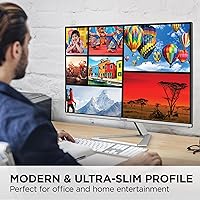
The ViewSonic VX2776-4K-MHDU 27-inch 4K IPS Monitor sits squarely in the mid-range sweet spot — sharp enough for serious work, priced well below professional-grade panels. Since its early 2023 launch, it has held a strong position among competitive monitors, which says something about its staying power. The matte screen surface is a genuinely practical call for home offices with mixed lighting, cutting glare without washing out colors. Worth flagging upfront: at 60Hz refresh rate, this is a productivity and content-consumption display, not a gaming monitor. If smooth frame rates are a priority, this is not your pick. Its single-cable USB-C setup, though, is a real convenience win for laptop users.
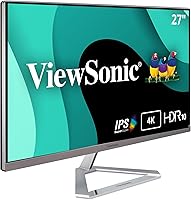
Features & Benefits

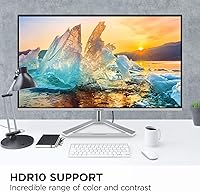
At 3840x2160, the IPS panel on this ViewSonic 4K monitor renders text with a crispness that makes working in documents or spreadsheets noticeably more comfortable than on a 1080p screen. Photos look genuinely detailed rather than just enlarged, and video content holds up well. The 65W USB-C charging is where the practical value really shows — one cable handles video, data, and power delivery for most modern laptops, including MacBooks. HDR10 is on the spec sheet, but be realistic: without local dimming, it lifts contrast above standard SDR levels rather than delivering the dramatic effect you see on high-end panels. The Flicker-Free technology and Blue Light Filter are subtle but worth having for long work sessions. Thin bezels on three sides help when pairing two units side by side.

Best For

The VX2776-4K-MHDU makes the most sense for remote workers who want to connect a laptop and be done with cable management — one USB-C connection handles everything. Mac users in particular will appreciate the plug-and-play compatibility, as it tends to work without fuss. Photographers and designers on a budget will find the IPS color rendering genuinely useful, though anyone doing professional color-critical work at a serious level may want to look at factory-calibrated panels. Students stepping up from a 1080p screen will notice the resolution jump immediately. Multi-monitor users will also value the slim bezels, which keep the visual gap between screens minimal. This is not a monitor built around gaming or fast-action content.

User Feedback

With a 4.6-star average across more than 2,200 ratings, this 27-inch USB-C display has built a solid following. The most common praise centers on image clarity and how painlessly it integrates into a laptop-based desk via a single cable. Critical feedback tends to cluster around two things: the stand offers tilt only — no height adjustment — which is a real ergonomic limitation that an aftermarket monitor arm can fix cheaply. Some users also note that peak brightness disappoints in HDR content, consistent with its entry-level HDR implementation. Long-term reliability reports are mostly positive, with few complaints about panel consistency over time. A handful of buyers mention that spending more gets you meaningfully better brightness and stand adjustability.

Pros

  • Crisp 4K IPS panel makes text, photos, and video look sharp and detailed in everyday use.
  • Single USB-C cable handles video, data, and 65W laptop charging — a genuine desk-clutter fix.
  • Plug-and-play compatibility with MacBooks and most modern laptops requires little to no configuration.
  • Matte screen surface handles glare well in bright or mixed-lighting home office environments.
  • Thin bezels on three sides make side-by-side dual-monitor arrangements look clean.
  • Flicker-Free technology and Blue Light Filter offer practical comfort during extended work sessions.
  • HDMI and DisplayPort inputs alongside USB-C cover a wide range of devices and use cases.
  • Strong long-term reliability based on user feedback, with few reports of panel degradation over time.
  • Competitive price point for a 27-inch 4K IPS panel with USB-C power delivery included.

Cons

  • Stand offers tilt adjustment only — no height, swivel, or pivot, which is a real ergonomic shortcoming.
  • 60Hz refresh rate rules out smooth gameplay; this is strictly a productivity and media display.
  • HDR10 support lacks local dimming, so real-world HDR impact is modest rather than dramatic.
  • Peak brightness is underwhelming, particularly noticeable when viewing HDR content or working in bright rooms.
  • No built-in USB hub limits desk connectivity for users with multiple peripherals.
  • Color coverage stops at standard sRGB — not suitable for wide-gamut or DCI-P3 professional workflows.
  • The included stand feels basic given the monitor's overall feature set; most users may need a separate arm.
  • No variable refresh rate support means even light gaming can show occasional screen tearing.

Ratings

The scores below reflect an AI-driven analysis of thousands of verified global purchases of the ViewSonic VX2776-4K-MHDU 27-inch 4K IPS Monitor, with spam, bot-generated, and incentivized reviews actively filtered out before scoring. Each category is rated independently, drawing on real-world usage patterns reported by buyers across home offices, creative workflows, and everyday computing. Both the genuine strengths and the recurring frustrations are weighted honestly — nothing is glossed over.

Image Clarity
91%
Users consistently describe text as noticeably sharper than anything they had used before upgrading from 1080p, with fine detail in spreadsheets, design files, and browser tabs looking crisp rather than merely adequate. Photographers working on hobbyist projects report that image detail in editing software feels meaningfully improved at native 4K.
A small subset of users note that achieving optimal sharpness requires dialing in the sharpness setting in the OSD, as the out-of-box default can look slightly over-processed on certain content types. This is a minor calibration issue rather than a panel deficiency, but it does require a few minutes of setup attention.
USB-C Convenience
93%
For laptop users — especially MacBook owners — the single-cable connection that handles video, data, and 65W charging is the feature buyers mention most enthusiastically in reviews. Desks that previously had three or four cables running to a monitor can be reduced to one, and most users report the connection is recognized immediately without driver installation.
A handful of users with older USB-C laptops or non-PD-compliant ports found that charging did not work as expected, requiring them to verify their laptop supports USB Power Delivery before assuming full compatibility. The 65W ceiling is also not enough for some high-performance laptops under heavy load, where charging slows rather than stops entirely.
Color Accuracy
78%
22%
IPS panel technology gives this ViewSonic 4K monitor a consistent color response across the screen, with no significant color shift when viewing from slightly off-center angles — a genuine advantage over cheaper TN-based alternatives at this price. Hobbyist photographers and designers report that colors look natural and balanced for editing work without any obvious tinting issues.
The panel is not factory calibrated and covers standard sRGB rather than a wide-gamut space like DCI-P3 or Adobe RGB, which limits its usefulness for professional print or video production workflows. Users doing color-critical work professionally tend to note that a calibration tool is effectively required to trust the output for client deliverables.
HDR Performance
54%
46%
HDR10-flagged content does produce a noticeable lift in contrast compared to standard SDR output, and users watching streaming video in supported apps report that darker scenes handle shadow detail reasonably well for a monitor in this price bracket.
Without local dimming, the panel cannot achieve the deep blacks or specular highlights that define a genuine HDR viewing experience, and several reviewers describe the HDR mode as only marginally better than a well-tuned SDR picture. Peak brightness also falls short of what HDR content is mastered for, which makes the feature feel more like a checkbox than a meaningful capability.
Stand & Ergonomics
46%
54%
The stand is sturdy enough that the monitor does not wobble during use, and the tilt range covers most standard sitting postures at a conventional desk height. For users whose desk and chair combination already places the screen at a comfortable eye level, the stand is adequate without any modification.
The absence of height adjustment is the single most common complaint in negative reviews, with many users noting they had to stack the monitor on books or a riser to get comfortable viewing angles during long work sessions. Swivel and pivot are also absent, which becomes a meaningful limitation for anyone who shares the monitor between portrait and landscape use or needs to reposition it frequently.
Refresh Rate & Motion
58%
42%
For its intended productivity and media consumption use case, 60Hz feels perfectly smooth — scrolling through documents, browsing the web, and watching streaming content all look natural without any perceptible choppiness. Users who primarily use this 27-inch USB-C display for office tasks report no complaints whatsoever about motion smoothness.
Anyone who plays fast-paced games even occasionally will notice the 60Hz ceiling immediately, and the lack of adaptive sync means tearing can appear in titles that push frame rates above the panel's limit. Buyers who later found themselves wanting to use the monitor for gaming consistently noted they wished they had spent more for a higher-refresh alternative.
Build Quality
77%
23%
The chassis feels solid in hand with no obvious flex or creaking, and the plastic finish is consistent and clean enough to look professional on a home office desk. Long-term reviewers report that the build holds up well over time, with no reports of cracking hinges or panel separation after extended use.
The plastic construction does feel noticeably less premium compared to monitors positioned slightly above this price range, and the stand in particular has a lower-cost feel that does not inspire confidence. Some users also note that the bezel finish attracts fingerprints and dust more visibly than expected.
Connectivity Range
83%
Having USB-C, HDMI, and DisplayPort available simultaneously means most users can connect their primary laptop via USB-C and a secondary device such as a desktop or console via HDMI without touching any cables when switching. The breadth of inputs is something buyers frequently call out as a reason they chose this monitor over competing options.
There is no built-in USB-A hub, which is a limitation buyers notice once the monitor is on their desk and they realize they still need a separate hub for peripherals. A single USB-C upstream with no downstream USB ports is a common point of frustration for users who expected a more complete docking-style experience.
Setup Experience
86%
The majority of buyers describe getting the monitor up and running as fast and frustration-free, with USB-C connections to MacBooks and modern Windows laptops recognized immediately without any driver downloads or display configuration beyond selecting the correct input. Physical assembly of the stand is similarly reported as quick and tool-free.
A smaller group of users encountered resolution or refresh rate defaulting incorrectly when connecting via HDMI, requiring a manual OSD adjustment to unlock 4K output at 60Hz. The OSD menu itself is functional but not intuitive, and navigating it to fix display settings can take longer than it should for a first-time user.
Eye Comfort
81%
19%
Users who spend six or more hours daily in front of a screen consistently mention that the Flicker-Free backlight makes a real difference over time compared to their previous displays, with fewer reports of the low-grade headaches that often accompany cheaper monitors during long sessions. The Blue Light Filter mode is appreciated in the evening without making content look unacceptably warm.
Some users note that the Blue Light Filter mode shifts white balance noticeably toward yellow, which makes color-sensitive work impractical while the mode is active — meaning it is really only useful for non-visual tasks or casual browsing. A more granular filter intensity setting would help users find a balance between comfort and color fidelity.
Brightness
62%
38%
In a typical indoor home office environment with controlled ambient light, the panel is bright enough for comfortable all-day use, and the matte coating helps maintain perceived image quality without cranking the backlight to maximum. Most users working in shaded or mixed-light rooms report the brightness range as adequate.
Buyers working near windows or in brightly lit rooms find that the peak brightness is not high enough to comfortably overcome ambient light at certain times of day, which can cause the display to look washed out even with the backlight at maximum. This limitation becomes particularly evident when viewing HDR content, where the brightness ceiling undercuts the format's intent.
Value for Money
84%
At its price point, combining a 4K IPS panel with 65W USB-C charging, HDR10, and a three-input connectivity setup is genuinely hard to beat, and most buyers indicate they feel they received more than they paid for when comparing it to competing options in the same range. The sustained sales performance since 2023 reflects real buyer satisfaction rather than a short-lived initial buzz.
Users who later upgraded to monitors priced meaningfully higher consistently noted that the step up in brightness, stand adjustability, and HDR quality was noticeable enough to make the VX2776-4K-MHDU feel like a compromise in hindsight. It is strong value within its tier, but buyers should be clear they are buying a mid-range display, not a near-premium one.
Glare Handling
79%
21%
The matte anti-glare coating is one of the more practically useful features for home office environments, where windows and overhead lighting frequently cause reflections on glossy panels. Users near windows consistently praise the coating for keeping the image readable throughout the day without repositioning the monitor.
In very low ambient light conditions, the matte coating introduces a slight graininess to the image that is noticeable on solid-color backgrounds and dark content — a trade-off inherent to anti-glare coatings rather than a defect. Users who work exclusively in dim environments sometimes wish for a glossy option, even knowing the reflection risk.
Multi-Monitor Suitability
82%
18%
The thin three-sided bezels make side-by-side arrangements look cleaner than many competitors at this size, with the visual seam between two units being narrow enough that most users quickly stop noticing it during work. Several reviewers specifically purchased a second unit after being satisfied with the first, citing bezel consistency as a factor.
The lack of a pivot function means the monitor cannot be rotated to portrait orientation, which limits its versatility for certain dual-monitor arrangements where one vertical panel is preferred for documents or code. The stand-only height adjustment limitation is also compounded in dual setups, where matching screen heights precisely requires aftermarket solutions for both units.

Suitable for:

The ViewSonic VX2776-4K-MHDU 27-inch 4K IPS Monitor is a strong fit for remote workers and home office users who want a noticeably sharper display without climbing into professional-monitor pricing territory. Laptop users — especially those on MacBooks or modern Windows ultrabooks — will get the most out of it, since a single USB-C cable handles video, data, and 65W charging simultaneously, keeping desks clean and simple. Mac users in particular tend to find setup nearly effortless, with reliable plug-and-play behavior. Photographers and designers working at a hobbyist or semi-professional level will appreciate the IPS color accuracy for editing tasks, even if the panel stops short of factory-calibrated precision. Students making the jump from a 1080p screen will feel the resolution difference right away, especially when reading text or working across multiple windows. Anyone building a dual-monitor setup will also benefit from the slim three-sided bezels, which keep the visual seam between screens minimal.

Not suitable for:

Gamers should look elsewhere — the VX2776-4K-MHDU caps out at 60Hz with no variable refresh rate support, which means fast-paced titles will feel noticeably less fluid compared to monitors built for that purpose. Buyers hoping for a meaningful HDR experience will also be disappointed: the HDR10 implementation lacks local dimming, so while contrast edges above standard SDR, it falls well short of what a proper HDR panel delivers. Anyone who spends long hours at a desk and cares about ergonomics should know upfront that the stand only tilts — there is no height adjustment — which can create neck strain over time without an aftermarket monitor arm. Professional colorists or print designers who need factory calibration and wide color gamut coverage beyond standard sRGB will want to invest in a more specialized display. If peak brightness is a priority — for instance, working in a very bright room or wanting punchier HDR highlights — this ViewSonic 4K monitor will leave those buyers wanting more.

Specifications

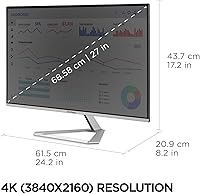
  • Screen Size: The display measures 27 inches diagonally, offering a comfortable viewing area for productivity and media use without requiring an oversized desk footprint.
  • Resolution: Native resolution is 3840x2160 pixels (4K UHD), delivering roughly four times the pixel density of a standard 1080p display at this screen size.
  • Panel Type: Uses an IPS (In-Plane Switching) panel, which provides consistent color accuracy and wide viewing angles compared to TN alternatives.
  • Refresh Rate: Runs at a fixed 60Hz refresh rate, suitable for office work, content creation, and media playback but not optimized for fast-paced gaming.
  • HDR Support: HDR10 content is supported, providing improved contrast over standard SDR output, though the panel lacks local dimming for full-range HDR performance.
  • USB-C Power: The USB-C port delivers up to 65W of power delivery, enough to charge most modern laptops while simultaneously transmitting video and data over a single cable.
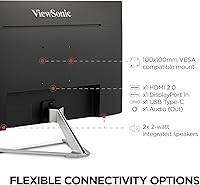
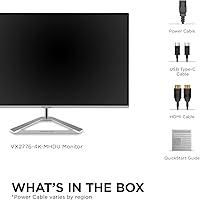
  • Connectivity: Input options include one USB-C, one HDMI, and one DisplayPort, covering compatibility with a wide range of laptops, desktops, and source devices.
  • Screen Surface: The panel features a matte anti-glare coating that reduces reflections in bright or mixed-lighting environments without introducing significant haze.
  • Aspect Ratio: Standard 16:9 widescreen aspect ratio, consistent with the majority of content formats including streaming video, productivity software, and web browsing.
  • Bezel Design: Three-sided thin bezels minimize the visual border around the panel, making this monitor well suited for side-by-side multi-monitor configurations.
  • Eye Care: Flicker-Free technology eliminates backlight flicker at all brightness levels, and a built-in Blue Light Filter mode reduces high-energy short-wavelength light output.
  • Dimensions: The monitor measures 24.2 x 17.2 x 8.2 inches (W x H x D) with the stand attached, making it a reasonably compact footprint for a 27-inch display.
  • Weight: Total unit weight with stand is 8.6 pounds, light enough for a single person to position and reposition on a desk without difficulty.
  • Stand Adjustment: The included stand supports tilt adjustment only; height, swivel, and pivot adjustments are not available without an aftermarket VESA-compatible monitor arm.
  • VESA Mounting: The monitor is VESA mount compatible, allowing users to attach it to a third-party monitor arm or wall mount for improved ergonomic positioning.
  • Color: Available in black with a consistent finish across the chassis and stand, designed to blend with standard home office and professional desk setups.
  • Brand & Series: Manufactured by ViewSonic under the VX series, a line positioned for home office and general professional use rather than gaming or color-critical production.
  • Availability: The VX2776-4K-MHDU was first made available in March 2023 and has maintained a top-300 ranking in the Computer Monitors category on Amazon since launch.

Related Reviews

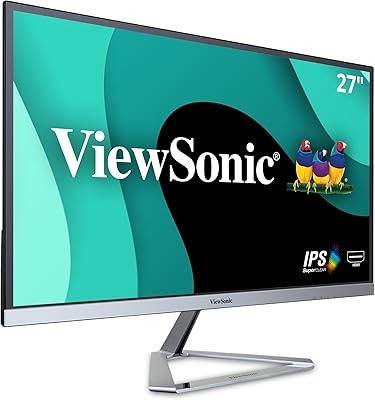
ViewSonic VG2756-4K 27-Inch 4K Docking Monitor
80%
91%
USB-C Docking Performance
88%
Display Clarity
74%
Connectivity & Port Selection
86%
Ergonomics & Stand Quality
71%
Color Accuracy
More
ViewSonic VX2776-SMHD 27-inch 1080p IPS Monitor

84%
92%
Display Quality
88%
Gaming Performance
90%
Ease of Setup
91%
Design & Aesthetics
89%
Eye Comfort
More
ViewSonic VP2768a-4K 27-Inch 4K Monitor

86%
94%
Color Accuracy
88%
Ergonomics & Comfort
91%
Value for Money
89%
Build Quality
85%
Ease of Setup
More
ViewSonic VA2756-4K-MHD 27-Inch 4K Monitor
84%
92%
Display Quality
90%
Color Accuracy
88%
Design & Build Quality
85%
Ease of Setup
89%
Connectivity Options
More
ViewSonic VP3268A-4K 32-inch 4K UHD IPS Monitor
86%
94%
Color Accuracy
88%
Ergonomics/Comfort
91%
Build Quality
83%
HDR Performance
85%
Connectivity Options
More
ViewSonic VS2747-H 27-inch IPS Monitor
75%
91%
Value for Money
86%
Image Quality
88%
Eye Comfort
79%
Refresh Rate & Smoothness
71%
Build Quality
More
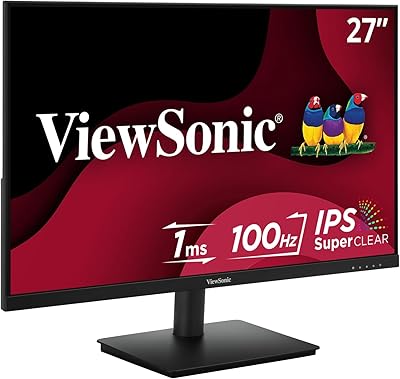
ViewSonic VX2767U-2K 27-inch 1440p IPS Monitor
74%
83%
Image Quality
88%
USB-C Connectivity
79%
Value for Money
51%
Stand & Ergonomics
82%
Eye Comfort
More
ViewSonic VA2756A-MHD 27 Inch IPS 1080p Monitor
86%
92%
Display Quality
90%
Value for Money
88%
Gaming Performance
80%
Ergonomics & Comfort
83%
Build Quality
More
ViewSonic VG2756A-2K 27-inch QHD IPS Docking Monitor
88%
90%
Display Quality
92%
Ergonomics and Comfort
88%
Connectivity and Ports
85%
Ease of Setup
89%
Build Quality
More
LG 27UP850K-W 27-inch 4K IPS Monitor
76%
88%
Image Quality
91%
Color Accuracy
93%
USB-C Connectivity & Power Delivery
86%
Ergonomics & Stand
84%
Build Quality & Design
More

FAQ

Yes, it will. The USB-C port on this ViewSonic 4K monitor delivers up to 65W of power delivery, which is enough to charge most MacBook Pro and MacBook Air models while also carrying the video signal. You end up with a true single-cable connection, which is one of the most practical things about this display for Mac laptop users.

Not really, and it is worth being direct about that. The 60Hz refresh rate and lack of variable refresh rate support mean fast-paced games will not feel as smooth as they would on a monitor built for that purpose. If gaming is a meaningful part of how you use a display, you will likely find this one limiting.

Manage expectations here. HDR10 support means HDR-flagged content will look a step above standard SDR in terms of contrast, but the panel has no local dimming, so you will not get the deep blacks or bright highlights that dedicated HDR displays produce. It is a modest improvement, not a dramatic one.

No, the included stand only tilts. There is no height, swivel, or pivot adjustment built in. For most users, this is fine at a typical desk height, but if ergonomics matter to you, picking up an inexpensive VESA monitor arm is a straightforward fix since the display is VESA-compatible.

Yes, this is actually one of the better use cases for it. The thin bezels on three sides reduce the visual gap between screens, and the single USB-C connection keeps things tidy. MacOS and Windows both recognize it quickly in extended display mode without needing extra drivers in most cases.

For hobbyist and semi-professional work, the IPS panel holds up well — colors are consistent across the screen, and the 4K resolution gives you a lot of detail to work with in editing software. That said, the panel is not factory calibrated and does not cover DCI-P3 or Adobe RGB, so professional colorists or print designers who need precise gamut accuracy should look at purpose-built monitors.

It does add a very slight haze compared to a glossy panel in ideal lighting, but the trade-off is well worth it for most office environments. Glare and reflections are kept under control even near windows, which is a more practical benefit day-to-day than a marginally punchier glossy image.

The VX2776-4K-MHDU covers a solid range of devices: USB-C for modern laptops, HDMI for desktops, streaming sticks, or consoles, and DisplayPort for desktop graphics cards. That combination means most people will not need an adapter out of the box, regardless of what they are connecting.

The honest answer is that it helps a little. Reducing blue light output can ease eye fatigue during extended use, particularly in evening hours. The Flicker-Free backlight is arguably more impactful for everyday comfort, since flicker — even at levels you cannot consciously detect — contributes to eye strain over time. Neither feature is a cure-all, but both are worth having.

Most users find it straightforward. Connecting via USB-C to a modern laptop is typically plug-and-play with no additional driver installation needed. HDMI and DisplayPort connections are equally simple. The on-screen menu is standard ViewSonic fare — functional but not particularly intuitive — though most people set it up once and rarely revisit it.

Where to Buy