ViewSonic VX1655-4K-OLED 15.6-inch Portable OLED Monitor


ViewSonic VX1655-4K-OLED 15.6-inch Portable OLED Monitor — image 1
ViewSonic VX1655-4K-OLED 15.6-inch Portable OLED Monitor — image 2
ViewSonic VX1655-4K-OLED 15.6-inch Portable OLED Monitor — image 3
ViewSonic VX1655-4K-OLED 15.6-inch Portable OLED Monitor — image 4
ViewSonic VX1655-4K-OLED 15.6-inch Portable OLED Monitor — image 5
ViewSonic VX1655-4K-OLED 15.6-inch Portable OLED Monitor — image 6
77%
23%

Overview

The ViewSonic VX1655-4K-OLED 15.6-inch Portable OLED Monitor sits at the premium end of the portable display market, and that positioning feels earned rather than assumed. Most portable monitors at this size rely on IPS panels that look perfectly adequate until you place them next to an OLED — then the difference is hard to unsee. The OLED panel delivers contrast and color depth that IPS simply cannot replicate. At 3840x2160 on a 15.6-inch screen, pixel density is genuinely impressive; text stays crisp and fine image detail holds up under scrutiny. The included magnetic cover doubles as a stand, and the matte finish keeps reflections manageable. This is a thoughtfully designed package.

Features & Benefits

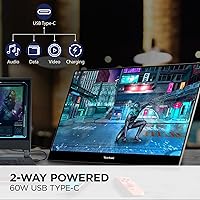
What separates this portable OLED monitor from the crowded field of budget IPS alternatives comes down to a few practical wins. The true black levels from the OLED panel make a real difference when reviewing photos, editing video thumbnails, or working with dark-themed interfaces for hours — eye fatigue noticeably decreases. The single USB-C cable handling video, data, and up to 60W of laptop charging simultaneously is the kind of convenience that sounds minor until you're digging through a bag for a third cable. A Mini HDMI port rounds out connectivity for devices that lack USB-C video output. At 1.5 lbs and just over half an inch thick, it genuinely disappears into a backpack. The 3-year warranty with US-based support is unusually generous for a portable display.

Best For

The ViewSonic OLED travel display clicks most naturally with a specific kind of buyer: someone who has already used a portable monitor and found the image quality underwhelming. Creatives — photographers, designers, video editors — who need reliable color representation away from their desks will feel the OLED difference immediately. Remote workers running dual-screen setups in hotels or rented offices get real productivity without dragging around a traditional monitor. MacBook Pro users with a single USB-C port will appreciate the clean one-cable connection. Developers who just want more vertical real estate for code will find it functional, but probably don't need OLED specifically — for them, a cheaper IPS option might make more financial sense.

User Feedback

Across the bulk of verified purchases, buyers consistently highlight two things: display vibrancy that surprises them compared to prior portable monitors, and how well the magnetic cover integrates as a practical stand rather than a flimsy afterthought. The build quality draws frequent positive comments — it doesn't feel cheap for the price point. The criticisms worth paying attention to: OLED panels carry a long-term burn-in risk with static content, and outdoor brightness is a genuine limitation in direct sunlight. A handful of users raised USB-C compatibility questions with specific host devices, worth testing before fully committing. Stand rigidity divides opinion slightly — adequate on a desk, less stable on uneven surfaces. Isolated defect reports appear but don't define the overall experience.

Pros

  • OLED panel delivers contrast and color depth that IPS portable monitors cannot match at any price.
  • 4K resolution on a 15.6-inch screen produces genuinely sharp text and fine image detail.
  • Single USB-C cable handles video, data, and up to 60W laptop charging simultaneously.
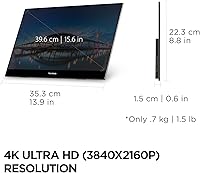
  • At 1.5 lbs and 0.6 inches thick, this 4K portable screen fits easily into any laptop bag.
  • The included magnetic cover doubles as a functional stand, removing the need for a separate accessory.
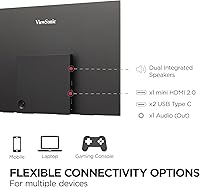
  • Mini HDMI input adds meaningful flexibility for devices lacking USB-C video output.
  • Portrait and landscape orientation support suits both coding layouts and standard widescreen use.
  • A 3-year warranty with US-based support is unusually strong coverage for a portable display.
  • Matte screen surface reduces glare in indoor office and cafe environments.
  • Built-in speakers remove the need for external audio when watching content on the road.

Cons

  • OLED burn-in is a genuine long-term risk for users who display static content or fixed UI elements for hours daily.
  • Peak brightness is limited, making the ViewSonic OLED travel display a poor choice for bright outdoor use.
  • The built-in stand can feel unstable on uneven or soft surfaces like beds and couch cushions.
  • 60Hz refresh rate is standard, not a strength — buyers expecting high-refresh performance will be disappointed.
  • USB-C compatibility is not universal; some host devices may require troubleshooting or an adapter.
  • The price is hard to justify for buyers who only need a basic secondary screen for light tasks.
  • No built-in battery means it depends entirely on host device or wall power — truly cable-free use is not possible.
  • OLED screens can be more susceptible to permanent image retention if screen savers or auto-sleep settings are neglected.
  • Mini HDMI requires a specific cable most users will not already own, adding a small extra purchase.
  • Dual speakers are present but should not be expected to replace even a modest portable Bluetooth speaker.

Ratings

The scores below were generated by AI after analyzing verified purchaser reviews worldwide for the ViewSonic VX1655-4K-OLED 15.6-inch Portable OLED Monitor, with automated filtering applied to remove incentivized, duplicate, and bot-generated submissions. Every category reflects the honest distribution of real buyer experiences — including the trade-offs and frustrations that marketing materials rarely acknowledge. Where this portable OLED monitor genuinely excels, the scores show it; where real users have run into consistent friction, that is reflected just as transparently.

Display Quality
93%
The OLED panel is the single most praised aspect across buyer reviews — users coming from IPS portable monitors consistently describe the jump in contrast and color depth as immediately noticeable. Creatives editing photos in hotel rooms report that skin tones and shadow detail look far more trustworthy than on competing displays. True blacks make dark-themed interfaces and late-night work genuinely easier on the eyes.
A small but consistent group of buyers flags that the matte coating softens fine gradients slightly compared to glossy OLED panels. A few photographers doing critical print color matching find they still need to return to a calibrated desktop monitor for final approval work.
Portability
91%
At 1.5 lbs and just over half an inch thick, buyers frequently note that this 4K portable screen genuinely disappears inside a laptop bag rather than dominating it. Remote workers and frequent flyers specifically call out how little it adds to carry-on weight, which is the real test of a portable monitor claiming to be travel-friendly.
The included magnetic cover and stand add a small amount of bulk compared to monitors sold without accessories. A handful of buyers mention that the cover feels slightly loose after repeated travel use, though this appears more common in earlier production batches.
USB-C Connectivity
84%
The single-cable USB-C experience earns consistent praise from MacBook and Windows laptop users who appreciate having video, data, and 60W charging consolidated into one connection. Buyers who previously managed three cables at a coffee shop desk describe the reduction in clutter as a meaningful quality-of-life improvement during the workday.
Compatibility is not universal — a recurring complaint involves certain USB-C hubs and docks not passing the full 4K signal cleanly, requiring buyers to connect directly to the host device instead. A few Android tablet users also report needing to troubleshoot display output that does not work out of the box.
Build Quality
88%
The chassis feels noticeably more substantial than typical portable monitors at lower price points — buyers describe it as feeling like a premium product rather than a cost-reduced accessory. The thin bezels and clean matte finish draw repeated compliments from users who keep it on their desks alongside high-end laptops.
Some buyers express concern about long-term durability of the hinge mechanism in the magnetic cover after daily folding and unfolding through travel routines. The glossy outer surface of the cover attracts fingerprints readily, which is a minor but recurring annoyance in reviews.
Stand Stability
67%
33%
On a firm, flat desk surface the built-in stand holds both landscape and portrait orientations adequately for standard typing and mouse-driven workflows. Buyers using it in hotel rooms on solid tables generally report no issues during normal productivity sessions.
The stand becomes a genuine pain point on any surface that is not perfectly flat and rigid — couch armrests, fabric-topped desks, and airplane tray tables all generate complaints about wobble. Several reviewers recommend pairing it with a small aftermarket clip-stand if stable desk positioning is a priority.
Brightness
61%
39%
Indoors and in controlled lighting environments, brightness levels are fully adequate for extended productivity sessions, and the OLED contrast compensates perceptually for any raw nit shortfall in dimmer spaces. Late-night use in particular draws positive comments about the richness of the image at moderate brightness settings.
Bright office environments near windows and any outdoor use expose a real limitation — buyers consistently report that the screen washes out in direct or strong ambient light. This is a fundamental characteristic of current OLED technology rather than a defect, but it surprises buyers who expected performance equivalent to high-nit IPS alternatives.
Color Accuracy
89%
Designers and photographers frequently single out color accuracy as a primary reason they chose this portable OLED monitor over IPS competitors. The wide color gamut makes working on client creative assets away from a desktop feel far less risky, and most users report no significant recalibration needed out of the box.
A small number of buyers with colorimeter tools note that the matte panel introduces a very slight desaturation in highly saturated hues at extreme angles. Factory calibration is generally good but not perfect — users with exacting color standards may want to profile the panel on first use.
Burn-in Risk
58%
42%
For users with varied screen content and good sleep/screen-saver habits, burn-in has not emerged as a real problem in reviews covering over a year of daily use. Buyers who use it primarily for browsing, documents, and video calls describe no visible retention issues.
Buyers who run fixed dashboards, persistent taskbars, or long gaming sessions with static HUD elements report visible image retention appearing sooner than expected. OLED burn-in is an inherent technology trade-off, but several reviewers feel the manual warnings about static content could be more prominent in ViewSonic's packaging.
Value for Money
74%
26%
Buyers who need OLED-grade color and contrast in a portable form factor find the price justifiable when compared to the cost of alternatives with equivalent panel quality. The 3-year warranty also factors into the value calculation positively — it meaningfully reduces the perceived risk of a premium purchase.
Users who do not specifically require OLED panel performance frequently conclude in their reviews that capable IPS portable monitors at substantially lower prices would have served them just as well. The price is difficult to defend for buyers whose primary use case is a secondary screen for Zoom calls and light document work.
Setup & Plug-and-Play
82%
18%
The majority of buyers on macOS and recent Windows systems report a plug-and-play experience with no driver installation needed — connect the USB-C cable and the display is recognized within seconds. This earns specific praise from less technical users who expected a complicated setup process.
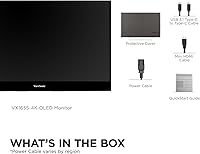
Edge cases around USB-C hubs, older Windows laptops, and certain Android devices generate a consistent tail of troubleshooting reviews. The Mini HDMI path requires a separately purchased cable that does not ship in the box, which catches some buyers off guard on first unboxing.
Speaker Quality
53%
47%
Buyers on video calls consistently report that the built-in speakers handle voice audio clearly enough to avoid needing headphones for meetings. Having any onboard audio at all is appreciated as a convenience layer when traveling without external speakers.
For anything beyond voice calls — music, streaming video, or presentation audio — the speakers draw near-universal criticism for thin sound and weak bass response. Most buyers treat them as a last-resort fallback rather than a feature worth factoring into the purchase decision.
Warranty & Support
87%
The 3-year coverage with US-based support is consistently called out as a standout differentiator by buyers who have previously dealt with 1-year warranties on cheaper portable monitors. Reviewers who have actually used ViewSonic support generally describe resolution times as reasonable and representative service as competent.
A small number of buyers report slow initial response times when submitting warranty claims during high-volume periods. As with most manufacturer warranties, accidental physical damage is not covered, and a few buyers discovered this only after cracking a panel during travel.
Multi-Device Compatibility
78%
22%
The combination of USB-C and Mini HDMI inputs covers the widest range of modern host devices among comparable portable monitors, and buyers using the ViewSonic OLED travel display across multiple platforms — a MacBook at home, a Windows work laptop at the office — report smooth transitions between setups.
Compatibility gaps still exist for gaming consoles and older HDMI-only devices that require users to source their own cables or adapters. The 4K signal occasionally drops to 1080p on certain third-party USB-C cables that cannot sustain the required bandwidth, a frustrating experience for buyers who assumed any USB-C cable would work.
Refresh Rate
69%
31%
For the target audience of professionals doing document work, photo editing, and video calls, 60Hz is entirely adequate and buyers in those use cases rarely mention it as a concern. Paired with OLED response characteristics, motion in video content looks clean enough for casual streaming.
Buyers who use portable monitors for gaming or who are accustomed to 120Hz laptop displays find 60Hz noticeably less fluid in fast-scrolling interfaces and motion-heavy content. This monitor was not designed for high-refresh use cases, but the marketing does not make that limitation particularly clear upfront.

Suitable for:

The ViewSonic VX1655-4K-OLED 15.6-inch Portable OLED Monitor makes the most sense for mobile professionals who have outgrown what budget portable displays can offer. Photographers, designers, and video editors will immediately feel the difference the OLED panel makes — color accuracy and contrast on this screen are in a different league compared to the IPS alternatives that dominate the portable monitor market. Remote workers who split time between home, hotels, and co-working spaces get a genuine dual-monitor setup without the bulk of a conventional display. MacBook and laptop users with USB-C will especially appreciate the single-cable connection that handles power and video together, keeping the workspace clean. If you already own a portable IPS monitor and find yourself wishing the blacks looked deeper or the colors more saturated, this is the natural upgrade path.

Not suitable for:

Buyers who primarily work outdoors or in bright, sun-drenched environments will likely find this portable OLED monitor frustrating — OLED panels tend to fall short on peak brightness compared to high-nit IPS displays, and sunlight readability is a real limitation here. Gamers looking for high refresh rates should look elsewhere; 60Hz is perfectly standard for productivity work but unremarkable for anyone used to 120Hz or higher. The ViewSonic VX1655-4K-OLED 15.6-inch Portable OLED Monitor also carries the long-term concern of OLED burn-in, which matters if you plan to run static dashboards, ticker displays, or fixed UI layouts for extended hours daily. Budget-conscious buyers who just need a second screen for video calls or light document work will find the price hard to justify when capable IPS alternatives exist at a fraction of the cost. And if your laptop or source device has known USB-C video compatibility quirks, it is worth testing before committing fully.

Specifications

  • Screen Size: The display measures 15.6 inches diagonally, offering a practical working area that balances portability with usable screen real estate.
  • Panel Type: Uses an OLED panel, which produces true blacks and high contrast ratios by individually controlling the light output of each pixel.
  • Resolution: Native resolution is 3840x2160 (4K UHD), delivering a pixel density that keeps text and fine image detail crisp at normal viewing distances.
  • Refresh Rate: Supports a 60Hz refresh rate, which is standard for productivity-oriented portable displays.
  • Aspect Ratio: 16:9 widescreen aspect ratio, compatible with standard HD and 4K video formats and typical laptop display layouts.
  • Screen Surface: Matte anti-glare coating reduces reflections in indoor environments such as offices, cafes, and co-working spaces.
  • Dimensions: The monitor measures 13.9 x 8.78 x 0.6 inches (L x W x H), making it thin enough to slide into most laptop sleeve compartments.
  • Weight: Weighs 1.5 lbs, which is light enough to carry daily without meaningfully adding to a typical laptop bag load.
  • USB-C Power: Supports up to 60W pass-through charging over USB-C, allowing it to simultaneously receive video input and charge a connected host device.
  • Video Inputs: Connectivity includes one full-function USB-C port and one Mini HDMI port, covering the majority of modern laptops and source devices.
  • Audio Output: Includes built-in dual speakers for basic audio playback, suitable for video calls and casual media consumption without external speakers.
  • Stand & Cover: Ships with a magnetic protective cover that also functions as a built-in adjustable stand, supporting both landscape and portrait orientations.
  • Orientation Support: Can be used in both landscape and portrait modes, useful for reading long documents, coding, or vertical content workflows.
  • Compatibility: Works with Windows, macOS, and other operating systems that support standard DisplayPort Alt Mode over USB-C or HDMI video output.
  • Warranty: Covered by a 3-year manufacturer warranty with access to a US-based customer service team for support and claims.
  • Voltage Input: Operates at 19V DC, with power delivered via the USB-C connection rather than a traditional barrel-plug power adapter.
  • Color: Available in a single colorway — black — with a clean finish that suits both professional and personal use environments.

Related Reviews
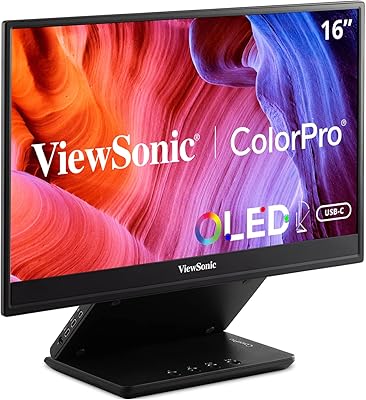
ViewSonic VP16-OLED 15.6-inch Portable OLED Monitor
80%
93%
Display Quality
91%
Color Accuracy
88%
Portability
74%
USB-C Connectivity
81%
Build Quality
More
ForHelp 15.6-inch 4K Portable Monitor
74%
91%
Display Sharpness
86%
Color Accuracy
93%
Portability
68%
USB-C Connectivity
63%
Build Quality
More
VILVA 15.6-inch 4K Portable Monitor
75%
91%
Display Sharpness
88%
Color Accuracy
93%
Portability
86%
Value for Money
67%
USB-C Compatibility
More
Topmonitor P15.6/4K 15.6-inch 4K Portable Monitor
79%
93%
Display Sharpness
88%
Color Accuracy
91%
Portability
67%
Stand Stability
84%
Connectivity & Compatibility
More
ViewSonic TD1655 15.6-inch Portable Touchscreen Monitor
77%
83%
Touch Responsiveness
89%
USB-C Connectivity
78%
Display Quality
91%
Portability
57%
Stand and Ergonomics
More
ViewSonic VA1655 15.6-Inch Portable Monitor
77%
93%
Portability & Form Factor
87%
Display Quality
82%
USB-C Connectivity
74%
Build Quality
91%
Ease of Setup
More
ViewSonic VG1655 15.6-Inch Portable Monitor
85%
91%
Portability & Design
88%
Display Quality
93%
Ease of Setup
85%
Performance for Casual Use
65%
Gaming Performance
More
Upperizon 15.6″ 4K OLED Touchscreen Portable Monitor
85%
91%
Display Quality
95%
Portability & Weight
88%
Color Accuracy
70%
Touchscreen Functionality
89%
Ease of Setup
More
FMC 15.6-Inch 4K Portable Gaming Monitor
87%
93%
Display Quality
91%
Portability & Design
85%
Touchscreen Performance
88%
Build Quality
90%
Connectivity
More
Dragon Touch S1 Pro 15.6-Inch 4K Portable Monitor
87%
94%
Display Quality
91%
Portability
88%
Gaming Performance
86%
Build Quality
62%
Audio Quality
More

FAQ

Yes, as long as your MacBook supports DisplayPort Alt Mode over USB-C — which all recent Apple Silicon and Intel MacBook models do. A single USB-C cable will carry the video signal and simultaneously charge your laptop at up to 60W, so you won't need a separate power brick on the desk.

It can work with the Nintendo Switch in docked mode via the Mini HDMI port, since the dock outputs standard HDMI. Keep in mind the monitor needs its own power source in that scenario, as the Switch dock does not deliver power back through the display connection. Performance will be limited to the Switch's own output resolution and frame rate, not the monitor's maximum specs.

It depends entirely on how you use it. For varied daily tasks — browsing, writing, video calls, photo editing — burn-in is unlikely to be an issue for years. Where it becomes a real concern is displaying fixed content for long stretches: think a static dashboard, a taskbar that never moves, or a game HUD running for hours at a time. Enabling auto-sleep after short idle periods and using a screen saver are simple precautions that significantly reduce the risk.

OLED panels are generally not the best choice for bright environments. Near a window or in direct sunlight, you will likely find the image washed out and uncomfortable to work with. In typical indoor settings — an office, a coffee shop, a hotel room — brightness is perfectly adequate. If most of your work happens outdoors or in very bright rooms, a high-nit IPS portable monitor would serve you better.

The included magnetic cover folds into a kickstand-style support for both landscape and portrait orientations. On a flat, solid desk surface it holds steady for standard typing and mouse use. It is less reliable on soft or uneven surfaces like a couch cushion or a fabric-covered table. If you plan to use it heavily at a fixed desk, a small aftermarket monitor stand with a clamp provides more stability.

Yes, via the Mini HDMI port. You will need a standard HDMI to Mini HDMI cable, which is not commonly found in most cable drawers but is inexpensive and widely available. Note that in this configuration the monitor will need its own USB-C power source, since HDMI does not carry power back to the display.

There is always a minor trade-off with matte coatings — they reduce reflections but can soften very fine detail slightly compared to glossy glass panels. For most professional workflows, including photo editing and document work, the difference is negligible. Photographers doing critical print color matching may prefer a calibrated glossy OLED, but for the vast majority of users the matte surface is a practical advantage, not a meaningful quality compromise.

Yes, portrait mode is supported. The built-in stand can hold the display in a vertical orientation, and most operating systems will auto-rotate the image once you adjust the display settings. It works well for reading long documents, scrolling through code, or reviewing tall web pages.

Adequate for video calls and background audio, but not much more than that. The dual speakers handle dialogue and basic audio clearly enough that you won't be scrambling for headphones on every call, but they lack the bass and volume of even a modest portable Bluetooth speaker. Treat them as a convenience feature rather than a selling point.

ViewSonic's warranty coverage for this portable OLED monitor is one of the stronger offerings in this product category — most competitors top out at one year. The US-based support team handles defect claims and hardware failures within the coverage period. Like most manufacturer warranties, it covers manufacturing defects and hardware failure rather than accidental damage, so a dropped monitor or a cracked panel from physical impact would not be included.

Where to Buy