Overview

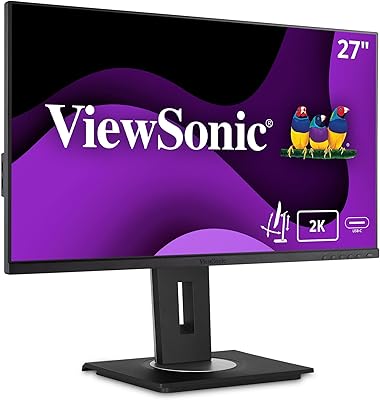
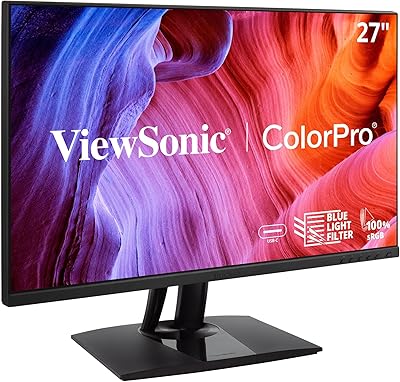
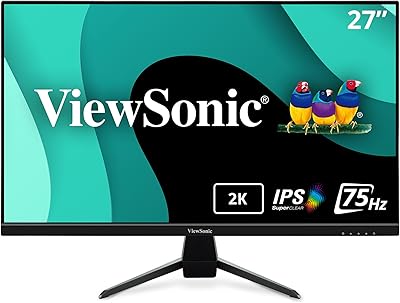
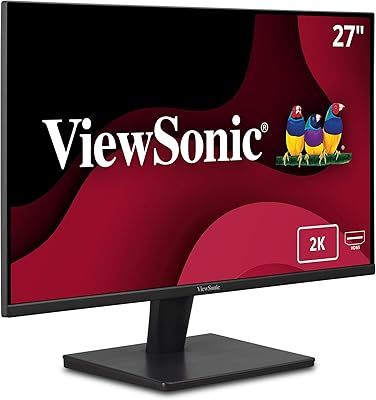
The ViewSonic VS2725-2K 27-inch QHD Monitor arrived in late 2024 as a straightforward answer to a real question: can you get a sharp, comfortable display without spending a lot? The jump from 1080p to 2560x1440 resolution is immediately noticeable — text is crisper, browser tabs are easier to scan, and spreadsheets feel less cramped. The frameless design looks cleaner on a desk than you might expect at this price point. Just keep expectations grounded: this is built for everyday work and casual use, not professional color-critical workflows.

Features & Benefits

The 1440p matte panel makes the biggest day-to-day difference — reading long documents or staring at code for hours is noticeably easier on the eyes than a glossy 1080p screen. The 100Hz refresh rate is a step up from the 60Hz most office monitors default to, giving motion a slightly smoother feel whether you are scrolling a long page or watching video. Variable Refresh Rate helps during casual gaming by eliminating choppy tearing. Flicker-Free technology and a built-in Blue Light Filter are practical additions for anyone logging serious screen hours. Both HDMI and DisplayPort inputs mean you can connect most devices without hunting for adapters.

Best For

This 27-inch QHD display suits remote workers and students particularly well. If you are upgrading from a 1080p monitor, the added resolution gives you noticeably more working space — two documents side by side, a browser and a spreadsheet open at once, without constant resizing. The slim bezel edges make it a natural fit for dual-monitor setups since the gap between screens stays minimal. Casual PC and Mac users benefit from the dual-input design, which requires no dongles. If you are a photographer or video editor needing precise color accuracy, though, this display is not the right tool for that work.

User Feedback

With over 230 ratings and a 4.6-star average, the VS2725-2K has earned a solid early reputation. Buyers consistently highlight sharp image quality and a painless setup process as standout strengths, with most finding the out-of-box calibration acceptable for general use. The value relative to competing 1440p options comes up frequently in positive reviews. On the critical side, the stand draws recurring complaints — it only tilts and lacks height adjustment, which is a genuine limitation for ergonomic setups. A few users note colors feel slightly flat for photo editing, and the absence of a USB hub is another commonly mentioned shortcoming.

Pros

  • The 2560x1440 resolution makes text and fine detail noticeably sharper than any 1080p alternative at this size.
  • 100Hz refresh rate delivers smoother everyday scrolling and motion compared to standard 60Hz office monitors.
  • Variable Refresh Rate reduces screen tearing during casual gaming without requiring a premium display.
  • Flicker-Free technology and a built-in Blue Light Filter make long work sessions easier on the eyes.
  • Slim, frameless bezels create a clean look and work especially well in dual-monitor configurations.
  • Both HDMI and DisplayPort inputs mean most laptops, desktops, and Macs connect without adapters.
  • Setup is fast and genuinely straightforward — most users are up and running within minutes of unboxing.
  • The matte screen surface handles ambient light and window glare better than glossy panels in bright rooms.
  • Out-of-box calibration is acceptable enough for general productivity without immediate manual adjustment.
  • Strong value for a QHD display with VRR and 100Hz at this price tier — hard to match spec-for-spec.

Cons

  • The stand only tilts — no height, swivel, or pivot adjustment, which is a real limitation for ergonomic desk setups.
  • No USB hub means you cannot connect peripherals directly through the monitor, requiring a separate hub.
  • Color accuracy falls short for photo editing or design work — not a display for color-sensitive creative tasks.
  • The plastic build and stand feel noticeably budget-grade, especially the wobbly base when nudged.
  • No USB-C input limits plug-and-play convenience for users with newer laptops that rely on that connection.
  • The OSD menu navigation is slightly unintuitive and takes some trial and error to get used to initially.
  • Factory calibration can look oversaturated or slightly off to users with more demanding visual standards.
  • 100Hz is a ceiling that will frustrate anyone moving down from a higher-refresh-rate gaming monitor.

Ratings

The ViewSonic VS2725-2K 27-inch QHD Monitor earns a strong overall reception among everyday users, and the scores below reflect what real buyers across global markets actually experienced — not marketing claims. Our AI analyzed hundreds of verified purchase reviews, actively filtering out incentivized, bot-generated, and outlier submissions to surface genuine sentiment. Both the clear strengths and the recurring frustrations are reflected here with full transparency.

Image Sharpness
91%
The jump to 2560x1440 is the single most praised aspect of this display. Users switching from 1080p consistently describe text as noticeably crisper, whether reading long documents, coding, or browsing — the difference is immediate and hard to go back from.
A handful of users note that without proper sharpness tuning in the OSD, the panel can look slightly soft out of the box. It is not a dealbreaker, but spending a few minutes adjusting settings makes a real difference.
Value for Money
93%
Buyers repeatedly call this one of the better QHD monitor purchases they have made at this price tier. Getting 1440p resolution, a 100Hz refresh rate, and VRR together without a steep outlay is something users across multiple reviews specifically call out as the main reason they chose it.
A small number of buyers feel the stand quality and lack of extras like a USB hub make the overall package feel slightly unfinished for the price. For some, it just barely crosses the threshold of feeling like a full-featured product rather than a stripped-down one.
Refresh Rate & Smoothness
82%
18%
The 100Hz panel is a meaningful upgrade over the 60Hz displays most office monitors default to. Users notice smoother scrolling through long web pages, cleaner motion in video playback, and a more responsive feel during casual gaming sessions.
For dedicated gamers coming from 144Hz or higher panels, 100Hz will feel like a step down. This monitor was not built to compete in that space, and buyers expecting high-frame-rate gaming performance will likely be underwhelmed.
Variable Refresh Rate
78%
22%
Casual gamers playing indie titles or less demanding games appreciate the reduction in screen tearing without needing a premium display. The VRR implementation works reliably for the use cases this monitor was designed for.
The VRR range is not wide enough to impress serious PC gamers, and compatibility with certain GPU configurations has caused inconsistent results for a small group of users. It is best treated as a bonus feature rather than a primary selling point.
Eye Comfort
86%
Remote workers logging 8-plus-hour days consistently mention that the flicker-free backlight and blue light filter make a noticeable difference in how their eyes feel by the end of the day. The matte screen surface also cuts down on reflections from overhead office lighting.
The blue light filter does shift the color temperature toward warmer tones, which some users find affects how accurate whites and cool colors look. Those who need precise color rendering for their work tend to disable the filter, which partially negates the comfort benefit.
Build Quality & Materials
71%
29%
The monitor feels solid enough for everyday desk use, and the matte black finish does not attract fingerprints or smudges the way glossy panels do. The slim bezels look noticeably cleaner in person than the product photos suggest.
The plastic construction feels noticeably budget-grade on closer inspection, and the stand in particular feels light and slightly wobbly when nudged. It does the job, but users who handle their equipment carefully or work in busier desk environments may find it underwhelming.
Stand & Ergonomics
52%
48%
The stand gets the monitor to a usable height for average desk setups, and tilt adjustment covers the basic angle most users need. For buyers who just want to plug in and go without fuss, it works adequately out of the box.
This is the most common complaint in user reviews — the stand only tilts and offers no height, swivel, or pivot adjustment. Taller users or anyone with an existing ergonomic setup will almost certainly need a VESA arm, which adds to the total cost and effort.
Connectivity
84%
Having both HDMI and DisplayPort inputs is genuinely useful for users running a laptop and a desktop from the same monitor, or for Mac users who appreciate not needing a dongle. The plug-and-play experience across different devices is consistently described as straightforward.
There is no USB hub, which feels like a missed inclusion at this price point. Users who rely on connecting peripherals directly through their monitor will need a separate hub, and the lack of USB-C is a limitation for newer laptop owners.
Out-of-Box Calibration
74%
26%
Most general users find the default color profile accurate enough to start working immediately. Brightness and contrast levels out of the box are described as reasonable for a home or office environment without any manual adjustment.
Users with more discerning eyes — or those doing any design or photo work — report that the factory calibration leaves colors looking slightly oversaturated or cool. A modest manual calibration session fixes most of the issues, but it requires patience.
Color Accuracy
63%
37%
For everyday content consumption — web browsing, video streaming, spreadsheets, and general productivity — the color output looks fine and does not distract from the work at hand. Casual users rarely raise color as a concern.
This is not a display for photo editors or digital artists. The color gamut and accuracy fall short of what creative professionals need, and users who tried using it for color-sensitive work consistently flagged inaccurate hues and limited coverage as frustrating limitations.
Setup & Installation
92%
Assembly takes under ten minutes for most users, and the included cables mean you can be up and running quickly after unboxing. Multiple reviewers specifically mention how little friction there is in getting the monitor working across different devices.
The instruction manual is minimal, and a few users note the OSD (on-screen display) menu navigation is slightly unintuitive at first. It is a minor issue, but reaching certain settings takes a bit of trial and error if you have not used ViewSonic monitors before.
Bezel & Aesthetics
87%
The frameless edge-to-edge design looks sharp on a desk and makes multi-monitor arrangements look much cleaner than typical monitors with thick plastic borders. The overall profile is slim and understated — it does not look cheap sitting next to more expensive displays.
The stand base has a wider footprint than some users expected, which can feel intrusive on smaller desks. The aesthetic is also purely functional — there are no RGB accents or premium finish touches for users who care about the look of their setup.
Screen Glare & Reflection
83%
The matte panel coating handles ambient light well, keeping glare from windows and overhead lights manageable during normal working hours. Users in bright home offices or open-plan workspaces specifically appreciate not having to reposition constantly.
In very brightly lit environments, some light scatter is still visible on the matte surface, which can reduce perceived contrast slightly. It is noticeably better than glossy alternatives, but not completely immune to challenging lighting conditions.

Suitable for:

The ViewSonic VS2725-2K 27-inch QHD Monitor is a strong fit for remote workers, hybrid professionals, and students who spend most of their screen time reading, writing, and managing multiple applications at once. The 1440p resolution gives you meaningfully more working space than a 1080p display — enough to comfortably run two documents or a browser alongside a spreadsheet without constant resizing. If you are building a dual-monitor desk setup, the slim bezels keep the gap between screens tight and visually clean. Casual gamers who want smoother motion and tear-free gameplay without the cost of a dedicated gaming display will also find it a solid option. Mac and PC users alike benefit from the dual-input design, which handles most modern devices without requiring extra adapters.

Not suitable for:

Buyers who need precise color reproduction for photography, video editing, or graphic design work should look elsewhere — the VS2725-2K was not built for color-critical workflows, and its panel will disappoint professionals who rely on accurate, consistent hues. Serious PC gamers accustomed to 144Hz or faster refresh rates will also find the 100Hz ceiling limiting, particularly in competitive titles where every frame matters. The stand is a genuine ergonomic concern: it only tilts, with no height or swivel adjustment, which means taller users or anyone with a specific monitor positioning routine will likely need to budget for a separate VESA mount arm. Those expecting USB hub functionality built into the display will also be let down, as there are no USB pass-through ports included. If you are outfitting a high-end workstation and want a display that feels premium in both hardware and image output, this monitor is priced and built for a different buyer.

Specifications

  • Screen Size: The display measures 27 inches diagonally, providing ample workspace for productivity and casual media consumption.
  • Resolution: Native resolution is 2560x1440 (QHD), delivering significantly sharper detail than standard 1080p panels at the same screen size.
  • Refresh Rate: The panel runs at a maximum of 100Hz, offering smoother motion than the 60Hz found on most standard office monitors.
  • Panel Type: Uses an LED-backlit panel with a matte screen surface that reduces glare and reflections under ambient lighting conditions.
  • Aspect Ratio: Standard 16:9 widescreen aspect ratio, compatible with all modern operating systems and media formats without letterboxing or stretching.
  • Variable Refresh Rate: Supports Variable Refresh Rate (VRR) technology to synchronize frame output and reduce screen tearing during gaming or video playback.
  • Eye Care: Equipped with Flicker-Free backlight technology and a built-in Blue Light Filter to reduce eye strain during extended screen sessions.
  • Inputs: Connectivity includes one HDMI port and one DisplayPort input, supporting a wide range of computers, laptops, and media devices.
  • Bezel Design: Features a frameless, edge-to-edge bezel design on three sides, making it well suited for side-by-side multi-monitor configurations.
  • VESA Compatibility: The monitor supports standard VESA wall-mount and arm mounting, allowing users to replace the included stand with third-party solutions.
  • Dimensions: Assembled dimensions are approximately 24.1″ wide, 18″ tall, and 8.1″ deep, including the attached stand base.
  • Weight: The monitor weighs 7.9 pounds with the stand attached, making it straightforward to position or reposition on a desk without assistance.
  • Stand Adjustment: The included stand supports tilt adjustment only; it does not offer height, swivel, or pivot functionality.
  • Screen Surface: The matte anti-glare coating diffuses light evenly and minimizes reflections from overhead lighting or nearby windows.
  • Color: Available in a matte black finish that resists fingerprints and integrates cleanly with most desk and office environments.
  • Brand: Manufactured by ViewSonic, a display and visual technology company with a broad consumer and business monitor lineup.
  • Model: The specific model designation is VS2725-2K, which identifies this exact configuration within ViewSonic's monitor range.
  • Launch Date: This monitor became available in September 2024, making it a relatively recent addition to the budget QHD monitor market.

Related Reviews
ViewSonic VG2748A-2K 27-Inch QHD Monitor
85%
93%
Display Quality
90%
Ergonomics/Comfort
89%
Connectivity Options
85%
Ease of Setup
87%
Value for Money
More
ViewSonic VG2756A-2K 27-inch QHD IPS Docking Monitor
88%
90%
Display Quality
92%
Ergonomics and Comfort
88%
Connectivity and Ports
85%
Ease of Setup
89%
Build Quality
More
ViewSonic VP2756-2K 27-inch QHD IPS Monitor
81%
93%
Color Accuracy
88%
Panel Sharpness
91%
USB-C Connectivity
54%
Refresh Rate
86%
Ergonomics
More
ViewSonic VX2728J-2K 27-Inch Gaming Monitor
86%
89%
Gaming Performance
93%
Display Quality
86%
Ergonomics and Adjustability
82%
Setup and Installation
78%
Build Quality
More
Gawfolk GF270L 27-inch 2K QHD Gaming Monitor
86%
91%
Display Quality
88%
Gaming Performance
94%
Color Accuracy
83%
Build Quality
87%
Value for Money
More
ViewSonic VA2715-2K-MHD 27-inch QHD Monitor
78%
88%
Image Sharpness
91%
Value for Money
84%
Eye Comfort
79%
Refresh Rate & Motion
82%
Glare Resistance
More
ViewSonic VX2767U-2K 27-inch 1440p IPS Monitor
74%
83%
Image Quality
88%
USB-C Connectivity
79%
Value for Money
51%
Stand & Ergonomics
82%
Eye Comfort
More
ViewSonic VG2455-2K 24-Inch QHD IPS Monitor
86%
92%
Display Quality
89%
Ergonomics & Adjustability
90%
USB-C Connectivity
86%
Value for Money
75%
Build Quality & Stability
More
memzuoix 27-inch QHD 165Hz Gaming Monitor
70%
88%
Image Clarity
84%
Refresh Rate Performance
91%
Value for Money
82%
Adaptive Sync (FreeSync/G-Sync)
77%
Color Accuracy
More
BenQ EW2790Q 27-inch 2K Monitor
84%
91%
Display Quality
87%
Ergonomics and Comfort
89%
Value for Money
93%
Color Accuracy
85%
Connectivity Options
More

FAQ

Yes, as long as your MacBook has an HDMI or DisplayPort output — or a USB-C port with a compatible adapter — it will connect without issues. Most modern MacBooks with USB-C will need a USB-C to DisplayPort or USB-C to HDMI cable, which are widely available and inexpensive.

The stand only supports tilt adjustment, which is one of the most commonly raised limitations by buyers. If you need height, swivel, or pivot adjustment, you will want to pick up a VESA-compatible monitor arm — the display does support standard VESA mounting, so swapping the stand out is straightforward.

Not ideally. The panel does a fine job for general productivity and casual use, but color accuracy and gamut coverage are not at the level professional creatives need. If precise, consistent color reproduction matters for your work, you would be better served by a monitor specifically rated for wide color gamut and factory calibration.

ViewSonic typically includes a power cable and at least one video cable in the box, though the exact included cables can vary by region and retailer. It is worth confirming before purchase if you need a specific cable type, or budget for one just in case.

The display uses Variable Refresh Rate technology, which is compatible with AMD FreeSync. It is not officially G-Sync certified, but many NVIDIA GPU users report functional VRR through DisplayPort using the adaptive sync standard. Results can vary depending on your GPU and driver version.

The difference is genuinely noticeable, especially on a 27-inch screen where 1080p can start to look slightly soft. Text is crisper, fine details in images and interfaces are sharper, and you get more usable screen real estate for multitasking. Most users who switch describe it as an upgrade they wish they had made sooner.

It works well for that purpose. The frameless bezel design minimizes the visual gap between two screens, and the matte finish keeps glare consistent across both panels if you are pairing it with another matte display. The 27-inch size also gives you plenty of working space on each side without the setup feeling overwhelming.

It does shift the color temperature toward warmer tones, which some users find affects how whites and blues look on screen. It is adjustable through the OSD menu, so you can dial in a level that balances comfort with acceptable color appearance — or turn it off entirely when color accuracy matters more.

Yes, the display is VESA mount compatible, so you can remove the stand and attach it to a wall mount or articulating arm. This is a popular option for users who find the included stand too limiting in terms of positioning flexibility.

Assembly is quick — most users have it fully set up in under ten minutes. Attaching the stand requires no tools, and the monitor is ready to use almost immediately after connecting a cable. The OSD menu takes a little getting used to, but basic brightness and input settings are easy to find.

Where to Buy