Overview

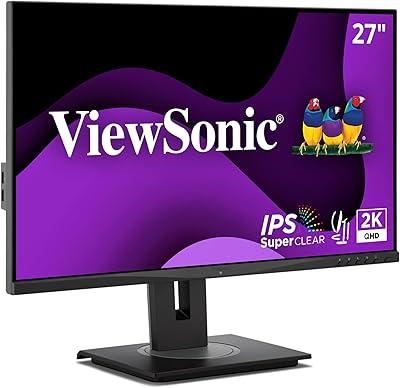
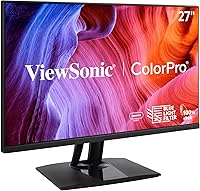
The ViewSonic VP2756-2K 27-inch QHD IPS Monitor sits in an interesting spot — professional enough to satisfy working creatives, yet priced where most people can actually consider it without wincing. What sets it apart at this tier is the Pantone Validation, a certification you typically see on monitors costing significantly more. The 27-inch QHD panel delivers crisp, detailed imagery that genuinely holds up when you're scrutinizing gradients or fine typography. Pair that with a thoughtful ergonomic stand and USB-C connectivity, and daily usability is clearly part of the design intent. One caveat worth stating upfront: the 60Hz refresh rate makes this a focused creative workstation tool, not a monitor you'd pick for gaming.
Features & Benefits

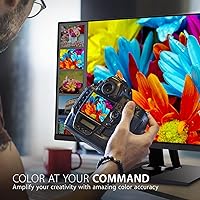
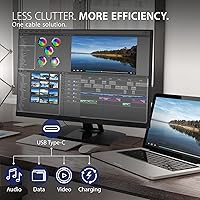
The 2560x1440 IPS panel is the foundation everything else builds on — text is sharp, color transitions are smooth, and wide viewing angles mean colors don't shift when you tilt your head or share the screen with a colleague. The color accuracy story goes deeper than marketing: Pantone Validation and a Delta E under 2 mean what you see on this color-accurate display is reliably close to what a client sees in print or on a calibrated device. Support for EBU and SMPTE C color spaces extends its usefulness into broadcast and video work. Then there's the single USB-C cable doing triple duty — video, data, and 60W charging — which genuinely cuts down desk clutter in a meaningful way.

Best For

This ViewSonic creative monitor makes the most sense for anyone whose work lives or dies by color reliability. Graphic designers and illustrators doing print work will appreciate how consistently the VP2756-2K renders Pantone colors without extra calibration effort. Photographers handling print-prep or color grading will find the Delta E accuracy genuinely useful day-to-day, not just on paper. Video editors working within broadcast standards like EBU will also feel at home here. MacBook users or anyone running a single-cable desk setup will find the USB-C connection particularly practical. Where this monitor doesn't quite fit is for gamers or anyone who needs a high refresh rate — 60Hz is the ceiling, and that's a real limitation for fast-paced content.

User Feedback

Across more than 400 ratings, the VP2756-2K holds a solid 4.5-star average — and digging into the reviews, that score reflects genuine satisfaction rather than hype. Buyers consistently highlight out-of-box color accuracy as a standout, noting they barely needed to adjust settings before using it for professional work. The build quality and ergonomic stand also draw frequent praise. On the critical side, a recurring theme is the 60Hz refresh rate disappointing users who hoped it could double as a gaming monitor — it can't, and some feel that point isn't emphasized clearly enough before purchase. A handful of reviewers also mention the OSD navigation feeling a bit dated. Overall, buyers in the target audience — creatives and home office workers — tend to see the value as well justified.

Pros

  • Pantone Validation is rare at this price point and genuinely useful for print-focused creative work.
  • Out-of-box color accuracy means most users can get to work without running a full manual calibration.
  • The single USB-C cable handles video, data, and 60W laptop charging simultaneously — real desk clutter reduction.
  • Full ergonomic adjustability including height, pivot, swivel, and tilt covers nearly every working posture.
  • The matte anti-glare surface holds up well under mixed office lighting without washing out colors.
  • Flicker-free technology and a built-in blue light filter make extended work sessions noticeably more comfortable.
  • 100% sRGB coverage with EBU and SMPTE C support gives broadcast and video professionals room to work confidently.
  • The VP2756-2K carries a strong 4.5-star average across hundreds of real buyer ratings, suggesting consistent quality control.
  • Thin bezels keep the overall look clean and work well in dual-monitor configurations.
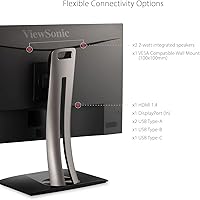
  • Wide connectivity options including HDMI, DisplayPort, and USB-C make it compatible with virtually any workstation setup.

Cons

  • The 60Hz refresh rate is a firm dealbreaker for gamers or anyone working with high-motion content.
  • No HDR support limits its appeal for editors working on HDR delivery projects.
  • The OSD menu navigation feels dated and can be slow to work through when adjusting settings.
  • At 15 pounds, the monitor is on the heavier side and not ideal for setups that require frequent repositioning.
  • Some users report the stand has minor wobble at certain height positions, which can be distracting on vibrating desks.
  • Buyers who never need Pantone accuracy or broadcast color spaces are essentially paying for precision they will not use.
  • No built-in speakers means you will need external audio, which adds to cable management if USB-C is already in use.
  • The 60W USB-C charging is adequate for most laptops but falls short for higher-wattage machines under heavy load.

Ratings

The scores below were generated by AI after analyzing verified buyer reviews for the ViewSonic VP2756-2K 27-inch QHD IPS Monitor from multiple global sources, with spam, bot-submitted, and incentivized feedback actively filtered out. Each category reflects both the genuine enthusiasm and the honest frustrations real users have reported over time. Nothing has been smoothed over — where buyers found limitations, those are reflected in the numbers just as clearly as the strengths.
Color Accuracy
93%
Designers and photographers consistently report that colors hold up reliably from screen to print, with very little need for post-purchase calibration. The Pantone Validation gives creatives real confidence when approving brand assets or preparing files for press, reducing costly revision cycles.
A small number of users doing extremely precise ICC-profiled print work still prefer to run a hardware calibration on top of the factory settings. The color accuracy advantage also diminishes somewhat when the blue light filter is activated, which shifts the white point noticeably.
Panel Sharpness
88%
At 2560x1440 on a 27-inch screen, pixel density hits a practical sweet spot — text is crisp and detailed illustrations hold fine line quality without requiring scaling tricks. Users migrating from 1080p displays frequently describe the jump in clarity as immediately and meaningfully noticeable.
Compared to 4K monitors in a similar price bracket, the QHD resolution does show its limits when working with very high-resolution print assets at 100% zoom. Those editing for 4K video delivery may also find the panel resolution a slight mismatch for accurate full-pixel previewing.
USB-C Connectivity
91%
The single-cable USB-C setup is one of the most consistently praised aspects of the VP2756-2K, particularly among MacBook users who value a clean desk. Handling video, data transfer, and 60W charging through one connection genuinely simplifies daily plug-in and plug-out routines.
The 60W power delivery ceiling can fall short for users running a high-wattage laptop under sustained load, causing the battery to drain slowly even while connected. A small number of users also reported intermittent signal handshake issues with certain USB-C hubs or docks, requiring a cable reseat to resolve.
Refresh Rate
54%
46%
For the target audience of creative professionals and home office workers, 60Hz is entirely adequate — design software, web browsers, and productivity applications all run perfectly smoothly at this rate. It is a deliberate engineering trade-off that keeps the focus on color precision rather than motion performance.
The 60Hz cap is the single most common point of buyer disappointment, particularly from users who hoped the VP2756-2K could double as a gaming display. Motion in fast games or high-frame-rate video appears noticeably less fluid compared to 144Hz panels, and there is no variable refresh rate support to compensate.
Ergonomics
86%
The full range of stand adjustments — height, tilt, swivel, and portrait pivot — covers nearly every reasonable working posture, which users in home office setups especially appreciate during long sessions. Being able to switch to portrait orientation for long-document review or vertical design work adds genuine workflow flexibility.
Several reviewers noted a degree of stand wobble at higher height positions, which can be distracting on desks shared with mechanical keyboards or other vibration sources. The stand base is also relatively wide, which may compete for desk real estate in tighter workstation setups.
Build Quality
83%
The overall construction feels solid and purposeful rather than hollow or plasticky, which buyers in this price range reasonably expect. The ultra-thin bezels are well-finished and align cleanly in dual-monitor configurations without visible gaps or mismatched seams.
The back panel and stand use predominantly plastic materials, which some users feel looks slightly budget compared to the premium positioning of the monitor. A few reviewers also noted minor flex in the display housing when adjusting the pivot angle, though this did not appear to cause any functional problems.
Eye Comfort
84%
Flicker-free backlight technology makes a tangible difference for users spending six or more hours a day in front of the screen, with multiple reviewers specifically crediting it for reduced end-of-day headaches. The built-in blue light filter adds a useful evening mode option without needing third-party software.
The blue light filter presets are somewhat coarse, with fewer fine-grained control levels than some competing monitors offer. Users doing color work in low-light evening conditions face a genuine trade-off between eye comfort and color fidelity, since the filter meaningfully alters white balance.
Out-of-Box Setup
79%
21%
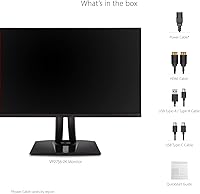
Most users report the physical assembly process is straightforward, with the stand clicking into place securely and requiring no tools. Connecting via USB-C to a Mac or modern laptop typically results in an immediate, clean signal with no driver installation required.
The included documentation is minimal, which can leave less experienced buyers uncertain about optimal settings for their specific use case. A few users mentioned confusion around which input to select for USB-C passthrough versus standalone display modes, requiring some trial and error.
OSD & Controls
61%
39%
The on-screen display covers all the expected adjustment categories including brightness, color temperature, input switching, and the eye care modes, giving users enough control to fine-tune the experience to their environment.
The OSD navigation is widely described as slow and somewhat unintuitive, relying on physical buttons with limited tactile differentiation that makes menu traversal more effortful than it should be. Compared to monitors offering joystick-based OSD control, the VP2756-2K feels dated in this specific area.
Matte Screen Performance
82%
18%
The anti-glare matte coating handles mixed office lighting well, making the display usable near windows or under overhead fluorescent lights without the harsh reflections that plague glossy alternatives. Creative professionals working in varied lighting environments consistently find this a practical advantage.
The matte coating introduces a slight texture to the image that some photographers and illustrators find mildly softening compared to a glossy panel, particularly when viewing fine photographic detail at close range. This is a known characteristic of matte coatings generally, not a defect, but it is worth knowing before purchase.
Connectivity Range
81%
19%
Having USB-C, HDMI, DisplayPort, and USB-A all available on one monitor means the VP2756-2K can accommodate nearly any source device without requiring adapters in most scenarios. This broad compatibility is particularly valuable in mixed-device workplaces or shared studio setups.
There is no Thunderbolt 4 support, which limits data transfer throughput for users connecting high-speed external storage through the monitor. The USB-A downstream ports are also limited in number, meaning users with multiple peripherals will still likely need a separate hub.
Value for Money
78%
22%
For buyers specifically seeking Pantone Validation and Delta E accuracy in a 27-inch QHD package, the price sits at a meaningful discount compared to monitors offering similar color credentials. Creative professionals who actually use those features tend to view the cost as well justified.
For buyers who do not need professional color accuracy, the price is harder to defend against competing monitors that offer higher refresh rates or better HDR support at a similar or lower cost. The value proposition is genuinely strong, but only for the specific audience this monitor was designed for.
Viewing Angles
87%
The IPS panel maintains consistent color and contrast when viewed from wide horizontal and vertical angles, which matters when presenting work to a colleague seated beside you or reviewing content from a slightly off-axis position. Colors do not shift or wash out the way they would on a TN panel.
A mild IPS glow is visible in very dark content when viewed from off-center angles in a dim room, which is a characteristic limitation of IPS technology broadly rather than a defect specific to this display. It is unlikely to affect professional use but may bother users watching dark cinematic content in a darkened room.
Broadcast Color Support
89%
Support for EBU and SMPTE C color spaces alongside sRGB makes this color-accurate display genuinely versatile for editors working across web, broadcast, and streaming deliverables without needing a separate reference monitor. Having these modes switchable through the OSD is a practical workflow convenience.
The absence of a wide color gamut option such as DCI-P3 means the monitor falls short for professionals working on cinema-grade or HDR content mastering, where broader coverage is increasingly expected. Users whose workflows are purely sRGB or broadcast-standard will not feel this gap, but it is a ceiling worth knowing about.

Suitable for:

The ViewSonic VP2756-2K 27-inch QHD IPS Monitor was clearly built with creative professionals in mind, and that focus shows in every meaningful spec choice. Graphic designers and illustrators who regularly send work to print will appreciate the Pantone Validation most — it means colors you approve on screen are far more likely to survive the trip to a print shop without surprises. Photographers handling color grading or preparing files for clients benefit from the Delta E under 2 accuracy, which removes a layer of guesswork from the process. Video editors working within broadcast pipelines will find the EBU and SMPTE C color space support a genuine practical asset, not just a checkbox. MacBook and laptop users running a single-cable desk setup will also find real daily value in the 60W USB-C charging connection. And for anyone spending eight or more hours a day in front of a screen, the fully adjustable ergonomic stand and flicker-free panel make a noticeable difference in how you feel by end of day.
Not suitable for:

If your priority is gaming or any workflow involving fast-moving content, the VP2756-2K will likely frustrate you — 60Hz is the hard ceiling here, and no amount of color accuracy compensates for that when you are chasing frames. Competitive gamers or anyone accustomed to 144Hz and above will find the experience noticeably sluggish by comparison. Budget-conscious buyers who just need a reliable everyday display for browsing, documents, and video calls may also find this monitor more specialized than their actual needs justify. The ViewSonic VP2756-2K 27-inch QHD IPS Monitor is a focused tool built around color-critical work, and paying for that precision makes no sense if your day-to-day tasks never require it. Those who prefer ultra-wide or larger screen formats may also find the standard 16:9 27-inch footprint limiting for certain multi-window workflows.

Specifications

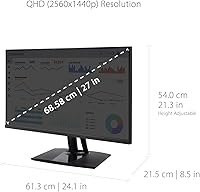
  • Screen Size: The display measures 27 inches diagonally, providing ample workspace for detailed creative tasks without requiring an oversized desk footprint.
  • Resolution: Native resolution is 2560x1440 QHD, delivering noticeably sharper text and image detail compared to a standard 1080p panel at the same screen size.
  • Panel Type: Uses an IPS (In-Plane Switching) panel, which maintains consistent color and contrast when viewed from wide angles up to 178 degrees horizontally and vertically.
  • Refresh Rate: The maximum refresh rate is 60Hz, suitable for professional creative work and general productivity but not designed for high-frame-rate gaming.
  • Color Accuracy: Factory-calibrated to a Delta E of less than 2, meaning color deviation from a reference standard is imperceptible to most trained eyes under normal viewing conditions.
  • Color Coverage: Covers 100% of the sRGB color space, with additional support for EBU and SMPTE C standards used in broadcast television and film production workflows.
  • Certification: Pantone Validated, confirming the display can reproduce Pantone Matching System colors with sufficient accuracy for print-preparation and brand-color-critical design work.
  • USB-C Power: The USB-C port delivers up to 60W of power delivery, enough to charge most laptops and MacBooks at a reasonable rate through a single cable connection.
  • Connectivity: Input options include one USB-C, one HDMI, one DisplayPort, and USB-A downstream ports, offering broad compatibility across Windows PCs, Macs, and modern laptops.
  • Ergonomics: The stand supports tilt, swivel, pivot (portrait rotation), and height adjustment, allowing the display to be positioned precisely for individual comfort during extended use.
  • Eye Care: Includes flicker-free backlight technology and a built-in blue light filter mode, both aimed at reducing the visual fatigue associated with long daily screen exposure.
  • Surface Type: The screen features a matte anti-glare coating that diffuses ambient light reflections, making it more usable in brightly lit rooms compared to glossy panels.
  • Bezel Design: Ultra-thin bezels on three sides keep the overall frame compact and make this monitor a practical candidate for side-by-side dual-monitor configurations.
  • Aspect Ratio: Standard 16:9 widescreen aspect ratio, compatible with the full range of professional software, operating systems, and display configurations without letterboxing.
  • Weight: The monitor with stand weighs approximately 15.1 pounds, which is typical for a 27-inch professional display and generally requires no special mounting reinforcement.
  • Dimensions: Overall product dimensions with stand are approximately 24.1 inches wide by 21.27 inches tall by 8.5 inches deep, fitting comfortably on most standard desks.

Related Reviews
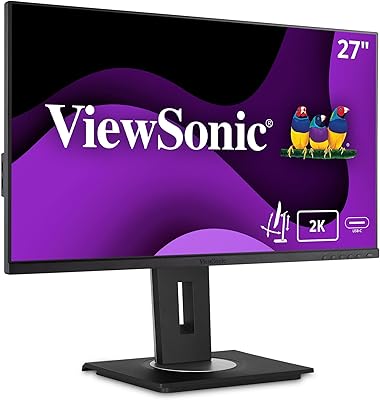
ViewSonic VG2756A-2K 27-inch QHD IPS Docking Monitor
88%
90%
Display Quality
92%
Ergonomics and Comfort
88%
Connectivity and Ports
85%
Ease of Setup
89%
Build Quality
More
ViewSonic VS2725-2K 27-inch QHD Monitor
80%
91%
Image Sharpness
93%
Value for Money
82%
Refresh Rate & Smoothness
78%
Variable Refresh Rate
86%
Eye Comfort
More
ViewSonic VG2748A-2K 27-Inch QHD Monitor
85%
93%
Display Quality
90%
Ergonomics/Comfort
89%
Connectivity Options
85%
Ease of Setup
87%
Value for Money
More
ViewSonic VX2767U-2K 27-inch 1440p IPS Monitor
74%
83%
Image Quality
88%
USB-C Connectivity
79%
Value for Money
51%
Stand & Ergonomics
82%
Eye Comfort
More
ViewSonic VG2455-2K 24-Inch QHD IPS Monitor
86%
92%
Display Quality
89%
Ergonomics & Adjustability
90%
USB-C Connectivity
86%
Value for Money
75%
Build Quality & Stability
More
ViewSonic VX2728J-2K 27-Inch Gaming Monitor
86%
89%
Gaming Performance
93%
Display Quality
86%
Ergonomics and Adjustability
82%
Setup and Installation
78%
Build Quality
More
ViewSonic VX2776-SMHD 27-inch 1080p IPS Monitor
84%
92%
Display Quality
88%
Gaming Performance
90%
Ease of Setup
91%
Design & Aesthetics
89%
Eye Comfort
More
ViewSonic VG3456A 34-Inch Ultrawide QHD IPS Monitor
86%
91%
Display Quality
88%
Ergonomics and Comfort
90%
Connectivity and Ports
85%
Ease of Setup
89%
Performance for Content Creation
More
ViewSonic VA2715-2K-MHD 27-inch QHD Monitor
78%
88%
Image Sharpness
91%
Value for Money
84%
Eye Comfort
79%
Refresh Rate & Motion
82%
Glare Resistance
More
Gawfolk GF270L 27-inch 2K QHD Gaming Monitor
86%
91%
Display Quality
88%
Gaming Performance
94%
Color Accuracy
83%
Build Quality
87%
Value for Money
More

FAQ

Most buyers find the VP2756-2K accurate enough to use immediately for professional work without any manual calibration. The factory calibration targets a Delta E under 2, which is within the threshold most designers and photographers consider acceptable. If your work demands absolute precision for a specific print workflow, running a quick profile with a hardware colorimeter is always a good idea, but it is not a necessity for the majority of users.

Yes, the USB-C port provides up to 60W of power delivery, which is sufficient to charge most MacBook Air and MacBook Pro models during normal use. Keep in mind that under very heavy CPU or GPU loads, a 60W supply may not fully keep pace with a high-wattage MacBook Pro, so the battery could still draw down slowly during demanding tasks. For everyday creative work, it handles the job well.

Technically yes, but it is not a good fit for that use case. The 60Hz refresh rate is the limiting factor — modern gaming monitors commonly run at 144Hz or higher, and the difference in motion clarity is immediately obvious once you have experienced it. The VP2756-2K is purpose-built for color-accurate creative work, so if gaming is your main priority, you will want to look elsewhere.

Pantone Validation means ViewSonic has tested this display against Pantone color standards and confirmed it can reproduce those colors within an acceptable tolerance. It matters most if your work involves brand colors, print design, or any project where a client hands you a Pantone swatch and expects the final output to match. If you work purely in digital media with no print deliverables, it is less critical — though the underlying color accuracy still benefits general creative work.

The stand is generally solid for everyday use, though a handful of reviewers have noted slight wobble at taller height settings, particularly on desks that vibrate from mechanical keyboards or heavy typing. For most people at standard sitting height, it is not an issue. If you work on a surface-mounted monitor arm instead, the VESA mount compatibility gives you that option as well.

The anti-glare matte coating does a solid job of diffusing overhead lighting and window glare, which is one area where it has a clear advantage over glossy panels. Colors may appear very slightly less vivid compared to a glossy screen, but for professional color work, the reduction in distracting reflections is generally considered a worthwhile trade-off.

Yes, the stand includes a pivot function that lets you rotate the display 90 degrees into portrait orientation. This is useful for coding, reading long documents, or working with vertical content like social media graphics. Just make sure your graphics card and operating system support display rotation, which virtually all modern setups do.

No, this color-accurate display does not include built-in speakers. If audio is part of your setup, you will need external speakers or headphones. It is worth factoring that into your desk cable management, especially if the USB-C connection is already handling your laptop link.

Yes, the VP2756-2K works with both platforms without any meaningful compatibility issues. The USB-C input works natively with modern Macs, while HDMI and DisplayPort cover a wide range of Windows desktops and laptops. Display settings and color profiles may need minor adjustments depending on your operating system, but initial setup is straightforward on either platform.

The blue light filter reduces the intensity of short-wavelength blue light emitted by the screen, which some research links to eye strain during long viewing sessions. Enabling it does shift the display toward warmer tones, which means color accuracy takes a noticeable hit when the filter is active. Most professionals keep it off during color-critical work and only enable it during late-night browsing or reading sessions when accuracy is less important.

Where to Buy