Overview

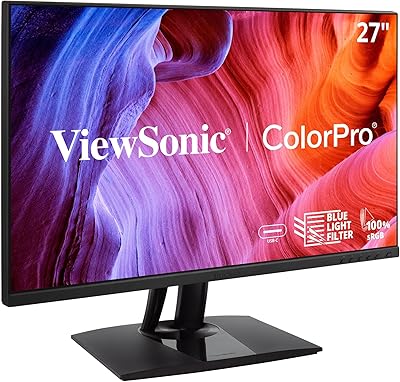
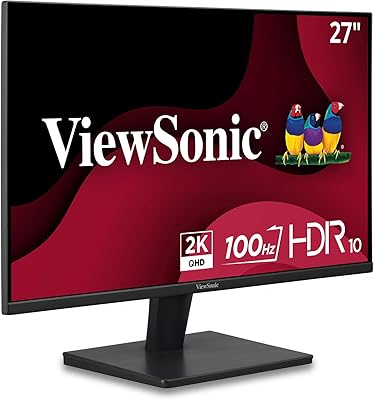
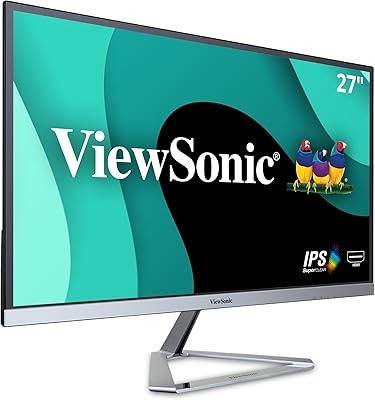
The ViewSonic VX2767U-2K 27-inch 1440p IPS Monitor landed in April 2023 as a practical mid-range option for hybrid workers and casual creatives who want noticeably sharper visuals without the complexity of a 4K setup. What sets it apart at this price tier is the USB-C single-cable connection — one cable handles video, audio, and up to 65W of charging, a genuine convenience most competing displays skip. The IPS panel brings solid color accuracy and wide viewing angles, making everyday tasks like document editing, browsing, and streaming look consistently clean from virtually any seated position.

Features & Benefits

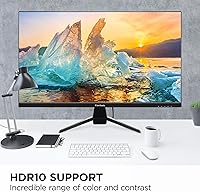
The QHD 2560x1440 resolution is the headline here — it's a meaningful step up from 1080p, rendering text crisper and images sharper without demanding a high-end GPU to drive it. The 65W USB-C port is genuinely useful, especially for MacBook or laptop users who can leave the power brick in a bag and run everything through a single cable. HDR10 is included, though the improvement is subtle and works best for streaming content, not professional color grading. Ultra-thin bezels keep the look clean, and the matte surface handles ambient light well in typical office or home environments.

Best For

This ViewSonic display hits a sweet spot for a fairly specific kind of buyer. Remote workers and students tired of cable clutter will appreciate the single-cable desk setup the USB-C port makes possible. People stepping up from a 1080p screen — whether for productivity, light photo editing, or a better streaming experience — will immediately notice the QHD difference. The slim bezels also make the VX2767U-2K a natural fit for side-by-side dual-monitor configurations. That said, competitive gamers should look elsewhere; this monitor prioritizes clarity and comfort over high refresh rates, so it won't satisfy anyone chasing 144Hz or beyond.

User Feedback

Across its ratings, this 27-inch QHD monitor earns mostly positive marks, with buyers frequently praising the image quality and USB-C convenience as the strongest selling points. The slim design also gets consistent appreciation. Where opinions cool slightly is around the stand — it offers limited height and tilt adjustability, which frustrates users with specific ergonomic needs. A few reviewers noted that out-of-box color calibration needed minor tweaking to reach its potential. On balance, most buyers feel the value-to-performance ratio is fair, though those expecting a dramatic HDR experience may find the HDR10 implementation modest next to higher-end panels.

Pros

  • QHD resolution delivers a sharp, detailed image that is a meaningful and immediate upgrade from 1080p.
  • The 65W USB-C port lets laptop users charge and display over a single cable, genuinely reducing desk clutter.
  • The IPS panel provides consistent color and wide viewing angles, making it comfortable from most seating positions.
  • Ultra-thin bezels look clean and work well in side-by-side dual-monitor configurations.
  • Flicker-Free technology and a Blue Light Filter make long work sessions noticeably more comfortable.
  • The matte screen surface handles reflections well in bright or mixed-light environments.
  • HDMI and DisplayPort inputs offer broad compatibility across PCs, Macs, and gaming consoles.
  • Buyers consistently report that image quality feels punchy and well-balanced straight out of the box with minor adjustments.
  • The slim, understated design fits naturally into both home office and professional desk setups.

Cons

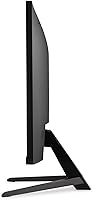
  • The stand offers only basic tilt adjustment, with no height or pivot options — a notable ergonomic limitation.
  • No high refresh rate support makes it a poor fit for gaming beyond casual or turn-based titles.
  • HDR10 performance is modest; do not expect dramatic contrast improvements comparable to premium HDR displays.
  • Out-of-box color calibration may need minor manual tuning to get the most out of the IPS panel.
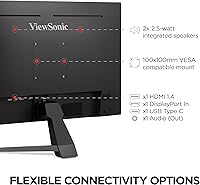
  • No built-in USB hub limits connectivity options for users with multiple peripherals.
  • With only 111 ratings at time of review, the long-term reliability picture is still relatively limited.
  • Buyers sensitive to color accuracy for professional work may find the panel falls short of specialized monitors.
  • The 65W USB-C charging is useful but may not be sufficient for high-performance laptops under heavy load.

Ratings

The scores below reflect an AI-driven analysis of verified global user reviews for the ViewSonic VX2767U-2K 27-inch 1440p IPS Monitor, with spam, bot-generated, and incentivized submissions actively filtered out to ensure reliability. Each category score is weighted against real-world usage patterns, not just feature lists, so both the genuine strengths and recurring frustrations are represented with equal honesty.

Image Quality
83%
Buyers consistently praise the QHD resolution for making text and fine detail noticeably crisper than a 1080p panel — a difference that becomes immediately obvious when working across multiple browser tabs or detailed spreadsheets. The IPS panel delivers natural, balanced colors that hold up well for everyday content without requiring heavy manual adjustment.
A portion of users note that factory color calibration skews slightly warm out of the box, requiring some time in the OSD menu to dial in. Those coming from higher-end or color-calibrated monitors may find the default output a touch inconsistent across the full brightness range.
USB-C Connectivity
88%
The 65W USB-C port is a genuine differentiator at this price tier, and laptop users — especially MacBook owners — frequently highlight it as the single most useful feature of the display. One cable replacing a power brick, video output, and audio transfer is the kind of daily convenience that adds up quickly.
The 65W ceiling is adequate for most thin-and-light laptops but falls short for larger, more power-hungry machines under sustained load. A handful of users with 15-inch or 16-inch pro-grade laptops report the charging rate barely keeps up during demanding tasks.
Value for Money
79%
21%
Most buyers feel the combination of QHD resolution, IPS panel, and USB-C power delivery at this price point represents a fair deal compared to alternatives that offer only two of those three. For remote workers and students, the cable-clutter savings alone factor into the perceived value.
A minority of reviewers feel the missing stand ergonomics and 60Hz refresh rate leave money on the table when competing options at a similar price now offer at least one of those upgrades. For buyers who discover the stand limitations after purchase, the value perception drops noticeably.
Stand & Ergonomics
51%
49%
The stand is stable enough for everyday desktop use, and the monitor does not wobble or shift with normal interaction. For users who sit at a fixed desk height and are comfortable with a modest tilt adjustment, the stand handles day-to-day placement reasonably well.
The lack of height adjustment is a frequently cited frustration, particularly among taller users or those with ergonomic desk setups. No pivot or swivel options further limit its adaptability, and several reviewers specifically recommend budgeting for a VESA monitor arm if you plan to use this display for long daily sessions.
Eye Comfort
82%
18%
Users who spend five to eight hours a day on this display report noticeably less end-of-day eye fatigue compared to their previous monitors, crediting both the Flicker-Free technology and the Blue Light Filter. The matte surface also contributes by cutting down on the subtle reflections that glossy screens create under office lighting.
The Blue Light Filter, while useful, does shift the white balance toward warmer tones at higher filter settings, which some color-sensitive users find distracting. A few reviewers also note that the matte coating, while anti-glare, introduces a slight texture to the image that is more noticeable on solid white backgrounds.
Build Quality
74%
26%
The slim bezel design looks clean and modern, and buyers who set this up in dual-monitor configurations appreciate how little visual interruption there is between screens. The chassis feels solid enough for everyday desk use, and the overall footprint is compact relative to the screen size.
Some users describe the plastic housing as feeling lightweight in a way that reads as budget-tier when handled directly. The stand base in particular draws comments about feeling less substantial than expected, which contributes to a slightly mixed impression despite the clean visual design.
HDR Performance
58%
42%
For casual streaming on platforms like Netflix or YouTube, HDR10 support does add a visible bump in contrast and color depth compared to standard dynamic range content — enough to make a film look more polished on a Saturday evening.
Users expecting dramatic HDR transformation will be disappointed. The panel lacks the local dimming or peak brightness needed for meaningful HDR impact, and several reviewers note that the difference between HDR on and off is subtle enough to question whether it materially improves the experience outside of darker scenes.
Refresh Rate & Responsiveness
56%
44%
For productivity tasks, document editing, streaming, and casual gaming, the 60Hz refresh rate causes no practical issues and the IPS response feels clean and predictable.
Anyone stepping in from a 75Hz or higher display will immediately feel the difference, and this monitor draws clear criticism from buyers who expected smoother motion for gaming or fast video scrubbing. It is one of the more common reasons reviewers dock a star or two in user feedback.
Connectivity Range
77%
23%
The combination of USB-C, HDMI, and DisplayPort covers the vast majority of modern source devices — from laptops and desktops to streaming sticks and gaming consoles — without requiring adapters in most standard setups.
There is no USB-A hub built into the display, which means peripheral users will need a separate dock or hub. For a monitor targeting home office and laptop users, the absence of even a basic two-port USB hub feels like an oversight at this price tier.
Setup Experience
81%
19%
Most buyers report a quick and straightforward assembly process, with the stand attaching tool-free in a few minutes. Input detection is generally automatic and reliable when switching between sources, with minimal manual intervention required.
A few users mention inconsistency with USB-C plug-and-play behavior on certain Windows laptops, requiring a driver check or display setting adjustment before the signal is recognized cleanly. This is not universal, but it does surface often enough to be worth noting for PC users.
Glare & Surface Handling
78%
22%
The matte anti-glare coating performs well in typical home office conditions with overhead lighting or a window to the side, reducing reflections enough that most users do not think about it after setup.
In rooms with a bright window directly behind the user, the matte coating mitigates but does not eliminate the distraction. Some reviewers also note the coating adds a faint graininess to pure white backgrounds that becomes more perceptible as the display ages.
Multi-Monitor Compatibility
84%
The ultra-thin bezels are a genuine practical asset for side-by-side setups, and users frequently mention how naturally this display pairs with a second monitor — including another VX2767U-2K — with a minimal visual gap between screens.
Without height adjustment on the stand, achieving perfect vertical alignment between two monitors can require workarounds like monitor risers or arms. Users who did not account for this report frustration after the fact.
Color Accuracy
71%
29%
For everyday content consumption, productivity work, and light photo reviewing, the IPS panel produces colors that are pleasing and consistent across the screen. Wide viewing angles mean color does not shift noticeably when moving slightly off-center.
Professional creatives who need calibrated color output for print or digital production will find this panel falls short of dedicated wide-gamut displays. The sRGB coverage is acceptable but not exceptional, and without factory calibration data included, buyers have to rely on their own adjustments.
Brightness & Contrast
69%
31%
In typical indoor lighting, the brightness range is sufficient for comfortable daytime use, and the IPS contrast delivers clean separation between dark and light areas in standard dynamic range content.
Peak brightness is not high enough to make HDR content pop convincingly, and users in particularly bright rooms or near sunlit windows may find themselves pushing the brightness slider to its limit. Darker scenes in films can appear slightly flat compared to VA panel alternatives at the same price.

Suitable for:

The ViewSonic VX2767U-2K 27-inch 1440p IPS Monitor is a strong match for anyone who wants a noticeably sharper screen without the cost or GPU overhead of jumping to 4K. It's particularly well-suited to remote workers and students who value a tidy desk — the 65W USB-C port means a modern laptop can be charged and displayed through a single cable, cutting out a real source of daily friction. MacBook users will find it especially practical, since Apple silicon handles the USB-C handshake cleanly and the IPS panel complements macOS color rendering well. Casual photo editors and content consumers who've outgrown 1080p will see an immediate, tangible improvement in sharpness and detail without needing to reconfigure their entire setup. Those building a dual-monitor workstation will also appreciate the ultra-thin bezels, which keep the visual gap between screens minimal and unobtrusive.

Not suitable for:

The ViewSonic VX2767U-2K 27-inch 1440p IPS Monitor is not the right pick for every buyer, and it's worth being clear about where it falls short. Competitive or even enthusiast gamers will likely find it frustrating — the display does not offer a high refresh rate, so fast-paced games won't feel as fluid as they would on a 144Hz or 165Hz panel. The stand is a recurring sticking point in user feedback: it lacks height adjustment and offers only basic tilt, which can be a real problem for anyone with ergonomic requirements or who shares a desk at different heights. Professional photographers, video editors, or anyone doing color-critical work should also look elsewhere, as the HDR10 implementation and factory calibration are mid-range at best — not unsuitable for casual use, but not a replacement for a proper color-accurate display. Finally, buyers who prioritize portability-friendly features like a VESA mount or built-in USB hub may find the feature set a bit lean for their needs.

Specifications

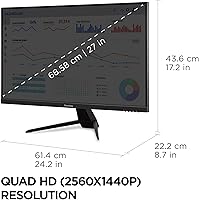
  • Screen Size: The display measures 27 inches diagonally, offering ample workspace for multitasking without requiring a large desk footprint.
  • Resolution: Native resolution is 2560x1440 QHD, delivering noticeably sharper text and images compared to a standard 1080p panel.
  • Panel Type: Uses an IPS (In-Plane Switching) panel, which provides accurate color reproduction and consistent image quality across wide viewing angles.
  • Aspect Ratio: Standard 16:9 widescreen aspect ratio, compatible with virtually all modern content formats and operating systems.
  • Screen Surface: Matte anti-glare coating reduces reflections in bright or mixed-light environments, making it comfortable for extended daytime use.
  • USB-C Power: The USB-C port supports up to 65W power delivery, enough to charge most ultrabooks and mid-range laptops while simultaneously transmitting video and audio.
  • HDR Support: HDR10 content support provides improved contrast and color depth for compatible streaming content, though it is supplemental rather than studio-grade performance.
  • Video Inputs: Connectivity includes one HDMI port and one DisplayPort input, in addition to the USB-C port, covering most modern source devices.
  • Eye Care: Flicker-Free technology eliminates screen flicker at all brightness levels, and a built-in Blue Light Filter helps reduce eye fatigue during long sessions.
  • Bezels: Ultra-thin bezels on three sides of the display minimize visual interruption, making it well-suited for dual or multi-monitor arrangements.
  • Dimensions: The monitor measures approximately 24.2 x 17.2 x 8.7 inches with the stand attached, fitting comfortably on standard office and home desks.
  • Weight: Total weight with stand is 11.7 pounds, making it manageable for solo setup or occasional repositioning.
  • Color: Available in black with a clean, understated finish that complements most desk setups and monitor arms.
  • Refresh Rate: The panel operates at a standard 60Hz refresh rate, which is adequate for productivity and media consumption but not optimized for fast-paced gaming.
  • Launch Date: The VX2767U-2K was first made available in April 2023, positioning it as a relatively recent mid-range entry in ViewSonic's monitor lineup.

Related Reviews
ViewSonic VA2715-2K-MHD 27-inch QHD Monitor
78%
88%
Image Sharpness
91%
Value for Money
84%
Eye Comfort
79%
Refresh Rate & Motion
82%
Glare Resistance
More
ViewSonic VG2756A-2K 27-inch QHD IPS Docking Monitor
88%
90%
Display Quality
92%
Ergonomics and Comfort
88%
Connectivity and Ports
85%
Ease of Setup
89%
Build Quality
More
ViewSonic VP2756-2K 27-inch QHD IPS Monitor
81%
93%
Color Accuracy
88%
Panel Sharpness
91%
USB-C Connectivity
54%
Refresh Rate
86%
Ergonomics
More
ViewSonic VX2728J-2K 27-Inch Gaming Monitor
86%
89%
Gaming Performance
93%
Display Quality
86%
Ergonomics and Adjustability
82%
Setup and Installation
78%
Build Quality
More
Cunpu 27-inch 1440p 120Hz IPS Monitor
81%
89%
Display Quality
91%
Gaming Performance
88%
Color Accuracy
73%
Build Quality
85%
Eye-Care Features
More
ViewSonic VG2748A-2K 27-Inch QHD Monitor
85%
93%
Display Quality
90%
Ergonomics/Comfort
89%
Connectivity Options
85%
Ease of Setup
87%
Value for Money
More
ViewSonic VS2725-2K 27-inch QHD Monitor
80%
91%
Image Sharpness
93%
Value for Money
82%
Refresh Rate & Smoothness
78%
Variable Refresh Rate
86%
Eye Comfort
More
ViewSonic VG2455-2K 24-Inch QHD IPS Monitor
86%
92%
Display Quality
89%
Ergonomics & Adjustability
90%
USB-C Connectivity
86%
Value for Money
75%
Build Quality & Stability
More
ViewSonic VX2776-SMHD 27-inch 1080p IPS Monitor
84%
92%
Display Quality
88%
Gaming Performance
90%
Ease of Setup
91%
Design & Aesthetics
89%
Eye Comfort
More
ViewSonic VG2756-4K 27-Inch 4K Docking Monitor
80%
91%
USB-C Docking Performance
88%
Display Clarity
74%
Connectivity & Port Selection
86%
Ergonomics & Stand Quality
71%
Color Accuracy
More

FAQ

Yes, the USB-C port delivers up to 65W of power, which is sufficient for most MacBook Air models and 13-inch MacBook Pro configurations during normal use. If you have a higher-powered 16-inch MacBook Pro under heavy load, you may still want your original charger on hand for demanding tasks, but everyday productivity should be covered.

Yes, you can connect a console using the HDMI port. Keep in mind the display runs at 60Hz, so you won't get the benefit of 120fps modes that newer consoles support — the output will be capped at 60fps. For casual gaming it works fine, but dedicated console gamers may want a higher refresh rate display.

Unfortunately, the included stand only offers basic tilt adjustment and does not support height, pivot, or swivel changes. This is one of the more commonly flagged limitations by buyers. If ergonomics matter to you, a third-party monitor arm with VESA mounting is worth considering — just confirm VESA compatibility with the current product listing before purchasing.

Absolutely. It works with Windows PCs, Macs, Linux machines, and Chromebooks. The USB-C connection is broadly compatible with any device that supports DisplayPort Alt Mode over USB-C, and the HDMI and DisplayPort inputs cover virtually everything else.

It's a modest improvement rather than a dramatic transformation. You'll notice slightly better contrast and color depth on HDR-enabled streaming content like Netflix or YouTube, but this panel doesn't reach the brightness levels or local dimming depth of dedicated HDR monitors. Think of it as a nice bonus, not a headline feature.

No, this display does not include a USB-A hub. The only USB port is the USB-C connection used for power delivery and video. If you need to connect a keyboard, mouse, or other peripherals through the monitor, you'll want a separate USB hub or dock.

Really well, actually. The QHD resolution at 27 inches hits a pixel density sweet spot where text looks crisp and easy to read without needing to scale up the display. People who spend most of their day in browsers, documents, or code editors tend to notice an immediate difference coming from a 1080p screen.

Most users find it usable right away, but a fair number of reviewers note that the factory color settings run slightly warm or over-saturated depending on your preference. Spending a few minutes in the monitor's OSD menu to adjust color temperature and contrast will get you closer to accurate results without needing external hardware.

Yes, and it's a common use case for this display. If your laptop has a USB-C or Thunderbolt port, you can run a single cable that handles both video and charging. For laptops with only HDMI out, the HDMI port works just as well for display purposes — you'd just charge separately.

It handles typical office lighting and side-lit environments well. Like most matte panels, it won't completely eliminate reflections from a window directly behind you, but it significantly reduces glare compared to glossy screens. Most users in standard home office or office environments report no major issues with reflections during daytime use.

Where to Buy