Overview

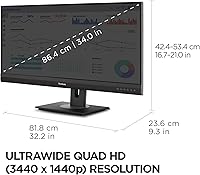
The ViewSonic VG3456A 34-inch QHD Ultrawide Monitor is the kind of screen you notice the moment you sit down in front of it, mostly because of how much horizontal real estate it hands you. This is a flat 34-inch panel with a 21:9 aspect ratio and a 3440x1440 resolution, so text stays crisp without forcing you to squint at scaled-down icons. The IPS matte coating keeps glare in check during daytime work sessions, which matters if your desk sits near a window. What stands out, though, is that this isn't just a display — it's built to function as a docking hub, handling power, video, and networking through one connection instead of a tangle of separate cables on your desk.
Features & Benefits

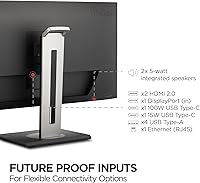
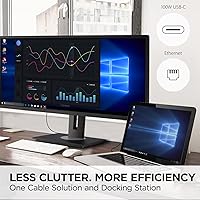
Where this ultrawide monitor really earns its keep is in the connectivity. A single USB-C cable can deliver 100W of power, meaning a laptop charges while video and data move through the same line — no separate power brick needed. There's also a built-in Gigabit Ethernet port, which is a nice touch for anyone who wants a wired connection without sacrificing a USB slot. The 100Hz refresh rate isn't going to win over competitive gamers, but it does make everyday scrolling and casual play noticeably smoother than a standard 60Hz panel. On the physical side, the stand tilts, swivels, and adjusts in height, and a quick-release mechanism with a built-in handle makes setup or VESA mounting fairly painless. DisplayPort and USB inputs round things out for switching between PC and Mac.

Best For

This setup makes the most sense for remote workers who want to plug in one cable and have their laptop powered, connected, and displayed without digging through a bag of dongles. Professionals who live in spreadsheets, code editors, or multiple browser windows will appreciate the extra horizontal space, since you can place documents side by side instead of constantly alt-tabbing. It's also a solid fit for hybrid employees who move between a home desk and a shared office setup, since the docking features cut down on what you need to carry or reconnect each time. And while it's not marketed as a gaming display, the 100Hz refresh rate gives casual gamers and light creative work a noticeably smoother feel than older 60Hz monitors typically offer.

User Feedback

Owners of the VG3456A display tend to focus their praise on the cable management side of things, with several mentioning how much tidier their desk looks once everything routes through that single USB-C connection. The extra screen space also comes up often, with buyers describing it as a genuine productivity boost rather than just a nice-to-have. On the downside, a few reviewers point out that the stand and overall footprint take up more desk real estate than expected, so it's worth measuring your workspace beforehand. Some also note that 100Hz, while an improvement, still falls short of what dedicated gaming monitors offer. Overall sentiment leans strongly positive, reflected in a solid average rating across more than a hundred reviews.

Pros

  • Single USB-C cable handles charging, video, and data without a separate power brick
  • Built-in Gigabit Ethernet frees up a laptop port for other accessories
  • 34-inch ultrawide screen meaningfully reduces window-switching during multitasking
  • Ergonomic stand adjusts for tilt, swivel, and height across different desk setups
  • Quick-release mount and handle make initial setup noticeably easier
  • 100Hz refresh rate feels smoother than typical 60Hz monitors for everyday use
  • Owners consistently praise how much tidier their desk looks after switching to it
  • Matte IPS coating helps cut down glare in bright rooms

Cons

  • Stand and overall footprint take up more desk space than expected
  • 100Hz refresh rate still falls short of dedicated gaming monitor standards
  • At over 19 pounds, this ultrawide monitor isn't easy to relocate often
  • Not positioned as a color-calibrated display for professional creative work
  • Docking features may be more than casual users actually need
  • Large screen size requires a fairly deep desk to sit comfortably
  • Single-monitor multitasking still has limits compared to a true dual-monitor setup

Ratings

After analyzing verified owner reviews from around the world, our AI rating engine breaks down exactly how the ViewSonic VG3456A 34-inch QHD Ultrawide Monitor performs across the categories that matter most to real buyers. Spam, bot activity, and incentivized reviews are filtered out before scoring, so what you see here reflects genuine usage patterns. Both the strengths people rave about and the recurring pain points are represented honestly below.
Display Sharpness & Resolution
89%
The 3440x1440 resolution across 34 inches gives text and images plenty of clarity for spreadsheet work, code editing, and document review. Users frequently mention how much easier it is to read fine print compared to a standard 1080p widescreen.
A handful of users wished for a true 4K-equivalent pixel density, especially when zooming into detailed photo or video work. It's sharp for productivity, but not the absolute ceiling for pixel-peeping creative tasks.
Color Accuracy & IPS Performance
82%
18%
The IPS panel delivers consistent color from wide viewing angles, which matters when two people are reviewing the same screen during a meeting or presentation. Colors look natural enough for everyday browsing, spreadsheets, and casual photo viewing.
This isn't a factory-calibrated panel, so professional photographers or print designers may notice color shifts that matter for client-facing work. Out-of-the-box calibration is acceptable but not exceptional for color-critical tasks.
Docking & Connectivity
93%
The combination of USB-C, Gigabit Ethernet, and DisplayPort in one unit consistently gets singled out as the standout feature. Remote workers describe plugging in a single cable each morning and instantly having power, internet, and video ready to go.
A small number of users with older laptops note that USB-C alternate mode compatibility can be hit or miss, requiring a firmware update or different cable. It's a minor hurdle, but it does happen on certain device combinations.
USB-C Power Delivery
86%
The 100W charging output handles most ultrabooks and many MacBook models without needing their original charger at all. Users appreciate not having a separate power brick cluttering their desk anymore.
Higher-wattage gaming laptops or workstation-class machines may still need their own charger, since 100W isn't enough for every device on the market. It covers the majority of users but not the most power-hungry laptops.
Refresh Rate & Motion Smoothness
71%
29%
Compared to a standard 60Hz monitor, the 100Hz refresh rate makes everyday scrolling and window dragging feel noticeably smoother. Casual gamers report a pleasant bump in responsiveness for non-competitive titles.
Serious gamers consistently point out that 100Hz falls well short of dedicated 144Hz or higher gaming monitors. It's a productivity-first display, so motion-heavy gaming isn't where it shines.
Ergonomics & Stand Adjustability
88%
The tilt, swivel, and height-adjustable stand lets users dial in a comfortable position for long work sessions, which matters a lot for anyone sitting at a desk for eight or more hours a day. Shared desk setups also benefit from quick repositioning between users.
A few reviewers mention the swivel range feels slightly limited compared to dedicated monitor arms. Those wanting extreme flexibility may eventually consider a third-party VESA arm.
Setup & Mounting Ease
84%
The quick-release stand and built-in carrying handle make initial assembly straightforward, even for people who don't usually deal with monitor hardware. VESA compatibility is appreciated by users who prefer wall or arm mounting.
The overall unit is large and somewhat awkward to handle solo during unboxing, simply due to its size and weight. A second pair of hands makes the process noticeably easier.
Desk Footprint
61%
39%
For users with deep, spacious desks, the large footprint isn't an issue and actually complements the immersive ultrawide experience. The stand base feels stable and doesn't wobble during typing or typing-heavy work.
Multiple reviewers specifically call out that the stand and overall screen size eat up more desk space than expected, especially on smaller or shallow desks. It's worth measuring your workspace before buying.
Glare Resistance & Matte Coating
85%
The matte finish does a solid job cutting down reflections in bright home offices or rooms with overhead lighting. Users near windows report fewer distracting glare spots compared to glossy alternatives.
In extremely bright, direct sunlight conditions, some users still find it necessary to adjust blinds or reposition the desk. Matte coating helps but doesn't eliminate glare entirely.
Multitasking & Productivity Gains
91%
Owners consistently describe a real productivity jump from having multiple documents, spreadsheets, or browser windows visible side by side without constant alt-tabbing. This is one of the most repeated positives across reviews.
A few users note that without window-snapping software, manually arranging multiple apps across the ultrawide space takes some initial setup time. It's a minor learning curve rather than a flaw in the screen itself.
Build Quality & Materials
80%
20%
The overall construction feels sturdy, with a stable base and a screen that doesn't flex noticeably when adjusted. Most users report no rattling or creaking even after months of regular use.
A small number of buyers mention the plastic used on the rear casing feels less premium than the front-facing design suggests. It's solid, but not in the same league as ultra-premium metal-bodied monitors.
Mac & PC Compatibility
83%
Switching between a work PC and a personal Mac is described as simple, with the multiple input options making cross-platform use convenient for hybrid households or offices. DisplayPort and USB-C cover most modern devices.
Some Mac users with older USB-C implementations report needing to double check charging and display output compatibility before relying on a single cable. It generally works well, but it's not universally plug-and-play.
Value for Money
78%
22%
Given that it replaces a separate dock, Ethernet adapter, and charger, many buyers feel the combined functionality justifies sitting in the mid-to-premium price tier. The docking features alone are seen as worth the investment for remote workers.
Buyers who only need a basic second screen without docking features may feel they're paying for capabilities they won't fully use. It's strong value specifically for docking use cases, less so for simple display needs.

Suitable for:

The ViewSonic VG3456A 34-inch QHD Ultrawide Monitor is a strong match for remote and hybrid workers who are tired of juggling a laptop charger, a video cable, and a separate Ethernet adapter every time they sit down to work. Anyone who spends their day in spreadsheets, multiple documents, or several browser windows side by side will appreciate having that much horizontal space to spread out on, instead of constantly switching tabs. It also suits people who move between a home office and a shared workspace, since plugging in a single USB-C cable handles power, video, and a wired network connection in one step. Light creative work, like photo editing or writing, benefits from the extra screen real estate too. Casual gamers who want a smoother feel than a basic 60Hz monitor without chasing a dedicated gaming display will also find the 100Hz refresh rate a welcome upgrade.

Not suitable for:

Buyers tight on desk space should think twice, since the stand and overall footprint of this docking monitor take up more room than a standard single monitor setup. Competitive or fast-paced gamers will likely find the 100Hz refresh rate underwhelming compared to dedicated 144Hz or 240Hz gaming panels built for that purpose. Anyone who only needs a basic secondary screen for occasional use may find the docking features and ergonomic stand overkill for what they actually require. The ViewSonic VG3456A 34-inch QHD Ultrawide Monitor also isn't ideal for users who primarily work with color-critical creative tasks like print design, since it isn't marketed around professional color calibration. Frequent travelers who need to relocate a monitor often may also find its weight a bit unwieldy.

Specifications

  • Screen Size: The display measures 34 inches diagonally with a flat, non-curved panel design.
  • Resolution: Native resolution is 3440 x 1440 pixels, classified as QHD ultrawide.
  • Aspect Ratio: The panel uses a 21:9 aspect ratio, wider than a standard 16:9 monitor.
  • Panel Type: An IPS panel is used to support wide viewing angles and consistent color.
  • Screen Surface: The display has a matte finish designed to reduce glare from overhead lighting and windows.
  • Refresh Rate: The monitor supports a 100Hz refresh rate for smoother motion than standard 60Hz panels.
  • USB-C Power Delivery: The USB-C port supplies up to 100W of power for charging a connected laptop.
  • Ethernet Port: A built-in Gigabit Ethernet (RJ45) port allows a wired network connection through the monitor.
  • Video Inputs: Connectivity includes DisplayPort and USB-C inputs for connecting PCs and Mac computers.
  • USB Ports: The monitor includes 2 USB 2.0 ports for connecting peripherals like a mouse or keyboard.
  • Stand Adjustability: The included stand supports tilt, swivel, and height adjustment for ergonomic positioning.
  • Stand Mounting: A quick-release stand design allows for easier setup and VESA wall-mount compatibility.
  • Carrying Handle: A built-in handle on the stand assembly makes the monitor easier to move or transport.
  • Item Weight: The monitor weighs approximately 19.4 pounds on its own.
  • Dimensions: The monitor measures approximately 9.3 x 32.2 x 21.02 inches in its standard configuration.
  • Color: The monitor is finished in black.
  • Voltage: The monitor operates on a 240 Volts AC power input rating.
  • Brand: The monitor is manufactured by ViewSonic under the VG3456A model series.
  • Release Date: The model first became available in December 2023.

Related Reviews
ViewSonic VX3418-2K 34-Inch Ultrawide Gaming Monitor
73%
89%
Value for Money
82%
Display Quality
81%
Gaming Performance
49%
Ergonomics & Stand
77%
Adaptive Sync Performance
More
LG 34WQ73A-B 34-Inch UltraWide QHD Monitor
79%
91%
Color Accuracy
93%
Productivity & Multitasking
88%
KVM & Multi-Device Setup
89%
USB-C Connectivity & Cable Management
61%
Refresh Rate & Gaming Performance
More
BenQ PD3420Q 34-inch Ultrawide Monitor
87%
91%
Display Quality
94%
Color Accuracy
88%
Ergonomics and Adjustability
89%
Connectivity and Ports
75%
Price-to-Value Ratio
More
Raywego Q34DB45-1 34-inch Curved Gaming Monitor
72%
88%
Value for Money
84%
Gaming Performance
74%
Image Quality
51%
HDR Performance
67%
Build Quality
More
Gawfolk GF340H 34-inch Ultrawide Monitor
72%
84%
Value for Money
88%
Screen Real Estate
71%
Image Quality
78%
Color Accuracy
76%
Refresh Rate & Motion
More
Samsung 34-Inch SJ55W Ultrawide Monitor
77%
88%
Picture Quality
91%
Contrast & Blacks
86%
Resolution & Sharpness
67%
Refresh Rate & Gaming Smoothness
93%
Ultrawide Productivity
More
LG 34WQ650-W 34-inch UltraWide Monitor
77%
83%
Display Quality
91%
Productivity & Multitasking
88%
USB-C Connectivity
86%
Ergonomics & Stand
78%
Color Accuracy
More
Westinghouse 34-Inch Curved Ultrawide Gaming Monitor
72%
84%
Value for Money
78%
Image Quality
81%
Refresh Rate & Motion
82%
Adaptive Sync
83%
Curve & Immersion
More
ViewSonic VS2725-2K 27-inch QHD Monitor
80%
91%
Image Sharpness
93%
Value for Money
82%
Refresh Rate & Smoothness
78%
Variable Refresh Rate
86%
Eye Comfort
More
LG 34UM68-P 34-inch UltraWide Monitor
78%
91%
Multitasking Performance
86%
Color Accuracy
88%
Viewing Angles
63%
Resolution & Sharpness
67%
Gaming Experience
More

FAQ

Yes, as long as your laptop supports USB-C charging. The single USB-C cable can carry video, data, and up to 100W of power at the same time, so for most ultrabooks and many MacBooks, that one cable replaces your charger entirely.

No, that's actually the point of this docking monitor. The Gigabit Ethernet port is built directly into the monitor, so you just connect one cable from your laptop and you get a wired internet connection without any extra hardware.

For everyday tasks like scrolling, dragging windows around, or browsing, yes, it feels noticeably smoother. It's not built for competitive gaming, but for general use and light gaming, the difference from 60Hz is easy to notice.

Yes, it supports both through its DisplayPort and USB-C inputs. Switching between the two just means changing the input source on the monitor, so it works well if you split time between a work laptop and a personal machine.

More than you might expect. Between the 34-inch width and the footprint of the stand, you'll want a desk that's reasonably deep and wide. It's worth measuring your setup beforehand, since some owners have mentioned the stand takes up more room than anticipated.

No, this is a flat ultrawide panel rather than a curved one. Some people prefer the immersive feel of a curve, but a flat panel like this one tends to be better for tasks like spreadsheet work, document editing, or design where straight lines matter.

The included stand already supports tilt, swivel, and height adjustment, so most people won't need a separate mount. If you do prefer wall mounting, the quick-release design is VESA-compatible.

It should be manageable. The screen uses a matte finish specifically to cut down on reflections, so while you'll still want to avoid direct sunlight hitting the panel, it handles ambient light better than a glossy screen would.

At around 19.4 pounds, it's manageable for most people, especially since the stand includes a carrying handle that makes positioning easier during setup. That said, it does help to have a sturdy desk surface ready before you start.

It's really built for people who want to simplify their desk setup, like remote workers, multitaskers juggling several windows, or hybrid employees moving between locations. If you're after a single-cable solution that handles power, video, and networking together, this is the kind of buyer it's designed for.