Overview

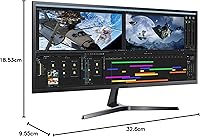
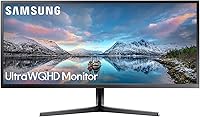
The Samsung 34-Inch SJ55W Ultrawide Monitor arrived in 2018 as Samsung's answer to buyers who wanted a genuinely wide desktop without paying flagship prices. At its core is a 34-inch VA panel running a 21:9 aspect ratio — a meaningful departure from the standard 16:9 monitors most people are used to. During the day it works as a productivity workhorse; in the evening it pulls double duty for casual gaming sessions. This is not the monitor for competitive players chasing triple-digit refresh rates. What it offers instead is rich contrast and color depth that many IPS alternatives at a similar price simply cannot match.
Features & Benefits

The jump to 3440x1440 WQHD resolution is one you notice immediately — text is crisper, spreadsheets hold far more columns, and open browser tabs no longer feel cramped. The VA panel's 3000:1 contrast ratio means dark scenes in games or films look genuinely dark, not the washed-out gray you often get from budget IPS screens. AMD FreeSync keeps things smooth during gaming, though it works best within a defined refresh range and needs a compatible AMD GPU for full effect — Nvidia users won't see the adaptive sync benefits. The built-in split-screen software is a genuine time-saver, letting you pipe two separate video sources side by side without any third-party tools.

Best For

The SJ55W makes most sense for people who spend long hours working across multiple applications — think developers with a code editor on one side and documentation on the other, or finance professionals running models alongside dashboards. It suits casual gamers and students who want an immersive experience without committing to a high-refresh-rate gaming setup. If you are currently on a standard 1080p 27-inch monitor, the jump in both resolution and width feels dramatic. Those who prioritize deep blacks over color precision — someone who watches a lot of dark-themed content or works in dim lighting — will find this 34-inch VA monitor a natural fit.

User Feedback

Across hundreds of owner reviews, the ultrawide format consistently earns praise — people who make the switch rarely want to go back to a standard aspect ratio. The contrast performance also surprises buyers who upgraded from IPS panels, with many noting that dark-room viewing is noticeably better. On the flip side, the stock stand is a recurring frustration: no height adjustment means many users end up buying a separate VESA arm shortly after unboxing. Competitive gamers point out that 75Hz has limits in fast-paced shooters, and a handful of owners have noted mild backlight bleeding in the corners — not unusual for VA panels at this price, but worth knowing before you commit.

Pros

  • The 3440x1440 WQHD resolution delivers noticeably sharper text and detail compared to 1080p ultrawides of the same size.
  • A 3000:1 contrast ratio produces genuinely deep blacks that most IPS panels at this price tier cannot match.
  • The 21:9 ultrawide format effectively replaces a dual-monitor setup, eliminating the annoying physical bezel gap between two screens.
  • Built-in PBP and PIP split-screen tools work well out of the box, requiring no third-party software to manage two input sources.
  • AMD FreeSync meaningfully reduces screen tearing during gaming for users with compatible AMD graphics cards.
  • Dual HDMI ports plus a DisplayPort input make it easy to connect a desktop PC, a laptop, and a console all at once.
  • The 75Hz refresh rate is a genuine step up from standard 60Hz monitors, producing smoother scrolling and motion in everyday use.
  • VESA 100x100mm compatibility means upgrading to an ergonomic third-party arm is straightforward.
  • The metallic bezel and slim panel give it a clean, professional look that fits both home office and workplace desks.
  • Setup is quick and the on-screen menu is straightforward, with most users reporting a painless out-of-box experience.

Cons

  • The stock stand offers only tilt adjustment — there is no height, swivel, or pivot, which is a real ergonomic compromise for extended use.
  • FreeSync benefits are limited to AMD GPU users; Nvidia owners get no adaptive sync advantage from this display.
  • At 75Hz, the SJ55W falls short for competitive gaming, where 144Hz monitors have become the practical standard.
  • Some units show mild backlight bleeding in the corners, a known characteristic of VA panels at this price point.
  • The 4ms response time is acceptable for casual gaming but can produce slight ghosting in very fast motion compared to faster IPS panels.
  • No USB hub is built into the monitor, so desk cable management requires more effort when connecting multiple peripherals.
  • The glossy screen surface can pick up reflections in brighter rooms, making placement near windows something to think through carefully.
  • Color accuracy out of the box may need some manual calibration for users doing color-sensitive creative work.

Ratings

The scores below for the Samsung 34-Inch SJ55W Ultrawide Monitor were generated by our AI engine after analyzing thousands of verified global owner reviews, actively filtering out incentivized, bot-generated, and duplicate submissions to surface what real buyers actually experienced. Both the genuine strengths and the recurring frustrations are reflected transparently — no category has been softened to protect an overall impression.
Picture Quality
88%
Owners consistently single out the image depth on this panel as one of the first things they notice after unboxing. The VA technology produces blacks that look genuinely dark rather than the murky gray you get from many budget IPS screens, which makes a real difference when watching films or working late at night in a dim room.
Color accuracy out of the box is not calibrated to any professional standard, and a handful of users doing photo or graphic work found the default color temperature slightly warm. Those needing precise, true-to-life color reproduction may need to invest time in manual calibration or a dedicated colorimeter.
Contrast & Blacks
91%
The 3000:1 contrast ratio is the single most praised specification among verified buyers, particularly those who switched over from IPS panels. Dark gaming scenes, cinematic content, and even dark-mode productivity interfaces look noticeably richer — several reviewers described it as the detail they did not know they were missing.
A recurring complaint is that the high contrast ratio comes with a trade-off: VA panels can exhibit some color shifting at extreme off-axis angles, which matters if multiple people are viewing the screen at once or if your seating position is not centered. It is a known limitation of the technology rather than a defect specific to this model.
Resolution & Sharpness
86%
At 3440x1440 across 34 inches, text rendering is noticeably crisper than on a 1080p ultrawide of the same size. Developers and writers in particular highlight how much easier it is to read long blocks of code or dense documents without zooming in or scrolling unnecessarily.
Driving this resolution smoothly in graphically demanding games requires a capable GPU, and some users were not fully prepared for that demand when they purchased. A mid-range graphics card from a few years ago may struggle to maintain comfortable frame rates in newer titles at native WQHD resolution.
Refresh Rate & Gaming Smoothness
67%
33%
For casual and mid-core gaming — open-world titles, RPGs, strategy games, and slower-paced adventures — 75Hz delivers a noticeably smoother experience than the 60Hz monitors most buyers are stepping up from. Paired with FreeSync on an AMD card, the overall motion consistency during these types of games is quite solid.
Competitive gamers who moved to this monitor from a 144Hz display almost universally report that 75Hz feels like a downgrade for fast-paced titles. In shooters and fighting games where reaction speed is critical, the refresh rate ceiling is a genuine limitation that no amount of other strengths can compensate for.
Ultrawide Productivity
93%
This is the category where the SJ55W earns its strongest endorsements. Professionals who replaced a dual-monitor arrangement with this single 34-inch panel consistently report that the bezel-free horizontal span makes multitasking feel more cohesive — spreadsheets, communication tools, and reference documents all fit side by side without constant window switching.
Not all software scales gracefully to a 21:9 aspect ratio. A handful of users noted that certain older applications, video conferencing tools, or legacy enterprise software displayed black bars or refused to stretch properly, which required workarounds or third-party resolution-fixing utilities.
Split-Screen Functionality
82%
18%
Samsung's built-in PBP and PIP modes received consistently positive remarks for being intuitive to access and configure. Users who frequently switch between a personal laptop and a work desktop praised the ability to display both on a single screen simultaneously without any additional switching hardware.
The split-screen software is Windows-centric, and macOS users reported a less polished experience with the companion application. A few buyers also noted that the PBP mode halves the resolution per source, which can look noticeably softer if you are used to the full WQHD image.
Adaptive Sync (FreeSync)
71%
29%
For AMD Radeon GPU owners gaming within the supported FreeSync range, screen tearing is effectively eliminated during the types of games this monitor suits best. The improvement is real and consistent, and owners using AMD hardware mentioned it as a meaningful value-add compared to monitors without any sync technology.
Nvidia GPU users receive no adaptive sync benefit, and the SJ55W does not carry G-Sync Compatible certification. This means a significant portion of potential buyers are purchasing the monitor with a feature they simply cannot use, which was a source of frustration in reviews from users who discovered this limitation after purchase.
Stand & Ergonomics
44%
56%
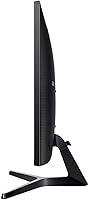
The Y-shaped stand has a stable footprint and does a reasonable job of keeping the monitor steady on the desk. The metallic accents give it a polished appearance that fits neatly in professional environments, and the VESA compatibility means the stand is easy to replace if ergonomics become a priority.
Tilt-only adjustment is the single most complained-about physical limitation across all verified reviews. Taller users, people using standing desks, and anyone with neck or posture concerns found themselves immediately shopping for a third-party VESA arm — an added cost that buyers should factor in upfront rather than treat as optional.
Connectivity & Inputs
83%
Two HDMI ports alongside a DisplayPort input give this monitor genuine versatility for users who want to connect multiple devices simultaneously. Home-office users appreciated being able to keep a desktop, a work laptop, and a gaming console all plugged in and ready to switch between with minimal fuss.
The absence of a built-in USB hub is a recurring wish among reviewers who expected it at this display size. Managing peripheral cables — keyboard, mouse, headset — still requires a separate hub, which adds desk clutter that a single USB port or two on the monitor itself would have solved cleanly.
Build Quality & Design
79%
21%
The slim panel profile and metallic bezel give the SJ55W a premium appearance that punches slightly above its price category. Most owners felt it looked well-built and professional on the desk, and the overall fit and finish received few complaints related to creaking, flex, or cheap-feeling plastics.
The rear panel is predominantly plastic, which some buyers noticed when handling the monitor during installation. The contrast between the attractive front face and the utilitarian back is a minor but noted inconsistency for buyers who are conscious of how their setup looks from multiple angles.
Panel Uniformity & Backlight
63%
37%
Most owners under typical usage conditions — bright desktops, colored wallpapers, general productivity content — never encounter any uniformity issues. The panel performs consistently across the majority of the screen area during day-to-day work, and color uniformity on mid-tones is generally reliable.
A consistent minority of verified reviewers flagged backlight bleeding along one or more corners, visible primarily on dark or black backgrounds. This is a statistical reality of VA panels at this price tier and not limited to defective units, but buyers planning to use the monitor frequently for dark-theme content or late-night gaming should weigh this risk carefully.
Response Time & Motion
66%
34%
At 4ms, the SJ55W handles everyday motion — scrolling, video playback, and slower gaming genres — without any issues that most users would consciously notice. Casual gamers exploring open-world environments or playing narrative titles reported no meaningful complaints about motion quality during normal play.
Users coming from faster IPS or TN panels sometimes noticed faint trailing behind moving objects in action-heavy scenes, particularly in high-contrast situations like a bright character moving against a dark background. It is subtle enough that most people adapt quickly, but it is a tangible step down from monitors with 1ms or 2ms rated response times.
Setup & Out-of-Box Experience
84%
The assembly process — attaching the stand and connecting cables — was described as quick and well-guided across the majority of owner reviews. The on-screen display menu is cleanly organized, and most users were up and running with a satisfactory picture within minutes of unboxing.
The included cable selection is minimal, typically limited to a single HDMI cable, which means buyers connecting via DisplayPort or running two simultaneous sources need to supply their own cables. A few international buyers also noted the power brick size was bulkier than expected for a monitor in this category.
Value for Money
78%
22%
For buyers whose primary needs are productivity and casual gaming, the combination of WQHD resolution, strong contrast, and ultrawide real estate at this price point is genuinely competitive. Users who evaluated the SJ55W against comparably priced 27-inch monitors felt the extra width and resolution justified the premium clearly.
Buyers who later discovered the stand limitations, the Nvidia FreeSync incompatibility, or the 75Hz ceiling sometimes felt the value proposition was not as clean as it first appeared. For users with specific competitive gaming or professional color needs, the money may be better allocated toward a more specialized alternative.

Suitable for:

The Samsung 34-Inch SJ55W Ultrawide Monitor is a strong match for anyone whose daily work involves juggling multiple applications at once — developers, analysts, writers, or project managers who constantly switch between windows will feel the difference that 21:9 real estate makes. Students working on research-heavy assignments or video editing timelines will also appreciate how much more content fits on screen without the physical gap of a dual-monitor setup. Home-office workers who occasionally unwind with casual gaming in the evenings get a monitor that handles both roles without requiring two separate purchases. If you are stepping up from a standard 1080p display and want a dramatic improvement in both sharpness and screen width, the SJ55W delivers that jump clearly. The VA panel's contrast performance also makes it a natural pick for anyone who watches a lot of dark-themed films or works in a dimly lit room where washed-out blacks would be genuinely distracting.
Not suitable for:

The Samsung 34-Inch SJ55W Ultrawide Monitor is not the right tool for competitive gamers who need 144Hz or higher refresh rates to stay sharp in fast-paced shooters or battle royale titles — 75Hz has a ceiling that experienced players will feel. Nvidia GPU owners should also be aware that the FreeSync adaptive sync is designed for AMD hardware, so the screen-tear reduction benefits largely won't apply to their setup. Professional photographers, graphic designers, and colorists who depend on precise, calibrated color accuracy will likely find IPS or OLED alternatives more reliable, since VA panels trade some color consistency for contrast depth. The fixed stock stand with no height adjustment is a real ergonomic gap that can be frustrating for taller users or those who spend eight or more hours a day at their desk — budget for a VESA arm if you go this route. Anyone working in a very small space should also factor in the physical footprint, as 34 inches at 21:9 demands a desk with genuine depth and width.
Specifications

  • Screen Size: The display measures 34 inches diagonally, giving you a noticeably wider field of view than a standard 27-inch widescreen monitor.
  • Resolution: Native resolution is 3440x1440 pixels (WQHD ultrawide), delivering sharp detail across the full 21:9 canvas.
  • Aspect Ratio: The 21:9 aspect ratio is significantly wider than the conventional 16:9 format, making it well-suited for side-by-side application layouts.
  • Panel Type: Uses a VA (Vertical Alignment) panel, which produces deeper blacks and higher contrast than most IPS alternatives at this price level.
  • Refresh Rate: The panel runs at a maximum of 75Hz, which is a step above standard 60Hz monitors and offers smoother motion during everyday tasks and light gaming.
  • Response Time: Rated at 4ms response time, which is adequate for casual gaming and general use, though competitive gamers may notice some ghosting in very fast scenes.
  • Contrast Ratio: The static contrast ratio is 3000:1, an industry-leading figure for VA panels that produces visibly darker shadows and richer dark tones compared to typical IPS screens.
  • Viewing Angle: Both horizontal and vertical viewing angles reach 178°, so color and brightness remain consistent even when viewing from off-center positions.
  • Adaptive Sync: AMD FreeSync is supported, synchronizing the display's refresh rate with a compatible AMD GPU to reduce screen tearing during gaming.
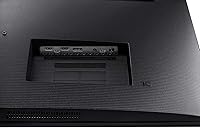
  • Connectivity: The monitor includes two HDMI ports and one DisplayPort input, allowing simultaneous connection of a desktop PC, a laptop, and a console without swapping cables.
  • Split Screen: Built-in PBP (Picture by Picture) and PIP (Picture in Picture) modes let you display two separate input sources on screen at the same time using Samsung's included software.
  • VESA Mounting: The rear panel is VESA-compatible at a 100x100mm pattern, so the stock stand can be replaced with any standard third-party monitor arm.
  • Stand Adjustability: The included Y-stand supports only tilt adjustment, ranging from approximately -1.5° to 15°; height, swivel, and pivot adjustments are not available on the stock stand.
  • Power Consumption: Maximum power draw is 59W during active use, and standby consumption drops to 0.3W or below, keeping idle energy use minimal.
  • Dimensions (Panel): Without the stand, the panel measures approximately 32.6 inches wide by 14.5 inches tall by 4.1 inches deep.
  • Weight: The full unit weighs 15.21 pounds, which is manageable for a single-person setup on a sturdy desk.
  • Input Voltage: The monitor accepts AC input between 100V and 240V, making it compatible with standard power outlets in most countries.
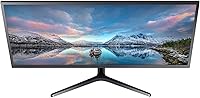
  • Color & Finish: The monitor ships in black with a slim metallic bezel, giving it a clean, professional appearance suitable for both office and home environments.

Related Reviews
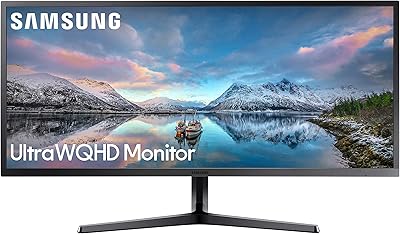
Samsung S34J552 34″ Ultrawide Curved Monitor
75%
93%
Screen Real Estate
84%
Image Clarity
71%
Color Accuracy
88%
Contrast & Blacks
38%
Ergonomics & Stand
More
Samsung S50GC 34″ Ultrawide QHD Monitor
75%
88%
Image Quality
91%
Resolution & Sharpness
84%
Refresh Rate & Smoothness
57%
HDR Performance
82%
Color Accuracy
More
BenQ PD3420Q 34-inch Ultrawide Monitor
87%
91%
Display Quality
94%
Color Accuracy
88%
Ergonomics and Adjustability
89%
Connectivity and Ports
75%
Price-to-Value Ratio
More
Samsung ViewFinity S65UA 34″ Ultrawide Curved Monitor
77%
91%
Productivity & Multitasking
84%
Image & Color Quality
89%
USB-C Connectivity
58%
Backlight Uniformity
47%
HDR Performance
More
ViewSonic VX3418-2K 34-Inch Ultrawide Gaming Monitor
73%
89%
Value for Money
82%
Display Quality
81%
Gaming Performance
49%
Ergonomics & Stand
77%
Adaptive Sync Performance
More
LG 34UM68-P 34-inch UltraWide Monitor
78%
91%
Multitasking Performance
86%
Color Accuracy
88%
Viewing Angles
63%
Resolution & Sharpness
67%
Gaming Experience
More
Westinghouse 34-Inch Curved Ultrawide Gaming Monitor
72%
84%
Value for Money
78%
Image Quality
81%
Refresh Rate & Motion
82%
Adaptive Sync
83%
Curve & Immersion
More
LG 34WQ650-W 34-inch UltraWide Monitor
77%
83%
Display Quality
91%
Productivity & Multitasking
88%
USB-C Connectivity
86%
Ergonomics & Stand
78%
Color Accuracy
More
Raywego Q34DB45-1 34-inch Curved Gaming Monitor
72%
88%
Value for Money
84%
Gaming Performance
74%
Image Quality
51%
HDR Performance
67%
Build Quality
More
Gawfolk GF340H 34-inch Ultrawide Monitor
72%
84%
Value for Money
88%
Screen Real Estate
71%
Image Quality
78%
Color Accuracy
76%
Refresh Rate & Motion
More

FAQ

FreeSync is primarily designed for AMD Radeon graphics cards, so Nvidia users won't get the adaptive sync benefit unless their card explicitly supports FreeSync via G-Sync Compatible mode — and the SJ55W is not officially certified for that. If you're running an Nvidia card, you can still use the monitor without any issues; you just won't get tear-free gaming through adaptive sync.

Yes, the back of the panel has a standard 100x100mm VESA mount pattern, so any compatible monitor arm will attach cleanly. Many owners upgrade to an arm fairly quickly given that the stock stand offers no height or swivel adjustment.

Samsung's split-screen software is generally considered straightforward. You install it on your PC, and it lets you snap different application windows into pre-defined zones across the wide panel. The PBP mode, which splits the screen between two physical input sources like a laptop and a desktop, works directly through the monitor's on-screen menu without any software needed.

A subset of owners have reported mild bleeding along the corners, which tends to show up most in dark scenes or when the screen displays a solid black background. It varies unit to unit — some people never notice it, while others find it distracting. VA panels at this price point are generally more prone to this than high-end IPS alternatives, so it's worth knowing going in rather than being surprised.

For everyday tasks like scrolling, browsing, and working, the jump from 60Hz to 75Hz does feel subtly smoother, though it's not as dramatic as going to 144Hz. For casual gaming it's a comfortable improvement, but if you play fast-paced competitive titles where every frame counts, you may find 75Hz limiting compared to what high-refresh gaming monitors offer.

For most productivity use cases, yes. The 3440x1440 resolution across a 34-inch 21:9 panel gives you enough horizontal space to comfortably run two or three application windows side by side without the physical gap a dual-monitor arrangement creates. It's particularly good for workflows like coding with documentation open alongside, or working in a spreadsheet while referencing another app. If you need completely separate display outputs for different computers, the PBP mode handles that as well.

It can. The glossy surface looks sharp in controlled lighting, but if your desk is near a window or a strong overhead light, reflections become noticeable. Positioning the monitor away from direct light sources helps significantly, and a monitor hood is an option for very bright environments.

Samsung typically includes one HDMI cable in the box. If you want to use the DisplayPort input or connect a second device simultaneously, you will need to supply your own cable. It's worth checking what outputs your PC or laptop supports before ordering so you're not caught short on day one.

For casual gaming, 4ms is perfectly usable and most players won't notice any issues during story-driven games, strategy titles, or slower-paced adventures. In very fast motion sequences — particularly in action games or shooters — some users do report slight trailing or ghosting, which is a known characteristic of VA panels compared to faster IPS or TN displays. If precise motion clarity is a priority, that's worth factoring into your decision.

Out of the box, the SJ55W looks good for everyday use and general content consumption, but it is not factory calibrated for professional color work. If you're doing photography editing, graphic design, or any work where accurate color representation matters, running a basic calibration with a colorimeter or at least adjusting the monitor's color temperature and gamma settings manually will get you noticeably better results.

Where to Buy