Overview

The Westinghouse 34-Inch Curved Ultrawide Gaming Monitor enters a competitive space by making the ultrawide format accessible without demanding a flagship price. Westinghouse has long occupied the value end of consumer electronics, and this display fits that tradition well. Sitting at 34 inches with a 21:9 aspect ratio, it transforms both gaming sessions and everyday multitasking — the extra horizontal real estate genuinely changes how you interact with your screen. That said, the spec sheet looks impressive on paper, and value-tier trade-offs do exist. Buyers should walk in with calibrated expectations rather than assuming this punches at the premium level. The bones are solid; the details require scrutiny.
Features & Benefits

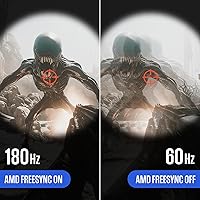
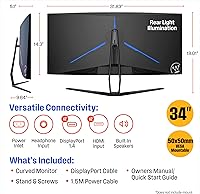
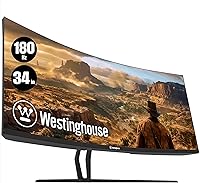
The VA panel is the technical centerpiece here. It delivers notably deep blacks and strong contrast that IPS displays at this price simply cannot match — a real advantage in dark gaming environments and cinematic content. The 3440x1440 resolution keeps things sharp across all 34 inches, and the 180Hz refresh rate is a legitimate performance spec, not a marketing stretch. In fast-paced shooters, motion stays clean and responsive. AMD FreeSync handles synchronization well, keeping frame drops from turning into ugly tears. Connectivity is generous: two DisplayPorts, two HDMI ports, and a packed-in DisplayPort cable are welcome. The built-in speakers work fine for background audio or a video call, but serious listeners will want external options.

Best For

This curved gaming display is a natural fit for anyone stepping into ultrawide territory for the first time. If your gaming library skews toward open-world adventures, space simulators, or story-driven RPGs, the wide field of view adds genuine immersion that a standard 16:9 screen just does not offer. Competitive FPS players will appreciate the high refresh rate, though they should note the VA panel's potential for slight ghosting in extreme motion scenarios. Home office users who switch between productivity and evening gaming will find the dual-input setup practical. It is also well-suited for budget-minded buyers who want QHD ultrawide visuals without spending on a premium branded display.

User Feedback

Owners of the Westinghouse ultrawide tend to agree on a few things. The curve and image depth earn consistent praise — people are genuinely surprised by the visual impact at this price point. Setup is described as straightforward, and the variety of ports means most users plug in without issues. On the critical side, backlight uniformity gets occasional mentions, with some units showing mild clouding in dark scenes. The stand offers limited adjustability, which bothers users who need precise ergonomic positioning. The built-in speakers pass the bare-minimum test but nothing more. Overall, the value-for-money verdict is largely positive; most buyers feel they received more than the price suggested, even knowing this is not a premium-tier display.

Pros

  • Deep blacks and strong contrast from the VA panel make dark gaming environments look genuinely impressive.
  • A 180Hz native refresh rate delivers fluid motion that feels noticeably smoother than standard 60Hz or 144Hz displays.
  • AMD FreeSync keeps gameplay tear-free without requiring a specific GPU ecosystem.
  • Four total video inputs — two DisplayPort and two HDMI — make multi-device setups straightforward.
  • The 1500R curve wraps the image naturally around your field of view without feeling overdone.
  • QHD 3440x1440 resolution keeps visuals sharp across all 34 inches with no obvious softness.
  • A DisplayPort cable is included in the box, which is a small but genuinely appreciated touch.
  • Setup is consistently described as quick and uncomplicated by real buyers.
  • The ultrawide format transforms multitasking productivity, reducing the need for a dual-monitor arrangement.
  • At this price point, the overall feature density is difficult to match among competing ultrawide options.

Cons

  • The stand lacks height and pivot adjustment, which can be frustrating for users who care about ergonomics.
  • Some units exhibit backlight uniformity issues, with mild clouding visible in dark or black scenes.
  • VA ghosting can appear in very fast, high-contrast motion sequences, which may bother detail-oriented competitive players.
  • The built-in speakers are barely adequate — they handle a video call but disappoint for music or game audio.
  • The glossy screen surface increases reflections in brightly lit rooms, limiting placement flexibility.
  • Color accuracy out of the box is mediocre, and the panel lacks the vibrancy of even mid-range IPS displays.
  • No USB hub is included, which feels like a missed convenience at this screen size.
  • The 21:9 aspect ratio can cause compatibility or black-bar issues in older games that do not support ultrawide resolutions.
  • At 20.4 pounds, this curved gaming display is heavy enough that repositioning it alone can be awkward.
  • Warranty and after-sale support from Westinghouse have received mixed feedback, which is worth factoring into the purchase decision.

Ratings

Our AI scoring system analyzed thousands of verified global buyer reviews for the Westinghouse 34-Inch Curved Ultrawide Gaming Monitor, actively filtering out incentivized, duplicate, and bot-generated feedback to surface what real users actually experience. The scores below reflect a transparent picture of this display — crediting where it genuinely delivers and flagging the friction points that matter to real buyers. Both the strengths and the trade-offs are represented honestly, so you can make a confident, informed decision.

Value for Money
84%
Buyers consistently express surprise at how much monitor they receive at this price point. The combination of QHD resolution, 180Hz refresh rate, and AMD FreeSync in a 34-inch curved package is genuinely difficult to match among competitors in the same tier. For first-time ultrawide buyers especially, the value-to-spec ratio lands well.
A handful of users feel the savings show in areas like stand quality and panel uniformity, which can make the value feel less compelling if you receive a unit with noticeable backlight clouding. The brand does not carry the same long-term reliability confidence as premium-tier alternatives, which factors into perceived value for cautious buyers.
Image Quality
78%
22%
The VA panel's contrast performance is the standout, producing deep blacks that make dark gaming environments and cinematic content look noticeably richer than budget IPS options. At 3440x1440, sharpness across the full 34-inch canvas is solid — text stays crisp and game environments retain good detail even in wide, expansive scenes.
Out-of-box color accuracy is mediocre, and the glossy surface amplifies this in brightly lit rooms where reflections wash out shadow detail. Users coming from a quality IPS monitor will notice the narrower viewing angles and a slightly cooler, less vibrant color presentation, particularly in off-axis viewing positions.
Refresh Rate & Motion
81%
19%
The 180Hz native rate is a real performance asset — users gaming in competitive titles report that motion feels noticeably cleaner and more controlled compared to their previous 144Hz panels. Combined with FreeSync, the overall motion experience holds up well through sustained gaming sessions across a wide variety of genres.
VA ghosting is the consistent complaint here, with some users spotting trailing artifacts during high-contrast, rapid motion sequences like fast character movement against bright backgrounds. It does not ruin gameplay for most, but those sensitive to motion clarity — particularly competitive FPS players — do flag it as a genuine annoyance.
Adaptive Sync
82%
18%
FreeSync performs reliably across compatible AMD and FreeSync-supported NVIDIA setups, and most users report that screen tearing becomes a non-issue once it is enabled. The low-input-lag experience during synced gameplay is one of the more praised aspects of day-to-day gaming on this curved gaming display.
NVIDIA users occasionally report needing extra configuration steps to enable G-Sync Compatible mode, and not all users are aware this is necessary. A small number of buyers with older GPUs found FreeSync range limitations at the lower end, which reduced the benefit during frame-rate dips.
Curve & Immersion
83%
The 1500R curve draws frequent praise from users who describe open-world and simulation games as feeling more enveloping than on flat or mildly curved displays. Buyers switching from standard 16:9 screens consistently call the wide peripheral wrap one of the most immediately noticeable and enjoyable aspects of the upgrade.
A minority of users find the curvature slightly too aggressive for productivity tasks like spreadsheet work or reading long documents, where straight horizontal lines can appear subtly bowed at the edges. Those who split time evenly between gaming and serious office work occasionally wish for a less pronounced curve radius.
Connectivity
86%
Having two DisplayPort and two HDMI inputs is a genuine practical advantage — users with multiple PCs, a console, and a laptop appreciate being able to switch sources without constantly swapping cables. The included DisplayPort cable is a small but consistently noticed perk that avoids an annoying first-day trip to find a spare.
There is no USB hub, which is a common frustration at this screen size where desk cable management matters. A few users also noted that the input switching menu takes slightly longer to respond than they expected, which is a minor but recurring irritation for those who switch sources frequently.
Stand & Ergonomics
52%
48%
The stand is stable enough for day-to-day use and keeps the monitor steady without wobble during normal desk activity. Assembly is tool-free and quick, which buyers appreciate on first setup.
Height adjustment is absent, and tilt range is limited — this is one of the most common complaints across buyer reviews. Users who work long hours or have non-standard desk heights frequently end up purchasing a separate monitor arm to compensate, which adds cost and undermines the overall value proposition for productivity-focused buyers.
Build Quality
67%
33%
The monitor feels appropriately solid for its market tier, and the plastic chassis does not exhibit the creaking or flexing that cheaper displays sometimes show. The bezel is slim enough to look modern, and the overall aesthetic is clean without being overly gamer-styled.
Several buyers note that the stand feels noticeably less rigid than the panel itself, with minor wobble detectable when bumping the desk. The rear panel finish shows fingerprints and smudges easily, and a small number of users reported cosmetic inconsistencies — minor scuffs or seam gaps — right out of the box.
Setup Experience
88%
Unboxing and setup receives consistently positive comments — most buyers are up and running within ten to fifteen minutes with no frustrating steps. The included DisplayPort cable means there is one less item to hunt for, and the on-screen display menu is intuitive enough that most users do not need the manual.
A small number of users encountered driver or resolution recognition issues on first connection, particularly on systems that had not been recently updated. First-time ultrawide users occasionally needed to manually configure resolution and refresh rate in their OS display settings, which was unexpected for a plug-and-play audience.
Audio Performance
43%
57%
The built-in speakers provide a genuinely useful fallback for video calls, quick YouTube sessions, or background music when a headset is not within reach. They handle voice frequencies clearly enough that virtual meetings are comprehensible without external audio.
Buyers expecting usable game audio or music playback from the internal speakers are consistently disappointed — bass is essentially absent and volume maxes out at levels that feel thin in a normal room. Most reviewers recommend treating the speakers as an emergency option only, with dedicated headphones or a desktop speaker setup as the real audio solution.
Color Accuracy
61%
39%
For general content consumption — streaming, browsing, and casual gaming — colors look acceptable and punchy enough that typical users are not actively bothered. The VA panel's contrast helps colors in dark scenes pop in a way that compensates partially for the accuracy shortfall.
Anyone who does photo editing, color-sensitive design work, or gaming with a preference for natural color reproduction will find the default calibration noticeably off. The glossy surface and moderate color gamut coverage mean this panel does not compete with even entry-level IPS displays when accurate, consistent color is the priority.
Ultrawide Compatibility
72%
28%
Most modern games support 21:9 natively, and users gaming primarily in titles from the last five or six years report a clean, full-screen ultrawide experience that significantly enhances immersion versus their previous 16:9 setups.
Older games and some platform titles still do not support the 21:9 format natively, resulting in black bars or requiring third-party patch tools. Console users connecting via HDMI face a further limitation, as PS5 and Xbox Series X do not output at 3440x1440, leaving portions of the screen unused or forcing stretched display modes.
Backlight Uniformity
58%
42%
On well-calibrated units, the backlight is even enough that most content — especially gaming and video — does not expose any irregularities during normal viewing. Users who primarily use the display in well-lit rooms with varied content rarely mention uniformity as a concern.
Buyers who watch a lot of dark-scene content or use the monitor with a black desktop background frequently report visible clouding or glow in the corners and edges of the panel. This is a known characteristic of VA panels in this price bracket and is particularly noticeable during the Windows lock screen or loading screens with solid dark colors.
Multitasking Utility
79%
21%
The 21:9 format genuinely changes daily productivity workflows — having a browser, a document, and a communication app open side by side without losing readable space is one of the most frequently praised aspects by home office users. The wide canvas reduces the need for a second monitor in most workday scenarios.
The lack of picture-in-picture or picture-by-picture mode limits how effectively users can manage multiple simultaneous sources. Heavy productivity users who want to mirror a laptop alongside a desktop feed find themselves manually swapping inputs rather than running both signals at once.

Suitable for:

The Westinghouse 34-Inch Curved Ultrawide Gaming Monitor is a strong match for first-time ultrawide buyers who want to experience the 21:9 format without committing to a high-end budget. Gamers who spend most of their time in open-world RPGs, space sims, or story-driven titles will find the wide field of view genuinely rewarding — it adds peripheral depth that a standard widescreen simply cannot replicate. The 180Hz refresh rate and AMD FreeSync combination also make it a reasonable pick for casual-to-intermediate competitive players who want smooth, tear-free gameplay at QHD resolution. Home office users who toggle between spreadsheets, browser tabs, and evening gaming sessions will appreciate the extra horizontal workspace and the flexible four-port input setup. Anyone who values deep blacks and high contrast over clinical color accuracy will find the VA panel a better fit than a budget IPS alternative.
Not suitable for:

Buyers with serious demands around color accuracy — photographers, video editors, or content creators who need reliable color reproduction — should look elsewhere, as the VA panel in this curved gaming display is not calibrated for professional color work. Hardcore competitive FPS players who prioritize absolute pixel response over everything else may encounter minor ghosting during the most extreme motion sequences, which is a known characteristic of VA technology at this tier. The stand offers minimal ergonomic adjustability, so users who require precise height, tilt, or pivot control for long work sessions will likely need an aftermarket arm. Audiophiles or anyone expecting usable sound from a monitor should plan to connect external speakers from day one, as the built-in audio is functional at best. In short, the Westinghouse 34-Inch Curved Ultrawide Gaming Monitor is a value-oriented display, and buyers expecting flagship-level polish in every department will come away disappointed.

Specifications

  • Screen Size: The display measures 34 inches diagonally, offering a wide viewing area suited for both gaming and multitasking.
  • Panel Type: Uses a VA (Vertical Alignment) panel, which produces deeper blacks and higher contrast ratios compared to IPS panels at a similar price.
  • Resolution: Native resolution is 3440x1440 pixels (QHD Wide), delivering sharp detail across the full 21:9 ultrawide canvas.
  • Aspect Ratio: The 21:9 aspect ratio provides significantly more horizontal screen space than a standard 16:9 widescreen monitor.
  • Refresh Rate: Features a 180Hz native refresh rate, enabling smooth, fluid motion during fast-paced gaming without overclocking required.
  • Curve Radius: The screen uses a 1500R curve, which wraps moderately around the viewer's natural field of vision to reduce edge distortion.
  • Adaptive Sync: Supports AMD FreeSync, which synchronizes the monitor's refresh rate with a compatible GPU to reduce tearing and stuttering.
  • Video Inputs: Equipped with two DisplayPort inputs and two HDMI inputs, allowing connection of up to four devices simultaneously.
  • Audio Output: Includes a 3.5mm audio-out jack for connecting headphones or external speakers, alongside integrated internal speakers.
  • Built-in Audio: Internal speakers are included for basic audio playback during video calls, casual media, or light gaming sessions.
  • Screen Surface: The panel has a glossy screen surface, which enhances color vibrancy but may increase reflections in bright ambient lighting.
  • Dimensions: The monitor measures approximately 31.83″ wide, 18.01″ tall, and 9.64″ deep with the stand attached.
  • Weight: The complete unit with stand weighs 20.4 pounds, making repositioning a two-hand task for most users.
  • Included Cable: A DisplayPort cable is included in the box, so most users can connect and start using the monitor immediately.
  • Brand: Manufactured and sold under the Westinghouse brand, a consumer electronics label positioned in the value and mid-range market segment.

Related Reviews

Raywego Q34DB45-1 34-inch Curved Gaming Monitor
72%
88%
Value for Money
84%
Gaming Performance
74%
Image Quality
51%
HDR Performance
67%
Build Quality
More
Sealan Q34P4D-1 34-inch Ultrawide Curved Gaming Monitor
69%
83%
Value for Money
79%
Gaming Performance
71%
Picture Quality
58%
Build Quality
72%
Color Accuracy
More
Alienware AW3425DWM 34-inch Curved Gaming Monitor
82%
91%
Image Clarity & Sharpness
89%
Refresh Rate & Motion Performance
93%
Ultrawide Immersion
84%
Color Accuracy & Vibrancy
62%
HDR Performance
More
Dell S3422DWG 34-inch Curved Gaming Monitor
83%
88%
Image Quality
84%
Refresh Rate & Smoothness
93%
Curvature & Immersion
54%
HDR Performance
91%
Build Quality & Design
More
Samsung 34-Inch SJ55W Ultrawide Monitor
77%
88%
Picture Quality
91%
Contrast & Blacks
86%
Resolution & Sharpness
67%
Refresh Rate & Gaming Smoothness
93%
Ultrawide Productivity
More
Great voell Q34DB45 34-inch Curved Gaming Monitor
70%
84%
Value for Money
88%
Screen Size & Immersion
79%
Gaming Performance
72%
Image Quality
86%
Productivity & Multitasking
More
Gawfolk GF340H 34-inch Ultrawide Monitor
72%
84%
Value for Money
88%
Screen Real Estate
71%
Image Quality
78%
Color Accuracy
76%
Refresh Rate & Motion
More
Xiaomi 34-inch Curved Gaming Monitor G34WQi
84%
94%
Display Quality
91%
Gaming Performance
88%
Color Accuracy
82%
Build Quality
89%
Value for Money
More
ASUS TUF VG34VQL1B 34-inch Curved Gaming Monitor
78%
83%
Image Quality
89%
Refresh Rate & Smoothness
78%
Response Time & Motion Clarity
81%
Adaptive Sync Performance
54%
HDR Performance
More
Acer Nitro XZ342CU 34″ Curved Gaming Monitor
78%
86%
Image Quality
88%
Refresh Rate Performance
91%
Ultrawide Immersion
54%
HDR Performance
83%
Build Quality
More

FAQ

FreeSync is AMD's technology, but many NVIDIA GPUs from the GTX 10 series onward support FreeSync displays through NVIDIA's G-Sync Compatible mode. You may need to enable it manually in the NVIDIA Control Panel. It is worth checking your specific GPU model before assuming full compatibility.

VA ghosting is a real consideration, and this panel is not immune to it. In most gaming scenarios — even fast-paced shooters — it stays manageable and many users do not notice it. However, if you play games with very high-contrast, rapid motion sequences (like dark enemies on bright backgrounds), you may catch occasional trailing. It is not a dealbreaker for most people, but competitive purists sensitive to motion clarity might want to factor it in.

Yes, both consoles connect via HDMI, and the Westinghouse 34-Inch Curved Ultrawide Gaming Monitor provides two HDMI ports. Keep in mind that console output at 3440x1440 in 21:9 is not natively supported by PS5 or Xbox Series X — those consoles typically output at standard 16:9 resolutions, so you will likely see black bars on the sides or a stretched image depending on settings.

They are usable in the most basic sense — good enough for a video call, a YouTube video in the background, or quick game audio when you have no headset handy. For music listening, movie nights, or any situation where audio quality matters, external speakers or headphones will make a noticeable difference. Think of them as a convenience feature rather than a selling point.

The stand supports basic tilt adjustment but does not offer height adjustment or pivot (portrait rotation). For most desk setups this is fine, but if you have specific ergonomic needs or sit at an unusual desk height, a VESA-compatible monitor arm is worth considering. The monitor does support VESA mounting if you want to go that route.

It can be. Glossy panels reflect overhead lights and windows more noticeably than matte alternatives. If your desk is positioned near a window or under bright overhead lighting, you may see distracting reflections. Repositioning the monitor or using a bias light behind it can help. If your room is consistently bright and you cannot control the lighting, a matte-panel display might be a more comfortable long-term choice.

Pushing QHD ultrawide at high frame rates is demanding. For modern AAA titles at high settings near 180fps, you would want at least a mid-to-high-tier GPU like an RTX 4070 or RX 7800 XT. In less demanding or older games, more modest cards handle it well. For competitive titles like CS2 or Valorant, even a mid-range GPU can hit high frame rates since those games are less graphically intensive.

Some older games do not natively support the 21:9 aspect ratio and will display black bars on the sides or stretch the image incorrectly. There are community patches and tools — like Flawless Widescreen — that fix many of them, and most games released in the last five or six years include proper ultrawide support out of the box. It is worth checking compatibility for specific titles you care about before purchasing.

Most buyers describe setup as simple and quick. The stand attaches without tools in most cases, and the included DisplayPort cable means you can be up and running within minutes of unboxing. On-screen menu navigation is standard for a gaming monitor of this type. Nothing here requires technical expertise.

At this price tier, the Westinghouse ultrawide delivers a spec list that would have cost considerably more just a few years ago. Premium brands like LG or Samsung offer better out-of-box calibration, more refined stands, stronger after-sale support, and in some cases superior panel consistency. What you give up with the value option is that last layer of polish and reliability assurance. If your budget is firm and the specs meet your needs, this curved gaming display offers solid return; if you can stretch further, the premium brands do justify the gap for many buyers.