Overview

The Raywego Q34DB45-1 34-inch Curved Gaming Monitor enters a crowded market as a budget-tier option from Shenzhen Yundacheng Technology, a manufacturer most buyers won't recognize by name — and that's worth acknowledging upfront. Despite launching in late 2024, it has already carved out a respectable ranking among computer monitors, which suggests real purchase volume. The 34-inch ultrawide panel with 1500R curvature and UWQHD 3440x1440 resolution delivers genuine screen real estate at a price that undercuts established brands by a wide margin. The matte surface handles ambient light well. One heads-up: the VESA mount is 75x75mm, not the more common 100x100mm, so confirm arm compatibility before purchasing. No built-in speakers, either.
Features & Benefits

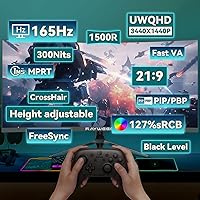
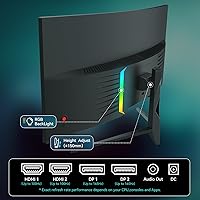
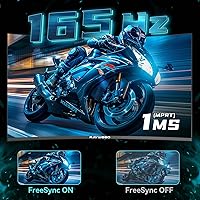
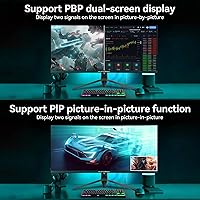
Push this budget ultrawide to 165Hz via DisplayPort and the improvement in motion clarity is immediately noticeable in fast-paced titles. The 1ms MPRT response time keeps ghosting manageable during quick camera sweeps, and AMD FreeSync delivers tear-free performance regardless of whether you're on an AMD or Nvidia GPU. Connectivity is a genuine strength — two HDMI 2.0 ports and two DisplayPort 1.4 inputs let you keep a PC and console plugged in at the same time. The Picture-in-Picture mode adds real flexibility for streamers or dual-system workflows. Color coverage at 99% sRGB is solid for gaming and everyday use, though the 300-nit ceiling means the HDR label here is entry-level, not the high-brightness HDR you'd find on premium panels.

Best For

This ultrawide curved monitor makes the most sense for buyers stepping up from a standard 27-inch 1080p display who want a meaningful upgrade without spending on an LG UltraWide or Samsung Odyssey. The 21:9 aspect ratio pays off immediately for productivity — spreadsheets, code editors, and side-by-side browser tabs all benefit from the extra horizontal room. Budget-minded gamers chasing fluid, high-refresh gameplay in immersive titles will find it hits the right notes. The dual HDMI ports make it a natural pick for console and PC hybrid setups, and the matte panel earns extra credit for anyone working near a window. Just plan for external audio from the start.

User Feedback

Early buyers frequently praise out-of-box image quality as a pleasant surprise, with several noting the curve feels more immersive than anticipated on a first ultrawide. FreeSync performance earns consistent positive mentions as well. On the downside, stand wobble surfaces as a recurring minor complaint, and some owners report needing manual color calibration before the image looks balanced. Occasional backlight bleed reports are not unusual at this price point, but worth factoring in. Because Raywego is a newer brand, long-term support reliability remains an open question, and that uncertainty is a fair reason to weigh the two-year warranty claim carefully — few buyers have had enough time to truly test it.

Pros

  • 165Hz refresh rate via DisplayPort makes fast-paced gaming noticeably smoother than typical 144Hz budget alternatives.
  • AMD FreeSync keeps gameplay tear-free without requiring a specific GPU brand, which adds real flexibility.
  • Four video inputs — two HDMI 2.0 and two DP 1.4 — make multi-device setups straightforward and practical.
  • The 1500R curve wraps the 34-inch panel comfortably into your peripheral vision without feeling overdone.
  • 99% sRGB coverage delivers vivid, well-saturated colors for gaming and everyday productivity tasks.
  • Picture-in-Picture mode is a genuine workflow tool for streamers or dual-system users, not just a spec-sheet checkbox.
  • The matte anti-glare surface handles bright room conditions better than glossy panels at this price tier.
  • Out-of-box image quality draws consistent praise from early buyers, which suggests solid factory calibration.
  • A two-year warranty offers reasonable coverage for a budget-tier ultrawide from a newer manufacturer.
  • At its price point, the sheer screen size and resolution combination is difficult to match from established brands.

Cons

  • Panel type is not disclosed — buyers cannot confirm VA or IPS before purchasing, which matters for color and contrast expectations.
  • The 75x75mm VESA pattern is non-standard and incompatible with most popular third-party monitor arms.
  • HDR support is entry-level at best; 300 nits is far below what meaningful HDR performance requires.
  • No built-in speakers means additional cost and desk space for external audio are necessary from day one.
  • Stand stability complaints appear in early user reports, which can be frustrating on a monitor this wide.
  • Some buyers report needing manual color calibration out of the box before the image looks balanced.
  • Raywego has no established track record, making long-term reliability and warranty follow-through an open question.
  • Backlight bleed has been flagged by a portion of early users, a known risk at this price tier.
  • The 165Hz maximum is only confirmed via DisplayPort; HDMI users likely face a lower refresh rate ceiling.

Ratings

Our AI rating system analyzed verified global buyer reviews for the Raywego Q34DB45-1 34-inch Curved Gaming Monitor, actively filtering out incentivized, bot-generated, and duplicate submissions to surface what real users actually experience. The scores below reflect a transparent synthesis of both the genuine strengths and the frustrations that emerge after extended daily use — not just first-impression enthusiasm. Buyers considering this budget ultrawide will find an honest picture of where it delivers and where it asks for compromise.

Value for Money
88%
For buyers stepping into the ultrawide category without flagship-brand pricing, this budget ultrawide consistently surprises. The combination of 3440x1440 resolution, 165Hz refresh rate, and four video inputs at this price tier is genuinely difficult to match, and most users feel they got more than they paid for.
The value equation depends heavily on expectations — buyers who compare it directly to LG or AOC panels at twice the price will notice the gaps in build finish and color consistency. A few users felt the stand quality undercut an otherwise strong deal.
Gaming Performance
84%
The 165Hz refresh rate via DisplayPort makes a real difference in fast-paced titles, and FreeSync works reliably across both AMD and compatible Nvidia setups. Players moving from a 60Hz panel describe the difference as immediately obvious during rapid camera movement.
The MPRT-based 1ms spec can be misleading — traditional gray-to-gray response is slower, and some users notice residual ghosting in very dark, fast-moving scenes. The advertised refresh rate also drops when using HDMI instead of DisplayPort.
Image Quality
74%
26%
Out-of-box color presentation earns consistent praise from everyday gaming and productivity users, with 99% sRGB coverage translating to punchy, well-saturated visuals. The matte surface keeps the image readable under office lighting without distracting reflections.
Some units arrive with color temperature that skews noticeably cool or warm, requiring manual OSD calibration before the image looks natural. Brightness at 300 nits is adequate indoors but falls short in sun-lit rooms or for anyone who relies on a vivid HDR experience.
HDR Performance
51%
49%
HDR mode does produce a visible lift in contrast and color range compared to SDR in supported games and streaming content. For casual users who have never used a higher-tier HDR display, the effect feels like a meaningful enhancement.
At 300 nits peak brightness, the HDR implementation is entry-level in every practical sense — there is no local dimming, and highlights cannot reach the luminance levels needed for truly impactful HDR scenes. Experienced users who have used proper HDR monitors will find this underwhelming.
Build Quality
67%
33%
The monitor body itself feels reasonably solid for its price tier, and the slim bezel design gives the setup a cleaner look than older budget monitors. At 14 pounds, it is lightweight enough to reposition without help.
The stand is the most commonly criticized element — multiple users report visible wobble when the desk is bumped or the screen is adjusted. Plastic panel housing shows minor flex under pressure, which is consistent with the lightweight chassis at this price point.
Stand & Ergonomics
58%
42%
The included stand holds the monitor at a functional height for most desktop setups and does not require tools beyond basic assembly. For stationary, set-and-forget configurations, most users find it adequate.
There is no height adjustment, swivel range is minimal, and the wobble issue reported by multiple buyers makes it frustrating for users who frequently reposition their monitor or work on vibration-prone surfaces. An aftermarket arm is the practical fix, though the 75x75mm VESA pattern limits compatible options.
Connectivity
87%
Four video inputs — two HDMI 2.0 and two DisplayPort 1.4 — make this one of the stronger connectivity offerings in its price class. Users with a PC and console running side by side report that switching inputs is quick and reliable through the OSD.
There is no USB hub, which is a missing convenience that competing monitors in a similar price range sometimes include. The audio output is a basic 3.5mm jack with no volume control on the port itself, requiring adjustment through the connected device.
Color Accuracy
71%
29%
The 99% sRGB gamut gives everyday gaming and web content a richly saturated look that most buyers in this category find satisfying. Colors across common use cases — streaming, productivity, and casual gaming — are pleasing and consistent after calibration.
Factory calibration varies between units, and the undisclosed panel type means buyers cannot predict whether they are getting the wider viewing angles of IPS or the deeper blacks of VA. Professional color work is not a realistic use case at this accuracy level.
Screen Curvature
82%
18%
The 1500R curvature strikes a balance that most users find comfortable for both gaming immersion and extended work sessions — curved enough to feel enveloping without creating distortion in productivity applications or spreadsheets near the edges.
A small number of users seated closer than the recommended viewing distance report mild distortion in straight-line content like spreadsheets or code editors. Those transitioning from flat monitors sometimes need a brief adjustment period before the curve feels natural.
Refresh Rate Consistency
76%
24%
When connected via DisplayPort and with FreeSync active, the 165Hz refresh rate performs reliably across extended gaming sessions. Users specifically running AMD GPUs report smooth, tear-free performance that holds up well over time.
The refresh rate advantage is partly locked behind the DisplayPort connection — HDMI users are working with a lower ceiling, and the listing does not clearly communicate this distinction. A handful of users also reported needing to manually enable the higher refresh rate in their display settings after first setup.
Brightness & Glare Handling
72%
28%
The matte anti-glare coating is a genuine daily-use benefit, especially for users with overhead lighting or windows behind them. It eliminates the mirror-like reflections that plague glossy panels in typical home and office environments.
The 300-nit brightness cap becomes a real limitation in bright rooms or near south-facing windows during daytime. Users who previously owned higher-brightness panels may find themselves pushing the monitor to maximum brightness more often than expected.
Panel Uniformity
63%
37%
A portion of buyers report clean, even backlighting across the majority of the screen surface, which is a reasonable outcome for a curved VA-type panel at this price. Dark backgrounds in gaming and video content look consistent for most of the panel area.
Backlight bleed in corners and uneven luminance in dark scenes appear in a meaningful percentage of early user reports — a known risk with budget curved panels. Those sensitive to clouding or glow in dark room gaming conditions may want to inspect the panel early in the return window.
Setup & Installation
83%
Assembly is straightforward — the stand attaches without tools, cables are included, and most users report being display-ready within fifteen minutes of opening the box. The OSD menu is navigable without consulting the manual for basic adjustments.
Getting the most out of the monitor requires manual steps that are not well-documented: enabling the full refresh rate in system display settings, activating FreeSync in GPU software, and dialing in color temperature through the OSD. New monitor buyers may find this less intuitive.
Brand Trust & Support
54%
46%
The two-year warranty is a reasonable commitment for a budget-tier brand, and early buyers who have contacted Raywego support report responses that are at least functional. The warranty coverage for damage and missing accessories is broader than some competitors offer.
Raywego is a newly launched brand with no established long-term track record, and that uncertainty is a legitimate concern when buying a monitor expected to last several years. User experiences with warranty claims beyond initial contact are sparse, making it difficult to assess follow-through reliability.
Eye Comfort
77%
23%
The matte surface and the monitor's eye care features — which typically include flicker reduction and low blue light modes — make extended sessions more comfortable for users sensitive to screen fatigue. Several users specifically mention reduced eye strain during long work-from-home days.
The eye care features are not well-specified in the product documentation, so buyers cannot confirm the exact flicker reduction frequency or the degree of blue light filtering applied. Users with significant light sensitivity may want to supplement with third-party software like night mode tools.

Suitable for:

The Raywego Q34DB45-1 34-inch Curved Gaming Monitor is a strong fit for buyers who want a genuine ultrawide experience without committing to a flagship-brand price tag. If you're upgrading from a standard 27-inch 1080p screen, the jump to 3440x1440 on a curved 21:9 panel will feel substantial — more screen real estate for side-by-side apps, wider field of view in games, and a noticeably more immersive workspace overall. Casual to mid-level gamers who prioritize smooth motion over absolute color accuracy will appreciate the 165Hz refresh rate and FreeSync support. The dual HDMI and dual DisplayPort inputs also make this a practical pick for anyone running a PC and console simultaneously, or those who hot-swap between two machines regularly. Home office users who work near windows or under bright overhead lighting will find the matte anti-glare surface a quiet but meaningful daily benefit.
Not suitable for:

Buyers who prioritize display accuracy for photo editing, video grading, or any color-critical professional work should look elsewhere — the Raywego Q34DB45-1 34-inch Curved Gaming Monitor tops out at 300 nits and carries an HDR badge that reflects entry-level implementation rather than true high-dynamic-range performance. The panel type is not clearly disclosed in the product listing, which is a red flag for anyone making a purchase decision based on VA versus IPS characteristics. If you plan to use a third-party monitor arm, double-check your arm's compatibility first, since the 75x75mm VESA pattern is less common than the standard 100x100mm and many popular arms do not support it. Those who need built-in speakers for a cleaner desktop setup will need to budget for external audio. Finally, buyers who place high value on established brand support and a well-documented warranty track record may prefer sticking with names like LG, AOC, or ASUS, given that Raywego is still an unproven quantity when it comes to long-term reliability and service.
Specifications

  • Screen Size: The panel measures 34 inches diagonally, formatted in a 21:9 ultrawide aspect ratio.
  • Resolution: Native resolution is 3440x1440 pixels (UWQHD), offering significantly more horizontal workspace than a standard 1080p or 1440p 16:9 display.
  • Curvature: The panel uses a 1500R curvature radius, meaning the screen bends to match the approximate focal arc of human vision at typical viewing distances.
  • Refresh Rate: Maximum refresh rate is 165Hz when connected via DisplayPort 1.4; HDMI 2.0 connections likely cap at a lower refresh rate ceiling.
  • Response Time: Rated at 1ms MPRT (Moving Picture Response Time), which reflects motion blur reduction rather than traditional gray-to-gray pixel transition speed.
  • Brightness: Peak brightness is 300 cd/m², suitable for moderately lit rooms but not designed for high-ambient-light or true HDR performance environments.
  • Color Gamut: Covers 99% of the sRGB color space, providing accurate and vivid color reproduction for gaming and general productivity use.
  • Color Depth: Supports 8-bit color depth, rendering up to 16.7 million colors across the display.
  • HDR Support: HDR is supported at an entry level; given the 300-nit brightness ceiling, the HDR effect is modest compared to dedicated HDR monitors with higher peak luminance.
  • Sync Technology: AMD FreeSync is supported, synchronizing the monitor's refresh rate with a compatible GPU to reduce screen tearing and stuttering during gameplay.
  • Connectivity: Inputs include two HDMI 2.0 ports, two DisplayPort 1.4 ports, and one 3.5mm audio output jack; no USB hub is included.
  • Picture-in-Picture: PiP mode allows two video sources to be displayed simultaneously on screen, useful for dual-system or streaming workflows.
  • Panel Surface: The screen uses a matte anti-glare coating, which reduces reflections from ambient light sources without introducing heavy graininess.
  • VESA Mount: Wall mount compatibility follows a 75x75mm VESA pattern — note this is smaller than the more common 100x100mm standard used by most third-party monitor arms.
  • Dimensions: The monitor body measures approximately 31.7 x 17.5 x 2.4 inches (width x height x depth) with the stand attached.
  • Weight: Total unit weight is 14 pounds, which is on the lighter end for a 34-inch ultrawide panel.
  • Speakers: There are no built-in speakers; an external audio solution is required for sound output.
  • Warranty: Raywego provides a 2-year limited warranty covering defects, malfunctions, and missing accessories through their customer support team.
  • Manufacturer: This monitor is manufactured by Shenzhen Yundacheng Technology Co., Ltd. and sold under the Raywego brand name.
  • Power Input: The monitor operates at 12 volts DC input, supplied via the included power adapter.

Related Reviews

Sealan 34-inch Ultrawide Curved Gaming Monitor Q34P4D-1
83%
91%
Visual Quality
88%
Gaming Performance
79%
Build Quality
93%
Color Accuracy
85%
Connectivity Options
More
Alienware AW3425DWM 34-inch Curved Gaming Monitor
82%
91%
Image Clarity & Sharpness
89%
Refresh Rate & Motion Performance
93%
Ultrawide Immersion
84%
Color Accuracy & Vibrancy
62%
HDR Performance
More
Dell S3422DWG 34-inch Curved Gaming Monitor
83%
88%
Image Quality
84%
Refresh Rate & Smoothness
93%
Curvature & Immersion
54%
HDR Performance
91%
Build Quality & Design
More
Great Voell 34-Inch Curved Gaming Monitor
86%
92%
Visual Quality
89%
Gaming Performance
85%
Ergonomics & Adjustability
80%
Setup & Installation
91%
Value for Money
More
Xiaomi 34-inch Curved Gaming Monitor G34WQi
84%
94%
Display Quality
91%
Gaming Performance
88%
Color Accuracy
82%
Build Quality
89%
Value for Money
More
Westinghouse 34-inch Curved Ultrawide Gaming Monitor
86%
87%
Display Quality
91%
Gaming Performance
92%
Value for Money
85%
Ease of Setup
78%
Built-in Speakers
More
Acer Nitro XZ342CU 34-inch Curved Gaming Monitor
84%
92%
Gaming Performance
90%
Display Quality
88%
Build Quality
85%
Ergonomics and Adjustability
80%
Connectivity Options
More
ASUS TUF VG34VQL1B 34-inch Curved Gaming Monitor
78%
83%
Image Quality
89%
Refresh Rate & Smoothness
78%
Response Time & Motion Clarity
81%
Adaptive Sync Performance
54%
HDR Performance
More
SANSUI ES-G34C5 34-inch Curved Gaming Monitor
73%
91%
Value for Money
84%
Image Quality & Color Accuracy
83%
Refresh Rate & Smoothness
47%
HDR Performance
41%
Ergonomics & Stand Adjustability
More
MSI Optix MAG342CQR 34-inch Curved Gaming Monitor
88%
93%
Display Quality
92%
Gaming Performance
87%
Build Quality
88%
Design & Aesthetics
85%
Ergonomics & Adjustability
More

FAQ

FreeSync works natively with AMD graphics cards, but many Nvidia GPUs also support FreeSync displays through Nvidia's G-Sync Compatible mode. Check your GPU settings to enable it — most mid-range and newer Nvidia cards handle it without issues.

The full 165Hz refresh rate is confirmed via DisplayPort 1.4. When using HDMI 2.0, the refresh rate is likely capped lower — commonly 100Hz or 144Hz depending on resolution — so for competitive gaming, a DisplayPort connection is the better choice.

That depends on your arm. The Raywego Q34DB45-1 34-inch Curved Gaming Monitor uses a 75x75mm VESA pattern, which is less common than the 100x100mm standard found on most monitors and supported by most popular arms. Before buying an arm, confirm it explicitly lists 75x75mm compatibility — many do not.
Honest answer: it's modest. At 300 nits peak brightness, the HDR performance is entry-level. You will see some improvement in contrast and color pop in HDR-enabled games or content, but it won't compare to monitors with dedicated HDR zones and 600+ nits output. Treat it as a bonus rather than a headline feature.

Yes, this is one of the more practical strengths of this ultrawide. With two HDMI ports and two DisplayPort inputs, you can keep a console and a PC connected simultaneously and switch between them through the on-screen menu without unplugging anything.

Unfortunately, Raywego does not disclose the panel type in the product listing, which is a genuine gap in the product information. Based on the specs — particularly the 1500R curvature and brightness level — it is more consistent with a VA panel, but this has not been officially confirmed. If the panel type is a deciding factor for you, reaching out to Raywego support before purchasing is advisable.

Most buyers find the image usable straight out of the box, and several report being pleasantly surprised by the color quality. That said, some users do note that default settings lean slightly cool or oversaturated, and a quick manual calibration through the OSD menu brings it closer to accurate. It's worth spending ten minutes adjusting brightness, contrast, and color temperature when you first set it up.

The stand does its job for everyday use, but a handful of early users have flagged minor wobble — particularly noticeable when adjusting the screen or bumping the desk. Given the monitor's relatively light 14-pound weight, this isn't uncommon at this price tier. If stand rigidity matters to you, a VESA arm is worth considering, provided it supports the 75x75mm pattern.

Yes — the monitor includes a Picture-in-Picture mode that lets you display two video sources simultaneously. It's particularly handy if you're running a secondary system for communication or monitoring while your primary source takes up most of the screen.

Raywego offers a 2-year warranty and encourages buyers to contact their support team directly for damage, malfunctions, or missing accessories. Since this is a newer brand without a long track record, keep your purchase receipt and document any issues with photos early. Response quality from newer brands can vary, so reaching out promptly rather than waiting is always the safer approach.