Overview

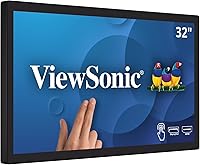
The ViewSonic TD3207 32-Inch Touch Monitor is not designed for a home office or a typical desk setup — it is built for environments where displays take real punishment and cannot afford downtime. The open-frame chassis makes it straightforward to integrate into custom kiosk enclosures, POS terminals, or digital signage rigs without fighting a consumer-oriented stand. Rated for 24/7 continuous operation, it occupies a different category than the monitors most people casually shop for. The price reflects that reality. This is a commercial investment, and it only makes financial sense if your deployment genuinely demands that level of durability and sustained uptime.
Features & Benefits

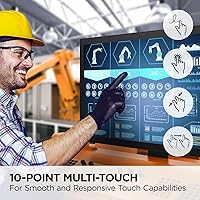
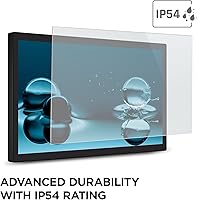
The 10-point PCAP touch technology is a meaningful step above resistive panels common in older commercial displays — it registers multiple simultaneous inputs accurately, which matters for everything from interactive directories to fast-paced POS workflows. The screen is protected by 3mm-thick, 7H-hardness glass with an IP54 rating, so dust and incidental water splashes are non-issues in retail or food service settings. Connectivity spans HDMI, DisplayPort, USB-B, and RS232, covering modern laptops and legacy hardware alike. Mac users get a genuine and uncommon bonus — vTouch driver support enables native touch gestures on macOS, something most commercial monitors in this class simply do not offer.

Best For

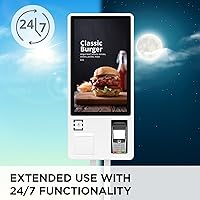
This touch display makes the most sense in professional commercial deployments. Retail and hospitality businesses running it as a POS terminal display will appreciate the always-on rating and the durable surface — high-traffic countertops are exactly the environment it was engineered for. Public-facing interactive kiosks are another strong use case, where the IP54 protection and scratch-resistant glass hold up to unpredictable daily use. The dual VESA mount options give integrators real flexibility across portrait, landscape, and face-up orientations. Mac-based retail or creative studios running touch-enabled workflows are a smaller but legitimate audience. Home users, however, should look elsewhere entirely.

User Feedback

Across roughly 264 ratings, the TD3207 holds a 4.2-star average — respectable, though not without honest caveats. Buyers consistently praise touch responsiveness and build quality, and commercial integrators tend to highlight how cleanly it fits into custom mounting setups. The criticisms are predictable but worth understanding: at 32 inches, 1080p produces a lower pixel density than many buyers anticipate, which stands out to anyone accustomed to sharper panels. A handful of reviewers noted setup friction, particularly around macOS driver installation. The price also draws occasional pushback from buyers who underestimated how niche this monitor truly is. Satisfied users are almost exclusively in commercial or professional contexts.

Pros

  • Rated for 24/7 continuous operation, making it genuinely reliable for always-on commercial deployments.
  • The 10-point PCAP touch panel registers multi-finger input accurately and holds up well in fast-paced POS environments.
  • IP54 protection and 7H-hardness glass handle daily exposure to dust, splashes, and surface contact without issue.
  • Open-frame design integrates cleanly into kiosks and custom enclosures with two VESA mounting configurations.
  • RS232 input alongside HDMI and DisplayPort means compatibility with legacy POS hardware and modern systems alike.
  • MacOS touch gesture support via the vTouch driver is a rare feature in commercial monitors at this size.
  • The advanced cooling system and burn-in prevention give operators confidence running graphics-rich content around the clock.
  • Build quality consistently earns praise from commercial integrators who put it through real-world deployment conditions.
  • Portrait, landscape, and face-up orientation support offers meaningful flexibility for varied installation types.
  • A 4.2-star average across a substantial number of commercial buyer reviews reflects genuine field-level satisfaction.

Cons

  • At 32 inches, 1080p resolution yields noticeably soft pixel density compared to modern higher-resolution panels.
  • The price is steep for buyers whose use case does not specifically require 24/7 operation or IP54 durability.
  • MacOS touch support requires manual driver installation and is not available for iPhones or iPads.
  • Some buyers report setup complexity, particularly when configuring the display within non-standard commercial environments.
  • The open-frame design has no standalone mounting solution, requiring a separate enclosure or integration plan.
  • At over 28 pounds, physical installation demands planning and likely more than one person for secure mounting.
  • No adjustable stand is included, which limits flexibility for users who have not accounted for a custom housing.
  • Occasional compatibility edge cases have been reported when connecting to less common legacy hardware configurations.

Ratings

The scores below reflect our AI-driven analysis of verified global buyer reviews for the ViewSonic TD3207 32-Inch Touch Monitor, with spam, bot-generated, and incentivized submissions actively filtered out before scoring. Ratings are built from real commercial deployment feedback spanning retail, hospitality, kiosk, and digital signage use cases. Both the standout strengths and the legitimate frustrations buyers encountered are transparently factored into every category score.

Touch Responsiveness
88%
Commercial integrators consistently report that the 10-point PCAP panel keeps up reliably in fast-paced POS environments — cashiers and kiosk users rarely experience missed inputs or lag during multi-finger interactions. Pinch and swipe gestures register cleanly, which matters in self-service or interactive signage contexts where hesitation erodes the user experience.
A small number of buyers noted occasional calibration drift after extended continuous operation, requiring a recalibration cycle. This is uncommon but worth monitoring in deployments where precision touch targeting is critical, such as detailed form-entry kiosks.
Build Quality
91%
The combination of 3mm tempered glass, 7H surface hardness, and a solid metal open-frame chassis earns consistent praise from installers who have fielded commercial displays before. Buyers running the TD3207 in high-traffic retail countertops report no significant surface degradation even after months of heavy daily contact.
A handful of reviewers noted that the internal cable management options within the frame are limited, which can create minor complications during professional enclosure integration. The weight — over 28 pounds — also means that mounting hardware quality becomes a real concern during installation.
Durability & Protection
86%
The IP54 rating provides genuine peace of mind for food service counters and public kiosks where liquid splashes and dust exposure are routine. Buyers in hospitality environments specifically call out how well the display holds up to cleaning spray and ambient kitchen moisture over time.
IP54 does not cover high-pressure water or submersion, so environments involving hose-down cleaning routines will exceed the display's protection rating. A few buyers in more demanding industrial settings felt the dust protection, while adequate for retail, fell short of their requirements.
Resolution & Image Clarity
59%
41%
For its intended use cases — POS interfaces, kiosk menus, and digital signage viewed at arm's length — the 1080p output is functional and legible. Text rendering on standard business software is clean enough at typical interaction distances in retail or hospitality settings.
At 32 inches, 1080p produces a pixel density that noticeably trails modern consumer monitors of comparable size, and buyers who sit close to the screen regularly flag this as a visible trade-off. Anyone expecting the sharpness of a 1440p or 4K panel at this screen size will be disappointed, and this is one of the most cited criticisms across the review pool.
24/7 Operation Reliability
89%
Buyers running the TD3207 in always-on commercial environments — lobby displays, overnight retail kiosks, continuous digital signage — report stable performance without image burn-in or thermal issues over extended deployment periods. The engineering behind the cooling system appears to deliver on its promise in real-world installations.
A small number of users reported unexpected shutdowns during the initial break-in period, though most resolved after firmware updates or improved ventilation in their enclosures. Long-term reliability data beyond 18 months of deployment is still limited in the publicly available review pool.
Connectivity Range
84%
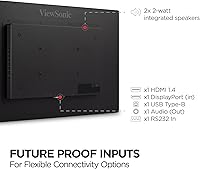
The inclusion of RS232 alongside HDMI and DisplayPort is a genuine differentiator for businesses that run mixed hardware environments — integrators managing both legacy POS terminals and modern computers appreciate not having to source adapters or separate interface boxes. USB Type-B for touch data transfer works cleanly with most modern host systems.
There is no USB-A hub functionality built into the display, which some integrators noted as a missed opportunity for cleaner peripheral cable management in kiosk builds. A few legacy hardware configurations produced compatibility edge cases that required additional troubleshooting to resolve.
MacOS Compatibility
73%
27%
Touch and gesture support on macOS is genuinely uncommon in commercial open-frame monitors at this size, and buyers running Apple-based retail or creative studio setups find the vTouch driver integration valuable once it is properly configured. For Mac-centric POS or interactive display workflows, this capability removes a significant barrier.
The driver installation process is not plug-and-play, and several Mac users reported a frustrating initial setup experience involving driver version conflicts or unclear documentation. The absence of iPhone and iPad support also limits the appeal for businesses that have shifted to iOS-based POS platforms.
Mounting Flexibility
87%
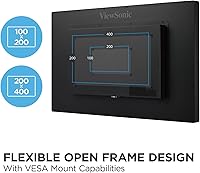
Dual VESA patterns (200x100mm and 400x200mm) give installers real options across portrait, landscape, and face-up configurations without requiring custom adapter plates in most cases. Commercial integrators routinely highlight this flexibility as a time-saver during multi-unit deployments with varied enclosure types.
The open-frame design assumes the buyer has a complete mounting plan in place — there is no standalone stand included, and users who underestimated the integration requirements have expressed frustration after purchase. Face-up installations require careful attention to enclosure design to maintain proper airflow around the cooling system.
Setup & Installation
67%
33%
For experienced AV integrators and commercial display installers, the setup process is logical and the VESA mounting points are well-positioned. Buyers with prior open-frame display experience generally report a smooth installation workflow, particularly for landscape-mounted POS counter builds.
First-time buyers unfamiliar with open-frame displays frequently underestimate the complexity involved in getting the unit properly housed and connected. MacOS driver setup compounds this for Apple users, and several reviewers noted that the included documentation does not adequately address non-standard configuration scenarios.
Value for Money
62%
38%
For commercial buyers whose deployments genuinely require 24/7 operation, IP54 protection, PCAP touch accuracy, and legacy RS232 connectivity, the price reflects a coherent set of engineering trade-offs rather than a luxury markup. Integrators who have priced comparable commercial touch displays recognize this as competitive within its category.
Home buyers or small businesses with modest touch display needs consistently feel the price is difficult to justify against the relatively modest 1080p resolution and the absence of consumer-friendly features. The value proposition is narrow — it only makes sense if your use case actually demands what this commercial monitor was built to do.
Viewing Angles
81%
19%
The IPS panel delivers wide, consistent viewing angles that hold up well in multi-viewer kiosk scenarios where people approach the display from varied positions. Color consistency from off-center angles is noticeably better than TN alternatives in the same commercial display segment.
Matte screen surface, while reducing glare effectively, can slightly mute perceived contrast and color vibrancy compared to glossy alternatives — a minor but noticeable trade-off in environments where visual impact of digital signage content matters most.
Glare & Ambient Light Handling
79%
21%
The matte surface coating handles bright retail and hospitality lighting environments competently, reducing reflections that would otherwise frustrate users trying to interact with the screen in well-lit spaces. Buyers in sunlit lobby installations specifically call this out as a practical advantage over glossy commercial panels.
In very high-ambient-light environments, such as near large windows or under strong directional spotlights, the display can lose some visibility without the option to push brightness higher. Peak brightness figures are adequate but not exceptional for the most demanding outdoor-adjacent installations.
Long-Term Consistency
83%
The burn-in prevention system appears to perform well across the review pool, with buyers running continuous graphical content reporting stable image quality over extended deployment periods. This is one of the most practically important features for digital signage operators and earns specific positive mentions in long-term user reviews.
A smaller subset of buyers reported subtle color shift after many months of continuous operation, which is not uncommon for IPS panels under 24/7 load conditions. This does not appear widespread but is worth factoring in for deployments with strict color consistency requirements.

Suitable for:

The ViewSonic TD3207 32-Inch Touch Monitor was built for commercial environments where consumer-grade hardware simply would not survive the workload. Retail businesses running point-of-sale terminals are the obvious primary audience — the always-on rating, durable glass surface, and IP54 splash resistance make it a practical fit for busy checkout counters and service desks. Hospitality operators building kiosk installations benefit from the open-frame design, which drops cleanly into custom enclosures without the bulk of a stand or bezel-heavy housing. Public-facing interactive displays in airports, lobbies, or museums also align well with what this monitor was engineered to handle. Businesses running a mix of legacy and modern hardware will appreciate the RS232 input sitting alongside HDMI and DisplayPort. Mac-based retail or creative studios are a smaller but genuine fit, especially given the vTouch driver support for native gesture controls on macOS — a capability that is genuinely hard to find in this product category.
Not suitable for:

The ViewSonic TD3207 32-Inch Touch Monitor is a poor match for anyone shopping for a home office display, a gaming monitor, or a general-purpose desktop screen. At 32 inches, the 1080p resolution produces a noticeably lower pixel density than modern consumers expect from panels in this size range — text and fine detail will look softer than they would on a comparable 1440p or 4K display. The price point reflects commercial-grade engineering, not premium image quality, and home buyers paying that much for a monitor will almost certainly find sharper, more versatile alternatives. The open-frame form factor also assumes professional integration — without a housing or enclosure, it is an awkward fit for a standard desk. MacOS touch support requires driver installation and is explicitly unavailable for iPhones and iPads, so casual Apple users expecting plug-and-play simplicity may be frustrated. Anyone prioritizing refresh rate, color accuracy, or high-resolution content for creative or entertainment use should look elsewhere.
Specifications

  • Screen Size: The display measures 32 inches diagonally, providing a large viewing surface suited for commercial kiosk and POS installations.
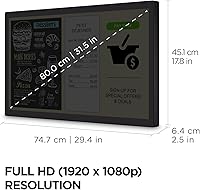
  • Resolution: Native resolution is 1920x1080 (Full HD), which delivers adequate clarity for most commercial applications but results in lower pixel density than higher-resolution panels at this size.
  • Panel Type: An IPS panel is used, offering consistent color reproduction and wider viewing angles compared to TN alternatives — useful in multi-viewer environments.
  • Touch Technology: 10-point Projected Capacitive (PCAP) touch technology enables accurate simultaneous multi-touch input, including pinch, swipe, and tap gestures.
  • Refresh Rate: The display operates at a 60Hz refresh rate, which is standard for commercial touch displays not intended for high-frame-rate content.
  • IP Rating: An IP54 rating provides protection against dust ingress and water splashes from any direction, making it suitable for demanding public-facing environments.
  • Glass Specs: The touchscreen surface uses 3mm-thick tempered glass rated at 7H hardness, offering meaningful resistance to scratches and surface impact.
  • Form Factor: The open-frame design has no external housing or stand, requiring integration into a custom enclosure, kiosk chassis, or mounting structure.
  • VESA Mounting: Two VESA mounting patterns are supported — 200x100mm and 400x200mm — enabling portrait, landscape, and face-up installation orientations.
  • Connectivity: Input options include HDMI, DisplayPort, USB Type-B, and RS232, covering modern computers and legacy point-of-sale hardware in a single unit.
  • MacOS Support: ViewSonic's vTouch driver enables native touch and gesture functionality on macOS devices; this driver is not compatible with iPhone or iPad.
  • Operation Rating: The TD3207 is rated for 24/7 continuous operation and includes an advanced cooling system and burn-in prevention for sustained use.
  • Screen Surface: The matte screen surface reduces glare and reflections, which improves visibility in brightly lit retail or hospitality environments.
  • Aspect Ratio: The display uses a standard 16:9 widescreen aspect ratio, compatible with virtually all commercial media and software interfaces.
  • Dimensions: The unit measures 2.5 x 29.4 x 17.8 inches (D x W x H), providing reference dimensions for enclosure design and mounting planning.
  • Weight: At 28.2 pounds, professional installation with appropriate mounting hardware and ideally more than one person is strongly recommended.
  • Color: The unit is finished in black, which suits most commercial integration contexts without drawing visual attention to the display housing.
  • Voltage: The monitor is rated at 240 volts; buyers in North American markets should confirm compatibility with their power infrastructure before purchase.

Related Reviews

ViewSonic VS3225-2K 32-inch QHD IPS Monitor
78%
88%
Image Clarity
81%
Color Accuracy
86%
Eye Comfort
83%
Build & Design
51%
Stand & Ergonomics
More
ViewSonic VX3276-2K-MHD 32-Inch Monitor
85%
92%
Display Quality
89%
Design and Aesthetics
77%
Build Quality
88%
Ease of Setup
94%
Flicker-Free and Eye Comfort
More
ViewSonic TD2760 27-Inch 1080p Touch Monitor
87%
91%
Touch Response
88%
Ergonomics & Comfort
84%
Display Quality
87%
Connectivity Options
90%
Build Quality & Durability
More
ViewSonic TD2455 24-Inch Touch Screen Monitor
84%
91%
Touch Responsiveness
89%
Display Quality
88%
Ergonomics & Comfort
85%
Connectivity & Ports
80%
Build Quality
More
ViewSonic TD2465 24-inch Touch Screen Monitor
86%
89%
Touchscreen Responsiveness
91%
Ergonomics and Comfort
85%
Connectivity Options
83%
Display Quality
88%
Build Quality and Durability
More
ViewSonic VX3267U-4K 32-inch 4K IPS Monitor
74%
91%
Image Sharpness
83%
USB-C Functionality
76%
Color Accuracy
54%
HDR Performance
47%
Stand & Ergonomics
More
ViewSonic VP3256-4K 32-Inch 4K UHD Monitor
88%
94%
Display Quality
92%
Color Accuracy
88%
Ergonomics & Comfort
86%
Build Quality
90%
Ease of Setup
More
ViewSonic VA3209M 32-inch FHD IPS Monitor
75%
91%
Value for Money
93%
Screen Size & Real Estate
78%
Image Quality & Color Accuracy
58%
Pixel Density & Sharpness
86%
Eye Comfort & Fatigue Reduction
More
ViewSonic VX3276-MHD 32-inch 1080p IPS Monitor
73%
88%
Value for Money
76%
Display Quality
61%
Sharpness & Pixel Density
83%
Eye Comfort & Ergonomics
58%
Stand & Build Quality
More
ViewSonic XG320U 32-Inch 4K UHD Gaming Monitor
87%
93%
Display Quality
91%
Gaming Performance
95%
Color Accuracy
88%
Build Quality
89%
Ergonomics
More

FAQ

It is genuinely rated for 24/7 continuous operation — this is an engineering specification, not a sales claim. The TD3207 includes an active cooling system and burn-in prevention features specifically designed to support around-the-clock use without degrading image quality over time. Consumer monitors are not built to this standard, so if your installation requires always-on performance, this distinction matters.

Open-frame means the display panel and electronics are sold without any enclosure, housing, or stand. It is designed to be mounted directly into a kiosk cabinet, POS counter, or custom-built structure using the included VESA mounting points. If you are expecting to set it on a desk out of the box, this is not the right display for that.

Projected capacitive touch is substantially more accurate and responsive than resistive technology. Resistive screens require physical pressure and typically only support single-touch input. PCAP registers up to 10 simultaneous touch points through light contact, supports natural gestures like pinch and swipe, and holds up better over time in high-use environments.

Yes, but it requires installing ViewSonic's vTouch driver — it does not work as plug-and-play on macOS the way it might on Windows. Once the driver is installed, touch and gesture controls function properly on supported Mac computers. Note that the vTouch driver does not extend to iPhones or iPads, only Mac desktop and laptop devices.

Yes, the RS232 input is specifically included for compatibility with legacy point-of-sale and industrial hardware. This makes the ViewSonic TD3207 32-Inch Touch Monitor one of the few modern commercial displays that bridges older serial-based systems and current HDMI or DisplayPort sources in a single unit.
IP54 provides protection against dust and water splashes, which covers most food service counter scenarios — incidental liquid contact, cleaning spray drift, and dusty storage areas are all within its tolerance. It is not waterproof and should not be exposed to direct water jets or submersion, so environments with high-pressure hose cleaning would exceed its rating.

It depends entirely on your use case. For POS interfaces, kiosk menus, digital signage, and standard business software, 1080p at 32 inches is functional and clear enough. If you are sitting close to the screen for detailed design work or expecting the sharpness of a modern 4K panel, the lower pixel density will be noticeable. Commercial deployments viewed at arm's length or farther tend not to have issues with it.

At just over 28 pounds, it is manageable but not a one-person job. Mounting it securely into a kiosk enclosure or onto a wall bracket requires planning — you will want appropriate VESA hardware and a second person during the actual mount. The dual VESA pattern options (200x100mm and 400x200mm) give installers flexibility for different enclosure designs and orientations.

Yes, the TD3207 supports portrait, landscape, and face-up (flat table) orientations through its VESA mounting system. This makes it well-suited for vertical kiosk installations, interactive table surfaces, or any configuration where a standard landscape orientation would not fit the application.

For a 7H-hardness glass surface rated at IP54, a soft microfiber cloth with a mild isopropyl alcohol solution is generally safe for routine cleaning. Avoid abrasive materials, ammonia-based cleaners, or anything applied in excess liquid. Given the commercial context, checking ViewSonic's official care recommendations before establishing a regular cleaning routine for your installation is a sensible step.