ViewSonic VX3276-2K-MHD 32-inch QHD Monitor

Overview
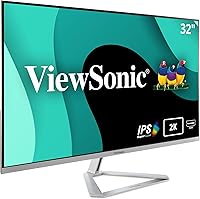
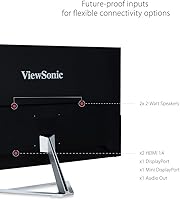
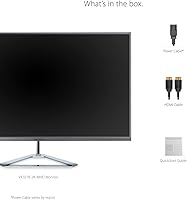
The ViewSonic VX3276-2K-MHD 32-inch QHD Monitor launched back in 2017, and the fact that it still sells well says something real about its staying power in a crowded mid-range market. At its core, this is a productivity-first display built around an IPS panel — which at 32 inches means genuinely wide viewing angles and consistent color rendering whether you're sitting square in front of it or glancing from the side. The matte screen finish is a quiet but practical win: ambient light doesn't turn your workspace into a mirror. Don't expect flagship-level specs. This ViewSonic display is built for reliable, all-day use, not bragging rights.
Features & Benefits
The 2560x1440 resolution spread across 32 inches hits a sweet spot — text stays sharp, spreadsheets gain real breathing room, and you're not squinting at tiny UI elements the way you might on a smaller panel. The 75Hz refresh rate won't impress anyone coming from a 144Hz rig, but for browsing, video playback, and light gaming, the difference over 60Hz is noticeable in daily scrolling. Long sessions are where Flicker-Free technology earns its keep — pairing it with the built-in Blue Light Filter genuinely reduces the heavy-eye feeling after hours at the desk. Connectivity covers HDMI, DisplayPort, and Mini DisplayPort, so switching between a laptop and desktop involves no adapters.
Best For
This 32-inch QHD screen makes the most sense for home office setups where screen space is the priority and 4K pricing isn't justified. Designers and photo editors doing color-critical work will appreciate the IPS accuracy, though it's worth noting this isn't a factory-calibrated professional panel — it performs well, but it's not a substitute for a purpose-built color display. Students who spend hours reading and writing will find the eye-care features particularly valuable. Casual gamers who enjoy visually rich single-player titles will be satisfied; competitive multiplayer players chasing low latency should look elsewhere. The thin bezels also make it a natural fit for anyone running a dual-monitor configuration.
User Feedback
With over 8,000 ratings averaging 4.5 stars, the VX3276-2K-MHD has earned its reputation honestly. Buyers consistently praise out-of-box color as a genuine strength — many report being impressed without any manual calibration. Build quality also draws regular compliments for this price tier. The criticisms, though, are worth taking seriously: the stock stand only tilts, with no height or swivel adjustment, which frustrates enough users that many reach for a VESA arm fairly quickly. There's also no USB hub, which feels like an obvious omission on a desk-focused display. Backlight bleed shows up in a handful of reviews, particularly in dark-room use, though it isn't a widespread complaint. Long-term owners generally report solid durability after a couple of years.
Pros
- IPS panel delivers accurate, consistent colors and wide viewing angles at 32 inches — a genuine advantage for creative and office work alike.
- The matte screen coating cuts glare effectively, making this 32-inch QHD screen a practical choice for brightly lit rooms.
- 2560x1440 resolution on a 32-inch canvas provides sharp text and comfortable pixel density for all-day reading and multitasking.
- Flicker-Free technology and a built-in Blue Light Filter make extended work sessions noticeably easier on the eyes.
- 75Hz refresh rate offers a perceptible smoothness improvement over standard 60Hz monitors, benefiting casual gaming and general scrolling.
- Triple input support — HDMI, DisplayPort, and Mini DisplayPort — covers nearly every laptop, PC, and Mac without needing adapters.
- Ultra-thin bezels make the VX3276-2K-MHD a natural anchor for a clean dual-monitor setup.
- Color vibrancy straight out of the box is a consistent highlight in long-term owner reviews, with minimal calibration needed.
- VESA compatibility gives buyers the flexibility to ditch the stock stand and mount it at the ideal ergonomic height.
- Broad voltage support means it travels and relocates without any power compatibility concerns.
Cons
- The stock stand is tilt-only — no height adjustment, swivel, or pivot, which is a real ergonomic limitation for many users.
- No USB hub means no cable consolidation at the display, a frustrating omission for a desk-centric monitor.
- Backlight bleed and IPS glow have been flagged by a subset of owners, particularly noticeable during dark-scene content or low-light use.
- At 75Hz, this screen is simply not competitive for fast-paced or multiplayer gaming where higher refresh rates matter.
- The panel is not factory-calibrated, so color-critical professionals may need to invest time or money in a proper calibration workflow.
- No built-in speakers means users need separate audio — an extra expense and cable to manage.
- The physical footprint is substantial; at over 28 inches wide, this screen demands meaningful desk space.
- Preset view modes like Game and Movie are convenient in concept but offer limited real-world refinement compared to manual calibration.
Ratings
Our AI rating engine analyzed thousands of verified global owner reviews for the ViewSonic VX3276-2K-MHD 32-inch QHD Monitor, actively filtering out suspected bot activity, incentivized submissions, and unverified one-liners to surface what real long-term users genuinely think. Each score below reflects the honest consensus — strengths are credited where they are earned, and recurring pain points are reported without being softened.
Image Quality
Color Accuracy
Value for Money
Ergonomics & Stand
Eye Comfort
Build Quality
Connectivity
Text Clarity
Viewing Angles
Gaming Performance
Multi-Monitor Setup
Matte Screen Finish
Setup & Ease of Use
Long-Term Durability
Suitable for:
The ViewSonic VX3276-2K-MHD 32-inch QHD Monitor is a strong fit for anyone who spends the bulk of their day in front of a screen and wants more real estate without paying for 4K. Home office workers will appreciate how comfortably a 2560x1440 panel handles split-window multitasking — spreadsheets, documents, and browser tabs all coexist without feeling cramped. Designers and photo editors on a budget will find the IPS color accuracy more than adequate for general creative work, especially straight out of the box where color vibrancy consistently earns praise from actual owners. Students who log long reading or writing sessions benefit directly from the Flicker-Free and Blue Light Filter features, which take some of the edge off extended screen time. Anyone building a dual-monitor workstation will also value the thin bezels, which minimize the visual gap between displays and keep the setup looking clean.
Not suitable for:
Competitive gamers should look elsewhere — the VX3276-2K-MHD is not built for high-refresh-rate play, and 75Hz, while better than 60Hz for casual use, is a real limitation for fast-paced titles where 144Hz or higher makes a tangible difference. Color professionals requiring factory-calibrated accuracy — print designers, video colorists, or photographers doing critical output work — will find this panel falls short of what a dedicated wide-gamut display provides. Buyers who care about ergonomics should also think carefully: the stand offers tilt only, with no height adjustment or pivot, which is a recurring frustration among owners and often leads to purchasing a separate VESA arm. Those hoping for a convenient USB hub to consolidate desk cables will be disappointed, as this screen offers no such functionality. If desk space or portability is a concern, the monitor's footprint and 13-plus-pound weight may also give pause.
Specifications
- Panel Type: This monitor uses an IPS (In-Plane Switching) panel, delivering consistent color accuracy and wide viewing angles of up to 178 degrees both horizontally and vertically.
- Screen Size: The display measures 32 inches diagonally, providing a large working canvas well suited to multitasking, document-heavy workflows, and general creative use.
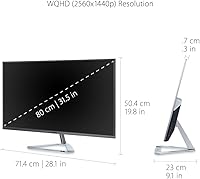
- Resolution: Native resolution is 2560x1440 (QHD/WQHD), producing noticeably sharper text and finer image detail than a standard 1080p display at this screen size.
- Refresh Rate: The panel supports a maximum refresh rate of 75Hz, offering smoother motion than a standard 60Hz display for everyday productivity and casual gaming.
- Response Time: Gray-to-gray response time is rated at 3ms, which is adequate for general productivity and light gaming but is not optimized for fast-paced competitive titles.
- Aspect Ratio: The screen uses a standard 16:9 widescreen aspect ratio, compatible with virtually all modern video content, operating systems, and productivity software layouts.
- Peak Brightness: Maximum brightness is rated at 250 cd/m², which is sufficient for typical indoor office environments but may feel dim in very brightly lit rooms.
- Contrast Ratio: Static contrast ratio is 1000:1, a standard figure for IPS panels that delivers solid differentiation between dark and light tones under most everyday viewing conditions.
- Screen Surface: The matte anti-glare coating diffuses reflections from ambient light sources, making this a practical choice for desks positioned near windows or overhead lighting.
- Color Coverage: The panel covers 99% of the sRGB color space, which is suitable for web design, hobbyist photo editing, and document work, though it does not address DCI-P3 or AdobeRGB workflows.
- Video Inputs: Connectivity includes one HDMI port, one full-size DisplayPort, and one Mini DisplayPort, allowing simultaneous connection of multiple devices without repeatedly swapping cables.
- Eye-Care Features: Flicker-Free technology eliminates backlight flicker at all brightness levels, while the built-in Blue Light Filter reduces high-energy short-wavelength light output to ease prolonged eye fatigue.
- View Presets: Five on-screen picture mode presets are available — Game, Movie, Web, Text, and Mono — enabling quick adjustments to color temperature and contrast for different content types.
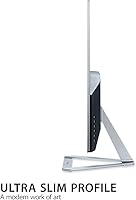
- Bezel Style: The ultra-thin bezel design on three sides of the panel minimizes the visual interruption between screens when the monitor is used in a dual or multi-display configuration.
- VESA Support: The display is VESA mount compatible, allowing users to remove the stock stand and attach a third-party monitor arm or wall mount for more flexible ergonomic positioning.
- Weight: The monitor weighs 13.64 pounds (approximately 6.18 kg) with the stand attached, which is typical for a 32-inch display in this market segment.
- Dimensions: With the stand, the unit measures 28.1 inches wide, 19.8 inches tall, and 9.1 inches deep, requiring a desk surface at least 10 inches front-to-back to accommodate it stably.
- Power Input: The monitor accepts 100–240V AC input at 50/60Hz, making it compatible with standard power outlets across North America, Europe, and most international markets without a voltage adapter.
Related Reviews
ViewSonic VX3276-MHD 32-inch 1080p IPS Monitor

ViewSonic VX3276-4K-MHD 32-inch 4K Monitor
ViewSonic VS3225-2K 32-inch QHD IPS Monitor
ViewSonic VS2725-2K 27-inch QHD Monitor
ViewSonic VG2748A-2K 27-inch QHD Monitor
ViewSonic VG2455-2K 24-inch QHD IPS Monitor
ViewSonic VA2715-2K-MHD 27-inch QHD Monitor
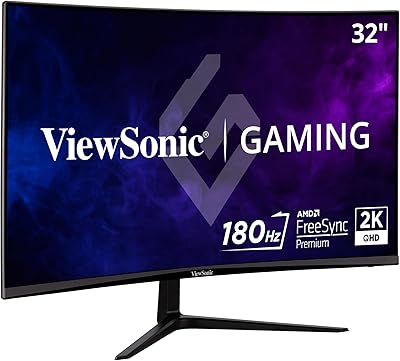
ViewSonic VX3218C-2K 32-inch Curved Gaming Monitor
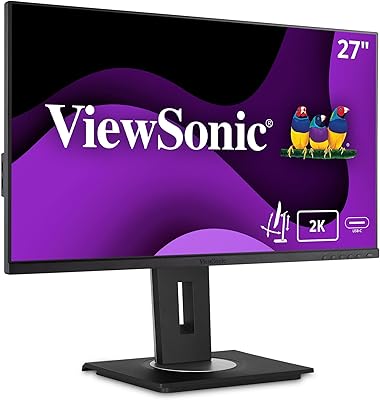
ViewSonic VG2756A-2K 27-inch Docking Monitor