Overview

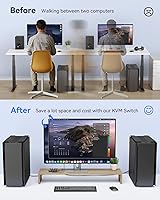
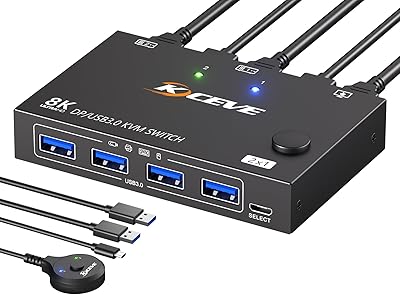
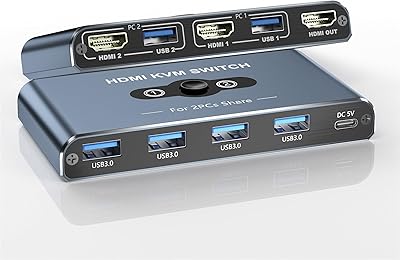
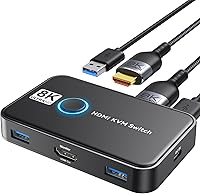
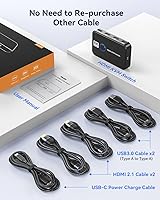
The Viagkiki 2-Computer 1-Monitor KVM Switch is a no-frills solution for anyone tired of juggling two computers on one desk. It lets you share a single keyboard, mouse, and HDMI monitor between two machines — and everything you need to get started ships in the box, including two USB and two HDMI cables. Switching between computers takes one button press, with an LED light confirming which machine is active. It sits at #133 in KVM Switches on Amazon with over 280 ratings at a 4.0 average — solid numbers for a budget-tier peripheral that keeps its promises simple and focused.
Features & Benefits

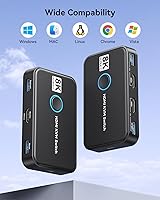
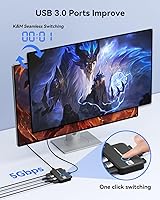
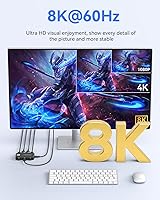
The Viagkiki switch advertises 8K@60Hz support, which looks impressive on paper — though hitting that resolution in practice depends heavily on your cables and monitor, so treat 4K@60Hz as the more reliably useful ceiling for most setups. USB 3.0 passthrough means you can share more than just a keyboard and mouse; plug in a printer or an external drive and it follows whichever computer is active. There are no drivers to install — it works on Windows, macOS, and Linux straight out of the box. The unit itself is small enough to tuck behind a monitor stand without a second thought.

Best For

This two-computer switcher is a natural fit for the home office dual-machine setup — think a work laptop and a personal desktop sharing one monitor and one set of peripherals. It also suits console-to-PC gamers who want a quick toggle without unplugging anything. Budget and desk space are the two variables that tend to push people toward a switch like this, and it addresses both without asking much in return. That said, if you need audio switching, multi-monitor support, or hotkey control, a more capable unit is worth the extra spend. For straightforward two-source setups, though, it delivers what it promises.

User Feedback

Buyers tend to appreciate how quickly this KVM switch gets up and running — most report having it working within minutes of unboxing, and the included cables regularly get called out as a genuine convenience. On the critical side, some users flag occasional switching lag and note that audio does not pass through the HDMI output, which catches people off guard if they expected full AV control. The 8K claim draws quiet skepticism; most find it performs reliably at 1080p and 4K but have not pushed it further. Build quality draws mixed comments — the plastic housing feels lightweight, though few report it actually failing with regular daily use.

Pros

  • Plug-and-play setup works across Windows, macOS, and Linux with zero driver installation required.
  • All necessary cables are included in the box, so there is nothing extra to order before getting started.
  • The compact two-inch footprint disappears on a crowded desk without claiming meaningful space.
  • USB 3.0 passthrough lets you share a printer or external drive between both computers, not just input devices.
  • A clear LED indicator confirms which machine is active at a glance, removing any guesswork mid-workflow.
  • Switching works reliably for standard office tasks and light gaming when used within its intended scope.
  • Broad device compatibility covers consoles, laptops, and TV boxes alongside standard desktop PCs.
  • The Viagkiki switch delivers genuine day-to-day convenience for home office users balancing two machines on one monitor.

Cons

  • Audio does not switch reliably alongside video, forcing manual sound source management after every toggle.
  • The plastic housing feels lightweight and draws consistent criticism from buyers expecting sturdier construction.
  • Switching lag appears under load, and occasional missed button presses disrupt focus during time-sensitive work.
  • The bundled one-meter cables are too short for anything but tightly arranged desk setups.
  • Long-term reliability is inconsistent — a pattern of failure between three months and one year shows up in reviews.
  • The 8K resolution claim is difficult to achieve in practice and depends on factors well outside this switch's control.
  • Wireless USB peripheral dongles sometimes lose pairing after a switch, requiring a manual reconnect.
  • No hotkey or software-based switching option exists, which limits convenience for fast-switching power users.
  • Newer console generations are not confirmed compatible, and real-world results with PS5 and Xbox Series X are inconsistent.

Ratings

The Viagkiki 2-Computer 1-Monitor KVM Switch earned its scores through AI analysis of verified global buyer reviews, with spam, incentivized, and bot-flagged submissions actively filtered out before any score was calculated. The result is an honest picture of where this budget two-computer switcher genuinely delivers and where it falls short — no cherry-picking, no inflated averages. Both the recurring praise and the consistent frustrations are reflected in equal measure across every category below.
Ease of Setup
91%
Most buyers report having this KVM switch running within five to ten minutes of opening the box, with no driver downloads or configuration menus to navigate. The included cables cover everything needed for a basic two-machine desk, which reviewers consistently call out as a time-saver compared to sourcing cables separately.
A small number of users on older Windows builds or certain Linux distributions encountered recognition delays on first boot, requiring a USB re-plug to get peripherals detected. These cases appear infrequent, but they do suggest the plug-and-play experience is not perfectly universal across every system configuration.
Switching Reliability
76%
24%
For most users doing standard office work — toggling between a work laptop and a personal desktop across an eight-hour day — the button press registers cleanly and the monitor re-syncs within a couple of seconds. Day-to-day reliability holds up reasonably well over the first few months of use according to the bulk of long-term reviewers.
Occasional missed button presses and intermittent switching lag show up repeatedly in critical reviews, particularly when switching rapidly or when one of the connected computers is under heavy load. Some users report the monitor taking noticeably longer to handshake after switching compared to pricier alternatives, which breaks focus during time-sensitive work.
Video Quality & Resolution
68%
32%
At 1080p and standard 4K resolutions, the Viagkiki switch passes a clean signal without visible degradation, which covers the practical needs of most home office and casual gaming setups. Users running 1440p monitors report no complaints about picture clarity during everyday productivity tasks.
The advertised 8K@60Hz spec is treated with skepticism by reviewers who have tried to push it — real-world results depend heavily on cable quality and monitor firmware, and few users confirm achieving it reliably. Buyers expecting a guaranteed 8K experience should verify their entire signal chain before assuming the switch is the limiting factor.
Build Quality & Durability
61%
39%
The compact plastic chassis does its job on a desk without taking up meaningful space, and the push button feels tactile enough for daily use without feeling like it will stick or misfire. Several reviewers note using the switch for six-plus months without any functional degradation, which is reasonable at this price tier.
The lightweight plastic housing divides opinion — some buyers find it acceptably minimal, while others describe it as feeling fragile or cheap to the touch. A handful of reviews mention the button becoming slightly less responsive over time, and the overall construction does not inspire confidence for users who want a peripheral that will last several years of heavy use.
Value for Money
83%
When assessed against what buyers actually need from a basic two-computer KVM — one monitor, one keyboard, one mouse, no drivers — the Viagkiki switch lands well on the value scale. The inclusion of all required cables in the box removes a common hidden cost that catches budget shoppers off guard with competing products.
Users who purchased expecting audio passthrough or hotkey switching found the value proposition weaker once they discovered those features are absent. For buyers with more than the most basic switching needs, the cost savings start to look less compelling when a modest upgrade in budget would unlock significantly more capable hardware.
Audio Passthrough
34%
66%
The HDMI connection technically carries audio data when the source device outputs it, and some users in straightforward monitor-plus-speakers setups report functional audio without additional steps. For systems where audio runs independently through the monitor speakers, basic sound switching works passively alongside the video signal.
This is one of the most frequently cited disappointments in negative reviews — many buyers assume HDMI-based KVM switches handle audio switching automatically, and this one does not reliably deliver that. Users with dedicated audio setups, headphone DACs, or external speaker systems find they still need to manually manage audio sources after every switch, which defeats part of the convenience appeal.
USB Peripheral Compatibility
79%
21%
Standard USB peripherals — keyboards, mice, and most plug-and-play printers — switch over cleanly without re-pairing or dropout issues in the majority of reported use cases. USB 3.0 speeds are adequate for sharing an external hard drive between machines, which a subset of reviewers specifically call out as a practical daily workflow benefit.
Wireless USB dongles for certain mice and keyboards occasionally lose pairing when switching, requiring a manual reconnect. A few users also report that high-draw USB devices, such as charging hubs or certain webcams, do not receive consistent power through the switch, pointing to real-world limits on the USB passthrough amperage.
Compatibility Range
82%
18%
The broad OS compatibility — covering Windows across multiple generations, macOS, and Linux — means most multi-machine users can deploy this switch without worrying about platform mismatches. Console users connecting a PS4 or Xbox One alongside a PC report the video switching works as expected for basic display sharing.
Compatibility with newer console generations (PS5, Xbox Series X) is not confirmed in the product specs, and reviewers who have tested those combinations report inconsistent results. Some macOS users on recent silicon-based Macs also mention needing a USB-C to USB-A adapter that slightly complicates the otherwise clean setup.
Cable Included Quality
66%
34%
The fact that both HDMI and USB cables are included at all is genuinely appreciated by budget buyers — it removes the need for a separate accessories order before getting started. The one-meter cable length suits compact desk arrangements where both computers sit within arm's reach of the switch.
The bundled cables are functional but basic, and reviewers with longer desk runs note that one meter falls short for anything but the tightest setups. A few users report the HDMI connectors fitting loosely in their monitor or GPU ports, raising minor concerns about long-term connection stability under repeated switching cycles.
Form Factor & Desk Footprint
88%
At roughly two inches square and under an inch tall, this two-computer switcher disappears on a desk — it can tuck behind a monitor base, sit flat on a cable management tray, or simply rest near the edge without claiming meaningful real estate. Reviewers with crowded standing desks and minimalist setups alike consistently praise how unobtrusive it is.
The small size, while generally a plus, makes the unit prone to sliding around on smooth desk surfaces when the button is pressed, since there is no rubber base or mounting option. A few users have attached adhesive pads underneath as a DIY fix, which works but feels like an oversight for a desk-bound peripheral.
LED Indicator Clarity
72%
28%
The LED light gives an immediate at-a-glance confirmation of which computer is currently active, which is a small but genuinely useful feature when you are switching frequently throughout a workday. Most users find the indicator bright enough to notice in normal office lighting without being distracting.
Some units ship with a green LED while others have blue, and the product listing does not clarify which you will receive — a minor but occasionally annoying inconsistency. In bright ambient light or on desks positioned at an angle to the switch, the indicator can be hard to spot without leaning forward to check directly.
Long-Term Reliability
63%
37%
A meaningful portion of reviewers who purchased this KVM switch over a year ago report it still functioning without any issues, which suggests the core hardware is reasonably durable for light-to-moderate daily switching. For users who switch a handful of times per day in a home office context, longevity complaints are relatively rare.
Among the more critical reviews, a pattern of hardware failure between the three-month and one-year mark does appear, typically described as the unit stopping to switch properly or USB devices no longer being recognized after switching. At the budget price point this may be an acceptable risk for some, but buyers seeking multi-year reliability should weigh it carefully.
Driver-Free Operation
86%
The zero-driver requirement is one of the most practically appreciated attributes in positive reviews — plug it in, and it works. IT-conscious buyers and users on managed corporate machines who cannot install third-party software particularly benefit from not needing admin rights or software installation to get up and running.
On a small number of systems — particularly certain Linux distributions with non-standard USB stack configurations — reviewers note that the plug-and-play behavior is less reliable than advertised, occasionally requiring a manual udev rule or port reassignment. This appears to be an edge case, but it is worth noting for Linux power users.

Suitable for:

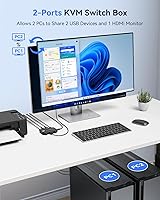
The Viagkiki 2-Computer 1-Monitor KVM Switch is a practical pick for anyone who needs a no-fuss way to share one monitor, keyboard, and mouse between two machines without spending much or installing any software. It fits naturally into home office setups where a work-issued laptop and a personal desktop coexist on the same desk, letting you flip between them with a single button press rather than unplugging cables every time. Remote workers, freelancers, and students who operate across two machines will find it removes a genuinely annoying daily friction point. It also suits budget-conscious desk gamers who want to toggle between a console and a PC on one screen without a dedicated A/V switch or manual cable swapping. If your needs are straightforward — two sources, one display, basic peripheral sharing — this two-computer switcher hits the brief without overcomplicating things.
Not suitable for:

The Viagkiki 2-Computer 1-Monitor KVM Switch is not the right tool for buyers whose workflows depend on audio switching, as the unit does not reliably route audio alongside the video signal, leaving external speaker and headphone DAC users managing sound sources manually after every switch. Anyone running more than one monitor, or planning to expand to a three- or four-computer setup in the near future, will quickly outgrow it — the hardware is fixed at a strict two-in, one-out configuration. Power users who rely on hotkey switching or software-based control will find the single physical button limiting during fast-paced workflows. Those expecting the advertised 8K resolution to work reliably out of the box should proceed with caution; real-world performance depends heavily on cable quality and monitor firmware compatibility that this switch cannot control. Finally, buyers who need a peripheral built for years of heavy daily use should consider investing in a more robust unit, as long-term durability at this price tier is genuinely mixed.
Specifications

  • Supported Computers: The switch connects to exactly two computers simultaneously, with one active at any given time.
  • Supported Monitors: A single HDMI monitor is shared between the two connected computers via one output port.
  • Max Resolution: The unit supports a maximum advertised resolution of 8K@60Hz, with full compatibility at 4K@60Hz, 4K@30Hz, and lower resolutions.
  • Video Interface: All video connections use the HDMI standard; no DisplayPort or VGA connectivity is available on this unit.
  • USB Standard: Peripheral passthrough runs over USB 3.0, supporting keyboards, mice, printers, and compatible external storage devices.
  • Switching Method: A physical push button on the top panel of the device toggles the active computer; no hotkey or software switching is supported.
  • LED Indicator: A single LED light on the unit changes color (green or blue depending on the unit shipped) to indicate which computer is currently active.
  • Driver Requirement: No drivers or software installation are required; the device operates as a plug-and-play peripheral on all supported operating systems.
  • Compatible OS: Officially supported operating systems include Windows XP through Windows 10, macOS, and Linux distributions.
  • Compatible Devices: In addition to standard PCs and laptops, the switch is compatible with PS3, PS4, PS4 Pro, Xbox One, and most HDMI-capable TV boxes.
  • Included Cables: The package includes two HDMI cables and two USB 3.0 cables, each approximately 1 meter (40 inches) in length.
  • Dimensions: The unit measures 1.97 x 1.97 x 0.79 inches, making it one of the more compact KVM switches in its category.
  • Weight: The device weighs 10.8 ounces including its housing, which is typical for a small passive KVM switch of this type.
  • Operating Voltage: The switch operates at 4.99 volts and draws power directly from the connected USB host ports — no external power adapter is required.
  • Current Rating: The unit is rated for a maximum current draw of 3 amps across its USB connections.
  • Housing Material: The outer casing is constructed from plastic, finished in matte black.
  • Brand & ASIN: Manufactured by Viagkiki; Amazon ASIN is B0CCY2W6YG, first listed in July 2023.
  • Protection Rating: The unit carries an IP69 international protection rating as listed in its technical specifications.

Related Reviews

MLEEDA Displayport KVM Switch 2 Computers 1 Monitor
84%
88%
Performance
92%
Ease of Setup
90%
Resolution Support
85%
USB Port Functionality
82%
Build Quality
More
UGREEN 2-Computer HDMI KVM Switch
72%
84%
Ease of Setup
78%
Video Quality
71%
Switching Reliability
88%
Desktop Controller
69%
USB Peripheral Sharing
More
AUKOKIOULA KVM Switch 2 Computers 1 Monitor 4K@60Hz
83%
91%
Switching Speed
88%
4K Resolution Quality
80%
USB Port Functionality
85%
Build Quality
82%
Compatibility with Other Devices
More
SUIDEK SJW-KM202B Dual Monitor KVM Switch
73%
83%
Ease of Setup
71%
Switching Reliability
79%
Display Quality
91%
Desktop Controller Usability
77%
USB Peripheral Sharing
More
CMSTEDCD SW330 Dual Monitor KVM Switch
77%
91%
EDID & Window Layout Preservation
88%
4K Display Quality
84%
Switching Speed & Responsiveness
79%
USB 3.0 Peripheral Sharing
61%
Setup & Initial Configuration
More
UGREEN AK500 Dual Monitor KVM Switch
77%
91%
Ease of Setup
88%
Switching Reliability
86%
Video & Display Quality
78%
USB Peripheral Sharing
83%
Build Quality & Materials
More
ANGEET HDMI KVM Switch 2 Monitors 2 Computers 4K@60Hz
85%
91%
Display Quality
88%
Ease of Setup
85%
USB Performance
93%
Compatibility with Systems
87%
Build Quality
More
TJCXELE 4K@144Hz Dual-Monitor DisplayPort KVM Switch
75%
88%
Video Output Quality
63%
Setup & Installation
82%
Switching Reliability
84%
Desktop Controller Usability
67%
USB Device Recognition
More
EVATEK 8K@60Hz DisplayPort KVM Switch 2 Monitors 2 Computers USB 3.0
84%
88%
Performance
91%
Value for Money
78%
Setup & Installation
94%
Display & Visuals
89%
Ease of Use
More
NAWEN HDMI KVM Switch 4 Computers 1 Monitor
86%
89%
Performance
93%
Resolution Support (8K/4K)
91%
Ease of Setup
85%
USB 3.0 Performance
87%
Switching Reliability
More

FAQ

No, the Viagkiki 2-Computer 1-Monitor KVM Switch is fully plug-and-play. Just connect the cables to your computers and monitor, plug in your keyboard and mouse, and it works. Windows, macOS, and Linux all recognize it without any driver downloads or configuration menus.
This is one of the most important things to know before buying: audio passthrough is not a reliable feature of this switch. If your monitor has built-in speakers and accepts audio over HDMI, you may get basic sound, but if you use external speakers or a headphone DAC connected separately, you will need to switch audio sources manually every time you toggle computers.

The 8K@60Hz claim is technically listed as a maximum, but getting there in practice is difficult. You would need an 8K-capable monitor, high-bandwidth HDMI 2.1 cables, and a GPU that outputs 8K — and most users find the bundled cables are not rated for that bandwidth. For practical purposes, treat 4K@60Hz as the reliable ceiling for everyday use.

For most users doing office work, the switch takes two to four seconds for the monitor to re-sync after pressing the button, which is acceptable for casual toggling. However, if you press the button rapidly or one of your computers is under heavy CPU or GPU load, the handshake can take longer or occasionally need a second press to register.

At one meter each, they work well if both computers sit within about three feet of the switch. If your desktop tower sits on the floor or your second machine is at the other end of a wide desk, you will likely need longer cables purchased separately. One meter is a fairly short run for anything but the most compact desk arrangements.

The official compatibility list covers PS3, PS4, PS4 Pro, and Xbox One — the previous generation and earlier. PS5 and Xbox Series X compatibility is not confirmed by the manufacturer, and user reports on those combinations are inconsistent. If you are specifically trying to connect a current-gen console alongside a PC, it is worth checking recent buyer reviews before committing.

In most cases, yes — wireless peripherals with a USB dongle work fine. The catch is that some wireless receivers lose their pairing signal during a switch and require a brief reconnect before responding again. Wired keyboards and mice switch more reliably without that hiccup, so if low-latency consistency matters to you, wired input devices are the safer choice here.

Yes, USB 3.0 passthrough supports sharing a printer between both machines. Whichever computer is currently active will have access to the shared printer, just as it would if the printer were plugged directly into that machine. Keep in mind that the printer connection hands off along with everything else when you switch, so printing from the inactive computer requires toggling first.

Not with this unit. There is no hotkey shortcut, no app, and no remote control option — the physical button on the device is the only way to switch. If hotkey switching is important to your workflow, you would need to look at a different model that supports keyboard shortcut toggling, which is common in mid-range and higher-end KVM switches.

User experiences vary more than you might expect for a simple device. Many buyers report no issues after a year or more of daily switching, while a noticeable portion of critical reviews describe failures — typically a stuck switch or unresponsive USB ports — somewhere between three months and a year of use. For light switching a few times a day in a home office, it tends to hold up reasonably well; for heavier or more demanding environments, the durability at this price tier is less predictable.