Overview

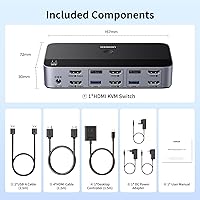
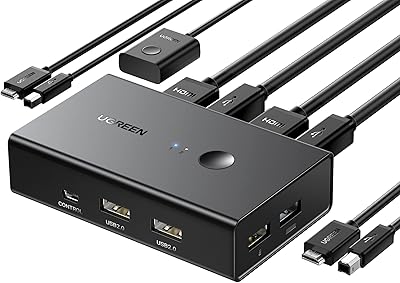
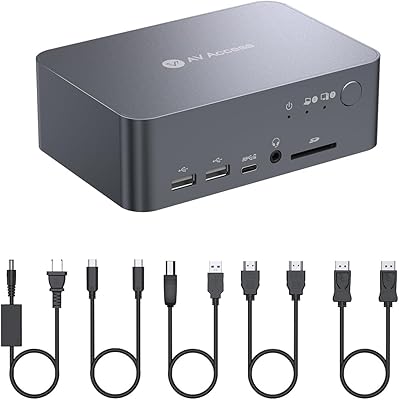
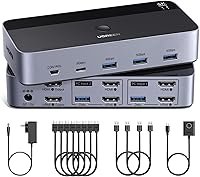
The UGREEN AK500 Dual Monitor KVM Switch sits squarely in the mid-range of a crowded category, designed for anyone tired of juggling cables between two machines on a single desk. The premise is straightforward: one keyboard and mouse controls both computers while both screens stay active. No driver installation is required — plug in the cables and you are running. One important caveat to flag early: this is an HDMI-only device. If your monitors use DisplayPort, this desktop sharing hub won't work for you. On the practical side, the package ships with four HDMI cables, two USB cables, a power adapter, and a separate desktop controller, so you're not scrambling for accessories on day one.
Features & Benefits

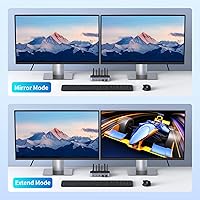
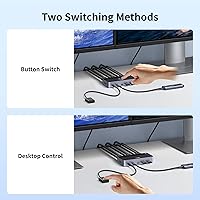
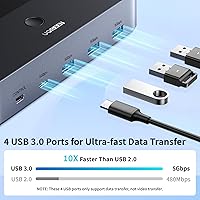
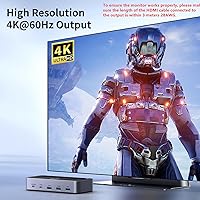
At 4K and 60 frames per second, the image quality from the UGREEN dual-monitor switch holds up well for photo editing, video work, or just having crisp text across two large screens. HDR10+ support adds real value for color-sensitive work. The four USB 3.0 ports — three USB-A and one USB-C — let you share a printer, external drive, or other peripherals between both machines without replugging. That USB-C port is worth clarifying: it's part of the shared USB hub, not a video or charging output. Connecting the power adapter is essential for the USB ports to function reliably — don't skip it. Switching works two ways: a button on the unit, or a wired desktop controller you can keep within arm's reach. Both extend and mirror modes are supported, giving you flexibility for different workflows.

Best For

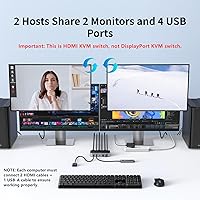
This desktop sharing hub makes the most sense for people running two separate computers from a single workspace — the classic scenario being a personal laptop and a work machine sharing the same keyboard, mouse, and two monitors. It's also well-suited for developers or designers who regularly switch between systems but can't afford a second full desk. One firm requirement worth repeating: each computer needs two HDMI output ports plus one USB-A port. That rules out many thin and light laptops, so check before purchasing. If you already have HDMI monitors and want everything in one box, this KVM switch is a strong fit. Those who want a clutter-free desk will particularly appreciate the included controller.

User Feedback

Users consistently praise how fast and reliable the switching is — press the button and both monitors respond without lag or flicker, which matters when you're jumping between machines frequently. Build quality earns positive mentions too, with the aluminum-and-ABS housing feeling more solid than its price suggests. That said, the lack of hotkey support is the most commonly cited frustration. If you're used to toggling between machines with a keyboard shortcut, this unit won't accommodate that — it's buttons only. A few users also note brief reconnection delays with USB peripherals right after switching, particularly with mice or keyboards that take a moment to re-initialize. The cable length restriction on HDMI outputs — under three meters — can also catch people off guard in larger desk setups.

Pros

  • Plug-and-play setup works straight out of the box — no drivers, no software, no configuration menus.
  • Ships with all necessary cables included, so most users need zero additional accessories.
  • 4K at 60Hz output keeps both monitors sharp and smooth for demanding visual work.
  • The desktop controller lets you switch computers without reaching behind your desk or the KVM unit itself.
  • Four USB 3.0 ports mean a printer, keyboard, and external drive can all stay connected and shared.
  • Supports both extend and mirror display modes, giving flexibility across different day-to-day workflows.
  • Works across Windows, macOS, and Linux without any per-system configuration.
  • HDR10+ support adds noticeable color depth for photo editing and video review on compatible monitors.
  • Solid aluminum-and-ABS build feels more durable than competitors at a similar price point.
  • The power adapter includes multiple regional plug variants, which is genuinely useful for international buyers.

Cons

  • No hotkey or keyboard shortcut support — every switch requires a physical button press.
  • Each connected computer must have two HDMI output ports, which rules out many modern slim laptops.
  • HDMI output cables must stay under three meters, limiting placement flexibility on larger desks.
  • USB peripherals can take one to three seconds to reconnect immediately after switching between computers.
  • The USB-C port is a basic hub port only — it does not support video output or device charging.
  • The desktop controller cable is fixed-length and may fall short on wider or more complex desk setups.
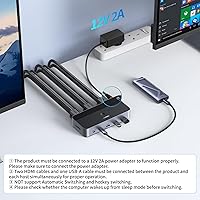
  • The power adapter must be connected for USB ports to function — easy to overlook during initial setup.
  • No support for DisplayPort monitors, which increasingly matters as newer displays move away from HDMI.
  • Included HDMI cables meet the minimum required spec but may need replacing for longer or 8K-ready runs.

Ratings

The UGREEN AK500 Dual Monitor KVM Switch has been evaluated by our AI system after processing thousands of verified global user reviews, with spam, bot activity, and incentivized submissions actively filtered out. Scores reflect the real distribution of buyer sentiment — strengths are credited where earned, and recurring frustrations are represented honestly. The result is a transparent picture of where this desktop sharing hub excels and where it falls short for different types of users.
Ease of Setup
91%
Most users had both monitors and both computers running within minutes of unboxing. The plug-and-play design means there is no software to install, no driver conflicts to wrestle with, and no configuration menus — a genuine advantage for people who just want their desk working.
A small but consistent group of buyers ran into confusion around the cabling requirements — specifically, each computer needs two HDMI outputs plus a USB-A port, and that prerequisite isn't always obvious until you're mid-setup with cables scattered across your desk.
Switching Reliability
88%
The physical button and desktop controller both trigger fast, clean transitions between machines. Users working in dual-monitor setups report that both screens switch simultaneously without one lagging behind the other, which is the kind of consistency that matters during back-to-back meetings or coding sessions.
Without hotkey support, every switch requires a physical button press. For users who previously relied on keyboard shortcuts to toggle between systems, this friction adds up across a full workday and is the single most mentioned workflow complaint.
Video & Display Quality
86%
At 4K and 60Hz, the output is sharp and stable across both monitors. Users doing photo editing and video review note that HDR10+ support keeps colors looking accurate rather than washed out, which is more than most KVM switches at this price tier deliver.
The three-meter cable length restriction on HDMI outputs catches some users off guard, particularly in larger desk arrangements or sit-stand setups where monitors are positioned further from the switch unit.
USB Peripheral Sharing
78%
22%
Having four USB 3.0 ports on the hub means a printer, external drive, and keyboard can all stay connected and shared between both computers. Transfer speeds are fast enough that moving large files from a connected drive mid-workday doesn't feel like a bottleneck.
The power adapter is required for the USB ports to function reliably, and users who skip it often report inconsistent peripheral behavior. A few buyers also notice a brief reconnection pause with mice and keyboards immediately after switching, lasting one to three seconds.
Build Quality & Materials
83%
The aluminum and ABS plastic combination gives the unit a noticeably solid feel compared to cheaper all-plastic alternatives. Several users specifically mention that it sits firmly on a desk without sliding, and the ports feel robust after repeated cable insertions.
The desktop controller, while useful, is attached via a fixed cable and feels slightly less premium than the main unit. Users with minimalist setups sometimes find the controller adds visual clutter rather than reducing it.
Included Accessories
89%
Shipping with four HDMI cables, two USB-A cables, a power adapter with multiple regional plugs, and a desktop controller is genuinely practical. Most buyers don't need to order a single additional accessory, which removes a common friction point from the initial setup experience.
The included HDMI cables are functional but not premium — users with longer cable runs or 8K-ready monitors may prefer to replace them with higher-rated alternatives, particularly since the bundled cables are rated to the minimum required spec rather than above it.
Desktop Controller Usability
74%
26%
The ability to place the controller within easy reach rather than pressing a button on the back of a crowded KVM unit is a real convenience for daily use. Users who keep it near their keyboard report that switching feels natural and doesn't interrupt their workflow.
The controller is wired, not wireless, and its cable length limits where you can position it. On wider desks or in setups where the switch unit is mounted out of sight, the cable can fall short of ideal placement.
OS & Device Compatibility
81%
19%
Windows, macOS, and Linux all work without any per-system configuration, which is particularly useful for mixed-OS households where one machine runs macOS and the other runs Windows. Users also note that consoles like a PlayStation or Nintendo Switch can be connected as a secondary HDMI source.
Compatibility is limited to devices with HDMI output, so users with newer laptops that only offer Thunderbolt or USB-C video output would need an adapter — and that adds a potential point of failure that a few users have flagged in reviews.
Display Mode Flexibility
76%
24%
Support for both extend and mirror modes gives users meaningful choice depending on their workflow. Developers tend to favor extended mode for spreading windows across both screens, while users doing presentations or mirroring content appreciate having mirror mode available without any software toggle.
Switching between extend and mirror modes is not instant or software-driven — it depends on how the connected computer handles the display configuration. Some users find this slightly unintuitive compared to monitor-native mode switching.
Value for Money
84%
Factoring in the full accessory bundle, the 4K output quality, and the four USB 3.0 ports, buyers generally feel the pricing is justified for what they get. It competes credibly with higher-priced options that offer fewer included cables or a weaker USB hub.
Users who later discover that their laptop lacks dual HDMI outputs feel the purchase was wasted, since that limitation is not prominently communicated at the point of sale. Returns for this reason are a recurring theme in negative reviews.
Hotkey & Shortcut Support
41%
59%
For users who don't rely on hotkeys, the absence of shortcut support is entirely unnoticeable — the physical button and controller are sufficient for anyone switching a handful of times per day.
Power users and developers who switch between machines dozens of times daily find the lack of keyboard shortcut support a significant downgrade from competing units. This is the most polarizing omission in the product and a hard dealbreaker for a specific type of buyer.
Cable Management
67%
33%
The compact form factor keeps the main unit from dominating a desk, and having all the necessary cables in the box means the initial routing is at least consistent and organized from the start.
Running two HDMI cables plus one USB-A cable from each computer to the switch creates a dense cable cluster behind the desk. Users in tight workstation setups mention that the rear panel gets crowded quickly, and the fixed cable on the controller adds to the tangle.
Power Requirements
69%
31%
The included power adapter comes with three different regional plug specifications, which international buyers appreciate. The USB hub functions properly and at full speed when the adapter is connected, with no reports of power-related instability under normal use.
Requiring an external power adapter for USB functionality is an extra dependency that not all buyers expect. Users who set up the switch without connecting the adapter often assume the USB ports are broken, leading to frustration that a clearer setup guide would likely prevent.

Suitable for:

The UGREEN AK500 Dual Monitor KVM Switch is a strong fit for anyone managing two separate computers from a single desk — the most common scenario being a personal laptop and a work-issued machine sharing the same two monitors, keyboard, mouse, and printer without any cable swapping. Home office workers who have standardized on HDMI monitors will get the most out of it, particularly if they want everything working out of the box without installing software or reading lengthy setup guides. Developers and designers who frequently reference output from one system while actively working on another will appreciate being able to keep both screens populated rather than toggling a single monitor back and forth. The included desktop controller is a genuine quality-of-life addition for people who prefer a tidy desk, since it removes the need to reach behind a rack or under a monitor stand to hit a button. Anyone who values a complete bundle — cables, adapter, and controller all in the box — will find the out-of-the-box experience notably less frustrating than assembling accessories separately.
Not suitable for:

The UGREEN AK500 Dual Monitor KVM Switch will not work for buyers whose computers lack two dedicated HDMI output ports each — this is a firm hardware requirement, and modern thin laptops with only a single Thunderbolt or USB-C port will need an adapter that may or may not deliver stable 4K output. Users who rely on keyboard shortcuts to switch between machines dozens of times a day should look elsewhere, as there is no hotkey support at all, and that absence becomes genuinely disruptive in high-frequency switching workflows. Anyone with DisplayPort monitors should stop here — this device is HDMI only, with no adapter support built in. If your desk setup requires cable runs longer than roughly three meters to reach the switch from your monitors, the output cable restriction will force you to rearrange your workspace or invest in higher-spec cables. Finally, power users expecting the USB-C port to charge devices or carry video are likely to be disappointed — it is simply part of the shared USB 3.0 hub and nothing more.
Specifications

  • Model Number: This unit is manufactured under the model designation AK500 by Ugreen Group Limited.
  • Video Standard: Video input and output operates over HDMI 2.0, supporting HDCP 2.2 and 1.4 content protection standards.
  • Max Resolution: Peak output resolution is 4K at 60Hz, with backwards compatibility for 4K at 30Hz and 1080p or lower.
  • HDR Support: The switch supports HDR, HDR10+, and 3D video pass-through for compatible source and display combinations.
  • USB Ports: Four USB 3.0 ports are provided in a 3×USB-A and 1×USB-C configuration for sharing peripherals across both computers.
  • USB Speed: All four USB ports operate at USB 3.0 speeds with a maximum data transfer rate of 5Gbps.
  • Switching Method: The unit supports two switching methods: a physical button mounted on the device body and a wired desktop controller.
  • Display Modes: Both extend mode and mirror mode are supported, selectable based on the connected computer's display settings.
  • OS Compatibility: Compatible operating systems include Windows, macOS, and Linux, with no driver or software installation required on any platform.
  • Power Supply: The unit requires a 12V DC power adapter at 2 amps, with the adapter and three regional plug variants included in the box.
  • Dimensions: The main unit measures 6.18 × 2.83 × 1.18 inches and weighs 1.96 pounds.
  • Materials: The enclosure is constructed from a combination of aluminum and ABS plastic for rigidity and heat dissipation.
  • Included Cables: The package includes four HDMI cables and two USB-A cables to complete the connection between the switch and both computers.
  • Cable Length Limit: HDMI output cables connected to monitors must not exceed 3 meters in length and should be rated at 28AWG for reliable 4K signal integrity.
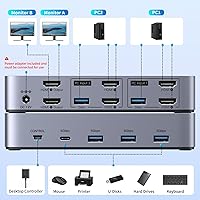
  • Computer Inputs: The switch supports two computer sources, each requiring two HDMI connections and one USB-A connection to the switch.
  • Monitor Outputs: Two HDMI monitor outputs are provided, enabling simultaneous display across two screens from whichever computer is currently active.
  • Hotkey Support: Keyboard shortcut or hotkey-based switching is not supported; toggling between computers requires pressing the physical button or desktop controller.
  • Device Compatibility: In addition to computers, HDMI source inputs can accept consoles such as PlayStation 4 and 5, Xbox One, and Nintendo Switch as secondary devices.

Related Reviews

DXchip 8K Dual Monitor KVM Switch
85%
88%
Performance
91%
Ease of Use
94%
Visual Quality (Resolution & Clarity)
87%
USB Transfer Speed
83%
Build Quality
More
MLEEDA 8K Dual Monitor KVM Switch
86%
92%
Visual Performance
88%
Ease of Setup
85%
Build Quality
90%
USB Connectivity
75%
Switching Reliability
More
AV Access iDock C10 KVM Docking Station
77%
93%
Build Quality
88%
Video Performance
81%
KVM Switching
89%
EDID Emulation
84%
Ethernet Reliability
More
AV Access 4KSW21-DM Dual Monitor KVM Switch
77%
83%
Switching Speed & Reliability
86%
EDID Emulation Performance
88%
Video Quality at 4K
74%
Dual Operating Modes (KVM vs USB Mode)
71%
USB 3.0 Hub Performance
More
UGREEN 2-Computer HDMI KVM Switch
72%
84%
Ease of Setup
78%
Video Quality
71%
Switching Reliability
88%
Desktop Controller
69%
USB Peripheral Sharing
More
Minisopuru MK808M-US Dual Monitor KVM Switch Docking Station
84%
94%
Dual Monitor Performance
91%
USB Peripheral Compatibility
88%
Switching Convenience
90%
Build Quality
82%
Setup & Installation
More
TRENDnet TK-240DP Dual Monitor DisplayPort KVM Switch
79%
88%
4K Signal Stability
84%
Dual Monitor Switching
71%
Value for Money
63%
Audio Switching Reliability
79%
USB Hub Functionality
More
TRENDnet TK-440DP 4-Port Dual Monitor DisplayPort KVM Switch
85%
92%
Video Quality
85%
Ease of Use
90%
Compatibility
88%
Build Quality
87%
USB Hub Functionality
More
CKL 2x2 KVM Switch Dual Monitor HDMI 2.0 4K 60Hz
83%
88%
Ease of Setup
91%
Display Quality
85%
Switching Flexibility
84%
USB Hub Functionality
79%
Build Quality
More
Viagkiki 2-Computer 1-Monitor KVM Switch
73%
91%
Ease of Setup
76%
Switching Reliability
68%
Video Quality & Resolution
61%
Build Quality & Durability
83%
Value for Money
More

FAQ

Yes, and this is the most important compatibility check before buying. Each computer must have two HDMI output ports plus one USB-A port available. Many desktop PCs meet this easily, but slim laptops often have only one HDMI port or none at all, in which case this KVM switch will not work without an external dock or adapter.

No — the UGREEN AK500 Dual Monitor KVM Switch does not support hotkey or keyboard shortcut switching of any kind. You will need to either press the button on the unit itself or use the included desktop controller. If you switch machines frequently throughout the day and rely on keyboard shortcuts, that limitation is worth factoring into your decision.
It is not optional if you want the USB ports to work reliably. The power adapter is required for the USB hub to function correctly — without it, connected peripherals like keyboards, mice, and printers may behave inconsistently or not be recognized at all. Plug it in during initial setup and leave it connected.

It will, as long as your MacBook has two available HDMI outputs — which most MacBook Pros do not natively. You would need a Thunderbolt-to-HDMI adapter or a dock that provides two HDMI outputs. Assuming you have that sorted, the switch handles mixed-OS setups without any special configuration.

The USB-C port is part of the shared USB 3.0 hub, so it functions as a standard data port for connecting peripherals like phones, USB-C drives, or accessories. It does not support video output, power delivery, or Thunderbolt — it is simply a USB 3.0 port with a USB-C connector shape.

No, that is not how this desktop sharing hub works. Both monitors always display the same active computer — either Computer 1 or Computer 2. When you switch, both screens change simultaneously. If you need to independently assign each monitor to a different computer at the same time, you would need a different type of multi-viewer or matrix switch.

The video transition is generally quick, typically one to two seconds for both monitors to fully refresh. USB peripherals like keyboards and mice may take a slightly longer moment to re-initialize after switching — usually under three seconds. It is fast enough for normal workflow but not instantaneous in the way a software KVM might appear.

Technically you could use active DisplayPort-to-HDMI adapters on your monitors, but this is not a setup the manufacturer validates and it introduces potential signal compatibility issues at 4K. If your monitors are natively DisplayPort, it is generally safer to look for a KVM switch with native DisplayPort output rather than relying on adapters.

Yes — the HDMI inputs are compatible with consoles including PlayStation 4, PlayStation 5, Xbox One, and Nintendo Switch. You would connect the console as one of the two input sources, and it would share your monitors, though the USB hub features are primarily designed for computer peripherals rather than console accessories.

The HDMI cables running from the switch to your monitors must be no longer than three meters and should be 28AWG rated to ensure stable 4K signal quality. If your desk layout requires longer runs on the output side, you will need to reposition the switch or use higher-spec cables — going beyond three meters risks signal degradation or intermittent display issues at higher resolutions.

Where to Buy