Overview

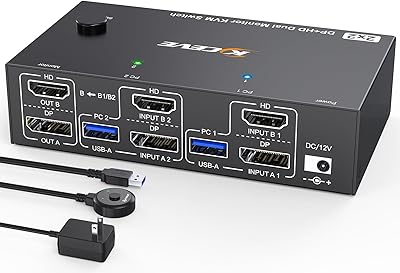
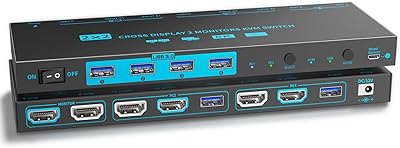
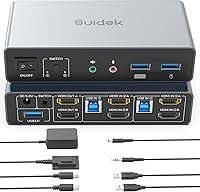
The SUIDEK SJW-KM202B Dual Monitor KVM Switch is built for anyone juggling two computers on one desk and tired of reaching behind monitors to swap cables. At its price point, it sits comfortably in mid-range territory — solid enough for daily use, without the build quality of enterprise-grade hardware. The unit is compact, roughly the size of a paperback, and ships with a dedicated desktop controller that handles switching without you ever touching the main box. You can trigger a switch via the front button or that controller, which is a small but genuinely useful distinction. Just know upfront: laptop dual-output is not supported, there is no EDID, and no network port is included.
Features & Benefits

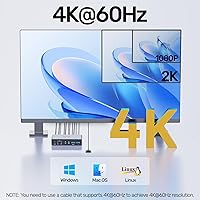
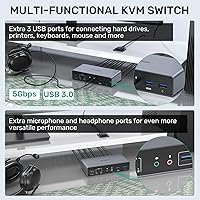
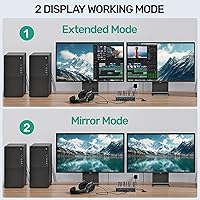
This KVM switch handles 4K at 60Hz across both HDMI outputs, though that figure assumes you are using HDMI 2.0 cables under five meters and your GPU can actually push that resolution — the switch itself won't compensate for weak links in the chain. You get the choice between extended and mirror display modes, configured through your OS display settings rather than any hardware toggle. Three USB 3.0 ports let you share a keyboard, mouse, and one additional peripheral between both machines, hitting transfer speeds up to 5Gbps. There is also a 3.5mm audio jack and microphone port, so your headset follows your focus rather than your computer.

Best For

The dual-monitor switcher fits best into a home office or small business setup where two desktop PCs share one workspace. Developers and designers who need a genuine extended desktop across two machines will appreciate that it handles the display arrangement without forcing mirror mode by default. If you already own HDMI 2.0 cables, setup is close to plug-and-play. That said, if you plan to connect a laptop and expect it to drive two external monitors simultaneously, this is not the right tool — that configuration is not supported. The compact form factor and tidy cable routing make it a practical fit for desks where space is already stretched.

User Feedback

Across verified reviews, the most consistent praise centers on quick initial setup and how fast most users had both monitors running without driver headaches. The desktop controller gets repeated mention as a quality-of-life highlight, and the build feels appropriately solid for the price tier. On the downside, some buyers have reported occasional switching lag and compatibility issues tied to specific GPU configurations or lower-quality HDMI cables — swapping to a proper HDMI 2.0 cable resolved the problem in most documented cases. USB 3.0 reliability for keyboards and mice is generally praised, though a few users noted inconsistent speeds with external drives. Feedback on customer support is mostly positive.

Pros

  • Dual-monitor extended desktop works reliably for two desktop PCs without requiring any additional software.
  • The desktop controller lets you switch computers from the desk surface rather than reaching for the unit itself.
  • Three USB 3.0 ports handle keyboard, mouse, and a third peripheral simultaneously without an extra hub.
  • A dedicated 3.5mm audio and microphone jack means your headset follows your active computer automatically.
  • Setup is fast for most desktop users — both monitors are typically recognized within minutes of connecting.
  • Compact footprint keeps the unit unobtrusive on even a crowded desk.
  • Both extended and mirror display modes are supported, giving flexibility depending on the task.
  • Backward compatibility with 1080p means older monitors work without any special configuration.
  • The included accessories — USB cables, controller, and power adapter — cover everything needed to get started.

Cons

  • No EDID support can cause resolution mismatches on mixed monitor setups after every computer switch.
  • Switching lag has been reported by users running GPU-intensive workloads on one or both connected PCs.
  • HDMI cables are not included, and substandard cables are a common cause of display errors with this switcher.
  • The desktop controller has a fixed cable length, limiting placement options on larger or deeper desks.
  • Audio output quality through the 3.5mm jack is adequate for calls but not reliable for media or music monitoring.
  • No network port means this KVM handles display and USB sharing only — network switching requires a separate device.
  • The power adapter must remain connected at all times, adding one more cable to manage at the back of the desk.
  • DisplayPort GPUs are not compatible, ruling out this unit for users who cannot output via HDMI natively.
  • Resolution handshake issues after switching are not flagged by the unit itself, leaving users to diagnose problems manually.

Ratings

The SUIDEK SJW-KM202B Dual Monitor KVM Switch has been rated across thousands of verified global purchases, with our AI filtering out incentivized, bot-generated, and duplicate feedback to surface what real desk workers and home-office users actually experienced. Scores reflect both the genuine strengths that earned repeat recommendations and the recurring pain points that caused frustration — nothing is glossed over.

Ease of Setup
83%
Most users had both monitors recognized and running within ten to fifteen minutes of unboxing, without needing to install any drivers. The included USB-A to B cables and desktop controller mean you're not hunting for accessories before getting started.
A subset of users ran into issues when their existing HDMI cables were below the 2.0 standard, which caused display errors that were easy to misattribute to the switch itself. The manual could do more to walk users through initial OS display configuration for extended mode.
Switching Reliability
71%
29%
For the majority of desktop-to-desktop use cases, switching between computers is quick and consistent. Users running standard workloads — coding, spreadsheets, browser tabs — generally found the transition responsive and stable throughout the day.
A recurring pattern in negative reviews points to intermittent lag or failed switches, particularly when one PC is under heavy GPU load or connected via a longer HDMI run. Some users reported the switch occasionally requiring a second press to complete the transition.
Display Quality
79%
21%
When paired with proper HDMI 2.0 cables and a GPU that supports 4K output, both monitors hold a sharp, stable image with no observable signal degradation compared to a direct connection. 1080p users consistently reported clean, flicker-free output.
The absence of EDID support means some monitor-GPU combinations struggle to negotiate resolution correctly after a switch, occasionally defaulting to a lower resolution until manually corrected. This is not a dealbreaker but does affect a noticeable share of users with mixed monitor setups.
Desktop Controller Usability
91%
This is one of the most praised aspects across all feedback. Being able to switch computers from a small controller sitting on the desk — rather than reaching for a button on the unit itself — feels noticeably more polished than what most similarly priced KVM switches offer.
The controller cable length is fixed, which limits where you can position it on larger desks. A handful of users also wished the controller had a status indicator showing which computer is currently active.
USB Peripheral Sharing
77%
23%
Keyboard and mouse handoff between computers works reliably for the vast majority of users, and the three USB-A 3.0 ports mean you can keep a printer or secondary drive connected without an additional hub. Daily peripheral switching was largely described as painless.
Transfer speeds for external drives occasionally fell short of the advertised 5Gbps ceiling in real-world tests, particularly with longer or lower-quality USB cables. A small number of users reported devices needing to be re-enumerated after switching, adding a brief delay.
Build Quality
74%
26%
The enclosure feels appropriately solid for a mid-range peripheral — not hollow or plasticky, but clearly not metal-chassis territory either. At just over a pound, it sits firmly on a desk without sliding during button presses.
Some users noticed minor flex in the HDMI port housing after extended use, suggesting the long-term durability under frequent cable plugging and unplugging may not match that of pricier alternatives. The finish also picks up fingerprints and dust visibly.
Audio Jack Performance
68%
32%
Having a single 3.5mm audio output and microphone input that follows the active computer is genuinely convenient for anyone on regular video calls across both machines. Users working from home appreciated not needing a separate audio switcher.
Audio quality through the jack was described as functional rather than impressive — adequate for voice calls but not something audio-sensitive users would rely on for music or media monitoring. A few users reported faint static when the power adapter was nearby.
4K Performance Consistency
72%
28%
Users with high-end desktops and proper cabling reported stable 4K at 60Hz across both outputs, which is the core promise and one it does fulfill under the right conditions. No significant color banding or refresh rate drops were noted in these setups.
The 4K experience is highly conditional on cable quality and GPU capability, and the switch provides no feedback when a resolution handshake fails. Users with mixed-spec setups found themselves troubleshooting what the hardware manual does not clearly anticipate.
Extended vs Mirror Mode
76%
24%
The ability to run extended desktop across two monitors on two separate computers is the feature that sets this class of KVM apart from basic single-monitor switchers, and it works as advertised for desktop-to-desktop configurations.
Mode selection is handled entirely through OS display settings rather than any toggle on the device, which confuses users who expect a hardware switch. There is also no visual confirmation on the unit that the correct mode is active.
Power Adapter Requirement
61%
39%
The included 5V DC adapter is compact and powers the unit reliably. Users who kept it plugged in permanently reported no instability related to power delivery.
The hard requirement to keep the adapter connected at all times is a minor but genuine annoyance for desk setups where outlet space is limited. A few users also expressed concern about what happens if the proprietary adapter fails and needs replacement.
Laptop Compatibility
38%
62%
The switch functions normally when a laptop is connected as one of the two inputs in a single-monitor output scenario, which works fine if that is all you need from a laptop connection.
This is a firm limitation that catches many buyers off guard: connecting a laptop and expecting it to drive two external monitors simultaneously is simply not supported. The product description buries this caveat, and it accounts for a disproportionate share of one-star reviews.
Value for Money
81%
19%
For desktop users who need genuine dual-monitor KVM functionality with USB sharing and audio passthrough, the price-to-feature ratio is competitive. Most buyers in this use case felt they received more than they paid for.
Buyers who run into the laptop limitation, EDID issues, or switching lag tend to reassess the value equation sharply. For those edge cases, the price feels harder to justify compared to alternatives with broader compatibility.
Cable Management
78%
22%
The compact footprint and logical port layout make it easier than average to route cables neatly behind a dual-monitor desk setup. Users managing two full desktop workstations consistently noted cleaner desk aesthetics after installing it.
The unit does not include HDMI cables, which means buyers need to source HDMI 2.0-compliant cables separately before setup. The power adapter cable is also on the shorter side, limiting placement flexibility near the back of a desk.
Customer Support Experience
73%
27%
Users who contacted support generally reported responses within a reasonable window, and several reviewers noted that the brand walked them through cable and resolution troubleshooting effectively via email.
Support quality appears inconsistent — some users described helpful, specific guidance while others received generic replies that did not address their configuration. There is no community forum or detailed FAQ to handle common issues before they require a support ticket.

Suitable for:

The SUIDEK SJW-KM202B Dual Monitor KVM Switch is a practical fit for anyone running two desktop PCs or workstations from a single desk and tired of the cable-swapping routine. Home office workers who split their day between a personal machine and a work computer will find the setup straightforward and the desk-top controller genuinely useful for fast, low-effort switching. Developers and designers who rely on a true extended desktop — spreading their workspace across two monitors while working on two separate machines — are the sweet spot audience here. If you already own HDMI 2.0 cables and your monitors support 4K, the experience is close to plug-and-play without requiring additional adapters or software. Small business environments with shared workstations, where a single keyboard, mouse, headset, and pair of monitors need to serve multiple machines on a rotating basis, will also get strong value out of this dual-monitor switcher.

Not suitable for:

Buyers who plan to connect a laptop and run two external monitors simultaneously should look elsewhere — this is a hard limitation, not a configuration issue, and no workaround resolves it. The SUIDEK SJW-KM202B Dual Monitor KVM Switch also lacks EDID support, which means users with mixed monitor setups or unusual resolution combinations may face repeated handshake failures and manual resolution fixes after every switch. There is no DisplayPort input, so anyone with a GPU that outputs exclusively via DP will need a dedicated DP-native KVM instead — the brand explicitly advises against DP-to-HDMI adapters with this unit. Users who need network sharing built into their KVM will need to add a separate solution, as there is no network port included. Finally, buyers expecting enterprise-grade build quality or long-term heavy-cycle durability may find the mid-range construction falls short of those expectations over time.
Specifications

  • Brand: Manufactured by SUIDEK, a product of Shenzhen Saijiwei Technology Co., Ltd.
  • Model Number: The unit is identified by model number SJW-KM202B.
  • Dimensions: The main unit measures 5.12″ x 2.44″ x 1.18″ and weighs 1.1 pounds.
  • Video Input: Two HDMI input ports accept signal from two separate source computers simultaneously.
  • Video Output: Two HDMI output ports drive two monitors independently for extended or mirrored display.
  • Max Resolution: Supports up to 4K at 60Hz, with backward compatibility down to 4K at 30Hz and 1080p.
  • Display Modes: Operates in either Extended mode or Mirror mode, selected through the host operating system display settings.
  • USB Ports: Three USB-A 3.0 ports provide peripheral sharing with transfer speeds up to 5Gbps.
  • Audio: Includes one 3.5mm analog audio output jack and one 3.5mm microphone input jack.
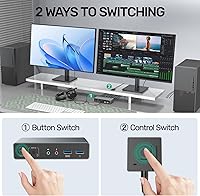
  • Switching Methods: Computer switching is triggered either via the front-panel button on the main unit or via the included desktop controller.
  • Power Supply: Requires a 5V DC power adapter, which is included in the box and must remain connected during use.
  • HDMI Standard: Source cables must meet HDMI 2.0 standard or higher, with a maximum recommended cable length of 5 meters.
  • Laptop Support: Connecting a laptop while simultaneously outputting to two external monitors is not supported by this unit.
  • EDID Support: EDID passthrough is not supported, which may affect automatic resolution negotiation on mixed monitor setups.
  • Network Port: No network or Ethernet port is included; this unit handles display and USB sharing only.
  • DisplayPort: DisplayPort input is not supported, and use of DP-to-HDMI conversion cables is not recommended by the manufacturer.
  • Sleep Mode: Computer switching is disabled when either connected PC enters sleep mode; the host must be awake to switch.
  • In the Box: Package includes the KVM switch unit, two USB-A to B cables, one desktop controller, one 5V DC power adapter, and one user manual.

Related Reviews

MLEEDA 8K Dual Monitor KVM Switch
86%
92%
Visual Performance
88%
Ease of Setup
85%
Build Quality
90%
USB Connectivity
75%
Switching Reliability
More
DXchip 8K Dual Monitor KVM Switch
85%
88%
Performance
91%
Ease of Use
94%
Visual Quality (Resolution & Clarity)
87%
USB Transfer Speed
83%
Build Quality
More
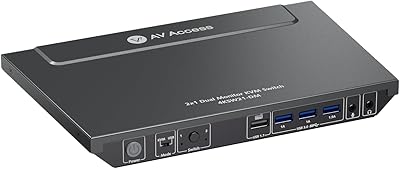
AV Access 4KSW21-DM Dual Monitor KVM Switch
77%
83%
Switching Speed & Reliability
86%
EDID Emulation Performance
88%
Video Quality at 4K
74%
Dual Operating Modes (KVM vs USB Mode)
71%
USB 3.0 Hub Performance
More
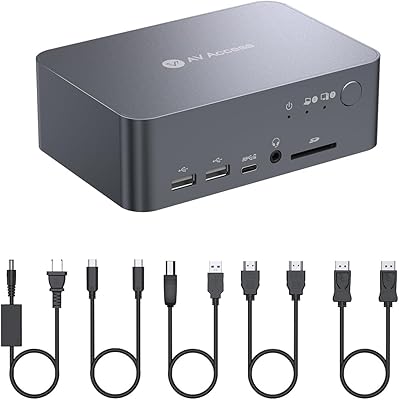
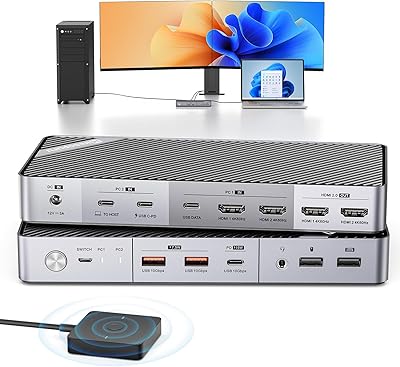
AV Access iDock C10 KVM Docking Station
77%
93%
Build Quality
88%
Video Performance
81%
KVM Switching
89%
EDID Emulation
84%
Ethernet Reliability
More
Minisopuru MK808M-US Dual Monitor KVM Switch Docking Station
84%
94%
Dual Monitor Performance
91%
USB Peripheral Compatibility
88%
Switching Convenience
90%
Build Quality
82%
Setup & Installation
More
TRENDnet TK-240DP Dual Monitor DisplayPort KVM Switch
79%
88%
4K Signal Stability
84%
Dual Monitor Switching
71%
Value for Money
63%
Audio Switching Reliability
79%
USB Hub Functionality
More
TRENDnet TK-440DP 4-Port Dual Monitor DisplayPort KVM Switch
85%
92%
Video Quality
85%
Ease of Use
90%
Compatibility
88%
Build Quality
87%
USB Hub Functionality
More
CKL 2x2 KVM Switch Dual Monitor HDMI 2.0 4K 60Hz
83%
88%
Ease of Setup
91%
Display Quality
85%
Switching Flexibility
84%
USB Hub Functionality
79%
Build Quality
More
Viagkiki 2-Computer 1-Monitor KVM Switch
73%
91%
Ease of Setup
76%
Switching Reliability
68%
Video Quality & Resolution
61%
Build Quality & Durability
83%
Value for Money
More
MLEEDA 202CH Dual Monitor KVM Switch
75%
91%
Ease of Setup
84%
Dual 4K Display Performance
47%
Mac M1/M2 Compatibility
88%
USB-C Power Delivery (80W Charging)
72%
Switching Speed & Reliability
More

FAQ

No, and this is probably the most important thing to check before buying. When a laptop is one of the two connected computers, the unit cannot drive two external monitors simultaneously from that laptop. It works fine with a laptop as one input if you only need a single monitor output, but dual external monitor support from a laptop is simply not part of what this hardware can do.

No drivers are required. The dual-monitor switcher is plug-and-play on Windows — connect your HDMI cables, plug in the USB cables to both PCs, power the unit via the 5V adapter, and both monitors should be recognized by your operating system. You will need to go into your display settings to choose between extended and mirror mode, but that is a standard OS step, not a software installation.

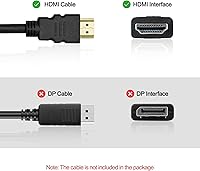
HDMI cables are not included in the box, so you will need to supply your own. They must meet the HDMI 2.0 standard or higher and should be no longer than 5 meters. If you are seeing display errors or resolution issues right after setup, the cable is often the first thing worth replacing — lower-quality or older cables are a surprisingly common cause of problems with this KVM switch.

Yes, the unit is backward compatible with 1080p and even 4K at 30Hz, so you do not need 4K monitors to use it. Just make sure the resolution settings on both your monitors and your graphics card output match each other, as the unit does not automatically negotiate resolution between mismatched displays.

You can switch using either the button on the front of the unit or the small desktop controller that sits on your desk. For most standard desktop workloads the switch is quick, but users running GPU-intensive applications have occasionally reported a brief lag or a second press being needed. Switching is also disabled when a connected PC is in sleep mode, so both machines need to be awake for the button to work.

Yes, the three USB-A 3.0 ports support printers, external drives, and other USB peripherals in addition to your keyboard and mouse. Transfer speeds are rated up to 5Gbps, though real-world speeds will depend on the peripheral and cable quality. Most users find keyboard and mouse sharing completely reliable; external drive performance is slightly more variable.

Yes, both the 3.5mm audio output and the microphone input follow the active computer, so your headset or speakers automatically serve whichever machine you have switched to. The audio quality is adequate for video calls and standard communication apps, though it is not designed for high-fidelity music or studio monitoring use.

This is a known limitation related to the lack of EDID support. When the unit switches computers, some monitor-GPU combinations fail to renegotiate resolution correctly and may drop to a lower setting. The fix is usually to go into your display settings and manually reset the resolution to your preferred value. If it happens consistently, checking that both your HDMI cables are genuinely HDMI 2.0 compliant and under 5 meters is also worth doing before anything else.

The SUIDEK SJW-KM202B Dual Monitor KVM Switch is primarily designed and tested for Windows desktop use. Mac compatibility depends on your specific Mac model and its HDMI output capability — Macs that output natively via HDMI should work in principle, but EDID limitations and macOS display management behavior may cause resolution or refresh rate quirks. If Mac support is critical to your setup, it is worth confirming before committing.
The brand offers customer support and states a 24-hour response window for inquiries. If a component fails outside of a return window, contacting SUIDEK support directly is the recommended path for sourcing a replacement part. In the meantime, the front-panel button on the main unit functions as a full backup to the desktop controller, so a controller failure would not leave you unable to switch computers.