Overview

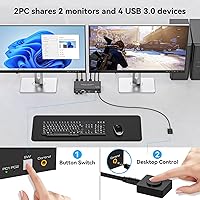
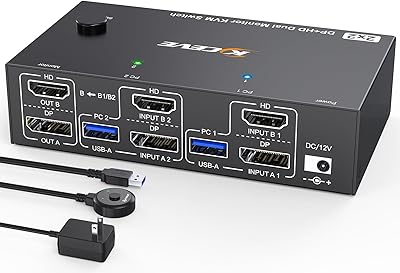
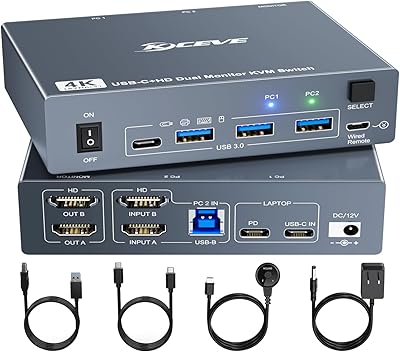
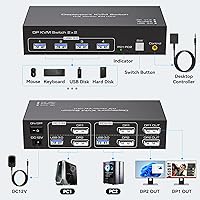
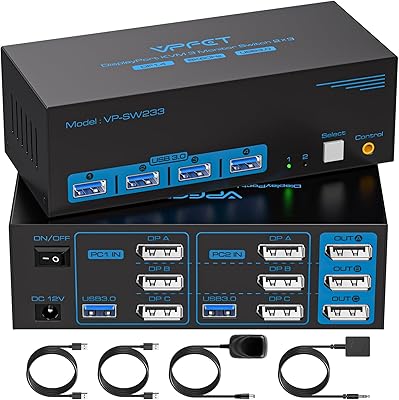
The TJCXELE 4K@144Hz Dual-Monitor DisplayPort KVM Switch is built for anyone tired of juggling two computers on one desk. It lets you share two monitors and four USB peripherals across both machines, switching between them with a single button press. The included wired desktop controller is a practical touch — you can place it anywhere on your desk instead of reaching around the back of the unit. One important caveat before buying: each connected computer needs two DisplayPort outputs. That rules out most laptops with only a single DP port. Power comes from an external 12V adapter, which keeps USB devices running reliably during switching.
Features & Benefits

Running on DP 1.4, this dual-monitor KVM switch handles up to 4K at 144Hz across both screens simultaneously, with 48Gbps of video bandwidth doing the heavy lifting. That kind of headroom matters when you want crisp, high-refresh visuals without compromise. Four USB 3.0 ports transfer data at up to 5Gbps, so your keyboard, mouse, and even a printer stay connected and recognized the moment you switch. It also supports both extended and copy modes, which is genuinely useful depending on whether your two machines serve different purposes. Older DP 1.2 monitors work fine here too, so you don't need to replace existing hardware to get started.

Best For

This two-computer switch is a solid pick for home office users who run a personal and work machine side by side and want one clean desk rather than two sets of peripherals. Engineers or creative professionals who rely on dual high-resolution displays will appreciate not having to dial back refresh rates to make a KVM work. It also suits someone who games on one machine and works on another — the 144Hz support is a nice bonus in that scenario, though this isn't a dedicated gaming KVM. One firm requirement: both computers need two physical DisplayPort outputs. If your laptop only has one, this switch won't fit your setup.

User Feedback

Buyers generally appreciate how straightforward the TJCXELE DP switch is to set up once the cable requirements click — the desktop controller in particular gets consistent praise for keeping switching accessible without clutter. On the critical side, some users run into USB recognition issues, usually traced back to plugging input cables into the wrong ports. That's a setup error, but it's common enough to flag. Real-world 4K 144Hz performance draws mostly positive notes, though a handful of buyers mention that results vary depending on their GPU and cable quality. The 12-month warranty covers defects and malfunctions, which is reasonable, but doesn't extend to accidental damage.

Pros

  • Supports 4K at 144Hz across both monitors simultaneously without forcing a resolution compromise.
  • The wired desktop controller means you never have to reach behind your desk to switch computers.
  • Four USB 3.0 ports let you share a full peripheral setup — keyboard, mouse, and printer — across both machines.
  • Both extended and copy display modes are available, covering different workflow needs in one device.
  • External power adapter keeps USB devices stable and properly powered during and after switching.
  • Backward compatibility with DP 1.2 means older monitors work without any hardware upgrades.
  • Switching is fast and reliable in day-to-day use, with minimal monitor blank time between computers.
  • The included USB-A cables reduce immediate out-of-box costs for buyers starting from scratch.
  • Build quality is solid enough for a permanent desk setup, with clear indicator lights showing active computer.

Cons

  • Each computer requires two DisplayPort outputs, which disqualifies most laptops and many compact desktops.
  • No hotkey switching support, which is a real limitation for keyboard-centric power users.
  • DisplayPort cables are not included, yet each computer needs two — that is an unexpected added expense.
  • USB device recognition failures are a recurring issue when input cables are connected in the wrong port order.
  • The external power adapter adds another cable and brick to an already busy desk setup.
  • Controller cable length is borderline short for deep desks or setups where the KVM unit is mounted on a shelf.
  • Achieving the full 4K at 144Hz spec requires high-quality cables purchased separately, not standard ones.
  • Warranty covers defects for 12 months only and does not include accidental damage or user setup errors.
  • Some users report one monitor occasionally failing to wake after switching, requiring a manual display input toggle.

Ratings

The TJCXELE 4K@144Hz Dual-Monitor DisplayPort KVM Switch has been evaluated using AI analysis of verified buyer reviews collected globally, with spam, incentivized, and bot-generated feedback actively filtered out. The scores below reflect a candid synthesis of real-world experiences — from smooth daily switching workflows to frustrating cable compatibility surprises — so both the strengths and the genuine friction points are represented fairly.
Video Output Quality
88%
Users running dual 4K monitors at high refresh rates report sharp, stable output with no perceptible flickering or color degradation during normal use. For creative work like photo editing or detailed CAD work across two screens, the DP 1.4 bandwidth holds up well in practice.
A handful of buyers noted that hitting the full 4K at 144Hz spec required premium-grade cables not included in the box, leading to unexpected extra costs. Results also varied noticeably depending on the GPU, so some users had to dial back refresh rates to achieve stable output.
Setup & Installation
63%
37%
Buyers who read the manual carefully found the initial setup straightforward, and the included USB-A cables reduce the number of things to source separately. Once everything is wired correctly, the switch recognizes all devices quickly without any driver installation.
The two-DP-ports-per-computer requirement catches a lot of buyers off guard, particularly those hoping to use a laptop with only one DisplayPort output. Several reviewers flagged that getting the input USB ports in the right order is critical — plug them in wrong and your peripherals simply will not show up.
Switching Reliability
82%
18%
Day-to-day switching between a work PC and a personal machine feels responsive and consistent for most users. The one-click action — whether via the panel button or the wired controller — completes quickly without leaving monitors in a blank or confused state.
A smaller subset of users reported occasional hiccups where one monitor would fail to wake after switching, requiring a manual input toggle on the display itself. These incidents appear more common in setups mixing older and newer monitors rather than matched pairs.
Desktop Controller Usability
84%
The wired desktop controller is one of the most consistently praised aspects of this switch. Being able to place the switching button anywhere on the desk — rather than reaching behind a rack or tower — makes the daily routine noticeably less awkward for users with cluttered workspaces.
Some buyers found the controller cable just long enough to be borderline, particularly on deeper desks or setups where the KVM unit sits on a shelf. A longer cable option or a wireless alternative would address this for a meaningful portion of buyers.
USB Device Recognition
67%
33%
When set up correctly, all four USB 3.0 ports recognize keyboards, mice, and even USB hubs reliably. Transfer speeds are fast enough that users connecting external SSDs or flash drives alongside their standard peripherals reported no bottlenecks in day-to-day transfers.
USB recognition failures are the most cited complaint across reviews, and most trace back to incorrect port assignment during setup rather than a hardware defect. Still, the fact that this trips up a recurring number of buyers suggests the labeling or documentation could be clearer.
Build Quality & Form Factor
74%
26%
The unit feels solid enough for a desk-mounted peripheral, and the panel buttons have a tactile press that does not feel flimsy. At just over a pound, it sits firmly without sliding around, and the indicator lights give clear visual feedback on which computer is active.
The external power adapter adds an extra cable to manage, which some users found annoying in already-busy cable setups. The chassis material does not feel premium up close, and a few buyers noted minor flex in the housing when pressing the panel button firmly.
Display Mode Flexibility
79%
21%
Having both extended and copy mode available in one device is genuinely useful for users whose two machines serve different roles — mirroring for presentations on one computer, extended desktop for productivity on the other. Switching between modes works without rebooting either machine.
There is no hotkey switching support, which is a limitation for power users who prefer keeping their hands on the keyboard. Toggling display modes also requires a manual reconfiguration process that some users found less intuitive than expected from the listing description.
Compatibility
71%
29%
Backward compatibility with DP 1.2 means buyers running a mixed monitor setup — one newer display and one older one — can use the switch without upgrading hardware. Most mainstream desktop GPU brands from the past several years work without issue.
Laptop users frequently run into trouble, as the dual-DP requirement eliminates most thin-and-light models from contention entirely. A few buyers also reported inconsistencies with specific AMD GPU configurations, though these appeared to be edge cases rather than a systemic issue.
Value for Money
77%
23%
For a dual-monitor DP 1.4 KVM switch that bundles a desktop controller and USB 3.0 hub functionality into one unit, the pricing sits at a reasonable point relative to comparable options in the category. Buyers who needed exactly this feature set felt the purchase was justified.
The lack of included DisplayPort cables — given that each computer needs two — means first-time buyers are often spending noticeably more than the sticker price to get fully operational. For buyers who already own quality DP cables this is a non-issue, but for others it stings.
Power Stability
83%
The external 12V DC adapter design pays off in USB stability — connected devices like external drives and printers maintain consistent power even when switching between computers. Users who previously dealt with bus-powered KVM switches dropping peripherals mid-task found this a clear improvement.
The external adapter is one more power brick to account for, which is a minor but real annoyance for users managing a tidy desk. In rare cases, buyers reported that the adapter ran warmer than expected after extended hours of use, though no failures were attributed to this.
After-Sales Support & Warranty
66%
34%
The 12-month return or replacement warranty is a meaningful commitment in this product category, and several buyers noted that the brand responded to support inquiries within a reasonable timeframe. For a defective unit, the replacement process appears to run smoothly based on reported experiences.
The warranty covers malfunctions and defects but does not extend to accidental damage or user-caused issues, which is worth understanding before purchase. A few buyers felt the 12-month window was shorter than what competing brands offer, especially given the setup complexity involved.
Cable Management
61%
39%
The included USB-A cables are a practical inclusion that reduces the immediate shopping list for new buyers. The unit's port layout keeps video and USB inputs reasonably organized on the back panel, which helps when routing cables along a desk.
Running two DP cables plus one USB cable per computer adds up fast, and the external power adapter cable compounds the clutter. Users with minimal cable management infrastructure described the back of their desk as noticeably messier after installation than before.
Peripheral Sharing Performance
80%
20%
Sharing a keyboard and mouse across two machines works as expected, and most buyers reported that input devices were recognized on both sides without lag or dropped inputs. Printers and USB hubs also held up well in extended use, which matters for office users running shared workflows.
A small number of users noted that certain USB devices — particularly older peripherals with custom drivers — occasionally needed to be re-initialized after switching. This was not a widespread issue but is worth considering for anyone relying on legacy hardware.

Suitable for:

The TJCXELE 4K@144Hz Dual-Monitor DisplayPort KVM Switch is built for desktop-first users who run two computers side by side and want a single, clean workspace without duplicating monitors, keyboards, and mice. It fits particularly well for home office professionals who keep a personal PC and a work machine on the same desk, or for engineers and designers who need both machines accessible throughout the day without re-cabling between sessions. Creative professionals who depend on dual high-resolution displays for color-accurate work will appreciate that the DP 1.4 interface does not force a trade-off between resolution and refresh rate. It also suits mixed-use setups where someone wants to game on one machine and work on another — the 144Hz support is a genuine bonus in that context, even if it is not the device's primary selling point. Anyone already running USB 3.0 peripherals like an external drive, printer, or full-sized keyboard will get real value from the shared four-port hub without needing a separate peripheral switch.

Not suitable for:

The TJCXELE 4K@144Hz Dual-Monitor DisplayPort KVM Switch has a hard compatibility wall that will disqualify a lot of potential buyers: every connected computer needs two physical DisplayPort outputs. That eliminates virtually all thin-and-light laptops, most ultrabooks, and any machine that only exposes a single DP port alongside HDMI or USB-C. If you were hoping to pair a laptop with a desktop through this switch, verify your laptop's port configuration carefully before purchasing. It is also not the right choice for buyers looking for hotkey switching — there is no keyboard shortcut to toggle between computers, which is a genuine workflow limitation for power users. Those who want to connect more than two computers, need HDMI inputs, or require a switch that travels well should look elsewhere, as this is a stationary, desktop-oriented device with an external power adapter that adds to desk clutter. Finally, buyers on a strict budget should factor in the cost of DisplayPort cables, since each computer needs two and none are included in the box.
Specifications

  • Brand: Manufactured and sold under the TJCXELE brand.
  • Interface: Uses DisplayPort 1.4 on all video input and output connections.
  • Max Resolution: Supports a maximum resolution of 3840x2160 at 144Hz (4K at 144Hz) per display.
  • Video Bandwidth: Provides up to 48Gbps of video bandwidth across the DP 1.4 interface.
  • Displays Supported: Connects to and drives two monitors simultaneously from either of the two connected computers.
  • Computers Supported: Supports exactly two source computers or signal devices at one time.
  • DP Ports Required: Each connected computer must have two physical DisplayPort outputs to function correctly with this switch.
  • Display Modes: Supports both extended desktop mode and copy (mirror) mode across the two connected monitors.
  • USB Ports: Includes four USB-A 3.0 ports for sharing peripherals such as keyboards, mice, and printers.
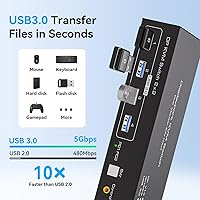
  • USB Transfer Speed: USB 3.0 ports support data transfer speeds of up to 5Gbps, ten times faster than USB 2.0.
  • Switching Method: Computer switching is performed via a panel button on the unit or through the included wired desktop controller.
  • Power Supply: Requires an external 12V DC power adapter, which is included in the package.
  • Backward Compatibility: Fully backward compatible with DisplayPort 1.2 monitors and cables.
  • Weight: The unit weighs 1.21 pounds without cables or power adapter attached.
  • Package Dimensions: Packaged dimensions measure 7.95 x 5.71 x 2.13 inches.
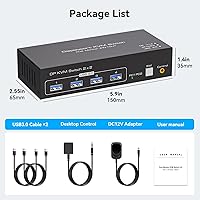
  • In the Box: Package includes the KVM switch unit, two USB-A 3.0 cables, one desktop controller, one DC 12V adapter, and a user manual.
  • Warranty: Covered by a 12-month return or replacement warranty against manufacturing defects and malfunctions.
  • Operating Voltage: Operates at 12 volts with a current rating of 0.6 amps via the included power adapter.

Related Reviews
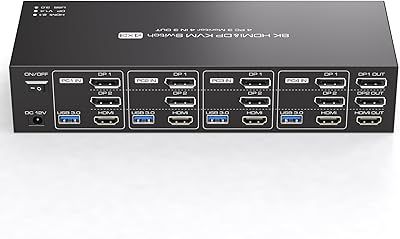
TJCXELE 4K 144Hz HDMI + DisplayPort KVM Switch for 4 Computers, 3 Monitors
83%
88%
Performance
70%
Ease of Setup
91%
Switching Flexibility
89%
USB Port Functionality
85%
Display Quality
More
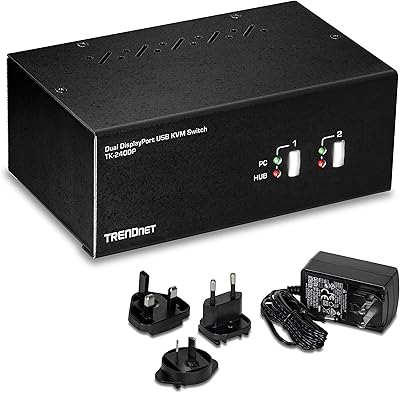
TRENDnet TK-240DP Dual Monitor DisplayPort KVM Switch
79%
88%
4K Signal Stability
84%
Dual Monitor Switching
71%
Value for Money
63%
Audio Switching Reliability
79%
USB Hub Functionality
More
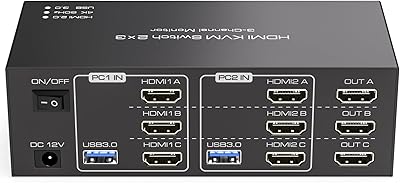
TJCXELE HDMI KVM Switch 3 Monitors 2 Computers 4K@60Hz
85%
85%
Overall Performance
92%
Visual Quality (4K@60Hz)
75%
Ease of Setup
88%
USB Port Functionality (Data Transfer)
90%
Compatibility with Operating Systems
More
CMSTEDCD 4K@120Hz DisplayPort KVM Switch 3 Monitors 2 Computers
84%
90%
Performance
88%
Ease of Use
91%
Video Quality
85%
USB Compatibility
60%
Display Flickering
More
TRENDnet TK-440DP 4-Port Dual Monitor DisplayPort KVM Switch
85%
92%
Video Quality
85%
Ease of Use
90%
Compatibility
88%
Build Quality
87%
USB Hub Functionality
More
CKL 2x2 KVM Switch Dual Monitor HDMI 2.0 4K 60Hz
83%
88%
Ease of Setup
91%
Display Quality
85%
Switching Flexibility
84%
USB Hub Functionality
79%
Build Quality
More
Terived 4 Computers 1 DP Monitor Automatic KVM Switch 4K@144Hz
84%
88%
Performance
92%
Value for Money
85%
Setup Ease
75%
Audio Integration
91%
Display Quality
More
DXchip 8K Dual Monitor KVM Switch
85%
88%
Performance
91%
Ease of Use
94%
Visual Quality (Resolution & Clarity)
87%
USB Transfer Speed
83%
Build Quality
More
MLEEDA 8K Dual Monitor KVM Switch
86%
92%
Visual Performance
88%
Ease of Setup
85%
Build Quality
90%
USB Connectivity
75%
Switching Reliability
More
MLEEDA 202CH Dual Monitor KVM Switch
75%
91%
Ease of Setup
84%
Dual 4K Display Performance
47%
Mac M1/M2 Compatibility
88%
USB-C Power Delivery (80W Charging)
72%
Switching Speed & Reliability
More

FAQ

No, this two-computer switch is plug-and-play. You connect your cables, power it on, and both computers should recognize the switch and peripherals without any driver installation. Just make sure you follow the port order described in the manual to avoid USB recognition issues.

Unfortunately, no. The switch requires two DisplayPort connections from each computer — one for each monitor. If your laptop only has a single DP port, it will not be able to drive both displays through this switch. You would need a laptop with two physical DP outputs or two DP-capable ports via USB-C adapters that support full DP Alt Mode.

No, DisplayPort cables are not included. The box comes with two USB-A 3.0 cables, the desktop controller, a DC adapter, and a manual, but you will need to source DP cables separately. Since each computer needs two DP cables, budget for four cables total before your setup is complete.

Both modes are supported. You can run your monitors as an extended desktop — effectively one large workspace spread across two screens — or in copy mode where both displays show the same image. You configure this at the operating system level just as you would with any dual-monitor setup.

This is the most common setup issue with the TJCXELE 4K@144Hz Dual-Monitor DisplayPort KVM Switch, and it almost always comes down to the USB input cables being plugged into the wrong ports on the back of the unit. Each computer has a designated USB input port, and swapping them will cause the output peripherals to go unrecognized. Double-check the port labeling in the manual and re-seat the cables accordingly.

It works with most mainstream GPUs from both brands, provided your graphics card has two physical DisplayPort outputs available. A small number of users have reported minor inconsistencies with specific AMD configurations, but these appear to be edge cases. Make sure your GPU supports DP 1.4 if you want to use the full 4K at 144Hz capability.

No, hotkey switching is not supported on this switch. You have to either press the physical button on the unit itself or use the included wired desktop controller. If keyboard shortcut switching is important to your workflow, you would need to look at a different KVM model that specifically lists hotkey support.

The exact cable length is not officially specified, but user feedback suggests it is adequate for most standard desk setups. A few buyers with deeper desks or units placed on shelving found it a little short. If you plan to position the KVM unit more than a meter or so from your sitting position, it is worth keeping this in mind.

Yes, the switch is backward compatible with DP 1.2, so older monitors will work fine. You will just be limited to that monitor's maximum supported resolution and refresh rate rather than the full 4K at 144Hz that DP 1.4 can deliver. The newer monitor in the same setup can still run at its full capability independently.

The warranty covers manufacturing defects and device malfunctions that occur within 12 months of purchase, with a return or replacement offered as the remedy. It does not cover accidental damage, cable damage, or issues caused by incorrect setup or incompatible hardware. If you run into a genuine defect, the brand states they respond to support inquiries within 24 hours.