Overview

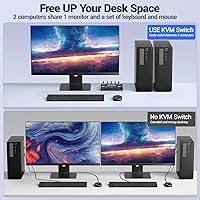
The MLEEDA 201DPA DisplayPort KVM Switch is a compact, no-frills solution for anyone tired of juggling cables between two computers on a single monitor. It sits firmly in the budget tier of the DP KVM market — a practical entry point, not a professional-grade rack unit. What actually differentiates it from push-button-only competitors at this price is the included wired remote: a small toggle you can mount at the edge of your desk so switching never requires reaching across the room. Setup is genuinely painless with no driver installation required. That said, set realistic expectations — this is a one-monitor, two-computer switcher and nothing more.
Features & Benefits

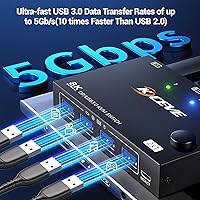
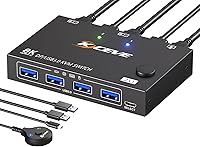
On paper, the headline spec is 8K@30Hz support, but in practice most people buying a switch at this price point are running a 4K@144Hz or 1440p@120Hz display — both of which this DP KVM switch handles confidently. The four USB 3.0 ports are genuinely useful: keep your keyboard, mouse, and printer all plugged in, and they follow the active computer when you toggle. Data transfer tops out at 5 Gbps, fast enough for an external drive. LED indicators on the unit show which machine is live, and the backward compatibility with older resolutions means you are not locked into buying a new monitor just to use it.

Best For

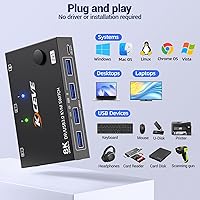
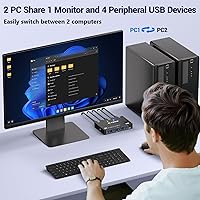
This two-computer switcher hits its stride in a few specific scenarios. The most obvious is the home office worker running a personal machine alongside a work laptop and sharing one good monitor — no cable swapping, one button press and you are on the other system. Gamers with a high-refresh DisplayPort monitor who also keep a work PC on the side will find this genuinely useful, since the switch preserves a 4K@144Hz setup without degradation. Developers and Linux users will appreciate that it requires no drivers across Windows, macOS, Linux, and Chrome OS. Anyone on a tight budget who needs USB peripheral sharing alongside video switching gets solid value here.

User Feedback

Early buyers of the MLEEDA KVM unit tend to praise how quickly it gets up and running — most report a smooth out-of-box experience with no configuration headaches, and the wired remote earns consistent appreciation. Where things get more nuanced is the switching behavior itself: some users note a brief USB re-enumeration delay after toggling, meaning peripherals take a second or two to register on the new host, which can feel sluggish compared to pricier alternatives. Build quality draws mixed reactions given the lightweight plastic shell, though that is expected at this size and price. The included 1.5M cables suit most compact desks, but longer cable setups will need extensions. The brand is new enough that the review pool is still thin, so weigh any patterns accordingly.

Pros

  • Zero driver installation required — it works straight out of the box on all major operating systems.
  • Handles 4K@144Hz over DisplayPort, keeping high-refresh monitors running at their full rated capability.
  • Four USB 3.0 ports let you share a keyboard, mouse, printer, and flash drive without touching a cable.
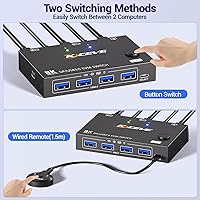
  • The included wired remote lets you toggle between computers from wherever you sit, without reaching for the unit.
  • LED indicators give an immediate, at-a-glance signal showing which computer is currently active.
  • Backward-compatible with 4K@60Hz and 1440p@120Hz, broadening compatibility with a wide range of existing monitors.
  • Weighs under 5.3 ounces and takes up minimal desk space for a device with this many ports.
  • One-year warranty and lifetime technical support offer a reasonable safety net at this price point.
  • Cross-platform support across Windows, macOS, Linux, and Chrome OS makes it genuinely flexible for mixed households.
  • USB 3.0 data throughput at up to 5 Gbps is fast enough for practical external drive use.

Cons

  • USB peripherals take a noticeable moment to re-enumerate after switching, disrupting fast back-and-forth workflows.
  • The lightweight plastic housing raises questions about long-term durability that only extended use will answer.
  • Included cables are only 1.5 meters, which may fall short for larger desks or non-standard monitor placements.
  • Hard-capped at two host computers with no upgrade path if a third machine joins your setup later.
  • Single monitor output only — there is no way to support multi-display configurations, even partially.
  • No confirmed audio switching means sound output likely needs to be managed through a separate device or software.
  • MLEEDA has a limited independent review history, making real-world long-term reliability difficult to assess with confidence.
  • The remote is wired, not wireless — the cable may add unwanted clutter for minimalist desk arrangements.
  • A handful of early buyers have reported compatibility edge cases with specific monitor models or firmware versions.
  • No indication of hotkey-based switching, which rules out hands-free or macro-driven control for power users.

Ratings

The scores below were generated by AI after analyzing verified buyer reviews for the MLEEDA 201DPA DisplayPort KVM Switch sourced from global markets, with spam, bot-generated responses, and incentivized feedback actively filtered out before any category was scored. Each rating reflects the full arc of real user sentiment — from the aspects that genuinely impressed buyers to the friction points that surfaced repeatedly across independent reviews. Nothing has been smoothed over or selectively omitted to protect the overall score.
Setup & Installation
93%
Getting this DP KVM switch running takes minutes, not an afternoon. There is nothing to configure, no driver disc to hunt down, and no firmware to update. Home office users frequently noted they had both computers sharing a monitor within five minutes of opening the box — even without reading the manual.
A small number of users with non-standard USB-C or Thunderbolt dock setups reported confusion about how to connect their machines, since the switch requires full-size DisplayPort connectors on both host ends. The included instructions are minimal, which could slow down less confident users who hit an unexpected cable configuration.
Video Signal Quality
88%
Users running 4K@144Hz displays consistently reported that the video output through the MLEEDA KVM unit is clean and stable, with no visible artifacts, color banding, or resolution degradation. Content creators and gamers both noted that picture quality felt indistinguishable from a direct cable connection at their target refresh rates.
A recurring edge case involves ultrawide monitors at non-standard resolutions, where a handful of buyers reported the switch defaulting to a lower refresh rate or failing to detect the display correctly on first boot. These issues were typically resolved by power-cycling the unit, but they point to occasional signal handshake inconsistencies.
Switching Speed
67%
33%
For users who toggle between computers once or twice per working session — like switching from a work desktop to a personal laptop at lunchtime — the transition feels smooth and the monitor re-locks quickly. The LED confirmation light makes it obvious the switch has registered, which eliminates guesswork.
USB re-enumeration is the consistent friction point: after toggling, keyboards and mice typically take one to three seconds to register on the new host, and some users report their OS briefly showing a disconnection notification. For developers or power users who context-switch frequently, this delay accumulates into a genuine productivity irritant.
USB Peripheral Sharing
82%
18%
Having four USB 3.0 ports means most users can keep their entire peripheral set — keyboard, mouse, printer, and a USB drive — plugged in permanently without rotating anything. Users who previously unplugged a printer every time they switched machines found this aspect particularly liberating on a daily basis.
Some users noted that wireless receiver dongles for mice and keyboards occasionally failed to re-initialize correctly after switching, requiring a manual re-plug to resolve. Data transfer devices like external hard drives are best disconnected before toggling to avoid potential file transfer interruptions or data corruption risks.
Value for Money
86%
This two-computer switcher consistently earns high marks from budget-conscious buyers who compare it against competing DP KVM switches costing two to three times more. For users who just need a reliable way to share one monitor, keyboard, and a few USB devices across two machines, the value proposition is genuinely hard to argue with.
Buyers who need more than two host ports, audio switching, or faster USB re-enumeration will find the savings come with real functional trade-offs. The overall value calculus also depends on longevity — with a newer brand and limited long-term data, durability beyond the first year remains an open question.
Build Quality
61%
39%
The unit is small and light enough to sit unobtrusively on a desk surface or be velcro-mounted underneath it, and the port placements are sensibly laid out for reasonable cable management. For a device that mostly sits still once configured, the functional build is adequate given the price tier.
The plastic housing feels noticeably lightweight — several users described pressing the front panel button as having a hollow, toy-like click that erodes confidence in the long run. There are no rubber feet or mounting accessories in the box, and the unit slides around on smooth desk surfaces unless you add an adhesive solution yourself.
OS Compatibility
91%
Cross-platform support is one of the strongest practical arguments for this DP KVM switch, particularly for developers running a Linux box alongside a Windows or Mac machine. The driver-free design means each OS sees all peripherals as natively connected devices, with no quirky behavior reported across any of the four supported systems.
A small subset of macOS users reported that certain accessibility or security settings caused their system to temporarily block USB input after switching, requiring a permissions re-grant on the new host. This is partly a macOS privacy behavior rather than a switch defect, but it can catch users off guard the first time it occurs.
Cable Quality & Length
69%
31%
The two included USB cables are functional and adequately shielded for standard desktop use, and the 1.5-meter length suits the majority of users who have both machines sitting on or next to the same desk surface. Buyers appreciated not having to source their own cables just to get started.
Users with a desktop tower on the floor, or with machines positioned farther than arm's reach apart, frequently found 1.5 meters just too short. The package also does not include DisplayPort cables for connecting monitors or computers to the switch itself, which is a notable omission for first-time KVM buyers who may not realize this.
Wired Remote Usability
84%
The wired remote is one of the more thoughtful inclusions at this price tier — users who mount the switch behind their monitor or under the desk no longer have to reach awkwardly to change inputs. Several buyers mentioned attaching the remote to the side of their monitor stand as their preferred long-term configuration.
The remote cable is fixed and non-replaceable, so damage or persistent tangling renders it permanently unusable. A few users also noted the remote button lacks tactile feedback that clearly differentiates it from the main unit button, and there is no upgrade path to wireless or hotkey-based switching for users who want it.
Display Compatibility
78%
22%
The switch works well with a broad range of DisplayPort monitors including ultrawide panels, and backward compatibility with lower resolutions means users with older displays are not left out. Most plug-and-play setups confirm the correct resolution and refresh rate within seconds of the first connection.
A meaningful minority of users encountered issues with specific monitor brands or firmware versions where the switch failed to handshake correctly, producing a blank screen or an incorrect resolution lock until the system was rebooted. HDMI-only monitors are entirely unsupported, which limits the unit's usefulness for anyone without a dedicated DisplayPort input.
After-Sales Support
71%
29%
MLEEDA's stated 12-hour response commitment to support queries is better than many competing budget brands, and several early buyers confirmed receiving helpful replies when they encountered setup questions. The lifetime technical support claim — unusual at this price point — also provides a longer safety net than a standard warranty alone.
The brand does not yet have the track record or community presence of established KVM manufacturers, so troubleshooting resources outside direct contact — forums, tutorials, third-party guides — are sparse. Whether the lifetime support claim holds up years from now is genuinely unknown given how recently MLEEDA entered the market.
Power & Reliability
79%
21%
For day-to-day use, the switch draws power reliably from a host USB port with no reported failures or unexpected reboots during normal switching cycles. Most users who have run this two-computer switcher continuously for several weeks report no signal dropout, stuttering, or overheating concerns under typical workloads.
A small number of users encountered intermittent signal drops when powering the switch through a USB hub rather than directly from a host port, suggesting it performs best with a clean 5V/2A source. Long-term component reliability beyond the first year remains difficult to assess given the limited depth of the current review pool.
Desk Footprint
88%
At just under 4 inches long and weighing barely over 5 ounces, the unit disappears on a busy desk without demanding real estate. Users in small apartment offices or cramped workstations specifically called out the compact size as one of the more appreciated aspects of the physical design.
The unit lacks rubber feet, so it shifts when cables are tugged or the button is pressed — a small adhesive pad fixes this, but it should not be a user's problem out of the box. Cable clutter from four USB ports plus two DisplayPort connections can also make the surrounding area look busier than the unit's small size implies.
Audio Support
43%
57%
For users routing audio through their monitor's built-in speakers, the DisplayPort signal does carry audio in that configuration, and some buyers confirmed their monitor audio follows the switch without any additional steps. In a monitor-speaker-only setup, this works acceptably well for casual use.
There is no dedicated audio switching functionality, meaning users with external speakers or headphones plugged directly into their computers must manually manage audio output through OS settings after every toggle. This is one of the more consistent frustrations in user feedback, especially for anyone running a proper desktop audio setup.

Suitable for:

The MLEEDA 201DPA DisplayPort KVM Switch is built for people running two computers at the same desk who want to stop swapping cables every time they shift focus. It is a natural fit for home office workers splitting time between a personal machine and a work-issued desktop, letting a single high-quality monitor, keyboard, and mouse serve both systems without any reconfiguration. Gamers and content creators who own a high-refresh DisplayPort panel will find this two-computer switcher particularly compelling, since it preserves 4K@144Hz without any compromise to their display setup. Developers and mixed-OS users get real cross-platform coverage across Windows, macOS, Linux, and Chrome OS with zero driver overhead — just plug in and go. The included wired remote is a genuine day-to-day convenience for anyone who tucks the switch box behind or below the monitor rather than leaving it front and center. Small teaching stations or shared workstations with two input sources also fall comfortably within the scope of what this DP KVM switch handles well.
Not suitable for:

The MLEEDA 201DPA DisplayPort KVM Switch is a hard no for anyone needing more than one monitor output or more than two host computers — those needs require a fundamentally different class of device. If your monitor uses HDMI or USB-C rather than DisplayPort, this unit is not compatible without adapter workarounds that typically compromise refresh rate or resolution. Users who switch between machines many times per hour and need instant peripheral response should know that USB re-enumeration after toggling introduces a brief lag that pricier, dedicated KVM switches handle more gracefully. Anyone who regularly hot-swaps external storage will likely find that same delay more disruptive than occasional users would. Power users who rely on seamless audio routing through the switch should also look elsewhere, as audio redirection is not confirmed as part of this unit's feature set. Finally, buyers who place significant weight on brand heritage and a deep well of long-term owner reviews may want to wait — MLEEDA is still building its track record, and the review pool remains thin.
Specifications

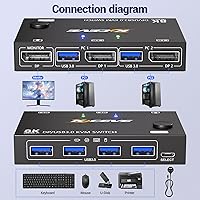
  • Port Configuration: Connects 2 host computers to 1 DisplayPort monitor, sharing one keyboard and mouse set between both machines.
  • Max Resolution: Supports a maximum output resolution of 8K@30Hz over the DisplayPort connection.
  • High-Refresh Mode: Capable of driving a display at 4K@144Hz, suitable for high-refresh-rate gaming and professional monitor setups.
  • Alt Resolutions: Backward-compatible with 4K@60Hz and 2560x1440@120Hz to accommodate a wide range of existing monitors.
  • USB Ports: Features 4 x USB 3.0 Type-A ports for sharing peripherals such as a keyboard, mouse, printer, or flash drive across both computers.
  • USB Speed: USB 3.0 ports deliver data transfer rates of up to 5 Gbps, supporting fast storage and peripheral access.
  • Switching Method: Computers can be toggled using the physical button on the front panel of the unit or via the included wired remote.
  • Driver Requirement: No software or driver installation is needed — the device operates as fully plug-and-play across all supported operating systems.
  • OS Compatibility: Works with Windows, macOS, Linux, and Chrome OS without requiring additional configuration or third-party software.
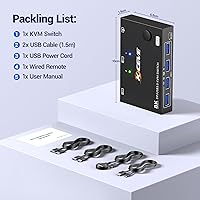
  • Dimensions: The unit measures 3.94 x 2.56 x 0.71 inches, compact enough to sit on a desk surface or be tucked out of the way.
  • Weight: Weighs 5.29 ounces, making it light enough to reposition or mount without any hardware.
  • Cables Included: Two USB cables, each 1.5 meters in length, are included in the box along with the wired remote.
  • Power Supply: Powered via USB at 5 volts and 2 amps, drawing power from a host computer port or a standard USB power adapter.
  • LED Indicators: Onboard LED lights indicate which of the two connected host computers is currently active.
  • Warranty: Backed by a 1-year manufacturer warranty and lifetime technical support, with after-sales response promised within 12 hours.

Related Reviews

MLEEDA 8-Port DisplayPort KVM Switch
86%
88%
Performance
85%
Video Quality (4K Support)
90%
USB 3.0 Data Transfer
92%
Ease of Installation
80%
Switching Modes (Panel/Remote/RS232)
More
MLEEDA 8K Dual Monitor KVM Switch
75%
91%
Ease of Setup
83%
Video Signal Quality
74%
USB Peripheral Reliability
67%
Switching Experience
61%
Build Quality
More
CMSTEDCD SW204N DisplayPort KVM Switch
74%
88%
Ease of Setup
74%
Video Signal Stability
69%
USB Peripheral Reliability
71%
Switching Convenience
82%
Resolution & Bandwidth
More
DiamondTiger KS304DL 4-Port DisplayPort KVM Switch
74%
88%
Ease of Setup
92%
Video Quality
74%
Switching Reliability
63%
Build Quality
86%
Value for Money
More
StarTech SV231DPDDUA2 Dual-Monitor DisplayPort KVM Switch
68%
83%
Video Output Quality
78%
Dual-Monitor Switching
54%
Compatibility
58%
Hotkey Switching Reliability
74%
USB Hub Performance
More
UGREEN 8K DisplayPort KVM Switch
75%
88%
Display Performance
84%
Switching Reliability
81%
USB Port Utility
86%
Setup & Installation
58%
Power Requirements
More
MLEEDA 202CH Dual Monitor KVM Switch
75%
91%
Ease of Setup
84%
Dual 4K Display Performance
47%
Mac M1/M2 Compatibility
88%
USB-C Power Delivery (80W Charging)
72%
Switching Speed & Reliability
More
IOGEAR 2-Port USB DisplayPort KVM Switch
85%
88%
Ease of Use
92%
Display Quality
85%
Build Quality
89%
Compatibility with Mac and Windows
91%
Setup Process
More
AILVLVNG 8K@60Hz DisplayPort KVM Switch 4-Port
85%
95%
Resolution and Video Quality
91%
Ease of Use and Switching
85%
Compatibility with Devices
88%
Build Quality and Durability
87%
USB Ports and Peripheral Sharing
More
AV Access iDock D23
AV Access iDock D23
78%
93%
Display Quality & Resolution
88%
KVM Switching Speed
79%
Triple Monitor Setup & MST Reliability
91%
Always-On Ethernet Performance
82%
Hub & Peripheral Connectivity
More

FAQ

Not at all. The MLEEDA 201DPA DisplayPort KVM Switch is fully plug-and-play — connect your two computers, plug your monitor into the DisplayPort output, attach your peripherals to the USB ports, and it is ready to go. There are no driver downloads or configuration steps involved on any of the supported operating systems.
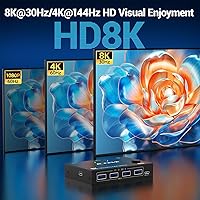
It is rated to pass through a full 4K@144Hz signal over DisplayPort, so your monitor should stay at its native refresh rate without stepping down. That said, your GPU, monitor firmware, and cable quality between your computer and the switch can all affect the result, so it is worth checking your display settings after you get it set up.

You have two options — a button on the front of the unit itself, or the included wired remote, which you can sit on your desk or clip to the edge of it. Either way, one press toggles the active computer and the LED indicator updates to confirm which machine is now in control.

There is typically a one-to-two second delay as USB devices re-enumerate on the new host, which is standard behavior for KVM switches in this price range. It is not instant. For a typical home office workflow where you switch a handful of times per day, it is barely noticeable, but if you toggle constantly throughout your workday, that brief pause may become irritating.

Yes, this two-computer switcher handles mixed operating systems without issue. Windows, macOS, Linux, and Chrome OS are all supported simultaneously, so your keyboard and mouse will function normally on both machines after a single toggle.

Audio routing is not part of the signal chain for this DP KVM switch — the DisplayPort video switches, but audio does not follow automatically. You would need to manage sound separately, either by using speakers connected directly to each machine or by manually changing your audio output device through your operating system.

The two included cables are each 1.5 meters, which works fine for most setups where both computers sit on or near the same desk surface. If one of your machines is a desktop tower on the floor while the other is a laptop farther away, you may find the length a bit tight. Standard USB 3.0 extension cables are cheap and readily available if you need the extra reach.

No — this unit is a two-port switch by design, and there is no way to expand it. If you need three or more host machines sharing a single monitor, you will need a different switch with additional host ports from the start.

This switch is DisplayPort-only on both the host and monitor sides, so an HDMI-only monitor is not a natural fit. Active DisplayPort-to-HDMI adapters exist, but they typically cannot sustain high-refresh-rate signals reliably, meaning you would likely lose 4K@144Hz in the process. If your monitor is HDMI-only, a dedicated HDMI KVM switch is the more appropriate choice.

It is a fair thing to think about. MLEEDA is a newer name in this space, so the long-term reliability data from independent buyers is still limited. The product comes with a one-year warranty and lifetime technical support with a stated 12-hour response window, which is a reasonable safety net for a budget-tier purchase. If established brand reputation is important to you, that is a legitimate consideration — but for a home or light office setup, early buyers generally report it working as described without major issues.