Overview

The NAWEN 4-Port HDMI KVM Switch solves a problem that anyone juggling multiple computers knows well: the constant unplugging, re-plugging, and display-swapping that eats into your workday. This KVM switch lets you run up to four machines through a single monitor, keyboard, and mouse — no cables to swap, no rebooting required. NAWEN sits firmly in the mid-range segment, and this unit reflects that positioning honestly: solid build, capable specs, and a straightforward feature set. It handles most scenarios well, but if you rely on keyboard hotkeys to flip between machines, that feature simply isn't here — and it's worth knowing before you commit.

Features & Benefits

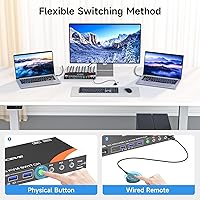
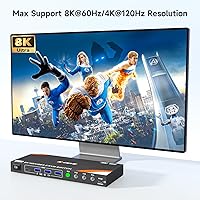
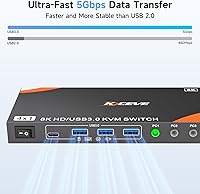
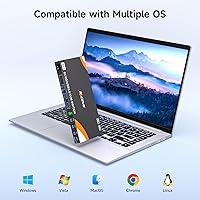
Display performance is a real strength. The four-computer switcher handles 4K at 120Hz natively, which covers the vast majority of modern monitor setups without any additional configuration. If you have an 8K display, the unit can push that resolution at 60Hz — but you'll need to supply your own HDMI 2.1 cable, as none are included in the box. Four USB 3.0 ports let you share peripherals like printers, external drives, or USB hubs across all connected machines. Switching is handled via a front-panel button or a wired remote with roughly 1.5 meters of reach. Setup is entirely plug-and-play with no drivers to install, and compatibility spans Windows, macOS, Linux, and Unix.

Best For

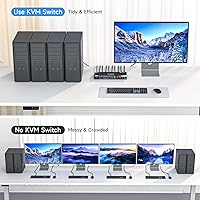
This four-computer switcher works best for people who regularly operate across multiple workstations and want a clean, low-friction desk setup. Developers running separate environments on different operating systems, IT staff managing several machines, and content editors splitting work between a personal and professional PC will get genuine daily value from it. Small classrooms and shared office spaces also benefit, since consolidating peripherals around one display removes a lot of redundant hardware. One honest caveat: if your workflow depends on fast keyboard-shortcut switching, this unit won't accommodate that. It's designed for users comfortable reaching for a physical or wired button, which is a fair trade-off for most people in this scenario.

User Feedback

Buyers consistently highlight how fast the NAWEN 4-port unit is to set up — many report having all four machines running through one display within minutes of unboxing. USB 3.0 performance draws particular praise from users who share external drives between computers, with transfers described as stable and noticeably quick. Resolution handling at 4K is seen as dependable, with no signal drops during switching. The recurring criticism is the missing hotkey support; for anyone coming from a KVM that offers keyboard shortcuts, the adjustment period is real. A handful of buyers were also caught off guard that HDMI cables aren't included. On balance, the one-year warranty and lifetime technical support leave most buyers feeling the purchase is well-backed.

Pros

  • Connects four computers to a single monitor, keyboard, and mouse with no cable swapping needed.
  • Supports 4K at 120Hz out of the box — reliable and sharp for most modern monitor setups.
  • Four USB 3.0 ports let you share external drives, printers, and hubs across all connected machines.
  • Plug-and-play setup means most users are fully running within minutes of unboxing.
  • Compatible with Windows, macOS, Linux, and Unix — no single-OS lock-in.
  • The included wired remote gives you switching control without leaving your chair.
  • USB 3.0 data transfers are consistently stable, even with larger external storage devices.
  • One-year warranty and lifetime technical support offer solid post-purchase peace of mind.
  • Driver-free operation keeps things clean — no software conflicts or background processes to manage.
  • 8K@60Hz capability is available for users with the right display and an HDMI 2.1 cable.

Cons

  • No keyboard hotkey switching — a significant gap for users coming from more feature-rich KVM options.
  • HDMI cables are not included in the box, which catches some buyers off guard at setup.
  • Reaching 8K resolution requires purchasing a separate HDMI 2.1 cable not bundled with the unit.
  • The wired remote reaches only about 1.5 meters, limiting placement flexibility in larger desk setups.
  • No support for more than four computers, and daisy-chaining is not an option.
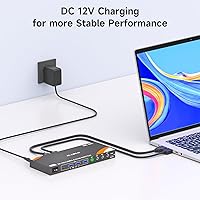
  • The unit requires a power adapter to operate — not entirely bus-powered, adding one more cable to manage.
  • No audio switching capability, so users with speaker or headphone setups will need a separate audio solution.
  • Lacks any on-screen display or visual indicator beyond physical buttons to confirm which port is active.

Ratings

The scores below reflect an AI-driven analysis of verified buyer reviews for the NAWEN 4-Port HDMI KVM Switch, sourced globally and filtered to remove incentivized, duplicate, and bot-generated feedback. Each category is scored independently based on recurring themes in real user experiences, capturing both what this four-computer switcher does well and where it falls short. The result is an honest, balanced picture designed to help you make a confident buying decision.

Ease of Setup
93%
Buyers consistently describe getting all four machines up and running within minutes of opening the box — no drivers, no configuration menus, no frustration. Developers and IT professionals especially appreciate that it just works across Windows, macOS, and Linux without any OS-specific tweaking.
A small number of users noted that the lack of any printed quick-start guide made the initial cable routing slightly confusing, particularly around which USB cable connects to which port on each computer. First-timers unfamiliar with KVM setups may need a moment to orient themselves.
Display Performance
88%
Running at 4K and 120Hz is where this unit earns its reputation — the output is crisp and stable, with no signal drops reported during switching in normal use. Content editors and designers working on color-sensitive projects noted that the image quality held up well across extended sessions.
Reaching 8K@60Hz requires sourcing a separate HDMI 2.1 cable, which catches some buyers off guard at setup time. A handful of users also reported that at the highest resolutions, there is a brief black-screen moment during switching, which is standard behavior for KVM switches but still annoying in time-sensitive workflows.
Switching Reliability
84%
The physical push-button and wired remote both perform consistently in everyday use, with inputs registering immediately and computers activating without lag. Users running mixed OS environments particularly valued the clean, predictable handoff between machines with no ghost inputs or keyboard/mouse dropouts.
The 1.5-meter remote cable limits placement flexibility, and buyers with the KVM unit mounted under a deep desk or tucked into a cabinet found the remote barely reaches a comfortable position. There is also no visual confirmation of which port is currently active beyond the physical button state, which adds minor friction in multi-machine setups.
Hotkey & Control Options
41%
59%
The physical button and wired remote are tactile and responsive, and users who prefer deliberate, hardware-based switching rather than accidental hotkey triggers actually find this approach less error-prone. For shared office setups, a physical button also avoids mid-presentation switches triggered by stray keystrokes.
The complete absence of keyboard hotkey switching is the single most cited complaint across user feedback. Power users migrating from hotkey-enabled KVM switches report a noticeable productivity dip, and for anyone managing fast context switches throughout the day, walking to or reaching for a physical button adds up quickly.
USB 3.0 Performance
86%
Data transfers through the four USB 3.0 ports are described as fast and stable, with users sharing external SSDs and large media drives reporting throughput that feels on par with a direct connection. Printers and USB hubs are also recognized reliably without needing to re-pair after each switch.
Some users noted that certain USB devices — particularly older or non-standard USB hubs — occasionally require a moment to re-initialize after switching computers. There is no USB-C port on the unit, so anyone relying on newer USB-C peripherals will need a separate adapter.
Build Quality
73%
27%
The unit feels solid enough for a desk-bound device at this price tier, and the port connections are firm without excessive wobble. Buyers who have used cheaper plastic KVM switches in the past tend to describe this one as a step up in terms of physical feel.
It is not a premium enclosure by any stretch — the matte plastic housing shows fingerprints and scuffs with regular handling, and the button mechanism has a slightly hollow click that does not inspire high confidence over years of use. Long-term durability data is still limited given the product's relatively recent market entry.
Cable Management
67%
33%
Having the USB 3.0 cables included in the box means one less trip to the store before the first setup, and the four cable bundle keeps the peripheral side of the desk organized once everything is routed. Users in small office setups appreciated the reduction in loose cables compared to manually swapping peripherals.
The absence of HDMI cables in the package means buyers still need to source four input cables and one output cable separately, which undermines the out-of-box convenience somewhat. Routing five HDMI cables plus four USB cables from four separate computers can also create a significant cable tangle if the KVM is not positioned thoughtfully.
OS Compatibility
89%
Cross-platform support is genuinely broad — buyers running Linux alongside Windows and macOS on the same desk reported no compatibility issues whatsoever, which is not always guaranteed with budget-tier KVM switches. The driver-free design means OS updates do not break functionality.
A small number of macOS users reported that the keyboard layout occasionally shifts after switching back from a Windows machine, requiring a manual reset of certain key mappings. This is largely a system-level behavior rather than a flaw in the unit itself, but it is worth flagging for Mac-heavy workflows.
Package Completeness
62%
38%
The inclusion of four USB 3.0 cables and a wired remote means the peripheral side of the setup is covered from day one. The power adapter being included also removes one potential compatibility headache for international buyers.
Not including a single HDMI cable — not even one for the monitor output — is a meaningful omission that leaves many buyers needing to make an additional purchase before they can use the device at all. The product listing could be clearer about this gap upfront to avoid the frustration of an incomplete-feeling unboxing.
Value for Money
78%
22%
For users who genuinely need to manage four computers from one desk without hotkey requirements, the price-to-performance ratio is reasonable for what the hardware delivers. The 4K@120Hz capability at this price point is competitive within the mid-range KVM segment.
Buyers who later discover the missing hotkey support feel the value proposition weakens significantly, since comparable units with hotkey switching exist in a similar price range. The need to purchase HDMI cables separately also adds to the real total cost of ownership.
Warranty & Support
82%
18%
The one-year warranty combined with a one-month free replacement window gives buyers a meaningful safety net, and NAWEN's lifetime technical support commitment is well above average for this product category. Users who contacted support reported receiving responses and practical solutions within a reasonable timeframe.
As a relatively newer brand, NAWEN does not yet have the long-term track record of established KVM manufacturers, so the lifetime support promise is harder to fully evaluate. Some buyers also noted that warranty claim processes required back-and-forth communication before a resolution was reached.
Audio Handling
38%
62%
Users who route audio through their monitor speakers via HDMI do not experience any additional audio issues beyond the standard brief interruption during display switching. For this narrow use case, audio follows the display signal without requiring a separate setup.
There is no dedicated audio switching capability on this unit, which is a real gap for users with external speakers or headphone setups connected directly to the computer. Anyone expecting the KVM to handle a full audio switch alongside video will need to manage sound routing separately, adding friction to every computer swap.
Desk Footprint
74%
26%
At just over 10 inches long and under 3 inches tall, the NAWEN 4-port unit sits comfortably on most desks without dominating the space, and its flat profile allows it to be tucked beside a monitor stand or at the rear of a desk. Users in compact home office setups found it easy to position.
The unit is not particularly light at around 19.4 oz, which makes it feel slightly overbuilt for what it does and limits mounting flexibility. There are no mounting holes or VESA attachment options, so if you want it off the desk surface entirely, your options are limited to improvised solutions.

Suitable for:

The NAWEN 4-Port HDMI KVM Switch is a practical fit for anyone who regularly works across multiple computers and is tired of the cable-swapping routine that comes with it. Developers maintaining separate machines for different operating systems, IT professionals managing several desktops from a single desk, and home office workers running a personal and work PC side by side will all find this unit genuinely useful day to day. Content creators and video editors who need a high-resolution display shared across machines will appreciate the reliable 4K@120Hz output without needing to reconfigure anything between switches. It also suits small shared spaces — a classroom lab, a compact office, or a home studio — where reducing redundant peripherals is a real organizational win. If your workflow is built around physical controls and you simply want a dependable, no-fuss way to consolidate four computers onto one monitor and one set of peripherals, this four-computer switcher delivers exactly that.

Not suitable for:

The NAWEN 4-Port HDMI KVM Switch will frustrate buyers who rely on keyboard hotkeys to switch between machines quickly — that feature does not exist here, and there is no workaround. Power users in fast-paced trading, coding, or production environments who flip between systems dozens of times a day will likely find the physical button or wired remote too slow for their rhythm. Anyone expecting a fully stocked box should also know upfront that HDMI cables are not included; if you are running 8K, you will need to source your own HDMI 2.1 cables separately, which adds to the overall cost. This is also not the right choice for enterprise or data-center environments that demand rack-mount form factors, IP-based remote access, or advanced security features. Buyers needing more than four connected computers will need to look elsewhere, as this unit tops out at four inputs with no daisy-chaining support documented.

Specifications

  • Brand: This unit is manufactured and sold under the NAWEN brand.
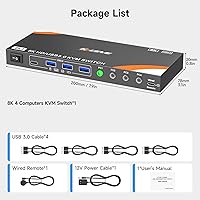
  • Dimensions: The unit measures 10.35 x 6.1 x 2.64 inches in its physical footprint.
  • Weight: The switch weighs approximately 19.4 oz, making it a solid mid-sized desktop unit.
  • HDMI Inputs: Four HDMI input ports allow simultaneous connection of up to four source computers or devices.
  • HDMI Output: A single HDMI output port connects to your monitor or display.
  • USB Ports: Four USB 3.0 ports are included for sharing peripherals such as drives, printers, or hubs across all connected machines.
  • Max Resolution: The switch supports up to 8K@60Hz when used with a compatible HDMI 2.1 cable, which must be sourced separately.
  • Standard Resolution: Out of the box with standard HDMI cables, the unit reliably handles 4K at 120Hz.
  • Switching Method: Switching is performed via a front-panel push button or an included wired remote control.
  • Remote Cable Length: The included wired remote has a cable length of approximately 1.5 meters.
  • Hotkey Support: Keyboard hotkey switching is not supported on this unit.
  • OS Compatibility: The switch is compatible with Windows (including Vista and XP), macOS, Linux, and Unix operating systems.
  • Driver Requirement: No drivers or software installation are required; the device is fully plug-and-play.
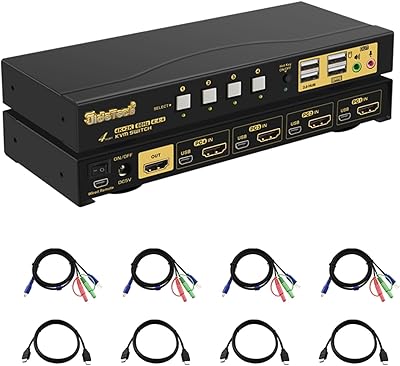
  • Package Contents: The box includes the KVM switch unit, four USB 3.0 cables, one wired remote, and one power adapter.
  • Power: The unit requires the included external power adapter to operate and is not bus-powered.
  • Warranty: NAWEN provides a one-year warranty and a one-month free replacement policy on this switch.
  • Tech Support: Lifetime technical support is offered directly by NAWEN for the duration of the product's use.
  • Circuit Type: The internal circuit is configured as a 4-way switch design.
  • Control Type: The unit uses a direct hardware-switching control method rather than software or network-based control.
  • Included Cables: HDMI cables are not included in the package and must be purchased separately by the buyer.

Related Reviews

ANXQQ ANQ-8401B 4-Port HDMI KVM Switch
77%
91%
Ease of Setup
88%
Display Switching Reliability
86%
EDID Performance
67%
USB Device Recognition
61%
8K Resolution Capability
More
DGODRT KS604H 4-Port HDMI KVM Switch
80%
91%
Ease of Setup
74%
Switching Reliability
78%
Video Quality
79%
USB Peripheral Sharing
84%
Wired Remote Control
More
StarTech SV431HDU3A2 4-Port HDMI KVM Switch

73%
74%
Switching Reliability
69%
Video Quality
66%
USB 3.0 Hub Performance
71%
Audio Switching
83%
Setup & Installation
More
GREATHTEK 4-Port HDMI KVM Switch
66%
89%
Video Signal Quality
74%
Switching Performance
83%
USB Peripheral Sharing
92%
Setup Experience
71%
Build Quality
More
JideTech 64H2UA 4-Port HDMI KVM Switch
73%
84%
Video Output Quality
79%
EDID Emulation Reliability
81%
Switching Methods & Flexibility
62%
USB Hub Performance
77%
Audio Switching
More
Steetek STK-S7415H 4-Port HDMI KVM Switch
74%
91%
Ease of Setup
83%
Switching Reliability
78%
Video Quality & Resolution
76%
Adaptive EDID Performance
69%
USB Peripheral Sharing
More
TESmart HKS403-P23 4-Port Triple Monitor KVM Switch
69%
78%
Display Performance
72%
EDID Emulation Reliability
74%
Switching Speed & Reliability
58%
USB Hub Performance
69%
Network Sharing
More
Scyniney 4-Port Triple-Monitor HDMI KVM Switch
74%
83%
Video Signal Stability
79%
4K Resolution Performance
74%
USB Hub Performance
81%
Switching Reliability
41%
Hotkey Switching Support
More
TCNEWCL KS-801 8-Port HDMI KVM Switch

78%
88%
Ease of Setup
91%
Port Capacity & Scalability
74%
Video Quality & Resolution
69%
Switching Speed & Reliability
83%
IR Remote Control
More
DiamondTiger KS304DL 4-Port DisplayPort KVM Switch
74%
88%
Ease of Setup
92%
Video Quality
74%
Switching Reliability
63%
Build Quality
86%
Value for Money
More

FAQ

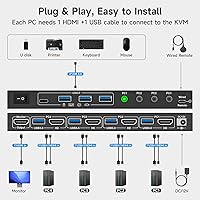
No, the NAWEN 4-Port HDMI KVM Switch is fully plug-and-play. You just connect your computers and monitor via HDMI, plug in the USB cables to each PC, attach the power adapter, and you are ready to go. There is no software to install and no driver conflicts to worry about.

Technically yes, but there is an important catch: you need to supply your own HDMI 2.1 cable for each connection where you want 8K@60Hz output. The cables included in the box are USB 3.0 cables for peripherals, not HDMI cables. Standard HDMI cables will cap you at lower resolutions, so if 8K is your goal, budget for the right cables.

Unfortunately, no. This four-computer switcher does not support keyboard hotkey switching at all. You will need to either press the physical button on the front of the unit or use the included wired remote. If hotkey switching is critical to your workflow, this is a real limitation worth considering before buying.

You get the KVM switch itself, four USB 3.0 cables, one wired remote control, and a power adapter. HDMI cables are not included, so make sure you have those on hand before you set up — you will need one per connected computer plus one for the monitor output.

Yes, that is one of the more useful features of this unit. The four USB 3.0 ports let you connect peripherals like external drives, printers, or scanners, and those devices become accessible to whichever computer is currently active. USB 3.0 speeds make sharing storage drives a smooth experience in practice.

Yes. The switch is compatible with Windows, macOS, Linux, and Unix, so mixing operating systems across the four connected machines is not a problem. Since there are no drivers involved, the OS does not affect how the switch itself behaves.

The wired remote cable is about 1.5 meters long, which is enough for most standard desk setups. If the KVM unit is tucked under your desk or off to the side, you may need to position it carefully to keep the remote within comfortable reach.

This unit handles video output and USB peripheral sharing only — there is no dedicated audio switching built in. If you need to route speakers or headphones alongside your display, you will need a separate audio switch or manual audio management on your end.

When you switch to a different computer, the USB peripherals connected to the KVM switch transfer along with it. The previously active computer effectively loses access to those devices until you switch back. Keep that in mind if you have background processes on another machine that depend on connected USB hardware.

NAWEN backs this switch with a one-year warranty and a one-month free replacement policy, which means if a defect shows up early, getting a replacement is relatively straightforward. Beyond that, they offer lifetime technical support, so you can reach out to their team even after the warranty period ends if you run into configuration or compatibility questions.