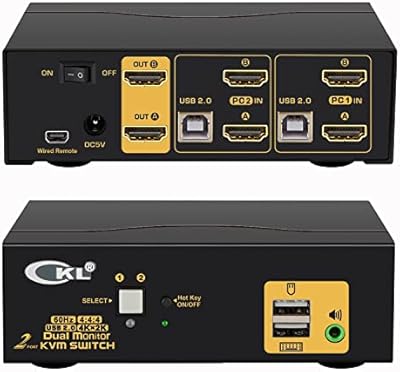
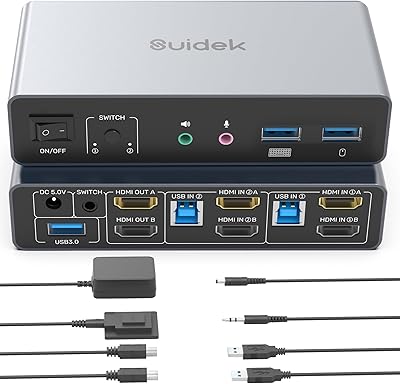
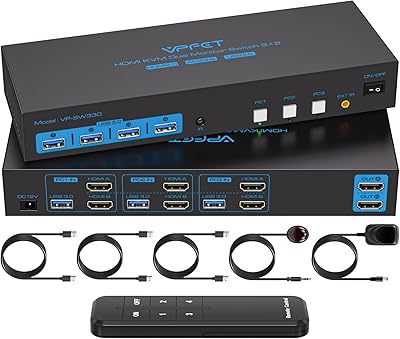
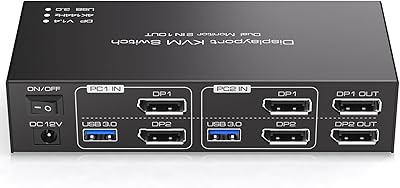
Overview

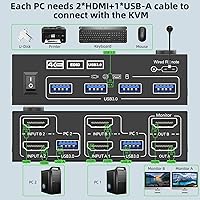
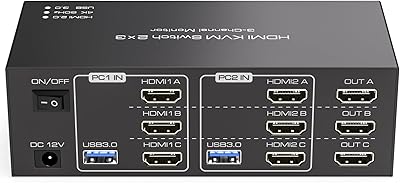
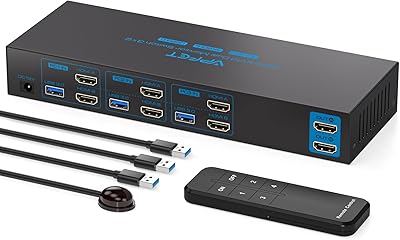
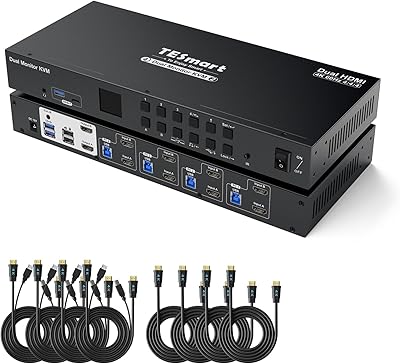
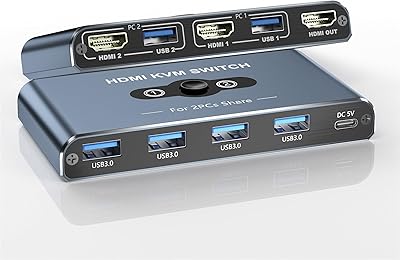
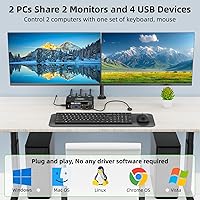
The ANGEET HDMI KVM Switch 2 Monitors 2 Computers 4K@60Hz is a versatile solution for users managing two computers and dual monitors. This KVM switch allows seamless control of both systems through a single set of peripherals, eliminating the need for multiple keyboards and mice. It supports high-definition 4K@60Hz resolution, ensuring crystal-clear video quality for both extended and mirrored display modes. Additionally, the device allows for sharing up to four USB devices, such as a keyboard, mouse, and printer, providing a complete and efficient workspace solution. Overall, this KVM switch offers a practical way to streamline multi-computer setups.
Features & Benefits

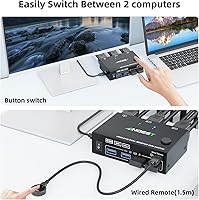
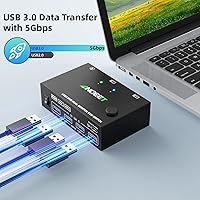
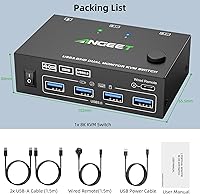
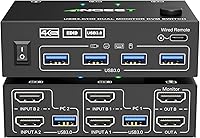
This dual monitor switch boasts several useful features that make switching between computers smooth and hassle-free. One of the standout features is its EDID simulation, which ensures that display settings remain consistent even when toggling between systems. The device includes four USB 3.0 ports that support rapid data transfer at up to 5Gbps, making it ideal for users with demanding peripherals. HDMI support provides clear video and audio, while a wired remote with LED indicators makes switching between the two computers fast and intuitive.

Best For

This HDMI switch is best suited for users who require efficient control of two computers using dual monitors. It's particularly helpful in home office setups, allowing professionals to manage multiple devices from a single set of peripherals. Gamers and multimedia creators who need high-quality, 4K resolution across two screens will also benefit from its seamless functionality. The easy-to-use interface and wide compatibility make this switch a strong contender for anyone needing to optimize their workspace without complex setups.

User Feedback

Overall, users appreciate how easy this switch is to set up and use, with many highlighting the reliable EDID simulation feature that ensures display settings don’t reset when switching between computers. Many also find the device’s compact design a space-saver, making it ideal for smaller desks or workspaces. However, some users have noted that cable length can impact 4K performance, especially if the cables exceed the recommended length of 1.5 meters. While the product excels in performance, a few users wish for even more durable cables.

Pros

  • This KVM switch is a great solution for managing multiple devices with dual monitors in home office setups.
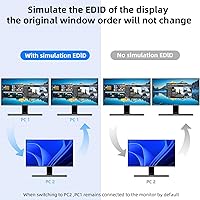
  • EDID simulation ensures display settings stay consistent when switching between computers.
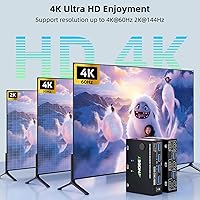
  • Supports 4K at 60Hz, providing sharp, high-definition visuals for both work and gaming.
  • USB 3.0 ports allow fast data transfer up to 5Gbps, ideal for devices like printers and external drives.
  • Easy to set up and use, with a simple wired remote for switching between computers.
  • Compact design allows for space-saving, making it ideal for smaller workstations or desk setups.

Cons

  • Some users experienced signal issues with longer cables, particularly when running 4K resolution.
  • The short cable length may be restrictive in larger setups or if the switch needs to be placed far from devices.
  • Occasional compatibility issues with certain operating systems can lead to setup difficulties.
  • While it supports multiple USB devices, the number of ports may be limiting for users with many peripherals.
  • The switch may not perform as well with ultra-fast switching needed for high-end gaming or real-time applications.
  • There is no dedicated support for extended desktops across more than two monitors, limiting some multi-display setups.

Ratings

After analyzing verified user reviews worldwide across multiple languages and platforms, we found that the ANGEET HDMI KVM Switch 2 Monitors 2 Computers 4K@60Hz has received a balanced mix of praise and criticism. All reviews considered were carefully filtered to exclude spam, bot-driven, incentivized, and exaggerated content, ensuring that only authentic, high-quality feedback shaped the scores. Both strengths and potential pain points have been reflected in these results, with various user experiences captured from a diverse set of sources.
Display Quality
91%
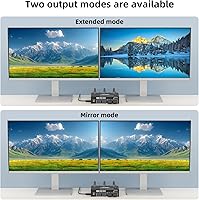
Users are pleased with the clear and vibrant 4K resolution provided by this device. The 60Hz refresh rate ensures smooth visuals, making it a reliable option for both work and entertainment setups. The ability to switch between extended and mirrored display modes is particularly appreciated for multi-tasking or gaming.
Some users mentioned occasional issues with the display not always recognizing the 4K signal when switching between devices. A few noted that the performance could degrade with longer cable lengths, leading to potential visual glitches or lower resolution output at full 4K.
Ease of Setup
88%
Many users highlighted how easy it is to set up this device with minimal configuration. The clear instructions and straightforward plug-and-play functionality are ideal for both tech-savvy and novice users. Most buyers appreciated that they didn’t need additional software or complex setups.
While setup is generally simple, some users reported challenges when trying to position the switch in tight spaces. A few mentioned that the cables provided were a bit short, which required them to buy extra ones to accommodate their specific workstation setup.
USB Performance
85%
The inclusion of four high-speed USB 3.0 ports allows for seamless device sharing across two computers, which is a major plus for users who need to switch between multiple peripherals like keyboards, mice, and printers. The 5Gbps transfer rate ensures that data is handled efficiently without noticeable lag.
Some users experienced intermittent USB disconnections when switching between computers. A few reviews mentioned that the USB ports didn’t always register devices immediately after switching, requiring them to unplug and re-plug the peripherals for them to work.
Compatibility with Systems
93%
This switch supports a wide variety of operating systems including Windows, Mac OS, Linux, and Chrome OS, making it a versatile choice for many users. This broad compatibility ensures that it will fit seamlessly into almost any multi-device workspace, whether for personal or professional use.
While the device is compatible with multiple systems, a small number of users reported occasional issues with non-Windows OS, where the switch didn't recognize certain peripherals correctly. However, this issue was rare and generally related to specific system configurations or outdated drivers.
Build Quality
87%
The build quality of this device feels solid and durable, with most users impressed by its compact design and sturdy construction. The small form factor is ideal for users who are limited on space but still need a reliable switch for their dual-monitor setup.
Despite the sturdy build, some users reported that the switch’s plastic exterior feels a bit flimsy under pressure. Additionally, a few reviewers mentioned that the button to switch between computers occasionally felt unresponsive, requiring multiple presses to work.
Switching Speed
90%
The switching process between two computers is quick and efficient, with minimal delay. The wired remote control and clear LED indicators help make the process seamless, especially when managing multiple devices in a fast-paced environment. Users appreciated that switching didn't cause noticeable lag in their workflow.
A handful of users pointed out that the switch speed could slow down when using extended display modes. Some also mentioned that, while the remote is useful, it could benefit from a longer cable to reach comfortably from various desk setups.
Cable Length Issues
60%
40%
For most users, the cable length was sufficient for typical home or office desk setups. The device is compact and easy to integrate into standard workspaces without much need for extra cables.
Several users noted that the provided cables were too short for their needs, especially when trying to position the switch further from their monitors or computers. This limitation forced some to purchase additional cables to extend the reach, affecting the overall convenience.
Power Supply Stability
85%
The USB-powered supply provides consistent power to the device without the need for additional adapters or bulky power bricks. Users appreciate the convenience of a 5V USB power source, making the setup cleaner and more energy-efficient.
A few users reported that the power supply occasionally cut out when using high-power devices connected through USB, such as printers or external hard drives. This issue was mostly resolved by switching the power source to a different USB port but was still a minor inconvenience.
Remote Control Functionality
92%
The wired remote control received praise for its responsiveness and ease of use. It provides a simple, convenient way to switch between two computers without needing to physically interact with the device, which many users found invaluable in busy work environments.
Although most found the remote helpful, a few users noted that the cord length could be a bit limiting, especially for larger desks or more complex setups. Some also mentioned that the remote could be a bit more tactile to enhance the switching experience.
Price vs Performance
89%
Users generally felt that the device provided excellent value for the price, considering its high-quality features like 4K resolution, USB 3.0 ports, and broad OS compatibility. Many felt that it struck a good balance between affordability and performance.
A few buyers pointed out that while the product offered good performance, there were cheaper alternatives available with fewer features. Some users felt that the price could be a bit lower considering the limitations in cable length and occasional switching delay in some use cases.
Customer Support
78%
22%
When users did reach out to customer support, they generally found the team helpful and responsive. The support team was able to address most issues like setup questions or cable-related concerns in a timely manner.
Some users experienced delays in receiving responses from customer support. A few mentioned that their issues weren't resolved as quickly as expected, particularly with regards to troubleshooting compatibility with certain operating systems.
Long-Term Reliability
82%
18%
The device performs reliably over time, with many users reporting consistent performance even after prolonged use. The build quality and simplicity of the device contribute to its longevity, making it a good option for users who need a long-lasting switch for everyday use.
A small number of long-term users reported that the switch began to show signs of wear after several months of use, with some experiencing slower switching speeds or issues with the remote control. However, these were isolated incidents and not widespread concerns.
Multitasking Performance
85%
This device excels at handling multitasking between two computers, especially for users who need to switch frequently between systems without interruptions. The 4K resolution and USB ports make it ideal for demanding tasks like gaming or professional video editing across two monitors.
While it performs well for multitasking, some users pointed out that it can struggle when running multiple heavy applications simultaneously on two computers. The occasional lag when switching could disrupt more resource-intensive workflows, especially with complex setups.
User-Friendliness
88%
The intuitive controls, clear LED indicators, and easy-to-use remote make this device user-friendly for a wide range of users, from beginners to experienced tech users. Setting it up and switching between devices requires minimal effort, making it an accessible tool for a variety of environments.
Not all users found the instructions as clear as they would have liked, particularly those with more complex setups. Some struggled with cable management or figuring out the optimal configuration for their monitors and peripherals.

Suitable for:

The ANGEET HDMI KVM Switch 2 Monitors 2 Computers 4K@60Hz is ideal for users who need to efficiently manage two computers with dual monitors. It’s particularly well-suited for home office setups where switching between computers is frequent, such as when managing work and personal devices simultaneously. Gamers and professionals who require high-quality 4K video on multiple displays will appreciate the clear visuals and smooth performance at 60Hz. Additionally, users with limited desk space can benefit from the compact design, as it allows them to easily switch between devices without the need for multiple keyboards and mice, streamlining their workflow.
Not suitable for:

However, this KVM switch may not be the best option for those with complex or extended setups. Users with longer cable runs may experience issues with signal degradation, particularly when using 4K resolution, which can impact performance. If you have a large desk or need to position the switch far from your computers and monitors, the relatively short cables could be a limitation. Moreover, users with specific operating system configurations or those needing seamless performance across all systems might encounter occasional compatibility issues. Additionally, if you require ultra-fast switching with minimal delay for high-performance gaming or video editing, the occasional lag reported by some users might not meet your expectations.

Specifications

  • Resolution: Supports 4K resolution at 60Hz for clear and detailed visuals on dual monitors.
  • Display Modes: Offers extended and mirrored display modes for flexible screen configurations.
  • USB Ports: Equipped with 4 USB 3.0 ports for connecting peripherals such as keyboard, mouse, and printer.
  • Data Transfer Rate: USB 3.0 ports support data transfer speeds of up to 5Gbps for fast file sharing.
  • HDMI Support: Supports HDMI connections for both high-definition video and audio output.
  • EDID Simulation: EDID simulation prevents display settings from resetting when switching between computers.
  • Switching Method: Switch between computers easily using a wired remote with LED indicators.
  • Power Supply: Powered via USB (5V), eliminating the need for an external power adapter.
  • Compatibility: Compatible with Windows, Mac OS, Linux, and Chrome OS for broad system support.
  • Cable Length: Recommended HDMI cable length is under 1.5 meters for optimal 4K performance.
  • Form Factor: Compact design with dimensions of 3.94 x 2.56 x 1.34 inches for easy integration into desk setups.
  • Weight: Weighs approximately 0.3 pounds, making it lightweight and easy to install.
  • Maximum Input Devices: Supports up to two computers, each with its own set of connected USB devices.
  • LED Indicators: LED indicators show the active computer, making it easy to know which system is in use.
  • HDMI Version: Supports HDMI 2.0 for stable 4K video output and backward compatibility with lower resolutions.
  • Audio Support: Supports HDMI audio pass-through, allowing clear audio alongside high-quality video.
  • Warranty: Comes with a standard warranty for reliability and peace of mind.

FAQ

Setting up this KVM switch is simple. Connect your two computers via HDMI cables, then connect each monitor to the HDMI output ports. Use the provided USB cables to link your keyboard, mouse, and any other USB devices. Finally, plug in the device's USB power cable and connect the wired remote for switching. Once everything is plugged in, you can toggle between computers using the remote.

EDID simulation ensures that your display settings are preserved even when switching between computers. This feature prevents the monitors from resetting or displaying incorrect resolutions when you toggle between the two systems. It’s especially useful if you’re using high-resolution setups like 4K monitors, as it maintains consistent visual performance.

Yes, this device supports 4K resolution at 60Hz on both monitors when using the extended or mirrored display mode. It's perfect for users who need high-definition visuals for both work tasks and gaming. Just ensure that your cables are compatible and the length is within the recommended range for optimal performance.

You can connect up to four USB devices, including a keyboard, mouse, printer, or external drives. The KVM switch supports USB 3.0 ports, ensuring fast data transfer up to 5Gbps. This is ideal for users who need to share peripherals between two computers seamlessly.

Yes, this KVM switch is suitable for gaming setups as it supports 4K resolution at 60Hz and provides high-quality video and audio through HDMI connections. Gamers who need seamless switching between two systems will find it very practical, though be mindful of the cable length limitations for optimal performance.

Users have reported minimal to no lag when switching between computers, thanks to the wired remote and LED indicator for easy operation. However, performance may vary depending on cable quality and setup, particularly when dealing with long cables or higher resolutions like 4K.

For the best performance, it’s recommended to keep the HDMI cables under 1.5 meters. Longer cables may impact the quality of the 4K signal, potentially causing signal degradation or connectivity issues, especially when using high-resolution displays.

The KVM switch is compatible with multiple operating systems, including Windows, Mac OS, Linux, and Chrome OS. Whether you're using a mix of systems in your workspace or need to switch between different OS setups, this device will work reliably across these platforms without any additional software or drivers.

While this switch supports dual-monitor setups, it does not support more than two monitors at once. If you’re looking to manage three or more displays simultaneously, this device won’t meet your needs. It’s ideal for standard dual-monitor workstations or gaming setups but not suitable for large-scale multi-monitor configurations.

Some users have noted occasional issues with 4K performance, particularly when using longer HDMI cables or certain display settings. The signal may weaken, or the display might not work properly if the cable length exceeds the recommended limit. Keeping the cables under 1.5 meters generally ensures the best 4K output.