Overview

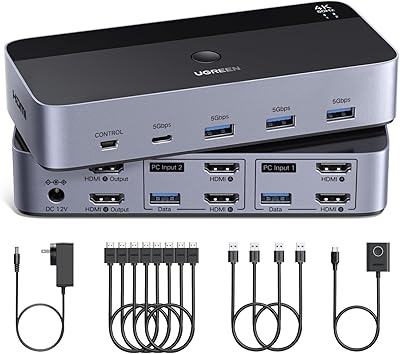
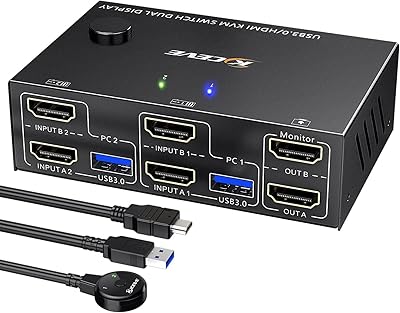
The UGREEN 2-Computer HDMI KVM Switch is a compact, no-frills device that lets you run two computers from a single monitor, keyboard, and mouse — a straightforward fix for anyone tired of swapping cables. It sits firmly in the budget tier of the KVM market, yet ships with everything you need out of the box: two HDMI cables, two USB-A to USB-B cables, and a wired desktop controller. Setup is plug-and-play across Windows, Mac, and Linux, with no drivers involved. One thing worth knowing upfront: this two-port switcher does not support EDID emulation, hotkey switching, or docking stations, so understanding those limits before purchasing will save you frustration later.
Features & Benefits

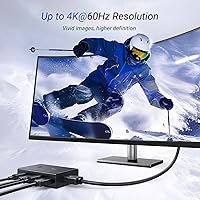
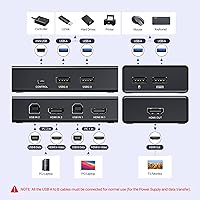
On the technical side, this KVM switch delivers 4K at 60Hz over HDMI 2.0 — clean output with HDR and 3D support included. That said, hitting that resolution reliably depends on keeping cable runs short and ensuring both connected sources are set to matching resolutions; mismatched output settings can cause display issues. You get four USB 2.0 ports for sharing peripherals like a keyboard, mouse, or printer, and the unit is small enough to tuck out of sight easily. One critical setup point: both USB cables must stay connected to both computers at all times, not just the active machine — skipping this step is the source of most reported problems.

Best For

This two-port switcher hits a sweet spot for a specific kind of user. If you bounce between a personal laptop and a work machine on the same desk, it handles that cleanly without overcomplicating things. Budget-conscious shoppers will appreciate the included cable bundle, which means nothing extra to buy before getting started. Gamers who want to flip between a PC and a PlayStation or Nintendo Switch on one display will also find it practical. It is less suitable for anyone needing hotkey shortcuts, multi-monitor control, or docking station compatibility. But if a physical button switch covers your needs, this fits the bill without unnecessary overhead.

User Feedback

Across buyer reviews, easy setup and overall value come up most often as positives — people are generally pleased to unbox something that works without hunting for drivers or configuration menus. The desktop controller earns specific praise; having a dedicated clicker instead of reaching behind the unit turns out to be more useful than it sounds. On the downside, some users report USB peripherals dropping out briefly mid-switch, which can disrupt an active workflow. The absence of hotkey switching frustrates power users who expected it at this price point. A notable number of buyers also ran into problems simply because they missed the dual USB cable requirement — something the included instructions could explain far more clearly.

Pros

  • Ships with all cables included — two HDMI and two USB cables — so setup costs nothing extra.
  • Plug-and-play across Windows, Mac, and Linux with zero driver installation required.
  • The included desktop controller is genuinely useful, especially when the unit is tucked out of reach.
  • 4K at 60Hz output looks sharp and consistent when cable lengths are kept reasonable.
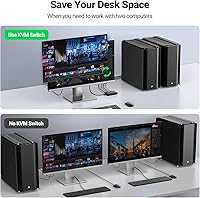
  • Compact enough to disappear on a crowded desk without claiming valuable surface space.
  • Works across a broader device range than most rivals at this price, including consoles and TV boxes.
  • Physical button switching is fast and tactile, with no lag between pressing and display handoff.
  • Cross-platform compatibility makes this KVM switch a rare fit for mixed Mac and Windows workflows.

Cons

  • Both USB cables must stay connected to both computers at all times — missing this causes most reported failures.
  • USB peripheral dropout during switching is a documented pattern, not an isolated defect.
  • No hotkey switching support is a real limitation for anyone who switches computers frequently throughout the day.
  • EDID emulation is absent, meaning the inactive computer may rearrange windows every time you switch away.
  • Included HDMI cables are short, which restricts how far apart the two connected computers can be positioned.
  • Docking station incompatibility rules it out for a large share of modern laptop users.
  • The user guide does a poor job explaining the dual-cable requirement, causing avoidable setup confusion.
  • 4K at 60Hz performance degrades noticeably if source resolutions do not match or cables exceed recommended lengths.

Ratings

The UGREEN 2-Computer HDMI KVM Switch has been evaluated by our AI rating system after analyzing thousands of verified global buyer reviews, with spam, bot-submitted, and incentivized feedback actively filtered out before scoring. Ratings reflect the full spectrum of real ownership experiences — from first-day setup to months of daily use — so both the strengths and the friction points are represented honestly. Where this two-port switcher delivers genuine value, the scores reflect it; where real users ran into consistent trouble, that shows up too.
Ease of Setup
84%
Most buyers were up and running within minutes of opening the box. The plug-and-play nature means no driver downloads, no software menus to navigate, and no compatibility headaches across Windows, Mac, or Linux systems — a genuine time-saver for non-technical users.
A meaningful subset of buyers ran into immediate problems simply because they did not realize both USB cables must stay connected to both computers simultaneously. The included documentation explains this poorly, leading to avoidable support frustration for first-time KVM users.
Video Quality
78%
22%
When conditions are right — matching resolutions on both source devices and cable runs kept reasonably short — the 4K at 60Hz output looks sharp and consistent. HDR support adds a noticeable improvement for users with HDR-capable monitors who are switching between compatible sources.
The 4K performance is more conditional than the spec sheet implies. Users connecting longer third-party HDMI cables, or running sources at mismatched resolutions, reported dropped frames and flickering. The switch itself is not the issue in most cases, but the constraints are real and matter in practice.
Switching Reliability
71%
29%
For the majority of casual users switching a few times per day, the button and desktop controller both work cleanly and without delay. The physical feedback of the switch is satisfying, and the desktop controller in particular gets positive mentions for making the transition feel deliberate and responsive.
A recurring pattern in negative reviews involves USB peripheral dropout mid-switch — keyboards and mice occasionally failing to register on the newly active computer until the device is unplugged and re-plugged. This happens infrequently but consistently enough across different setups to count as a known issue rather than an isolated one.
Desktop Controller
88%
The wired desktop controller is a standout inclusion at this price tier. Buyers who placed the KVM unit out of reach — on a shelf or behind a monitor — found the controller genuinely useful rather than just a box-filler. Several reviewers specifically said it made daily use feel more polished and considered.
The controller cable length limits where you can position it on a desk, and there is no wireless option. A small number of buyers found the controller button feel cheap compared to the main unit, though this was a minority opinion and not tied to any functional failures.
USB Peripheral Sharing
69%
31%
Four USB 2.0 ports cover the basics well — keyboard, mouse, and a printer or USB hub can all coexist without fighting for ports. For users with modest peripheral setups, the sharing works reliably once the dual-cable requirement is properly understood and implemented.
USB 2.0 is a bottleneck for anyone hoping to share faster storage devices or high-polling-rate gaming peripherals. The dropout issue during switching, while not universal, is the single most common complaint and directly limits confidence in the peripheral-sharing experience for users with active, time-sensitive workflows.
Build Quality
73%
27%
The unit is compact and solid enough for everyday desk use. At just over a pound it stays put without a rubber base being strictly necessary, and the plastic casing feels durable enough to handle regular button presses without any flex or creaking after extended use.
It is clearly a budget-tier build — nothing about the materials suggests premium construction. Some buyers noted the casing feels hollow and lightweight in a way that reads as thin rather than minimal. It functions well, but it will not withstand rough handling or frequent repositioning over months without showing wear.
Cable Bundle Value
91%
Shipping with two HDMI cables and two USB-A to USB-B cables included is a legitimately useful differentiator. Buyers setting up a fresh dual-computer workspace do not need to order anything extra, which at this price point represents real savings and a quicker path to a working desk.
The included cables are functional but not exceptional — the HDMI cables in particular are on the shorter side, which limits how far apart the two connected computers can sit. Users with larger desk setups or tower PCs placed on the floor found themselves needing to source longer replacements.
Compatibility Range
83%
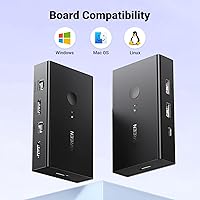
Cross-platform support across Windows, Mac, and Linux works as advertised without any configuration changes. The fact that it also handles consoles like PS5 and Nintendo Switch gives it legitimate versatility for users who mix gaming and productivity on the same monitor.
Docking station incompatibility is a real limitation for laptop users, many of whom rely on docks as their primary connection hub. This rules the switch out entirely for a common home office scenario, and it is not always clearly communicated in listings before purchase.
Hotkey Switching
38%
62%
For users who knew going in that hotkey switching was not supported, the physical button and desktop controller are sufficient replacements. The switching process itself is fast enough that the absence of hotkeys does not disrupt a casual workflow in any meaningful way.
Power users and developers who switch computers dozens of times per day consider hotkey switching a baseline expectation, and its absence here is a hard dealbreaker for that group. Competing products at similar or only slightly higher prices do offer hotkey support, making this omission a genuine competitive weakness.
EDID Emulation
41%
59%
For straightforward single-monitor setups where both connected computers run the same resolution, the lack of EDID emulation is mostly invisible. Users with matched hardware configurations rarely encounter any display detection issues during or after switching.
Without EDID emulation, the monitor can lose its handshake with the inactive computer when the switch toggles. This causes the disconnected machine to rearrange open windows or reset display settings — an infuriating experience for users who work across both computers and need to return to a tidy layout every time.
Value for Money
87%
Taken at face value as a budget KVM for light dual-computer use, the price-to-functionality ratio is genuinely strong. The included cables, desktop controller, and broad OS support pack real utility into a low-cost package that would cost meaningfully more if those accessories were sourced separately.
The value calculation shifts if you need features this switch does not offer. Buyers who discover post-purchase that hotkeys, EDID emulation, or docking station support are missing often feel the price was not as low as it appeared once they factor in the need to buy a different or additional device.
Size & Desk Footprint
89%
At under four inches long and less than an inch tall, this two-port switcher disappears on a desk easily. Users in small apartment offices or shared workspaces specifically mentioned appreciating that it does not compete for the same real estate as the monitor, keyboard, and everything else already on the surface.
The compact size is mostly a positive, but it does mean the unit can shift around when pressed without something anchoring it. There is no adhesive pad or locking slot included, so users who press the top button firmly will find themselves chasing the unit across their desk occasionally.
Documentation & Instructions
47%
53%
The physical setup steps are laid out simply enough that confident users can get going without reading much. For a device with a single core function — switch between two computers — the learning curve is shallow for anyone who has used a KVM before.
The user guide consistently falls short on the dual USB cable requirement, which is the root cause of the most common setup failures across buyer reviews. A single bolded warning explaining that both cables must remain connected to both machines at all times would eliminate the majority of reported problems.
Peripheral Dropout Frequency
62%
38%
Many users report zero dropout issues over weeks or months of regular use. For those running standard wired keyboards and mice without unusual polling requirements, the switching process is clean and the devices register on the new host within a second or two without any manual intervention.
The dropout issue is not a rare edge case — enough buyers have documented it across different hardware combinations that it reads as an inherent behavior of the USB 2.0 hub architecture rather than a defective unit. Unplugging and re-plugging to recover a stuck peripheral is a workflow disruption that adds up over time.

Suitable for:

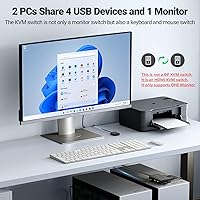
The UGREEN 2-Computer HDMI KVM Switch is a practical fit for anyone who needs to split desk time between two computers without the complexity or cost of a high-end solution. Home office workers juggling a personal laptop and an employer-issued machine will find it particularly useful — one monitor, one keyboard, one mouse, and a button press to move between worlds. Budget-conscious buyers who want everything included out of the box will appreciate that the cables and desktop controller are already in the package, removing the usual accessory math that inflates the real cost of budget peripherals. Casual gamers or hobbyists looking to share a single monitor between a PC and a console like a PS5 or Nintendo Switch also get good mileage out of this setup. Educators and small-office professionals who need to demonstrate content from two different machines in a classroom or meeting room will find the physical switching fast and reliable enough for that kind of intermittent, low-pressure use.
Not suitable for:

The UGREEN 2-Computer HDMI KVM Switch is not the right tool for power users who rely on hotkey shortcuts to switch between computers dozens of times a day — that feature simply does not exist here, and no firmware workaround changes that. Anyone using a laptop docking station as their primary connection hub will hit a hard wall immediately, since docks are explicitly unsupported and there is no workaround. Users who need their inactive computer to hold its display configuration while switching — keeping windows arranged and resolution locked — will be frustrated by the lack of EDID emulation, which causes the disconnected machine to lose track of the monitor and scatter open windows. Multi-monitor setups are entirely out of scope; this switcher handles exactly one display and no more. Anyone planning to share high-speed USB storage devices or peripherals that depend on USB 3.0 bandwidth should also look elsewhere, since all four ports run at USB 2.0 speeds only.
Specifications

  • Video Resolution: Supports up to 4K at 60Hz via HDMI 2.0, with backward compatibility for 4K at 30Hz, 2560x1440 at 120Hz, and lower resolutions.
  • HDMI Version: Uses HDMI 2.0, supporting HDR, 3D output, and HDCP 2.2 and 1.4 content protection standards.
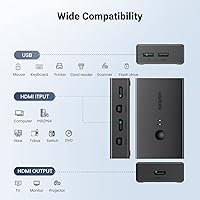
  • USB Ports: Equipped with four USB 2.0 Type-A ports for sharing peripherals such as a keyboard, mouse, and printer across both connected computers.
  • Switching Method: Offers two physical switching options: a button mounted directly on the unit and a wired desktop controller included in the box.
  • Hotkey Switching: Hotkey switching is not supported; users must use the physical button or desktop controller to toggle between computers.
  • EDID Emulation: EDID emulation is not supported, which may cause the inactive computer to reset display configurations when the switch is toggled.
  • Dimensions: The main unit measures 3.8 x 2.3 x 0.9 inches, making it compact enough to sit discreetly on or under a desk.
  • Weight: The unit weighs 1.19 pounds, light enough to be repositioned easily but stable enough for regular button-press use.
  • OS Compatibility: Compatible with Windows 11, 10, 8.1, 8, 7, Vista, and XP, as well as Mac OS and Linux distributions.
  • Driver Required: No driver or software installation is required; the switch operates on a fully plug-and-play basis across all supported operating systems.
  • Docking Station Support: Docking stations are explicitly not supported; the switch must be connected directly to each computer via the included USB-A to USB-B cables.
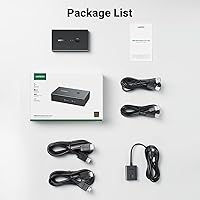
  • Cables Included: The package includes two HDMI cables and two USB-A to USB-B cables, along with the wired desktop controller and a user guide.
  • Power Supply: The switch draws power through the USB-A to USB-B cables connected to the host computers; no external power adapter is required.
  • Compatible Devices: Beyond PCs and laptops, the switch is compatible with PlayStation 3, 4, and 5, Xbox One, Nintendo Switch, TV boxes, Blu-ray players, and projectors.
  • Color: Available in black with a matte plastic finish designed to blend into standard home office and professional desk environments.
  • USB Cable Requirement: Both USB-A to USB-B cables must remain connected to both computers at all times for keyboard and mouse sharing to function correctly.
  • HDMI Cable Limit: To maintain stable 4K at 60Hz output, HDMI cable lengths must not exceed 5 meters (approximately 16 feet).
  • Wireless Peripheral Range: Wireless keyboard and mouse receivers must be within 1 meter for a single device and within 0.3 meters when multiple wireless devices are connected.

Related Reviews

UGREEN AK500 Dual Monitor KVM Switch
77%
91%
Ease of Setup
88%
Switching Reliability
86%
Video & Display Quality
78%
USB Peripheral Sharing
83%
Build Quality & Materials
More
SUIDEK SJW-KM202B Dual Monitor KVM Switch
73%
83%
Ease of Setup
71%
Switching Reliability
79%
Display Quality
91%
Desktop Controller Usability
77%
USB Peripheral Sharing
More
CMSTEDCD SW330 Dual Monitor KVM Switch
77%
91%
EDID & Window Layout Preservation
88%
4K Display Quality
84%
Switching Speed & Responsiveness
79%
USB 3.0 Peripheral Sharing
61%
Setup & Initial Configuration
More
ANGEET HDMI KVM Switch 2 Monitors 2 Computers 4K@60Hz
85%
91%
Display Quality
88%
Ease of Setup
85%
USB Performance
93%
Compatibility with Systems
87%
Build Quality
More
Camgeet USB 3.0 HDMI KVM Switch for 2 Computers
84%
88%
Value for Money
91%
Ease of Setup
90%
Display Quality
82%
Build Quality
85%
Switching Speed
More
KCEVE 2-Monitor 4-Computer KVM Switch
81%
91%
Ease of Setup
83%
Switching Reliability
86%
Dual-Monitor Configuration
82%
USB 3.0 Performance
88%
Wired Remote Control
More
Camgeet KVM Switch 3 Monitors 3 Computers HDMI+2 DisplayPort
88%
95%
Display Resolution Support
93%
Multi-Computer Switching
89%
USB Connectivity
82%
Setup and Installation
91%
Compatibility Across OS
More
EVATEK 4K@60Hz HDMI KVM Switch for 4 Computers & 2 Monitors
83%
89%
Performance
93%
Ease of Setup
91%
Resolution Quality (4K@60Hz)
87%
USB 3.0 Port Functionality
85%
Switching Speed
More
TJCXELE HDMI KVM Switch 3 Monitors 2 Computers 4K@60Hz
85%
85%
Overall Performance
92%
Visual Quality (4K@60Hz)
75%
Ease of Setup
88%
USB Port Functionality (Data Transfer)
90%
Compatibility with Operating Systems
More
AILVLVNG HDMI KVM Switch 2 Monitors 3 Computers 4K@60Hz USB 3.0
84%
91%
Ease of Setup
88%
Dual Monitor Functionality
87%
USB Port Performance
84%
Display Consistency (EDID Emulator)
80%
Switching Speed (Button vs Remote)
More

FAQ

No, nothing to install at all. It is fully plug-and-play on Windows, Mac, and Linux. Just connect your cables and it works straight away without touching any settings.

The most common cause is that only one USB cable is connected instead of two. Both USB-A to USB-B cables must be plugged into both computers simultaneously, even the one you are not actively using. If both cables are connected and the issue persists, try unplugging and re-plugging the affected peripheral to reset the USB handshake.

Unfortunately, no. Docking stations are explicitly unsupported by this two-port switcher, and connecting through a dock typically causes peripheral and display issues. You will need to connect the USB cables directly from the switch to each laptop's USB port.

It can, because this UGREEN 2-Computer HDMI KVM Switch does not support EDID emulation. Without it, the monitor may not communicate its capabilities to the inactive computer, which can cause that machine to reset its display resolution or rearrange open windows. If display stability across both computers matters to you, look for a KVM that includes EDID emulation.
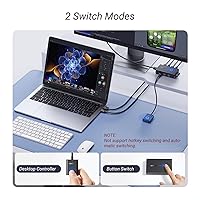
No, hotkey switching is not supported on this model. You have two options: the physical button on the unit itself or the included wired desktop controller. Both work reliably, but if hotkey switching is something you use constantly, this switcher would not be the right fit.

Yes, both are compatible. The switch works with a range of HDMI source devices beyond PCs, including PlayStation 3, 4, and 5, Xbox One, and Nintendo Switch. It is a convenient way to share a single monitor between a gaming console and a computer without swapping cables.

UGREEN recommends keeping HDMI cable length under 5 meters (about 16 feet) to maintain stable 4K at 60Hz output. Beyond that, signal degradation can cause flickering or a drop to a lower resolution. The cables included in the box are well within that limit.

Yes, but with some distance constraints. The wireless receiver needs to be within 1 meter of the switch for a single wireless device, and within 0.3 meters if you are connecting multiple wireless devices at once. If your keyboard or mouse receiver sits further away than that, you may experience input lag or disconnections.

The computer you switch away from stays running normally in the background — your applications and files remain open. The main thing to be aware of is that without EDID emulation, the inactive machine may lose sight of the monitor and potentially rearrange windows. It is worth logging back into that machine occasionally to check if the layout has shifted.

It turns out to be genuinely handy, especially if you tuck the main unit somewhere out of reach. Rather than leaning over to press a button on the switch, you can place the controller at the front of your desk and tap it whenever you need to toggle. Buyers who initially ignored it often end up relying on it more than the button on the unit itself.