Overview

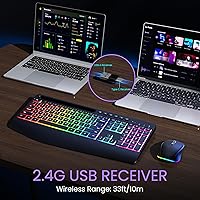
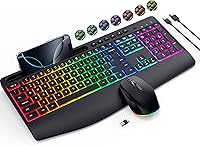
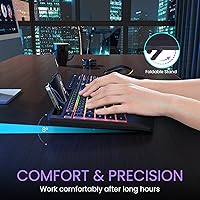
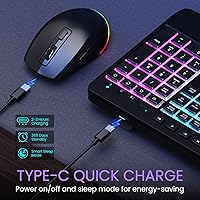
The VEILZOR UK418 Wireless Keyboard and Mouse Combo arrived quietly in late 2024, but it has already cracked the top 100 in its Amazon category — not bad for a brand most buyers encounter for the first time. VEILZOR positions itself squarely in the value tier, and this wireless combo delivers on that promise without embarrassment. You get a full-size keyboard with an integrated wrist rest, a built-in phone holder slot, and a 2-in-1 USB-A/C receiver so you are not hunting for the right dongle. The USB-C rechargeable setup is genuinely appreciated here — no AA batteries, no interruptions, just plug in overnight and you are good for weeks.
Features & Benefits

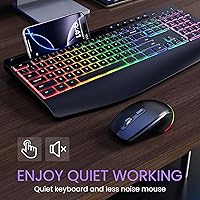
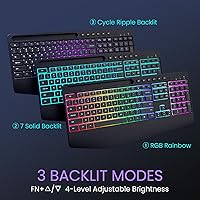
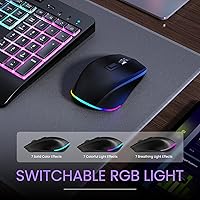
Quiet operation is probably the most practical selling point of the VEILZOR keyboard set. The silent keystroke mechanism keeps noise to a minimum during long sessions, and the mouse reduces click sound dramatically — so working beside a colleague or on a late-night deadline won't draw annoyed looks. The RGB lighting gives you nine effects and several color options, which adds personality to a plain desk setup, even if there's no dedicated software for fine-tuning. The mouse offers three DPI steps topping out at 1600, which handles everyday tasks comfortably. Wireless range extends to 10 meters, and the keyboard's tilt legs let you adjust typing angle to ease wrist strain during longer sessions.

Best For

This rechargeable keyboard and mouse is a natural fit for anyone building or upgrading a home office setup on a modest budget. Students who need a reliable daily driver will find it covers all the bases — full-size layout, comfortable wrist support, and a quiet experience that holds up in a library or shared study space. The phone holder deserves a specific mention: it sits along the top edge of the keyboard and keeps your device at eye level while you work, which is a thoughtful touch at this price point. If you are moving away from wired peripherals for the first time, this set makes that transition low-risk and practical.

User Feedback

With over 550 ratings averaging 4.3 stars, buyers are broadly satisfied with what the VEILZOR keyboard set delivers. The wrist rest and quiet click feel come up repeatedly as standout positives — people are genuinely surprised by how comfortable extended typing sessions can be. The mouse tends to suit small to medium hands best, so larger-handed users may find it a touch compact. On the critical side, some buyers note the RGB lighting has no software customization, locking you into onboard presets. Key travel depth occasionally disappoints those coming from mechanical keyboards. Long-term durability is a fair concern for any budget peripheral, and a few reviews suggest the build quality, while acceptable, makes no effort to disguise its price-conscious origins.

Pros

  • The integrated wrist rest meaningfully reduces fatigue during long typing sessions, which is rare at this price.
  • Silent keys and a near-noiseless mouse make this wireless combo office- and library-friendly without compromise.
  • USB-C charging on both devices eliminates the recurring cost and annoyance of disposable batteries.
  • The built-in phone holder keeps your desk tidier and your screen at eye level — a genuinely useful extra.
  • Plug-and-play setup with a dual USB-A/C receiver means zero configuration hassle on nearly any machine.
  • Full-size layout with number pad suits data entry, spreadsheets, and users who hate cramped key spacing.
  • RGB backlighting with multiple brightness levels adds practical low-light visibility, not just visual flair.
  • Weeks of battery life per charge cycle means this rechargeable keyboard and mouse rarely interrupts your workflow.
  • Wireless range holds reliably across typical room distances without input lag during everyday productivity tasks.
  • At its price point, the feature count — wrist rest, phone holder, silent keys, RGB, rechargeable — is hard to match.

Cons

  • Shallow membrane key travel disappoints touch typists and anyone used to mechanical keyboard feedback.
  • The mouse feels cramped for large hands during extended sessions, limiting all-day comfort significantly.
  • No companion software means RGB customization is locked to onboard presets with no per-key control.
  • The scroll wheel feels loose and imprecise compared to mice even slightly above this price range.
  • Only one shared receiver means losing the dongle disables both devices simultaneously — a real vulnerability.
  • Wireless range falls short of the advertised 10 meters in signal-dense or obstacle-heavy environments.
  • Budget plastics show wear and surface scuffing within a few months of regular daily use.
  • No dedicated media keys or volume controls require navigating function-layer shortcuts that feel unintuitive.
  • The phone holder has no angle adjustment and struggles with larger phones or cases beyond a certain thickness.
  • Long-term reliability from a lesser-known brand remains an open question with limited track record to draw from.

Ratings

The VEILZOR UK418 Wireless Keyboard and Mouse Combo scores below are generated by AI after analyzing verified buyer reviews worldwide, with spam, bot-submitted, and incentivized feedback actively filtered out. Across hundreds of real-world ratings, this wireless combo surfaces as a surprisingly capable budget peripheral — though not without its trade-offs. Both the genuine strengths and the recurring frustrations are reflected transparently in each category score.
Value for Money
91%
Buyers consistently point to the feature-to-price ratio as the standout reason they chose this combo. Getting an integrated wrist rest, phone holder, USB-C charging, and RGB lighting together at this price point feels like a lot, and most purchasers agree it over-delivers for the spend.
A handful of buyers felt the overall build quality didn't quite justify even the modest asking price once they had the set in hand. Those with prior experience using slightly pricier peripherals noted the savings are visible in the plastics and mouse scroll wheel feel.
Typing Comfort
84%
The integrated wrist rest is the most praised comfort feature in user reviews. Long typing sessions — think multi-hour report writing or remote work days — feel noticeably less fatiguing compared to using a flat keyboard without any palm support.
Key travel is shallower than what touch typists who prefer tactile feedback tend to expect. Users migrating from mechanical keyboards in particular flagged the soft, membrane-style press as underwhelming, reporting a slight loss of typing rhythm during fast-paced work.
Noise Level
89%
Silent operation is one of the most frequently praised aspects of this set. Shared-office users and those on late-night work sessions report that neither the keystrokes nor the mouse clicks draw any attention, making it a genuinely considerate choice for open-plan environments.
A small number of buyers noted that while the keyboard is quiet, it is not completely silent under heavier-handed typing. The bottom-out sound, though muffled, is still faintly audible in very quiet rooms, which may matter to users in recording or studio-adjacent setups.
Wireless Reliability
82%
18%
The 2.4G connection holds steady across typical desk setups with no meaningful lag reported during everyday tasks like document editing, spreadsheets, or web browsing. The dual USB-A/C receiver is a practical inclusion that eliminates compatibility headaches on modern and older machines alike.
A few users working in signal-dense environments — busy co-working spaces or desks surrounded by multiple wireless devices — noticed occasional brief disconnections. The range holds well within 5 to 6 meters, but the advertised 10-meter claim gets skeptical reviews from users who tested it at distance.
Mouse Ergonomics
76%
24%
The contoured shape and thumb rest make casual use comfortable for small-to-medium sized hands. Users who spend a few hours a day browsing, clicking through documents, or doing light editing found the grip natural and the side support useful for reducing wrist tension.
Buyers with larger hands repeatedly flagged the mouse as too compact for extended use, with fingers feeling cramped over long sessions. The thumb rest, while present, sits slightly low on the body for some hand sizes, reducing its practical benefit for taller palm grips.
RGB Lighting
73%
27%
The backlighting genuinely improves low-light usability, and users who work in dimly lit rooms appreciate having three brightness levels to choose from. The variety of color modes and effects adds a pleasant visual element to an otherwise utilitarian desk setup without being distracting.
There is no companion software for customizing lighting beyond the onboard presets, which frustrates buyers expecting per-key control or programmable profiles. Users who wanted to lock in a single static color found the cycling through modes to reach it mildly tedious.
Build Quality
63%
37%
For the price tier, the keyboard feels reasonably solid on a desk — it does not flex noticeably during typing, and the tilt legs click into position without wobbling. Most buyers who adjusted expectations accordingly reported no complaints about the physical construction.
The mouse chassis and key caps have a lightweight plastic feel that signals the budget origins clearly. Several buyers mentioned minor surface scuffing appearing within the first few months of regular use, and the scroll wheel on the mouse drew specific criticism for feeling loose and imprecise.
Battery Life
86%
Charging frequency is rarely a concern for this set. Most buyers report weeks of regular daily use before needing to reach for the USB-C cable, which removes one of the more persistent annoyances of rechargeable peripherals — the mid-week dead battery interruption.
Battery life estimates vary noticeably depending on RGB usage. Buyers who keep the backlight active at higher brightness report noticeably shorter cycles, occasionally under two weeks. The keyboard and mouse charge separately, which means tracking two charge states rather than one.
Phone Holder Utility
88%
This is one of the few peripherals at this price with a usable phone holder built directly into the keyboard frame. Buyers who use their phone as a reference screen, video call device, or second display while working found it keeps the desk tidier and the phone at a comfortable viewing angle.
The slot works best with phones in a certain size and thickness range — users with larger flagship devices or bulky cases found the fit awkward or unstable. It is a passive holder with no adjustable angle, so users wanting a tilted or landscape view will be disappointed.
Mouse DPI and Precision
71%
29%
Three DPI settings covering 800 to 1600 handle everyday computing tasks without issue. Buyers using the combo for document work, email, and casual browsing found the 1200 DPI setting to be the sweet spot — responsive enough without feeling twitchy on standard monitors.
For anything beyond basic productivity — photo editing, precise cursor work, or multi-monitor navigation — the 1600 DPI ceiling feels limiting. There is no on-the-fly DPI switching button, so changing sensitivity requires cycling through settings in a way some buyers found clunky.
Setup and Plug-and-Play
93%
Setup is about as frictionless as it gets. Plug in the receiver, and both the keyboard and mouse connect immediately with no driver installation, pairing buttons, or software required. Buyers replacing a failed wired set in a hurry particularly appreciated the zero-configuration experience.
The shared receiver means both devices rely on a single dongle — losing it renders the entire combo non-functional. A small number of buyers also noted the receiver sits slightly proud of the USB port on some laptops, making it a minor snag risk in portable setups.
Keyboard Layout and Key Spacing
81%
19%
The full-size layout with number pad is the right call for anyone doing data entry, accounting work, or simply preferring the spatial familiarity of a standard desktop keyboard. Key spacing feels deliberate and comfortable for average to large finger sizes during extended sessions.
There is no dedicated media key row, which some buyers found frustrating when wanting quick volume or playback control. Function-layer shortcuts exist but require a learning curve that not all users found worth the effort on a budget-tier keyboard.
Adjustability and Tilt Legs
78%
22%
Adjustable tilt legs are a basic but underappreciated feature, and buyers who spend long hours typing noted that even a small change in keyboard angle can reduce forearm and wrist fatigue. The legs click firmly into two positions and hold without slipping during normal use.
Only two tilt angles are available, which limits customization for users with specific ergonomic setups or non-standard desk heights. Buyers who prefer a flat typing angle also mentioned the default leg position adds more incline than they wanted with no fully flat override option.

Suitable for:

The VEILZOR UK418 Wireless Keyboard and Mouse Combo is a strong fit for home office workers and students who want a capable, clutter-free setup without spending heavily on peripherals. If you spend several hours a day typing documents, browsing, or hopping between video calls with your phone propped nearby, this wireless combo checks a surprising number of boxes at once. The built-in wrist rest makes long writing sessions noticeably more comfortable than a bare keyboard, and the silent keystrokes mean you can work late or in a shared space without bothering anyone around you. People transitioning away from wired peripherals for the first time will find the plug-and-play setup completely painless — no drivers, no complicated pairing, just plug in the receiver and start working. It also suits anyone tired of replacing AA batteries, since the USB-C rechargeable design keeps both devices topped up with a single cable you likely already own.
Not suitable for:

Buyers with more demanding expectations around build quality, typing feel, or mouse precision will want to look elsewhere before committing to this wireless combo. The VEILZOR UK418 Wireless Keyboard and Mouse Combo is a budget-tier product at heart, and the lightweight plastics, shallow key travel, and modest 1600 DPI ceiling make that clear once you spend a full workweek with it. Touch typists who have grown accustomed to the satisfying feedback of a mechanical keyboard will likely find the membrane key action flat and unsatisfying. The mouse, while comfortable for small-to-medium hands, becomes cramped and fatiguing for users with larger palms during extended use. Designers, photo editors, or anyone who needs precise cursor control or high DPI settings for multi-monitor work should pass on this set entirely. And if long-term durability is a priority — say, you need a peripheral that holds up under daily heavy use for two or more years — the build quality here offers limited assurance beyond the first year.
Specifications

  • Wireless Protocol: Both the keyboard and mouse connect via 2.4G wireless technology, providing a stable low-latency link suitable for everyday productivity tasks.
  • Receiver: A single 2-in-1 USB-A/C dongle handles both devices simultaneously, compatible with both legacy USB-A ports and modern USB-C ports.
  • Keyboard Layout: Full-size layout includes a dedicated number pad, standard function row, and arrow cluster for complete desktop-style input coverage.
  • Wrist Rest: An integrated, non-detachable wrist rest runs the full width of the keyboard base to support the palms during extended typing sessions.
  • Phone Holder: A built-in slot positioned along the top edge of the keyboard holds a smartphone upright in portrait orientation for hands-free reference while working.
  • Backlight: Nine RGB lighting effects are available with 7+1 color options and three adjustable brightness levels, all controlled via onboard key shortcuts without software.
  • Charging: Both the keyboard and mouse recharge via USB-C cable, with the charging cable included in the box; no proprietary connectors or disposable batteries are required.
  • Battery Life: The keyboard and mouse are rated to last several weeks on a full charge under typical daily use conditions, with heavier RGB usage reducing that estimate.
  • Mouse DPI: The mouse offers three selectable DPI settings — 800, 1200, and 1600 — switchable via a dedicated button on the top of the mouse body.
  • Mouse Design: The mouse features a contoured ergonomic shell with a dedicated thumb rest on the left side, designed to fit small-to-medium right-handed users.
  • Noise Reduction: The keyboard uses a silent membrane switch mechanism, and the mouse buttons are rated to reduce click noise by up to 99.99% compared to standard switches.
  • Wireless Range: The combo is rated for a wireless range of up to 10 meters in open, unobstructed conditions between the receiver and devices.
  • Tilt Legs: The keyboard includes adjustable tilt legs on the underside that allow the typing angle to be raised from the default flat position for ergonomic customization.
  • Compatibility: The combo works with Windows-based desktops, laptops, and tablets via plug-and-play USB receiver with no driver installation required.
  • Package Dimensions: The retail package measures 17.4 x 10.83 x 1.65 inches, making it straightforward to ship and store before setup.
  • Item Weight: The combined package weight is 2.12 pounds, reflecting the lightweight plastic construction used across both the keyboard and mouse.
  • Model Number: The manufacturer model number for this combo is UK418, produced by VEILZOR and first listed for sale in November 2024.

Related Reviews

Arteck HW192 Wireless Keyboard and Mouse Combo
78%
78%
Build Quality
72%
Typing Experience
63%
Mouse Comfort & Ergonomics
81%
Battery Life
69%
Wireless Connectivity
More
MPTOG S801AG Wireless Keyboard and Mouse Combo
75%
88%
Aesthetic Design
93%
Ease of Setup
78%
Typing Feel
61%
Mouse Tracking Accuracy
82%
Wireless Reliability
More
HP 18H24AA Wireless Keyboard and Mouse Combo
79%
91%
Value for Money
93%
Ease of Setup
74%
Keyboard Typing Experience
63%
Mouse Comfort & Ergonomics
86%
Wireless Reliability
More
Letton Wireless Keyboard and Mouse Combo
83%
89%
Design & Aesthetics
81%
Ergonomics & Comfort
75%
Wireless Connectivity
90%
Battery Life
92%
Value for Money
More
MOWUX Wireless Keyboard and Mouse Combo
88%
91%
Typing Comfort
89%
Mouse Responsiveness
94%
Wireless Connectivity
85%
Build Quality
88%
Keycap Durability
More
RECCAZR Wireless Keyboard and Mouse Combo
86%
89%
Ergonomics & Comfort
86%
Build Quality & Durability
75%
Keyboard Responsiveness
91%
Mouse Precision & Quietness
94%
Ease of Setup
More
GEEZER Wireless Keyboard and Mouse Combo
72%
83%
Value for Money
91%
Aesthetic Design
94%
Ease of Setup
67%
Typing Feel
62%
Mouse Quality
More
GUKJOB Wireless Keyboard and Mouse Combo
87%
88%
Typing Experience
91%
Design & Aesthetics
75%
Battery Life
95%
Ease of Setup
72%
Build Quality
More
Links9+ Wireless Keyboard and Mouse Combo
85%
89%
Ergonomics and Comfort
92%
Wireless Performance and Connectivity
85%
Build Quality
94%
Ease of Use and Setup
80%
Battery Life
More
EDJO Wireless Keyboard and Mouse Combo
76%
88%
Value for Money
94%
Ease of Setup
71%
Keyboard Typing Feel
63%
Mouse Performance
86%
Wireless Connectivity & Range
More

FAQ

No, setup is completely plug-and-play. Just insert the USB receiver into your computer and both the keyboard and mouse connect automatically. There are no drivers to download and no software required, which makes it especially easy if you are setting up a new machine or replacing a failed set in a hurry.

The included receiver is a 2-in-1 dongle that fits both USB-A and USB-C ports natively, so no adapter is needed. You just flip or use the appropriate end depending on what your laptop has available, which is a thoughtful design choice that saves a lot of hassle.

Under typical daily use — a few hours of typing and mouse activity with the backlight on at medium brightness — most users report two to three weeks before needing to recharge. If you keep the RGB effects running at full brightness constantly, expect that window to shorten noticeably. Both devices charge via the included USB-C cable.

Yes, both devices can be used while connected to the USB-C charging cable, so a low battery does not force you to stop working. Just plug in and carry on — there is no mandatory rest period or power-off cycle required during charging.

The VEILZOR UK418 Wireless Keyboard and Mouse Combo is designed primarily for Windows, and the key labeling reflects that. It will function as a basic input device on a Mac since the core keys work without drivers, but some function-layer shortcuts and key labels will not match macOS conventions, which can cause confusion during daily use.
The holder accommodates most standard-sized smartphones in portrait orientation without a case, or with a slim case attached. Larger flagship phones and devices in thick protective cases may sit loosely or not fit securely. There is no angle adjustment, so the phone will always sit upright at a fixed vertical angle.

Unfortunately, no. The mouse has an asymmetric ergonomic shell with a thumb rest on the left side only, which means it is designed specifically for right-handed use. Left-handed users would find the shape uncomfortable and the thumb rest positioned on the wrong side entirely.

Yes, as long as your tablet has a USB-A or USB-C port available and supports standard HID input devices, this wireless combo will work without any additional setup. Most Windows tablets and Android tablets with USB ports are compatible, though feature parity may vary by operating system.

Lighting is controlled entirely through onboard key shortcuts — typically a dedicated function key or key combination printed on the keyboard itself. There is no companion app or software involved. You cycle through the available effects and brightness levels directly from the keyboard, which keeps things simple but limits customization to the preset options only.

The wrist rest is integrated directly into the keyboard base and cannot be detached or replaced separately. It is a fixed part of the keyboard chassis, which means it offers consistent support during use but cannot be swapped out if it wears down or if you prefer a different material or thickness.