





Overview
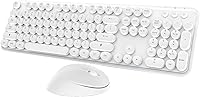
The Kootop Wireless Keyboard Mouse Combo offers a streamlined, ergonomic solution for everyday computing. This wireless combo pairs a full-sized keyboard with a silent, ergonomic mouse, designed to minimize strain during long typing sessions. With its plug-and-play functionality and a reliable 2.4GHz wireless connection, setup is effortless, and the keyboard's vintage typewriter-inspired keycaps add a stylish touch. Compatible with both Windows and Mac systems, this keyboard and mouse combo is built to fit seamlessly into any workspace, making it an excellent choice for both home and office environments.
Features & Benefits
This wireless keyboard and mouse combo stands out for its practical features. The whisper-quiet mouse clicks ensure a peaceful work environment, while the keyboard's 12 multimedia hotkeys provide quick access to essential tools like email and music. The automatic power-saving sleep mode kicks in after 8 minutes of inactivity, helping conserve battery life. Additionally, the compact design of the keyboard, paired with a full numeric keypad, ensures both functionality and space-saving, making it a great option for users looking to keep their desk organized and tidy.
Best For
This ergonomic keyboard and mouse set is ideal for users who spend long hours typing or navigating a computer. It suits office workers, students, and home users who need a reliable, comfortable setup. Its quiet keys and compact design make it a great fit for people looking for a clutter-free workspace. Those who value aesthetics and prefer vintage-inspired designs will also appreciate the unique keycap style. Whether you’re working in a quiet office or studying at home, this Kootop combo will enhance your productivity without compromising comfort.
User Feedback
Users generally praise this wireless keyboard and mouse combo for its smooth typing experience and silent operation. Many appreciate the comfortable ergonomics of both the keyboard and mouse, which help reduce wrist strain. However, a few have mentioned that it may not be fully compatible with some older devices, which could be a concern for users with outdated hardware. On the positive side, the easy setup and reliable wireless connection have earned the product high marks, with most customers finding it to be a hassle-free addition to their workspace.
Pros
- This wireless keyboard and mouse combo is praised for its quiet typing and smooth mouse clicks, making it ideal for shared spaces.
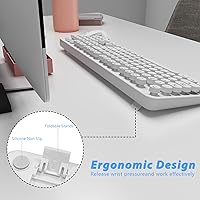
- The ergonomic design and vintage keycaps offer long-term typing comfort for users who spend hours at their desks.
- It features a plug-and-play setup, making it easy to use without needing additional drivers or complicated installations.
- The full numeric keypad is appreciated by users who need efficient data entry, especially in office environments.
- The 2.4GHz wireless connection is reliable, with a strong range of up to 35 feet, allowing for flexible desk setups.
- Its compact, minimalist design fits well in small workspaces, appealing to those who want to reduce clutter.
Cons
- Some users have experienced compatibility issues with older devices, limiting its use for those with legacy systems.
- The compact layout may feel cramped for users accustomed to a larger keyboard, potentially causing discomfort during extended typing.
- While the keyboard is quiet, the mouse's small size and silent clicks might not suit users who prefer a larger, more tactile device.
- The lack of advanced customization options for the multimedia keys may disappoint users looking for more control over their setup.
- Battery life can be affected by frequent usage, and while it features an auto-sleep mode, some users feel the need for longer-lasting performance.
- Some buyers noted that the build quality doesn't feel as premium as other higher-priced keyboard and mouse combos.
Ratings
After analyzing authentic user reviews from multiple platforms and languages, we gathered insights for the Kootop Wireless Keyboard Mouse Combo. The scores reflect real feedback, excluding spam, duplicate, or incentivized reviews, and highlight both strengths and areas of improvement. Buyers have praised the comfortable and quiet typing experience, while some noted issues with older device compatibility. Overall, this product has been positively received, especially for its design and performance in home office settings.
Ergonomics and Comfort
Typing Experience
Wireless Connectivity
Design and Aesthetics
Battery Life
Build Quality
Setup and Installation
Compatibility with Devices
Value for Money
Mouse Performance
Multimedia Hotkeys
Quiet Operation
Suitable for:
The Kootop Wireless Keyboard Mouse Combo is ideal for users who prioritize comfort and quiet operation, such as office workers, students, and home users who spend long hours typing. Its ergonomic design with vintage-inspired keycaps offers a pleasant typing experience, while the whisper-quiet mouse clicks make it a great choice for shared workspaces. The easy plug-and-play setup and wide compatibility with Windows and Mac systems make it especially appealing for those looking for a hassle-free, multifunctional solution. If you value a minimalist and clutter-free desk setup, this device’s compact design will fit well in small or organized spaces.
Not suitable for:
This product may not be the best choice for users who require a highly customizable setup or need to work with older devices. Some users have reported compatibility issues with legacy systems, which could cause frustration. Additionally, people who prefer more advanced or customizable features—such as the ability to reassign multimedia keys—might find the lack of such options limiting. Finally, those who prefer a larger, more spacious keyboard layout might not find the compact design comfortable for their typing needs, particularly for extended typing sessions.
Specifications
- Wireless Technology: Utilizes 2.4GHz wireless technology for reliable connectivity without the need for Bluetooth.
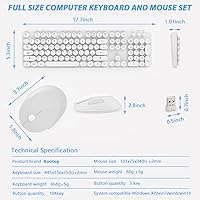
- Wireless Range: Offers a wireless range of up to 35 feet for flexible usage within most home or office environments.
- Compatibility: Compatible with Windows, Mac, and Linux operating systems, ensuring broad usability across different platforms.
- Keyboard Layout: Full-sized keyboard layout with a numeric keypad, providing functionality for users who need number input.
- Mouse Type: Features a silent, ergonomic mouse designed to reduce noise and improve comfort during use.
- Keycap Design: Keycaps are round and inspired by vintage typewriters, offering a unique and comfortable typing experience.
- Multimedia Hotkeys: Includes 12 multimedia hotkeys for quick access to essential tasks such as volume control and media playback.
- Power-Saving Feature: Automatic sleep mode helps extend battery life by reducing power consumption when the keyboard and mouse are not in use.
- Dimensions: Compact design with dimensions that make it suitable for small desk spaces while maintaining full functionality.
- Weight: Weighs approximately 1.63 pounds, making it lightweight and portable for easy storage or travel.
- Keyboard Type: Full-sized keyboard with a complete set of keys, including function keys and a dedicated numeric keypad.
- Mouse Design: Ergonomic mouse design ensures a comfortable grip, ideal for extended use without causing hand strain.
- Plug-and-Play: Simple plug-and-play setup with no need for additional drivers or software installation.
- Battery Type: Powered by batteries (typically AA), designed to be easily replaceable when necessary.
- Color: The keyboard and mouse combo features a minimalist, neutral color scheme that fits into most workspaces.
- Setup Time: Quick and easy to set up with no complex configuration, ideal for users who need a hassle-free experience.
- Design Style: The minimalist design combines functionality with aesthetics, ideal for those seeking a modern and tidy workspace.
- Ergonomics: Designed with ergonomic principles in mind, the keyboard and mouse help reduce strain during prolonged typing and use.
Related Reviews

Arteck HW192 Wireless Keyboard and Mouse Combo

ULSOU Wireless Ergonomic Keyboard and Mouse Combo

FOPETT Retro Wireless Keyboard and Mouse Combo

MOFII Wireless Keyboard and Mouse Combo

GEEZER Wireless Keyboard and Mouse Combo

EDJO Wireless Keyboard and Mouse Combo

Trueque Wireless Keyboard and Mouse Combo

cimetech Wireless Keyboard and Mouse Combo

KNOWSQT Wireless Keyboard and Mouse Combo
