Overview

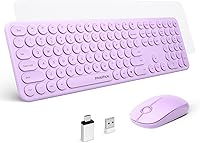
The Mobifice Retro Wireless Keyboard and Mouse Combo is a budget-friendly wireless set that stands out mostly because it looks different from everything else at this price. The violet rounded keycaps give it a distinct personality that plain black or grey keyboards simply cannot match. Setup takes seconds — plug the nano USB receiver in and both devices connect instantly, no drivers needed. It is also notably slim and light, making it easy to tuck away or move between rooms. Just go in knowing this is an affordable daily-driver, not a performance peripheral built for power users or demanding workflows.
Features & Benefits

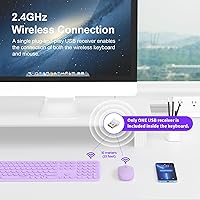
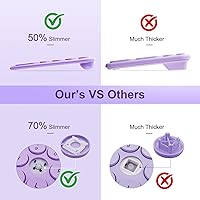
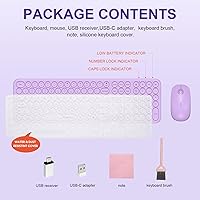
The wireless connection uses 2.4GHz and runs through a single nano receiver that handles both devices — it stores in a dedicated slot on the back of the keyboard, which is a thoughtful touch. The scissor-switch keys are noticeably quieter and crisper than typical membrane keyboards, and the full-size layout keeps the numpad intact, which not every slim keyboard bothers to do. At its thinnest the board measures just 0.17 inches. Both devices include auto-sleep and physical switches to conserve battery life, which helps since batteries are not included in the box — grab a AAA for the keyboard and an AA for the mouse before you start.

Best For

This retro keyboard combo is a natural fit for students and home office workers who want a setup that has some character without a high price tag. It is also a solid entry point for anyone moving away from wired peripherals — no pairing steps, no software installs, just plug and go. The quiet keystroke design makes it comfortable in shared spaces like libraries or open-plan offices. Mac and Chromebook users can pair it too, but note that you will need the bundled Type-C adapter if your device has no USB-A port. Anyone needing programmable keys or gaming-grade precision should look elsewhere.

User Feedback

With over 700 ratings and a 4.3-star average, the Mobifice combo has found a fairly happy audience. The most repeated praise centers on the visual design — buyers genuinely enjoy how the retro keys look on a desk — and many note that the typing feel is better than the price suggests. Wireless range at normal desk distances rarely comes up as a complaint. More divided opinions tend to focus on the mouse, with some buyers finding it feels slightly cheaper than the keyboard itself. A recurring frustration is batteries not included, which catches people off guard. For casual everyday use, the overall sentiment leans clearly positive.

Pros

  • The retro violet design genuinely stands out on a desk and does not look cheap for the price tier.
  • Single nano receiver handles both devices, so you only occupy one USB port.
  • Scissor-switch keys are meaningfully quieter than standard membrane keyboards at this price.
  • Full-size layout with numpad is preserved, which many slim keyboards at this price sacrifice.
  • Plug-and-play setup works immediately on Windows, Mac, and Chrome OS without any software.
  • Auto-sleep mode on both devices helps stretch battery life during normal daily use.
  • A Type-C adapter is included in the box, extending compatibility to modern USB-C laptops and tablets.
  • At 1.12 pounds, the keyboard is light enough to move around the home or pack into a bag easily.
  • 12-month warranty provides basic coverage that many competing budget sets skip entirely.
  • Buyers consistently rate the typing feel as better than expected for the price.

Cons

  • Batteries are not included, which means you cannot use the set straight out of the box without a separate purchase.
  • The mouse has received noticeably more mixed feedback than the keyboard, with some buyers finding it feels less refined.
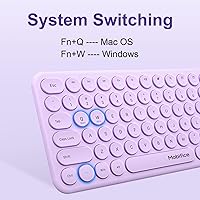
  • Mac compatibility depends on the bundled adapter and is not as reliable or complete as native Apple input devices.
  • No rechargeable battery option means ongoing disposable battery costs over the product lifespan.
  • Wireless range, while adequate at typical desk distances, has not impressed users who need flexibility across a larger room.
  • The ABS plastic construction, while durable enough for daily use, does not feel premium when handled directly.
  • No backlighting is available, making low-light or nighttime use less comfortable without ambient lighting.
  • Limited to a single color option, so buyers who want a matching setup in a different color scheme have no alternative variant.

Ratings

The scores below were produced by our AI rating engine after analyzing verified global buyer reviews for the Mobifice Retro Wireless Keyboard and Mouse Combo, with automated filters applied to remove incentivized, bot-generated, and outlier feedback. The result is an honest snapshot of what real everyday users actually experienced — the genuine strengths and the recurring frustrations are both reflected here without softening either side.

Value for Money
83%
Most buyers feel they got more than they paid for, especially given the full-size layout, scissor-switch keys, and included Type-C adapter at this price point. Reviewers frequently describe the set as a smart buy for casual home or student use where spending more simply is not justified.
The value perception drops for buyers who expected a mouse that matched the keyboard in quality — the mouse feels noticeably cheaper, and having to buy batteries separately adds a small but real extra cost that some find irritating at this tier.
Design & Aesthetics
89%
The violet retro rounded keycaps are the most consistently praised aspect across all reviews. Buyers describe their desks looking noticeably more distinctive after switching, and several mention receiving comments from coworkers or roommates about the look.
The aesthetic appeal is specific — anyone who prefers a minimalist or professional-looking workspace may find the retro styling too playful. The ABS plastic finish, while visually appealing in photos, can show fingerprints and smudges more visibly than matte alternatives.
Typing Experience
78%
22%
Scissor-switch keys deliver a crisper, more satisfying keystroke than the flat membrane keyboards that dominate this price range. Casual typists and students doing homework or light office work consistently describe the keys as comfortable for extended sessions.
Enthusiast typists or anyone coming from a mechanical keyboard will find the feedback shallow and the key travel limited. The switches are good for the price, but they do not replicate the tactile depth that heavier daily users tend to prefer.
Mouse Performance
61%
39%
For basic point-and-click tasks — browsing, document editing, casual spreadsheet work — the mouse is perfectly functional and tracks reliably on standard desk surfaces. Users who treat it as a complement to the keyboard rather than a standalone peripheral are generally satisfied.
Compared to the keyboard, the mouse consistently receives lower marks. Reviewers note it feels lighter and less precise than expected, and the click buttons on some units feel slightly loose or hollow. It is the most common source of disappointment in otherwise positive reviews.
Build Quality
69%
31%
The keyboard body holds up well under daily casual use, and the ABS plastic feels solid enough for the price. The key caps do not wobble noticeably, and the overall construction passes muster for students or home users who are not particularly rough on their peripherals.
The slim chassis flexes slightly under firm pressure, and the mouse in particular feels less robust than the keyboard. Buyers who are used to mid-range or premium peripherals will notice the difference in material density immediately upon picking either device up.
Wireless Reliability
76%
24%
At typical desk distances — receiver within two to three feet of the devices — the 2.4GHz connection stays solid and responsive throughout normal daily use. Most buyers report zero dropouts during typing or mousing, which is the baseline expectation for this connection type.
Users who positioned their computer further away, such as in a media center or across a room, reported inconsistent performance. The wireless range is adequate but not generous, and obstacles like desk drawers or monitor stands between the receiver and devices can cause occasional stutter.
Noise Level
82%
18%
The scissor-switch keys are genuinely quieter than standard membrane keyboards, and buyers who work in shared apartments, open-plan offices, or late at night while others sleep specifically call this out as a deciding factor in their positive rating.
The keys are not whisper-silent — they produce a light, crisp click that is audible in a completely quiet room. Buyers expecting near-silent operation comparable to premium low-profile keyboards were occasionally disappointed, particularly if they had read noise reduction as the primary selling point.
Setup & Ease of Use
91%
Plug-and-play works exactly as described — insert the receiver and both devices are ready within seconds on any supported system. First-time wireless keyboard users repeatedly highlight how stress-free the setup was compared to Bluetooth pairing processes they had struggled with before.
The only friction point is the batteries-not-included situation, which trips up buyers who expected to use the set immediately after unboxing. It is a minor issue but surfaces consistently enough in reviews to be worth flagging.
Battery Life
67%
33%
The auto-sleep feature on both devices does a reasonable job of stretching battery life during normal use. Buyers who use the physical on/off switches when stepping away from their desk report getting several weeks of use before needing a replacement.
Users who forgot to switch devices off, or who disabled the sleep feature inadvertently, found batteries draining faster than expected. The reliance on disposable AAA and AA cells rather than a rechargeable internal battery is a long-term cost and convenience trade-off that some buyers did not anticipate.
Compatibility
74%
26%
Windows support is broad and effortless across every version from XP onward, and Chrome OS users report the same plug-and-play experience without any configuration. The included Type-C adapter is a practical inclusion that genuinely extends the usable range of devices.
Mac compatibility works but requires the adapter and involves the typical Windows-key-for-Command remapping that non-Apple keyboards always bring. iPad users have reported that some function-level shortcut keys do not translate cleanly, making the experience workable but not optimized for Apple tablet workflows.
Portability
79%
21%
At 1.12 pounds and a slim 0.17-inch minimum thickness, the keyboard is easy to slip into a bag for a commute or move between a home office and a kitchen desk. The receiver slots into the keyboard body for travel, which prevents the most common cause of losing it.
While the keyboard is light, it is still full-size, meaning it occupies meaningful bag space compared to tenkeyless or 75 percent compact alternatives. Users who prioritize absolute portability above all else would be better served by a smaller layout.
Receiver Management
84%
Storing the nano receiver in a dedicated slot on the keyboard is one of those small design decisions that makes daily life noticeably easier. Buyers who previously lost tiny receivers with other sets specifically praised this detail in their reviews.
Because the single receiver is pre-paired at the factory, losing it renders both devices unusable and there is no straightforward replacement path. This is a structural limitation shared across most budget wireless sets, not unique to this one, but it is a real risk worth acknowledging.
Key Layout Completeness
86%
Keeping the full-size layout with numpad intact is a deliberate and appreciated choice — accountants, data entry workers, and anyone who uses number-heavy workflows praised this in reviews as the reason they chose this set over competing slimmer options.
The full-size footprint means this is not a space-saving solution. Users with small desks who wanted a wireless upgrade while also reclaiming desk space will find the layout no more compact than a standard wired keyboard.

Suitable for:

The Mobifice Retro Wireless Keyboard and Mouse Combo is a strong match for anyone who wants a functional wireless setup without spending much, but still wants their desk to look a little more personal than a generic black keyboard allows. Students are an obvious fit — the retro violet aesthetic stands out in a dorm or shared study space, and the plug-and-play setup means zero time wasted on drivers or configuration. Remote workers who type in quiet environments, like home offices or shared apartments, will appreciate the scissor-switch keys that stay noticeably subdued during long typing sessions. First-time wireless peripheral buyers will find the single-receiver approach refreshingly simple, and the included Type-C adapter makes it usable with a wider range of modern laptops and tablets than the price might suggest. If your needs are everyday typing, light spreadsheet work, or casual browsing, this wireless set covers all of that without asking much of your wallet.
Not suitable for:

The Mobifice Retro Wireless Keyboard and Mouse Combo is not the right tool for anyone who depends on their peripherals for precision, speed, or extended customization. Gamers should look elsewhere immediately — there is no polling rate advantage, no programmable keys, and the mouse does not offer the tracking accuracy that fast-paced use demands. Heavy typists who spend eight or more hours a day at a keyboard may eventually notice the limitations of budget scissor switches compared to mechanical alternatives. Mac users should also be aware that compatibility requires the bundled Type-C adapter; it works, but it is not the native, seamless experience you get with Apple-branded accessories. Anyone who regularly loses or forgets to buy batteries will find the no-batteries-included policy a recurring frustration, since both devices require disposable cells rather than offering USB charging.
Specifications

  • Connectivity: Both the keyboard and mouse connect via 2.4GHz wireless using a single nano USB-A receiver that handles both devices simultaneously.
  • Receiver Storage: The nano receiver has a dedicated storage slot built into the back of the keyboard, so it will not get lost between uses.
  • Adapter Included: A Type-C adapter is included in the box to allow the nano receiver to plug into USB-C ports on modern laptops and tablets.
  • Switch Type: The keyboard uses scissor-switch low-profile keys, which offer a crisper actuation and quieter sound than standard dome membrane keyboards.
  • Key Durability: Each keycap is rated for up to 5 million presses, which is adequate for several years of casual to moderate daily typing.
  • Keyboard Thickness: At its thinnest point, the keyboard chassis measures 0.17 inches, making it one of the slimmer full-size boards available at this price tier.
  • Dimensions: The keyboard measures 14.31 x 4.3 x 1.36 inches overall, providing a full-size footprint with numpad while remaining compact enough for most desks.
  • Weight: The complete keyboard unit weighs 1.12 pounds, light enough for easy repositioning or occasional transport in a bag.
  • Layout: The keyboard is full-size and includes a dedicated numpad and function row, preserving a complete key set without any layout compromises.
  • Keyboard Battery: The keyboard is powered by one AAA battery, which is not included in the package and must be purchased separately before first use.
  • Mouse Battery: The mouse requires one AA battery, also not included, and both devices feature physical on/off switches to conserve charge when not in use.
  • Auto-Sleep: Both devices automatically enter a low-power sleep state after a period of inactivity, helping to extend battery lifespan during everyday use.
  • Material: The keyboard and mouse bodies are constructed from ABS plastic, a common and reasonably durable material used across most budget peripherals.
  • Color: This variant is offered in Violet, featuring rounded retro-style keycaps that give the set a visually distinct look compared to standard flat-key designs.
  • Compatibility: The set works with Windows XP through Windows 11, Mac OS, Chrome OS, and iPad or other tablets when used with the included Type-C adapter.
  • Driver Requirement: No software or drivers are required; the receiver is plug-and-play and recognized automatically by all supported operating systems.
  • Warranty: Mobifice covers this set with a 12-month warranty, and the manufacturer encourages direct contact for any order or product issues within that period.

Related Reviews

Arteck HW192 Wireless Keyboard and Mouse Combo
78%
78%
Build Quality
72%
Typing Experience
63%
Mouse Comfort & Ergonomics
81%
Battery Life
69%
Wireless Connectivity
More
RECCAZR Wave Keys Ergonomic Wireless Keyboard Mouse Combo
78%
83%
Typing Comfort
67%
Mouse Feel & Handling
91%
Noise Level
86%
Wireless Connectivity
88%
Value for Money
More
Arcwares Wireless Keyboard and Mouse Combo
78%
88%
Value for Money
91%
Aesthetic Design
76%
Keyboard Typing Experience
67%
Mouse Performance
84%
Wireless Connectivity
More
Links9+ Rainbow Wireless Keyboard Mouse Combo
76%
91%
Aesthetic Design
88%
Setup & Ease of Use
86%
Cleaning & Maintenance
84%
Wireless Connectivity
83%
Value for Money
More
TopMate Wireless Keyboard and Mouse Combo
77%
91%
Value for Money
78%
Typing Experience
68%
Mouse Performance
63%
Build Quality
83%
Wireless Reliability
More
VEILZOR UK418 Wireless Keyboard and Mouse Combo
81%
91%
Value for Money
84%
Typing Comfort
89%
Noise Level
82%
Wireless Reliability
76%
Mouse Ergonomics
More
MOWUX Wireless Keyboard and Mouse Combo
78%
91%
Visual Design
83%
Typing Experience
61%
Mouse Performance
74%
Wireless Reliability
58%
Build Quality
More
Trueque Wireless Keyboard and Mouse Combo
78%
83%
Value for Money
81%
Typing Comfort & Ergonomics
78%
Backlight Quality
74%
Mouse Performance
88%
Noise Level
More
Kootop Wireless Keyboard Mouse Combo

87%
89%
Ergonomics and Comfort
91%
Typing Experience
85%
Wireless Connectivity
87%
Design and Aesthetics
83%
Battery Life
More
Hayyiesh KG659-01 Wireless Keyboard and Mouse Combo
75%
88%
Value for Money
79%
Keyboard Comfort & Ergonomics
74%
Key Feel & Typing Experience
58%
Mouse Build Quality
86%
Noise Level
More

FAQ

No, nothing to install at all. Just plug the nano receiver into a USB-A port and both the keyboard and mouse connect automatically. If your laptop only has USB-C ports, use the included adapter and it works the same way.

It does not, and that catches a lot of buyers off guard. You will need one AAA battery for the keyboard and one AA battery for the mouse before you can use anything. Pick those up ahead of time so you are not waiting around after unboxing.

It does work with Mac, but you will need the included Type-C adapter since the nano receiver has a USB-A connector. Once plugged in, Mac recognizes it without any drivers. Just keep in mind that some Mac-specific keys like the Command key will map to the Windows key, which is standard for non-Apple keyboards.

Yes, that is exactly how it works. The single nano receiver is a 2-in-1 unit that pairs with both devices out of the box. You only use one USB port for the entire set, which is a practical advantage if your ports are limited.

They are noticeably quieter than a typical rubber dome keyboard — the scissor switches have a crisper, lower-pitched sound rather than the deep clack of membrane keys. They would not disturb someone in the same room during a call, though they are not silent in the way a premium low-profile mechanical board would be.

Unfortunately, replacing a lost receiver for budget wireless sets like this one is rarely straightforward since the receiver is pre-paired at the factory. It is worth keeping it stored in the dedicated slot on the back of the keyboard when not in use, which is exactly what that slot is designed for.

For typical desk setups with the receiver within two or three feet of the devices, the connection is solid and responsive. If your computer is further away, say across a room, you may notice occasional lag or dropouts, but for standard desk use the range is reliable.

Battery life depends heavily on how much you type and whether you remember to use the physical on/off switch when you step away. The auto-sleep feature helps considerably. For moderate daily use, expect several weeks to a couple of months from a set of batteries.

It is actually a very approachable first wireless setup. There is nothing to configure, the receiver stores neatly in the keyboard itself, and both devices just work. The learning curve is essentially zero, which makes it a comfortable entry point.

Yes, each device operates independently through the shared receiver. If you already have a mouse you prefer, you can simply use the keyboard on its own, and vice versa. The receiver will still connect to whichever device is turned on.