FOPETT Retro Wireless Keyboard and Mouse Combo



Overview
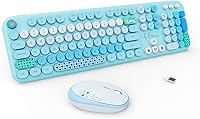
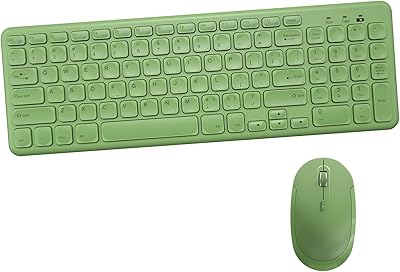
The FOPETT Retro Wireless Keyboard and Mouse Combo is one of those rare desk accessories that actually makes you smile when you look at it. Launched in April 2024, this colorful wireless set climbed to a top-120 ranking in its category surprisingly fast — a sign that buyers were actively hunting for something that looked different from the usual grey-and-black options. With a 4.4-star rating across 329 reviews, confidence in it is reasonable, though that sample size is modest. To be clear upfront: this is a style-first peripheral, built for casual typists who want personality on their desk, not a powerhouse for heavy productivity.
Features & Benefits
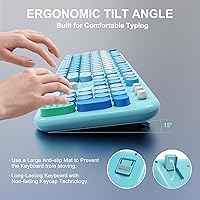
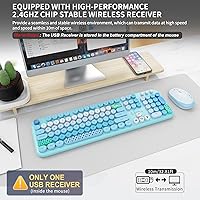
Plug the nano USB-A receiver into any compatible port and you are connected instantly — no driver downloads, no pairing headaches. The wireless signal holds steady up to about 10 meters, which is plenty for most desk setups. All 104 keys are full-sized with round, retro-style keycaps that have a satisfying, low-profile feel without being loud. The keyboard goes to sleep after about five minutes of inactivity and can run for up to a year on a pair of included AA batteries. There are 12 hotkeys for media and browsing shortcuts, though Mac users should know that hotkey support is partial on Apple systems. One important heads-up: this set uses USB-A only, so USB-C laptop owners will need a separate adapter.
Best For
This retro keyboard combo makes the most sense for students, casual home-office workers, or anyone building a desk setup with character on a budget. It works well as a secondary keyboard for a shared family computer or a lightweight companion for light typing tasks. Shared quiet spaces — think libraries, dorm rooms, or open-plan offices — will appreciate the subdued keystroke noise. It also stands out as a genuinely fun gift for teens or creative types who care about how their workspace looks. Windows and Chromebook users will get the smoothest experience; MacBook owners should take note of the USB-A requirement and partial hotkey compatibility before buying.
User Feedback
Buyers tend to mention two things right away: how much better the combo looks in person than in photos, and how quiet the keys feel during everyday typing. Build quality gets consistent credit for the price point — most people are not expecting premium construction here and are not disappointed. On the critical side, a few reviewers note that the mouse scroll wheel can feel a bit light, and the absence of a power switch is a minor but real annoyance for some. Mac users have flagged the incomplete hotkey support. The warranty and return policy do appear in positive reviews, suggesting the brand backing gives buyers genuine comfort when purchasing.
Pros
- Round retro keycaps give the desk a distinctive, eye-catching look that stands out from generic peripherals.
- Low-profile membrane switches keep typing noise to a minimum in shared or quiet environments.
- Plug-and-play setup via nano USB-A receiver takes under ten seconds with no software needed.
- Battery life on the keyboard is genuinely impressive, rated up to 12 months on two included AA batteries.
- Auto-sleep mode activates after five minutes idle, helping preserve battery without any manual intervention.
- Full 104-key layout means no compromises on key availability compared to compact alternatives.
- A three-year warranty and 60-day return window offer solid peace of mind for a budget-tier purchase.
- Wireless range of up to 10 meters gives comfortable flexibility for living room or larger desk setups.
- Works across Windows, Mac, Android, Chromebook, and Smart TV with no driver installation required.
- The matching mouse completes the retro aesthetic without needing to source a separate compatible peripheral.
Cons
- No power switch on the keyboard means you rely entirely on auto-sleep to conserve battery between sessions.
- USB-A only receiver requires a separate adapter for any laptop or device with USB-C ports exclusively.
- Mac hotkey support is incomplete, making several shortcut keys non-functional on Apple systems.
- The mouse scroll wheel feels light and imprecise to some users, especially those used to mid-range mice.
- Single receiver means this set cannot pair with multiple devices or switch between them quickly.
- Membrane switches lack the tactile feedback that enthusiast typists or fast typists often prefer.
- At 2.1 pounds the combo is not particularly travel-friendly despite the wireless convenience.
- No backlight option is available, making this a poor fit for low-light or nighttime typing environments.
Ratings
Our AI-generated scores for the FOPETT Retro Wireless Keyboard and Mouse Combo are built by analyzing verified buyer reviews from multiple global markets, with spam, incentivized, and bot-flagged submissions actively filtered out before any scoring is applied. The result is an honest, balanced snapshot of what real everyday users experience — strengths and frustrations included. Every category below reflects genuine patterns in the feedback, not averages skewed by outliers.
Design & Aesthetics
Typing Experience
Mouse Performance
Wireless Connectivity
Battery Life
Noise Level
Build Quality
Hotkey Functionality
Compatibility
Setup & Ease of Use
Value for Money
Warranty & Support
Gifting Appeal
Suitable for:
The FOPETT Retro Wireless Keyboard and Mouse Combo is a strong fit for anyone who wants their desk to look as good as it functions, without stretching their budget. Students working from dorm rooms or shared study spaces will appreciate the quiet keystrokes and the cheerful aesthetic that makes hours of note-taking feel a little less tedious. Remote workers setting up a secondary or guest workstation will find the plug-and-play wireless setup genuinely convenient — no IT support required, no driver installations, just plug in the nano receiver and start typing. It also makes a thoughtful and distinctive gift for teens, designers, or anyone who takes pride in a visually curated workspace. Windows and Chromebook users in particular will get the most out of this set, since compatibility across those platforms is clean and complete.
Not suitable for:
The FOPETT Retro Wireless Keyboard and Mouse Combo is not the right choice for buyers who prioritize raw typing performance, tactile switch precision, or dedicated gaming responsiveness. Power users who rely heavily on customizable hotkeys or full macro support will find this combo too limited for serious productivity workflows. Mac users face two concrete friction points: the USB-A-only receiver requires a separate adapter on modern MacBooks, and several hotkeys simply do not function as expected under macOS. Anyone who moves frequently between devices and expects a seamless multi-device Bluetooth pairing experience will also be disappointed, as this set connects to only one device at a time via its single receiver. If you need a keyboard built for endurance typing or precise mouse tracking for creative or technical work, this colorful wireless set is likely to feel underpowered for those demands.
Specifications
- Connectivity: The combo connects via a 2.4GHz nano USB-A wireless receiver included in the box.
- Wireless Range: The receiver maintains a stable connection at distances of up to 10 meters from the host device.
- Key Count: The keyboard features a full-sized 104-key layout, including a numeric keypad and function row.
- Keycap Style: All keys use round, retro typewriter-style keycaps with a smooth, glossy finish.
- Switch Type: Keys use low-profile quiet membrane switches designed to minimize typing noise in shared environments.
- Hotkeys: Twelve dedicated multimedia hotkeys provide shortcuts for media playback, email, and web search.
- Keyboard Battery: The keyboard runs on 2 AA batteries, which are included, with a rated lifespan of up to 12 months.
- Auto-Sleep: An automatic power-saving mode activates after 5 minutes of inactivity and wakes instantly with a single keypress.
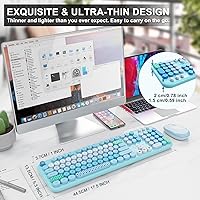
- Dimensions: The keyboard measures 17.5 x 5.3 x 1 inches, offering a standard desktop footprint.
- Weight: The full combo weighs approximately 2.1 pounds including the keyboard and mouse.
- OS Support: Compatible with Windows, Mac OS, Android, Chromebook, and Smart TV platforms without driver installation.
- Plug and Play: No software or drivers are required; the receiver connects and works immediately upon insertion.
- Port Requirement: The nano receiver uses a USB-A port; devices with only USB-C ports will require a separately purchased adapter.
- Mouse Design: The included wireless mouse shares the retro colorful aesthetic of the keyboard and operates on the same receiver.
- Warranty: FOPETT provides a three-year manufacturer warranty covering defects and malfunctions.
- Return Policy: A 60-day money-back guarantee or replacement option is available directly through the manufacturer.
- Mac Hotkeys: Multimedia hotkeys offer only partial functionality under Mac OS; core typing functions remain fully compatible.
- Power Switch: Neither the keyboard nor the mouse includes a physical power switch; power management relies on auto-sleep mode.
Related Reviews

Arteck HW192 Wireless Keyboard and Mouse Combo

HP 18H24AA Wireless Keyboard and Mouse Combo

Atelus Wireless Keyboard and Mouse Combo
Hayyiesh KG659-01 Wireless Keyboard and Mouse Combo
TopMate Wireless Keyboard and Mouse Combo

QUASIO Wireless Keyboard and Mouse Combo

EDJO Wireless Keyboard and Mouse Combo
Arcwares Wireless Keyboard and Mouse Combo

cimetech Wireless Keyboard and Mouse Combo
