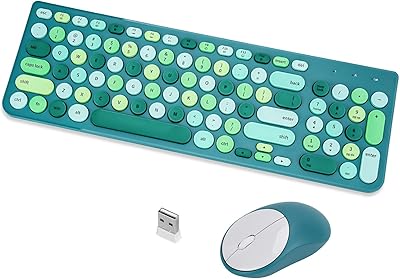
Harburfine Wireless Keyboard and Mouse Combo



Overview
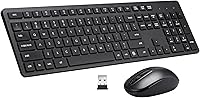
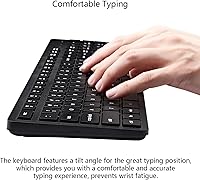
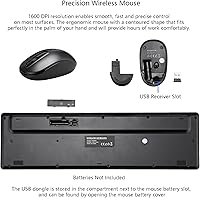
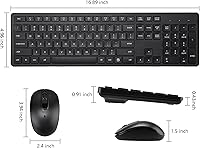
The Harburfine Wireless Keyboard and Mouse Combo provides a reliable and comfortable solution for those looking for a complete wireless setup. This ergonomic keyboard and mouse offer a full-sized layout with a numeric keypad, making it ideal for both work and home use. The 1600 DPI mouse ensures smooth and precise control, while the 2.4GHz wireless connection guarantees stable performance within a range of up to 33 feet. This set is designed for anyone seeking a blend of comfort and functionality, with no need for additional software or drivers.
Features & Benefits
This wireless keyboard and mouse combo is designed with comfort in mind. The quiet keys and mouse clicks create a peaceful environment, especially in shared spaces. The ergonomic design helps alleviate wrist strain, making it a great option for long typing sessions. Thanks to the automatic sleep mode, the device conserves battery life, offering up to six months of use. Compatibility is another strong point, as it works seamlessly across a variety of operating systems, including Windows, Mac OS, Chrome OS, and Linux.
Best For
The Harburfine set is best suited for office workers, students, and home users who prioritize comfort and quiet operation. It's perfect for those in need of a reliable, wireless keyboard and mouse combo that won't take up multiple USB ports, thanks to the compact nano receiver. If you work in a shared space or need a less disruptive setup, this combo offers the ideal balance of functionality and peace. Its wireless range of up to 33 feet makes it convenient for users who prefer a bit more mobility at their desk.
User Feedback
Users generally appreciate the Harburfine wireless keyboard and mouse combo for its quiet performance in open environments, making it a top choice for shared offices or study spaces. The ergonomic design receives praise for providing comfort during long work sessions, although some users mention the keys may feel a bit stiff initially. While most are satisfied with the wireless range and connection stability, a few have pointed out that the initial setup might take a moment to get used to. Overall, this set is well-received for its functionality and ease of use.
Pros
- This wireless keyboard and mouse combo offers excellent comfort for long typing sessions, thanks to its ergonomic design.
- Quiet keys and mouse clicks make it ideal for shared workspaces, reducing noise distractions.
- The 1600 DPI mouse provides smooth and precise control, suitable for everyday tasks and casual use.
- The 2.4GHz wireless connection offers a stable link with a range of up to 33 feet, allowing flexibility in positioning.
- Its compatibility with multiple operating systems, including Windows, Mac OS, and Linux, makes it versatile for various devices.
- Auto sleep mode extends battery life, ensuring up to 6 months of use without frequent battery changes.
Cons
- The keys can feel stiff initially, which may require some time to get used to.
- Users who prefer a more tactile or responsive keyboard experience might find this setup lacking.
- The lightweight design might not appeal to those seeking a more premium, sturdy feel in their peripherals.
- Some users found the mouse DPI setting (1600) to be too low for tasks requiring high precision, like gaming.
- The keyboard's full size with a numeric keypad may be too large for those with limited desk space.
- While the range is sufficient for most, some users reported occasional dropouts in very large rooms or open spaces.
Ratings
After analyzing verified user reviews from multiple platforms and languages, we found that the Harburfine Wireless Keyboard and Mouse Combo generally receives positive feedback for its ergonomic design and quiet performance, especially in shared environments. The scores reflect both the strengths, such as comfort and reliability, and a few pain points, such as initial stiffness in the keys. Only authentic reviews were considered, and spam, bot, and incentivized feedback was filtered out to ensure accurate results from diverse sources worldwide.
Ergonomics & Comfort
Quietness & Noise Level
Wireless Connectivity & Range
Battery Life & Power Management
Setup & Installation
Build Quality & Durability
Compatibility
Key Feel & Responsiveness
Value for Money
Customer Support & Warranty
Overall User Satisfaction
Suitable for:
The Harburfine Wireless Keyboard and Mouse Combo is ideal for office workers, students, and home users who prioritize comfort and quiet operation. Those who spend long hours typing will appreciate its ergonomic design, which helps reduce wrist strain, making it a great choice for extended work sessions. The quiet keys and mouse clicks are especially beneficial for individuals in shared spaces, like open-plan offices or dorm rooms, where noise can be distracting. Additionally, its reliable 2.4GHz wireless connection and broad compatibility across Windows, Mac, Chrome OS, and Linux make this combo versatile and easy to use in various setups.
Not suitable for:
While this combo offers excellent comfort and performance for general use, it may not be the best choice for users who prefer a more tactile or responsive typing experience. Some users found the keys to feel a bit stiff, which could be off-putting for those accustomed to more traditional or mechanical keyboards. Additionally, the lightweight build may not meet the expectations of those seeking a premium, sturdy feel. Gamers or users requiring extremely fast, precise control from their mouse may also find the 1600 DPI insufficient for high-performance tasks, making this set better suited for office or casual use rather than demanding applications.
Specifications
- Connectivity: Uses a 2.4GHz wireless connection for stable and reliable performance.
- Wireless Range: Provides a reliable wireless connection up to 33 feet in distance.
- Compatibility: Compatible with Windows, Mac OS, Chrome OS, and Linux operating systems.
- Keyboard Layout: Full-sized keyboard with a numeric keypad for efficient data entry.
- Mouse DPI: The mouse features a 1600 DPI sensor for precise cursor control.
- Ergonomics: Ergonomically designed keyboard and mouse to reduce wrist strain during long use.
- Battery Life: Keyboard and mouse can last up to 6 months on a single set of batteries.
- Battery Type: Keyboard requires 1 AAA battery; mouse uses 1 AA battery.
- Sleep Mode: Includes an auto sleep mode feature to conserve battery when idle.
- Mouse Design: The mouse is designed for comfortable use with contoured shape for better grip.
- Receiver Type: Comes with a USB nano receiver for easy plug-and-play setup.
- Dimensions (Package): Package dimensions: 16.93 x 5.35 x 2.44 inches.
- Weight: The total weight of the package is 1.1 pounds.
- Color: The keyboard and mouse combo comes in a black color.
- Key Press Type: The keyboard features quiet keys to minimize noise in shared workspaces.
- Special Features: Features quiet key presses, auto sleep mode, and ergonomic design for comfort.
- Mouse Type: The mouse is a standard optical type with smooth performance.
- Setup: The keyboard and mouse are ready to use immediately after connecting the USB nano receiver.
Related Reviews

Arteck HW192 Wireless Keyboard and Mouse Combo

HP 18H24AA Wireless Keyboard and Mouse Combo

MPTOG S801AG Wireless Keyboard and Mouse Combo

Vssoplor Wireless Keyboard and Mouse Combo

TKVPJYYI Wireless Retro Typewriter Keyboard and Mouse Combo

UBOTIE Wireless Keyboard and Mouse Combo

SABLUTE Wireless Backlit Keyboard and Mouse Combo

Atelus Wireless Keyboard and Mouse Combo
VEILZOR UK418 Wireless Keyboard and Mouse Combo