ULSOU Wireless Ergonomic Keyboard and Mouse Combo



Overview
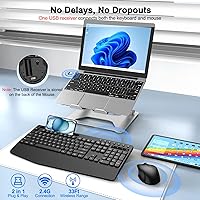
The ULSOU Wireless Ergonomic Keyboard and Mouse Combo arrived on the market in late 2024, and it has already carved out a respectable spot among budget-friendly desk setups. At its core, this is a full-size wireless combo built around everyday comfort — there is a cushioned palm rest baked right into the keyboard, a foldable stand for tilt adjustment, and a single nano USB receiver that handles both devices. It works across Windows, macOS, Chrome OS, and Linux without any driver fuss. For the price, the package is surprisingly complete, and the cable-free setup makes for a noticeably tidier desk.
Features & Benefits
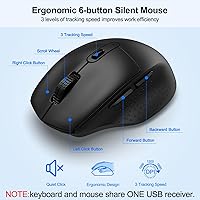
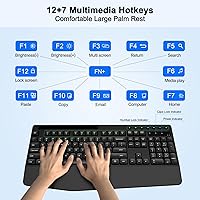
The quiet membrane keys are one of the first things you notice — they muffle the usual clatter well enough that typing in a shared room stops being a concern. The mouse offers three DPI settings (800, 1200, and 1600), which covers most everyday tasks from document editing to casual browsing. Battery life is claimed at up to 365 days, though real-world results will vary depending on usage habits; the auto-sleep after ten minutes of inactivity does help stretch things out. The built-in phone and tablet holder sounds minor until you actually use it — keeping your device propped without a separate stand genuinely clears desk space. Seven hotkeys round things out for quicker media control.
Best For
This ergonomic keyboard set makes the most sense for remote workers and students who spend several hours a day typing and want something that eases wrist strain without a steep price tag. The whisper-quiet keys make it a natural fit for bedrooms, small apartments, or open-plan offices where noise carries. If you keep your phone on the desk while working — checking messages or following a how-to video — the integrated holder adds real, practical convenience. It also suits anyone who switches between Mac and Windows regularly, since setup requires nothing beyond plugging in the receiver. A secondary workstation or a first proper home office is where this wireless combo holds its own.
User Feedback
Buyers consistently highlight wrist comfort as a standout, especially during longer sessions, and the low noise level earns frequent praise from people in shared living spaces. On the flip side, anyone accustomed to mechanical keyboards may find the key travel a bit shallow and the tactile feedback less satisfying. A few users mention that the scroll wheel on the mouse feels average at best. The phone holder gets mixed reactions — those who use it appreciate the tidiness it brings, while others rarely touch it. Battery longevity is hard to verify from user reports, as most people simply do not track it closely enough to confirm the stated figure. Overall, sentiment leans positive for what you pay.
Pros
- The built-in palm rest reduces wrist strain noticeably during long typing sessions.
- Keys are genuinely quiet enough to use comfortably in shared rooms without drawing attention.
- A single USB nano-receiver for both devices keeps the setup simple and port-efficient.
- Works out of the box on Windows, macOS, Chrome OS, and Linux with no driver installation.
- The integrated phone and tablet slot is a practical desk-tidying feature that earns its place.
- Auto-sleep mode and a physical on/off switch help stretch battery life between changes.
- The ambidextrous mouse design works equally well for left- and right-handed users.
- A 33-foot wireless range gives enough flexibility to use it from a couch or across a larger room.
- Seven hotkeys speed up common media and workflow tasks without extra software.
- The 12-month after-sales warranty provides a reasonable safety net for a budget-tier purchase.
Cons
- Key travel is shallow and the tactile feedback will disappoint anyone used to mechanical switches.
- The scroll wheel on the mouse feels cheap and lacks the smooth resistance many users prefer.
- Battery life claims are hard to verify and likely optimistic for users who type heavily all day.
- The mouse DPI tops out at 1600, which is inadequate for high-resolution displays or detail work.
- Full-size layout takes up significant desk space and offers no compact or tenkeyless alternative.
- Build materials feel lightweight and plasticky, raising questions about durability over time.
- The phone holder, while handy, only accommodates devices in a fixed upright position with limited adjustability.
- No backlighting means this ergonomic keyboard set is impractical in low-light environments.
- The foldable stand offers only one tilt angle, so users who prefer a flatter or steeper keyboard slope have no options.
- Brand recognition is low, which may give cautious buyers pause despite the stated warranty coverage.
Ratings
The scores below for the ULSOU Wireless Ergonomic Keyboard and Mouse Combo were generated by our AI after analyzing thousands of verified global purchase reviews, with spam, bot submissions, and incentivized feedback actively filtered out. Each category reflects the honest distribution of real buyer experiences — the genuine highlights and the recurring frustrations alike — so you can make a clear-eyed decision before buying.
Value for Money
Typing Comfort
Key Noise Level
Key Feel & Tactility
Mouse Performance
Battery Life
Build Quality
Wireless Reliability
Setup & Compatibility
Phone Holder Usefulness
Desk Footprint
Indicator Lights
Packaging & Unboxing
After-Sales Support
Suitable for:
The ULSOU Wireless Ergonomic Keyboard and Mouse Combo is a strong match for students and remote workers who spend a good chunk of their day typing and want something that reduces wrist strain without spending a lot. If you share a space with others — a bedroom, a small apartment, an open-plan office — the genuinely quiet keys make a real difference and remove that low-level guilt of disturbing people nearby. The built-in phone holder is a thoughtful addition for anyone who keeps their device on the desk as a secondary screen or reference tool, since it frees up space without requiring a separate stand. It also suits anyone piecing together a first proper home office on a tight budget, or setting up a spare workstation for occasional use. Mac and Windows users alike can plug in and get going without drivers or configuration headaches, which makes it a practical choice for households with mixed devices.
Not suitable for:
The ULSOU Wireless Ergonomic Keyboard and Mouse Combo is unlikely to satisfy anyone who has grown accustomed to the tactile punch of a mechanical keyboard, since membrane keys simply cannot replicate that crisp, satisfying feedback. Power users who rely on precise, high-speed mouse movement for tasks like graphic design, video editing, or competitive gaming will also find the three-level DPI range limiting and the overall mouse performance underwhelming. The battery life claim of up to 365 days is appealing on paper, but heavy daily users should treat that figure with some skepticism, as real-world results depend heavily on how often and how long the devices are in active use. Anyone needing a compact or tenkeyless layout for a cramped desk will find the full-size form factor bulkier than expected. This wireless combo is also not aimed at buyers who want a premium build quality with solid materials and a long-lasting feel — at this price tier, the plastics and overall construction reflect the cost.
Specifications
- Connectivity: Both the keyboard and mouse connect via 2.4GHz wireless using a single shared nano USB receiver.
- Wireless Range: The combo operates reliably at distances of up to 33 feet from the USB receiver.
- Keyboard Type: Full-size membrane keyboard with quiet keys designed to reduce typing noise by over 95% compared to standard keyboards.
- Palm Rest: A cushioned palm rest is integrated directly into the keyboard body to reduce wrist fatigue during extended typing sessions.
- Keyboard Stand: A foldable rear stand allows for basic tilt adjustment to suit different typing preferences.
- Hotkeys: The keyboard includes 7 one-touch hotkeys and dedicated media control keys for faster access to common functions.
- Mouse DPI: The optical mouse offers three selectable DPI levels — 800, 1200, and 1600 — to adjust cursor speed on the fly.
- Mouse Design: The mouse uses a symmetrical, ambidextrous shape that accommodates both left-handed and right-handed users comfortably.
- Battery Life: ULSOU claims up to 365 days of battery life for both devices under typical usage conditions, with actual results varying by use.
- Auto-Sleep: Both devices automatically enter a power-saving sleep mode after 10 minutes of inactivity to conserve battery.
- Power Switch: Each device includes a physical ON/OFF switch, allowing users to cut power completely when the combo is not in use.
- Phone Holder: A built-in slot on the keyboard accommodates a smartphone or small tablet in an upright position for easy viewing.
- OS Compatibility: The combo is compatible with Windows, macOS, Chrome OS, and Linux without requiring any additional drivers.
- Package Dimensions: The retail package measures 17.52 x 11.46 x 2.05 inches and weighs 2.31 pounds in total.
- Warranty: ULSOU provides a 12-month after-sales support guarantee, which extends beyond the standard Amazon return window.
- LED Indicators: Three LED indicator lights on the keyboard display status information such as Caps Lock, Num Lock, and power state.
- Receiver Type: The nano USB receiver is compact enough to leave plugged in permanently on most laptops and desktops without obstructing nearby ports significantly.
- Color: The combo is available in a Black Graphite colorway that suits most neutral desk setups.
Related Reviews
GAMCATZ Ergonomic Wireless Keyboard and Mouse Combo
PEIOUS Wireless Ergonomic Keyboard and Mouse Combo
JOYACCESS Ergonomic Wireless Keyboard and Mouse Combo
Lomiluskr Wireless Ergonomic Keyboard and Mouse Combo
E-YOOSO Ergonomic Wireless Keyboard and Mouse Combo
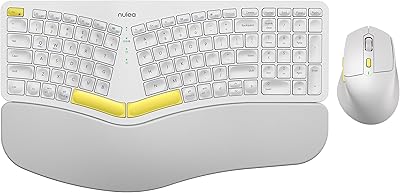
Nulea KM75
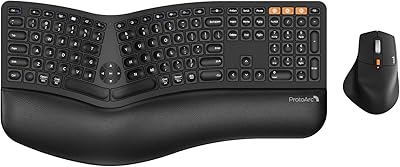
ProtoArc EKM01 Plus Ergonomic Keyboard Mouse Combo
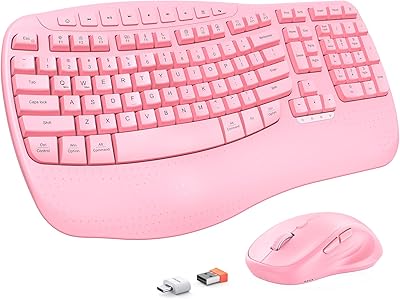
MEETION Director-D-2 Ergonomic Wireless Keyboard Mouse Combo

Perixx Periduo-605 Wireless Ergonomic Keyboard Mouse Combo
