Overview

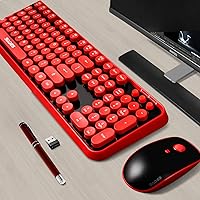
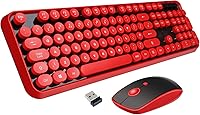
The Letton Wireless Retro Keyboard and Mouse Combo is one of those rare budget peripherals that leads with personality. The black body paired with round red keycaps gives it a genuine typewriter-inspired charm that stands out on any desk. Out of the box, you get the full-size keyboard, a wireless mouse, one nano USB receiver that handles both devices, and a pair of AA batteries to get started. Setup takes about ten seconds — plug in the receiver and you are typing. Just keep expectations grounded: this retro wireless combo is built for style and everyday convenience, not for power users chasing precision or speed.
Features & Benefits

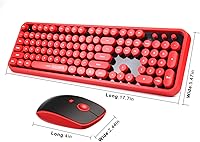
The 2.4GHz wireless connection keeps both the keyboard and mouse running smoothly up to 33 feet away — useful if your desk setup puts some distance between you and the screen. A single nano USB dongle drives both devices, so there is no driver juggling or complicated pairing to deal with. The 104-key full-size layout covers everything you would expect, and the round keycaps give typing a slightly softer, cushioned feel compared to standard flat caps. Both devices drop into auto sleep mode after inactivity to stretch battery life, and a small indicator light in the keyboard corner warns you before power runs out. The mouse also includes three DPI settings for switching between detailed work and general browsing.

Best For

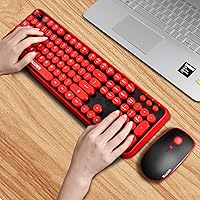
This typewriter-style combo fits naturally into home offices or personal desks where the visual setup actually matters. If you spend more time writing emails and browsing than gaming or crunching spreadsheets, it handles those tasks without any fuss. Students will appreciate the cheerful aesthetic without a steep price tag, and gift buyers will find the packaging genuinely presentable — this is not something that arrives in a plain brown box. It also works well for anyone who bounces between devices, since the plug-and-play receiver moves easily from port to port. Just do not expect it to satisfy a fast typist who is used to a mechanical keyboard.

User Feedback

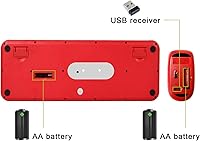
Buyers consistently point to the eye-catching design as the main draw, with many saying it looks even better in person than in the product photos. The setup experience also earns praise; people appreciate that everything works within seconds of plugging in the receiver. On the critical side, typists coming from mechanical keyboards notice the key travel feels shallower and less satisfying. One detail that catches buyers off guard: the nano USB receiver is tucked into a slot on the back of the mouse, not loose in the box — worth knowing before you assume something is missing. Overall, the Letton keyboard and mouse set holds solid ratings among casual users, with most complaints tied to expectations rather than actual defects.

Pros

  • The retro round keycap design genuinely stands out and looks great on a styled home desk.
  • A single nano USB receiver pairs both the keyboard and mouse instantly with no software needed.
  • Broad device compatibility means it works across Windows, Mac, Chromebook, iPad, and even Smart TVs.
  • Auto sleep mode on both devices helps the included AA batteries last a reasonable amount of time.
  • The low battery indicator light gives you a heads-up before either device goes dark unexpectedly.
  • Three adjustable DPI levels on the mouse give just enough flexibility for switching between tasks.
  • The 33-foot wireless range is more than enough for typical home office or living room use.
  • Gift-ready packaging makes this retro wireless combo a presentable, no-extra-wrapping-needed present.
  • The full 104-key layout means no compromises on key availability compared to compact alternatives.
  • Setup is genuinely effortless — plug in the receiver and both devices are ready within seconds.

Cons

  • Key travel is shallow and soft, which will frustrate typists who rely on tactile or clicky feedback.
  • The nano USB receiver is stored on the back of the mouse — easy to miss and confusing at unboxing.
  • Battery-powered operation means ongoing AA replacements; there is no built-in rechargeable option.
  • The mouse feels basic in hand and lacks side buttons or ergonomic contouring for longer sessions.
  • Build materials feel lightweight and plasticky, which raises questions about long-term durability under daily use.
  • No Bluetooth support limits connectivity options for devices without a free USB port.
  • The mouse DPI options are limited compared to what most mid-range standalone mice offer.
  • Not suitable for fast or high-volume typists — the keyboard was designed for comfort over speed.
  • The Letton keyboard and mouse set does not support multi-device pairing or channel switching.
  • Color options are limited, so buyers who want a different palette have few alternatives in this line.

Ratings

The scores below reflect an AI-driven analysis of verified global buyer reviews for the Letton Wireless Retro Keyboard and Mouse Combo, with spam, incentivized feedback, and bot activity actively filtered out before any rating was calculated. Both the genuine enthusiasm and the recurring frustrations found across thousands of real-world purchase experiences are transparently represented here — nothing is smoothed over to favor a better-looking scorecard.

Visual Design & Aesthetics
93%
This is where the retro wireless combo genuinely earns its keep. The round red keycaps against the black keyboard body draw consistent, enthusiastic praise from buyers who say it looks better on their desk than they expected from a budget peripheral. Students and home office workers frequently cite it as a centerpiece of their setup.
A small number of buyers found the red-and-black color scheme too bold for a neutral or minimalist workspace. Color options are limited, so anyone wanting a softer or more subdued palette has nowhere to go within this product line.
Setup & Ease of Use
91%
Plug-and-play works exactly as advertised — insert the nano USB receiver and both devices are ready within seconds, no software downloads or pairing menus required. Buyers with limited technical experience consistently highlight this as one of the most stress-free peripheral setups they have encountered.
The one friction point that repeatedly surfaces is the nano receiver being stored inside the mouse rather than loose in the box. Buyers unfamiliar with this common design convention sometimes spend several minutes searching for it, and the lack of clear in-box signage makes this more confusing than it needs to be.
Typing Feel & Key Travel
61%
39%
Casual typists — those primarily handling emails, light documents, or web browsing — find the rounded keycap shape comfortable enough and report that the keys register cleanly without requiring excessive force. The typing experience is quiet, which works well in shared living or office spaces.
Anyone accustomed to mechanical keyboards or even quality membrane boards will find the key travel shallow and the tactile feedback underwhelming. Faster typists report more mis-hits than expected, and extended typing sessions can feel a little flat due to the lack of satisfying key response.
Wireless Reliability
84%
The 2.4GHz RF connection performs solidly across typical home distances, with the vast majority of buyers reporting no noticeable lag, dropouts, or interference during normal daily use. Working from a couch, across a room, or at a media center all tend to be within comfortable range.
A subset of users noted occasional stuttering when obstructions or competing wireless signals were present in the environment. At this price and technology tier, that is not unusual, but buyers in RF-dense apartments or open-plan offices may notice it more than those in quieter home setups.
Mouse Performance
58%
42%
The three DPI settings give users enough flexibility to switch between tasks like document navigation and more precise cursor work. For light, everyday computing use, it functions reliably and the scroll wheel performs consistently without notable skipping.
The mouse feels generic in the hand — there is no ergonomic shaping, side buttons, or texture to speak of, and it sits awkwardly for users with larger hands during longer sessions. Precision suffers noticeably at higher cursor speeds, making it a poor fit for anything beyond basic computing tasks.
Build Quality & Durability
63%
37%
For a budget-tier combo, the keyboard holds together well enough under light daily use, and the keycaps show no significant wobble or rattle during typing. Buyers using it for a few hours a day in a home environment report it holding up over several months without obvious degradation.
The overall construction feels noticeably lightweight and plasticky, and buyers who type heavily or handle their peripherals roughly report wear showing earlier than expected. This is not a combo built to withstand years of intensive daily use, and treating it as such leads to disappointment.
Battery Life
76%
24%
The auto-sleep feature does a solid job of stretching battery life for light users, and several buyers report going months without a replacement on the keyboard in particular. The low battery indicator light on the keyboard is a practical touch that prevents sudden shutdowns mid-session.
Running on AA batteries indefinitely does add a recurring cost that rechargeable alternatives avoid entirely. Heavier users find battery drain accelerates faster than expected, and the mouse tends to run through its battery quicker than the keyboard under active daily use.
Compatibility
88%
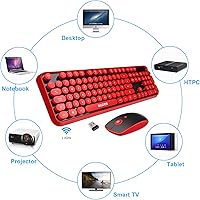
The Letton keyboard and mouse set covers an impressively wide range of devices for a single-receiver combo — from older Windows PCs to modern Macs, Chromebooks, Smart TVs, and iPads — all without any driver installation. This makes it a low-friction option for shared households with mixed devices.
macOS users occasionally note that Windows-labeled keys do not map perfectly to Mac shortcuts, requiring some mental adjustment. There is also no Bluetooth option, so devices without a free USB port — such as some tablets or newer ultrabooks — are effectively excluded.
Value for Money
82%
18%
At its price point, the combination of wireless connectivity, a full 104-key layout, a matching mouse, included batteries, and strong visual personality is hard to argue with for casual users. Buyers who go in with the right expectations consistently feel they received more than they paid for on the aesthetics front alone.
Buyers expecting performance comparable to mid-range peripherals come away feeling shortchanged, and the lack of a rechargeable battery system means the long-term cost of replacements quietly adds up. The value calculation depends heavily on how much the retro design matters to the individual buyer.
Packaging & Gifting Appeal
87%
The retail packaging is notably more polished than what most budget peripherals arrive in, and the black-and-red color theme carries through to the box presentation. Gift buyers frequently mention being relieved they did not need to re-wrap or disguise the original packaging.
The box does not include any quick-start guide or visual callout indicating where the USB receiver is stored, which causes confusion for gift recipients opening it without prior research. A simple printed insert addressing this would remove the most common unboxing frustration entirely.
Noise Level
79%
21%
The typewriter-style combo types quieter than its retro look might suggest, which buyers in shared bedrooms, open living areas, or quiet office corners appreciate. The lack of a clicky switch mechanism keeps the sound profile modest and non-disruptive during video calls or late-night sessions.
Some users who specifically wanted a loud, clicky typewriter-like sound to match the visual theme were disappointed to find the keys are quiet membrane switches beneath the retro exterior. The aesthetic evokes an old typewriter; the acoustics do not.
Wireless Range
81%
19%
The claimed 33-foot range holds up reliably in most single-room home environments, making it practical for living room TV setups or larger home office arrangements where the computer sits at some distance from the user.
Range performance drops in environments with walls or significant wireless interference between the receiver and the devices. Users expecting the full stated distance through obstructions will find real-world performance falls short of the spec under those conditions.
Key Legibility
74%
26%
The white printed legends on the red round keycaps are clearly visible under standard room lighting conditions and provide a good contrast against the key color. Buyers setting up the combo in well-lit home or office environments rarely report any readability issues.
In dim lighting or evening use without a desk lamp, the legends become harder to read — there is no backlight of any kind. Touch typists will not notice, but hunt-and-peck users working in low light may find themselves squinting more than they would like.

Suitable for:

The Letton Wireless Retro Keyboard and Mouse Combo is a natural fit for anyone who wants their desk setup to reflect a bit of personality without spending a lot. Students setting up a dorm room or home workspace will appreciate the cheerful black-and-red aesthetic paired with the convenience of wireless connectivity. Casual home office users who primarily handle emails, documents, and light browsing will find it covers all their daily needs without any friction. It also makes a genuinely thoughtful gift — the packaging is tidy and presentable, and the visual appeal translates well in person. Gift buyers shopping for teenagers, creative types, or anyone who appreciates a vintage-inspired look will find this retro wireless combo lands well on arrival. People who move between devices regularly will also value the single plug-and-play USB receiver that requires zero configuration.
Not suitable for:

The Letton Wireless Retro Keyboard and Mouse Combo is not the right tool for anyone who demands serious typing performance or precise mouse control. Writers and coders who spend long hours at the keyboard and prefer the tactile feedback of a mechanical switch will likely find the key travel here too shallow and underdefined for extended sessions. Competitive or even casual gamers should look elsewhere entirely — the mouse lacks the polling rate and precision that even entry-level gaming mice offer. Professionals who depend on a reliable, low-latency connection for fast-paced workflows may find battery-powered 2.4GHz RF less reassuring than a wired or Bluetooth setup with device memory. Anyone expecting ergonomic shaping or wrist support will also be disappointed, as this typewriter-style combo prioritizes visual style over extended comfort. If durability under heavy daily workloads is a priority, the budget build quality means it is better treated as a light-use peripheral.
Specifications

  • Brand: Manufactured and sold by LETTON, a brand focused on budget-friendly styled peripherals.
  • Wireless Technology: Uses 2.4GHz RF (radio frequency) to connect both the keyboard and mouse through a single nano USB 2.0 receiver.
  • Wireless Range: Both devices operate reliably at distances up to 33 feet from the connected receiver.
  • Key Count: The keyboard features a full 104-key layout, including a numeric keypad and standard function row.
  • Keycap Style: Round, retro-inspired keycaps designed to evoke a classic typewriter aesthetic, finished in red against a black keyboard body.
  • Mouse DPI: The included wireless mouse supports three selectable DPI levels for adjustable cursor sensitivity.
  • Power Source: Each device is powered independently by one AA battery, with both batteries included in the box.
  • Battery Saving: Both the keyboard and mouse enter an automatic power-save mode after a period of inactivity and wake instantly on input.
  • Battery Indicator: A low battery indicator light on the top-right corner of the keyboard illuminates when power is running low.
  • Compatible OS: Works with Windows XP, 7, 8, and 10, as well as Mac OS and Chrome OS, requiring no additional drivers.
  • Compatible Devices: Supports use with desktop PCs, laptops, Macs, iPads, Chromebooks, and Smart TVs with a USB port.
  • Package Contents: Includes the full-size wireless keyboard, one wireless mouse, one nano USB receiver, and two AA batteries.
  • Package Dimensions: The retail package measures 17.91 x 8.94 x 1.97 inches, suitable for gifting without additional repackaging.
  • Item Weight: The complete package weighs 2.25 pounds, making it lightweight enough for easy transport or relocation.
  • Receiver Storage: The nano USB receiver is stored in a dedicated compartment on the underside of the mouse when not in use.
  • Market Rank: Holds a Best Sellers Rank of #156 in the Computer Keyboard and Mouse Combos category on Amazon.

Related Reviews

Arteck HW192 Wireless Keyboard and Mouse Combo
78%
78%
Build Quality
72%
Typing Experience
63%
Mouse Comfort & Ergonomics
81%
Battery Life
69%
Wireless Connectivity
More
FOPETT Retro Wireless Keyboard and Mouse Combo
82%
93%
Design & Aesthetics
76%
Typing Experience
67%
Mouse Performance
88%
Wireless Connectivity
91%
Battery Life
More
CHESONA Multi-Device Wireless Keyboard and Mouse Combo
79%
88%
Multi-Device Switching
81%
Keyboard Typing Feel
61%
Mouse Quality
84%
Battery Life
74%
Wireless Connectivity Stability
More
ULSOU Wireless Ergonomic Keyboard and Mouse Combo
74%
88%
Value for Money
84%
Typing Comfort
86%
Key Noise Level
57%
Key Feel & Tactility
61%
Mouse Performance
More
SABLUTE Wireless Backlit Keyboard and Mouse Combo
77%
83%
Value for Money
62%
Typing Experience
71%
Mouse Performance
84%
Wireless Connectivity
88%
Battery Life
More
UBOTIE Wireless Keyboard and Mouse Combo
79%
88%
Value for Money
74%
Typing Experience
83%
Keycap Design & Aesthetics
67%
Mouse Performance
81%
Wireless Connectivity & Range
More
QUASIO Wireless Keyboard and Mouse Combo
77%
88%
Value for Money
93%
Setup & Ease of Use
79%
Typing Comfort
84%
Wireless Connectivity & Range
72%
Mouse Performance
More
Harburfine Wireless Keyboard and Mouse Combo
85%
88%
Ergonomics & Comfort
93%
Quietness & Noise Level
85%
Wireless Connectivity & Range
84%
Battery Life & Power Management
90%
Setup & Installation
More
Hayyiesh KG659-01 Wireless Keyboard and Mouse Combo
75%
88%
Value for Money
79%
Keyboard Comfort & Ergonomics
74%
Key Feel & Typing Experience
58%
Mouse Build Quality
86%
Noise Level
More
MPTOG S801AG Wireless Keyboard and Mouse Combo
75%
88%
Aesthetic Design
93%
Ease of Setup
78%
Typing Feel
61%
Mouse Tracking Accuracy
82%
Wireless Reliability
More

FAQ

No drivers or software are required. Just plug the nano USB receiver into an available USB port on your computer and both devices connect automatically. It is fully plug-and-play out of the box.

It is almost certainly not missing. The nano USB receiver is stored in a small slot on the back of the mouse, not loose in the packaging. Flip the mouse over and you should find it tucked in there. This catches a lot of buyers off guard, so it is worth checking before assuming anything was left out.

Yes, the Letton Wireless Retro Keyboard and Mouse Combo is compatible with Mac OS. Just plug in the receiver and it works. Keep in mind that some key labels correspond to Windows conventions, so a few function shortcuts may behave differently on macOS than you expect.
Battery life varies depending on how heavily you use both devices, but the auto-sleep feature helps extend it noticeably. For light to moderate daily use, most people report getting several months from a single set of AA batteries. The keyboard also has a low battery indicator light that gives you advance warning before either device cuts out.

It handles everyday typing tasks like emails, documents, and casual browsing without issue. That said, if you are someone who types at high speed for hours at a time, the key travel on this combo is relatively shallow and may feel less satisfying than a mechanical keyboard. It is best suited to light to moderate typing workloads.

No, that is not supported. Both devices share the same single USB receiver and are paired to it together. To use them on a different device, you simply move the receiver to the new device's USB port — there is no multi-device or channel-switching functionality.

Yes, as long as your Smart TV has a USB port that supports USB input devices, this typewriter-style combo should work. It is a convenient option for navigating menus or typing on a TV without needing to rely on a slow on-screen remote.

Most buyers say yes. The retail box is reasonably well-presented and the black-and-red design gives it an appealing visual identity that comes through even in the packaging. If you are giving it to someone who appreciates aesthetics, it holds up as a gift without needing extra effort.

The wireless range extends up to 33 feet under typical conditions. In most home or office environments, this is more than enough, whether you are sitting at a normal desk distance or across a room connected to a TV setup.

The round keycaps on this retro wireless combo use a non-standard shape, which means standard aftermarket keycap sets are unlikely to fit properly. If custom keycaps are important to you, this would not be the right starting point, as the retro round profile is a design choice that limits third-party compatibility.