Overview

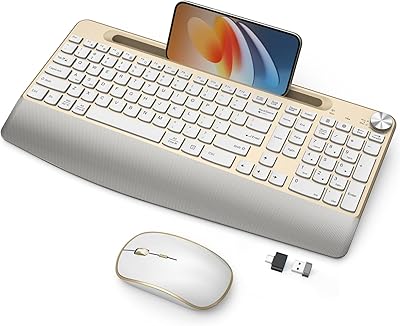
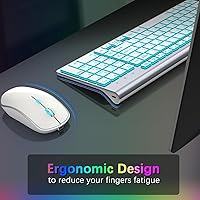
The JOYACCESS Wireless Keyboard and Mouse Combo stands out in a crowded budget peripheral market for one simple reason: it doesn't look like every other black plastic set on a desk. The white and silver colorway is genuinely refreshing, and the full-size layout — numeric keypad included — is surprisingly rare at this price point. Connectivity runs through a 2.4GHz USB dongle rather than Bluetooth, which keeps pairing simple and reliable. What distinguishes this wireless combo most practically, though, is that both units are Type-C rechargeable, meaning no drawer full of AA batteries. Just plug in, charge up, and get back to work.
Features & Benefits

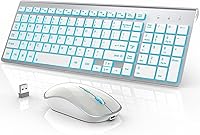
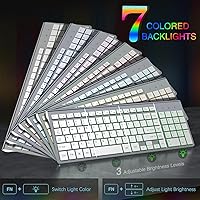
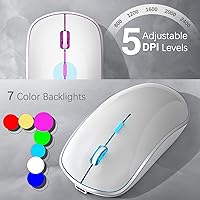
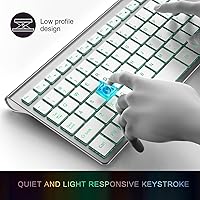
The scissor-switch keys have a low, shallow travel of around 2mm, which gives typing a quiet, controlled feel — not quite mechanical, but noticeably better than standard membrane boards. The backlighting is a genuine highlight: seven color options with three brightness levels means you can dial it down for late-night sessions without disturbing anyone nearby. The mouse handles five DPI settings up to 2400, which covers everyday browsing and spreadsheet work comfortably. Both devices sleep after a short idle period, and when used without the backlight active, the claimed standby figures — close to a year for the keyboard — hold up reasonably well in practice.

Best For

This rechargeable peripheral duo is a strong fit for home office workers who regularly type in low-light conditions and want a setup that doesn't look like it came from a server room. Students and remote workers will appreciate the full-size layout that travels well — it fits in a laptop bag without much hassle. If you've been spending on AA batteries every few months, switching to a rechargeable combo makes real practical sense here. It also works across Windows, Mac, and Chrome OS without any driver fuss, which makes it a low-friction option for people who move between machines or platforms.

User Feedback

Across nearly 3,000 ratings, the JOYACCESS keyboard and mouse set holds a 4.2-star average, reflecting a mostly satisfied buyer base. The most consistent praise centers on the quiet click experience and the backlit aesthetic — buyers seem genuinely pleased with how the combo looks on a desk. The mouse's lightweight build comes up occasionally; some find it comfortable for long sessions, while others would prefer a heavier feel. A smaller number of buyers have flagged that the USB dongle can sit a little loose depending on the port. Nothing severe, but worth knowing before you buy. Battery longevity without the backlight tends to track closely with what is advertised.

Pros

  • Both the keyboard and mouse are Type-C rechargeable, eliminating the ongoing cost of disposable batteries.
  • Seven backlight colors with three brightness levels make low-light typing noticeably more comfortable.
  • Quiet scissor-switch keys let you work in shared spaces without disturbing anyone nearby.
  • Full-size layout with numeric keypad is a rare feature at this price point.
  • The white and silver design stands out in a market dominated by generic black peripherals.
  • Auto-sleep on both devices activates quickly, meaningfully extending time between charges.
  • Works out of the box on Windows, Mac, and Chrome OS — no drivers or software needed.
  • Silent mouse clicks are a consistently praised feature for open-plan office environments.
  • Battery longevity without backlighting holds up well against advertised figures, according to real buyers.

Cons

  • No Bluetooth support limits this wireless combo to single-device use only.
  • The mouse feels noticeably lightweight, which won't suit buyers who prefer a heavier, palm-filling grip.
  • The USB dongle has no fallback — losing it means neither device works until a replacement is found.
  • Backlight brightness cannot be programmed per key, and color choices are fixed presets only.
  • The mouse DPI ceiling of 2400 is too low for users wanting precision beyond standard office tasks.
  • No charging indicator light makes it easy to miss when a unit is running low on power.
  • Charging both devices simultaneously requires two USB ports or a separate hub.
  • The white finish picks up smudges and oils faster than darker peripheral alternatives.
  • Keyboard tilt angle is fixed, offering no ergonomic adjustment for users with specific wrist positioning needs.

Ratings

The JOYACCESS Wireless Keyboard and Mouse Combo has been evaluated by our AI system after parsing thousands of verified global buyer reviews, with spam, bot-submitted, and incentivized feedback actively filtered out before scoring. The result is an honest, balanced breakdown that reflects what real users consistently praise and where the combo falls short. Both the standout strengths and the genuine frustrations are represented in the scores below.
Value for Money
88%
Buyers consistently feel they get more than expected at this price tier. The rechargeable design alone removes an ongoing cost that comparable AA-battery combos carry, and the full-size layout with numeric keypad is a feature usually reserved for pricier options.
A small segment of buyers who compared it directly to brand-name peripherals felt the mouse quality didn't quite justify the gap over cheaper non-backlit alternatives. The value equation depends heavily on how much the backlighting and rechargeable convenience matter to you personally.
Typing Experience
83%
The low-profile scissor-switch keys register cleanly without the heavy actuation force of traditional membrane boards. Buyers who spend long hours drafting documents or filling spreadsheets consistently report less finger fatigue compared to standard budget keyboards.
Typists who prefer tactile feedback or a deeper key press will find the shallow 2mm stroke underwhelming. It's a capable everyday keyboard, but anyone coming from a mechanical board is likely to miss the satisfying resistance and click they're used to.
Mouse Performance
74%
26%
For standard office tasks — web browsing, scrolling through documents, light photo editing — the five DPI levels give enough range to feel responsive on different monitor setups. The silent clicks are a real day-to-day benefit in shared spaces.
The mouse is noticeably lightweight, which divides opinion sharply. Users who prefer a more substantial feel find it flimsy under the palm during extended sessions. DPI tops out at 2400, which is adequate for office use but limiting for anyone who picked this up hoping for casual gaming precision.
Backlight Quality
86%
Seven color options with three adjustable brightness levels is a genuine differentiator at this price point. Users who work in dim home offices or type late at night consistently highlight the backlight as one of the combo's most satisfying features, particularly on the white keycaps.
The backlighting is not per-key programmable, and color options are fixed rather than customizable. A few buyers found the lowest brightness setting still a touch bright for completely dark environments, though this is a minor gripe rather than a functional flaw.
Battery Life
81%
19%
Buyers who use the combo with backlighting off report charge intervals that track closely with the advertised figures — the keyboard in particular seems to last an impressively long stretch before needing a top-up. The auto-sleep feature kicks in quickly and meaningfully extends time between charges.
Turning the backlight on noticeably shortens the real-world runtime, and a handful of buyers who kept it lit constantly found themselves charging more frequently than expected. The standby figures advertised assume backlight-off use, which isn't always made obvious at point of purchase.
Build Quality
71%
29%
The slim profile feels intentional and reasonably solid for a budget combo. The keyboard in particular has very little flex across the deck, which gives it a more premium impression than its weight might suggest.
The mouse chassis feels plasticky under sustained pressure, and the scroll wheel has a slightly loose feel that some users flagged after a few weeks of use. It holds up fine under normal office conditions, but it's not a combo built to withstand rough daily handling.
Wireless Connectivity
79%
21%
The 2.4GHz USB dongle connects instantly and holds a stable signal across a normal desk setup. Buyers working in typical home or office environments rarely report dropouts or lag during everyday tasks.
The absence of Bluetooth is a genuine limitation for users with multiple devices or those who work from tablets and phones. Several buyers also noted the dongle can sit loosely in certain USB-A ports, which isn't a performance issue but does feel slightly unsatisfying physically.
Noise Level
89%
Quiet operation is one of the most consistently praised attributes across reviews. Both the keyboard and mouse are noticeably hushed — buyers in open-plan offices and shared living spaces specifically mention being able to type without drawing attention or interrupting others nearby.
It's not completely silent — the keyboard produces a faint thock at the bottom of each keystroke that's audible in a very quiet room. Users expecting total silence comparable to a premium silent keyboard may notice it during late-night sessions in a still environment.
Design & Aesthetics
84%
The white and silver colorway is a strong differentiator. Buyers frequently mention how the combo looks on their desk compared to the sea of matte-black peripherals in this category, and the matching design between keyboard and mouse is visually cohesive.
The silver-white finish shows smudges and fingertip oils more readily than darker alternatives. A few buyers noted the keycap legends looked slightly uneven under bright lighting, though this is a cosmetic observation rather than a usability complaint.
Ergonomics
73%
27%
The keyboard's slight tilt angle provides decent wrist positioning for extended typing sessions, and most buyers with average hand sizes find the mouse shape comfortable enough for a few hours of use without discomfort.
The mouse's lightweight build and compact shape can cause fatigue for users with larger hands or those who prefer a palm grip. There's no wrist rest included, and the keyboard tilt isn't adjustable, which limits customization for buyers with specific ergonomic needs.
Setup & Compatibility
91%
Plug in the USB dongle and both devices connect immediately — no drivers, no software, no pairing ritual. Cross-platform support covers Windows, Mac, and Chrome OS reliably, which makes it easy to switch between machines without any configuration overhead.
Because everything runs through a single dongle, losing it renders both devices unusable. There's no Bluetooth fallback, and replacement dongles aren't straightforward to source, which is a longer-term fragility risk worth factoring in for travel users.
Portability
77%
23%
At under 1.4 pounds combined, this rechargeable peripheral duo is easy to drop into a laptop bag for a commute or co-working day. The slim keyboard profile doesn't take up much horizontal real estate either, fitting comfortably alongside a laptop on a smaller desk or cafe table.
Full-size keyboards with numeric keypads are inherently bulkier than tenkeyless alternatives, and the combo doesn't compress down further. For users who genuinely prioritize portability above all else, a compact layout would serve better despite the lost number row convenience.
Charging Convenience
87%
Type-C charging on both units is a genuinely practical feature — one cable type handles everything, and the included cable means buyers don't need to source accessories separately. Not needing to stock AA batteries is a small but real quality-of-life improvement over most combos in this range.
There's no charging indicator light beyond a brief LED cue, which makes it easy to forget a unit is running low until it actually sleeps unexpectedly. Charging both simultaneously also requires two ports or a hub, which isn't always convenient on a laptop.

Suitable for:

The JOYACCESS Wireless Keyboard and Mouse Combo is a genuinely good fit for home office workers who spend hours at a desk but want to keep their setup quiet and clutter-free. If you regularly work in low-light conditions — late evenings, dimly lit rooms, or early mornings before the household wakes up — the adjustable backlit keys add real practical value rather than just visual flair. Students and remote workers who occasionally pack up and work from a cafe or co-working space will appreciate having a full-size keyboard with a numeric keypad that still fits in a standard laptop bag. The rechargeable design suits anyone who's grown tired of buying replacement batteries every few months; both units charge via the same Type-C cable most people already carry. It also works reliably across Windows, Mac, and Chrome OS without any driver installation, which makes it a practical choice for users who switch between machines or operating systems regularly.
Not suitable for:

The JOYACCESS Wireless Keyboard and Mouse Combo is not the right pick for anyone who relies on Bluetooth to connect multiple devices, since the single USB dongle setup doesn't support device-switching at all. Serious typists who prefer tactile or mechanical feedback will likely find the shallow scissor-switch keys unsatisfying — the 2mm stroke is adequate, but it doesn't replicate the feel of a proper mechanical board. The mouse's lightweight build is a real dividing line: users who prefer a heavier, more substantial palm grip may find it uncomfortable during extended sessions. Gamers should look elsewhere entirely — the 2400 DPI ceiling and absence of customizable software make this a poor fit for anything beyond casual desktop use. Finally, anyone who frequently uses USB-A ports on older hardware should be aware that the dongle fit has been reported as slightly loose on certain port configurations, which is a minor but recurring annoyance worth knowing about before purchasing.
Specifications

  • Connectivity: Both keyboard and mouse connect via a single 2.4GHz USB dongle included in the box — no Bluetooth support is available.
  • Keyboard Switch: The keyboard uses low-profile scissor-switch mechanisms with a key travel depth of 2mm for a quiet, shallow typing stroke.
  • Backlight Options: Seven switchable backlight colors are available, each adjustable across three brightness levels (low, mid, high) or fully off.
  • Mouse DPI: The wireless mouse offers five selectable DPI levels ranging up to a maximum of 2400 DPI for cursor sensitivity adjustment.
  • Keyboard Standby: With backlighting disabled, the keyboard is rated for up to 365 days of standby on a full charge under typical usage conditions.
  • Mouse Standby: The mouse is rated for up to 270 days of standby on a full charge when used without the backlight active.
  • Auto-Sleep: The keyboard enters sleep mode after 60 seconds of inactivity, and the mouse enters sleep mode after 90 seconds, to conserve charge.
  • Charging: Both units charge via Type-C cable; one Type-C cable is included in the package and works for both devices.
  • Battery Type: Both the keyboard and mouse are powered by built-in lithium polymer batteries — no removable or replaceable cells are used.
  • Layout: The keyboard is a full-size layout that includes a numeric keypad on the right side alongside the standard alphanumeric and function rows.
  • Dimensions: The keyboard measures 14.6 x 5.5 x 2.16 inches, making it a standard full-size footprint suitable for most desk setups.
  • Weight: The combined weight of the keyboard and mouse is approximately 1.37 pounds, making the set relatively easy to transport.
  • Compatibility: This combo is confirmed compatible with Windows, macOS, and Chrome OS operating systems without requiring additional driver installation.
  • Color: The set is available in a white and silver colorway, designed to stand out from the predominantly black peripherals in this category.
  • Mouse Clicks: Both the left and right mouse buttons are designed for silent operation, producing noticeably reduced click noise compared to standard mouse switches.
  • Keyboard Noise: The scissor-switch keys are engineered for quiet operation, making the keyboard suitable for shared office spaces or home environments with noise sensitivity.
  • Package Contents: The package includes the wireless keyboard, wireless mouse, one USB receiver dongle, one Type-C charging cable, and a user manual.

Related Reviews

JOYACCESS Ergonomic Wireless Keyboard and Mouse Combo
86%
88%
Ergonomics and Comfort
90%
Wireless Range and Connectivity
93%
Mouse Performance and Noise
70%
Keyboard Responsiveness
85%
Build Quality
More
Arteck HW192 Wireless Keyboard and Mouse Combo
78%
78%
Build Quality
72%
Typing Experience
63%
Mouse Comfort & Ergonomics
81%
Battery Life
69%
Wireless Connectivity
More
ULSOU Wireless Keyboard and Mouse Combo
85%
88%
Ergonomics and Comfort
92%
Battery Life
84%
Typing Experience
87%
Wireless Connectivity
80%
Mouse Performance
More
Tayderley Wireless Keyboard and Mouse Combo
86%
88%
Typing Comfort
85%
Mouse Performance
94%
Battery Life
83%
Build Quality
92%
Ease of Setup
More
seenda Wireless Keyboard and Mouse Combo
88%
89%
Typing Comfort
87%
Ergonomics
82%
Wireless Connectivity
94%
Setup & Installation
88%
Key Spacing & Accuracy
More
UBOTIE Wireless Keyboard and Mouse Combo
79%
88%
Value for Money
74%
Typing Experience
83%
Keycap Design & Aesthetics
67%
Mouse Performance
81%
Wireless Connectivity & Range
More
Trueque Wireless Keyboard and Mouse Combo
78%
83%
Value for Money
81%
Typing Comfort & Ergonomics
78%
Backlight Quality
74%
Mouse Performance
88%
Noise Level
More
MOFII Wireless Keyboard and Mouse Combo
84%
94%
Ease of Setup
85%
Ergonomics and Comfort
90%
Wireless Connectivity
88%
Design and Aesthetics
83%
Battery Life
More
Kootop Wireless Keyboard Mouse Combo
87%
89%
Ergonomics and Comfort
91%
Typing Experience
85%
Wireless Connectivity
87%
Design and Aesthetics
83%
Battery Life
More
FOPETT Wireless Keyboard and Mouse Combo
85%
91%
Typing Experience
87%
Battery Life
94%
Design & Aesthetics
88%
Ergonomics
85%
Build Quality
More

FAQ

No, you don't. Just plug the USB dongle into an available port on your computer and both devices connect automatically. It works on Windows, Mac, and Chrome OS straight out of the box without any driver downloads or software setup.

Unfortunately, no. The combo uses a single 2.4GHz USB dongle for both devices, and there's no Bluetooth option or multi-device switching feature built in. You'd need to physically move the dongle to use it on a different machine.

With the backlighting turned off, the keyboard can last an impressively long time between charges — the advertised figures hold up reasonably well based on buyer feedback. If you run the backlight continuously, expect noticeably shorter intervals. Toggling the backlight off when you don't need it is the easiest way to extend your charge cycle significantly.

It's fine for very casual, low-stakes use — the 2400 DPI ceiling and silent clicks work well for everyday desktop tasks and light gaming at home. That said, this isn't a gaming peripheral by design, so competitive or precision gaming would be better served by a dedicated gaming mouse with higher DPI, polling rate, and software support.

Yes, that's by design rather than a defect. The mouse is intentionally lightweight and slim, which some users genuinely prefer for comfortable all-day office use. Others who favor a heavier, more palm-filling feel may find it takes some adjustment. It's worth knowing before you buy if grip style and mouse weight are important to you.

This is a real limitation worth thinking about. Because both devices rely entirely on that one small dongle, losing it means neither the keyboard nor the mouse will work. The JOYACCESS Wireless Keyboard and Mouse Combo doesn't support Bluetooth as a fallback, and replacement dongles aren't always easy to source. If you travel frequently, keeping the dongle stored safely in a consistent spot is genuinely important.
Yes, but you'll need two USB ports available or a USB hub, since each device charges individually via its own Type-C connection. The included cable handles both units, but you'll need to charge them one at a time if you only have one port free.

Both devices support the same seven color options and three brightness levels, so they can be matched visually. Each unit's backlight is controlled independently, so you can adjust or turn off one without affecting the other.

White keycaps do tend to show smudges and fingertip oils more readily than darker alternatives — that's a general characteristic of white peripherals, not specific to this set. Regular light wiping with a slightly damp cloth keeps them looking clean. Long-term yellowing is possible with white plastics over time, though this varies by environment and usage habits.

Simply press any key on the keyboard or move or click the mouse. Both devices wake up almost instantly from sleep mode, so there's no noticeable delay when you return to your desk after a short break.