seenda Wireless Keyboard and Mouse Combo


Overview
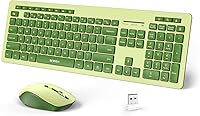
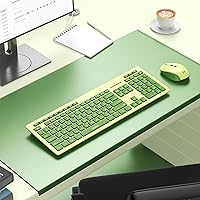
The seenda Wireless Keyboard and Mouse Combo sits squarely in the budget wireless category, yet it stands out by leaning hard into aesthetics — specifically, a two-tone green colorway that genuinely turns heads on a desk. Unlike most no-frills combos at this price, it comes full-sized with a numeric keypad, making it useful for spreadsheets, data entry, and everyday work. Setup is as simple as it gets: plug in the nano-receiver and you are working within seconds. One thing worth knowing upfront — the USB receiver ships tucked under the mouse battery cover, so do not panic if it is not immediately visible in the box.
Features & Benefits
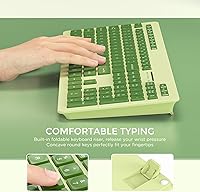
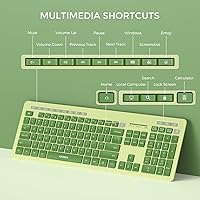
The wireless connection holds steady up to ten meters away with no noticeable lag during typing or scrolling. The keys are quiet enough for a shared apartment or open office, and the slightly concave key shape helps fingers land accurately without much conscious effort. Two small fold-out stands at the back let you raise the keyboard to a more comfortable angle, which makes a real difference during longer sessions. There are also 12 function keys and 14 multimedia hotkeys built in, so adjusting volume or skipping a track does not require reaching for the mouse at all.
Best For
This wireless combo makes the most sense for students, remote workers, or anyone building a home office on a reasonable budget. If you are replacing a tangled wired setup and want something that works the moment you plug it in, the seenda keyboard-mouse set fits well. The full-size layout with a number pad is a practical bonus for anyone who regularly handles numbers. Windows users across laptops, desktops, and towers are all covered with zero driver downloads. And if desk aesthetics genuinely matter to you — if you want peripherals that look good together — the green pairing is hard to dismiss.
User Feedback
Buyers consistently praise the look of this green desk combo in real setups — it tends to surprise people with how vibrant it appears out of the box, and many mention it photographs well for workspace photos. On the downside, some reviewers flag that mouse build quality feels a little light, and a handful note the scroll wheel loses precision after extended use. Battery life feedback is mixed — the keyboard holds up well for most users, but the mouse drains noticeably faster. Long-term durability under heavy daily use remains the biggest question at this price point.
Pros
- Plug-and-play setup takes under a minute with no software installation required.
- The two-tone green design genuinely stands out and looks great in desk photos.
- Full-size layout with a number pad adds real practical value for data-heavy tasks.
- Quiet key action is noticeable enough to matter in shared or open-plan spaces.
- A 10-meter wireless range means it works reliably even from across a room.
- Fourteen multimedia hotkeys reduce how often you need to switch between keyboard and mouse.
- Adjustable tilt stands make a real difference for wrist comfort during longer typing sessions.
- The single nano-receiver connecting both devices keeps your USB ports free.
- At its price point, this wireless combo delivers far more aesthetic personality than most competitors.
- Concave keycap shape helps with finger placement and reduces accidental mis-hits.
Cons
- Mouse build quality feels noticeably lightweight and may degrade with heavy daily clicking.
- Scroll wheel precision tends to drop off after extended use according to multiple buyers.
- The USB receiver hidden under the mouse battery cover causes unnecessary unboxing confusion.
- Battery drain on the mouse is faster than expected compared to the keyboard.
- Limited compatibility outside of Windows reduces its appeal for mixed-device households.
- No Bluetooth option means you are always occupying a USB port on your device.
- Key travel and feedback will disappoint anyone accustomed to better membrane or mechanical boards.
- Long-term durability under daily professional use remains an open question at this price tier.
Ratings
Our AI scoring system analyzed thousands of verified global purchases of the seenda Wireless Keyboard and Mouse Combo, actively filtering out incentivized, duplicate, and bot-generated reviews to surface what real buyers consistently experienced over time. The scores below reflect both the genuine strengths that keep this combo highly rated in its category and the recurring frustrations that honest buyers reported after weeks of daily use. Nothing has been smoothed over — the wins and the weak points are both represented here.
Value for Money
Design & Aesthetics
Ease of Setup
Typing Comfort
Mouse Performance
Key Noise Level
Wireless Reliability
Build Quality
Battery Life — Keyboard
Battery Life — Mouse
Ergonomics
Compatibility
Multimedia Hotkeys
Suitable for:
The seenda Wireless Keyboard and Mouse Combo is a natural fit for students, remote workers, and casual home office users who want a functional wireless setup without spending a lot. If your daily computing involves browsing, writing, spreadsheets, or light data entry, this combo covers all those bases comfortably. The full-size layout with a number pad is genuinely useful for anyone who handles invoices, budgets, or any kind of numerical work regularly. People who care about how their desk looks — whether that is a dorm room, a home studio, or a shared workspace — will appreciate that the two-tone green colorway feels intentional rather than an afterthought. It also works well as a secondary setup: a spare computer station, a living room PC, or a kid's homework desk. Anyone upgrading from a wired combo who just wants to plug something in and start working immediately will find this wireless combo refreshingly straightforward.
Not suitable for:
Heavy daily typists, gamers, or professionals who depend on peripheral reliability for hours on end will likely find the seenda Wireless Keyboard and Mouse Combo falls short of their expectations. The mouse, in particular, raises concerns around long-term build quality — users who click frequently or demand precise scroll control may notice inconsistencies after several months of use. Mac and ChromeOS users should also be cautious, as compatibility is primarily optimized for Windows environments. If you work in a setting where peripheral durability is non-negotiable — think a busy reception desk or a shared workstation used by multiple people daily — the construction at this price tier may not hold up well enough. Those who prefer mechanical key feedback or need a high-precision mouse for design, photo editing, or intensive productivity work should look at a higher price tier entirely.
Specifications
- Connectivity: Both the keyboard and mouse connect to your computer via a single 2.4GHz USB nano-receiver, requiring no Bluetooth or additional software.
- Wireless Range: The combo maintains a stable connection at distances of up to 10 meters from the receiver under typical indoor conditions.
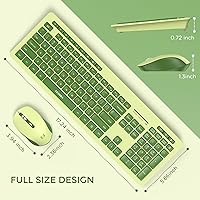
- Layout: The keyboard uses a standard full-size US QWERTY layout, including a dedicated numeric keypad on the right side.
- Function Keys: Twelve standard function keys (F1–F12) are included along the top row of the keyboard.
- Multimedia Hotkeys: Fourteen multimedia shortcut keys are built in, covering common actions such as volume control, media playback, and quick-launch functions.
- Key Design: The keycaps use a quiet membrane mechanism and feature a concave surface to guide fingertip placement during typing.
- Keyboard Tilt: Two foldable plastic stands on the underside of the keyboard allow users to raise the rear edge for a more comfortable typing angle.
- Receiver Storage: The USB nano-receiver is stored under the battery cover on the underside of the mouse when not in use or during shipping.
- Compatibility: The combo is designed for use with Windows-based PCs, laptops, desktops, and notebooks; it is not officially supported on macOS or ChromeOS.
- Driver Requirement: No driver installation is needed; the combo operates as a plug-and-play device on compatible Windows systems.
- Color Scheme: The set features a two-tone light and dark green colorway applied consistently across both the keyboard and mouse.
- Package Dimensions: The retail package measures 17.72 x 5.94 x 2.4 inches, accommodating both devices together.
- Item Weight: The combined packaged weight of the keyboard and mouse is 1.96 pounds.
- Brand: This combo is manufactured and sold under the seenda brand, which specializes in affordable computer peripherals.
- Availability: This product was first made available for purchase in October 2023.
Related Reviews
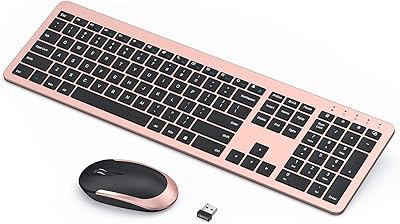
seenda Wireless Rechargeable Keyboard Mouse Combo
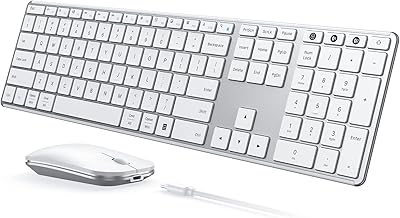
seenda SKM64-3 Wireless Keyboard and Mouse Combo

Arteck HW192 Wireless Keyboard and Mouse Combo

KNOWSQT Wireless Keyboard and Mouse Combo

MOFII Wireless Keyboard and Mouse Combo

cimetech Wireless Keyboard and Mouse Combo

EDJO Wireless Keyboard and Mouse Combo

JOYACCESS Wireless Keyboard and Mouse Combo

Kootop Wireless Keyboard Mouse Combo
