Overview

The Trueque Wireless Keyboard and Mouse Combo entered the market in mid-2024, and for a newcomer brand, it has made a reasonable impression — sitting at #400 in its Amazon category with over 580 ratings averaging 4.2 stars. It offers a full-size layout with numpad, USB-C recharging for both devices, and a white finish that suits anyone trying to keep their desk looking clean and minimal. The built-in phone holder is an unexpected touch that genuinely adds utility. It is not a powerhouse name, but it competes solidly at its price tier.
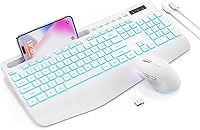
Features & Benefits

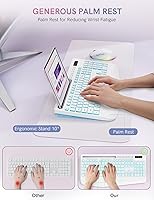
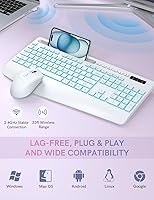
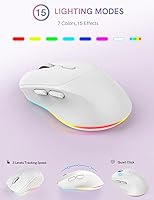
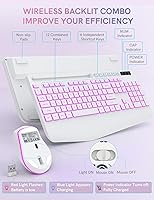
What stands out right away is the integrated wrist rest — it is part of the keyboard frame, not a separate pad you have to position and reposition. That alone reduces desk clutter noticeably. The backlighting spans seven colors with three brightness levels, and the mouse adds its own fifteen lighting modes if you want a bit more personality on your desk. Both devices charge over USB-C, which is a genuine quality-of-life upgrade when you are tired of hunting for AA batteries. The single nano-receiver tucks inside the mouse when not in use, and typing stays genuinely quiet — comfortable in a shared apartment or open office.

Best For

This wireless desk set makes the most sense for home office workers or students who want something that looks good, stays quiet, and does not require constant battery swaps. The phone holder on the keyboard edge is a small but practical detail — genuinely useful if you prop up your phone during calls, follow a recipe, or glance at a secondary display without adding a separate stand. It works across Windows and macOS with no driver installation, making it a low-friction choice for anyone who switches between machines. People stepping up from a wired or disposable-battery setup will notice the improvement right away.

User Feedback

Buyers frequently highlight the wrist rest comfort and backlit keys as real standouts, with several noting how much cleaner their setup looks overall. The quiet clicks earn consistent praise from people working in shared spaces or near light sleepers. On the flip side, some users flag minor key wobble and uncertainty about whether the phone holder grips larger tablets securely. A few Mac users note that some key labels do not map cleanly to macOS shortcuts. The brand is new enough that long-term durability remains an open question — early reports are mostly encouraging, but there simply is not enough time in the field yet to say definitively.

Pros

  • Integrated wrist rest keeps your posture supported without adding a separate accessory to your desk.
  • USB-C charging on both devices means no more hunting for AA batteries mid-week.
  • Quiet keystrokes and subdued mouse clicks are genuinely considerate in shared living or working spaces.
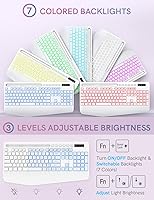
  • Seven backlight colors with adjustable brightness give real flexibility for different lighting environments.
  • Single nano-receiver handles both devices and stores neatly inside the mouse when not in use.
  • The built-in phone holder is a practical addition that doubles as a lightweight tablet stand.
  • Full-size layout with numpad makes this wireless desk set viable for data entry and spreadsheet work.
  • Plug-and-play compatibility across Windows and macOS requires zero software setup.
  • Six-button mouse with forward and backward navigation noticeably speeds up browser-based work.
  • Spill-resistant, non-slip surface adds a layer of everyday reassurance for busy desks.

Cons

  • The mouse scroll wheel feels imprecise and slightly loose compared to rivals in the same price range.
  • Plastic on the mouse body flexes noticeably when gripped firmly, undermining the premium aesthetic.
  • The phone holder struggles to hold larger tablets securely, limiting its usefulness beyond smartphones.
  • Mac users face a learning curve because several function key labels do not match macOS defaults.
  • No companion software means zero ability to remap keys or save custom lighting profiles.
  • Glossy sections on the mouse attract fingerprints quickly, especially on the white version.
  • The 2,000-hour standby claim is hard to verify in real use, particularly with backlighting active.
  • Key wobble on certain keys has been reported to worsen slightly after several months of regular use.
  • The non-removable wrist rest is poorly suited to users with smaller hands or unconventional desk angles.
  • Brand history is too short to assess whether this combo holds up reliably beyond the one-year mark.

Ratings

The scores below for the Trueque Wireless Keyboard and Mouse Combo were generated by our AI system after analyzing verified global user reviews, with spam, bot-submitted, and incentivized feedback actively filtered out. Each category reflects the honest pattern of what real buyers praised and where they ran into frustration. Both the strengths and the pain points are represented as transparently as possible.
Value for Money
83%
Most buyers feel the price-to-feature ratio is genuinely strong for a rechargeable, backlit, ergonomic combo that includes a wrist rest and phone holder out of the box. Compared to similarly priced competitors that still require AA batteries, this wireless desk set feels like a step up without a steep cost increase.
A small segment of users felt the plastic construction did not fully justify even the mid-range asking price, particularly when comparing tactile feel against established brands. If longevity is a concern, some buyers questioned whether it would hold up as well over two or three years of daily use.
Typing Comfort & Ergonomics
81%
19%
The integrated wrist rest is the single most praised feature in this category — users specifically highlight that it is part of the keyboard body rather than a loose accessory, which keeps it properly aligned during long sessions. People doing several hours of daily typing noted noticeably less wrist fatigue compared to flat keyboards without support.
The wrist rest is non-removable, which some users with smaller hands or unconventional desk setups found restrictive. A few reviewers also noted the keyboard angle, while ergonomic for most, felt slightly steep during extended late-night work sessions.
Backlight Quality
78%
22%
The seven available colors with three adjustable brightness levels give buyers enough flexibility to match their desk aesthetic or reduce eye strain in dim lighting. Users working in darker environments specifically appreciated that the key legends stay clearly legible even at the lowest brightness setting.
Some users reported that the backlight cycling between colors is not always intuitive and can require multiple button presses to land on a preferred setting. A handful of buyers noted minor inconsistency in brightness across individual keys, particularly toward the edges of the board.
Mouse Performance
74%
26%
The six-button layout with forward and backward navigation is well-received among users who do a lot of browser-based work or document editing. The three DPI settings give enough range to switch between detailed work and faster desktop navigation without feeling locked into one speed.
The scroll wheel feel drew repeated criticism — several users described it as slightly loose or imprecise compared to mice in a similar price range. The contoured grip works well for right-handed medium-sized hands but feels awkward for users with larger hands during extended sessions.
Noise Level
88%
This is one of the most consistently praised aspects across the review pool. Users in open-plan offices and shared apartments specifically called out how much quieter both the keyboard and mouse are compared to their previous setups, with several mentioning it no longer disturbs housemates or colleagues during calls.
While the keyboard is genuinely quiet, a small number of users noted the mouse click is not as silent as expected despite the 95% noise reduction claim — particularly audible in very quiet rooms at night. The sound reduction is real, but the baseline expectations set by the product description can occasionally feel slightly overstated.
Build Quality & Materials
67%
33%
The keyboard frame feels reasonably solid for its weight class, and the spill-resistant coating gives some peace of mind during busy desk use. The white finish in particular looks clean and holds up well cosmetically, with few early reports of yellowing or scuffing under normal conditions.
The plastic on the mouse body and some keycaps was flagged by multiple buyers as feeling noticeably thin, with slight flex when pressed firmly. Given the brand launched only in mid-2024, there is not yet enough real-world data to assess how these materials hold up beyond the first year of regular use.
Battery Life
76%
24%
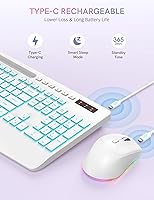
The USB-C charging on both devices is a genuine convenience upgrade, and most users reported the combo lasts through a full work week of moderate use before needing a top-up. The auto backlight shutoff after 90 seconds of inactivity works quietly in the background and clearly helps conserve charge without frustrating interruptions.
The 2,000-hour standby claim is difficult to verify in real-world conditions, and several reviewers expressed skepticism about how that figure holds up with backlighting enabled at higher brightness levels. A few users noted the mouse drains noticeably faster than the keyboard when lighting effects are running continuously.
Wireless Connectivity
82%
18%
The single nano-receiver handling both devices is consistently praised for being hassle-free — plug it in and both peripherals work immediately with no software or pairing steps. The connection held stable across a 25 to 30-foot range for the majority of users in standard home and office environments.
A small number of users reported occasional micro-stutters on the mouse when the USB receiver was plugged into a rear USB port on a desktop tower, suggesting interference at greater distances. Those who kept the receiver within a foot or two of their workspace reported no issues.
Phone & Tablet Holder
71%
29%
For users who prop a phone up during video calls or follow along with a tutorial on a tablet, the built-in holder is a genuinely useful addition that removes the need for a separate stand cluttering the desk. Most smartphone users found it secure and well-positioned above the function row.
The holder struggles with larger tablets, particularly anything above 10 inches, where stability becomes questionable. A few users also noted it added slight visual bulk to the top of the keyboard, which felt out of place in cleaner, more minimal desk setups.
Software & Compatibility
79%
21%
Plug-and-play setup works reliably across Windows and macOS without any driver downloads, which is particularly appreciated by users who switch between a Mac and a Windows machine. Smart TV and tablet compatibility worked as advertised for the majority of users who tested it beyond standard desktop use.
Mac users specifically flagged that certain function key labels do not map to the expected macOS shortcuts without manual reassignment, which created a short learning curve. There is no dedicated software for remapping keys or customizing lighting profiles, which limits flexibility for power users.
Ease of Setup
91%
Virtually every reviewer commented on how fast and trouble-free the initial setup was — unbox, plug in the receiver, power on, done. The nano-receiver stored neatly inside the mouse body is a small but appreciated detail that prevents it from getting lost during transport or storage.
The instruction manual was described as minimal by several users, with limited guidance on toggling between lighting modes or activating specific function key shortcuts. New users unfamiliar with backlit keyboards occasionally needed to experiment before finding the right key combinations.
Aesthetic Design
84%
The white colorway is the clear draw for buyers building a clean or minimalist desk setup, and photos from reviewers consistently show it photographs well under both natural and desk lamp lighting. The uniform styling between the keyboard and mouse creates a cohesive look that feels intentional rather than mismatched.
The glossy sections on the mouse body attract fingerprints visibly, which can frustrate buyers who prefer a pristine-looking setup. Some users noted the white plastic shows slight discoloration around high-contact areas like the palm rest after several months of heavy daily use.
Shortcut & Function Keys
73%
27%
The six dedicated shortcut keys for common tasks like calculator access and browser navigation are appreciated by users who want faster access without alt-tabbing or using a mouse. Number pad inclusion is consistently mentioned positively by users doing data entry or spreadsheet work.
The shortcut key placement required an adjustment period for most users, and a couple of the secondary functions printed on the F-row keys were not immediately obvious without consulting the manual. Power users found the fixed shortcuts limiting compared to programmable alternatives in a higher price bracket.
Long-Term Durability
61%
39%
Early adopters from the product's mid-2024 launch have generally reported no catastrophic failures within the first six to nine months of regular use, which is an encouraging baseline for a new brand. The spill-resistant coating held up without issue in a couple of reported minor liquid incidents.
The brand simply has not been on the market long enough to generate reliable data on durability beyond the one-year mark, and that gap is a legitimate concern for buyers expecting a multi-year investment. A handful of early reviews flagged key wobble that worsened slightly over several months, raising questions about the longevity of the key stabilizers.

Suitable for:

The Trueque Wireless Keyboard and Mouse Combo is a strong match for home office workers and students who want a capable, attractive setup without paying premium brand prices. If you share a workspace with others — a partner working nearby, a roommate, or colleagues in an open office — the genuinely quiet keystrokes and subdued mouse clicks make day-to-day use much less intrusive than a standard combo. The USB-C recharging on both devices removes the ongoing cost and inconvenience of disposable batteries, which is a meaningful practical win for anyone who has ever scrambled for AAs mid-workday. People who frequently prop up a phone during video calls or follow a tutorial on a tablet will find the built-in holder surprisingly useful — it is a small feature that quietly earns its place. The plug-and-play setup works across Windows and macOS without any driver installs, making this wireless desk set a sensible pick for anyone who switches between systems or simply does not want to deal with software configuration.
Not suitable for:

The Trueque Wireless Keyboard and Mouse Combo is not the right choice for buyers who prioritize long-term build durability above all else. The plastic construction, while adequate for light to moderate daily use, does not inspire confidence for heavy professional environments where peripherals take real punishment. Power users who want programmable keys, customizable DPI presets, or dedicated lighting software will hit a hard ceiling quickly — this wireless desk set offers no companion app and no remapping capability. Mac users in particular should be aware that some function key labels do not translate cleanly to macOS shortcuts, which adds a friction point that more established brands have solved. Anyone who needs a mouse suited to larger hands will likely find the ergonomic shape too narrow for comfortable extended use. Finally, buyers expecting multi-year reliability data before committing should note that Trueque only launched in mid-2024, so the long-term durability track record simply does not exist yet.
Specifications

  • Connectivity: Both the keyboard and mouse connect via a single 2.4GHz USB nano-receiver, providing a stable wireless connection up to 33 feet from the host device.
  • Receiver Storage: The nano-receiver stores inside a dedicated compartment in the mouse body, preventing loss during transport or desk reorganization.
  • Keyboard Backlight: The keyboard offers 7 selectable backlight colors with 3 adjustable brightness levels to suit different ambient lighting conditions.
  • Mouse Lighting: The mouse features 15 switchable lighting effects, independently controllable from the keyboard backlight settings.
  • Charging Port: Both the keyboard and mouse charge via USB-C, with a USB-C cable included in the box.
  • Standby Battery: The manufacturer rates standby battery life at up to 2,000 hours, with an automatic backlight shutoff triggered after 90 seconds of inactivity.
  • Wireless Range: The combo maintains a reliable connection at distances of up to 33 feet under standard indoor conditions without reported latency issues.
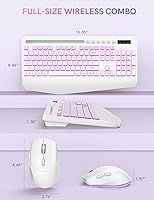
  • Keyboard Layout: The keyboard is a full-size layout including a numeric keypad, 12 function keys, and 6 dedicated shortcut keys for common tasks.
  • Mouse Buttons: The mouse has 6 buttons including left, right, scroll wheel click, DPI toggle, and forward and backward navigation buttons.
  • DPI Settings: The mouse offers 3 selectable tracking speed levels to accommodate different surface types and user preferences.
  • Wrist Rest: An ergonomic wrist rest is permanently integrated into the keyboard base and cannot be detached or repositioned separately.
  • Device Holder: A phone and tablet holder is built into the top edge of the keyboard frame, designed primarily for smartphones and smaller tablets.
  • Spill Resistance: The keyboard surface features an anti-sweat, non-slip, spill-resistant coating, though it is not rated for full liquid submersion.
  • Dimensions: The overall keyboard unit measures 16.85 x 8.46 x 1.38 inches, which includes the integrated wrist rest footprint.
  • Weight: The keyboard and mouse combo has a combined weight of approximately 2.29 pounds as listed by the manufacturer.
  • OS Compatibility: The combo works with Windows XP through Windows 11, macOS (including MacBook Pro, MacBook Air, and iMac), tablets, and smart TVs via plug-and-play.
  • Noise Reduction: The keyboard uses low-actuation silent switches and the mouse is designed to produce approximately 95% less click noise than standard mechanical alternatives.
  • Colorway: The combo is available in a white colorway with matching keyboard and mouse finish for a cohesive desk aesthetic.

Related Reviews

Arteck HW192 Wireless Keyboard and Mouse Combo
78%
78%
Build Quality
72%
Typing Experience
63%
Mouse Comfort & Ergonomics
81%
Battery Life
69%
Wireless Connectivity
More
Harburfine Wireless Keyboard and Mouse Combo

85%
88%
Ergonomics & Comfort
93%
Quietness & Noise Level
85%
Wireless Connectivity & Range
84%
Battery Life & Power Management
90%
Setup & Installation
More
Cimetech Wireless Keyboard and Mouse Combo
88%
91%
Value for Money
88%
Ease of Use
83%
Connectivity
94%
Portability
85%
Ergonomics
More
ULSOU Wireless Keyboard and Mouse Combo
85%
88%
Ergonomics and Comfort
92%
Battery Life
84%
Typing Experience
87%
Wireless Connectivity
80%
Mouse Performance
More
seenda Wireless Keyboard and Mouse Combo
88%
89%
Typing Comfort
87%
Ergonomics
82%
Wireless Connectivity
94%
Setup & Installation
88%
Key Spacing & Accuracy
More
KNOWSQT Wireless Keyboard and Mouse Combo

87%
89%
Wireless Performance
83%
Build Quality
86%
Ergonomics & Comfort
91%
Design & Aesthetics
76%
Battery Life
More
FOPETT Wireless Keyboard and Mouse Combo
85%
91%
Typing Experience
87%
Battery Life
94%
Design & Aesthetics
88%
Ergonomics
85%
Build Quality
More
UBOTIE Wireless Keyboard and Mouse Combo
79%
88%
Value for Money
74%
Typing Experience
83%
Keycap Design & Aesthetics
67%
Mouse Performance
81%
Wireless Connectivity & Range
More
Kootop Wireless Keyboard Mouse Combo
87%
89%
Ergonomics and Comfort
91%
Typing Experience
85%
Wireless Connectivity
87%
Design and Aesthetics
83%
Battery Life
More
Tayderley Wireless Keyboard and Mouse Combo
86%
88%
Typing Comfort
85%
Mouse Performance
94%
Battery Life
83%
Build Quality
92%
Ease of Setup
More

FAQ

No, there is nothing to install. Just plug the nano-receiver into any available USB port on your computer, power on the keyboard and mouse, and they connect automatically. This applies to both Windows and macOS systems.

Yes, both devices charge over USB-C and can be used while plugged in, so a low battery does not have to interrupt your work. You will need two USB-C cables if you want to charge both simultaneously, but only one cable is included in the box.

The wrist rest works well for average to large hand sizes, but some users with smaller hands have found the fixed position slightly awkward because it cannot be removed or repositioned. If wrist rest adjustability matters to you, that is worth factoring into your decision.

The holder is a slot built into the top edge of the keyboard frame that props your device up at a fixed angle. Most standard and large smartphones fit fine, but the slot is designed with phones primarily in mind and can feel unstable with heavier or wider devices.

It connects and works without drivers on macOS, but several Mac users have noted that some function key labels printed on the keyboard do not directly correspond to the expected macOS shortcuts. You can still use the keys, but a short adjustment period is normal.

The 2,000-hour figure refers to standby time with the backlight off, which is not a realistic daily-use number. In practical terms, most users find the battery lasts through a full work week of moderate use before needing a recharge, though running the backlights at high brightness will shorten that noticeably.

Yes, the backlight at its higher brightness settings is clear enough to read the key legends in a dark room without straining. The lower brightness levels are better suited to dim ambient light rather than total darkness.

Losing the receiver is a real concern since a replacement from the manufacturer is not guaranteed to be easy to source for a newer brand. It is worth storing it in the mouse compartment whenever you are not using the combo at a fixed desk, which is exactly what the compartment is designed for.

Yes, the full-size layout includes a numeric keypad, which makes it a practical choice for spreadsheet work, accounting tasks, or any role that involves frequent number input. The dedicated shortcut keys for calculator access also add a small but convenient time-saver.

The keyboard is genuinely quiet by mainstream standards, and the mouse clicks are significantly more subdued than a typical office mouse. In a silent bedroom at night they are still audible up close, but most users in shared apartments have reported no complaints from partners or housemates during normal typing sessions.








