Overview

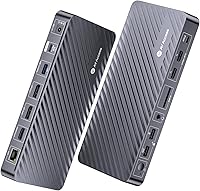
The AV Access KD-S03 Triple Monitor Docking Station enters a competitive mid-range market with a clear pitch: one USB-C cable connecting your laptop to three monitors, charging, networking, and a full set of peripherals. It launched in March 2025 and has collected 178 ratings averaging 4.3 stars — a solid early showing, though long-term reliability data is still limited. At roughly 3 pounds and 12×7×3 inches, this docking station is substantial enough to feel sturdy on a desk without dominating it. One critical note upfront: on macOS, you get mirrored displays only, not extended screens. That limitation alone rules it out for many MacBook owners.
Features & Benefits

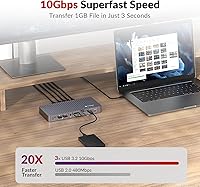
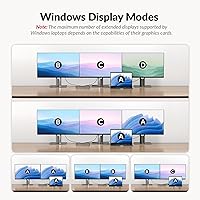
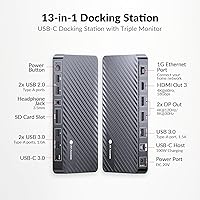
The KD-S03 packs genuine capability into its 13 ports. On Windows, you can run two DisplayPort monitors at 4K@60Hz while pushing a third through HDMI at 4K@30Hz — a configuration that suits most multi-tasking setups without compromise. Switch to a single DisplayPort connection and the dock reaches 8K at 30Hz, which is useful for designers working with large-format visuals. Data transfers across its USB 3.0 ports hit 10Gbps, fast enough that moving large video files feels quick rather than tedious. The 100W Power Delivery keeps most laptops charged throughout the day, and wired Gigabit Ethernet removes the unreliability of Wi-Fi from video calls entirely. No driver installation required — just plug in and it works.

Best For

This triple-monitor dock is built around one core user: a Windows laptop owner who wants a capable multi-display setup without spending on a premium Thunderbolt dock. Dell, HP, Lenovo, and Surface users will find broad compatibility out of the box, covering most mainstream business and creative machines. It also suits hybrid workers who want a single-cable desk connection — one plug handles displays, charging, wired internet, and peripherals at once. Photographers and video editors who occasionally need a single ultra-high-resolution display will appreciate the 8K output option. MacBook users, however, should look elsewhere for multi-monitor work; macOS only mirrors content across screens rather than extending the desktop, regardless of dock specs.

User Feedback

Early buyers of this docking station are largely satisfied, with most praise directed at how straightforward setup is and how stable the triple-monitor configuration runs on Windows machines day-to-day. That said, macOS complaints are frequent — many buyers admit they missed the fine print about mirroring limitations, and the frustration shows up repeatedly in lower-rated reviews. Some users have flagged that 100W charging can fall short for larger, more power-hungry laptops under sustained load. Build quality impressions are generally positive, though a few mention the unit runs warm after extended use. Given this dock only launched in early 2025, long-term durability remains genuinely unknown — the reviewer pool is still largely early adopters.

Pros

  • True extended triple-monitor output on Windows works reliably from the first connection, no configuration required.
  • A single USB-C cable replaces a tangle of separate monitor, charging, and Ethernet cables on your desk.
  • Two DisplayPort outputs each deliver a full 4K at 60Hz, which is genuinely smooth for everyday desktop work.
  • Gigabit Ethernet provides stable, consistent wired networking that Wi-Fi simply cannot match for video calls.
  • 10Gbps USB data ports make transferring large video or photo files fast enough to stop feeling like a chore.
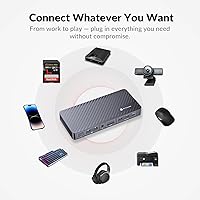
  • The KD-S03 includes an SD card slot, audio jack, and USB 2.0 ports, covering nearly every daily peripheral need.
  • Driver-free plug-and-play setup means zero IT hassle — connect it and everything works immediately.
  • At its price point, matching this port count and triple 4K display capability from a competing brand typically costs more.
  • The compact footprint keeps your desk tidy without the dock itself becoming a physical obstacle.

Cons

  • The third monitor via HDMI is capped at 4K@30Hz, noticeably less smooth than the two 60Hz DisplayPort outputs.
  • macOS users get only mirrored displays — this is a hard platform limitation, not a fixable firmware issue.
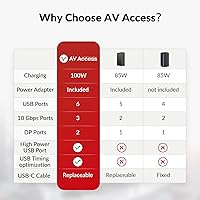
  • The included power brick adds a bulky adapter under your desk; the upstream USB-C cable is not included in the box.
  • 100W charging can fall short for larger, power-hungry laptops running intensive workloads while fully docked.
  • The unit runs noticeably warm under sustained heavy load, and the plastic body retains heat more than a metal chassis would.
  • Port labeling is not always easy to read at a glance, which makes initial cable routing slightly awkward.
  • The product launched in early 2025, so long-term durability beyond a few months remains genuinely unproven.
  • Some users report needing to power-cycle the dock or restart their laptop before the full triple-display setup is recognized.

Ratings

The AV Access KD-S03 Triple Monitor Docking Station scores below are generated by AI after analyzing verified buyer reviews worldwide, with spam, bot-submitted, and incentivized feedback actively filtered out. This dock earned a strong overall reception among Windows power users, though real pain points around macOS compatibility and thermal behavior under load are transparently reflected in the individual scores. Both what buyers genuinely love and what quietly frustrates them after a few weeks of daily use are captured here.
Multi-Monitor Performance
88%
Windows users consistently report that running three screens works reliably from day one without configuration headaches. Reviewers doing video editing, spreadsheet work, and coding across multiple displays note that the dual 4K@60Hz plus one 4K@30Hz configuration holds steady during long sessions.
The third monitor running at 30Hz is noticeably less smooth for anything with motion, which frustrates users who want consistent refresh rates across all three screens. A handful of reviewers found that certain laptop and display combinations required a specific port arrangement to get the full setup recognized correctly.
macOS Compatibility
41%
59%
MacBook owners can still use this docking station for single-monitor output up to 8K@30Hz via DisplayPort, which works cleanly for focused workflows. Charging and peripheral connectivity function without issues on macOS regardless of the display limitations.
The hard reality is that macOS simply does not support USB-C MST, meaning any Mac user hoping for extended dual or triple screens will be disappointed — they get mirrored output only. This is the single most common source of negative reviews, and many buyers admit they overlooked the warning in the product description.
Setup & Ease of Use
91%
Plug-and-play functionality is one of the most praised aspects across early adopter reviews. Users coming from docks that required driver installation or firmware updates specifically call out how refreshing it is to connect one cable and have everything — displays, Ethernet, audio, charging — just work immediately.
A small number of users report that their laptop did not recognize the full triple-display setup on first connection and needed to be restarted or the dock power-cycled. Port labeling on the unit itself could be clearer for users setting up in low-light home office environments.
100W Power Delivery
74%
26%
For most 13-inch and 14-inch laptops, 100W charging keeps the battery topped up even during demanding workloads. Reviewers using Dell XPS 13, Surface Pro, and similar mid-sized machines report no charging issues during a full workday of docked use.
Owners of larger 15-inch and 16-inch laptops — particularly power-hungry gaming or mobile workstation models — report that charging slows noticeably or the battery gradually drains under sustained CPU and GPU load. The 100W ceiling is adequate for mainstream laptops but not generous enough for high-performance machines.
Data Transfer Speed
86%
The 10Gbps USB 3.0 ports deliver on their spec sheet promise in real-world use. Reviewers transferring large video project files or backing up camera cards report fast, consistent throughput that makes the dock genuinely useful as a central data hub, not just a display expander.
The two USB 2.0 ports are noticeably slower and feel like a bottleneck if used for anything beyond keyboards or mice. Some users wished all USB-A ports ran at the same 10Gbps speed rather than mixing standards.
Build Quality & Materials
77%
23%
The matte grey plastic housing feels solid and purposeful rather than cheap, and the overall weight of nearly 3 pounds gives the unit a grounded, stable presence on a desk without sliding around. Most reviewers describe the finish as professional-looking and appropriate for office environments.
After extended use, several reviewers note the dock runs noticeably warm — not hot enough to cause concern, but warm enough to be obvious to the touch. A few buyers question whether sustained heat over months of use will affect long-term component reliability, though no failures have been widely reported yet.
Port Selection & Layout
83%
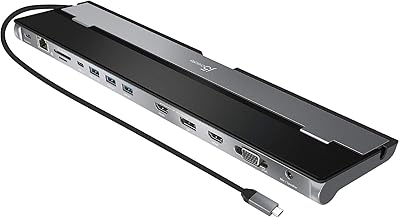
Thirteen ports covering display outputs, high-speed USB, Ethernet, SD, and audio in one unit is genuinely useful for desk setups that previously required a separate hub and dock. The inclusion of both USB-A and USB-C data ports alongside two USB 2.0 ports covers a wide range of accessories simultaneously.
The physical placement of some ports has drawn mild criticism — rear-facing ports are convenient for permanent cables, but the layout makes it slightly awkward to plug in SD cards or headphones without moving the unit. A front-accessible USB-A port would have improved day-to-day usability.
8K Single-Display Output
79%
21%
For designers and photographers who occasionally need to push maximum resolution through a single monitor, the 8K@30Hz DisplayPort output is a legitimate differentiator at this price point. Users with compatible 8K displays confirm the output is clean and stable.
The 30Hz refresh rate at 8K makes this output unsuitable for anything dynamic — cursor movement can look slightly laggy and scrolling feels less responsive than at lower resolutions. It is a feature best suited for static or near-static creative work rather than general desktop use.
Ethernet Reliability
89%
Wired Gigabit Ethernet through this dock consistently outperforms laptop Wi-Fi for reviewers doing video calls, large file transfers, or remote desktop sessions. Several work-from-home users specifically mention network stability as one of the reasons they chose a docked setup over staying wireless.
A small number of users report occasional network drops that were resolved by reconnecting the dock or updating laptop network drivers. These seem to be edge cases tied to specific laptop firmware rather than a systematic issue with the dock itself.
Broad Device Compatibility
82%
18%
The compatibility list is impressively wide — Dell, Lenovo, HP, Surface, and even select Samsung and ASUS models work without fuss. Buyers with less common laptop brands have also reported success as long as the laptop supports full-featured USB-C with DisplayPort Alt Mode.
Compatibility is ultimately determined by the connected laptop's USB-C implementation, not just the dock, which creates unpredictable outcomes for users with older or budget laptops. Some reviewers discovered their laptop only supported a subset of the dock's features after purchase.
Value for Money
84%
At its price point, this docking station offers a port count and display capability that typically costs more from established brands. Windows users who need triple 4K output with charging and Ethernet in one unit find it hard to match this combination without spending significantly more.
Buyers who later discover the macOS limitation feel the value proposition collapses entirely for their use case. Additionally, a few reviewers note that similarly priced Thunderbolt 4 docks offer stronger Mac compatibility, making the KD-S03 a poor investment if platform flexibility matters.
Thermal Management
63%
37%
Under typical mixed loads — three monitors, Ethernet, a few USB peripherals, and charging — the dock maintains acceptable temperatures and shows no signs of throttling or instability. Most users running standard office workloads report no thermal concerns whatsoever.
When the dock is pushed hard — transferring large files while all display outputs are active and charging a power-hungry laptop simultaneously — surface temperatures climb to a level that makes some users uneasy. There is no active cooling, and the plastic enclosure retains heat more than a metal-bodied alternative would.
Long-Term Reliability
66%
34%
The early batch of reviews from buyers who have used this docking station for two to three months report consistent performance with no hardware failures or degradation in display quality. Initial signs are encouraging for a product at this price tier.
The dock only launched in early 2025, which means the reviewer pool is almost entirely early adopters. There is simply not enough time-in-field data to draw confident conclusions about durability past the six-month mark, and that uncertainty is worth acknowledging honestly.
Cable Management & Desk Footprint
71%
29%
A single upstream USB-C cable connecting the laptop to the dock dramatically reduces desk clutter compared to running separate monitor, charging, and Ethernet cables directly into the laptop. The compact rectangular form factor sits neatly behind or beside a monitor without demanding attention.
The dock does require its own 120W power brick, which adds a moderately bulky adapter to the cable situation under the desk. The upstream cable is not included in the box, which surprised a few buyers expecting a complete out-of-box experience.

Suitable for:

The AV Access KD-S03 Triple Monitor Docking Station is purpose-built for Windows laptop users who want a genuinely productive multi-display desk setup without the complexity or cost of a Thunderbolt ecosystem. If you work from home on a Dell, Lenovo, HP, or Surface machine and have been getting by with one external monitor while wishing for two more, this dock closes that gap with a single cable connection. It particularly suits professionals who juggle multiple applications simultaneously — think financial analysts with data dashboards, developers running code editors alongside documentation and terminals, or video editors previewing timelines while referencing project assets. The 100W Power Delivery means your laptop stays charged throughout the workday without a separate power adapter on the desk. Hybrid workers who dock and undock daily will appreciate how fast and frictionless the connection process is — no drivers to manage, no software to update. Photographers and graphic designers who occasionally want to push maximum resolution through a single screen will also find the 8K@30Hz DisplayPort output a useful option for detail-critical work.
Not suitable for:

The AV Access KD-S03 Triple Monitor Docking Station is the wrong choice for MacBook users hoping to run two or three independent screens — macOS does not support USB-C MST, so all connected monitors will simply mirror your laptop display rather than extend it. That limitation is baked into the operating system itself and no firmware update or workaround will change it, making this dock a frustrating and costly mistake for Mac-first households or mixed Windows-Mac offices. Users with high-performance 15-inch or 16-inch laptops that draw significant power under load may find that 100W charging is not enough to keep the battery from slowly depleting during intensive tasks. Buyers who need all three monitors running at the same silky-smooth refresh rate will notice that the third HDMI output tops out at 4K@30Hz, which is a visible step down compared to the two DisplayPort outputs. Since the dock launched only in early 2025, anyone who requires proven multi-year durability data before committing — enterprise IT buyers, for instance — should wait for a longer track record to develop before deploying this at scale.

Specifications

  • Brand & Model: Manufactured by AV Access under the model designation KD-S03.
  • Host Interface: Connects to the laptop via a single full-featured USB-C port supporting MST (Multi-Stream Transport) for multi-monitor output.
  • Display Outputs: Provides two DisplayPort outputs and one HDMI output for a total of three simultaneous external monitor connections.
  • Max Resolution: Supports up to 8K@30Hz through a single DisplayPort connection, or triple 4K output (2×4K@60Hz via DisplayPort plus 1×4K@30Hz via HDMI) on Windows.
  • Power Delivery: Delivers up to 100W of upstream USB-C Power Delivery to charge the connected laptop while the dock is in use.
  • USB-A Ports: Includes two USB 3.0 Type-A ports running at 10Gbps and two USB 2.0 Type-A ports for lower-bandwidth peripherals.
  • USB-C Data Port: Features one USB 3.0 Type-C data port operating at 10Gbps for high-speed storage or peripheral connections.
  • Ethernet: Equipped with one Gigabit Ethernet (RJ-45) port for stable, high-speed wired network connectivity.
  • Audio: Includes one 3.5mm combination audio jack supporting both headphone output and microphone input.
  • Card Reader: Built-in SD card slot supports standard SD memory cards for direct file transfer from cameras and other devices.
  • Total Ports: Offers 13 ports in total, covering display output, data transfer, networking, audio, and card reading in a single unit.
  • Power Input: Powered by an included 120W AC adapter rated at 120V input, which provides sufficient overhead for charging and full port operation simultaneously.
  • Dimensions: The dock measures 12″ in length, 7″ in width, and 3″ in height, making it suitable for most standard desktop setups.
  • Weight: Weighs approximately 2.97 lbs, giving it a stable, desk-anchored presence without being difficult to move when needed.
  • Driver Requirement: Operates completely driver-free on compatible systems, relying on plug-and-play USB-C MST without requiring any software installation.
  • macOS Display Mode: On macOS, all connected external monitors display mirrored content only; extended multi-monitor desktop layouts are not supported due to Apple's macOS MST restriction.
  • Compatibility: Broadly compatible with USB-C laptops from Dell, Lenovo, HP, Microsoft Surface, ASUS, Acer, and select Samsung devices that support DisplayPort Alt Mode over USB-C.
  • Availability Date: First made available for purchase in March 2025, making it a recent addition to the mid-range docking station market.

Related Reviews

LIONWEI USB C Docking Station Triple Monitor
85%
88%
Display Performance
91%
Ease of Setup
93%
USB-C Compatibility
89%
Build Quality
87%
Power Delivery
More
j5create USB-C Triple Monitor Docking Station JCD543
85%
89%
Setup & Installation
91%
Display Performance
85%
Build Quality
90%
Port Availability & Functionality
94%
Power Delivery
More
StarTech.com Triple Monitor USB 3.0 Docking Station
83%
89%
Performance
91%
Ease of Setup
88%
Display Support
85%
Connectivity Options
80%
Build Quality
More
TobenONE USB-C Docking Station 3 Monitors & Dual Monitor
89%
92%
Value for Money
94%
Ease of Setup
89%
Performance with Multi-Monitor Setups
88%
Build Quality
90%
USB Port Functionality
More
TobenONE Quad Monitor Docking Station UDS033B
85%
91%
Performance with Multiple Displays
85%
Ease of Setup
93%
Charging Speed and Power Delivery
87%
Build Quality and Durability
88%
Connectivity Options
More
Minisopuru DisplayLink Triple Display Docking Station DS808
83%
91%
Triple Display Support
88%
Ease of Setup
85%
Build Quality
65%
USB-A Compatibility
92%
100W Charging Performance
More
StarTech USB-C Quad Monitor Docking Station DK31C4DPPD
86%
93%
Multi-monitor Support
85%
Setup & Installation
90%
Connectivity & Compatibility
91%
Power Delivery
89%
Display Quality (4K Resolution)
More
AV Access 4KSW21-DM Dual Monitor KVM Switch
85%
94%
Video Quality
91%
Switching Responsiveness
88%
USB Hub Functionality
85%
Build Quality
90%
Compatibility
More
AV Access iDock-C10 KVM Switch with Dual Monitors
84%
89%
Performance
92%
Build Quality
80%
Ease of Setup
94%
Display Quality
78%
Compatibility
More
VisionTek VT4510
VisionTek VT4510
73%
84%
Dual Display Performance
52%
Driver Setup & Ease of Use
74%
Laptop Charging & Power Delivery
61%
macOS & Apple Silicon Compatibility
88%
Port Selection & Connectivity
More

FAQ

Not in the way most people hope. The AV Access KD-S03 Triple Monitor Docking Station will connect to a MacBook without issue, but macOS does not support USB-C MST, which is the technology that enables independent extended screens through this type of dock. What you will get on a Mac is all monitors showing the same mirrored image — useful in some presentation scenarios, but not a multi-display productivity setup. If extended screens on a Mac are important to you, you would need a Thunderbolt dock instead.

No, nothing to install. The dock is fully plug-and-play — connect the upstream USB-C cable to your laptop, plug in your monitors and peripherals, and everything should be recognized automatically. Most Windows users report it works on first connection without any manual configuration at all.

Yes, as long as your laptop supports DisplayPort Alt Mode over USB-C with MST, which most modern Dell XPS and Lenovo ThinkPad models do. You can run two monitors via the DisplayPort outputs at 4K@60Hz each, and a third via HDMI at 4K@30Hz, all displaying independent extended desktops simultaneously on Windows.

For most 13-inch and 14-inch laptops, yes — 100W is sufficient to maintain or slowly top up the battery even under moderate workloads. Where it gets trickier is with larger 15-inch and 16-inch machines that have high-wattage CPUs and GPUs; under heavy load those laptops can draw more than 100W, meaning the battery may slowly deplete rather than charge while docked. For typical office workloads on mainstream-sized machines, it holds up well.

It does run noticeably warm, particularly when all display outputs are active, high-speed USB ports are in use, and charging is happening simultaneously. It does not reach temperatures that cause shutdowns or indicate a safety problem, but you will feel the heat if you touch the casing after a few hours of heavy use. The plastic enclosure retains heat more than a metal-bodied dock would, which is worth keeping in mind if your desk setup has limited airflow around the unit.

Both DisplayPort outputs support up to 4K at 60Hz when running in triple-monitor mode, so for most practical purposes they behave identically. The key distinction only matters when you switch to single-monitor mode through one DisplayPort, which is when the dock can push up to 8K at 30Hz. In everyday triple-display use, treat them as equivalent outputs.

You need a full-featured USB-C cable that supports both data and video (DisplayPort Alt Mode), not a basic charging cable. It is worth noting that the upstream connection cable is not included in the box, so check what you have on hand before the dock arrives. Using an underpowered or data-only USB-C cable is the most common reason the triple-display setup does not work on first try.

It works with gaming laptops that have a full-featured USB-C port, including the ASUS ROG Ally and Steam Deck (in desktop mode). That said, gaming laptops with discrete GPUs that draw 150W or more under load may find that 100W upstream charging does not fully sustain battery life during intensive gaming sessions while docked. For productivity use on a gaming laptop it is perfectly functional.

At this price tier, the main alternatives are generic MST hubs and a few lesser-known brands offering similar port counts. Where this docking station differentiates itself is the combination of true 10Gbps data ports, 100W Power Delivery, Gigabit Ethernet, and triple 4K support in one chassis — some competing units drop one or two of those features to hit a lower price. Thunderbolt 4 docks with similar specs typically cost meaningfully more, so for a Windows-only setup this represents a reasonable middle ground.

Yes, that is exactly the scenario this dock is designed for. The single upstream USB-C connection handles everything — display output to all three monitors, 100W charging back to your laptop, and all peripheral data — through that one port. You do not need a Thunderbolt port specifically, just a USB-C port with DisplayPort Alt Mode and Power Delivery support, which is standard on most laptops released in the last four or five years.