Overview

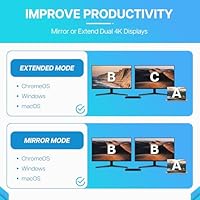
The VisionTek VT4510 sits at the higher end of the universal docking station market, built for professionals who need a dependable dual-monitor workstation without juggling cables. Its core appeal is dual 4K output, supported across HDMI and DisplayPort connections — a meaningful spec for anyone working with design tools, financial dashboards, or two busy screens. It covers Windows, macOS including Apple Silicon, and ChromeOS, though you will need to install DisplayLink drivers before any of that works. This is not a plug-and-play device out of the box, which is worth knowing upfront. Think of it as competing directly with Plugable and CalDigit offerings in the premium single-cable dock space.

Features & Benefits

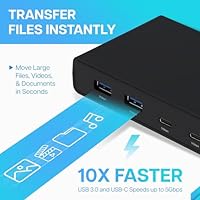
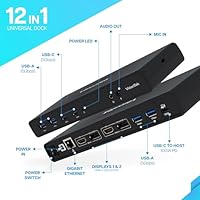
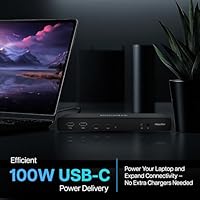
Four video ports — two HDMI and two DisplayPort — give you flexibility on monitor connections, though only two run simultaneously for dual 4K at 60Hz. The USB side is well-stocked: four USB-A and two USB-C ports, all running at 5Gbps. Wired networking via Gigabit Ethernet and 3.5mm audio round things out for a complete desk setup. Power delivery reaches 100W through USB-C, capable of charging most modern laptops, but the power supply is separate — it does not ship in the box, so factor that into your budget. IT teams will also appreciate Wake on LAN, PXE Boot, and MAC Address Pass-Through built right in.

Best For

This docking station is a strong fit for hybrid and remote workers who want one cable connecting their laptop to two monitors, a wired network, and all their peripherals at once. MacBook users on M1 or M2 chips, Windows ultrabook owners, and Chromebook users will all find it functional — though each should verify DisplayLink driver support for their specific OS version before buying. IT administrators who need network boot and remote management features in a dock will find this USB-C hub genuinely useful. That said, if you want zero setup and zero driver installation, this is probably not the right fit.

User Feedback

With a 4.1-star average across over 130 ratings, the VT4510 dock earns solid but not universal praise. Buyers frequently commend the reliable dual-monitor performance and the broad cross-platform compatibility once everything is properly configured. The build feels sturdy, and most report stable long-term operation. The consistent sticking point is the DisplayLink dependency — some users hit driver conflicts or intermittent display drops, especially after OS updates. A number of buyers were also caught off guard by the missing power supply, which adds to the real-world cost. Mac users in particular report a mixed experience, with occasional hiccups on newer Apple Silicon machines under certain display configurations.

Pros

  • Drives two 4K displays at 60Hz simultaneously — a meaningful spec for serious dual-monitor workstations.
  • Six USB ports across USB-A and USB-C give you enough connections for all standard desktop peripherals without a hub.
  • Gigabit Ethernet delivers rock-solid wired networking for video calls, VPNs, and large transfers.
  • The VT4510 dock supports Windows, macOS, and ChromeOS from a single hardware unit.
  • 100W USB-C power delivery keeps most modern laptops charged through the same cable that carries data and video.
  • Wake on LAN and PXE Boot make this docking station genuinely useful for IT teams managing remote fleets.
  • Build quality feels solid and durable — long-term owners report no port degradation after extended daily use.
  • Four video port options give flexibility when mixing HDMI and DisplayPort monitor combinations.

Cons

  • DisplayLink drivers are mandatory — this is not a plug-and-play dock, and OS updates can break display output unexpectedly.
  • The required power supply is not included in the box, adding hidden cost to an already premium purchase.
  • Mac users on Apple Silicon report inconsistent dual 4K performance that varies with macOS version.
  • At over 10 inches long and nearly 3 lbs, this USB-C hub occupies serious desk real estate and is not portable.
  • Customer support response times have drawn criticism, leaving users with driver issues waiting longer than expected.
  • Only two of the four video ports are active simultaneously — easy to misread from the product listing.
  • A faint audio hiss through the 3.5mm output has been noted by users with higher-quality headphones.
  • Ethernet connection drops briefly on wake-from-sleep for some users, requiring manual reconnection.
  • Setup documentation inside the box is sparse, making the initial configuration harder than it needs to be for non-technical buyers.

Ratings

The VisionTek VT4510 has been scored by our AI system after analyzing verified global buyer reviews, with spam, bot activity, and incentivized feedback actively filtered out. This docking station earns a nuanced picture — strong where it counts for serious dual-monitor setups, but with real friction points that cost-conscious and plug-and-play buyers should weigh carefully. Both the standout strengths and the recurring frustrations are reflected honestly in the scores below.

Dual Display Performance
84%
Running two monitors at 4K and 60Hz is the whole reason most buyers choose this dock, and it largely delivers. Users report stable, sharp output across both HDMI and DisplayPort connections during long workdays with multiple browser tabs, video calls, and design tools open simultaneously.
A consistent minority of users hit refresh rate drops or flickering after OS updates, almost always traced back to DisplayLink driver conflicts. The experience is not always consistent across different host machines, and troubleshooting dual-output issues can eat up significant time.
Driver Setup & Ease of Use
52%
48%
Once DisplayLink drivers are installed and configured correctly, daily use is largely hands-off. Users who read the setup documentation first tend to have smooth experiences and rarely need to revisit driver settings after the initial install.
This docking station is not plug-and-play, full stop. New users frequently report confusion when nothing works out of the box, and driver updates after macOS or Windows upgrades have caused display outages for a notable share of reviewers. It is a real barrier for less technical buyers.
Laptop Charging & Power Delivery
74%
26%
The 100W USB-C power delivery handles most modern laptops comfortably — MacBooks, Dell XPS, and ThinkPad users all report keeping their battery topped up through a single cable while running dual monitors and peripherals. That single-cable tidiness is a genuine daily convenience.
The power supply does not come in the box, which catches many buyers off guard at checkout. For a premium-priced dock, shipping without the required PSU feels like an incomplete product, and the added cost of sourcing a compatible 100W adapter stings more than it should.
macOS & Apple Silicon Compatibility
61%
39%
The VT4510 dock does work on M1 and M2 MacBooks after installing DisplayLink software, and users who set it up correctly report usable dual-monitor output for office productivity tasks and light creative work.
Mac users consistently report a rougher experience than their Windows counterparts — occasional display lag, limitations with certain resolutions, and the extra friction of DisplayLink on Apple Silicon add up. A handful of M2 users noted that dual 4K at full 60Hz is inconsistent depending on the macOS version running.
Port Selection & Connectivity
88%
Six USB ports across USB-A and USB-C, Gigabit Ethernet, audio in and out, and four video ports make this one of the more comprehensively connected docks at its tier. For a desk that needs to handle a keyboard, mouse, external drive, headset, and wired internet all at once, the layout covers the bases without compromise.
Some users noted that having four video ports can be misleading — only two operate simultaneously, which requires reading the fine print carefully. A few buyers also wished for at least one USB-C port with higher power output for charging secondary devices more quickly.
Windows Compatibility
83%
Windows 10 and 11 users report the most straightforward experience with this docking station. Driver installation is well-documented, and most reviewers on Windows describe consistent dual-monitor operation with minimal intervention after the initial setup.
Windows users are not entirely immune to driver hiccups — a few report that major Windows updates occasionally break DisplayLink functionality and require a manual driver reinstall. It is manageable, but it is an ongoing maintenance consideration rather than a set-and-forget situation.
Build Quality & Durability
79%
21%
The physical construction feels solid and appropriately sturdy for a desk-bound professional dock. Users comment that it does not feel hollow or cheap, and long-term owners report no port degradation or structural issues after extended daily use.
At nearly 3 lbs and over 10 inches long, this is a chunky unit that takes up meaningful desk real estate. A few users mention it runs noticeably warm under full load, which has not caused failures but raises questions about sustained thermal management over years of use.
ChromeOS Compatibility
67%
33%
Chromebook users can get this USB-C hub working, and those in managed enterprise environments appreciate the PXE Boot and Wake on LAN features that are otherwise rare at this form factor. Basic dual-display functionality is confirmed by multiple ChromeOS reviewers.
ChromeOS support is thinner than Windows or even Mac — DisplayLink on Chrome can be finicky, and the feature set feels more limited compared to the experience on a Windows machine. Buyers using Chromebooks should verify driver support for their exact device before purchasing.
IT & Enterprise Features
86%
Wake on LAN, PXE Boot, and MAC Address Pass-Through are genuinely useful for IT teams managing remote or hybrid fleets. These are not features you find in consumer-tier docks, and sysadmins specifically call them out as a deciding factor in choosing this unit over cheaper alternatives.
These features require proper network and BIOS configuration to work, so they offer no value to general consumers who do not manage enterprise environments. The documentation around these advanced options is serviceable but not exhaustive, and setup may require trial and error.
Ethernet & Network Performance
82%
18%
Gigabit Ethernet performs reliably across the board — video call stability, large file transfers, and VPN connections all benefit noticeably compared to Wi-Fi. Remote workers on hybrid setups consistently praise the wired connection as one of the most dependable aspects of daily use.
A small number of users report that the Ethernet connection drops briefly after the host laptop wakes from sleep, requiring a cable re-plug or driver restart. It is an intermittent issue but one that appears often enough in reviews to warrant a mention.
Value for Money
63%
37%
For IT professionals and power users who fully utilize dual 4K output, enterprise network features, and broad platform support, the price reflects a genuinely capable tool. Buyers who get stable performance out of the box tend to feel the investment was justified.
The missing power supply, the driver requirement, and occasional instability issues make it hard to recommend unreservedly at this price point. Buyers who hit compatibility problems early feel burned, and the total cost once you factor in the PSU pushes the value proposition into uncomfortable territory.
Audio Performance
71%
29%
The 3.5mm audio ports handle headset and speaker connections without noticeable interference for most users. Those who replaced a tangle of separate adapters with this single-dock solution appreciate having audio handled in one unified setup.
Audio is functional rather than noteworthy — a handful of users report a faint background hiss through the audio out, particularly when using higher-impedance headphones. It is not a dealbreaker for office use, but audiophiles or podcast creators may want a dedicated audio interface.
Physical Design & Desk Footprint
68%
32%
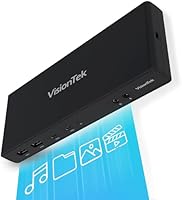
The rectangular horizontal form factor is straightforward and stable on a desk, and the port layout is accessible without being cluttered. The matte black finish does not attract dust visibly and blends into most workspace setups without demanding attention.
Nearly 10.3 inches long and close to 3 lbs, this is not a compact dock. Buyers with tight desk setups or those who travel occasionally with their kit find the size impractical. It is clearly designed to stay in one place, which may limit its appeal compared to smaller travel-friendly alternatives.
Setup Documentation & Support
58%
42%
VisionTek does provide driver download resources and basic setup guidance, and users who follow the documentation methodically generally get up and running without contacting support. The product page clearly flags the DisplayLink requirement, which helps set expectations.
Customer support response times have drawn criticism in reviews, with some users waiting days for help with driver or compatibility issues. The included documentation inside the box is sparse, and buyers who encounter edge-case problems with Mac or ChromeOS setups often end up relying on community forums rather than official channels.

Suitable for:

The VisionTek VT4510 is built for professionals who spend most of their day at a desk and need a single cable to connect their laptop to a full workstation setup — two 4K monitors, wired internet, peripherals, and power all at once. Windows users on ultrabooks or business laptops will get the most straightforward experience, with reliable dual-monitor output and stable Gigabit Ethernet for video calls and large file transfers. IT administrators and sysadmins running hybrid or remote teams will find genuine utility in the PXE Boot, Wake on LAN, and MAC Address Pass-Through features, which are rare in a consumer dock at this size. MacBook owners on M1 or M2 chips can use this docking station effectively, though they should go in knowing the setup involves a few more steps and the dual 4K experience can vary depending on the macOS version. Chromebook users in managed enterprise environments also have a viable use case here, particularly where network boot capabilities matter. In short, this dock rewards buyers who are technically comfortable, have a fixed desk setup, and genuinely need the full port and display spec it offers.

Not suitable for:

If you want to unbox a dock, plug in a cable, and have two monitors light up instantly, the VisionTek VT4510 is the wrong choice — the DisplayLink driver requirement is a hard dependency, not an optional step, and skipping it means nothing works. Casual home users or students who only occasionally connect to an external display will find the setup complexity and price point difficult to justify compared to simpler single-display USB-C hubs. Buyers expecting the power supply to be included will be caught off guard; this dock ships without the required 100W PSU, and sourcing a compatible one adds to the real out-of-pocket cost. Mac users who need guaranteed, consistent dual 4K performance at all times should approach carefully — Apple Silicon compatibility works but carries more caveats than the marketing suggests, and macOS updates have disrupted DisplayLink functionality for a meaningful number of users. Anyone with a cramped desk setup should also note this is a physically large, stationary unit that does not disappear neatly into a small workspace.

Specifications

  • Video Outputs: Equipped with 2x HDMI and 2x DisplayPort ports, supporting two simultaneous display connections at up to 4K@60Hz each.
  • Display Technology: Uses DisplayLink technology to drive dual monitors, which requires downloading and installing DisplayLink drivers before use.
  • Max Resolution: Each connected display supports a maximum resolution of 4K (3840x2160) at 60Hz refresh rate.
  • USB-A Ports: Four USB-A ports operating at SuperSpeed 5Gbps (USB 3.0) for connecting keyboards, mice, external drives, and other peripherals.
  • USB-C Ports: Two USB-C ports operating at 5Gbps data transfer speed, also usable for connecting compatible devices and peripherals.
  • Power Delivery: Delivers up to 100W via USB-C for system charging, with laptop pass-through charging capped at approximately 60W under typical load.
  • Power Supply: Requires a 100W (20V/5A) external power supply for full operation; the power adapter is sold separately and not included in the box.
  • Networking: Integrated Gigabit Ethernet (10/100/1000 Mbps) port provides a stable wired network connection for faster and more reliable connectivity than Wi-Fi.
  • Audio: Includes a 3.5mm combo audio jack supporting both headphone output and microphone input for connected audio devices.
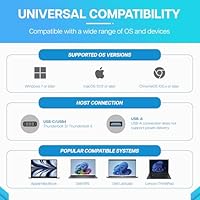
  • Compatibility: Compatible with Windows, macOS (including Apple Silicon M1 and M2), and ChromeOS laptops connected via USB-C.
  • IT Features: Supports Wake on LAN, MAC Address Pass-Through, and PXE Boot for enterprise deployment and remote management scenarios.
  • Connection Interface: Connects to the host laptop via a single USB-C cable, consolidating all peripherals, displays, and power into one connection point.
  • Dimensions: Measures 10.3 x 5.2 x 3.6 inches, designed as a stationary desktop unit rather than a compact travel accessory.
  • Weight: Weighs 2.93 lbs, reflecting a solid desktop build intended for permanent or semi-permanent desk placement.
  • Total USB Ports: Provides six total USB ports in combination: four USB-A and two USB-C, all running at SuperSpeed 5Gbps throughput.
  • Model Number: Manufactured by VisionTek Products LLC under the model designation VT4510, part number 901250.
  • Color & Finish: Available in matte black, with a plain rectangular form factor designed to blend unobtrusively into standard desk environments.
  • Input Voltage: Operates at 20V DC input via the required external power supply, with a total rated wattage of 100W.

Related Reviews
VisionTek Radeon HD 7750 2GB GDDR5 Graphics Card
83%
91%
Value for Money
89%
4K Performance
94%
Multi-Monitor Support
77%
Gaming Performance
65%
Driver Compatibility
More
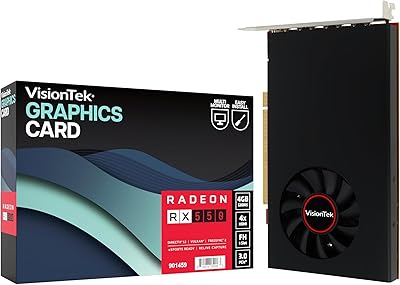
VisionTek Radeon RX 550 4GB GDDR5 Graphics Card
86%
88%
Performance for Productivity
91%
Value for Money
85%
4K Display Support
95%
Power Consumption
72%
Gaming Performance
More

FAQ

Yes, and this is important to know before you buy. The VisionTek VT4510 uses DisplayLink technology to drive its video outputs, which means you must download and install DisplayLink drivers on your laptop before any monitors will show an image. Without the drivers, the USB ports may still function, but the displays will not. The good news is the installation is straightforward — grab the latest drivers from the DisplayLink website, run the installer, and reboot.

No, it does not, and that surprises a lot of buyers. This docking station requires a 100W (20V/5A) power adapter to operate, but VisionTek ships the dock without one. You will need to source a compatible 100W USB-C power supply separately, so factor that into your total budget before purchasing.

You can run two monitors simultaneously, which is the whole point of this dock. It has four video ports in total — two HDMI and two DisplayPort — but only two of them are active at once. So you pick any combination of those ports for your two displays and both will run at up to 4K@60Hz at the same time.

It does work with Apple Silicon MacBooks, but with some caveats worth knowing. You need to install DisplayLink drivers on macOS, and the experience is generally less smooth than on Windows. Some M1 and M2 users report that dual 4K at full 60Hz can be inconsistent depending on the macOS version, and major macOS updates occasionally break DisplayLink functionality temporarily until a driver update is released. It works, but it requires more patience than a Windows setup.

Yes, it will charge your laptop through the same USB-C connection that carries data and video signals. The dock can deliver up to around 60W of charging power to your laptop under typical conditions, which is enough to keep most ultrabooks and MacBooks charged during normal use. Very power-hungry laptops under heavy load may charge slowly or maintain battery rather than gaining charge, which is normal behavior for any dock at this wattage.

This is one of the more common complaints from users of this docking station. Because the video output depends on DisplayLink drivers, a major OS update can sometimes break display functionality until the DisplayLink driver is updated to match. The fix is usually straightforward — update or reinstall the DisplayLink driver — but it can be disruptive if it happens unexpectedly on a workday. Keeping an eye on DisplayLink driver release notes after OS updates is a good habit.

Yes, ChromeOS is officially supported. That said, the experience is more limited compared to Windows and is better suited to managed enterprise Chromebooks than consumer models. IT environments that need PXE Boot or Wake on LAN on ChromeOS devices will find it functional. For casual Chromebook users, simpler and cheaper docks may be a better fit.

For the most part, the Gigabit Ethernet performs well and is one of the more consistently praised aspects of this dock. The main issue some users encounter is the Ethernet dropping briefly when the laptop wakes from sleep, which occasionally requires unplugging and replugging the cable. It is not universal, but it is reported often enough to mention. If your workflow depends on a constant wired connection, it is worth being aware of.

This is a big unit by docking station standards. At over 10 inches long and nearly 3 lbs, it takes up a noticeable amount of desk space and is not something you tuck out of sight easily. It is designed to stay in one place permanently rather than travel with you. If you have a compact workspace or want something discreet, you will want to measure your available desk area before committing.

These are IT and enterprise-grade network features. Wake on LAN lets a system administrator power on a connected computer remotely over the network, which is useful for managing office machines without being physically present. PXE Boot allows a computer to start up and load an operating system from a network server rather than a local drive, which is standard in large-scale corporate deployments. If you are an individual working from home, you almost certainly do not need these features — but if you are an IT manager overseeing a fleet of remote machines, they are a genuine reason to choose this dock over simpler alternatives.