Overview

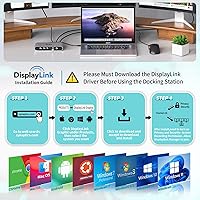
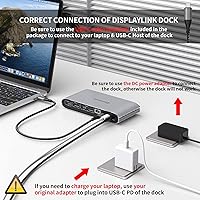
The Minisopuru DS808 DisplayLink Triple Monitor Docking Station exists to solve one specific, frustrating problem: Apple Silicon Macs natively support only a single external display, and this dock works around that hardware ceiling without requiring an eGPU. The key thing to understand upfront is that it relies on DisplayLink driver software, which you must install before anything works — this is not plug-and-play. The dock also requires its included 36W DC power adapter to function at all; unplug it and the whole unit goes dead. Sitting in a compact silver housing that barely takes up desk space, this triple-display hub lands in mid-range territory, priced above basic hubs but well below professional-grade docking solutions.
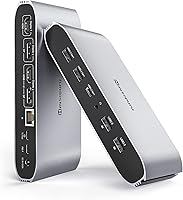
Features & Benefits

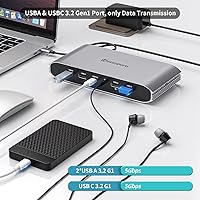
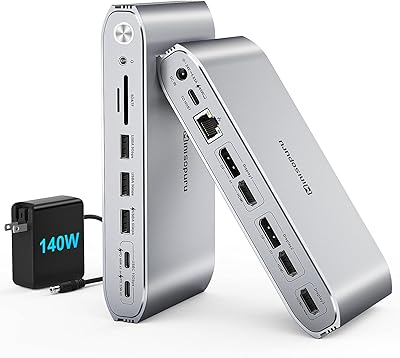
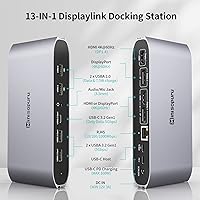
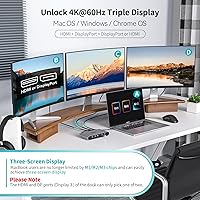
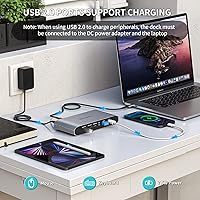
This DisplayLink dock supports up to three 4K displays at 60Hz using its two HDMI and two DisplayPort outputs — though one important caveat applies: the third display slot accepts either an HDMI or a DisplayPort cable, not both simultaneously. Charging is handled by a 100W USB-C PD port, which keeps most laptops topped up during heavy use, but only when the host connects via USB-C. Wired networking comes via Gigabit Ethernet, a genuine advantage over unreliable shared Wi-Fi. Data ports include two USB-A 3.2 Gen1 and one USB-C 3.2 Gen1, all running at 5Gbps, plus two USB-A 2.0 ports that also deliver 7.5W device charging. A 3.5mm combo audio jack rounds things out for headsets and microphones.

Best For

This triple-display hub is most valuable for MacBook M1 through M4 owners who have already run into Apple Silicon's one-monitor wall and need a software-based solution that stops short of buying dedicated GPU hardware. Windows laptop users benefit too, particularly anyone wanting consolidated port coverage from a single connection. Remote workers will appreciate having wired Ethernet, audio, and peripheral ports all in one place. Analysts or researchers who keep reference material spread across three screens will find the layout practical. If you prefer a low-profile desk setup and don't want a large station dominating your workspace, the compact form factor is a genuine plus here.

User Feedback

Across several hundred ratings, the Minisopuru dock holds a solid 4.3-star average, which reflects genuine satisfaction rather than inflated scores. Buyers consistently praise how straightforward the triple-monitor configuration becomes once the DisplayLink driver is properly installed on an M-series Mac. That said, two recurring complaints are worth knowing. First, DisplayLink's software architecture can introduce mild display latency and slightly reduced sharpness during GPU-intensive tasks like video playback — it is a known trade-off of the technology, not a defect unique to this dock. Second, the mandatory power adapter adds an extra cable to manage, which frustrates users coming from bus-powered hubs. A smaller group flagged that USB-A host mode disables both the HDMI output and PD charging simultaneously.

Pros

  • Unlocks triple 4K monitor support on Apple Silicon Macs without requiring an eGPU or hardware upgrade.
  • DisplayLink is a mature, stable technology — driver installation is a one-time step, not an ongoing burden.
  • 100W USB-C PD keeps most laptops charged during heavy multitasking sessions without a second power brick.
  • Gigabit Ethernet delivers rock-solid wired connectivity for video calls, large file transfers, and VPN use.
  • Seven USB ports across multiple standards cover keyboards, mice, drives, and phone charging in one hub.
  • Compact aluminum housing fits neatly on a desk without dominating the workspace or clashing with MacBook aesthetics.
  • The included USB-C to USB-A adapter extends compatibility to older laptops that lack a USB-C port.
  • 3.5mm combo audio jack handles headsets cleanly — no interference or ground hum reported by most users.
  • Broad OS support covers macOS, Windows, Chrome OS, Ubuntu, and Android for mixed-device households.
  • Strong 4.3-star average across hundreds of verified buyers reflects consistent real-world reliability.

Cons

  • DisplayLink driver must be installed before anything works — the box gives little warning about this requirement.
  • Software-based rendering introduces mild display latency and reduced sharpness during GPU-intensive tasks.
  • The mandatory 36W DC barrel-plug adapter adds cable clutter that bus-powered hub users will find irritating.
  • USB-A host mode disables both the HDMI output and 100W PD charging simultaneously — a steep functional penalty.
  • The third display slot accepts only one cable at a time, either HDMI or DisplayPort, not both together.
  • Port labeling on the dock itself is not always clear, making initial cable routing more confusing than it should be.
  • High ambient temperatures cause the fanless aluminum body to run noticeably hot under sustained full-port load.
  • USB-A 3.2 Gen1 ports are data-only with no charging output, limiting use with bus-powered portable drives.
  • Linux and Unix systems are fully unsupported — a hard dealbreaker for developers on those platforms.

Ratings

The Minisopuru DS808 DisplayLink Triple Monitor Docking Station earns its 4.3-star standing through a broad base of verified buyer experiences — our AI has analyzed that feedback globally, filtering out incentivized, repetitive, and bot-driven submissions to surface what real users actually encounter day to day. Scores below reflect genuine strengths and documented frustrations in equal measure, so you get a clear picture of where this dock performs and where it asks for compromise.
Multi-Monitor Setup Success
86%
Most MacBook M-series users report that getting three external displays running is straightforward once the DisplayLink driver is installed and configured. Buyers frequently describe the moment all three screens activate as immediately satisfying, especially those who previously struggled with Apple Silicon's native display cap.
A subset of users ran into confusion during initial setup because the driver requirement is not prominently communicated in the box. A few reviewers also noted that Display 3 being an either/or port between HDMI and DisplayPort was not obvious until they tried plugging into both simultaneously and one failed to activate.
DisplayLink Driver Experience
71%
29%
DisplayLink is a mature, widely supported technology, and most buyers get it running within a few minutes of downloading the driver from the official site. Once installed, the software runs quietly in the background and survives macOS updates reasonably well without constant reinstallation.
The driver adds a layer of CPU and GPU overhead that some users — particularly those running video editing or motion graphics workflows — notice as reduced display sharpness or occasional frame stuttering. It is a fundamental trade-off of software-based display rendering, not a flaw unique to this dock, but it catches buyers off guard if they expected native-quality output.
Display Output Quality
78%
22%
At 4K 60Hz across productivity tasks — spreadsheets, browser tabs, document editing, video calls — the output quality is clean and color-accurate enough that most users have no complaints. Windows users in particular report sharp, stable imagery across all three screens without noticeable degradation.
GPU-intensive content like 4K video playback or fast-motion gaming can expose the limits of DisplayLink rendering, with some users reporting a softer image or minor latency compared to native display connections. This gap is most noticeable on high-refresh monitors where the 60Hz ceiling also becomes a constraint.
USB-C Power Delivery
83%
The 100W USB-C PD port handles laptop charging reliably during active use, which means users running demanding workloads — multiple browser windows, video conferencing, external drives — can keep the laptop battery stable without a separate charger on the desk.
The 100W output is only available when the host laptop connects via the USB-C host port; buyers using the USB-A adapter mode lose PD charging entirely. A handful of users on power-hungry 16-inch laptops also reported that sustained workloads pulled slightly more power than the dock replenished, resulting in slow battery drain during peak loads.
Port Selection & Coverage
88%
The breadth of ports genuinely reduces desk clutter for most home-office setups. Having Gigabit Ethernet, seven USB ports across multiple standards, a combo audio jack, and dual display protocols in one compact unit covers the vast majority of daily peripheral needs without a secondary hub.
The USB-A 3.2 Gen1 ports are data-only with no charging, which limits their use for powering devices like portable SSDs that draw bus power. Users who need more than two high-speed charging ports will still need a supplemental charger, and those connecting via USB-A host mode lose access to HDMI output and PD simultaneously — a significant functional reduction.
Gigabit Ethernet Reliability
91%
Wired network performance through this dock is consistently praised. Remote workers on video calls and users transferring large files to NAS drives report stable, full-speed connections with no dropped packets or unexpected disconnections, even during multi-hour sessions.
A small number of users on very specific router or switch configurations reported intermittent Ethernet drops that resolved after updating network adapter drivers. This appears to be an edge case rather than a widespread issue, but it is worth noting for enterprise IT environments with managed network hardware.
Build Quality & Materials
79%
21%
The aluminum shell feels appropriately solid for the price tier, and the silver finish integrates well alongside MacBook and MacBook Pro aesthetics. At 520g, there is enough weight to keep the dock stationary on a desk without needing adhesive pads.
Some buyers noted the plastic end caps feel noticeably cheaper than the aluminum body, and a few reported that the USB ports developed minor wobble after several months of daily cable insertion and removal. It is not a dealbreaker, but the long-term durability does not quite match the premium appearance at first glance.
Cable Management & Power Adapter
62%
38%
The included USB-C to USB-C host cable is a reasonable length, and having everything ship in one box means users can be set up without hunting for additional cables. The USB-C to USB-A adapter inclusion is a thoughtful touch for users on older laptops.
The mandatory 36W DC barrel-plug power adapter is the most cited frustration among otherwise satisfied buyers. Unlike bus-powered or USB-C-powered docks, this unit adds a proprietary power brick to the desk, and the cable is not particularly long, which limits placement flexibility. Users coming from cleaner setups find the extra cord particularly irritating.
Compatibility Breadth
77%
23%
Support across macOS, Windows, Chrome OS, Ubuntu, and Android gives this dock genuine versatility across a household or small team with mixed devices. Windows users in particular get a simpler experience since the DisplayLink driver integrates more transparently with Windows display settings.
Linux and Unix systems are explicitly unsupported, which rules this dock out for developers on those platforms entirely. Android compatibility also requires a device with DisplayLink support, and performance can vary significantly by Android version and phone model — a few users reported inconsistent results on Android despite following setup instructions correctly.
Thermal Management
74%
26%
Under typical office workloads — three monitors active, Ethernet connected, a few USB peripherals running — the dock stays warm but manageable. Users in cooler rooms report no thermal concerns even during extended work sessions lasting six or more hours.
In warmer ambient environments or when all ports are loaded simultaneously, the dock can run noticeably hot to the touch. No users reported thermal shutdowns in reviewed feedback, but the lack of any ventilation slots means heat has nowhere to dissipate, which raises reasonable questions about long-term component longevity under sustained heavy load.
Setup & Documentation
66%
34%
Users who read the quick-start guide and visited the DisplayLink website for driver installation generally had a smooth experience. The included USB-C to USB-A adapter being in the box also helps users on older laptops get started without additional purchases.
The documentation assumes a baseline of technical familiarity that not all buyers have. Several reviewers described confusion around which display port corresponds to which output slot, particularly regarding the either/or nature of the third display zone. Better labeling on the dock itself and a clearer printed guide would significantly reduce the setup friction that appears repeatedly in negative reviews.
Value for Money
81%
19%
At its mid-range price point, this triple-display hub offers a feature set that would cost considerably more from premium brands. For MacBook M-series users who have no native multi-monitor option short of an eGPU, the value proposition is particularly strong given the alternative costs.
Budget-conscious buyers occasionally note that cheaper DisplayLink docks from other brands exist at lower prices, though typically with fewer ports or lower display resolution caps. The mandatory power adapter also means total desk cost is slightly higher than the unit price implies if a longer replacement cable is ever needed.
Audio Performance
73%
27%
The 3.5mm combo jack handles standard headsets and USB audio adapters without issues. Remote workers who spend hours on video calls consistently report clear microphone input and clean headphone output with no ground loop hum or interference from other connected peripherals.
Audiophiles or podcasters will quickly notice the audio output is functional rather than high-fidelity. There is no DAC specification published, and a few users with higher-impedance headphones reported lower-than-expected volume levels, suggesting the output stage is optimized for typical office headsets rather than studio-grade monitoring equipment.
USB-A Host Mode Functionality
54%
46%
The inclusion of a USB-C to USB-A adapter allows users on laptops without a USB-C port to connect to the dock at all, which extends compatibility to a wider range of older business laptops and budget Windows machines that are still USB-A only.
The functional penalty for using USB-A host mode is steep: both the HDMI Display 1 output and the 100W PD charging port are disabled simultaneously. This reduces the dock to effectively a dual-display hub with no laptop charging — a significant downgrade that many buyers only discover after purchase, leading to frustration and misaligned expectations.

Suitable for:

The Minisopuru DS808 DisplayLink Triple Monitor Docking Station is the right call for MacBook M1, M2, M3, and M4 users who have hit Apple Silicon's hard limit of one external display and need a practical, affordable way past it without investing in an eGPU. If your daily workflow involves keeping multiple reference windows open simultaneously — research documents on one screen, a spreadsheet on another, and a communication tool on the third — this triple-display hub gives you that layout at a mid-range price. Remote workers who need wired Ethernet stability during video calls, along with a reliable place to plug in a headset, keyboard, mouse, and USB drive, will find the port spread genuinely useful rather than padded. Windows laptop users also benefit cleanly here, since DisplayLink integrates more transparently with Windows display settings and the setup friction is lower. It suits anyone running a home office where desk space matters, since the compact footprint does not demand a dedicated docking corner.
Not suitable for:

The Minisopuru DS808 DisplayLink Triple Monitor Docking Station is not the right fit for buyers expecting a true plug-and-play experience — if installing a driver and occasionally managing software updates sounds like more friction than you want, this dock will frustrate you. Video editors, motion graphics artists, or anyone who relies on GPU-accelerated display rendering should look elsewhere, because DisplayLink's software-based approach introduces a perceptible ceiling on image fidelity and can stutter during fast-motion or high-bitrate content. Linux and Unix users are explicitly unsupported and cannot use this dock for display output at all. If your laptop connects only via USB-A, be aware that switching to the included adapter disables both the HDMI output and the 100W charging port simultaneously, which is a substantial functional loss. Users who prioritize a clean, minimal cable setup will also be annoyed by the mandatory 36W barrel-plug power adapter, which is required even when you only need basic functionality.
Specifications

  • Brand & Model: Manufactured by Minisopuru under model number DS808.
  • Dimensions: The dock measures 6.61″ long by 3.15″ wide by 1.06″ tall, making it compact enough to sit beside a laptop without demanding significant desk space.
  • Weight: The unit weighs approximately 520g (around 1.15 lbs), giving it enough heft to stay put on a desk without adhesive mounting.
  • Display Outputs: Provides two HDMI 2.0 ports and two DisplayPort 1.4 ports, supporting up to three simultaneous external displays at a maximum resolution of 4K at 60Hz each.
  • Display Configuration: The third display zone accepts either an HDMI or a DisplayPort cable — not both simultaneously — so the maximum active display output count is three screens regardless of how many cables are connected.
  • Host Connection: Connects to the host laptop via a USB-C port supporting Thunderbolt 3, Thunderbolt 4, USB4, or any full-featured USB-C interface.
  • USB-A Data Ports: Includes two USB-A 3.2 Gen1 ports operating at 5Gbps each, designated for data transfer only with no charging output on these ports.
  • USB-C Data Port: One USB-C 3.2 Gen1 port delivers 5Gbps data transfer speed and is intended for data use only, with no charging or video output capability.
  • USB-A Charging Ports: Two USB-A 2.0 ports support both data connectivity and up to 7.5W of device charging, suitable for phones, keyboards, and similar peripherals.
  • Laptop Charging: A dedicated USB-C Power Delivery port delivers up to 100W of output to charge the connected host laptop, active only when the host connects via the USB-C host port.
  • Ethernet: Onboard Gigabit Ethernet supports 10/100/1000Mbps wired network speeds for stable, high-throughput internet connectivity.
  • Audio: A single 3.5mm combo jack supports both headphone output and microphone input, compatible with standard TRRS headsets used in video conferencing.
  • Power Adapter: A 36W DC power adapter is included and required for the dock to operate; the unit will not function without it connected.
  • OS Compatibility: Supports macOS, Windows, Chrome OS, Ubuntu, and Android; Linux and Unix systems are explicitly not supported.
  • Driver Requirement: DisplayLink driver software must be downloaded and installed on the host device before any display output or full dock functionality becomes available.
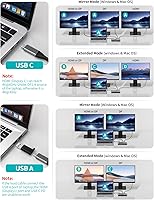
  • USB-A Host Mode: An included USB-C to USB-A adapter enables connection to laptops with only USB-A ports, though this mode disables the HDMI Display 1 output and the 100W PD charging port simultaneously.
  • Total Port Count: The dock provides 13 ports in total across display, data, charging, audio, and network functions.
  • Housing Material: The outer shell is constructed from aluminum with a silver finish, complemented by plastic end caps on both sides.

Related Reviews

Minisopuru DisplayLink Docking Station MD6950D
85%
89%
Setup & Installation
94%
Compatibility with MacBook & USB-C Laptops
91%
Multi-Monitor Support
87%
Charging Speed & Power Delivery
90%
Data Transfer Speed
More
LIONWEI Triple Monitor USB-C Docking Station
75%
83%
Multi-Monitor Display Performance
41%
macOS Compatibility
89%
Value for Money
81%
Power Delivery & Charging
92%
Plug-and-Play Setup
More
j5create USB-C Triple Monitor Docking Station JCD543
85%
89%
Setup & Installation
91%
Display Performance
85%
Build Quality
90%
Port Availability & Functionality
94%
Power Delivery
More
WAVLINK UG69DK13 Triple Monitor USB-C Docking Station
74%
88%
Multi-Monitor Performance
61%
Setup & Ease of Use
91%
Port Selection & Variety
86%
Video Output Quality
83%
Data Transfer Speed
More
StarTech.com Triple Monitor USB 3.0 Docking Station
83%
89%
Performance
91%
Ease of Setup
88%
Display Support
85%
Connectivity Options
80%
Build Quality
More
Minisopuru MK808M-US Dual Monitor KVM Switch Docking Station
84%
94%
Dual Monitor Performance
91%
USB Peripheral Compatibility
88%
Switching Convenience
90%
Build Quality
82%
Setup & Installation
More
AV Access KD-S03 Triple Monitor Docking Station
77%
88%
Multi-Monitor Performance
41%
macOS Compatibility
91%
Setup & Ease of Use
74%
100W Power Delivery
86%
Data Transfer Speed
More
TobenONE UDS041W USB-C Triple Monitor Docking Station
77%
84%
Multi-Monitor Output
91%
Single-Display Performance
93%
Integrated 100W Charging
88%
Data Transfer Speed
79%
Ethernet Performance
More
4URPC DisplayLink Docking Station DC0001A
85%
91%
Multi-Monitor Support
88%
Charging Performance
85%
Setup/Installation
89%
Connectivity & Ports
80%
Build Quality
More
TobenONE Quad Monitor Docking Station UDS033B
85%
91%
Performance with Multiple Displays
85%
Ease of Setup
93%
Charging Speed and Power Delivery
87%
Build Quality and Durability
88%
Connectivity Options
More

FAQ

Yes, and this is the single most important thing to know before buying. The Minisopuru DS808 DisplayLink Triple Monitor Docking Station relies on DisplayLink technology, which requires a software driver installed on your computer. Without it, the display outputs will not function. The good news is that the driver is free, well-maintained, and takes only a few minutes to download and install from the official DisplayLink website.
Yes, that is exactly what this dock is designed to do. Apple Silicon Macs natively support only one external display, but the DisplayLink driver works around that hardware limitation, allowing three separate screens to run simultaneously. Just make sure your MacBook has a full-featured USB-C or Thunderbolt port, and that the driver is installed before you plug everything in.

The dock has four display connectors — two HDMI and two DisplayPort — but only three displays can be active at once. The third display zone physically has one HDMI and one DisplayPort jack next to each other, and you can use only one of them at a time. Just pick whichever matches your monitor's cable and leave the other empty.

It does, but only when your laptop connects via the USB-C host port. The 100W USB-C PD port will keep most laptops charged during normal workloads, though very power-hungry machines like a loaded 16-inch laptop may see a slow net drain under peak CPU and GPU stress. If you connect via the USB-A adapter instead, laptop charging through the dock is not available in that mode.

Your laptop will still connect to the dock and you can use most peripherals, but two key features become unavailable: the HDMI Display 1 output stops working, and the 100W PD charging port is disabled. You would effectively be left with dual display output through the DisplayPort connections and no laptop charging through the dock. It is worth knowing this before assuming full functionality from a USB-A connection.

Yes, and in some ways Windows users have a slightly easier experience than Mac users. DisplayLink integrates cleanly with Windows display settings, and there is no Apple Silicon display-limit workaround required. As long as you install the DisplayLink driver and your laptop has a compatible USB-C port, you should have a straightforward setup experience.

No. The 36W DC power adapter is mandatory for the dock to function at all — it is not a bus-powered device. Without the adapter connected, the entire dock is non-operational, not just the display outputs. This is one of the more common surprises for buyers expecting a simpler setup.

The driver does add a small amount of background CPU load since it is handling display rendering through software rather than dedicated GPU hardware. Most users do not notice this during everyday tasks. macOS updates can occasionally require a driver reinstall, but Minisopuru and DisplayLink typically release updates promptly. If you run GPU-intensive applications like video editing or 3D rendering on your external displays, you may notice the software rendering ceiling more than an average office user would.

There is no fan — the dock is completely fanless and silent during operation. It does generate heat, especially when all ports are in use simultaneously, and can become warm to the touch in a hot room. Most users in typical office environments report no thermal issues even over long working sessions.

Android support is listed, but real-world results vary significantly depending on the Android version and the specific device's DisplayLink compatibility. Some users have reported success; others have not. iPad support depends on which iPad model and whether it supports the required USB-C display protocol. It is safest to treat this dock as primarily designed for Mac and Windows laptop use, and verify compatibility independently if you plan to use it with a mobile device.