UtechSmart D3903-1 USB-C Docking Station

Overview
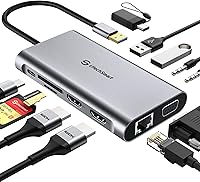
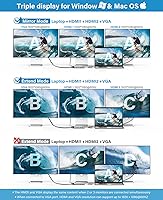
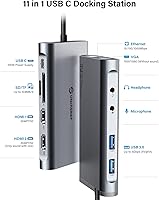
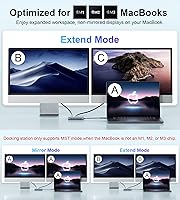
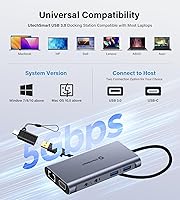
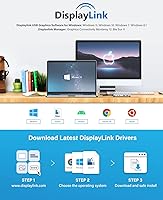
The UtechSmart D3903-1 USB-C Docking Station is a compact 11-in-1 hub built around the idea that one cable should be enough to run a full home office setup. Weighing under half a pound and stretching just over four inches, it sits comfortably on a crowded desk without demanding much real estate. It outputs to dual HDMI plus VGA for triple-monitor configurations and works with USB-A, USB-C, and Thunderbolt 3/4 hosts across both Windows and macOS. Mac users on Apple Silicon should know upfront, though: a DisplayLink driver install is required before the second HDMI and VGA ports do anything useful.
Features & Benefits
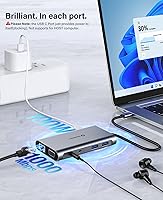
The port lineup here is genuinely practical. Gigabit Ethernet handles wired internet without a separate adapter, two USB 3.0 ports run at 5Gbps for fast file transfers, and both SD and microSD slots cover most camera and storage needs. The 3.5mm audio jack supports mic input and headphone output on the same connector, which comes in handy during video calls. Power Delivery pass-through keeps your laptop charging while everything else is plugged in. On the display side, all three outputs top out at 1080p at 60Hz — not 4K, but plenty for spreadsheet-heavy workdays. Keep in mind that VGA mirrors the first HDMI port rather than functioning as a fully independent third screen.
Best For
This docking station makes the most sense for remote workers and students who want to consolidate a pile of dongles into one tidy hub. If you use a MacBook M1, M2, or M3 and have run into the familiar frustration of limited native multi-display support, this dock addresses that gap through DisplayLink — though the driver setup is worth factoring into your first-day expectations. Windows users on Dell, Lenovo, HP, or Surface hardware will generally have a smoother out-of-the-box experience. It also works well for anyone moving between a home desk and a coffee shop, since the compact build makes it genuinely portable without feeling cheap.
User Feedback
With over 2,000 ratings averaging 4.4 out of 5, the UtechSmart hub sits in solid territory for its category. Windows users consistently highlight the reliable Ethernet performance and relatively painless setup. Mac owners are more divided — the mandatory DisplayLink driver catches many buyers off guard, and some report occasional reconnection hiccups after waking from sleep. The VGA-mirrors-HDMI behavior also surfaces in reviews from users who expected three fully independent outputs. On the support side, the 18-month warranty and responsive customer service come up repeatedly as real positives, suggesting the brand follows through when issues arise. Buyers who go in with calibrated expectations tend to walk away satisfied.
Pros
- Gigabit Ethernet delivers noticeably more stable video calls and file transfers compared to Wi-Fi.
- Windows users on Dell, Lenovo, HP, and Surface get a close to plug-and-play experience with minimal setup.
- Enables non-mirror dual extended displays on Apple Silicon MacBooks — a capability most docks at this price skip entirely.
- Eleven ports in a body smaller than a deck of cards makes for a genuinely tidy desk setup.
- SD and microSD card slots eliminate the need for a separate card reader on a crowded desk.
- Pass-through USB-C charging keeps your laptop powered throughout the workday without an extra cable run.
- The 3.5mm combo audio jack handles both headset mic and headphone output from a single port.
- An 18-month warranty and consistently responsive customer support add meaningful peace of mind at this price tier.
- Two USB 3.0 ports running at 5Gbps handle external drives and fast peripherals without bottlenecking transfers.
- Light enough at under half a pound to live in a laptop bag without a second thought.
Cons
- The VGA port mirrors the first HDMI output — you never actually get three independent extended screens.
- HDMI2 and VGA require a mandatory DisplayLink driver install, which surprises many Mac buyers at first setup.
- Monitors sometimes fail to reconnect after a MacBook wakes from sleep, requiring a manual fix mid-morning.
- The attached USB-C cable is non-removable, so cable damage means replacing the entire unit.
- Only two USB 3.0 ports fill up fast on a full desk setup with keyboard, mouse, drive, and webcam.
- Display output is hard-capped at 1080p — buyers with 1440p or 4K monitors will not get native resolution.
- USB 2.0 host ports are completely unsupported, locking out users with older hardware.
- Pass-through charging wattage is unspecified and may not keep pace with high-performance laptops under heavy load.
- The plastic shell picks up scuffs and fingerprints quickly, and port tightness can loosen after months of daily use.
- Audio output can carry faint electrical interference when USB 3.0 ports are under simultaneous heavy load.
Ratings
The scores below reflect what real buyers actually experience with the UtechSmart D3903-1 USB-C Docking Station — generated by AI after analyzing thousands of verified global reviews, with spam, bot submissions, and incentivized feedback actively filtered out. Every category captures both the genuine strengths this docking station delivers and the friction points that show up repeatedly across different user setups. Nothing is glossed over.
Multi-Monitor Performance
macOS Compatibility
Windows Compatibility
Ethernet Reliability
Setup & Ease of Use
USB Data Transfer
Card Reader Performance
Audio Performance
Power Delivery
Build Quality & Durability
Portability
Display Resolution Cap
Value for Money
Warranty & Support
Suitable for:
The UtechSmart D3903-1 USB-C Docking Station is a strong fit for remote workers and home office professionals who want to consolidate a cluttered desk into a single-cable setup without spending heavily on a premium dock. If you spend your day across multiple browser tabs, communication tools, and documents spread across two extended 1080p monitors, this docking station handles that workload comfortably on both Windows and Mac. Windows laptop users on Dell, HP, Lenovo, or Microsoft Surface hardware will especially appreciate how little friction there is between plugging in and getting to work — Ethernet connects, displays extend, and USB peripherals are recognized without much ceremony. MacBook M1, M2, and M3 owners who have hit the wall with Apple Silicon's native display limitations will find genuine value here too, since the DisplayLink-powered second HDMI port unlocks non-mirror dual external display support that most docks at this price simply cannot offer. Students and freelancers who regularly move between a home desk and a library or coworking space will also find the compact, lightweight build practical rather than a compromise.
Not suitable for:
The UtechSmart D3903-1 USB-C Docking Station is not the right call for buyers who own 1440p or 4K monitors and expect to run them at native resolution — the hard 1080p ceiling will be immediately apparent and consistently disappointing. If you were counting on three fully independent display outputs, the VGA port does not deliver that: it mirrors the first HDMI output, which means your actual extended real estate maxes out at two distinct screens. Mac users who bristle at installing third-party software or who rely on instant wake-from-sleep behavior in their workflow should factor in the DisplayLink driver dependency and the reconnection issues some macOS users encounter — it is a real friction point, not a minor footnote. Anyone connecting via an older USB-A 2.0 port will find the dock simply does not work, since USB 2.0 hosts are explicitly unsupported. Power users pushing demanding GPU workloads or high-resolution video editing across multiple screens will likely outgrow what this docking station can sustain, and should budget for a Thunderbolt-native dock that can actually leverage the full bandwidth their machine offers.
Specifications
- Model Number: This docking station carries the official model designation D3903-1, manufactured by UtechSmart Technology.
- Dimensions: The unit measures 4.52 × 2.44 × 0.62 inches, keeping the footprint small enough to sit beside a laptop without crowding the desk.
- Weight: At 7.8 oz, the dock is light enough to carry daily in a laptop bag without adding meaningful bulk.
- Total Ports: Eleven ports are distributed across display outputs, USB data, card readers, audio, Ethernet, and power delivery.
- Display Outputs: Two HDMI ports and one VGA port are provided; note that VGA mirrors the HDMI1 signal rather than outputting an independent third image.
- Max Resolution: Each display output supports a maximum resolution of 1920×1080 at 60Hz; resolutions above 1080p are not supported.
- Display Technology: The second HDMI port and the VGA port rely on DisplayLink technology, which requires a driver to be downloaded and installed before those outputs function.
- USB Data Ports: Two USB 3.0 Type-A ports deliver transfer speeds up to 5Gbps each and supply 5V at 1.5A for connected peripherals.
- Ethernet: A Gigabit Ethernet (RJ-45) port provides wired network connectivity at speeds up to 1000Mbps.
- Card Slots: One full-size SD card slot and one microSD (TF) slot are included for direct memory card access without an external reader.
- Audio: A single 3.5mm combo jack supports both headphone output and microphone input on the same port simultaneously.
- Power Delivery: USB-C pass-through charging allows the connected laptop to continue charging while the dock is in use, though maximum wattage is not officially specified.
- Host Compatibility: The dock connects to host devices via USB-A, USB-C, and Thunderbolt 3 or 4 ports; USB 2.0 host ports are explicitly not supported.
- OS Support: Compatible operating systems include Windows 10 and later, and macOS 11 (Big Sur) and above, including Apple Silicon M1, M2, and M3 systems.
- Color: The unit ships in a neutral grey finish with a matte plastic shell.
- Warranty: UtechSmart provides an 18-month product warranty along with 24/7 customer support for this docking station.
- In the Box: The package includes the docking station, one USB-C male to USB-A female adapter, and a printed user manual.
- Host Cable: The USB-C host connection cable is permanently attached to the dock body and cannot be removed or replaced separately.
Related Reviews
NOVOO 15-in-1 USB C Docking Station
HiDock H1 11-in-1 USB-C Docking Station
Selore 13-in-1 USB-C Quad Monitor Docking Station
ZMUIPNG 18-in-1 DisplayLink Docking Station
Selore&S-Global 16-in-1 USB-C Docking Station with Triple HDMI

Plugable UD-3900Z

WAVLINK WL-ST334UA Dual-Bay USB 3.0 Hard Drive Docking Station

StarTech DK31C3HDPD USB-C USB-A Docking Station
Targus DOCK182USZ USB-C Docking Station