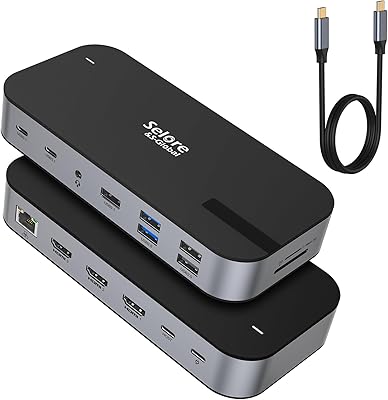
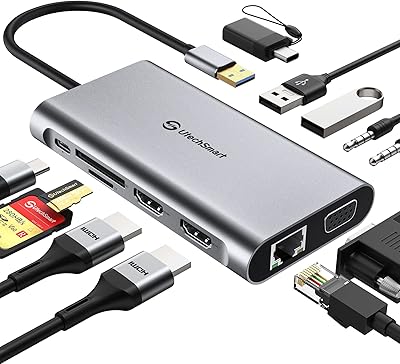
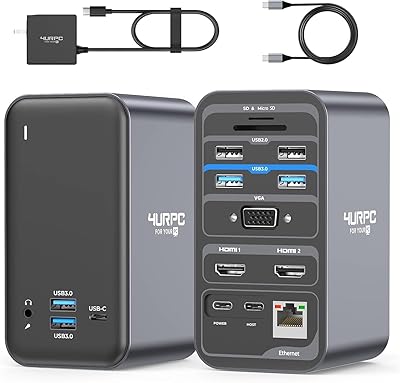
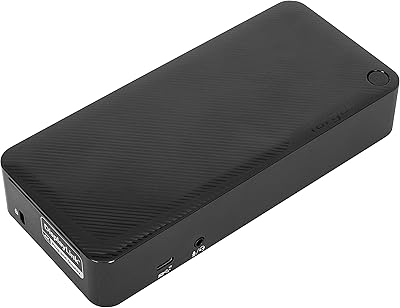
Overview

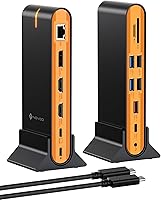
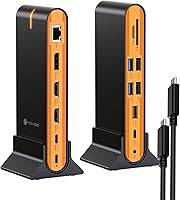
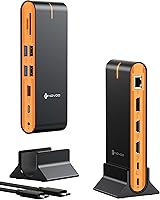
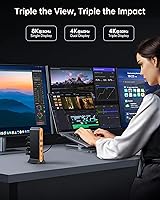
The NOVOO 15-in-1 USB C Docking Station is a versatile, all-in-one solution designed to simplify connectivity for laptops and desktops. This compact docking station offers multiple ports, allowing you to expand your workspace with ease. It supports triple display functionality, including dual HDMI and DisplayPort outputs, making it a perfect choice for professionals and creators alike. Whether you're using a MacBook or a Windows laptop, this docking station ensures compatibility with a wide range of devices. It delivers enhanced connectivity, allowing you to easily connect external monitors, storage, and peripherals in one setup.
Features & Benefits

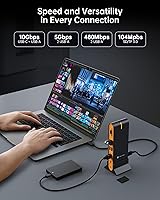
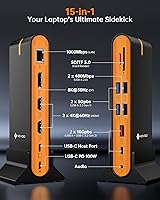
The NOVOO USB C Docking Station offers impressive display support with 8K at 30Hz and dual 4K at 60Hz, ensuring crystal-clear visuals for all your work and entertainment needs. It boasts high-speed data transfer with 10Gbps USB-A and USB-C ports, allowing you to transfer files quickly and efficiently. The 1Gbps Ethernet ensures a stable, reliable internet connection, while the power delivery port provides up to 100W of charging, keeping your devices powered during heavy use. Additional features like SD/TF card slots offer convenient access to external media for creative professionals.

Best For

This docking station is ideal for professionals who need to manage multiple monitors for productivity, such as financial analysts or designers. Gamers and content creators will also benefit from the fast data transfer and multi-display support it offers for a seamless, immersive experience. Users seeking a compact docking solution will find the NOVOO station a great choice, as it packs a full range of ports into a small footprint. It's also a perfect fit for remote workers, providing stable internet access for video calls and collaborative tasks.

User Feedback

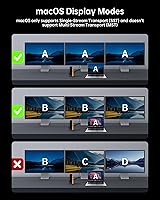
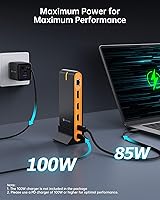
Users appreciate the ease of connecting multiple monitors with the NOVOO USB C Docking Station, citing its user-friendly setup. Many have praised the fast data transfer speeds, particularly when using external drives. However, some macOS users have noted that the docking station only supports mirror mode or single-screen extension, limiting its use for those with advanced display needs. A few also mentioned that for optimal performance, a higher-wattage charger may be necessary to ensure stable operation, especially when using multiple displays simultaneously.

Pros

  • This docking station provides seamless connectivity for multiple devices with 15 ports, offering great versatility.
  • It supports impressive display resolutions, including 8K at 30Hz and dual 4K at 60Hz, perfect for high-end video editing or gaming.
  • Users appreciate the plug-and-play setup, which makes it easy to get started without installing additional software.
  • The compact design is ideal for those with limited desk space or for those who need a portable solution for travel.
  • Its fast 10Gbps USB-A and USB-C ports allow for rapid data transfer, making it great for external drives and other high-speed peripherals.
  • The stable 1Gbps Ethernet connection ensures reliable internet access, which is especially helpful for remote workers and video calls.

Cons

  • Some macOS users report limitations with multi-display setups, making it less ideal for those who need more than two monitors.
  • A few users note that the 100W power delivery may not be sufficient for charging high-performance laptops that demand more power.
  • This device may be too bulky for users who need a truly portable docking station for frequent travel.
  • Certain users have complained about occasional overheating when using multiple high-demand devices simultaneously.
  • There is limited compatibility with older USB-C devices, so users with legacy hardware may face issues with full functionality.
  • While it supports a wide range of displays, some users have mentioned that the video output can be less stable on non-4K monitors.

Ratings

After analyzing authentic user feedback from various platforms and languages, the overall sentiment toward the NOVOO 15-in-1 USB C Docking Station is generally positive. This product has garnered praise for its connectivity features and performance, but some users have raised concerns regarding compatibility with macOS and its charger requirements. We’ve filtered out spam, bot, and incentivized reviews to ensure that only high-quality, verified feedback informs our scores. Both the product's strengths and pain points are reflected in the ratings below, providing a well-rounded view of its performance across different use cases.
Performance
88%
Users consistently praise the strong performance of this docking station. The ability to drive multiple 4K displays at 60Hz while maintaining stable data transfer speeds is a major advantage for productivity. It handles demanding tasks like video editing and gaming without lag, making it a reliable addition to any workstation.
Some users report that performance can be affected under heavy load, particularly when charging high-power devices. While the device handles most tasks well, those requiring extensive simultaneous connections or higher wattage charging may notice slower speeds or performance dips.
Display Support
92%
The multi-display support is a standout feature, with many users highlighting the smooth integration of dual 4K displays and even 8K output at 30Hz. Professionals who rely on multiple monitors for their work appreciate the flexibility and high-quality visuals provided by this docking station. It significantly boosts productivity by allowing seamless multitasking.
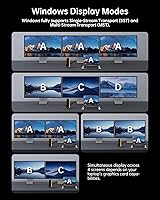
However, macOS users face limitations when it comes to multi-display setups. Some report issues with macOS not recognizing all connected displays, particularly when using adapters or more than two external monitors, which impacts its effectiveness for certain users.
Ease of Setup
85%
Setting up this docking station is relatively straightforward. Many users find that it works right out of the box with minimal configuration needed, especially when using Windows devices. The plug-and-play functionality for most devices is a huge plus for users looking for a hassle-free experience.
A few users, however, have mentioned that while it's easy to set up with Windows, macOS users may encounter some issues, especially with the display setup and driver installations. Additionally, some report that the lack of detailed setup instructions can make initial configuration a bit more challenging.
Compatibility with MacBook
80%
20%
Many users with MacBook devices have found this docking station works well for most functions. It’s great for connecting external displays, and the fast USB ports are ideal for transferring data to and from external storage. The 100W power delivery also provides ample charging power for MacBooks, making it a solid companion for productivity.
However, there are some compatibility issues with MacBooks when using multiple displays. macOS has known limitations with certain multi-monitor setups, which can cause the docking station to fail to detect or properly display on all monitors. Some users are also disappointed with the lack of full Thunderbolt support for faster speeds.
Connectivity (Ports)
94%
The wide variety of ports on this docking station is one of its biggest strengths. Users appreciate the 15-in-1 design, offering everything from HDMI and DisplayPort to USB-A, USB-C, and Ethernet. This broad connectivity makes it a perfect fit for anyone needing a versatile docking solution for both work and play.
Despite the variety, some users have expressed frustration with the positioning of certain ports. Specifically, the placement of the Ethernet port and the card slots may be awkward for users with tight desk spaces or specific setup needs. Additionally, some report that a few of the USB ports are not as fast as they would like for data-heavy applications.
Ethernet Speed
82%
18%
The 1Gbps Ethernet port is generally stable, providing fast internet speeds for most users. This is especially beneficial for those working from home or streaming content, as it ensures a reliable connection without the usual Wi-Fi interruptions. Many appreciate the peace of mind that comes with having a wired connection for tasks like video calls and online work.
Some users have mentioned that the Ethernet speed could be faster, especially in environments where high-speed internet is essential. For tasks like 4K streaming or large file downloads, the 1Gbps connection can feel limiting compared to faster options available on higher-end docks.
Charging Capacity (Power Delivery)
76%
24%
The 100W Power Delivery port is appreciated by users who rely on their docking station to charge their laptops. It can easily power most MacBooks, Windows laptops, and other USB-C devices without requiring an additional charger. This makes it a convenient solution for those who want a single hub for both connectivity and power.
Some users have noted that the charging capacity isn't always sufficient for laptops with higher power demands. When using the docking station to power more demanding devices while also using multiple peripherals, the 100W limit can be a bottleneck, leading to slower charging or inability to charge while in use.
Build Quality
89%
Many users appreciate the solid and compact build quality of this device. It feels sturdy and well-constructed, without being overly bulky, which makes it great for home offices or traveling. The sleek, modern design also complements most setups, giving it a professional look.
A few users have pointed out that while the build quality is generally good, the device can get somewhat warm after prolonged use, especially when running multiple displays or transferring large files. This could affect long-term durability if not managed properly.
Size and Portability
78%
22%
This docking station is compact and relatively lightweight, making it easy to transport for users who travel frequently for work. Its portability is particularly appreciated by remote workers who need to set up in different locations quickly. The small form factor allows it to fit neatly on a desk without taking up much space.
However, some users have found it slightly bulkier than expected for a portable device. While it's certainly smaller than some docking stations, it might still be too large for those who are used to ultra-compact hubs or need to travel with minimal gear.
Software/Driver Experience
70%
30%
Most users find that the software and drivers are relatively easy to install and don’t cause many issues. Windows devices typically work seamlessly, with no major driver-related problems during installation. The product’s plug-and-play nature is a huge advantage for many users.
On the downside, macOS users report that the driver experience is somewhat cumbersome, with occasional compatibility issues arising. Some have difficulty getting all features to work properly, particularly when updating the operating system or using multiple displays simultaneously.
User Support/Warranty
77%
23%
Users have noted that customer support is generally responsive, offering solutions for common issues like display problems or connectivity glitches. The warranty also provides a sense of security for those concerned about potential defects or malfunctions over time.
Despite positive feedback, some users have mentioned that the response time from support can be slow during peak periods. There are also reports of users feeling dissatisfied with the lack of in-depth troubleshooting advice for complex issues.
Value for Money
91%
With its combination of 15 ports, 8K support, and fast data transfer, this docking station offers excellent value for the price. Many users feel they get a lot of functionality for their investment, particularly for those looking for a reliable multi-display solution. Its competitive price point makes it a good option for professionals and remote workers alike.
Some users feel that the price could be a bit high, especially considering the occasional performance hiccups under heavy load. While it’s generally a good value, the occasional limitations with macOS and the need for a higher-wattage charger can detract from the overall cost-effectiveness for some buyers.
MacOS Multi-Display Limitations
62%
38%
While macOS compatibility isn’t perfect, many users are still able to use multiple displays with this docking station, especially when using one or two external monitors. For those not needing a full multi-monitor setup, the device offers decent performance.
However, the multi-display capabilities are limited when using macOS, with some users unable to achieve the same seamless performance that is available on Windows. The inability to fully utilize multiple monitors under macOS affects its usefulness for professionals requiring extensive screen real estate for productivity.

Suitable for:

The NOVOO 15-in-1 USB C Docking Station is ideal for professionals who need a reliable and versatile solution to connect multiple displays and peripherals. Its support for dual 4K displays and even 8K output at 30Hz makes it a great choice for content creators, designers, and video editors who require high-quality visuals. Remote workers and frequent travelers will also appreciate its compact design and the convenience of having one device to handle multiple connections, including USB-A, USB-C, Ethernet, and SD/TF card slots. With its plug-and-play functionality, it is well-suited for users of both MacBook and Windows laptops looking for seamless connectivity and fast data transfer speeds in their daily tasks.
Not suitable for:

While this docking station works well for most users, it may not be the best option for those relying on macOS for multi-display setups. Some MacBook users experience limitations with connecting more than two displays, which can be frustrating for those needing extensive screen real estate for work. Additionally, users with laptops that require more than 100W of power for charging may find this docking station insufficient for their needs. If you're working with high-performance devices that demand faster data transfer or power delivery, this docking station may not meet those specific requirements. Furthermore, those who prioritize extreme portability might find the device a bit bulky for travel.

Specifications

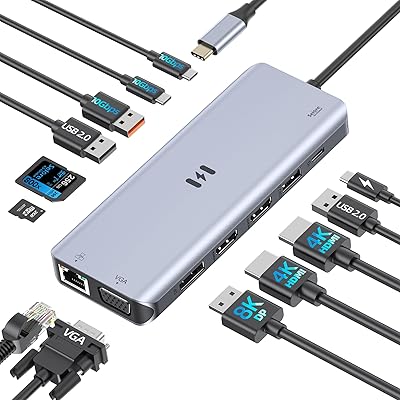
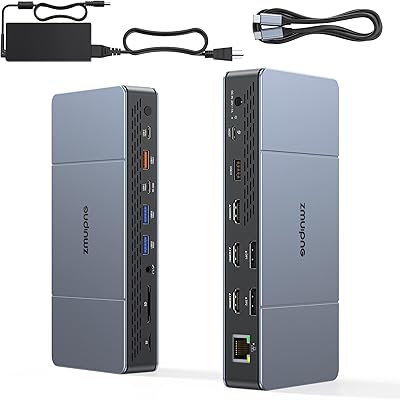
  • Ports: Includes 15 ports, providing a variety of connectivity options including USB-A, USB-C, HDMI, DisplayPort, Ethernet, SD/TF card slots, and audio output.
  • Display Outputs: Supports dual HDMI and DisplayPort outputs for multi-monitor setups, enabling triple display support.
  • Display Resolution: Supports 8K resolution at 30Hz and dual 4K resolution at 60Hz for high-quality video output.
  • USB Ports: Equipped with high-speed 10Gbps USB-A and USB-C ports for fast data transfer.
  • Ethernet: Offers a stable 1Gbps Ethernet port for reliable wired internet connectivity.
  • Power Delivery: Features a Power Delivery (PD) port capable of charging laptops up to 100W.
  • Card Slots: Includes SD/TF 3.0 card slots for fast media access and file transfers.
  • Audio Output: Provides a 3.5mm audio jack for connecting headphones or external speakers.
  • Compatibility: Compatible with MacBook, Windows laptops, and other USB-C devices, providing versatile connectivity options.
  • Design: Compact and lightweight design at only 2.56 ounces, making it easy to carry and use in various environments.
  • Build Quality: Constructed for durability with high-quality materials, ensuring long-term reliability for everyday use.
  • Dimensions: Measures 4.92 x 2.36 x 0.79 inches, offering a compact footprint that fits easily on desks or in bags.
  • Weight: Weighs 2.56 ounces, making it highly portable and easy to transport.
  • Operating System Support: Works with both macOS and Windows operating systems, though macOS users may face limitations with multi-display setups.
  • Charging Capacity: Supports charging of laptops and other devices up to 100W, ensuring efficient power delivery during use.
  • Installation: Plug-and-play setup with no need for additional drivers or software installation for most systems.
  • Security Features: Includes built-in surge protection and heat management to prevent overheating during extended use.
  • Warranty: Backed by a manufacturer's warranty for peace of mind and support.

FAQ

This device offers an extensive range of ports, including dual HDMI and DisplayPort for triple display support, 10Gbps USB-A and USB-C ports for fast data transfer, and 100W power delivery. It’s ideal for users who need to expand their connectivity without cluttering their desk.

Setting up this docking station is simple—just plug it into a USB-C port on your laptop or desktop. Connect your external monitors to the HDMI and DisplayPort outputs, and you’re ready to go. No extra drivers are needed for most setups, making it a plug-and-play solution.

Yes, this docking station is compatible with both MacBook and Windows laptops, as well as other USB-C devices. However, macOS users may encounter limitations with multi-display support, depending on the version of macOS you're running.

Yes, the NOVOO 15-in-1 USB C Docking Station supports triple display setups via dual HDMI and DisplayPort outputs. You can connect two 4K monitors and one 8K monitor simultaneously, provided your laptop or device supports such configurations.
This device supports impressive display resolutions, including 8K at 30Hz and dual 4K at 60Hz. This makes it a great choice for content creators, gamers, and professionals who require high-quality visuals across multiple screens.

The docking station provides high-speed 10Gbps USB-A and USB-C ports, allowing for rapid data transfers. It’s perfect for users who frequently work with external hard drives or need to move large files quickly.

Yes, the docking station supports Power Delivery (PD) with a maximum output of 100W. This allows it to charge compatible laptops while in use, ensuring that you don’t need to connect a separate charger.

While the docking station works well with most USB-C laptops, some older devices or those with limited USB-C support may experience connectivity issues. Also, macOS users might encounter limitations with multi-display setups due to system restrictions.

This docking station is ideal for professionals who need multiple displays for productivity, gamers who require high-quality video output, remote workers who need a stable internet connection, and anyone seeking a compact and versatile docking solution for laptops.

No special maintenance is required for this docking station. Just ensure that it’s not exposed to extreme heat or physical damage, and clean the ports occasionally to avoid dust buildup. It’s designed to be low-maintenance and durable for long-term use.