Overview

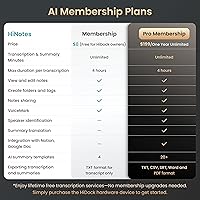
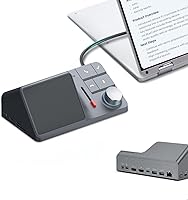
The HiDock H1 11-in-1 USB-C Docking Station is a versatile and powerful solution for expanding your laptop’s capabilities. This compact dock offers a range of connectivity options, including dual 4K HDMI output, fast 118W charging, and 10Gbps data transfer speeds. With its sleek design, it seamlessly integrates with both Mac and Windows devices, as well as ChromeOS. Whether you're working from home or in the office, this docking station enhances your setup with its multifunctional ports and smart AI features, like voice recording and transcription, which can help boost productivity and organization.
Features & Benefits

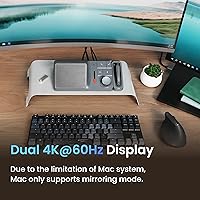
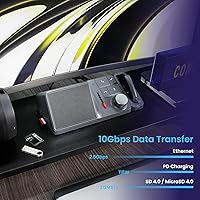
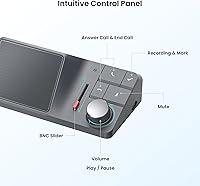
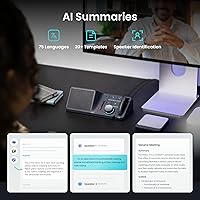
One of the standout features of this docking station is its dual HDMI ports, which support 4K output at 60Hz, allowing for a seamless multi-monitor setup. The HiDock H1 also boasts high-speed data transfer at 10Gbps, making it ideal for users who frequently transfer large files. Additionally, the built-in AI-powered voice recorder is a unique feature that enables automatic transcription and smart summaries, which can significantly save time for meetings and calls. With up to 118W of power delivery, it offers fast charging for laptops and other devices, making it an all-in-one solution for the modern workspace.

Best For

This USB-C docking station is perfect for a variety of users, from remote workers to professionals who need efficient connectivity and organization. It's particularly beneficial for those who rely on multiple devices, such as laptops, smartphones, and external storage drives. With its ability to handle dual 4K monitors, the HiDock H1 is also ideal for home offices with multi-monitor setups, where smooth display management is essential. Moreover, the device's compatibility with both Mac and Windows laptops makes it a versatile choice for professionals in any environment.

User Feedback

The HiDock H1 has received positive feedback for its seamless dual display setup and the convenience of its AI voice transcription feature. Many users have praised its fast charging capabilities and the variety of ports, which make it a versatile addition to their desk. However, some users have mentioned compatibility issues with older devices, and there have been occasional concerns about its bulkiness and cable management. Despite these minor drawbacks, the overall sentiment is overwhelmingly positive, with most users appreciating its performance and comprehensive functionality.

Pros

  • Dual HDMI ports enable seamless setup for multi-monitor displays.
  • AI-powered voice recording and transcription feature is a great tool for professionals.
  • Fast 118W charging supports even power-hungry laptops and devices.
  • 10Gbps data transfer speed makes it ideal for fast file transfers and external storage.
  • Compact design saves space while providing a comprehensive set of ports.
  • Works well with multiple operating systems, including Mac, Windows, and ChromeOS.

Cons

  • Compatibility issues with older devices may cause inconsistent performance.
  • Cable management can be tricky due to the large number of ports and cables.
  • Some users find the unit a bit bulky, especially for frequent travelers.
  • Limited support for USB-A ports, which could be inconvenient for users with older peripherals.
  • The power delivery might not be enough for certain high-power laptops during intensive use.
  • Not suitable for users who prefer minimalist setups or very portable docking stations.

Ratings

The HiDock H1 11-in-1 USB-C Docking Station has received a wide range of feedback from verified users around the world. After analyzing reviews across multiple platforms and languages, we’ve compiled ratings that reflect both the strengths and challenges reported by customers. Spam, bot-driven, and incentivized reviews have been filtered out to ensure only authentic feedback informs the scores. Users appreciate the docking station’s robust performance but have also highlighted some pain points, particularly around compatibility with older devices and its bulkiness. Here’s a breakdown of the key attributes and scores based on global user feedback.
Dual Display Performance
89%
Many users report that the dual 4K HDMI output is a standout feature, offering crisp visuals and smooth transitions for multitasking. This makes it ideal for those working with multiple monitors, whether for professional tasks or entertainment. The easy setup and stable connection add to the positive feedback.
Some users experienced occasional flickering or lag when using dual monitors at higher resolutions. A few mentioned that achieving 4K at 60Hz required additional configuration, especially with certain operating systems, and noted that older laptops may struggle with full performance.
AI Voice Recorder & Transcription
93%
The AI-powered voice recorder and transcription feature is highly praised by professionals who rely on accurate meeting notes and summaries. Users appreciate how it saves time by automatically transcribing audio and generating concise summaries. This feature is particularly useful for remote workers and business meetings.
Some users feel that the AI transcription accuracy could be improved, especially with complex terminology or background noise. While most find it useful, a few have pointed out occasional errors in transcriptions, which may require manual corrections, especially for long recordings.
Charging Power & Speed
90%
The 118W charging power is a significant advantage, especially for users with power-hungry laptops or devices. Many find that it delivers quick, efficient charging even while using multiple peripherals. This is particularly beneficial for those working from home or on the go, as it minimizes downtime.
A few users reported that while the charging speed is fast, it may not be as effective with some older laptops or devices that don't support higher charging speeds. Additionally, the bulkiness of the unit may not be ideal for those looking for a more compact, portable charging solution.
Data Transfer Speed
88%
The 10Gbps data transfer speed is highly valued by those who frequently work with large files or external drives. Many users mentioned how quickly they could transfer data without significant lag or delays, which is essential for professionals dealing with high-bandwidth tasks.
Some users experienced slower transfer speeds when using older USB standards or non-optimized devices. Additionally, a few reported that the docking station's transfer speeds were inconsistent depending on the connected peripherals, especially with certain external drives.
Build Quality
82%
18%
The overall build quality is solid, with many users noting that it feels sturdy and durable. The unit is well-constructed with materials that give it a premium feel, and its compact design makes it an attractive addition to workspaces.
However, a few users mentioned that the device is a bit bulkier than expected, making it less ideal for portable use. There were also some reports of the device getting warm during extended use, which raised concerns about long-term durability.
Port Selection & Versatility
91%
The variety of ports, including USB-C, USB-A, HDMI, and SD/MicroSD, is a big hit among users with diverse connectivity needs. This docking station provides everything from fast data transfer to high-quality video output, making it an ideal solution for users with multiple devices and peripherals.
While the port selection is extensive, some users found that managing multiple cables at once could be a bit challenging, especially in tight spaces. A few also reported compatibility issues with certain legacy devices, which may not fully support all the ports.
Ease of Setup & Installation
85%
Setting up this docking station is relatively straightforward, with users mentioning that it only took a few minutes to get everything up and running. The device is mostly plug-and-play, with no need for additional drivers in most cases, which adds to its appeal for users looking for simplicity.
Not everyone had a smooth installation process, especially when using older operating systems or specific configurations. A small number of users mentioned that they had to perform some troubleshooting, including manually installing drivers or adjusting system settings to get full functionality.
Compatibility with Devices
75%
25%
The docking station is compatible with a wide range of devices, including Mac, Windows, and ChromeOS, making it versatile for different setups. Many users were pleased with how seamlessly it worked across various operating systems, without needing much adjustment or compatibility tweaks.
However, some users reported issues with older laptops or specific models that had trouble recognizing the docking station or fully utilizing its features. There were also compatibility concerns when using certain USB-C devices or legacy hardware.
Cable Management
68%
32%
While the docking station offers plenty of ports, the cable management system is appreciated by those who want to keep things organized. Many users have found that it helps reduce clutter and keeps cables neatly arranged, especially in home offices or shared workspaces.
Despite the organizational design, some users expressed frustration with the lack of effective cable management options. The cables can become tangled or too long, which makes it challenging to maintain a clean setup, especially in smaller or more compact workspaces.
Size & Portability
80%
20%
The compact size makes it easy to fit into most workspaces, with users noting that it doesn’t take up too much room on their desks. Its portability is a plus for those who need a docking solution that’s easy to move between home and office setups.
However, some users found it a bit heavy and bulky for regular travel. The size can be inconvenient for those who need to carry it with them regularly, as it may take up valuable space in bags or backpacks.
Price-to-Value Ratio
92%
Many users feel that the HiDock H1 offers excellent value for its price, especially considering the number of ports, fast charging, and high-quality features it provides. The docking station’s versatility and performance at a reasonable price point is a significant selling point.
While the value is generally seen as good, a few users pointed out that the initial cost might be a bit high compared to simpler docking stations. Some feel that the price is only justified if you need the full range of features, such as dual 4K displays and AI transcription.
Customer Support & Warranty
84%
Users have praised the customer support team for being responsive and helpful when issues arise. Many reported quick responses and assistance with troubleshooting or returns, which contributes to a positive overall experience with the product.
A few users had negative experiences with customer service, mentioning that response times were longer than expected or that certain issues were not addressed effectively. Some also felt that the warranty process could be more transparent, particularly when it comes to returns or replacements.

Suitable for:

The HiDock H1 11-in-1 USB-C Docking Station is ideal for remote workers, professionals, and multi-device users who need efficient connectivity and high performance. Those with home office setups, particularly individuals who use dual 4K displays or require simultaneous device charging and data transfer, will find it especially valuable. It suits users who work with various peripherals such as external hard drives, SD cards, and multiple displays. The AI-powered transcription and smart summaries feature also makes it an excellent choice for business professionals who need to record meetings and transcribe them quickly for reference. MacBook, Windows, and ChromeOS users can all take advantage of the docking station's versatile compatibility and speed, making it a solid choice for a variety of work environments.
Not suitable for:

This docking station may not be the best choice for users with older laptops or devices that do not support modern USB-C connections or high-speed data transfer. Some users have reported compatibility issues with older devices, which could lead to unreliable performance, especially with the higher-end features like dual 4K output or fast charging. Additionally, while the unit is compact, it may still be too bulky for those who need a highly portable docking station for frequent travel. If you're someone looking for a minimalistic, lightweight option that fits easily into a backpack, this product might not be the most convenient choice.

Specifications

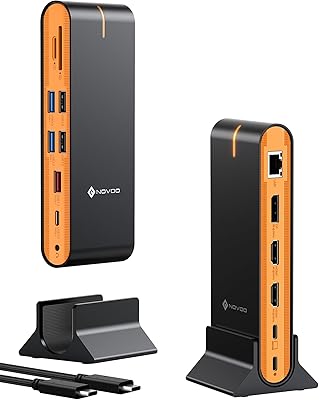
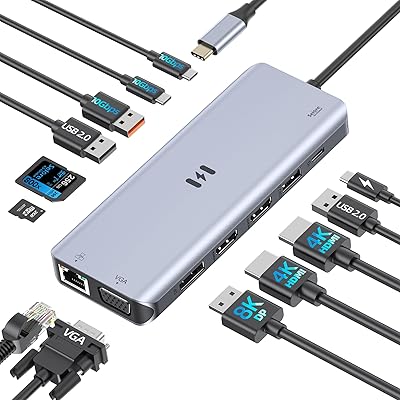
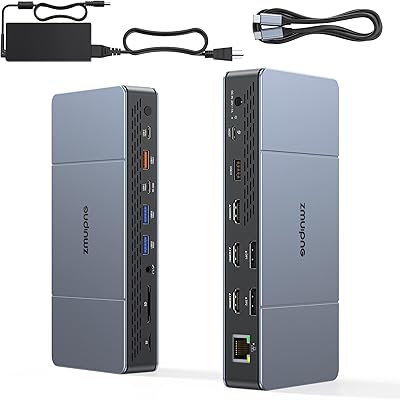
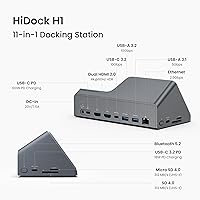
  • Ports: The docking station features 11 total ports, including USB-C, USB-A, HDMI, Ethernet, and card reader slots.
  • HDMI Output: Supports dual HDMI output with 4K resolution at 60Hz for multi-monitor setups.
  • Ethernet: Includes a 2.5Gbps Ethernet port for fast and stable wired internet connectivity.
  • Data Transfer Speed: Offers high-speed 10Gbps data transfer for quick file movement and external device interaction.
  • Charging Power: Supports 118W Power Delivery (PD), providing fast charging for laptops and mobile devices.
  • USB Ports: Comes with 5 USB ports, including 3 USB-C and 2 USB-A, for connecting a variety of peripherals.
  • AI Features: Features an AI-powered voice recorder with transcription and smart meeting summaries.
  • SD/MicroSD Reader: Equipped with both SD and MicroSD card readers, supporting 4.0 transfer speeds for additional storage options.
  • Power Delivery: Supports up to 100W Power Delivery via USB-C and 18W via USB-C 3.2 for efficient power management.
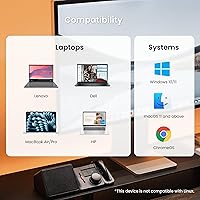
  • Compatibility: Compatible with MacBook, Windows laptops, and ChromeOS devices, offering broad device support.
  • Weight: Weighs approximately 1.15 pounds, providing a balance of portability and stability.
  • Dimensions: Has compact dimensions of 7 x 3 x 4 inches, making it easy to integrate into home or office setups.
  • Build Material: Constructed with durable materials designed for everyday use, ensuring long-lasting performance.
  • Operating System Support: Works seamlessly with macOS, Windows, and ChromeOS, making it versatile for various user environments.
  • Dual Display Support: Allows for dual 4K monitor setups, ideal for enhanced productivity in multi-monitor configurations.
  • AI Transcription: The AI-powered transcription feature is useful for recording and transcribing meetings or discussions automatically.
  • Fanless Design: Features a fanless design for quiet operation, reducing distractions in work or home environments.
  • Cable Management: The design includes provisions for cable management, although some users have reported challenges with bulkiness.
  • Heat Management: Built with efficient heat dissipation to maintain optimal performance during extended usage.

FAQ

The HiDock H1 11-in-1 USB-C Docking Station offers unique features like dual 4K HDMI output, an integrated AI-powered voice recorder with transcription, and fast 118W charging. It's a versatile hub that supports both work and home setups with high-speed data transfer and compatibility with multiple operating systems including Mac, Windows, and ChromeOS.
Setting up the HiDock H1 is simple: just connect it to your laptop or device using the USB-C cable. Plug in your monitors, keyboard, mouse, or external drives into the available ports. The docking station will automatically be recognized by your system without the need for additional drivers.

Yes, the HiDock H1 features dual HDMI 4K support at 60Hz, allowing you to easily connect and display content on two 4K monitors simultaneously. It's ideal for multi-monitor setups in both professional and home office environments.

The HiDock H1 is compatible with a wide range of devices, including MacBook, Windows laptops, and ChromeOS devices. It works with most USB-C enabled laptops and tablets, making it a versatile choice for various operating systems and devices.

Yes, the HiDock H1 supports fast 118W Power Delivery (PD), which is more than enough to power most modern laptops while you work. It’s capable of charging laptops, tablets, and phones, ensuring you stay powered up without needing extra charging adapters.

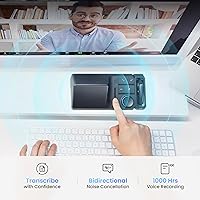
The AI transcription feature allows you to record meetings or conversations directly through the docking station and automatically transcribe them into text. It even summarizes key points, making it an excellent tool for professionals who need to keep track of discussions and take notes hands-free.

The HiDock H1 offers lightning-fast 10Gbps data transfer speed, which is perfect for transferring large files between external drives and your laptop. It also includes a 2.5Gbps Ethernet port for stable and quick wired internet connections.

Some users have reported compatibility issues with older devices, especially those that do not support USB-C or lack the necessary power delivery requirements. It’s important to ensure your device supports USB-C with Power Delivery and the specific video output features before purchasing.

Yes, the HiDock H1 includes both an SD and MicroSD card reader, which supports fast 4.0 transfer speeds. This is ideal for expanding your storage options, whether you're transferring photos, videos, or documents from your camera or external devices.

While the HiDock H1 is compact, it may not be the most portable option for frequent travelers due to its 1.15-pound weight and bulkier design. However, it’s a great choice for setting up a permanent or semi-permanent workstation at home or in the office.