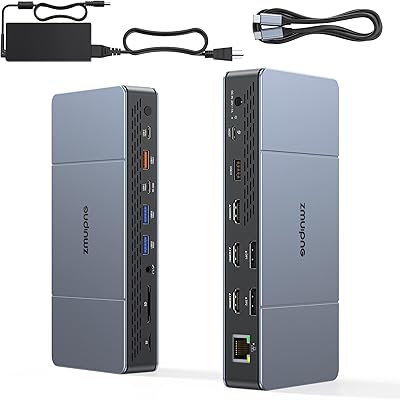
Selore 13-in-1 USB-C Quad Monitor Docking Station




Overview
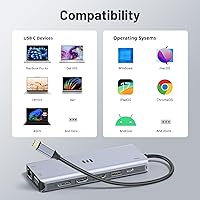
The Selore 13-in-1 USB-C Quad Monitor Docking Station is a compact hub that appeared in early 2025 as a budget-conscious answer to running four monitors from a single laptop cable. At 4.6 oz and under 8 inches long, it's genuinely portable for something capable of quad-display output — most docks in this category are bulkier and heavier. Selore pitches it as a practical alternative to pricier docks from CalDigit or Plugable, and the price supports that positioning. One thing to sort out before buying: your laptop's USB-C port must support full-function USB-C, Thunderbolt 3, 4, or 5, or USB4. A charging-only USB-C port won't work here, and that trips up more buyers than you'd expect.
Features & Benefits
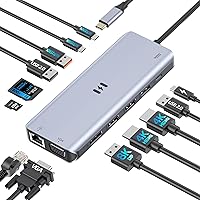
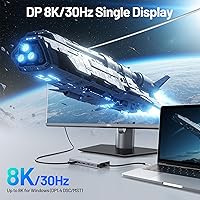
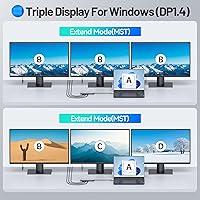
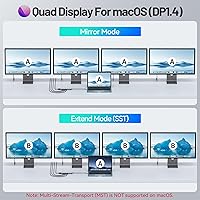
The display lineup is the main draw. You get dual 4K/60Hz HDMI outputs alongside an 8K-capable DisplayPort and a VGA port for older monitors — all four running simultaneously on Windows. For data transfers, both USB-A and USB-C ports run at 10Gbps, which in practice means copying a large video project to an external SSD takes seconds rather than minutes. The SD and MicroSD card slots handle reads up to 104MB/s, handy for pulling footage off a camera card quickly. Gigabit Ethernet rounds out the connectivity without a separate dongle. Power delivery is rated at 100W input, though your laptop receives closer to 85W. On macOS, MST multi-display simply doesn't work — that's an Apple limitation, not a dock flaw, but it's a real deal-breaker for Mac users needing more than one extended screen.
Best For
This quad-display hub earns its place primarily on Windows-based setups where you want to drive three or four monitors from a single port without a high outlay. It works well as a desk anchor for remote workers tired of juggling individual adapters for display, networking, storage, and charging. Designers and data analysts who constantly switch between a primary work screen, a reference display, and a secondary dashboard will find the mixed output options — HDMI, DisplayPort, VGA — practically useful rather than just on paper. The slim build also makes it reasonable to pack for travel. If you're on a Mac, though, skip this one unless you only need a single extended display; the macOS multi-stream limitation makes it a poor fit for the quad-monitor use case it's built around.
User Feedback
Because the Selore dock only hit the market in early 2025, the review base is still building — worth being upfront about rather than treating sparse feedback as a settled consensus. Early adopters generally highlight plug-and-play reliability on Windows, with most noting that monitors, drives, and Ethernet all register automatically without hunting for drivers. The port count for this price point gets mentioned often as a genuine positive. On the downside, the unit runs noticeably warm during extended sessions — something to watch if your desk already runs hot. A few buyers encountered compatibility surprises when their USB-C port didn't support the full feature set required. Selore advertises pre-sale consultation for exactly this scenario, and some reviewers confirm that support was helpful when they reached out ahead of purchase.
Pros
- Four simultaneous display outputs from one USB-C cable is genuinely rare at this price point.
- Dual HDMI ports both run at 4K/60Hz, so you're not stuck compromising resolution on the second screen.
- The 8K-capable DisplayPort gives the setup real headroom if you upgrade monitors down the road.
- VGA output means older office monitors don't get left behind.
- 10Gbps data ports make external SSD transfers fast enough that waiting stops being a frustration.
- Built-in Gigabit Ethernet removes the need for a separate USB-to-Ethernet dongle entirely.
- SD and MicroSD card slots at 104MB/s speeds suit photographers who offload large files regularly.
- At under 8 inches and 4.6 oz, this quad-display hub is light enough to pack without thinking twice.
- Plug-and-play on Windows means no driver hunting — monitors and peripherals just appear.
- Selore offers pre-sale compatibility consultation, which is a practical safety net for unsure buyers.
Cons
- macOS users get only one extended display due to MST limitations — the quad-display promise simply does not apply.
- Laptop charge pass-through tops out around 85W despite the 100W input rating, which may fall short for power-hungry machines.
- The dock runs noticeably warm during extended use, which may be a concern in already-warm environments.
- Buyers with standard charging-only USB-C ports will find this docking station completely non-functional.
- The product launched in early 2025, so long-term durability and firmware support remain unproven.
- Review volume is still low, making it harder to assess real-world consistency across different laptop models.
- Some users with non-Thunderbolt USB-C ports have hit unexpected compatibility walls after purchase.
- No mention of a dedicated power adapter included — you need your own adapter rated above 100W for full PD functionality.
- The slim, horizontal form factor offers no mounting or vertical stand option, which limits desk placement flexibility.
Ratings
The scores below reflect an AI-driven analysis of verified global buyer reviews for the Selore 13-in-1 USB-C Quad Monitor Docking Station, with spam, incentivized submissions, and bot activity actively filtered out before scoring. Each category is rated independently to give you an honest, granular picture — strong points are credited, but genuine pain points are never smoothed over. Whether this quad-display hub fits your setup or falls short depends heavily on your laptop and OS, and the ratings below reflect exactly that nuance.
Display Performance
Compatibility
Value for Money
Build Quality
Thermal Management
Data Transfer Speed
SD Card Performance
Power Delivery
Ethernet Reliability
Portability
Setup & Ease of Use
VGA Output Quality
Brand Trust & Support
macOS Experience
Suitable for:
The Selore 13-in-1 USB-C Quad Monitor Docking Station is built for Windows laptop users who want to run three or four monitors from a single cable without spending a lot of money. It makes the most sense for home-office workers who are tired of a tangle of individual adapters for displays, networking, storage, and charging — this docking station collapses all of that into one lightweight bar that sits quietly on a desk. Data analysts, designers, and researchers who genuinely need multiple screens open at once — a primary workspace, a reference display, a dashboard — will find the mix of HDMI, DisplayPort, and VGA outputs practically useful, especially if their monitor collection is a mixed bag of older and newer hardware. Travelers who want a single dock to throw in a bag and use in hotels or coworking spaces will appreciate the sub-5-oz weight. It also suits buyers who need fast SD card offloading alongside their display setup, since the card slots run at speeds that make pulling camera footage feel quick rather than painful.
Not suitable for:
Mac users are the clearest group to steer away from this quad-display hub. Apple's operating system does not support the Multi-Stream Transport technology that allows this dock to drive four independent displays simultaneously, meaning MacBook owners will effectively get one extended monitor rather than four — a fundamental mismatch with the product's main purpose. Beyond the Mac issue, anyone whose laptop has a USB-C port used only for charging should know upfront that this docking station simply won't work for them; it requires a fully functional USB-C port with data and display support, or Thunderbolt 3, 4, or 5 — a detail many buyers don't think to check. Users who run CPU- and GPU-intensive workflows for many hours straight should also be cautious, as compact docks at this price point tend to run warm under sustained load. Finally, anyone who needs guaranteed long-term brand support or an established track record might want to wait, since Selore only launched this product in early 2025 and the real-world reliability data is still accumulating.
Specifications
- Total Ports: The dock provides 13 ports in total, covering display output, data transfer, card reading, networking, and power delivery.
- Display Outputs: Four video outputs are included: two HDMI ports at 4K/60Hz, one DisplayPort at 8K/30Hz, and one VGA port at 1080p/60Hz.
- Max Displays: Up to four monitors can be connected and run simultaneously on compatible Windows systems using all four display ports at once.
- USB-A Data: USB-A data ports operate at 10Gbps (USB 3.2 Gen 2), supporting fast transfers to external drives, flash storage, and high-speed peripherals.
- USB-C Data: USB-C data ports also run at 10Gbps, allowing high-speed connectivity for modern external SSDs and other USB-C accessories.
- Power Delivery: The dock accepts up to 100W via its Power Delivery input port and passes up to 85W through to the connected host laptop.
- Ethernet: A built-in Gigabit Ethernet port provides 1Gbps wired network connectivity without requiring a separate USB-to-Ethernet adapter.
- SD Card Speed: The full-size SD card slot supports read speeds of up to 104MB/s, suitable for offloading high-resolution photos and video files quickly.
- MicroSD Slot: A dedicated MicroSD card slot is included alongside the SD slot, allowing simultaneous access to two different memory cards.
- Host Connection: The dock connects to the host laptop via a single USB-C cable, requiring a fully functional USB-C, Thunderbolt 3/4/5, or USB4 port on the host device.
- Dimensions: The unit measures 7.91 x 2.52 x 0.75 inches, keeping it compact enough to fit on a crowded desk or slip into a laptop bag.
- Weight: At 4.6 oz, this docking station is notably lightweight for a quad-display hub, making it practical for users who travel frequently.
- macOS Support: macOS does not support Multi-Stream Transport (MST), so Mac users can only run one external display in extended mode through this dock.
- Compatibility: The dock is designed for laptops running Windows or macOS with a fully functional USB-C port; Thunderbolt 3, 4, or 5 ports and USB4 ports are explicitly supported.
- Brand: Manufactured by Selore & S-Global, a brand that focuses on affordable USB-C hubs and docking stations for consumer and home-office markets.
- Launch Date: This product became available in March 2025, making it a recent release with a still-growing base of long-term user reviews.
- VGA Output: The VGA port delivers up to 1080p at 60Hz, extending usability to older monitors that lack HDMI or DisplayPort inputs.
- DisplayPort Spec: The single DisplayPort output supports up to 8K resolution at 30Hz, providing headroom for high-resolution single-monitor professional workflows.
Related Reviews
StarTech DK31C4DPPD Quad Monitor USB-C Dock
Selore&S-Global 16-in-1 USB-C Docking Station with Triple HDMI
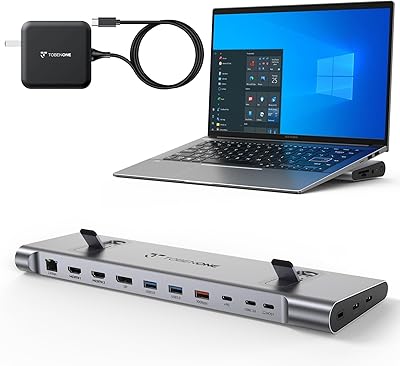
TobenONE UDS041W USB-C Triple Monitor Docking Station
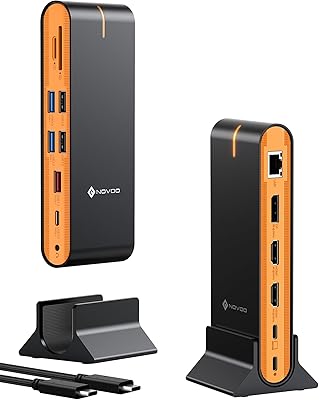
NOVOO 15-in-1 USB C Docking Station

LIONWEI Triple Monitor USB-C Docking Station
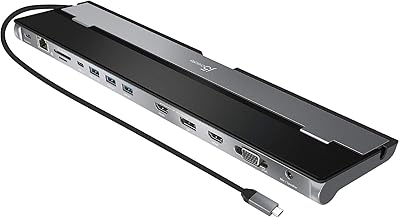
j5create USB-C Triple Monitor Docking Station JCD543
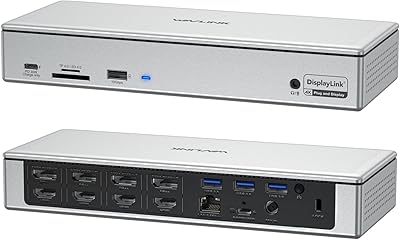
WAVLINK WL-UG69PD12 Quad Monitor Docking Station
HiDock H1 11-in-1 USB-C Docking Station
WAVLINK UMD05 USB-C Triple Display Docking Station