4URPC DSC05 USB-C Docking Station



Overview
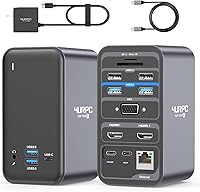
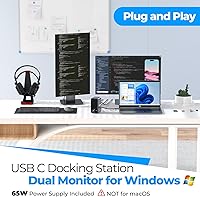
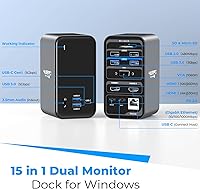
The 4URPC DSC05 USB-C Docking Station is a mid-range Windows-focused dock built for anyone who wants to drive two external monitors from a single USB-C port without buying a pile of separate adapters. Plug it in and you immediately gain access to 15 ports — displays, storage, networking, audio — all from one compact vertical unit that barely takes up desk space. Unlike many docks at this price, it ships with a 65W power adapter included, so your laptop charges while everything else runs. It officially supports Windows 10/11 and ChromeOS; macOS is not compatible, and 4URPC makes no attempt to hide that. A two-year warranty and an active support team round out a package that feels more considered than most.
Features & Benefits
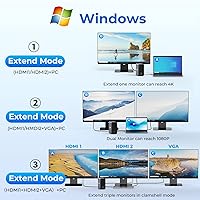
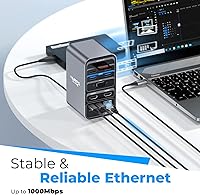
The two HDMI ports are the headline here — connect two HD monitors simultaneously for a proper dual-display workspace, or use just one for a single 4K output. Worth noting clearly: you cannot run both monitors at 4K at once. On the USB side, four USB 3.0 ports handle fast file transfers at up to 5 Gbps, while two USB 2.0 ports are sized well for a wireless keyboard and mouse dongle. The Gigabit Ethernet port is genuinely useful for remote workers; a stable wired connection makes a real difference during large uploads or video calls. There is also a combo audio jack, plus SD and TF card slots that photographers and content creators will actually reach for.
Best For
This USB-C dock is a natural fit for remote and hybrid workers who want one cable to drop their laptop onto a full desk setup and pick it back up without fuss. Dell, HP, Lenovo ThinkPad, and Microsoft Surface users will find broad compatibility, provided their USB-C port carries DisplayPort Alt Mode — if it does not, this docking station will simply not function, full stop. That point bears repeating because it catches buyers off guard regularly. Photographers appreciate having SD and TF card readers built right in. If you use a Mac, look elsewhere; the 4URPC dock is built exclusively for Windows and ChromeOS, and it handles that audience well.
User Feedback
Across more than 700 ratings averaging 4.2 stars, the 4URPC dock earns its score without any single feature stealing the spotlight. Most praise centers on plug-and-play reliability — people connect it and it simply works, with dual monitors and Ethernet running without driver headaches. Where it draws criticism is equally consistent: buyers discover after the fact that their laptop port lacks DisplayPort Alt Mode, which is a laptop-side limitation, not a dock defect. A handful of users report the unit runs noticeably warm under sustained load. The front USB-C port being data-only also surprises people expecting to charge a device from it. On a positive note, customer support responsiveness comes up repeatedly and reinforces the warranty claim.
Pros
- Dual HDMI ports let you run two HD monitors simultaneously from a single USB-C connection.
- The included 65W power adapter charges your laptop while all peripherals run — no separate charger needed.
- Gigabit Ethernet provides a stable, fast wired connection that Wi-Fi simply cannot match for large transfers.
- Four USB 3.0 ports at 5 Gbps handle fast external drives and quick file access without bottlenecking.
- Built-in SD and TF card readers are a practical touch that photographers and creators will use constantly.
- Setup is genuinely plug-and-play — most users report no driver installation required on Windows 10 and 11.
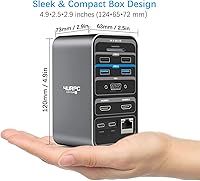
- The compact vertical footprint keeps desk clutter minimal even when every port is in use.
- A two-year warranty with an actively responsive support team adds a meaningful layer of purchase confidence.
- VGA output extends compatibility to older monitors and projectors that lack HDMI.
- The 3.5mm combo audio and mic jack covers headset users without requiring a USB audio adapter.
Cons
- No macOS support at all — a total dealbreaker for Apple laptop users.
- Requires a USB-C port with DisplayPort Alt Mode; many buyers discover too late their port lacks this.
- Dual-monitor mode is limited to HD resolution — 4K output ties up both HDMI ports for a single display.
- The front USB-C port handles data only and cannot charge phones, tablets, or other devices.
- The unit runs noticeably warm under sustained multi-device loads, which may be a concern in tight spaces.
- 65W power delivery may not fully keep up with high-performance laptops under heavy CPU or GPU load.
- No DisplayLink chip means video output depends entirely on the laptop's native USB-C capabilities.
- The dock does not support Chromebooks older than ChromeOS version 100, limiting older device compatibility.
Ratings
The scores below reflect an AI-driven analysis of verified global buyer reviews for the 4URPC DSC05 USB-C Docking Station, with spam, incentivized feedback, and bot activity actively filtered out before any scoring was applied. Each category captures what real Windows and ChromeOS users experienced day-to-day — not just out-of-box impressions — so both the strengths and the friction points are represented honestly.
Dual Monitor Performance
Port Selection & Variety
Plug-and-Play Setup
USB-C Compatibility Clarity
Ethernet Reliability
Power Delivery
Thermal Management
Build Quality
macOS Compatibility
Data Transfer Speed
Value for Money
Card Reader Utility
Customer Support
Physical Footprint
Suitable for:
The 4URPC DSC05 USB-C Docking Station was clearly designed with the Windows-based hybrid worker in mind, and it delivers well for that audience. If you spend part of your week at a desk and part on the move, the single-cable connection means you can drop your laptop in, have two monitors running, your keyboard and mouse connected, your Ethernet live, and your laptop charging — all in one plug. Dell XPS, HP Spectre, Lenovo ThinkPad, and Microsoft Surface users with a full-featured USB-C or Thunderbolt port will find this docking station slots into their workflow without much fuss. Photographers and content creators also get genuine value here, since the built-in SD and TF card readers save you from carrying a separate adapter just to offload a shoot. Anyone who would rather spend money on a capable all-in-one unit than cobble together several cheaper adapters will find this dock hits a practical sweet spot.
Not suitable for:
Mac users should stop reading here — the 4URPC DSC05 USB-C Docking Station does not support macOS, and that is a hard limitation with no workaround. Beyond the OS restriction, the single most common source of buyer frustration is a USB-C port that lacks DisplayPort Alt Mode; if your laptop's USB-C port is purely for data or charging, this docking station will not output video at all, regardless of how new or expensive your machine is. Users expecting to run two 4K monitors simultaneously will also be disappointed — dual-monitor mode operates at standard HD, and 4K output requires dedicating both HDMI ports to a single screen. The front USB-C port is data-only and cannot charge another device, which catches people off guard if they were planning to daisy-chain power to a phone or tablet. Finally, if you run the dock hard for long stretches, expect it to get noticeably warm, which may give pause to anyone planning to use it in an enclosed or poorly ventilated space.
Specifications
- Total Ports: The dock expands a single USB-C connection into 15 usable ports covering display, data, networking, audio, and card reading.
- HDMI Outputs: Two full-size HDMI ports support dual HD monitors simultaneously or a single 4K display when only one port is in use.
- VGA Output: One VGA port provides compatibility with older monitors and projectors that do not have HDMI inputs.
- USB 3.0 Ports: Four USB 3.0 Type-A ports deliver data transfer speeds up to 5 Gbps each, suitable for external drives and fast storage devices.
- USB-C Data Port: One USB-C port on the front of the unit supports data transfer at up to 5 Gbps but does not carry display output or device charging.
- USB 2.0 Ports: Two USB 2.0 ports are included for low-bandwidth peripherals such as wireless keyboard and mouse receivers.
- Power Delivery: A 65W AC power adapter is included in the box and supplies charging power to the connected Windows laptop via PD 3.0.
- Ethernet: An RJ-45 Gigabit Ethernet port supports wired network speeds of 10, 100, or 1000 Mbps for stable, low-latency connectivity.
- Card Readers: Dedicated SD and TF (microSD) card slots allow direct file access from camera cards without a separate adapter.
- Audio Jack: A single 3.5mm combo port supports both audio output and microphone input, compatible with standard headsets.
- Dimensions: The dock measures 3.1″ long by 2.8″ wide by 5″ tall in its upright vertical orientation.
- Weight: The unit weighs 1.1 pounds (17.6 oz), making it light enough to pack alongside a laptop for occasional travel.
- OS Support: Compatible with Windows 10 and Windows 11, as well as ChromeOS version 100 and newer; macOS is not supported.
- Host Connection: Connects to the host laptop via a single full-featured USB-C or Thunderbolt 3/4 port that supports DisplayPort Alt Mode.
- Warranty: 4URPC covers this docking station with a two-year defect warranty backed by a dedicated customer support team.
Related Reviews

Plugable UD-3900Z

WAVLINK WL-ST334UA Dual-Bay USB 3.0 Hard Drive Docking Station

StarTech DK31C3HDPD USB-C USB-A Docking Station
Targus DOCK182USZ USB-C Docking Station
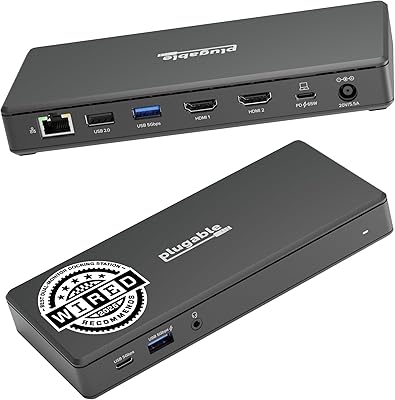
Plugable UD-MSTH2 USB-C Docking Station
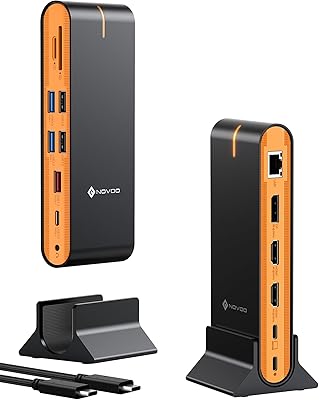
NOVOO 15-in-1 USB C Docking Station
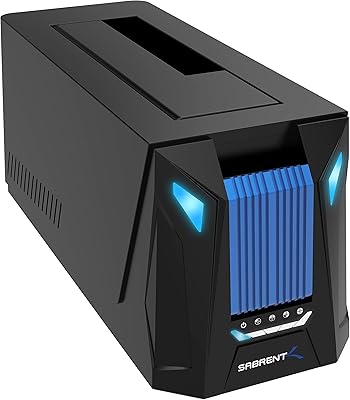
Sabrent DS-UNHC USB-C Docking Station
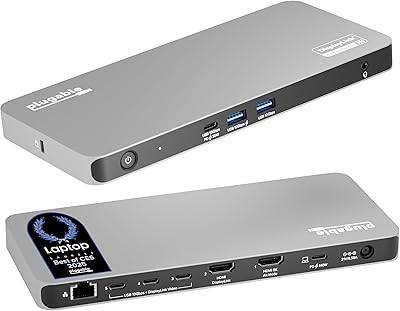
Plugable UD-7400PD 5-Monitor USB-C Docking Station

LIONWEI Triple Monitor USB-C Docking Station