ULSOU KM599 Wireless Keyboard and Mouse Combo

Overview
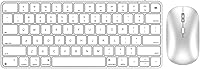
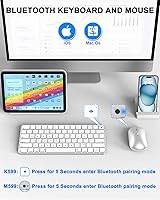
The ULSOU KM599 Wireless Keyboard and Mouse Combo arrived in late 2024 as one of the more thoughtfully designed budget options for Mac users who want Apple-inspired aesthetics without paying Apple prices. ULSOU is not a household name, and that is worth acknowledging upfront — but the brand has clearly done its homework. The slim white profile, Bluetooth-only connection, and Mac-native key layout all point to a product built with a specific audience in mind. No USB dongle to lose, no extra port sacrificed. The built-in rechargeable battery rounds out a package that punches well above its price tier for casual and everyday use.
Features & Benefits
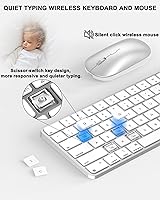
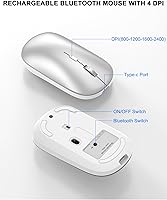
The 78-key Mac layout is one of the first things you notice — key placement mirrors what Mac users expect, with dedicated shortcuts for brightness, volume, and media controls sitting right where muscle memory wants them. Typing feel is quiet and low-travel thanks to the scissor-switch mechanism, making this Bluetooth keyboard and mouse a solid pick for open-plan offices or shared spaces. The mouse deserves attention too: four DPI settings spanning 800 to 2400 give real flexibility, and the symmetrical shape means left-handed users are not an afterthought. The auto-sleep function kicks in after ten minutes idle, helping stretch the battery well beyond a typical charge cycle.
Best For
This Mac keyboard combo is a natural fit for Mac and iPad users who want a peripheral that feels at home in the Apple ecosystem without the steep price. Students and remote workers in shared quiet spaces will appreciate the low-noise typing experience, and the slim form factor slides into a laptop bag without adding noticeable bulk. Left-handed users get a rare win with the ambidextrous mouse, genuinely comfortable from either side. If you prefer a cable-free desk and hate giving up a USB port to a dongle, this setup delivers exactly that. It is also a sensible choice for anyone building a clean, minimal home office on a budget.
User Feedback
Buyers generally respond well to the ULSOU wireless set, with the most common praise directed at how polished it looks for the price — many note it holds up visually against far pricier Mac peripherals. Typing feel draws favorable comparisons to the Apple Magic Keyboard, though experienced typists point out the key travel is slightly shallower. The initial Bluetooth pairing trips up some users on first setup, with a handful reporting the need to re-pair after a device restart. Mouse tracking on glossy or glass surfaces has come up as inconsistent in several reviews. Battery life gets mostly positive marks, though real-world results seem to land closer to six to eight weeks rather than the three months advertised.
Pros
- Mac-native key layout works out of the box with no remapping or driver installation required.
- Bluetooth-only design keeps every port on your Mac or iPad free for other use.
- Scissor-switch keys are genuinely quiet — comfortable for late-night work or open office environments.
- The ambidextrous mouse is a practical, underrated benefit for left-handed users.
- Ultra-slim profile makes this Bluetooth keyboard and mouse one of the easier combos to pack for travel.
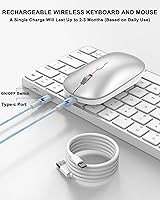
- Built-in rechargeable batteries eliminate the ongoing hassle and cost of disposable cells.
- The auto-sleep function helps preserve battery during passive or interrupted work sessions.
- Four DPI levels on the mouse provide real flexibility across different tasks and screen sizes.
- Clean white aesthetic pairs naturally with MacBook and iMac setups without looking out of place.
- At its price point, the overall feature set and build quality consistently exceed buyer expectations.
Cons
- Initial Bluetooth pairing can require multiple attempts and is not always smooth on first setup.
- Mouse tracking stutters noticeably on glass and high-gloss desk surfaces without a mousepad.
- Real-world battery life for moderate daily users runs well short of the three-month advertised figure.
- Key travel is shallow enough that fast or heavy typists may experience fatigue during long sessions.
- No battery level indicator means the combo can die mid-session without any low-power warning.
- The mouse click is louder than the keyboard, creating an uneven noise profile for silence-sensitive users.
- Plastic finish attracts fingerprints and smudges quickly, which is especially visible on the white surface.
- Pairing behavior after waking from sleep is inconsistent and occasionally requires manual reconnection.
- The mouse body is too compact for users with larger hands during extended daily use sessions.
- Brand is new enough that long-term durability data is limited, adding some uncertainty for longevity-focused buyers.
Ratings
The ULSOU KM599 Wireless Keyboard and Mouse Combo scores below are produced by AI analysis of verified global buyer reviews, with spam, bot-generated, and incentivized feedback actively filtered out before any scoring is applied. The results reflect what real everyday users experienced across a range of Mac-focused workflows — from home offices to college desks — capturing both what impressed them and what fell short of expectations. Strengths and frustrations are weighted equally, so the numbers tell the full story.
Value for Money
Keyboard Typing Feel
Mouse Performance
Bluetooth Connectivity
Battery Life
Build Quality & Materials
Design & Aesthetics
Portability
Mac & iPad Compatibility
Setup & Ease of Use
Multimedia Shortcut Keys
Noise Level
Charging & Power Management
Mouse Ergonomics
Suitable for:
The ULSOU KM599 Wireless Keyboard and Mouse Combo is a strong fit for Mac and iPad users who want a peripheral that looks and functions like it belongs in the Apple ecosystem without paying a premium for the Apple logo. Students who type in libraries, shared dorms, or quiet classrooms will appreciate the low-noise scissor switches and the slim profile that slides into any bag without adding bulk. Remote workers who already have too many cables and dongles cluttering their desk will find the Bluetooth-only approach genuinely freeing — no ports sacrificed, no receiver to misplace. Left-handed users get a practical win with the ambidextrous mouse, which is a rarer feature than it should be at this price tier. Minimalists building a clean, cable-free home office setup around a MacBook or iPad will find this combo fits that vision well, and casual daily users who do not push peripherals hard will likely be happy with the performance and battery for months at a time.
Not suitable for:
Buyers who depend on rock-solid, instant Bluetooth reconnection every time their Mac wakes from sleep may find the occasional pairing hiccup more frustrating than acceptable, especially in professional settings where lost seconds matter. The ULSOU KM599 Wireless Keyboard and Mouse Combo is also not the right call for heavy typists — copywriters, coders, or data entry professionals who hammer keys for six or more hours a day will likely want more key travel and tactile feedback than scissor switches at this level can provide. Anyone who regularly works on a glass desk or high-gloss surface should know upfront that the mouse tracking can struggle in those conditions, and a mousepad becomes essentially mandatory. Windows or Android users looking for a cross-platform combo will find the Mac-specific layout more of an inconvenience than a convenience, since the key labeling and shortcut logic are built squarely around macOS and iPadOS. Finally, buyers expecting the three-month battery life claim to hold under real daily workloads should temper that expectation — moderate-to-heavy users should plan on charging considerably more often.
Specifications
- Brand: Manufactured and sold under the ULSOU brand, a newer peripheral maker focused on Mac-compatible accessories.
- Model: The keyboard and mouse are identified as model KM599, sold exclusively as a matched combo unit.
- Connection Type: Bluetooth only — no 2.4GHz USB receiver is included or required, keeping all device ports fully available.
- Key Count: The keyboard features 78 keys arranged in a Mac-native layout, including 11 dedicated multimedia shortcut keys.
- Switch Type: Scissor-switch key mechanisms are used throughout, providing low-travel, relatively quiet keystrokes suited to shared environments.
- Mouse DPI: The optical mouse offers four selectable DPI levels: 800, 1200, 1600, and 2400, switchable via a dedicated button.
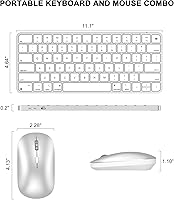
- Mouse Design: The mouse body is fully symmetrical, making it equally usable for right-handed and left-handed users without any adjustment.
- Battery Type: Both the keyboard and mouse use built-in lithium polymer rechargeable batteries; no disposable batteries are required or supported.
- Claimed Battery Life: ULSOU states a full charge can last up to 3 months, though real-world results vary depending on daily usage intensity.
- Auto-Sleep: Both devices enter a power-saving sleep mode automatically after 10 minutes of continuous inactivity to extend battery duration.
- Keyboard Dimensions: The keyboard measures 11.1 x 4.64 x 0.2 inches, making it one of the slimmer options in its category.
- Combo Weight: The full keyboard and mouse combo weighs 14.4 ounces, light enough for regular travel and bag-friendly portability.
- Compatible Systems: Designed for use with macOS, iOS, and iPadOS devices including MacBook Air, MacBook Pro, iPad, iPhone, and Mac mini.
- Color: Available in white only, with a finish designed to complement Apple hardware aesthetics on a home or office desk.
- Charging: Both devices charge via USB cable; no proprietary connector is used, though the specific cable type is not confirmed in official specs.
- Availability Date: The KM599 combo became available for purchase in October 2024, making it a relatively recent entry in its category.
- BSR Ranking: At the time of review data collection, this combo held a rank of number 99 in the Computer Keyboard and Mouse Combos category on Amazon.
- Warranty: ULSOU offers an after-sales warranty that extends beyond the standard Amazon return window, with resolution available by contacting the brand directly.
Related Reviews

ULSOU Wireless Ergonomic Keyboard and Mouse Combo

Arteck HW192 Wireless Keyboard and Mouse Combo

Harburfine Wireless Keyboard and Mouse Combo

GEEZER Wireless Keyboard and Mouse Combo

cimetech Wireless Keyboard and Mouse Combo

FOPETT Retro Wireless Keyboard and Mouse Combo

EDJO Wireless Keyboard and Mouse Combo

Trueque Wireless Keyboard and Mouse Combo

KNOWSQT Wireless Keyboard and Mouse Combo
