cimetech Wireless Keyboard and Mouse Combo




Overview
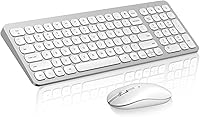
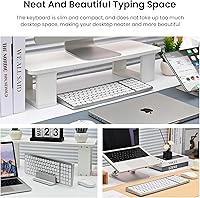
The cimetech Wireless Keyboard and Mouse Combo is a no-frills peripheral set aimed at home office users, remote workers, and students who want a tidy, quiet setup without spending a lot. cimetech is a smaller brand that has built a steady following on Amazon by hitting a practical sweet spot: thin, light, and easy to toss in a bag. The single USB nano-receiver handles both devices at once, which keeps setup simple and port usage low. This is not a power-user rig — it is an everyday solution for people who want dependable wireless without the complexity or cost of premium alternatives.
Features & Benefits
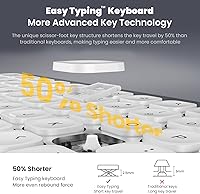
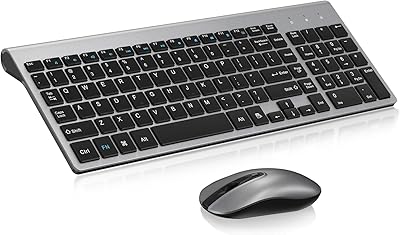
Despite its 0.2-inch thickness, this keyboard-mouse pair packs a full 99-key layout that includes a numeric keypad — something many slim keyboards sacrifice. The low-profile keys are noticeably quieter than standard membrane keyboards, and the mouse uses a silent-click mechanism, so the whole setup stays hushed whether you are in a coffee shop or a late-night home office session. Wireless range reaches up to 33 feet over 2.4GHz, and there is no software to install. Auto-sleep and physical on/off switches do a decent job stretching battery life, though heavy daily users may need to swap batteries more often than the marketing suggests. Multimedia hotkeys for volume and browser shortcuts round things out nicely.
Best For
This wireless combo makes the most sense for Windows users who need a practical, portable typing solution — Mac and Chrome OS users should look elsewhere, as official support stops at Windows 10. Remote workers who move between a home desk and a coffee shop will appreciate how flat and light it is; it slides into a bag without any fuss. Students upgrading from a cramped built-in laptop keyboard will find the full-size layout a genuine step up. It also suits anyone sharing a quiet space — an open-plan office or a library — where clicking noise matters. Keep in mind that one USB port will always be occupied by the nano-receiver.
User Feedback
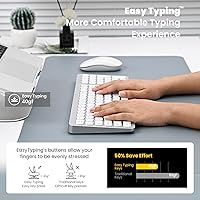
Across a large pool of reviews, the cimetech set earns consistent praise for two things: quiet key feel and how painlessly it gets going straight out of the box. Buyers who type for extended stretches report that the keys are comfortable enough to sustain long sessions without fatigue. The mouse, though, draws more mixed reactions — a recurring complaint involves the scroll wheel feeling cheap after a few months, and some buyers note that tracking sensitivity is adequate rather than precise. Battery drain is worth watching; moderate users fare well, but those who keep the combo running all day may find it depletes faster than the packaging implies. Build quality is decent but plainly budget-tier.
Pros
- Retains a full numeric keypad despite being only 0.2 inches thin — rare at this price.
- The low-profile keys are noticeably quieter than standard membrane boards, making shared spaces bearable.
- Silent mouse clicks keep the entire combo hushed, which is a genuinely useful feature in open offices.
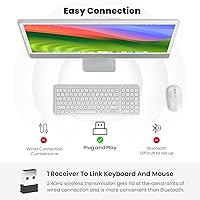
- Single nano-receiver handles both devices, so setup takes under a minute with zero software installs.
- Wireless range holds steady up to 33 feet, giving real freedom of placement around a desk or room.
- Auto-sleep and on/off switches mean batteries last a reasonable stretch under moderate daily use.
- The slim silver finish looks clean and uncluttered, fitting neatly into most home office aesthetics.
- Multimedia hotkeys for volume, email, and browsing save small but regular amounts of time across a workday.
- Lightweight enough to slide into a laptop bag without adding meaningful bulk for traveling users.
Cons
- The mouse scroll wheel feels flimsy and has drawn repeated durability complaints from buyers after a few months.
- Mouse tracking sensitivity is average at best — not suited for detail-oriented or precision-heavy tasks.
- Battery life under heavy daily use falls noticeably short of the advertised multi-month claims.
- Only officially compatible with Windows; Mac and Chrome OS users are simply not supported.
- One USB port is permanently occupied by the nano-receiver, which stings on laptops with limited ports.
- The overall build material feels plasticky in hand, which is noticeable if you have used mid-range peripherals before.
- No backlighting on the keyboard, which limits usability in dim environments for touch-typing beginners.
- The mouse size may feel small for users with larger hands during extended sessions.
- No dedicated media keys beyond basic hotkey shortcuts, which may frustrate users wanting richer controls.
Ratings
Our AI scoring engine analyzed thousands of verified global buyer reviews for the cimetech Wireless Keyboard and Mouse Combo, applying filters to remove incentivized, bot-generated, and duplicate submissions before assigning each category score. The result is an honest, data-driven breakdown that surfaces both what this keyboard-mouse pair genuinely does well and where real users have run into frustration. Nothing is glossed over — the scores reflect the full picture.
Ease of Setup
Typing Noise Level
Portability
Key Layout & Usability
Mouse Performance
Build Quality
Wireless Stability
Battery Life
Mouse Comfort
Value for Money
Compatibility
Desk Aesthetics
Multimedia Shortcuts
Suitable for:
The cimetech Wireless Keyboard and Mouse Combo is a strong fit for Windows users who want a clean, quiet peripheral setup without spending heavily. Remote workers who split time between home and a shared office or coffee shop will appreciate how flat and light the combo is — it barely adds weight to a laptop bag. Students who spend long hours typing in libraries or dorms will value the low-noise keys and silent mouse, which keep things civil in shared spaces. Anyone who has been tolerating a cramped built-in laptop keyboard and wants a full-size layout with a numeric keypad — without cluttering their desk — will find this a sensible step up. It also suits home office users who want tidy cable-free aesthetics on a budget and can live with one USB port dedicated to the nano-receiver.
Not suitable for:
The cimetech Wireless Keyboard and Mouse Combo is not the right pick for Mac or Chrome OS users, as compatibility stops at Windows 10 with no official support beyond that. Buyers who depend on precise mouse tracking — graphic designers, spreadsheet-heavy analysts, or anyone doing detailed on-screen work — will likely find the mouse undershoots their needs. If you type all day, every day at high volume, battery replacement will come sooner than the packaging implies, which adds a small but real ongoing cost. People who invest in quality peripherals expecting them to last several years should be cautious: the build materials are functional but reflect the budget price tier, and the mouse scroll wheel in particular has drawn durability complaints from longer-term owners. Gamers or anyone needing low-latency response, backlit keys, or programmable inputs should look at purpose-built options instead.
Specifications
- Keyboard Dimensions: The keyboard measures 14.5 x 5.1 x 0.2 inches, making it exceptionally flat and easy to slip into a laptop bag or thin sleeve.
- Item Weight: The full combo — keyboard and mouse together — weighs approximately 1.39 pounds, light enough for daily commuting without adding noticeable bulk.
- Key Count: The keyboard includes 99 keys in a full-size layout, retaining a numeric keypad that many ultra-thin keyboards omit at this size.
- Wireless Technology: Both devices connect via 2.4GHz RF (radio frequency) using a single USB nano-receiver, with no Bluetooth or multi-device pairing support.
- Wireless Range: The stated wireless operating range is up to 10 meters (approximately 33 feet) under typical indoor conditions with minimal interference.
- Receiver Setup: One USB nano-receiver manages both the keyboard and mouse simultaneously, requiring no additional software installation or driver downloads.
- OS Compatibility: The combo officially supports Windows XP, Vista, 7, 8, and 10 only; macOS and Chrome OS are not listed as compatible platforms.
- Mouse Design: The mouse features a contoured, silent-click design with a sweat-resistant, skin-friendly surface finish intended for extended comfortable use.
- Power Source: Both devices are battery-powered and include an auto-sleep function alongside physical on/off switches to help conserve battery between sessions.
- Color and Finish: The set is available in a silver colorway with an ultra-thin low-profile finish suited to minimalist or modern desk setups.
- Key Mechanism: The keyboard uses low-profile, noise-reduced keys designed to minimize typing sound in shared or quiet environments.
- Mouse Click Type: The mouse uses a silent-click mechanism that significantly reduces click noise compared to standard optical mice.
- Hotkeys: The keyboard includes dedicated multimedia hotkeys for functions including volume control, email access, internet browsing, and media playback.
- Brand and Maker: The product is sold under the cimetech brand and manufactured by cntorich, a budget-tier peripheral maker with a catalog presence on Amazon since 2022.
- Sales Rank: The combo holds a Best Sellers Rank of #67 in the Computer Keyboard and Mouse Combos category on Amazon, indicating strong sustained sales volume.
Related Reviews
cimetech KF10 Wireless Keyboard and Mouse Combo

Arteck HW192 Wireless Keyboard and Mouse Combo

Letton Wireless Retro Keyboard and Mouse Combo

JOYACCESS Wireless Keyboard and Mouse Combo

Harburfine Wireless Keyboard and Mouse Combo

seenda Wireless Keyboard and Mouse Combo

Mobifice Retro Wireless Keyboard and Mouse Combo

MOFII Wireless Keyboard and Mouse Combo

FOPETT Retro Wireless Keyboard and Mouse Combo
