Overview

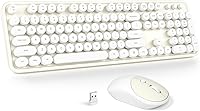
The GEEZER Wireless Keyboard and Mouse Combo is one of those budget picks that earns attention partly on aesthetics — the cream-white round keycaps carry a genuine retro typewriter charm that looks sharp on a desk. It runs a full 104-key layout paired with a wireless optical mouse, both handled by a single USB nano receiver. The target audience is clear: students, home office workers, and casual users who want something that looks put-together without overspending. It competes in a packed segment, and one practical note upfront — AA batteries required but not included in the box.
Features & Benefits

The single USB nano receiver connects both the keyboard and mouse at once — plug it in and you are working within seconds, no driver downloads, no setup menus to navigate. The 2.4GHz signal holds steadily up to 10 meters, which covers most home office or living room distances without issue. An auto-sleep function activates after roughly a minute of inactivity, which does stretch battery life in a meaningful way over weeks of use. The full-size numpad is a genuine plus for spreadsheet work or data entry, and the optical mouse tracks smoothly on most desk surfaces.

Best For

This wireless combo is a solid fit for students or anyone building their first wireless workstation on a limited budget. The retro styling makes it genuinely appealing for home desks where looks actually matter, and the plug-and-play setup means less tech-savvy users won't face any friction. It is built around Windows compatibility — Mac users should temper expectations, as the cross-platform claims in the product listing are optimistic at best. The typewriter-style keyboard and mouse also suits light daily use better than heavy workloads; those who type for hours on end may want something with more key travel.

User Feedback

With over 1,000 ratings and a 4.3-star average, the GEEZER keyboard set has clearly found a receptive audience. Buyers frequently highlight the visual appeal and how effortless setup is right out of the box. On the critical side, some users note that the key travel feels a bit shallow during longer typing sessions, and the mouse can feel light and plasticky in hand. The cream-white finish, while attractive initially, tends to pick up dirt over time. Missing batteries draw repeated complaints — a small omission that adds friction. Connectivity is generally reliable, though a few buyers mention intermittent lag.

Pros

  • Retro cream-white round keycaps give desks a distinctive, polished look at a fraction of typical aesthetic keyboard prices.
  • Single nano receiver handles both devices — no juggling multiple dongles or dealing with Bluetooth pairing headaches.
  • True plug-and-play setup: works immediately out of the box with zero driver installation on Windows.
  • Full 104-key layout with numpad makes it genuinely practical for spreadsheet users and data entry tasks.
  • Auto-sleep function meaningfully extends battery life during normal workday use with regular breaks.
  • Wireless range up to 10 meters comfortably covers living rooms, open desks, and couch setups.
  • Broad appeal for first-time PC users who want something that just works without any configuration.
  • The receiver stores inside the mouse, keeping it safe during transport or desk reorganization.
  • At this price tier, the combo offers solid visual and functional value for light daily use.

Cons

  • AA batteries are not included — an immediate out-of-pocket cost that feels like an oversight at any price.
  • No rechargeable battery option means recurring consumable costs and no eco-friendly alternative.
  • Cream-white keycaps visibly accumulate grime and skin oil within weeks of regular use.
  • Key legends on high-contact keys reportedly fade after a few months of consistent typing.
  • The mouse feels noticeably lightweight and plasticky, particularly for users with larger hands.
  • No battery level indicator on either device — dead batteries tend to appear without warning mid-session.
  • Mac compatibility is overstated in the listing; function keys and media controls behave inconsistently on macOS.
  • Shallow membrane key travel causes fatigue during extended typing sessions beyond casual use.
  • Wider keys like the spacebar can develop a subtle rattle as internal stabilizers loosen over time.
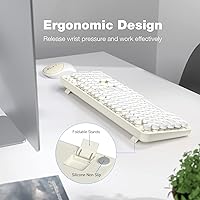
  • Wrist support is minimal — the slight incline does not substitute for genuine ergonomic relief during long sessions.

Ratings

The GEEZER Wireless Keyboard and Mouse Combo has been evaluated using AI-driven analysis of verified global buyer reviews, with spam, bot activity, and incentivized feedback actively filtered out before scoring. The ratings below reflect real-world usage patterns from students, home office workers, and casual PC users — capturing what buyers genuinely appreciate and where frustrations tend to surface. Strengths and pain points are both represented transparently, so you can make an informed decision rather than rely on polished marketing language.

Value for Money
83%
For the asking price, buyers consistently feel they are getting more than expected aesthetically. The combination of a full-sized keyboard and mouse in one wireless package at this price tier is hard to argue with, and most users feel the deal is fair for casual or secondary-PC use.
Those who push the setup through daily heavy typing or marathon work sessions start questioning the long-term value proposition. The missing AA batteries — not included in the box — add a small but irritating out-of-pocket cost right from day one.
Aesthetic Design
91%
The cream-white round keycaps consistently draw compliments in user reviews, with many buyers mentioning it as the primary reason they chose this over a generic black combo. It gives desks a clean, retro personality that stands out noticeably against standard office peripherals.
The light colorway is a double-edged sword — within a few weeks of regular use, smudges and grime accumulate visibly on the keycaps and palm rest area. Users with oily hands or those who eat at their desk report faster discoloration that is difficult to clean thoroughly.
Ease of Setup
94%
Plug-and-play functionality is one of the most praised aspects across the review base. Users — including older adults and first-time PC buyers — repeatedly note that the single nano receiver had both devices working within seconds, with zero driver hunting or configuration required.
A small number of users report that the nano receiver, stored inside the mouse compartment, can be easy to miss or lose during unboxing if you are not paying attention. There is no redundancy if the receiver is misplaced, which could be a costly inconvenience.
Typing Feel
67%
33%
For casual typing — emails, light document work, browsing — the keys feel responsive enough and the retro round-top keycaps give a tactile personality that membrane keyboards at this price rarely achieve. Occasional typists tend to enjoy the experience more than they expected.
Extended typing sessions reveal the shallow key travel and relatively soft actuation that is common in budget membrane boards. Users accustomed to mechanical keyboards or even mid-range office boards often find fatigue sets in faster, and the overall feedback lacks the crispness serious typists want.
Mouse Quality
62%
38%
Day-to-day navigation tasks — web browsing, clicking through documents, casual work — are handled adequately by the optical mouse. Tracking is smooth on standard desk surfaces, and the size fits average hands reasonably well for shorter work sessions.
The mouse feels noticeably lightweight and plasticky in hand, and several users describe the scroll wheel as flimsy over time. For users with larger hands or those expecting a more substantial grip, the mouse is the weaker half of this combo by a clear margin.
Wireless Connectivity
78%
22%
The 2.4GHz signal performs reliably within a standard room setup, and most users report no meaningful lag during everyday tasks. The 10-meter range is genuinely useful for living room or open-plan office arrangements where the receiver sits at a distance.
A recurring minority complaint involves intermittent micro-lag or brief dropout moments, particularly in environments with multiple wireless devices competing for signal. It is not a constant issue, but it surfaces enough across reviews to warrant mention for users in busy wireless environments.
Battery Life
71%
29%
The auto-sleep function — activating after roughly a minute of inactivity — makes a noticeable real-world difference in how long a set of AA batteries lasts. Users report going several weeks of regular use before needing a replacement, which is respectable for this category.
The absence of a rechargeable battery option means ongoing consumable costs that add up over months. There is also no battery level indicator on either device, so dead batteries tend to catch users off guard mid-session rather than offering any advance warning.
Build Quality
61%
39%
At a glance and on first touch, the keyboard does not feel embarrassingly cheap — the keys are stable and the base does not flex dramatically during normal typing. For occasional or light-use scenarios, the construction holds up adequately in the short term.
Under sustained daily use, the limitations of the budget plastics become apparent. Key stabilizers on wider keys like the spacebar can develop a slight rattle, and the mouse casing shows wear and minor creaking faster than buyers expect, even with careful handling.
Keycap Durability
59%
41%
The round typewriter-style keycaps are genuinely distinctive and add character to the keyboard that most budget alternatives lack. In the short term, the legends are clear and the keycap tops feel smooth without being slippery.
Longer-term feedback points to legend fading on frequently used keys — particularly Q, W, A, S, and the spacebar — after a few months of regular contact. The cream finish also shows shininess from skin oils in high-contact zones faster than darker-colored alternatives would.
Compatibility
64%
36%
For Windows users running any modern OS from Windows 7 onward, the combo works without any friction whatsoever. Most buyers using it on a standard Windows PC or laptop encounter exactly zero compatibility issues from start to finish.
The product listing implies broad compatibility including Mac and Chrome OS, but real-world Mac users frequently report missing function keys, inconsistent media control behavior, and no macOS-specific layout support. Mac buyers should approach this with lowered expectations.
Ergonomics & Comfort
58%
42%
The keyboard sits at a slight incline that works well enough for casual typing posture during short sessions. Most users find the default angle acceptable without needing to adjust anything, which keeps setup simple.
The ergonomics claim in the product description overstates reality. There is no meaningful wrist support — what exists is more of a shallow lip than a true wrist rest. Users typing for more than an hour at a stretch regularly report wrist fatigue that a proper ergonomic board would minimize.
Noise Level
77%
23%
The membrane construction keeps key noise to a relatively subdued level during normal typing. Shared-space users — students in libraries, remote workers in apartments — will find the sound profile unobtrusive compared to any clicky mechanical alternative.
The keys are not completely silent, and in quiet environments the soft thud of keystrokes is still audible to nearby people. The mouse click is particularly snappy-sounding relative to the rest of the combo, which a few users flag as inconsistent with an otherwise quiet board.
Portability & Packaging
72%
28%
The nano receiver tucks neatly inside the mouse for travel or storage, which is a genuinely practical design choice that budget combos often overlook. The overall weight keeps the setup light enough to move between rooms without hassle.
The packaging, while functional, does not inspire confidence on arrival — some buyers report the box arriving slightly crushed with minimal internal protection. The lack of a carrying case or storage pouch means traveling with this combo requires finding your own solution.

Suitable for:

The GEEZER Wireless Keyboard and Mouse Combo is a genuinely good fit for students, first-time PC builders, and casual home office workers who want a wireless setup that looks better than its price suggests. If your daily workload involves web browsing, email, light document editing, or spreadsheet work, this typewriter-style keyboard and mouse covers all of it without requiring any technical setup — plug in the receiver and you are running. It works particularly well for people who care about desk aesthetics but cannot justify spending significantly more on a premium board; the cream-white retro keycaps stand out in a sea of generic black peripherals at this price tier. The full-size layout with numpad is a real practical advantage for home users who do occasional data entry or financial tracking. Windows users specifically will have the smoothest experience, and anyone replacing a tangled wired setup with something cleaner and more flexible will find the 10-meter wireless range more than adequate for most room layouts.
Not suitable for:

The GEEZER Wireless Keyboard and Mouse Combo is not the right tool for power users, heavy daily typists, or anyone who expects professional-grade build quality at this price point. Writers or coders who spend four or more hours a day at a keyboard will likely find the shallow membrane key travel unsatisfying and fatiguing — this is a casual-use peripheral, not a workhorse. Mac users should be especially cautious: despite what the product listing implies, macOS compatibility is limited and inconsistent, with missing function mappings and no layout optimization for Apple operating systems. The mouse, while functional, feels lightweight and plasticky for users accustomed to a more substantial grip, and it will not satisfy anyone who values precision tracking for design work or gaming. The cream-white finish, while visually appealing, picks up dirt and skin oils faster than darker alternatives, making it a poor long-term choice for users who eat at their desk or skip regular cleaning. Finally, the absence of rechargeable batteries and any low-battery indicator means ongoing costs and the occasional surprise mid-session shutdown — small frustrations that add up for daily users.

Specifications

  • Brand: Manufactured and sold under the GEEZER brand.
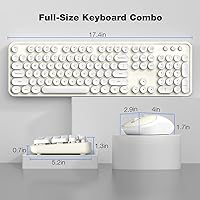
  • Keyboard Layout: Full-sized 104-key layout including a dedicated numeric keypad on the right side.
  • Keycap Style: Round-top retro typewriter-style keycaps in a cream-white colorway.
  • Connectivity: 2.4GHz wireless connection via a single USB nano receiver that handles both keyboard and mouse simultaneously.
  • Wireless Range: Operates reliably up to 10 meters (33 feet) from the USB receiver under typical conditions.
  • Mouse Type: Optical wireless mouse with smooth surface tracking suitable for standard desk and mousepad surfaces.
  • Receiver Storage: The USB nano receiver is stored inside a compartment in the mouse body when not in use.
  • Power Source: Both devices are powered by AA batteries, which are not included in the package.
  • Auto-Sleep: The keyboard enters sleep mode automatically after approximately one minute of inactivity to conserve battery life.
  • Driver Requirement: No driver installation is required; the combo is plug-and-play on supported operating systems.
  • OS Compatibility: Fully supported on Windows XP, Vista, 7, 8, and 10; limited and inconsistent functionality on macOS and Chrome OS.
  • Dimensions: The keyboard measures approximately 17.76 x 5.51 x 3.15 inches in its packaged form.
  • Weight: Total package weight is approximately 2.05 pounds including both keyboard and mouse.
  • Color: Available in cream-white, giving the combo a retro-inspired aesthetic suited to light-colored desk setups.
  • Best Sellers Rank: Ranked #341 in the Computer Keyboard and Mouse Combos category on Amazon at time of review.
  • Release Date: First made available for purchase on April 11, 2023.
  • Warranty & Support: GEEZER offers customer support via Amazon messaging with a stated response window of within 12 hours.

Related Reviews

Arteck HW192 Wireless Keyboard and Mouse Combo

78%
78%
Build Quality
72%
Typing Experience
63%
Mouse Comfort & Ergonomics
81%
Battery Life
69%
Wireless Connectivity
More
Cimetech Wireless Keyboard and Mouse Combo
88%
91%
Value for Money
88%
Ease of Use
83%
Connectivity
94%
Portability
85%
Ergonomics
More
MOFII Wireless Keyboard and Mouse Combo

84%
94%
Ease of Setup
85%
Ergonomics and Comfort
90%
Wireless Connectivity
88%
Design and Aesthetics
83%
Battery Life
More
Harburfine Wireless Keyboard and Mouse Combo
85%
88%
Ergonomics & Comfort
93%
Quietness & Noise Level
85%
Wireless Connectivity & Range
84%
Battery Life & Power Management
90%
Setup & Installation
More
seenda Wireless Keyboard and Mouse Combo
88%
89%
Typing Comfort
87%
Ergonomics
82%
Wireless Connectivity
94%
Setup & Installation
88%
Key Spacing & Accuracy
More
TKVPJYYI Wireless Retro Typewriter Keyboard and Mouse Combo
76%
88%
Design & Aesthetics
71%
Typing Experience
62%
Mouse Performance
58%
Build Quality
83%
Wireless Connectivity
More
Arcwares Wireless Keyboard and Mouse Combo
78%
88%
Value for Money
91%
Aesthetic Design
76%
Keyboard Typing Experience
67%
Mouse Performance
84%
Wireless Connectivity
More
ULSOU Wireless Keyboard and Mouse Combo
85%
88%
Ergonomics and Comfort
92%
Battery Life
84%
Typing Experience
87%
Wireless Connectivity
80%
Mouse Performance
More
Mobifice Wireless Keyboard and Mouse Combo
87%
89%
Ergonomics & Comfort
92%
Design & Aesthetics
83%
Battery Life
95%
Ease of Use & Setup
88%
Wireless Connectivity
More
JOYACCESS Wireless Keyboard and Mouse Combo

82%
88%
Value for Money
83%
Typing Experience
74%
Mouse Performance
86%
Backlight Quality
81%
Battery Life
More

FAQ

No, nothing to install at all. Just pull the nano receiver out of the mouse compartment, plug it into a USB port on your computer, and both devices connect automatically. It works on Windows straight away without touching any settings.

It tucks into a small compartment inside the mouse body, which is actually a thoughtful design choice. It means you are unlikely to lose it during a move or desk reorganization, and it keeps things tidy when packing up.

Technically it will register as a keyboard and mouse on a Mac, but the experience is inconsistent. Function keys may not map correctly, media controls can behave unexpectedly, and there is no macOS-specific layout support. If you are primarily a Mac user, this wireless combo is probably not the best fit for you.

Both the keyboard and the mouse run on AA batteries, but none are included in the box, which is worth knowing before you order. You will want to have a couple of AAs on hand for setup day. There is no rechargeable option built in, so factor in the ongoing cost of batteries if you use this daily.

That depends on your usage, but the auto-sleep function — which kicks in after about a minute of inactivity — does a solid job of extending battery life. Moderate daily users generally report getting several weeks out of a set of batteries before needing replacements. Heavy all-day typists will burn through them faster.

For the majority of users in typical home or office environments, the 2.4GHz connection is stable and responsive for everyday tasks. A minority of buyers do report occasional brief lag or dropout, particularly in spaces with a lot of competing wireless devices. For casual use like email and browsing, most people never notice any issue.

Honestly, yes — this is one of the more common complaints from long-term users. The light keycaps pick up fingerprint oils and desk grime noticeably faster than a black keyboard would. Regular light cleaning with a slightly damp cloth helps, but if you eat at your desk or have particularly oily skin, be prepared to clean it more often than you might expect.

Not really. It is a membrane keyboard with no anti-ghosting or gaming-specific features, and the mouse lacks the precision sensor and programmable buttons that even entry-level gaming mice offer. It is built for everyday productivity and light use, not fast-paced gaming where response time and accuracy really matter.

Just press any key on the keyboard or click the mouse — either action wakes it up immediately. There is a brief half-second response when waking from sleep, which most users never notice during normal use.

The stated 10-meter range holds up well in open spaces without many obstructions. In practice, across a standard-sized room with a clear line of sight to the receiver, performance is consistent. Walls, metal furniture, and other wireless interference can reduce effective range somewhat, but for typical home and office setups the range is more than sufficient.