EDJO Wireless Keyboard and Mouse Combo

Overview
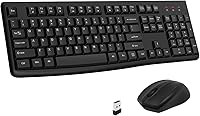
The EDJO Wireless Keyboard and Mouse Combo sits comfortably in the budget tier, but it doesn't feel like a compromise the moment you unbox it. A full-sized layout with an integrated palm rest, a single USB nano-receiver that handles both devices, and a weight just over 1.5 pounds — it's a practical desk setup for anyone tired of cable clutter. Launched in early 2023, it has quietly climbed to a top-150 ranking in its category, which says something about how well it resonates with everyday home office users and casual typists.
Features & Benefits
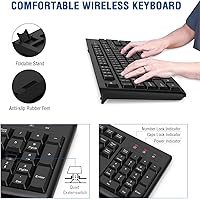
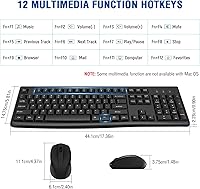
What makes this wireless combo genuinely useful day-to-day is that the features actually address real annoyances. The silent membrane keys keep noise down in shared offices or late-night work sessions without sacrificing too much tactile feedback. A foldable tilt stand lets you adjust the keyboard angle, which helps if you type for long stretches. The mouse offers three DPI levels, so you can dial in cursor speed whether you're editing a spreadsheet or browsing casually. Both devices also slip into auto-sleep mode automatically — the keyboard after about six minutes of inactivity, the mouse much sooner — which keeps you from burning through batteries too fast. Twelve multimedia hotkeys round things out nicely.
Best For
This keyboard-and-mouse bundle makes the most sense for home office workers, students, and anyone setting up a secondary desk without wanting to overspend. Plug it into your PC or laptop and it just works — no drivers needed, no pairing ritual. The 33-foot wireless range is more than enough for a standard desk, and having one receiver handle both devices simplifies the setup considerably. Mac users can use it, but should know that several multimedia keys won't function as labeled on macOS. For Windows users across older and current OS versions, compatibility is essentially a non-issue, making the EDJO set a solid pick for mixed-OS households.
User Feedback
Most buyers are quick to praise how effortlessly this wireless combo gets up and running — setup takes under a minute, and for the price, many feel they got more than they bargained for. The palm rest earns consistent compliments from people who spend long hours at a desk. That said, a recurring complaint involves the mouse scroll wheel feeling a bit cheap or imprecise after extended use. Some also find the key travel shallower than expected. Battery life gets mostly positive marks overall. Mac users occasionally flag limited hotkey support on macOS, so if that platform is your primary environment, go in with realistic expectations.
Pros
- Plug-and-play setup works instantly — no drivers, no pairing, no frustration.
- One nano-receiver handles both devices, keeping your USB ports free.
- Silent membrane keys are genuinely quiet enough for shared offices and late-night sessions.
- The integrated palm rest provides real wrist support during extended typing sessions.
- Auto-sleep on both devices keeps battery consumption impressively low over time.
- Three adjustable DPI levels make the mouse adaptable across different tasks and surfaces.
- The 33-foot wireless range is more than sufficient for any standard home or office desk setup.
- A 12-month warranty that outlasts the Amazon return window adds meaningful peace of mind.
- Full-sized layout with numpad is a practical advantage for users who do regular data entry.
- Lightweight build makes this keyboard-and-mouse bundle easy to move between rooms or workspaces.
Cons
- Batteries are not included — you will need AA and AAA cells before you can use it out of the box.
- The mouse scroll wheel feels cheap and can become inconsistent after a few months of regular use.
- Key travel is shallow and feedback is mushy, which will disappoint faster or heavier typists.
- Mac users lose access to most multimedia hotkeys, making that feature set largely irrelevant on macOS.
- The tilt stand offers only one fixed angle, limiting ergonomic adjustment for different desk heights.
- The mouse housing flexes slightly under a firm grip and shows wear faster than expected.
- Num Lock and Caps Lock indicators are small and hard to spot in brightly lit environments.
- The keyboard takes a brief moment to wake from deep sleep, which can interrupt quick return-to-work moments.
- Plastic surfaces on both devices attract smudges and light scratches with everyday handling.
- Buyers in high-interference wireless environments may notice occasional connectivity hiccups.
Ratings
The EDJO Wireless Keyboard and Mouse Combo has been evaluated by our AI system after processing thousands of verified global buyer reviews, with spam, bot-generated entries, and incentivized feedback actively filtered out. The scores below reflect an honest cross-section of real user experiences — both the aspects that genuinely impressed buyers and the friction points that came up repeatedly. Nothing has been softened or inflated.
Value for Money
Ease of Setup
Keyboard Typing Feel
Mouse Performance
Wireless Connectivity & Range
Battery Life
Build Quality & Durability
Ergonomics & Comfort
Noise Level
Mac Compatibility
Multimedia Hotkeys
Portability & Size
Indicator Lights & Status Visibility
Warranty & After-Sales Support
Suitable for:
The EDJO Wireless Keyboard and Mouse Combo was clearly built with a specific type of buyer in mind, and for that buyer it delivers reliably. Students setting up a dorm desk, remote workers who need a clean, cable-free workspace on a tight budget, and casual home users who spend their time on emails, spreadsheets, and light browsing will all find this combo more than adequate. The plug-and-play setup makes it especially appealing to less tech-savvy users — parents setting up a family computer, retirees upgrading an older desktop, or anyone who simply doesn't want to wrestle with drivers or pairing menus. The silent keys make it a considerate choice for shared apartments, open-plan offices, or anyone who works late while others sleep nearby. Windows users in particular get the full feature set, including all 12 multimedia hotkeys, making this a genuinely practical daily driver for that platform.
Not suitable for:
The EDJO Wireless Keyboard and Mouse Combo has real limitations that certain buyers will hit quickly, and it's worth being honest about them before you purchase. If you're a touch typist who logs heavy hours — writing long reports, coding, or doing serious data entry — the shallow membrane keys and modest tactile feedback will likely frustrate you within days. Dedicated Mac users should think carefully, since a meaningful portion of the multimedia hotkeys simply don't function on macOS, reducing one of the combo's headline features to near-irrelevance on that platform. The mouse scroll wheel in particular has drawn enough criticism from daily power users that if precise, consistent scrolling matters to your workflow — think long code files, dense documents, or frequent web research — you may find yourself annoyed sooner than expected. Gamers, graphic designers, and anyone who demands precision peripherals should look elsewhere entirely; this bundle was never designed for those use cases. Finally, buyers who prefer a compact tenkeyless layout will find the full-sized footprint with numpad a space constraint on smaller desks.
Specifications
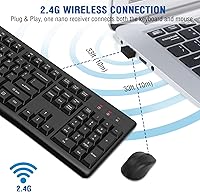
- Wireless Technology: Both the keyboard and mouse connect via 2.4GHz RF using a single USB nano-receiver, requiring no Bluetooth pairing or software installation.
- Wireless Range: The connection maintains stable performance at distances up to 33 feet (10 meters) from the USB receiver under typical indoor conditions.
- Keyboard Layout: Full-sized layout including a dedicated numeric keypad, function row, and navigation cluster, suited for data entry and general office work.
- Keyboard Dimensions: The keyboard measures 17.36 x 5.81 x 0.9 inches, with non-slip pads on the underside to keep it steady on flat desk surfaces.
- Total Weight: The combined package weighs approximately 1.52 pounds, making it light enough to reposition easily between workspaces.
- Palm Rest: An integrated, fixed palm rest is built into the front edge of the keyboard to support the wrists during extended typing sessions.
- Tilt Stand: A foldable tilt stand on the keyboard underside provides a single elevated angle to adjust the typing position to a more ergonomic incline.
- Key Technology: Silent membrane key switches are used throughout, designed to reduce audible keystroke noise in shared or quiet working environments.
- Multimedia Hotkeys: 12 dedicated multimedia hotkeys provide direct access to functions including volume control, email, browser favorites, and media playback on Windows.
- Mouse DPI: The optical mouse supports three selectable DPI sensitivity levels, allowing the user to adjust cursor speed for different tasks and surface types.
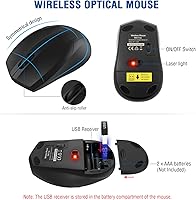
- Mouse Design: The mouse features a symmetrical shape suitable for both left- and right-handed users, with standard left, right, and scroll wheel buttons.
- Keyboard Battery: The keyboard requires one AA battery (not included) and enters an automatic sleep state after approximately 6 minutes of inactivity to conserve power.
- Mouse Battery: The mouse requires two AAA batteries (not included) and enters sleep mode after approximately 25 seconds of inactivity.
- USB Receiver Storage: The USB nano-receiver is stored inside the mouse battery compartment during transport, keeping it secure and preventing loss before first use.
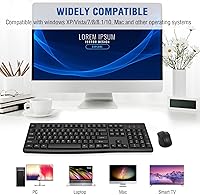
- OS Compatibility: The combo is compatible with Windows XP, Vista, 7, 8, 8.1, and 10, as well as Mac OS, though some multimedia hotkeys are non-functional on macOS.
- Status Indicators: Three LED indicators for Num Lock, Caps Lock, and power status are located in the upper right corner of the keyboard for at-a-glance monitoring.
- Driver Requirement: No drivers or additional software are required; the combo operates as a plug-and-play HID device on all supported operating systems.
- Warranty: EDJO provides a 12-month warranty covering manufacturing defects, which remains valid beyond the standard Amazon return window through direct seller contact.
Related Reviews
EDJO Foldable Wireless Keyboard Mouse Combo

Arteck HW192 Wireless Keyboard and Mouse Combo

UBOTIE Wireless Keyboard and Mouse Combo

SABLUTE Wireless Backlit Keyboard and Mouse Combo

Vssoplor Wireless Keyboard and Mouse Combo

CHESONA Multi-Device Wireless Keyboard and Mouse Combo

HP 18H24AA Wireless Keyboard and Mouse Combo

MPTOG S801AG Wireless Keyboard and Mouse Combo

QUASIO Wireless Keyboard and Mouse Combo
