MOFII Wireless Keyboard and Mouse Combo





Overview
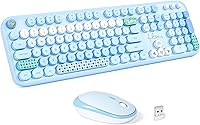
The MOFII Wireless Keyboard and Mouse Combo is one of those rare budget picks that leads with personality rather than apologizing for its price. The pale blue colorway is not an afterthought — it is clearly the whole point, designed to give a desk setup some visual life without requiring a full aesthetic overhaul. A single USB nano receiver connects both devices, keeping the setup dead simple. Plug it in and you are working in seconds. Sitting at #777 in its Amazon category, this wireless combo has found a real audience, and that kind of ranking does not come from marketing alone.
Features & Benefits
The 2.4GHz wireless connection is genuinely reliable day-to-day — no Bluetooth pairing dance, no driver installation, just a nano receiver handling both the keyboard and mouse from up to 33 feet away. The keyboard's round keycaps are the tactile talking point here. They feel slightly softer and more cushioned than standard flat chiclet keys, which makes longer typing sessions a bit more forgiving on the fingertips. An auto sleep mode kicks in after a minute of idle time, stretching battery life without any manual fuss. The bundle also runs on Windows, Mac, ChromeOS, and Smart TV systems, covering most households without compatibility headaches.
Best For
This wireless combo makes the most sense for students and remote workers who want their desk to look as good as it functions. If your workday involves browsing, writing, light spreadsheets, or streaming from a media PC, the keyboard-and-mouse bundle covers that territory comfortably. It is also a genuinely practical choice for Smart TV setups — 33 feet of range means controlling things from across the room without standing up. Gift buyers will appreciate that this MOFII set looks more expensive than it is, which is half the battle when shopping for someone else on a reasonable budget.
User Feedback
Buyers consistently highlight two things: setup takes seconds and the aesthetic genuinely delivers in person. The pale blue finish photographs well and reads as more premium than the price suggests. On the flip side, mouse tracking draws more criticism than the keyboard — several users note it feels adequate for casual use but falls short for anything requiring precision, like photo editing or fast gaming. Key travel is another common observation; the keys are comfortable but feel shallow to experienced typists. A handful of buyers mention that customer support responded quickly when issues arose, which counts for something at this price tier.
Pros
- Single nano receiver connects both devices instantly — no software, no pairing, no fuss.
- Round keycaps feel noticeably softer underfoot than standard flat keys, easing longer casual typing sessions.
- Works across Windows, Mac, ChromeOS, and Smart TV without any driver installation.
- The pale blue aesthetic genuinely stands out and looks more premium than the price implies.
- Auto sleep mode kicks in after a minute idle, helping stretch battery life passively.
- 33-foot wireless range covers living rooms and open office desks without signal dropouts.
- Full 104-key layout means no compromises on number pad or function row access.
- Lightweight package makes it easy to move between rooms or pack for travel.
- Setup is genuinely plug-and-play — most buyers report being up and running in under a minute.
- Customer support responds within 24 hours via email, which offers some peace of mind at this price tier.
Cons
- Mouse tracking lacks the precision needed for design work, photo editing, or any detail-heavy tasks.
- Key travel is shallow, which can feel unsatisfying for touch typists used to a deeper keystroke.
- Build materials feel light and plasticky — long-term durability is uncertain under heavy daily use.
- The one-minute auto sleep delay can feel abrupt during reading-heavy sessions with infrequent input.
- Mouse click feedback is soft and lacks the crisp tactile response that many buyers prefer.
- No dedicated media keys or shortcuts, limiting quick-action options for productivity-focused users.
- Battery compartment covers on budget combos like this can loosen or crack over time with repeated access.
- The nano receiver is small enough that losing it effectively disables the entire wireless setup.
- Color accuracy can vary from product photos, with some buyers noting the blue reads lighter or different in person.
Ratings
The scores below reflect an AI-driven analysis of verified global buyer reviews for the MOFII Wireless Keyboard and Mouse Combo, with spam, bot-generated, and incentivized feedback actively filtered out before scoring. Each category is weighted against real-world usage patterns reported by buyers across casual home setups, student desks, and media PC configurations. Both the genuine strengths and the honest shortcomings of this wireless combo are transparently reflected in every score.
Value for Money
Ease of Setup
Keyboard Typing Feel
Mouse Performance
Design & Aesthetics
Wireless Reliability
Battery Life
Build Quality
OS Compatibility
Key Stability & Noise
Portability
Customer Support
Suitable for:
The MOFII Wireless Keyboard and Mouse Combo is a strong fit for anyone who wants a functional, visually appealing wireless setup without spending a lot. Students setting up a dorm desk, remote workers who do most of their computing in a browser, and casual home users who type documents or send emails will find everything they need here and nothing they do not. The pale blue design appeals to those who treat their desk as a personal space worth curating, making this wireless combo a popular pick for aesthetic-focused setups. Smart TV and media PC users will appreciate the 33-foot range, which means comfortable couch control without line-of-sight fussing. It also works well as a thoughtful, practical gift — it looks considered, sets up in seconds, and covers the basics across Windows, Mac, and ChromeOS devices.
Not suitable for:
The MOFII Wireless Keyboard and Mouse Combo is not the right tool for anyone who depends on their peripherals for high-demand work. Graphic designers, video editors, and anyone doing pixel-level work will likely find the mouse tracking too imprecise for comfortable daily use. The shallow key travel, while fine for light typing, will frustrate experienced typists who are used to more tactile feedback or longer key stroke depth. Gamers should look elsewhere entirely — the combo offers no low-latency mode, no programmable inputs, and the mouse is simply not built for fast, accurate cursor movement. If long-term durability is a priority, the budget-tier build quality means you should temper expectations; this is a set that earns its keep for a year or two of moderate use, not a decade.
Specifications
- Connectivity: Both the keyboard and mouse connect via a single 2.4GHz USB nano receiver with no Bluetooth pairing required.
- Wireless Range: The combo operates reliably at distances of up to 10m (33ft) from the connected receiver.
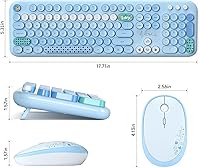
- Key Count: The keyboard features a full-sized 104-key layout, including a dedicated number pad and function row.
- Keycap Style: All keys use a round keycap design, which gives the keyboard a softer visual profile and a slightly cushioned typing feel compared to standard flat keycaps.
- Sleep Mode: The keyboard enters auto sleep mode after 1 minute of inactivity and wakes instantly upon pressing any key or moving the mouse.
- Color: The set is available in Pale Blue, a soft pastel colorway applied consistently across both the keyboard and mouse.
- Package Dimensions: The full package measures 17.83 x 5.55 x 2.76 inches, sized to house both devices together.
- Package Weight: The total packaged weight of the keyboard-and-mouse bundle is 2.02 pounds.
- OS Compatibility: This wireless combo is compatible with Windows XP, 7, 8, and 10, as well as Mac, iOS, ChromeOS, and most Smart TV platforms.
- Driver Requirement: No driver installation is required; the set is fully plug-and-play upon inserting the USB nano receiver.
- Receiver Type: A single mini USB nano receiver connects both devices simultaneously, leaving only one USB port occupied.
- Brand: This wireless combo is manufactured and sold by MOFII, a peripheral brand focused on affordable and design-forward input devices.
- Launch Date: The keyboard-and-mouse bundle was first made available on Amazon in May 2024.
- BSR Ranking: The set holds a Best Sellers Rank of #777 in the Computer Keyboard and Mouse Combos category on Amazon.
- Input Technology: The keyboard uses standard membrane key switches, which are characteristic of the round keycap design at this price tier.
Related Reviews

Arteck HW192 Wireless Keyboard and Mouse Combo

Harburfine Wireless Keyboard and Mouse Combo

Letton Wireless Retro Keyboard and Mouse Combo

FOPETT Retro Wireless Keyboard and Mouse Combo

KNOWSQT Wireless Keyboard and Mouse Combo

EDJO Wireless Keyboard and Mouse Combo

ULSOU Wireless Ergonomic Keyboard and Mouse Combo

Mobifice Retro Wireless Keyboard and Mouse Combo

GEEZER Wireless Keyboard and Mouse Combo
