Overview

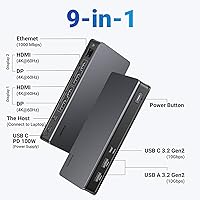
The UGREEN Revodok Pro 209 USB-C Docking Station is built around DisplayLink technology, which makes it one of the few docks capable of driving two external monitors from a single USB-C connection — including on Macs, where dual-display expansion is otherwise blocked without a Thunderbolt hub. That alone sets it apart in the mid-range docking market. The 9-in-1 port layout covers display outputs, data, charging, and networking in a single compact unit. It targets professionals who want a clean, capable desk setup without spending premium Thunderbolt dock prices.
Features & Benefits

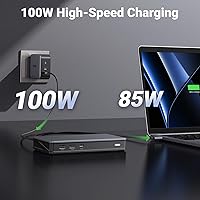
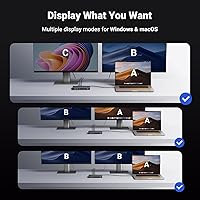
The display output is where this UGREEN dock genuinely delivers. Two HDMI 2.0 and two DisplayPort 1.4 connections support up to 4K at 60Hz each — but only two can be active at once for dual-monitor use. Worth noting upfront: the DisplayLink driver must be installed before any of that works, which adds a small but real setup step on macOS. Data transfers move at up to 10Gbps across three ports. The built-in 100W Power Delivery port keeps a MacBook Pro charged through the same cable, and Gigabit Ethernet replaces shaky Wi-Fi with a reliable wired connection. At 6.54 x 3.15 x 0.91 inches, it barely takes up desk space. One honest gap: there is no SD card reader.

Best For

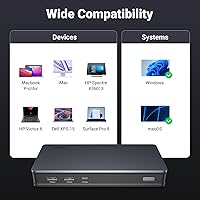
The Revodok Pro 209 is a strong match for MacBook Air and Pro users who need two external displays and have hit the usual single-monitor wall. It is equally capable with Windows machines like the Dell XPS or Surface Pro, making it flexible across platforms. Remote workers who rely on wired Ethernet stability over Wi-Fi will find the built-in port genuinely useful. That said, this USB-C hub is best suited for those who prioritize display expansion and fast charging over everything else. If you need an SD card slot for daily photo imports, or want wireless docking features, this is not the right fit.

User Feedback

Across more than 700 ratings, this UGREEN dock holds a 4.1-star average — respectable, though not without caveats. On the positive side, Windows users consistently report a smooth setup experience, stable dual-monitor output, and fast charging performance that lives up to the spec. Mac users tend to have a more mixed time: the DisplayLink driver requirement catches some off guard, and a portion of reviewers note a noticeable jump in CPU and GPU load after installation. Heat during extended use comes up occasionally, though it does not appear to be a widespread issue. The missing SD card slot and the lack of an included power adapter are the two most common points of frustration, especially at this price level.

Pros

  • Enables true dual 4K at 60Hz on MacBooks without requiring an expensive Thunderbolt hub
  • 100W Power Delivery charges a MacBook Pro fully through the same cable that carries data and video
  • Gigabit Ethernet replaces unreliable Wi-Fi with a wired connection that stays stable during long video calls
  • Three 10Gbps USB ports handle fast external SSD transfers and peripherals without bottlenecking
  • Low-profile design fits neatly on a desk without dominating the workspace or snagging cables
  • Works across both macOS and Windows, making it a versatile dock for mixed-platform households or offices
  • The included USB-C cable is good quality and rated for full power and data delivery
  • Solid build holds up to daily plug-and-unplug cycles without the port wobble common in budget hubs
  • Windows users report a near plug-and-play experience with minimal driver friction at first setup
  • Four display output ports give flexibility to mix and match HDMI and DisplayPort monitor combinations

Cons

  • No SD or microSD card reader included, a notable gap for photographers at this price point
  • Power adapter not included in the box, requiring a separate purchase before the dock is fully usable
  • DisplayLink driver installation on macOS is mandatory and catches many first-time buyers off guard
  • Running DisplayLink software increases CPU and GPU load on Apple silicon Macs, affecting thermal performance
  • No 3.5mm audio jack means audio passthrough is not available for wired headsets or speakers
  • macOS system updates can break DisplayLink compatibility, requiring a driver reinstall before displays reactivate
  • The dock runs noticeably warm under full load with dual 4K monitors and multiple peripherals active
  • No HDMI or DisplayPort cable is included, adding to the out-of-box cost for new buyers
  • Occasional display reconnection issues after sleep or wake cycles have been flagged by a subset of Mac users
  • Not ideal for users who need more than two active display outputs simultaneously

Ratings

The UGREEN Revodok Pro 209 USB-C Docking Station earns an overall 4.1-star consensus from over 700 verified buyers worldwide — a score our AI rating engine has stress-tested by filtering out incentivized reviews, bot activity, and duplicate submissions to surface what real daily users actually experience. The scores below reflect a honest cross-section of genuine strengths and recurring friction points, so you can make a fully informed decision before buying.
Dual Monitor Performance
83%
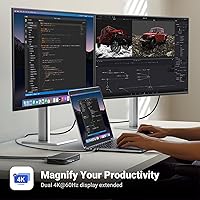
For Mac users who have wrestled with the single-display limitation of standard USB-C hubs, the DisplayLink-powered output here is a meaningful unlock. Running two 4K monitors at 60Hz simultaneously — one via HDMI, one via DisplayPort — holds up reliably in day-to-day multitasking, spreadsheet work, and video playback without dropped frames or resolution degradation.
The DisplayLink driver requirement is a real barrier for some Mac users, adding a setup step that catches a surprising number of buyers off guard. A small subset of reviewers also report occasional flickering or reconnection issues after waking from sleep, which can be disruptive in professional settings.
Driver Setup & Compatibility
61%
39%
On Windows machines like the Dell XPS or Surface Pro, setup is close to plug-and-play — drivers either install automatically or require minimal effort, and the dual-display output works within minutes. That straightforward experience accounts for a meaningful chunk of the positive feedback this dock receives.
macOS users face a noticeably steeper curve. Installing the DisplayLink driver manually, granting screen recording permissions, and occasionally rebooting before everything activates properly is not a dealbreaker, but it is friction that buyers at this price tier do not always anticipate. Compatibility is also narrower on older Mac models.
Build Quality & Design
78%
22%
The dock feels solid and purposeful in hand — not plasticky or hollow. Its low-profile shape (under an inch tall) and matte black finish blend naturally into most desk setups, and the port placement is practical enough that cables do not crowd each other awkwardly during daily use.
A few reviewers note that the chassis runs warm during extended sessions with multiple displays and peripherals connected simultaneously. It does not get hot enough to cause concern in most cases, but those running it continuously in enclosed spaces or on soft surfaces should factor in the ventilation gap.
Data Transfer Speed
86%
The three 10Gbps USB ports — two USB-A and one USB-C — perform exactly as advertised for most users. Backing up large video files to an external SSD or transferring a full camera card over USB-C feels noticeably faster compared to older-generation 5Gbps hubs, and the difference is tangible in daily content work.
The dock does not include a card reader, so photographers and videographers who expected to slot in an SD card directly are left needing a separate adapter. For a dock at this price point, that omission feels like a compromise that limits its appeal to one key audience.
100W Power Delivery
89%
The 100W PD port charges a MacBook Pro through the host USB-C cable with enough headroom to maintain battery level even under moderate processing load. Users report charging from a low battery to near-full in well under two hours, which removes the need for a separate charger cable cluttering the desk.
No power adapter is included in the box, which means the dock is entirely dependent on the host laptop's USB-C charger or a separately purchased adapter. For buyers who assumed the dock would come ready to power on its own, this is a recurring point of frustration found across multiple verified reviews.
Ethernet & Network Stability
84%
The Gigabit Ethernet port is one of the more consistently praised aspects of this hub. Remote workers who have switched from Wi-Fi to wired connections through this dock report noticeably fewer dropped video calls and more consistent download speeds — particularly useful in dense apartment buildings with congested wireless networks.
A small number of users note that the Ethernet connection requires driver installation alongside the DisplayLink software, which is not always communicated upfront. On fresh macOS installs, network functionality may not activate until the driver setup is complete, adding to the initial configuration friction.
Port Selection & Variety
72%
28%
Nine ports covering four display outputs, three high-speed data connections, one PD charging port, and Gigabit Ethernet is a genuinely practical spread for a single-cable office setup. Most users find they can connect all their daily peripherals — keyboard, mouse, external drives, monitors — without reaching for a secondary hub.
The lack of an SD or microSD card slot is the most common port-related complaint, and the absence of a 3.5mm audio jack means audio passthrough is not available. Users who need those connections will need additional adapters, which partially undermines the all-in-one appeal.
Value for Money
74%
26%
At its mid-range price point, the Revodok Pro 209 offers a capability — DisplayLink-based dual 4K output for Mac — that typically costs significantly more through competing Thunderbolt solutions. For users whose primary need is dual-monitor expansion, the price-to-performance equation holds up reasonably well.
Buyers who compare it against similarly priced docks with included power adapters, SD card readers, or audio jacks may feel the value proposition is diluted. If you only need single-monitor output or do not need DisplayLink, there are cheaper alternatives that offer a more complete accessory bundle for the same money.
Portability & Form Factor
81%
19%
At 1.12 lbs and under an inch thick, this hub is easy to slip into a laptop bag for hybrid workers who hot-desk between home and the office. The included USB-C cable is a nice touch and keeps the kit tidy without needing to source a separate cable at the right wattage rating.
It is not designed for truly mobile use — the form factor works best as a semi-permanent desk fixture rather than something you plug and unplug multiple times a day. The weight and size are fine for a bag, but frequent travelers may prefer something more pocketable.
macOS Dual Monitor Support
68%
32%
For MacBook Air and MacBook Pro users who need two external displays — historically a pain point on Apple silicon — this dock opens up that workflow without requiring an external GPU or an expensive Thunderbolt 4 hub. That functional unlock is genuinely valuable and explains a significant portion of the positive Mac-specific reviews.
Apple silicon Macs impose software rendering overhead through DisplayLink, and a noticeable minority of reviewers report increased CPU and GPU load after driver installation. This can translate to slightly warmer MacBook chassis temperatures and reduced battery efficiency when running on battery with multiple displays active.
Plug-and-Play Experience on Windows
88%
Windows users on compatible hardware tend to have a frictionless first experience. The dock is recognized quickly, display outputs activate without manual driver hunting in most cases, and the overall setup takes only a few minutes. This reliability is a recurring theme in the more enthusiastic Windows-specific reviews.
Even on Windows, some users with older or non-standard USB-C controllers report inconsistent display detection that requires port-swapping or a system restart to resolve. It is not a widespread issue, but it does appear often enough in verified feedback to be worth flagging for older Windows hardware.
Heat Management
66%
34%
Under typical office workloads — dual monitors, Ethernet, and one or two USB peripherals connected — the dock stays at a manageable temperature and does not cause any tangible concern for most users. It handles standard daily use without thermal throttling or shutdown events reported in mainstream feedback.
Extended sessions with all ports active, particularly with both display outputs running at 4K and a drive transferring data simultaneously, push the surface temperature noticeably higher. Users who run the dock at full capacity for hours at a stretch — video editors, for example — flag warmth as a minor but persistent issue.
Included Accessories
53%
47%
The included USB-C to USB-C cable is a practical inclusion that works reliably for both data and power delivery, and the user manual covers the driver installation process adequately for most buyers who read it before setup.
The absence of a power adapter is the most polarizing gap in the package. No HDMI cable is included either, so new buyers who purchase this without already owning the necessary cables will need to budget for additional accessories before the dock is fully functional out of the box.
Long-Term Reliability
71%
29%
The majority of users who have owned this dock for six months or more do not report significant degradation in port performance or display stability. The physical build holds up to regular daily connection cycles without the port wobble or intermittent contact issues that can appear in cheaper hubs over time.
A smaller segment of long-term owners report that the DisplayLink driver occasionally needs reinstalling after major macOS updates, disrupting the display setup until the new driver version is available. This dependency on third-party driver support introduces a reliability variable that Thunderbolt-native docks do not share.

Suitable for:

The UGREEN Revodok Pro 209 USB-C Docking Station is the right pick for MacBook Air and MacBook Pro users who need to run two external monitors simultaneously and do not want to pay the premium for a Thunderbolt 4 hub. It is equally well-suited to Windows laptop users on machines like the Dell XPS or Surface Pro who want a clean, single-cable desk setup that handles displays, charging, and networking in one shot. Remote workers and hybrid professionals who rely on a stable wired Ethernet connection for video calls and file transfers — rather than shared office Wi-Fi — will find the built-in Gigabit port genuinely useful day to day. If your workflow centers on having two large screens, a fast-charging cable, and reliable connectivity without a tangle of adapters, this dock covers that brief efficiently. It also suits anyone comfortable doing a one-time driver install at setup, particularly on macOS, and who will not be disrupted by occasional re-installation after major OS updates.
Not suitable for:

The UGREEN Revodok Pro 209 USB-C Docking Station is a poor fit for photographers or videographers who need direct SD or microSD card access as part of their daily workflow, since there is no card reader of any kind included. Buyers who want a fully self-contained kit out of the box will also be disappointed — no power adapter or display cables are included, so additional purchases are necessary before anything works. Users who are uncomfortable with third-party driver installations on macOS, or who are on a tight software-managed enterprise system where installing DisplayLink software is not permitted, should look elsewhere. If your laptop only needs one external monitor, this hub is likely overkill and several cheaper alternatives will serve that need without the DisplayLink overhead. Those who want audio passthrough, an integrated SD slot, or a wireless docking solution will find this dock too limited regardless of how well the display output performs.
Specifications

  • Display Technology: Uses a DisplayLink chip to enable dual external monitor support, including on macOS systems that do not natively support more than one external display via USB-C.
  • HDMI Ports: Equipped with 2x HDMI 2.0 outputs, each capable of driving a display at up to 4K at 60Hz when used individually or as part of a dual-monitor configuration.
  • DisplayPort Ports: Includes 2x DisplayPort 1.4 outputs supporting up to 4K at 60Hz, giving users the flexibility to mix and match display connections based on monitor type.
  • Max Resolution: Supports a maximum output resolution of 4K at 60Hz, with additional modes including 2K at 120Hz and 1080p at 144Hz depending on the connected display.
  • USB-A Data Ports: Features 2x USB-A 3.2 Gen 2 ports with a maximum transfer speed of 10Gbps each, suitable for fast external SSDs, flash drives, and peripheral devices.
  • USB-C Data Port: Includes 1x USB-C 3.2 Gen 2 port rated at 10Gbps for high-speed data transfer to compatible storage devices or peripherals.
  • Power Delivery: Provides 100W Power Delivery 3.0 via a dedicated USB-C charging port, capable of fast-charging a 15-inch MacBook Pro through the same cable used for connectivity.
  • Ethernet: Integrated Gigabit Ethernet port delivers wired network speeds of up to 1000Mbps and requires driver installation to function on macOS.
  • Total Ports: Offers 9 ports in total, covering display output, high-speed data transfer, power delivery, and wired networking in a single compact unit.
  • Dimensions: Measures 6.54 inches long by 3.15 inches wide by 0.91 inches tall, making it compact enough to sit flat on a desk without occupying significant space.
  • Weight: Weighs 510 grams (approximately 1.12 lbs), light enough to carry in a laptop bag for hybrid workers who move between home and office.
  • Compatibility: Designed for use with MacBook Pro, MacBook Air, Dell XPS, Surface Pro, and other laptops with a USB-C port that supports DisplayPort Alt Mode.
  • Driver Requirement: DisplayLink driver installation is required for display output and Ethernet functionality on macOS; Windows systems may install drivers automatically in most cases.
  • SD Card Reader: Does not include an SD or microSD card reader slot; users who need card access will require a separate adapter.
  • Audio Output: No 3.5mm audio jack is present on this dock; audio passthrough to wired headsets or speakers is not supported.
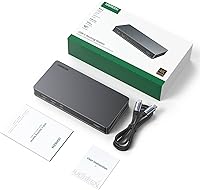
  • Included Accessories: Package includes one USB-C to USB-C cable and a user manual; no power adapter or display cables are included in the box.
  • Host Interface: Connects to the host laptop via a single USB-C cable supporting USB 3.2 Gen 2 for data and DisplayPort Alt Mode for video signal.
  • Brand & Model: Manufactured by Ugreen Group Limited under the model number 90912, released under the Revodok Pro product line in January 2023.

Related Reviews

StarTech USB-C / USB-A Hybrid Docking Station for MacBook Pro/Air & Windows - Triple 4K 60Hz HDMI/DP, 85W Power Delivery
83%
94%
Multi-Display Performance
89%
Charging Efficiency
80%
Compatibility with OS
91%
Data Transfer Speed
88%
Ethernet Stability
More
Plugable UD-3900Z
Plugable UD-3900Z
74%
88%
Dual Monitor Performance
79%
macOS Compatibility
93%
Wired Ethernet Reliability
82%
USB Port Availability
74%
Setup & Ease of Use
More
WAVLINK WL-ST334UA Dual-Bay USB 3.0 Hard Drive Docking Station
72%
83%
Offline Cloning Reliability
74%
Transfer Speed
79%
Build Quality
91%
Ease of Setup
38%
Mac Compatibility
More
Targus DOCK182USZ USB-C Docking Station
76%
88%
Plug-and-Play Setup
71%
Dual Monitor Performance
79%
Cross-Platform Compatibility
84%
Power Delivery
86%
Port Selection & Variety
More
4URPC USB C Docking Station DSC05
86%
95%
Setup and Installation
92%
Port Selection and Versatility
85%
HDMI Display Support
88%
USB Connectivity and Speed
77%
Power Delivery (65W)
More
Sabrent DS-UNHC USB-C Docking Station
80%
91%
Drive Compatibility
67%
Offline Clone Reliability
84%
Transfer Speed
78%
Thermal Management
72%
Build Quality
More
LIONWEI Triple Monitor USB-C Docking Station
75%
83%
Multi-Monitor Display Performance
41%
macOS Compatibility
89%
Value for Money
81%
Power Delivery & Charging
92%
Plug-and-Play Setup
More
Plugable UD-7400PD USB-C Docking Station
84%
91%
Performance with Multiple Displays
75%
Ease of Setup (Windows vs. macOS)
89%
Charging Power (Laptop and Device)
77%
Compatibility with macOS
85%
Ethernet Connectivity
More
NOVOO 15-in-1 USB C Docking Station
82%
88%
Performance
92%
Display Support
85%
Ease of Setup
80%
Compatibility with MacBook
94%
Connectivity (Ports)
More
Plugable UD-MSTH2 USB-C Docking Station
77%
93%
Ease of Setup
88%
Dual Display Performance
67%
Charging Adequacy
78%
Port Selection
18%
macOS Compatibility
More

FAQ

Yes, and this is probably the most important thing to know before buying. The dual-monitor output relies on DisplayLink technology, which requires you to download and install the DisplayLink Manager app from UGREEN or the DisplayLink website. You will also need to grant screen recording permissions in macOS System Settings before the displays activate. It takes about five minutes once you know the steps, but skipping it means your monitors will not work at all.

Yes, that is one of the main reasons people buy this dock. MacBook Air models running Apple silicon are normally limited to a single external display, but the DisplayLink chip in this hub works around that restriction at the software level. Both monitors will run at up to 4K at 60Hz. Just be aware that DisplayLink does use some CPU and GPU resources in the background, so you may notice slightly higher fan activity or battery drain compared to a native display connection.

The dock itself does not include a power adapter and does not require one for basic operation — it draws power from the host laptop. However, if you want to use the 100W Power Delivery port to charge your laptop at the same time, you will need to plug the dock into a USB-C charger that can supply enough wattage. Without an external power source, the charging port will not function.

Yes, and Windows users typically have an easier setup experience than Mac users. On most modern Windows laptops with a USB-C port that supports DisplayPort Alt Mode — including Dell XPS, Surface Pro, and similar machines — the dock is recognized quickly and drivers may install automatically. Dual-monitor output, Ethernet, and charging all work reliably once set up. If your laptop has an older or non-standard USB-C controller, you may need to try a different port or update your system drivers first.

No. The dock has two HDMI ports and two DisplayPort outputs, but only two of those can be active simultaneously for a dual-monitor setup. You choose which two to use based on which ports match your monitors — for example, one HDMI and one DisplayPort, or both HDMI outputs. The four ports give you flexibility in matching cable types, not four independent displays.

Under typical conditions — dual monitors, Ethernet, and a couple of USB devices connected — the dock runs warm but not hot. You might notice the surface temperature is elevated compared to a completely passive hub, which is normal given the DisplayLink chip doing active processing. Running it at full capacity for several hours (dual 4K monitors plus active file transfers) pushes the temperature higher, but it has not been widely reported as a safety concern. Avoid placing it on soft surfaces like fabric or carpet that block the bottom of the unit.

No, there is no SD or microSD card reader built into this hub. If you regularly import photos or video from a camera card, you will need a separate USB card reader. This is one of the more common points of frustration among buyers who expected it to be included at this price tier.

Not quite — similar to the display ports, the Gigabit Ethernet connection also requires the DisplayLink driver to be installed before it will function on macOS. Once the driver is active and permissions are granted, the wired network connection works reliably and many users find it significantly more stable than their Wi-Fi. Just make sure driver installation is your first step before expecting anything to work on a Mac.

This is a legitimate concern. Because the dock relies on third-party DisplayLink software, major macOS version updates can occasionally break compatibility until an updated driver is released. In practice this means your monitors and Ethernet may stop working after upgrading macOS until you reinstall or update the DisplayLink Manager app. DisplayLink usually releases updated drivers within a short window of major macOS releases, but there can be a gap. It is worth checking before you update your system if uninterrupted dual-monitor access is critical to your work.

Yes, that is one of the more useful aspects of this hub. The 100W Power Delivery port allows you to run a single USB-C cable from your laptop to the dock, and the dock then handles display output, data, Ethernet, and charging through that one connection. For a MacBook Pro, 100W is enough to maintain or recover battery level even under moderate workload. You will need to plug an external USB-C charger into the dock itself to enable the pass-through charging feature.

Where to Buy